

Learn more
 View our repository on GitHub
 Try it out with a live demo
 Explore the latest updates
Adyen offers Platform Experience components that are designed to simplify the development of your portal’s user interface (UI). You can use these components to create interactive user dashboards, which provide users with a clear view of their transactional data. This allows them to easily track the movement of funds in their balance accounts.
You can integrate the following components:
- Transaction components: Provide your users with a dashboard that shows their transactional data. With this dashboard, users can view and filter transactions for any of their balance accounts.
- Payout components: Provide your users with a dashboard that shows completed automatic payouts for each user’s balance account. This information allows users to reconcile the payouts they receive in their bank accounts with batches of payments and other related transactions.
- Reports component: Provide your users with a dashboard that shows daily reports generated by Adyen for their balance accounts. These reports detail the movement of funds within their accounts, such as payouts. This information can assist users with their bookkeeping and reconciliation processes.
- Dispute components: Provide your users with a dashboard view of open and resolved disputes, as well as fraud alerts (which correspond to the term “Notification of Fraud” in the Customer Area). This way, users can review disputes, choose to accept chargebacks, or defend them by submitting defense documents, all without needing to contact your support team or rely on email threads.
- Pay by Link components: Provide your users with the ability to generate and manage secure payment links. Users can view a list of all existing payment links within a specified period, including key details such as payment link ID, status, amount, and expiration date. This allows users to easily track the life cycle of the payment links they create.
Select a component type
Select the tab for the component you are interested in to view the relevant description and integration steps:Transaction components
Use Platform Experience components to build interactive dashboards for your users.Requirements
Before you begin, take into account the following requirements,limitations, and preparations.| Requirement | Description |
|---|---|
| Integration type | You must have the Adyen for Platforms integration. |
| API credentials | You must have a Balance Platform API key (for example, ws[_123456]@BalancePlatform.****[YourBalancePlatform]) to access the Session authentication API. Ensure that you have asked your Adyen contact to assign the following role to your API credential: Transactions Overview Component: View Transactions Overview Component: Manage Refunds (required to process refunds through the components) |
| Limitations | Document export limits:- Export functionality is currently limited to the CSV file format only. The maximum number of rows per transaction export is 100. |
| Setup steps | Before you begin: Verify that the component is available in the languages that apply to your situation. Check our Component libraries page for additional information on the supported countries/regions and browser versions. |
Component Description
Transactions Overview component
The Transactions Overview component shows a list of transactions processed for a specific balance account within a specified time period. Each transaction record includes details such as the date and time, payment method, transaction type, net amount, and gross amount. Additionally, the component allows for custom data integration, such as your own fields, icons, links, and buttons. For example, you can rename a column to match your branding or rearrange columns to change the display order. This component organizes transactions into two tabs:-
Transactions: shows account balances, which display the account balance (available funds) and the reserved balance (funds currently held in reserve). Key features include:
- Transaction list: a detailed list of transactions, which can be filtered.
- Transaction details: users can select a record to open the Transaction Details component, which provides granular information about that specific transaction.
- CSV export: an export button allows users to generate a CSV file containing the first 100 transactions that match the applied filters. Users retain control over the specific transaction fields included in the exported file.
-
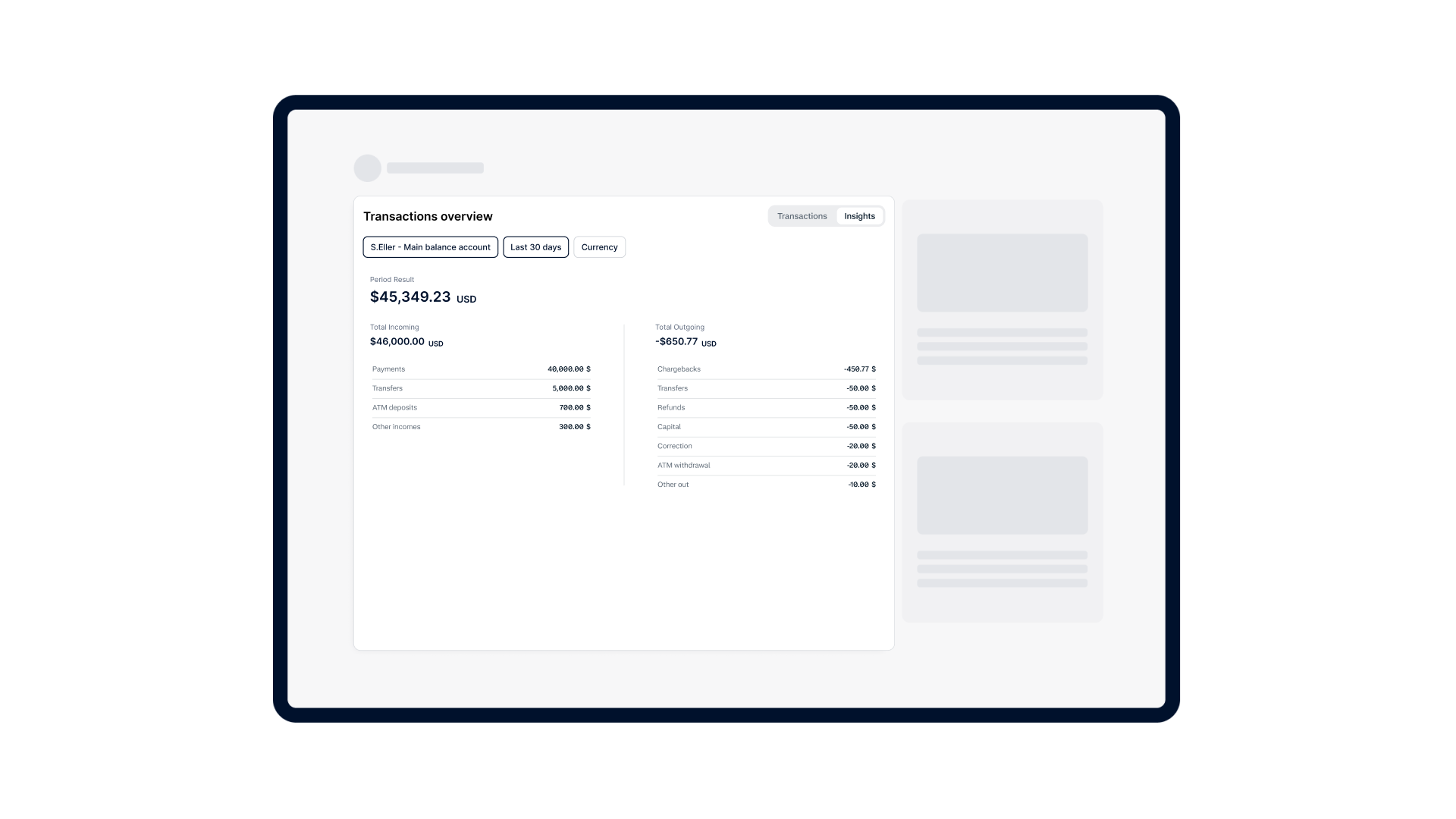
Insights: shows an analytical summary of transaction data for a specific balance account and time period. This data helps with bookkeeping, reconciliation, and financial analysis. This includes:
- Period Result: the net total for the specified period and currency, representing the difference between the total incoming and total outgoing funds.
- Total Incoming: the total amount of funds credited to the balance for all transactions processed during the specified period, grouped by transaction types, such as payments and transfers.
- Total Outgoing: the total amount of funds debited from the balance for all transactions processed during the specified period, grouped by transaction types, such as chargebacks and refunds.
- Transactions
- Insights
- Mobile
- Desktop
- Payment details
- Refund details
- Refund sent
- Refund status
- npm (recommended)
- Embed script and stylesheet
- Transactions Overview component
- Transaction Details component
- Transactions Overview component
- Transaction Details component
- Transactions Overview component
- Transaction Details component
- Example 1: Override CSS variables
- Example 2: Update CSS class settings
- Transactions Overview component
- Transaction Details component
- Transactions Overview component
- Transaction Details component
- Text
- Icon
- Link
- Button
- Transactions Overview component
- Transaction Details component
- Mobile
- Desktop
- Mobile
- Desktop
- npm (recommended)
- Embed script and stylesheet
- Payouts Overview component
- Payout Details component
- Payouts Overview component
- Payout Details component
- Payouts Overview component
- Payout Details component
- Example 1: Override CSS variables
- Example 2: Update CSS class settings
- Payouts Overview component
- Payout Details component
- Payouts Overview component
- Payout Details component
- Text
- Icon
- Link
- Button
- Payouts Overview component
- Payout Details component
- Mobile
- Desktop
- npm (recommended)
- Embed script and stylesheet
- Example 1: Override CSS variables
- Example 2: Update CSS class settings
- Text
- Icon
- Link
- Button
- Chargebacks
- Fraud alerts
- Ongoing & closed
- Mobile
- Desktop
- Dispute management
- Defense reason
- Provide evidence
- Additional evidence
- Submit defense
- Dispute status
- npm (recommended)
- Embed script and stylesheet
- Disputes Overview component
- Dispute Management component
- Disputes Overview component
- Dispute Management component
- Disputes Overview component
- Dispute Management component
- Example 1: Override CSS variables
- Example 2: Update CSS class settings
- Disputes Overview component
- Dispute Management component
- Disputes Overview component
- Dispute Management component
- Text
- Icon
- Link
- Button
- Disputes Overview component
- Dispute Management component
- Active
- Inactive
- Mobile
- Desktop
- Initiate
- Payment details
- Customer details
- Review summary
- Share
- Terms and conditions
- Themes
- npm (recommended)
- Embed script and stylesheet
- Payment Links Overview component
- Payment Link Details component
- Payment Link creation
- Payment Link Settings
- Payment Links Overview component
- Payment Link Details component
- Payment Link creation
- Payment Link settings
- Payment Links Overview component
- Payment Link Details component
- Payment Link creation
- Payment Link settings
- Example 1: Override CSS variables
- Example 2: Update CSS class settings
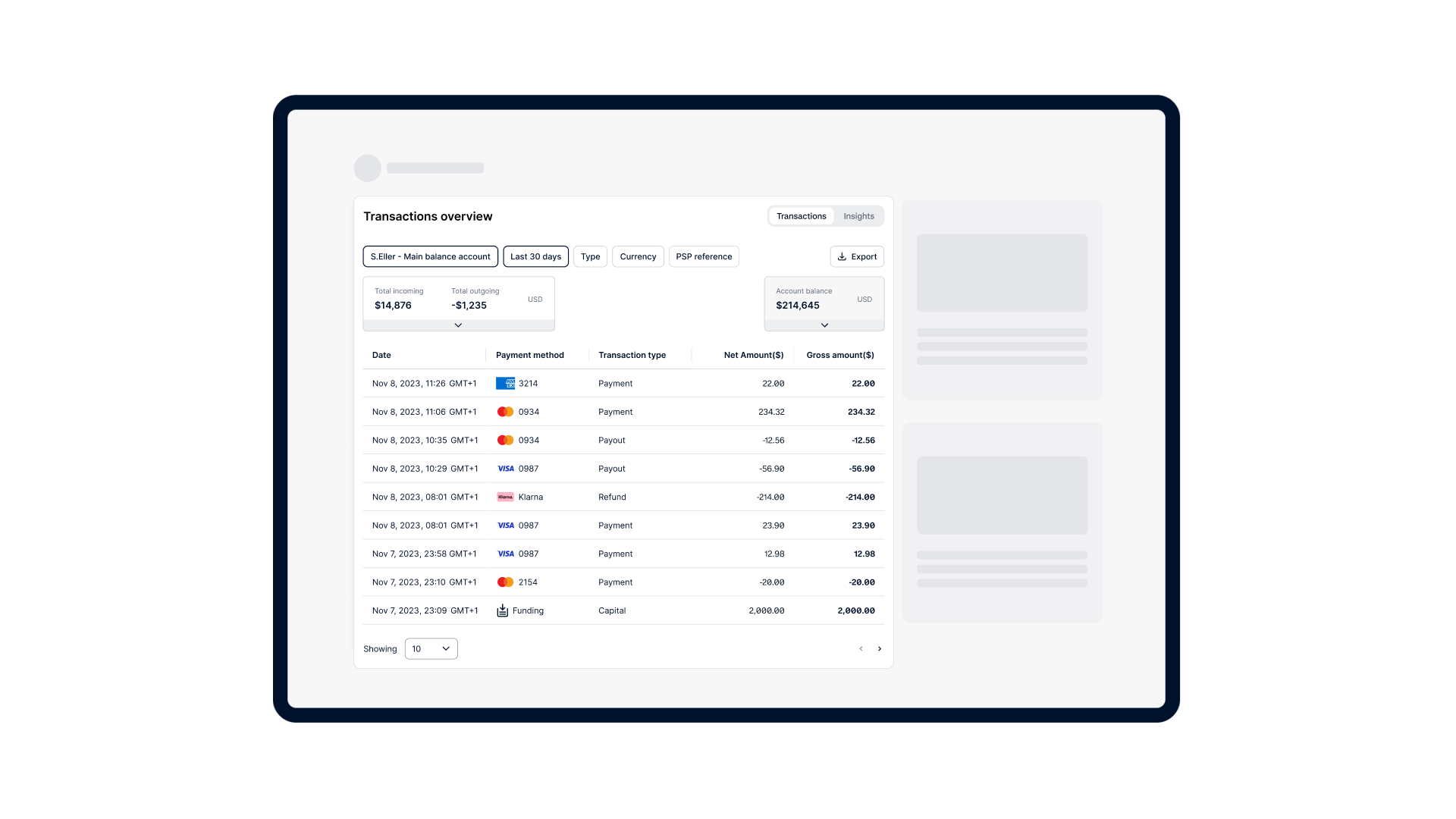
 The Transactions Overview component enables users to complete the following tasks:
- View a list of transactions for a balance account.
- View and export filtered transaction data as a CSV file for reconciliation and external analysis. Users can filter for transaction type, currency (for multi-currency accounts), PSP reference, and the time period specific to the balance account.
- View the available balance of the balance account, which shows the account balance and the reserved balance.
- View the total incoming and outgoing funds for a balance account. The total values update automatically when the user modifies the filters. For example, users can filter to see the total booked incoming and outgoing funds that were processed during the past month.
Available filters
The following sections show the available filters and their values for the Transactions Overview component.**Balance account
Users with multiple balance accounts can switch between them using the Balance Account filter. This is available in both the Transactions and Insights tabs.**Time period
The Time period filter specifies the date and time range for displaying transaction results. The specified time is determined by the time zone of the selected balance account. This is available in both the Transactions and Insights tabs.| Filter value | Description |
|---|---|
| Last 7 days | Includes transactions from the previous six days and from today until the current time. For example, if today is a Tuesday and the time is 8:00 PM, transactions from the previous Wednesday midnight until this Tuesday 8:00 PM are included. |
| This week | Includes transactions for the current week, starting from Monday midnight until the present moment. |
| Last week | Includes transactions from Monday midnight to Sunday 11:59:59 PM of the previous week. |
| Last 30 days | Includes transactions from the previous 29 days and from today until the current time. |
| Last 180 days | The default setting. Includes transactions from the previous 179 days from today until the current time. |
| This month | Includes transactions for the current month, starting from the first day of the month until today’s date. |
| Last month | Includes transactions from the previous month, starting from the first day of the month until the end of the month at 11:59:59 PM. |
| Year to date | Includes transactions from the first day of the current year up until today’s date. |
| Custom | Allows setting a custom time period. |
Type
The Type filter specifies which transaction types to show in the overview. The table below lists the available transaction types in the component along with their corresponding values returned in the Transfers API. This is only available in the Transactions tab.| Filter value | Value in the Transfers API | |
|---|---|---|
| ATM | atmWithdrawal, atmWithdrawalReversal. | |
| Capital | grant, repayment, capitalFundsCollection. | |
| Correction | manualCorrection, depositCorrection, leftover, balanceAdjustment, balanceRollover, installmentReversal, captureReversal, refundReversal. | |
| Payment | payment, capture, installment. | |
| Refund | refund | |
| Chargeback | chargeback, secondChargeback, chargebackReversal. | |
| Transfer | bankTransfer, internalTransfer, bankDirectDebit. | |
| Other | Includes all other transaction types. |
Currency
For multi-currency accounts, users can select their preferred currency for transactions overview. This is available in both the Transactions and Insights tabs.**PSP reference
The PSP reference filter enables users to find a transaction by specifying the exact PSP reference (equivalent to the internal Payment PSP reference), provided the transaction also matches the criteria of any other filters applied. This is only available in the Transactions tab.Transaction Details component
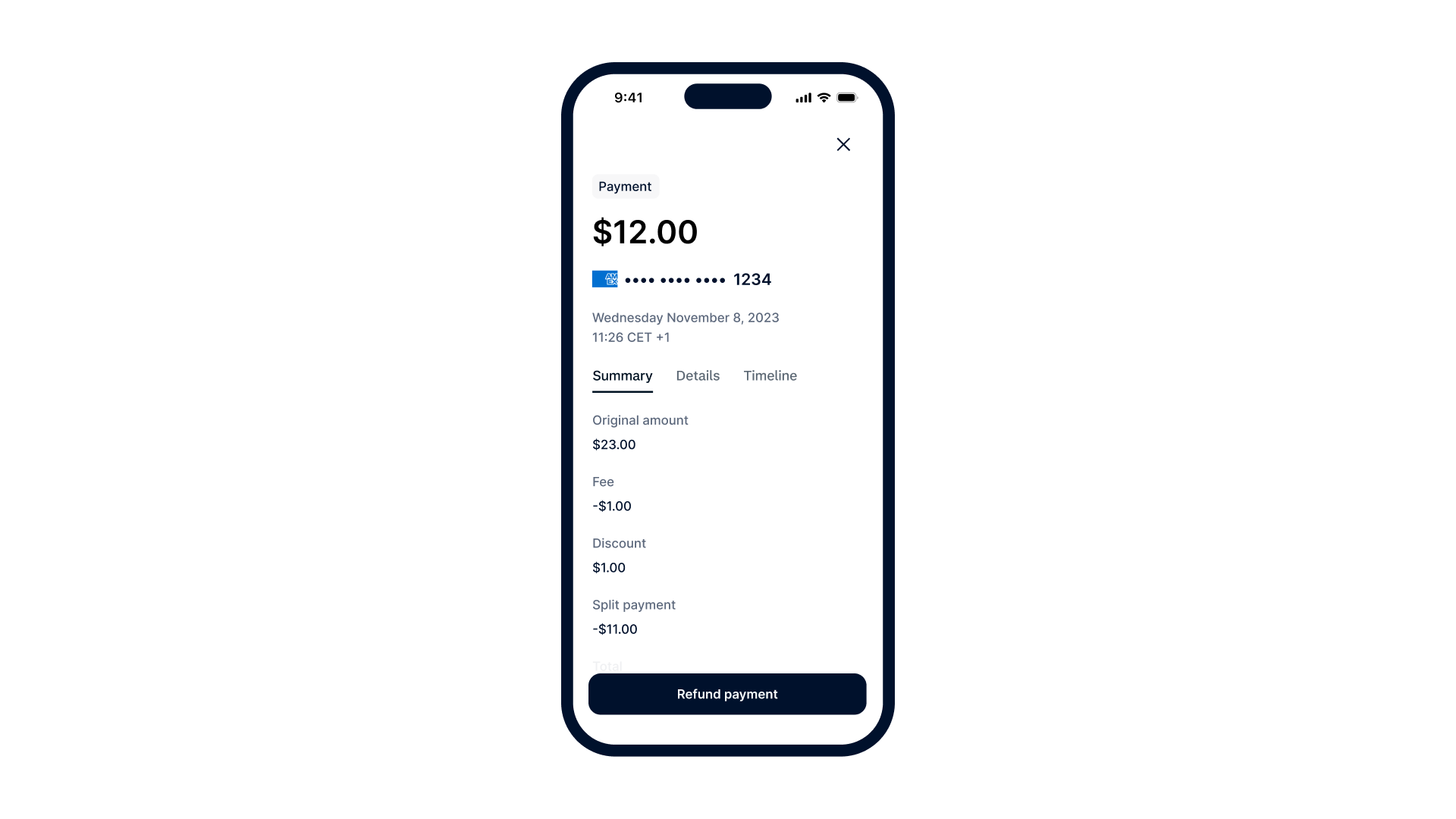
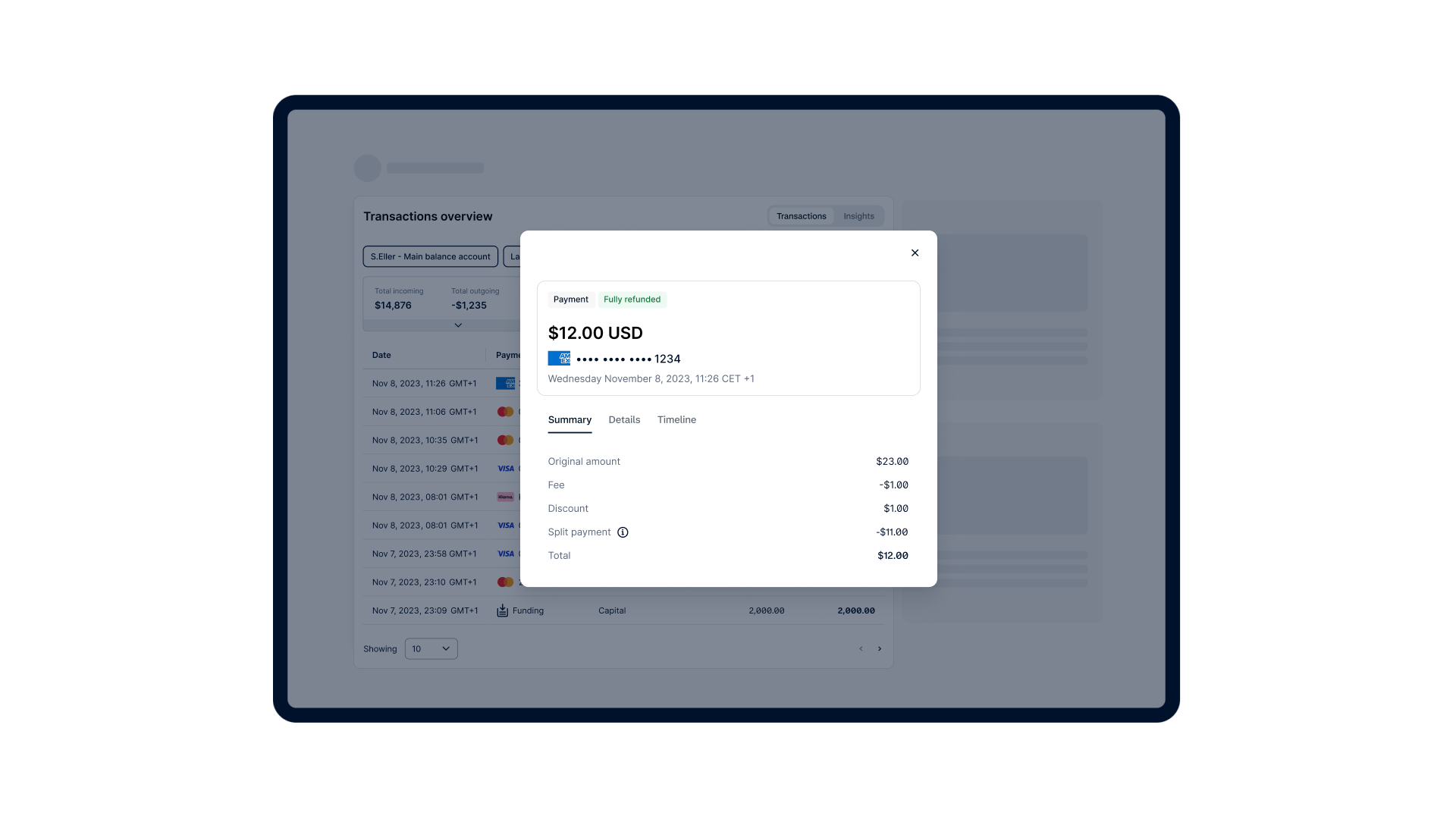
The Transaction Details component provides detailed information about a transaction, including its unique reference ID, the original amount, and any associated fees. For payment transactions, this component indicates whether a specific payment has been refunded. Additionally, it enables users to refund payments to their shoppers. The component also allows for custom data integration, such as your own fields, icons, links, and buttons.This component organizes the details of the transaction into three tabs:- Summary: when available, shows the breakdown of the transaction, including net and gross amounts, applicable fees, and deductions. This view explicitly details the original amount processed and the net amount received by the user.
- Details: shows information about the transaction useful for tracking purposes, such as transaction references, including the unique reference ID. For payment transactions, this tab includes associated refund information. All custom integration data configured for the component is also displayed here.
- Timeline: when available, shows the complete payment processing history and status changes for the transaction.
Refund User Flow
Processing refunds through components
The refund feature requires the Transactions Overview Component: Manage Refunds role to be assigned to your API credential and included in the session request.Users can refund payments to their shoppers through the transaction components. When a user initiates a refund, the components automatically call Adyen’s API to process the refund request. This means that no additional actions are needed on your part as a marketplace.The transaction components support both full and partial refunds depending on the payment method. For partial refunds, users can issue multiple smaller refunds through the components, as long as the total amount of these refunds does not exceed the original payment amount.The user flow for processing a refund through the components is as follows:- In the payment details, the user selects the Refund payment button.
- In the Refund payment modal window, the user specifies a reason for the refund and the refund amount.
- The user confirms their refund request.
- After the refund request is processed, users can view the refund status message and label in the payment details.
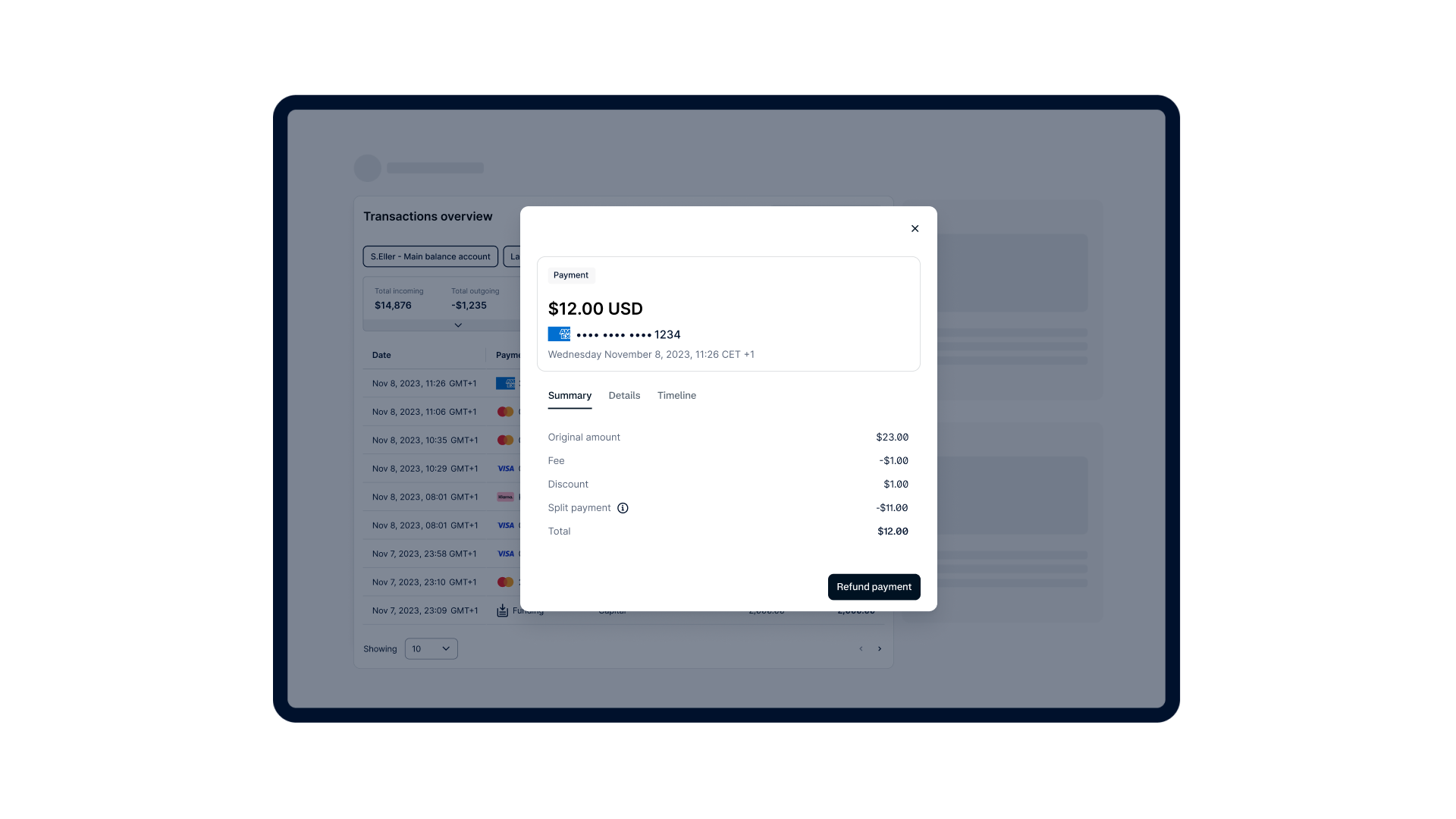
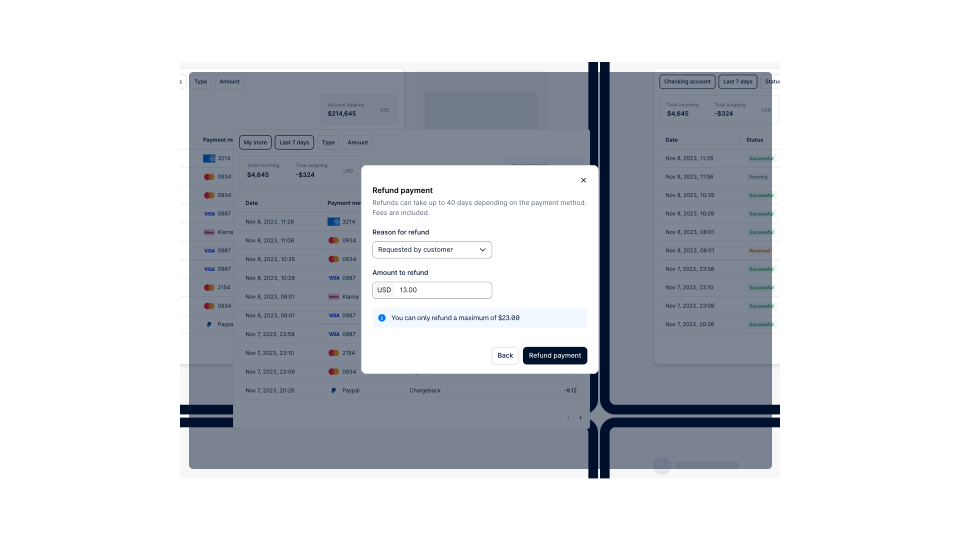
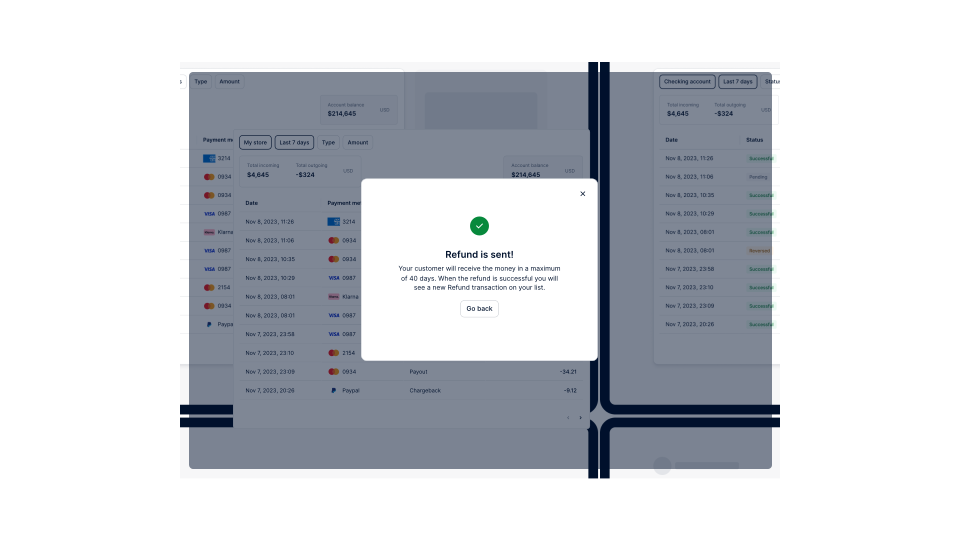
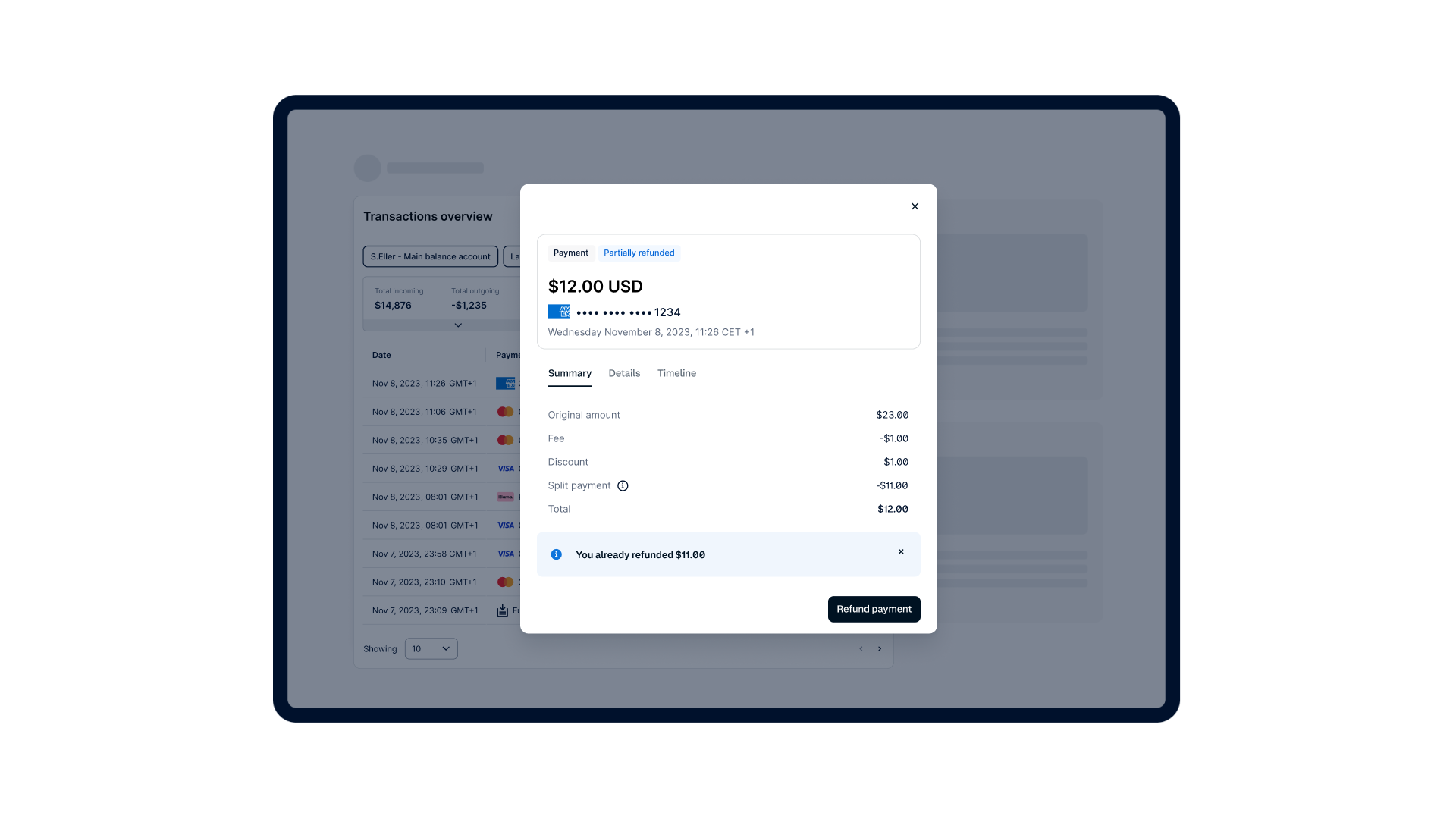 After the refund has been issued and processed, users can view the refund transaction in their overview. Each refund transaction is linked to the corresponding payment transaction, making it easy for users to find relevant references and navigate between transaction records.
How it works
The integration of components involves both server-side and client-side processes. You can find more details on the component libraries page.Integration steps
Follow these steps to integrate the component(s):- Create an authentication session from your server
- Install component library in your front end
- Initialize components
- Optional: Localize components
- Optional: Customize component appearance
- Optional: Customize component data
Create A Session
1. Create an authentication session from your server
To ensure secure communication between components and Adyen server, you must configure your server for authentication and create a session token. To create the token:-
From your server, make a POST /sessions request specifying the following parameters:
To make this API request, your API key must have the Transactions Overview Component: View role in your Customer Area. For more information, refer to the Requirements section.
Here is an example request for creating a session token. Create a session token
Parameter Required Description allowOrigin 
The URL where the component will appear. Must follow the format of https://www.yourcompany.comorhttps://*.yourcompany.com, whereyourcompany.comis the actual web address of your marketplace. On live, only the HTTPS protocol is supported.policy An object that contains:
resources: An object that contains:accountHolderId: The unique identifier of the account holder that is linked to the balance account shown in the component. type: The type of resource. Set this to accountHolder. roles: The role required to use the component. Set this to Transactions Overview Component: View. To enable users to process refunds through the components, include the Transactions Overview Component: Manage Refunds role in your request.product The type of product the component belongs to. Set this to platform. curl https://test.adyen.com/authe/api/v1/sessions \ -H 'content-type: application/json' \ -H 'x-api-key: ADYEN_BALANCE_PLATFORM_API_KEY' \ -D '{ "allowOrigin":"YOUR_DOMAIN", "product":"platform", "policy": { "resources": [ { "accountHolderId": "AH00000000000000000000001", "type": "accountHolder" } ], "roles": [ "Transactions Overview Component: View", "Transactions Overview Component: Manage Refunds" ] } }' -
Note the API response. Later, when initializing the components, you need to create and call a function that passes the entire session object from the response to your front end.
Session token created
{
  "id": "EC1234-1234-1234-1234",
  "token": "xxxxx.yyyyy.zzzzzz"
}
Install Component Library
2. Install component library in your front end
Use the Adyen Web npm package, or embed the Adyen Platform Experience script and stylesheet into your HTML file:Install the Adyen Platform Experience library in your front-end application as follows:
-
Install the npm package.
npm install @adyen/adyen-platform-experience-web -
Import the library, the components, and the style sheet.
import { AdyenPlatformExperience, component_name } from '@adyen/adyen-platform-experience-web';
import "@adyen/adyen-platform-experience-web/adyen-platform-experience-web.css";
Use the
integrity attribute so browsers can verify that the script and stylesheet have not been changed unexpectedly.The value of the integrity attribute is the Subresource Integrity (SRI) hash which Adyen provides for each version of the Adyen Web JavaScript and CSS files.Get the SRI hashes from the release notes for the Platform Experience components, under Updating to this version.embed-script-stylesheet.html<!-- Embed the Adyen Platform Experience script element above any other JavaScript in your page. -->
<script src="https://bae81f955b.cdn.adyen.com/platform-components/VERSION/adyen-platform-experience-web.js"
integrity="JS_INTEGRITY_HASH_FOR_YOUR_VERSION"
crossorigin="anonymous"></script>
<!-- Embed the Adyen Platform Experience stylesheet. You can add your own styling by overriding the rules in the CSS file -->
<link rel="stylesheet" href="https://bae81f955b.cdn.adyen.com/platform-components/VERSION/adyen-platform-experience-web.css"
integrity="CSS_INTEGRITY_HASH_FOR_YOUR_VERSION"
crossorigin="anonymous">
Initialize Components
3. Initialize components
To initialize the components:-
Gather the following information to be passed when initializing the library and its components.
-
Gather these parameters to initialize the library.
Parameter Required Description availableTranslationsDeprecatedDeprecated. This field is no longer needed because locales are now dynamically loaded on demand via CDN. Setting this field will trigger a deprecation warning. An array containing the names of the imported locale files used for localizing the components. For example, [es_ES, nl_NL, fr_FR].environmentSpecifies the environment for the component integration. The default value is test. Set the parameter to live when you are ready to go live. localeSpecifies the locale code, which determines the desired language of the components. This code must correspond to a supported language. For example, use es-ES for Spanish. onSessionCreateThe callback function that retrieves an authentication session token and refreshes the current session. - Gather these parameters to initialize each component. Select the tab for the component you want to use:
-
Gather these parameters to initialize the library.
| Parameter | Required | Description |
|---|---|---|
allowLimitSelection | Determines whether the user can change the number of transactions shown per page. Default value: true. | |
core | | The instance of the library. |
dataCustomization | An object that contains both the list and details objects, which include customization specifications for dashboard fields, allowing for additional data integration from your database. | |
onRecordSelection | If defined, the event allows obtaining the transaction ID when the user selects a specific transaction from the overview. You can use the obtained ID value to show the Transaction Details component in a different location within your portal’s UI, outside the Transactions Overview component. | |
preferredLimit | The number of transactions shown per page. Default value: 10. |
| Parameter | Required | Description |
|---|---|---|
core | | The instance of the library. |
dataCustomization | An object that contains the details object, which include customization specifications for dashboard fields, allowing for additional data integration from your database. | |
id | | The unique identifier of the transaction. |
- Create a DOM element on your portal’s UI page where you want the component to be rendered. Assign the element a unique and descriptive ID. This unique ID is important to avoid any misconfigurations when integrating multiple components into your portal’s UI. By default, the Transaction Details component is shown as a modal window within the Transactions Overview component. In this scenario, you only need to create a DOM element for the Transactions Overview component. If you want to use the Transaction Details component on its own, you need to create a separate DOM element for it. If you are using JavaScript frameworks such as Vue or React, make sure that you use references instead of selectors and that you do not re-render the DOM element. Select the tab for the component you want to use:
Create DOM element
<div id="transactions-overview-container"></div>
Create DOM element
<div id="transaction-details-container"></div>
-
Add a function that calls your API to retrieve and refresh an authentication session token.
The following code is the same for both transaction components.
Add function to retrieve and refresh an authentication session token
async function handleSessionCreate() { const response = await fetch('YOUR_IMPLEMENTATION_OF_CREATE_SESSION_ENDPOINT'); return response.json(); } - Initialize the component and mount it to the container you created. Be sure to include the function for retrieving and refreshing the session token that you added in the previous step. To implement the Transaction Details component as a modal window within the Transactions Overview component, use the following code examples. In this implementation, when a user selects a specific transaction from the overview page, the transaction ID is automatically passed to the Transaction Details component, and the modal window opens. Select the tab for the component you want to use:
Initialize library and create component
import { AdyenPlatformExperience, TransactionsOverview } from '@adyen/adyen-platform-experience-web';
import "@adyen/adyen-platform-experience-web/adyen-platform-experience-web.css";

const core = await AdyenPlatformExperience({
    onSessionCreate: handleSessionCreate,
});
const transactionsOverview = new TransactionsOverview({ core });

transactionsOverview.mount('#transactions-overview-container');
Initialize library and create component
import { AdyenPlatformExperience, TransactionDetails } from '@adyen/adyen-platform-experience-web';
import "@adyen/adyen-platform-experience-web/adyen-platform-experience-web.css";

const core = await AdyenPlatformExperience({
    onSessionCreate: handleSessionCreate,
});

const transactionDetails = new TransactionDetails({
    core,
    id: 'ABCDEFG1234567890'
});

transactionDetails.mount('#transaction-details-container');
-
(Optional) To use the Transaction Details component outside of the Transactions Overview component:
- Define the
onRecordSelectioncallback.
const transactionsOverview = new TransactionsOverview({ core, onRecordSelection: ({ id }) => { // Use selected transaction id. } });- Initialize the Transaction Details component using the
idfrom the object argument as shown below.
const transactionDetails = new TransactionDetails({ core, id: '<SELECTED_TRANSACTION_ID>' }); - Define the
Localize Components
4. Optional: Localize components
During the component initialization, you can also configure the components to use one of the supported languages.Update your code for initializing components to include the localization settings. If no localization settings are provided, the components will default to English.Localize componentsimport { AdyenPlatformExperience } from '@adyen/adyen-platform-experience-web';
const core = await AdyenPlatformExperience({
locale: 'es-ES', // See supported languages for possible values
/* ... */
});
Customize Appearance
5. Optional: Customize component appearance
The transaction components have a default appearance with pre-defined styles, such as colors, fonts, and borders. You can customize the appearance of your components by overriding the default values of CSS variables and the class settings:- Inspect the components using your browser’s developer tools.
- Modify the styles in your style sheet file.
style.css
:root {
    --adyen-sdk-border-radius-s: 10px;
    --adyen-sdk-border-radius-m: 20px;
    --adyen-sdk-border-radius-l: 30px;
    --adyen-sdk-color-background-disabled: #9ecdb1;
    --adyen-sdk-color-background-inverse-primary: #0abf53;
    --adyen-sdk-color-background-inverse-primary-hover: #57d389;
    --adyen-sdk-color-decorative-blue: #0abf53;
    --adyen-sdk-color-outline-primary-active: #0abf53;
}
style.css
.adyen-pe-modal {
    border-left: 3px solid #0abf53;
    border-radius: 0;
    height: 100%;
    max-height: unset;
    right: 0;
}
Customize Data
6. Optional: Customize component data
The transaction components allow you to include a diverse range of data types and sources to showcase within your user dashboard. You can:- Integrate custom data, such as your own fields, icons, links, and buttons.
- Define the settings for each dashboard field, including their names and visibility.
- Specify the
dataCustomizationparameter, including:
| Parameter | Required | Description |
|---|---|---|
list | An object that includes customization settings for dashboard fields in the transactions overview. Example: dataCustomization: { list: { } } | |
details | An object that includes customization settings for dashboard fields in the transaction details view. Example: dataCustomization: { list: { }, details: { } } |
| Parameter | Required | Description |
|---|---|---|
details | An object that includes customization settings for dashboard fields in the transaction details view. Example: dataCustomization: { details: { } } |
- Within the
listand/ordetailsobjects, define the customization settings, such as field names or visibility.
You can customize the default fields and add custom fields. In the dashboard, custom fields will be positioned immediately after the default fields.
| Parameter | Required | Description |
|---|---|---|
fields | | Defines the settings of dashboard fields in the transactions overview. Default fields: ‘createdAt’, ‘paymentMethod’, ‘transactionType’, ‘currency’, ‘amount’, ‘grossAmount’. Example: dataCustomization: { list: { fields: [] }, details: { fields: [] } } |
onDataRetrieve | The callback function that retrieves a Promise object resolved with an array of the transaction records extended with custom data. Example: dataCustomization: { list: { fields: [], onDataRetrieve: () => { } }, details: { fields: [], onDataRetrieve: () => { } } } |
| Parameter | Required | Description |
|---|---|---|
fields | | Defines the settings of dashboard fields in the transaction detail view. Default fields: ‘account’, ‘refundReason’, ‘id’, ‘merchantReference’, ‘pspReference’, ‘paymentPspReference’, ‘refundPspReference’. Example: dataCustomization: { details: { fields: [] } } |
onDataRetrieve | The callback function that retrieves a Promise object resolved with the extended transaction record that contains custom data. Example: dataCustomization: { details: { fields: [], onDataRetrieve: () => { } } } |
-
Define the settings for each dashboard field using the following parameters.
Parameter Type Required Description alignString Determines how the content in a field is aligned. Possible values: left, center, right. If not specified, it defaults to left. Example: { key: 'amount', align: 'right' }flexNumber Determines the width of a field in relation to other fields. It uses a numeric value that represents the flex-grow factor in the CSS Flexbox layout. A higher value means that the field occupies more space compared to others. If not specified, it defaults to 1. Example: { key: '_store', flex: 2 }keyString Specifies the name of a field. Example: fields: [ { key: '_store' } ]To prevent conflicts with the default field names, always start the names of your custom fields with an underscore (_) character.visibilityString Determines whether a field should be shown or not. Possible values: visible, hidden. If not specified, it defaults to visible. Example: { key: 'amount', visibility: 'hidden' } -
If adding a custom field, include the
onDataRetrieveparameter. `onDataRetrieve` parameterMake sure to include the received data object in the return object by using the spread syntax. The component can then use this as matching keys to map your custom data with the existing one. `additionalData` object{ onDataRetrieve: async (data) => { const ids = data.map(transaction => transaction.id); const extendedData = await getMyDataByIds(ids); return extendedData; }, }{ details: { fields: [ { key: '_store' }, ], onDataRetrieve: (data) => { return { ...data, _store: 'Amsterdam', }; }, }, } -
Specify the type of your custom data.
Parameter Type Required Description typeString Determines how the custom data value should look and behave. Possible values: text, icon, link, button. If not specified, it defaults to text.
`text` data type
{
    list: {
        fields: [
            { key: '_store' },
        ],
        onDataRetrieve: (data) => {
            return [
                {
                    ...data[0],
                    _store: {
                        type: 'text',
                        value: 'New York',
                        config: {
                            className: 'my-class my-class--variant',
                        },
                    },
                },
                {
                    ...data[1],
                    _store: {
                        type: 'text',
                        value: 'New York',
                        config: {
                            className: 'my-class my-class--variant',
                        },
                    },
                },
            ];
        },
    },
}
`icon` data type
{
    list: {
        fields: [
            { key: '_store' },
        ],
        onDataRetrieve: (data) => {
            return [
                {
                    ...data[0],
                    _store: {
                        type: 'icon',
                        value: 'New York',
                        config: {
                            src: '',
                            alt: '',
                            className: 'my-class my-class--variant',
                        },
                    },
                },
                {
                    ...data[1],
                    _store: {
                        type: 'icon',
                        value: 'New York',
                        config: {
                            src: '',
                            alt: '',
                            className: 'my-class my-class--variant',
                        },
                    },
                },
            ];
        },
    },
}
The target should accept both
_self and _blank. The default option is _blank.`link` data type{
list: {
fields: [
{ key: '_store' },
],
onDataRetrieve: (data) => {
return [
{
...data[0],
_store: {
type: 'link',
value: 'New York',
config: {
href: '',
target: '_self',
className: 'my-class my-class--variant',
},
},
},
{
...data[1],
_store: {
type: 'link',
value: 'New York',
config: {
href: '',
target: '_self',
className: 'my-class my-class--variant',
},
},
},
];
},
},
}
`button` data typeHere is an example
{
    list: {
        fields: [
            { key: '_store' },
        ],
        onDataRetrieve: (data) => {
            return [
                {
                    ...data[0],
                    _store: {
                        type: 'button',
                        value: 'New York',
                        config: {
                            action: () => {},
                            className: 'my-class my-class--variant',
                        },
                    },
                },
                {
                    ...data[1],
                    _store: {
                        type: 'button',
                        value: 'New York',
                        config: {
                            action: () => {},
                            className: 'my-class my-class--variant',
                        },
                    },
                },
            ];
        },
    },
}
dataCustomization object:Example `dataCustomization` object
{
    dataCustomization: {
        list: {
            fields: [
                { key: '_store' },
                { key: 'createdAt', visibility: 'hidden' },
            ],
            onDataRetrieve: async (transactions) => {
                return getCustomTransactionsData(transactions);
            },
        },
        details: {
            fields: [
                { key: 'transactionType', visibility: 'hidden' },
                { key: 'amount', visibility: 'hidden' },
                { key: '_store' },
            ],
            onDataRetrieve: async (transaction) => {
                return getCustomTransactionData(transaction);
            },
        },
    },
}
Example `dataCustomization` object
{
    dataCustomization: {
        details: {
            fields: [
                { key: 'id', visibility: 'hidden' },
                { key: '_store' },
                { key: '_product' },
                { key: '_summary' },
                { key: '_country' },
            ],
            onDataRetrieve: transaction => {
                return getCustomTransactionDataById(transaction);
            },
        },
    }
}
-
Make sure to include translations for your custom fields in the library initializer:
- If you are not localizing components, add the custom field translations for
en_US. - If you are localizing components, also include the appropriate custom field translations for all supported locales.
const core = await AdyenPlatformExperience({ translations: { en_US: { _store: 'Store', }, es_ES: { _store: 'Tienda', }, } }); - If you are not localizing components, add the custom field translations for
Supported languages
You can set one of the following languages to localize any of the Platform Experience components.| Language | Locale code | Locale file |
|---|---|---|
| Danish | da-DK | da_DK |
| Dutch | nl-NL | nl_NL |
| English | en-US | en_US |
| Finnish | fi-FI | fi_FI |
| French | fr-FR | fr_FR |
| German | de-DE | de_DE |
| Italian | it-IT | it_IT |
| Norwegian | no-NO | no_NO |
| Portuguese (BR) | pt-BR | pt_BR |
| Spanish | es-ES | es_ES |
| Swedish | sv-SE | sv_SE |
Payout components
Use Platform Experience components to build interactive dashboards for your users.Requirements
Before you begin, take into account the following requirements, limitations, and preparations.| Requirement | Description |
|---|---|
| Integration type | You must have the Adyen for Platforms integration. |
| API credentials | You must have a Balance Platform API key (for example, ws[_123456]@BalancePlatform.****[YourBalancePlatform]) to access the Session authentication API. Ensure that you have asked your Adyen contact to assign the following role to your API credential: Payouts Overview Component: View |
| Limitations | The Payout report relies on the Balance Platform Payout report. The Payout report has several limitations.- It is designed for platforms using automatic payouts with a default settlement delay. It does not support manual payouts, pass-through payouts, or sales day payout T+0. |
| Setup steps | Before you begin: Verify that the component is available in the languages that apply to your situation. Set up the Balance Platform Payout report to be generated, see Balance Platform Payout report to learn more. Check our Component libraries page for additional information on the supported countries/regions and browser versions. |
Component Description
Payouts Overview component
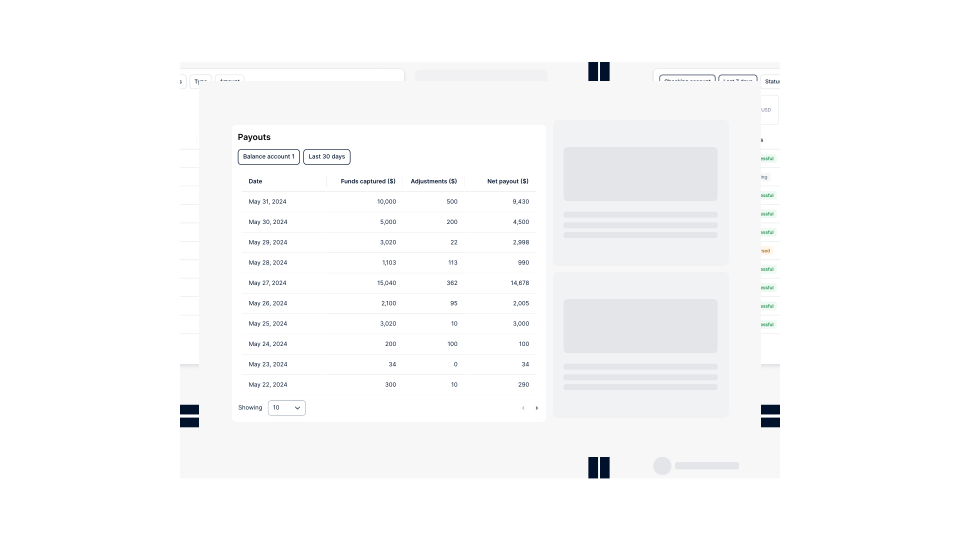
The Payouts Overview component shows a list of automatic payouts completed for a specific balance account within a specified time period. Each payout record includes details such as the date and time, funds captured, total adjustments, and net payout. Additionally, the component allows for custom data integration, such as your own fields, icons, links, and buttons.The funds captured represent the initial amount in the balance account on the day when a payout is initiated. This amount may be adjusted due to factors like fees, commissions, refunds, business financing, or internal funds transfers. The component presents these adjustments in an aggregated view. If you need to provide your users with a detailed breakdown of the payout adjustments, refer to the Payout Details component.After being adjusted, the funds captured amount results in the net payout amount, which is the final amount credited to the user’s bank account.All amounts are shown in the currency of the chosen balance account.The following tabs illustrate how the component appears on various screen sizes.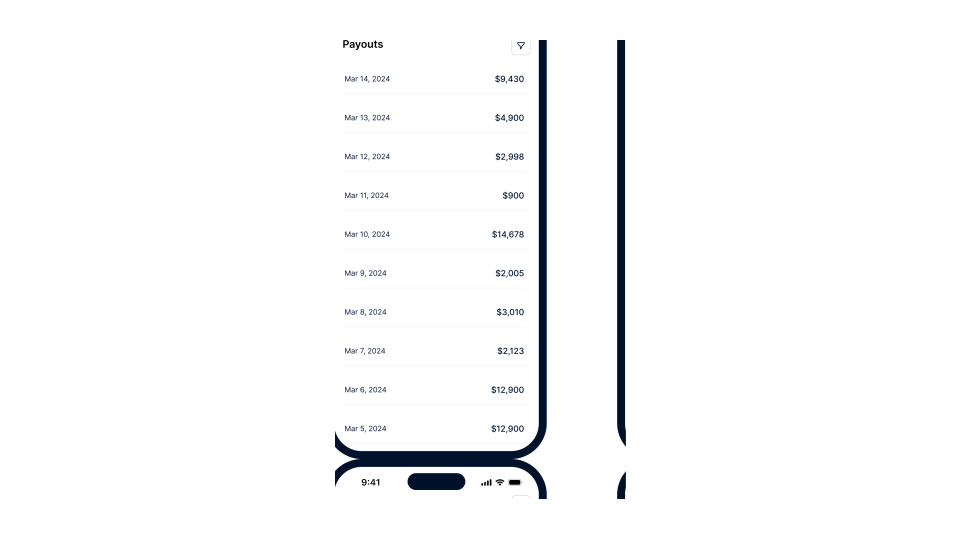
 The Payouts Overview component enables users to:
- View a list of automatic payouts completed for a balance account, including funds captured, adjustments, and net payout amounts per payout.
- Filter payouts by time period and balance account (if applicable). See the available filters for more details.
Available filters
The following sections shows the available filters and their values for the Payouts Overview component.**Balance account
Users with multiple balance accounts can switch between them using the Balance Account filter.**Time period
The Time period filter specifies the date and time range for showing payout records. The specified time is based on the UTC+0 time zone.| Filter value | Description |
|---|---|
| Last 7 days | Includes payouts from the previous six days and from today until the current time. For example, if today is a Tuesday and the time is 8:00 PM, payouts from the previous Wednesday midnight until this Tuesday 8:00 PM are included. |
| This week | Includes payouts for the current week, starting from Monday midnight until the present moment. |
| Last week | Includes payouts from Monday midnight to Sunday 11:59:59 PM of the previous week. |
| Last 30 days | The default setting. Includes payouts from the previous 29 days and from today until the current time. |
| This month | Includes payouts for the current month, starting from the first day of the month until today’s date. |
| Last month | Includes payouts from the previous month, starting from the first day of the month until the end of the month at 11:59:59 PM. |
| Year to date | Includes payouts from the first day of the current year up until today’s date. |
| Custom | Allows setting a custom time period. |
Payout Details component
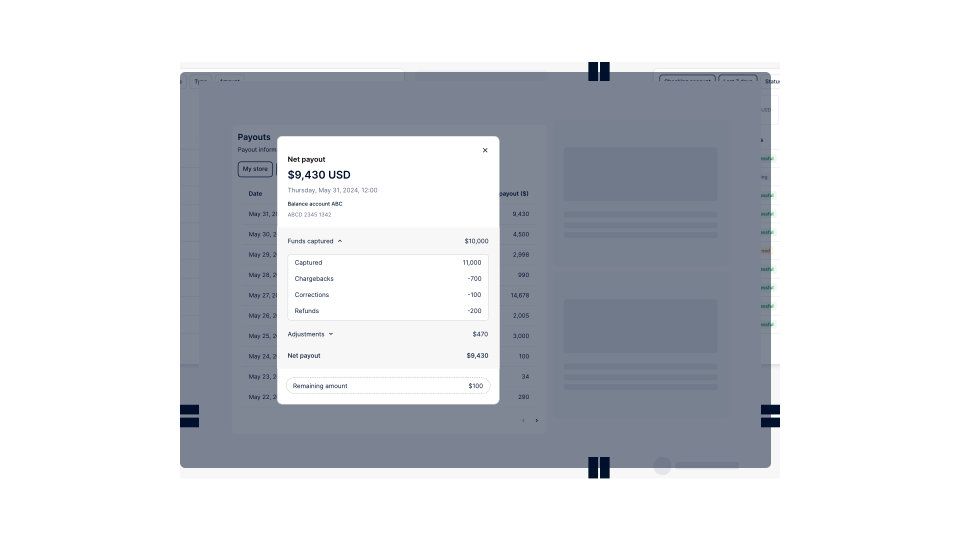
The Payout Details component shows specific information about a payout, including the date and time, breakdown of captured funds and adjustments, and the net payout amount. If there are any remaining funds in the balance account after the payout is completed, they will also be shown in the component. Additionally, the component allows for custom data integration, such as your own fields, icons, links, and buttons.By default, the Payout Details component is embedded in the Payouts Overview component and is shown as a modal window on the overview page. You can also choose to show the Payout Details component on a separate page during the initialization of the components.The following tabs illustrate how the component appears on various screen sizes.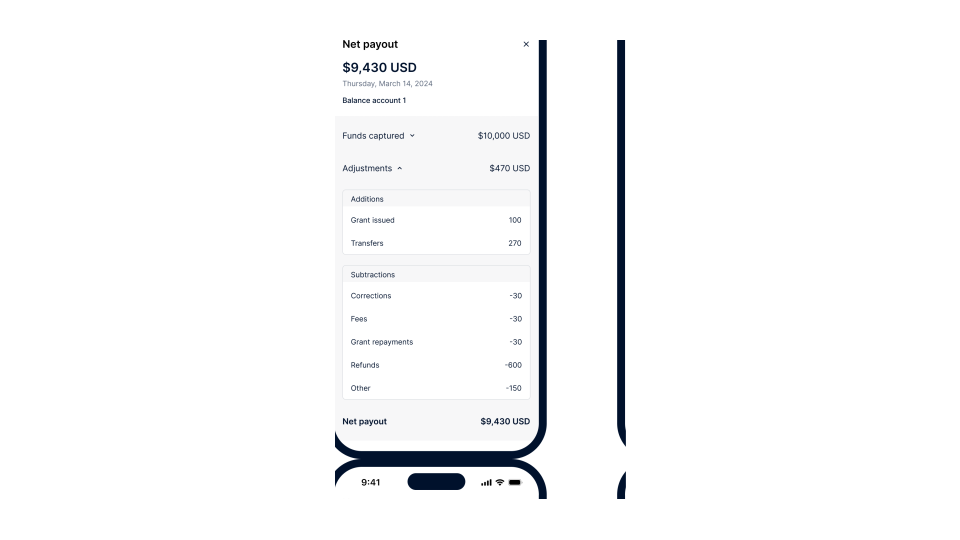
How it works
The integration of components involves both server-side and client-side processes. You can find more details on the component libraries page.Integration steps
Follow these steps to integrate the component(s):- Create an authentication session from your server
- Install component library in your front end
- Initialize components
- Optional: Localize components
- Optional: Customize component appearance
- Optional: Customize component data
Create A Session
1. Create an authentication session from your server
To ensure secure communication between components and Adyen server, you must configure your server for authentication and create a session token. To create the token:-
From your server, make a POST /sessions request specifying the following parameters:
To make this API request, your API key must have the Payouts Overview Component: View role in your Customer Area. For more information, refer to the Requirements section.
Here is an example request for creating a session token. Create a session token
Parameter Required Description allowOrigin The URL where the component will appear. Must follow the format of https://www.yourcompany.comorhttps://*.yourcompany.com, whereyourcompany.comis the actual web address of your marketplace. On live, only the HTTPS protocol is supported.policy An object that contains:
resources: An object that contains:accountHolderId: The unique identifier of the account holder that is linked to the balance account shown in the component. type: The type of resource. Set this to accountHolder. roles: The role required to use the component. Set this to Payouts Overview Component: View.product The type of product the component belongs to. Set this to platform. curl https://test.adyen.com/authe/api/v1/sessions \ -H 'content-type: application/json' \ -H 'x-api-key: ADYEN_BALANCE_PLATFORM_API_KEY' \ -D '{ "allowOrigin":"YOUR_DOMAIN", "product":"platform", "policy": { "resources": [ { "accountHolderId": "AH00000000000000000000001", "type": "accountHolder" } ], "roles": [ "Payouts Overview Component: View" ] } }' -
Note the API response. Later, when initializing the components, you need to create and call a function that passes the entire session object from the response to your front end.
Session token created
{
  "id": "EC1234-1234-1234-1234",
  "token": "xxxxx.yyyyy.zzzzzz"
}
Install Component Library
2. Install component library in your front end
Use the Adyen Web npm package, or embed the Adyen Platform Experience script and stylesheet into your HTML file:Install the Adyen Platform Experience library in your front-end application as follows:
-
Install the npm package.
npm install @adyen/adyen-platform-experience-web -
Import the library, the components, and the style sheet.
import { AdyenPlatformExperience, component_name } from '@adyen/adyen-platform-experience-web';
import "@adyen/adyen-platform-experience-web/adyen-platform-experience-web.css";
Use the
integrity attribute so browsers can verify that the script and stylesheet have not been changed unexpectedly.The value of the integrity attribute is the Subresource Integrity (SRI) hash which Adyen provides for each version of the Adyen Web JavaScript and CSS files.Get the SRI hashes from the release notes for the Platform Experience components, under Updating to this version.embed-script-stylesheet.html<!-- Embed the Adyen Platform Experience script element above any other JavaScript in your page. -->
<script src="https://bae81f955b.cdn.adyen.com/platform-components/VERSION/adyen-platform-experience-web.js"
integrity="JS_INTEGRITY_HASH_FOR_YOUR_VERSION"
crossorigin="anonymous"></script>
<!-- Embed the Adyen Platform Experience stylesheet. You can add your own styling by overriding the rules in the CSS file -->
<link rel="stylesheet" href="https://bae81f955b.cdn.adyen.com/platform-components/VERSION/adyen-platform-experience-web.css"
integrity="CSS_INTEGRITY_HASH_FOR_YOUR_VERSION"
crossorigin="anonymous">
Initialize Components
3. Initialize components
To initialize the components:-
Gather the following information to be passed when initializing the library and its components.
-
Gather these parameters to initialize the library.
Parameter Required Description availableTranslationsDeprecatedDeprecated. This field is no longer needed because locales are now dynamically loaded on demand via CDN. Setting this field will trigger a deprecation warning. An array containing the names of the imported locale files used for localizing the components. For example, [es_ES, nl_NL, fr_FR].environmentSpecifies the environment for the component integration. The default value is test. Set the parameter to live when you are ready to go live. localeSpecifies the locale code, which determines the desired language of the components. This code must correspond to a supported language. For example, use es-ES for Spanish. onSessionCreateThe callback function that retrieves an authentication session token and refreshes the current session. - Gather these parameters to initialize each component.
-
Gather these parameters to initialize the library.
| Parameter | Required | Description |
|---|---|---|
allowLimitSelection | Determines whether the user can change the number of payouts shown per page. Default value: true. | |
core | | The instance of the library. |
dataCustomization | An object that contains both the list and details objects, which include customization specifications for dashboard fields, allowing for additional data integration from your database. | |
onRecordSelection | If defined, the event allows obtaining the payout date and the corresponding balance account ID when the user selects a specific payout from the overview. You can use the obtained values to show the Payout Details component in a different location within your portal’s UI, outside the Payouts Overview component. | |
preferredLimit | The number of payouts shown per page. Default value: 10. |
| Parameter | Required | Description |
|---|---|---|
core | | The instance of the library. |
dataCustomization | An object that contains the details object, which include customization specifications for dashboard fields, allowing for additional data integration from your database. | |
date | | The payout date in an ISO format. |
id | | The unique identifier of the balance account. |
- Create a DOM element on your portal’s UI page where you want the component to be rendered. Assign the element a unique and descriptive ID. This unique ID is important to avoid any misconfigurations when integrating multiple components into your portal’s UI. By default, the Payout Details component is shown as a modal window within the Payouts Overview component. In this scenario, you only need to create a DOM element for the Payouts Overview component. If you want to use the Payout Details component on its own, you need to create a separate DOM element for it. If you are using JavaScript frameworks such as Vue or React, make sure that you use references instead of selectors and that you do not re-render the DOM element. Select the tab for the component you want to use:
Create DOM element
<div id="payouts-overview-container"></div>
Create DOM element
<div id="payout-details-container"></div>
-
Add a function that calls your API to retrieve and refresh an authentication session token.
The following code, including the role, is the same for both payout components.
Add function to retrieve and refresh an authentication session token
async function handleSessionCreate() { const response = await fetch('YOUR_IMPLEMENTATION_OF_CREATE_SESSION_ENDPOINT'); return response.json(); } - Initialize the component and mount it to the container you created. Be sure to include the function for retrieving and refreshing the session token that you added in the previous step. To implement the Payout Details component as a modal window within the Payouts Overview component, use the following code examples. In this implementation, when the user selects a specific payout from the overview page, the payout date and the corresponding balance account ID are automatically passed to the Payout Details component, and the modal window opens. Select the tab for the component you want to use:
Initialize library and create component
import { AdyenPlatformExperience, PayoutsOverview } from '@adyen/adyen-platform-experience-web';
import "@adyen/adyen-platform-experience-web/adyen-platform-experience-web.css";

const core = await AdyenPlatformExperience({
    onSessionCreate: handleSessionCreate,
});
const payoutsOverview = new PayoutsOverview({ core });

payoutsOverview.mount('#payouts-overview-container');
Initialize library and create component
import { AdyenPlatformExperience, PayoutDetails } from '@adyen/adyen-platform-experience-web';
import "@adyen/adyen-platform-experience-web/adyen-platform-experience-web.css";

const core = await AdyenPlatformExperience({
    onSessionCreate: handleSessionCreate,
});

const payoutDetails = new PayoutDetails({
    core,
    id: 'BA00000000000000000000001'
    date: '2024-12-31T00:00:00.135Z'
});

payoutDetails.mount('#payout-details-container');
-
To use the Payout Details component outside of the Payouts Overview component:
- Define the
onRecordSelectioncallback.
const payoutsOverview = new PayoutsOverview({ core, onRecordSelection: ({ balanceAccountId, date }) => { // Use selected payout balance account id and date. } });- Initialize the Payout Details component using the
idand thedatefrom the object argument as shown below.
const payoutDetails = new PayoutDetails({ core, id: '<SELECTED_PAYOUT_ID>', date: '<SELECTED_PAYOUT_DATE>' }); - Define the
Localize Components
4. Optional: Localize components
During the component initialization, you can also configure the components to use one of the supported languages.Update your code for initializing components to include the localization settings. If no localization settings are provided, the components will default to English.Localize componentsimport { AdyenPlatformExperience } from '@adyen/adyen-platform-experience-web';
const core = await AdyenPlatformExperience({
locale: 'es-ES', // See supported languages for possible values
/* ... */
});
Customize Appearance
5. Optional: Customize component appearance
The payout components have a default appearance with pre-defined styles, such as colors, fonts, and borders. You can customize the appearance of your components by overriding the default values of CSS variables and the class settings:- Inspect the components using your browser’s developer tools.
- Modify the styles in your style sheet file.
style.css
:root {
    --adyen-sdk-border-radius-s: 10px;
    --adyen-sdk-border-radius-m: 20px;
    --adyen-sdk-border-radius-l: 30px;
    --adyen-sdk-color-background-disabled: #9ecdb1;
    --adyen-sdk-color-background-inverse-primary: #0abf53;
    --adyen-sdk-color-background-inverse-primary-hover: #57d389;
    --adyen-sdk-color-decorative-blue: #0abf53;
    --adyen-sdk-color-outline-primary-active: #0abf53;
}
style.css
.adyen-pe-modal {
    border-left: 3px solid #0abf53;
    border-radius: 0;
    height: 100%;
    max-height: unset;
    right: 0;
}
Customize Data
6. Optional: Customize component data
The payout components allow you to include a diverse range of data types and sources to showcase within your user dashboard. You can:- Integrate custom data, such as your own fields, icons, links, and buttons.
- Define the settings for each dashboard field, including their names and visibility.
- Specify the
dataCustomizationparameter, including:
| Parameter | Required | Description |
|---|---|---|
list | An object that includes customization settings for dashboard fields in the payouts overview. Example: dataCustomization: { list: { } } | |
details | An object that includes customization settings for dashboard fields in the payout detail view. Example: dataCustomization: { list: { }, details: { } } |
| Parameter | Required | Description |
|---|---|---|
details | An object that includes customization settings for dashboard fields in the payout detail view. Example: dataCustomization: { details: { } } |
- Within the
listand/ordetailsobjects, define the customization settings, such as field names or visibility.
You can customize the default fields and add custom fields. In the dashboard, custom fields will be positioned immediately after the default fields.
| Parameter | Required | Description |
|---|---|---|
fields | | Defines the settings of dashboard fields in the payouts overview. Default fields: ‘createdAt’, ‘fundsCapturedAmount’, ‘adjustmentAmount’, ‘payoutAmount’. Example: dataCustomization: { list: { fields: [] }, details: { fields: [] } } |
onDataRetrieve | The callback function that retrieves a Promise object resolved with an array of the payout records extended with custom data. Example: dataCustomization: { list: { fields: [], onDataRetrieve: () => { } }, details: { fields: [], onDataRetrieve: () => { } } } |
| Parameter | Required | Description |
|---|---|---|
fields | | Defines the settings of dashboard fields in the payout detail view. Defaults to an empty string. Example: dataCustomization: { details: { fields: [] } } |
onDataRetrieve | The callback function that retrieves a Promise object resolved with the extended payout record that contains custom data. Example: dataCustomization: { details: { fields: [], onDataRetrieve: () => { } } } |
-
Define the settings for each dashboard field using the following parameters.
Parameter Type Required Description alignString Determines how the content in a field is aligned. Possible values: left, center, right. If not specified, it defaults to left. Example: { key: 'amount', align: 'right' }flexNumber Determines the width of a field in relation to other fields. It uses a numeric value that represents the flex-grow factor in the CSS Flexbox layout. A higher value means that the field occupies more space compared to others. If not specified, it defaults to 1. Example: { key: '_store', flex: 2 }keyString Specifies the name of a field. Example: fields: [ { key: '_store' } ]To prevent conflicts with the default field names, always start the names of your custom fields with an underscore (_) character.visibilityString Determines whether a field should be shown or not. Possible values: visible, hidden. If not specified, it defaults to visible. Example: { key: 'amount', visibility: 'hidden' } -
If adding a custom field, include the
onDataRetrieveparameter. `onDataRetrieve` parameterMake sure to include the received data object in the return object by using the spread syntax. The component can then use this as matching keys to map your custom data with the existing one. `additionalData` object{ onDataRetrieve: async (data) => { const ids = data.map(payout => payout.createdAt); const extendedData = await getMyDataByIds(ids); return extendedData; }, }{ details: { fields: [ { key: '_summary' }, { key: '_sendEmail' }, ], onDataRetrieve: (data) => { return { ...data, _summary: { value: 'Summary', type: 'link', config: { href: CUSTOM_URL_EXAMPLE, }, }, _sendEmail: { type: 'button', value: 'Send email', config: { action: () => sendEmail(), }, }, }; }, }, } -
Specify the type of your custom data.
Parameter Type Required Description typeString Determines how the custom data value should look and behave. Possible values: text, icon, link, button. If not specified, it defaults to text.
`text` data type
{
    list: {
        fields: [
            { key: '_store' },
        ],
        onDataRetrieve: (data) => {
            return [
                {
                    ...data[0],
                    _store: {
                        type: 'text',
                        value: 'New York',
                        config: {
                            className: 'my-class my-class--variant',
                        },
                    },
                },
                {
                    ...data[1],
                    _store: {
                        type: 'text',
                        value: 'New York',
                        config: {
                            className: 'my-class my-class--variant',
                        },
                    },
                },
            ];
        },
    },
}
`icon` data type
{
    list: {
        fields: [
            { key: '_store' },
        ],
        onDataRetrieve: (data) => {
            return [
                {
                    ...data[0],
                    _store: {
                        type: 'icon',
                        value: 'New York',
                        config: {
                            src: '',
                            alt: '',
                            className: 'my-class my-class--variant',
                        },
                    },
                },
                {
                    ...data[1],
                    _store: {
                        type: 'icon',
                        value: 'New York',
                        config: {
                            src: '',
                            alt: '',
                            className: 'my-class my-class--variant',
                        },
                    },
                },
            ];
        },
    },
}
The target should accept both
_self and _blank. The default option is _blank.`link` data type{
list: {
fields: [
{ key: '_store' },
],
onDataRetrieve: (data) => {
return [
{
...data[0],
_store: {
type: 'link',
value: 'New York',
config: {
href: '',
target: '_self',
className: 'my-class my-class--variant',
},
},
},
{
...data[1],
_store: {
type: 'link',
value: 'New York',
config: {
href: '',
target: '_self',
className: 'my-class my-class--variant',
},
},
},
];
},
},
}
`button` data typeHere is an example
{
    list: {
        fields: [
            { key: '_store' },
        ],
        onDataRetrieve: (data) => {
            return [
                {
                    ...data[0],
                    _store: {
                        type: 'button',
                        value: 'New York',
                        config: {
                            action: () => {},
                            className: 'my-class my-class--variant',
                        },
                    },
                },
                {
                    ...data[1],
                    _store: {
                        type: 'button',
                        value: 'New York',
                        config: {
                            action: () => {},
                            className: 'my-class my-class--variant',
                        },
                    },
                },
            ];
        },
    },
}
dataCustomization object:Example `dataCustomization` object
{
    dataCustomization: {
        list: {
            fields: [
                { key: 'adjustmentAmount', visibility: 'hidden' },
                { key: '_summary' },
                { key: '_country', flex: 0.5 },
                { key: '_sendEmail', align: 'right' },
            ],
            onDataRetrieve: payouts => {
                return getCustomPayoutsData(payouts);
            },
        },
        details: {
            fields: [{ key: '_summary' }, { key: '_country' }, { key: '_sendEmail' }],
            onDataRetrieve: payout => {
                return getCustomPayoutsDataById(payout);
            },
        },
    },
}
Example `dataCustomization` object
{
    dataCustomization: {
        details: {
            fields: [{key: '_store'}, {key: '_summary'}, {key: '_sendEmail'}],
            onDataRetrieve: payout => {
                return getCustomPayoutsDataById(payout)
            },
        },
    }
}
-
Make sure to include translations for your custom fields in the library initializer:
- If you are not localizing components, add the custom field translations for
en_US. - If you are localizing components, also include the appropriate custom field translations for all supported locales.
const core = await AdyenPlatformExperience({ translations: { en_US: { _summary: 'Summary', _sendEmail:'Send email', }, es_ES: { _summary: 'Resumen', _sendEmail: 'Enviar correo electrónico', }, } }); - If you are not localizing components, add the custom field translations for
Supported languages
You can set one of the following languages to localize any of the Platform Experience components.| Language | Locale code | Locale file |
|---|---|---|
| Danish | da-DK | da_DK |
| Dutch | nl-NL | nl_NL |
| English | en-US | en_US |
| Finnish | fi-FI | fi_FI |
| French | fr-FR | fr_FR |
| German | de-DE | de_DE |
| Italian | it-IT | it_IT |
| Norwegian | no-NO | no_NO |
| Portuguese (BR) | pt-BR | pt_BR |
| Spanish | es-ES | es_ES |
| Swedish | sv-SE | sv_SE |
Reports component
Use Platform Experience components to build interactive dashboards for your users.Requirements
Before you begin, take into account the following requirements, limitations, and preparations.| Requirement | Description |
|---|---|
| Integration type | You must have the Adyen for Platforms integration. |
| API credentials | You must have a Balance Platform API key (for example, ws[_123456]@BalancePlatform.****[YourBalancePlatform]) to access the Session authentication API. Ensure that you have asked your Adyen contact to assign the following role to your API credential: Reports Overview Component: View |
| Limitations | Currently, the reports component only supports the Payout report. More report types will be added in the future. The Payout report relies on the Balance Platform Payout report. The Payout report has several limitations.- It is designed for platforms using automatic payouts with a default settlement delay. It does not support manual payouts, pass-through payouts, or sales day payout T+0. |
| Setup steps | Before you begin: Verify that the component is available in the languages that apply to your situation. Set up the Balance Platform Payout report to be generated, see Balance Platform Payout report to learn more. Check our Component libraries page for additional information on the supported countries/regions and browser versions. |
Component Description
Reports Overview component
The Reports Overview component shows a list of downloadable reports for a specific balance account within a specified time period. Additionally, the component allows for custom data integration, such as your own fields, icons, links, and buttons.The following tabs illustrate how the component appears on various screen sizes.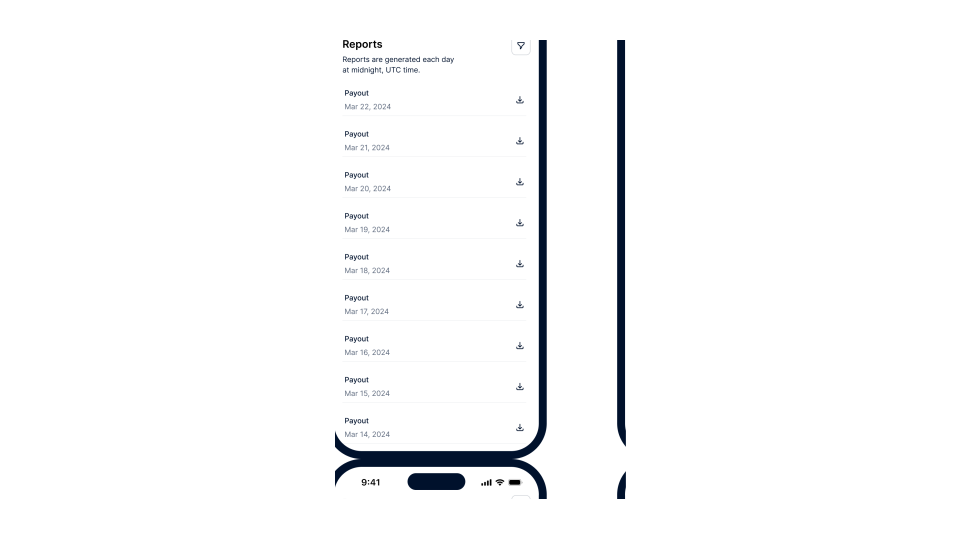
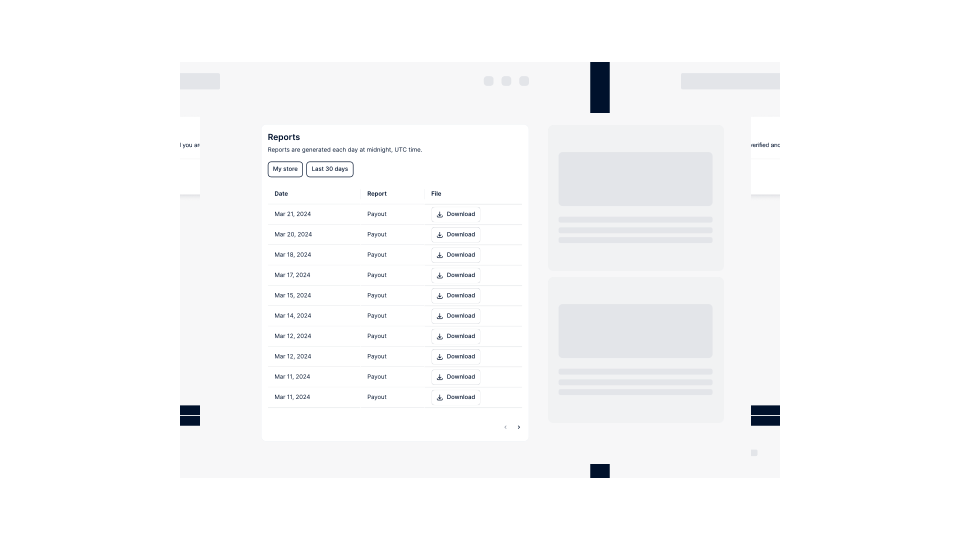 The component enables users to:
- Download a generated report in CSV format. The downloaded file name will be similar to this:
balanceaccount_payout_report_YYYY_MM_DD.csv. - Filter the generated reports by time period and balance account (if applicable). See the available filters for more details.
Supported report types
| Report type | Description |
|---|---|
| Payout report | This report shows a list of automatic payouts completed for a specific balance account within a specified time period, including details of the transactions (both debits and credits) which are part of these payouts. |
Available filters
The following sections shows the available filters and their values for the Reports Overview component.**Balance account
Users with multiple balance accounts can switch between them using the Balance Account filter.**Time period
The Time period filter specifies the date range for showing available reports. Report data is automatically generated every day at midnight based on the UTC+0 time zone.| Filter value | Description |
|---|---|
| Last 7 days | Includes reports from the previous six days and today. |
| This week | Includes reports for the current week, starting from Monday midnight until today. |
| Last week | Includes reports from Monday midnight to Sunday midnight of the previous week. |
| Last 30 days | The default setting. Includes reports from the previous 29 days and today. |
| This month | Includes reports for the current month, starting from the first day of the month until today’s date. |
| Last month | Includes reports from the previous month, starting from the first day of the month until the end of the month. |
| Year to date | Includes reports from the first day of the current year up until today’s date. |
| Custom | Allows setting a custom time period. |
How it works
The integration of components involves both server-side and client-side processes. You can find more details on the component libraries page.Integration steps
Follow these steps to integrate the component(s):- Create an authentication session from your server
- Install component library in your front end
- Initialize components
- Optional: Localize components
- Optional: Customize component appearance
- Optional: Customize component data
Create A Session
1. Create an authentication session from your server
To ensure secure communication between the component and Adyen server, you must configure your server for authentication and create a session token. To create the token:-
From your server, make a POST /sessions request specifying the following parameters:
To make this API request, your API key must have the Reports Overview Component: View role in your Customer Area. For more information, refer to the Requirements section.
Here is an example request for creating a session token. Create a session token
Parameter Required Description allowOrigin The URL where the component will appear. Must follow the format of https://www.yourcompany.comorhttps://*.yourcompany.com, whereyourcompany.comis the actual web address of your marketplace. On live, only the HTTPS protocol is supported.policy An object that contains:
resources: An object that contains:accountHolderId: The unique identifier of the account holder that is linked to the balance account shown in the component. type: The type of resource. Set this to accountHolder. roles: The role required to use the component. Set this to Reports Overview Component: View.product The type of product the component belongs to. Set this to platform. curl https://test.adyen.com/authe/api/v1/sessions \ -H 'content-type: application/json' \ -H 'x-api-key: ADYEN_BALANCE_PLATFORM_API_KEY' \ -D '{ "allowOrigin":"YOUR_DOMAIN", "product":"platform", "policy": { "resources": [ { "accountHolderId": "AH00000000000000000000001", "type": "accountHolder" } ], "roles": [ "Reports Overview Component: View" ] } }' -
Note the API response. Later, when initializing the component, you need to create and call a function that passes the entire session object from the response to your front end.
Session token created
{
  "id": "EC1234-1234-1234-1234",
  "token": "xxxxx.yyyyy.zzzzzz"
}
Install Component Library
2. Install component library in your front end
Use the Adyen Web npm package, or embed the Adyen Platform Experience script and stylesheet into your HTML file:Install the Adyen Platform Experience library in your front-end application as follows:
-
Install the npm package.
npm install @adyen/adyen-platform-experience-web -
Import the library, the components, and the style sheet.
import { AdyenPlatformExperience, component_name } from '@adyen/adyen-platform-experience-web';
import "@adyen/adyen-platform-experience-web/adyen-platform-experience-web.css";
Use the
integrity attribute so browsers can verify that the script and stylesheet have not been changed unexpectedly.The value of the integrity attribute is the Subresource Integrity (SRI) hash which Adyen provides for each version of the Adyen Web JavaScript and CSS files.Get the SRI hashes from the release notes for the Platform Experience components, under Updating to this version.embed-script-stylesheet.html<!-- Embed the Adyen Platform Experience script element above any other JavaScript in your page. -->
<script src="https://bae81f955b.cdn.adyen.com/platform-components/VERSION/adyen-platform-experience-web.js"
integrity="JS_INTEGRITY_HASH_FOR_YOUR_VERSION"
crossorigin="anonymous"></script>
<!-- Embed the Adyen Platform Experience stylesheet. You can add your own styling by overriding the rules in the CSS file -->
<link rel="stylesheet" href="https://bae81f955b.cdn.adyen.com/platform-components/VERSION/adyen-platform-experience-web.css"
integrity="CSS_INTEGRITY_HASH_FOR_YOUR_VERSION"
crossorigin="anonymous">
Initialize Components
3. Initialize component
To initialize the component:-
Gather the following information to be passed when initializing the library and component.
-
Gather these parameters to initialize the library.
Parameter Required Description availableTranslationsDeprecatedDeprecated. This field is no longer needed because locales are now dynamically loaded on demand via CDN. Setting this field will trigger a deprecation warning. An array containing the names of the imported locale files used for localizing the component. For example, [es_ES, nl_NL, fr_FR].environmentSpecifies the environment for the component integration. The default value is test. Set the parameter to live when you are ready to go live. localeSpecifies the locale code, which determines the desired language of the component. This code must correspond to a supported language. For example, use es-ES for Spanish. onSessionCreateThe callback function that retrieves an authentication session token and refreshes the current session. -
Gather these parameters to initialize the component.
Parameter Required Description allowLimitSelectionDetermines whether the user can change the number of report records shown per page. Default value: true. balanceAccountIdSet this parameter to a specific balance account ID to show reports for the given account only. If specified, the Balance Account filter will be hidden. coreThe instance of the library. dataCustomizationAn object that contains both the listanddetailsobjects, which include customization specifications for dashboard fields, allowing for additional data integration from your database.hideTitleDetermines whether to show the component title Reports. Default value: false. Set this to true to hide the component title. onContactSupportThe callback function triggered when an error occurs on the reports table. If the function is defined, the component will show the default error screen, which includes the error code ID and a contact support button. You can provide the URL to which you want to redirect the user when they click the button. For example, onContactSupport: () => {window.open('https://your-platform-domain/support');}onErrorThe callback function triggered when an error occurs on the reports table. You can define the function based on how you want to handle the errors. For example, you can log the errors on the console using onError: (error) => {console.log(error)}.onFiltersChangedThe callback function triggered when the user changes the filter selection. The function receives the current filter selection as an argument, including the balance account ID and time period. preferredLimitThe number of report records shown per page. Default value: 10.
-
Gather these parameters to initialize the library.
-
Create a DOM element on your portal’s UI page where you want the component to be rendered and assign it a unique and descriptive ID. This unique ID is important to avoid any misconfigurations when integrating multiple components into your UI.
If you are using JavaScript frameworks such as Vue or React, make sure that you use references instead of selectors and that you do not re-render the DOM element.
Create DOM element
<div id="reports-overview-container"></div> -
Add a function that calls your API to retrieve and refresh an authentication session token.
Add function to retrieve and refresh an authentication session token
async function handleSessionCreate() { const response = await fetch('YOUR_IMPLEMENTATION_OF_CREATE_SESSION_ENDPOINT'); return response.json(); } -
Initialize the component and mount it to the container you created.
Be sure to include the function for retrieving and refreshing the session token that you added in the previous step.
Initialize library and create component
import { AdyenPlatformExperience, ReportsOverview } from '@adyen/adyen-platform-experience-web';
import "@adyen/adyen-platform-experience-web/adyen-platform-experience-web.css";

const core = await AdyenPlatformExperience({
    onSessionCreate: handleSessionCreate,
});
const reportsOverview = new ReportsOverview({ core });

reportsOverview.mount('#reports-overview-container');
Localize Components
4. Optional: Localize components
During the component initialization, you can also configure the components to use one of the supported languages.Update your code for initializing components to include the localization settings. If no localization settings are provided, the components will default to English.Localize componentsimport { AdyenPlatformExperience } from '@adyen/adyen-platform-experience-web';
const core = await AdyenPlatformExperience({
locale: 'es-ES', // See supported languages for possible values
/* ... */
});
Customize Appearance
5. Optional: Customize component appearance
The reports components have a default appearance with pre-defined styles, such as colors, fonts, and borders. You can customize the appearance of your components by overriding the default values of CSS variables and the class settings:- Inspect the components using your browser’s developer tools.
- Modify the styles in your style sheet file.
style.css
:root {
    --adyen-sdk-border-radius-s: 10px;
    --adyen-sdk-border-radius-m: 20px;
    --adyen-sdk-border-radius-l: 30px;
    --adyen-sdk-color-background-disabled: #9ecdb1;
    --adyen-sdk-color-background-inverse-primary: #0abf53;
    --adyen-sdk-color-background-inverse-primary-hover: #57d389;
    --adyen-sdk-color-decorative-blue: #0abf53;
    --adyen-sdk-color-outline-primary-active: #0abf53;
}
style.css
.adyen-pe-reports-table--download {
    color: #0abf53;
    border: 1px solid #0abf53;
    border-radius: 20px;
}
Customize Data
6. Optional: Customize component data
The reports component allows you to include a diverse range of data types and sources to showcase within your user dashboard. You can:- Integrate custom data, such as your own fields, icons, links, and buttons.
- Define the settings for each dashboard field, including their names and visibility.
-
Specify the
dataCustomizationparameter, including:Parameter Required Description listAn object that includes customization settings for dashboard fields in the reports overview. Example: dataCustomization: { list: { } } -
Within the
listand/ordetailsobjects, define the customization settings, such as field names or visibility.
You can customize the default fields and add custom fields. In the dashboard, custom fields will be positioned immediately after the default fields.Parameter Required Description fieldsDefines the settings of dashboard fields in the reports overview. Default fields: ‘createdAt’, ‘dateAndReportType’, ‘reportType’, ‘reportFile’. Example: dataCustomization: { list: { fields: [] } }onDataRetrieveThe callback function that retrieves a Promiseobject resolved with an array of the report records extended with custom data. Required if adding a custom field. Example:dataCustomization: { list: { fields: [], onDataRetrieve: () => {} } }-
Define the settings for each dashboard field using the following parameters.
Parameter Type Required Description alignString Determines how the content in a field is aligned. Possible values: left, center, right. If not specified, it defaults to left. Example: { key: 'amount', align: 'right' }flexNumber Determines the width of a field in relation to other fields. It uses a numeric value that represents the flex-grow factor in the CSS Flexbox layout. A higher value means that the field occupies more space compared to others. If not specified, it defaults to 1. Example: { key: '_store', flex: 2 }keyString Specifies the name of a field. Example: fields: [ { key: '_store' } ]To prevent conflicts with the default field names, always start the names of your custom fields with an underscore (_) character.visibilityString Determines whether a field should be shown or not. Possible values: visible, hidden. If not specified, it defaults to visible. Example: { key: 'amount', visibility: 'hidden' } -
If adding a custom field, include the
onDataRetrieveparameter. `onDataRetrieve` parameterMake sure to include the received data object in the return object by using the spread syntax. The component can then use this as matching keys to map your custom data with the existing one. `additionalData` object{ onDataRetrieve: async (data) => { const ids = data.map(report => report.createdAt); const extendedData = await getMyDataByIds(ids); return extendedData; }, }{ list: { fields: [ { key: '_summary' }, { key: '_sendEmail' }, ], onDataRetrieve: (data) => { return data.map(reportData => ({ ...reportData, _summary: { value: 'Summary', type: 'link', config: { href: CUSTOM_URL_EXAMPLE, }, }, _sendEmail: { type: 'button', value: 'Send email', config: { action: () => sendEmail(), }, }, })); }, }, } -
Specify the type of your custom data.
Parameter Type Required Description typeString Determines how the custom data value should look and behave. Possible values: text, icon, link, button. If not specified, it defaults to text.
-
Define the settings for each dashboard field using the following parameters.
`text` data type
{
    list: {
        fields: [
            { key: '_store' },
        ],
        onDataRetrieve: (data) => {
            return [
                {
                    ...data[0],
                    _store: {
                        type: 'text',
                        value: 'New York',
                        config: {
                            className: 'my-class my-class--variant',
                        },
                    },
                },
                {
                    ...data[1],
                    _store: {
                        type: 'text',
                        value: 'New York',
                        config: {
                            className: 'my-class my-class--variant',
                        },
                    },
                },
            ];
        },
    },
}
`icon` data type
{
    list: {
        fields: [
            { key: '_store' },
        ],
        onDataRetrieve: (data) => {
            return [
                {
                    ...data[0],
                    _store: {
                        type: 'icon',
                        value: 'New York',
                        config: {
                            src: '',
                            alt: '',
                            className: 'my-class my-class--variant',
                        },
                    },
                },
                {
                    ...data[1],
                    _store: {
                        type: 'icon',
                        value: 'New York',
                        config: {
                            src: '',
                            alt: '',
                            className: 'my-class my-class--variant',
                        },
                    },
                },
            ];
        },
    },
}
The target should accept both
_self and _blank. The default option is _blank.`link` data type{
list: {
fields: [
{ key: '_store' },
],
onDataRetrieve: (data) => {
return [
{
...data[0],
_store: {
type: 'link',
value: 'New York',
config: {
href: '',
target: '_self',
className: 'my-class my-class--variant',
},
},
},
{
...data[1],
_store: {
type: 'link',
value: 'New York',
config: {
href: '',
target: '_self',
className: 'my-class my-class--variant',
},
},
},
];
},
},
}
`button` data typeHere is an example
{
    list: {
        fields: [
            { key: '_store' },
        ],
        onDataRetrieve: (data) => {
            return [
                {
                    ...data[0],
                    _store: {
                        type: 'button',
                        value: 'New York',
                        config: {
                            action: () => {},
                            className: 'my-class my-class--variant',
                        },
                    },
                },
                {
                    ...data[1],
                    _store: {
                        type: 'button',
                        value: 'New York',
                        config: {
                            action: () => {},
                            className: 'my-class my-class--variant',
                        },
                    },
                },
            ];
        },
    },
}
dataCustomization object:Example `dataCustomization` object{
dataCustomization: {
list: {
fields: [
{ key: 'reportType', visibility: 'hidden' },
{ key: '_summary' },
{ key: '_sendEmail', align: 'right' },
{ key: 'reportFile', flex: 0.8 },
],
onDataRetrieve: reports => {
return getCustomReportsData(reports);
},
},
},
}
-
Make sure to include translations for your custom fields in the library initializer:
- If you are not localizing components, add the custom field translations for
en_US. - If you are localizing components, also include the appropriate custom field translations for all supported locales.
const core = await AdyenPlatformExperience({ translations: { en_US: { _summary: 'Summary', _sendEmail:'Send email', }, es_ES: { _summary: 'Resumen', _sendEmail: 'Enviar correo electrónico', }, } }); - If you are not localizing components, add the custom field translations for
Supported languages
You can set one of the following languages to localize any of the Platform Experience components.| Language | Locale code | Locale file |
|---|---|---|
| Danish | da-DK | da_DK |
| Dutch | nl-NL | nl_NL |
| English | en-US | en_US |
| Finnish | fi-FI | fi_FI |
| French | fr-FR | fr_FR |
| German | de-DE | de_DE |
| Italian | it-IT | it_IT |
| Norwegian | no-NO | no_NO |
| Portuguese (BR) | pt-BR | pt_BR |
| Spanish | es-ES | es_ES |
| Swedish | sv-SE | sv_SE |
Dispute components
Use Platform Experience components to build interactive dashboards for your users.Requirements
Before you begin, take into account the following requirements, limitations, and preparations.| Requirement | Description |
|---|---|
| Integration type | You must have the Adyen for Platforms integration. |
| API credentials | You must have a Balance Platform API key (for example, ws[_123456]@BalancePlatform.[YourBalancePlatform]) to access the Session authentication API. Ensure that you have asked your Adyen contact to assign the following role to your API credential: Disputes Component: Manage |
| Limitations | Dispute visibility and access Account holders can view disputes created in this component on or after May 22, 2025. An account holder can perform an action or view submitted defense documents if and only if both of the following conditions are met: They are the sole non-liable account holder referenced via splits in the original payment. They receive at least one split of type BalanceAccount in the corresponding payment or capture. Document upload limits- Documents must be no larger than 2 MB and in .pdf, .jpg, .jpeg, or .tiff format. Images files must be no larger than 10 MB and in .jpg, .jpeg, or .tiff format.Refunds not supported- Currently this component does not support refunds. |
| Setup steps | Before you begin: Verify that the component is available in the languages that apply to your situation. Check our Component libraries page for additional information on the supported countries/regions and browser versions. |
Component Description
Disputes Overview component
The Disputes Overview component shows a list of disputes, including chargebacks, Requests for Information (RFIs), and fraud alerts for a specific balance account within a specified time period. Users can quickly view the status of open or closed disputes, helping them monitor and take action when needed.This component organizes disputes into three tabs:- Chargebacks: shows undefended or unresponded chargebacks and RFIs that require user action. Each dispute record includes details such as the respond by date, payment method, dispute reason, and disputed amount. Users can select a record to open the Dispute Management component, where they can accept or defend the dispute.
- Fraud alerts: shows fraud alerts to help users identify suspicious activity. Each record includes the payment method, fraud reason, total payment amount, and date of the alert. Fraud alerts correspond to the term “Notification of Fraud” in the Customer Area and dispute documentation.
- Ongoing & closed: shows ongoing chargebacks, RFIs, and resolved disputes to help users track and match disputes against payment activity. Each dispute record includes details such as the payment method, dispute reason, and disputed amount. This tab also shows the status of a dispute, see dispute statuses for more details.
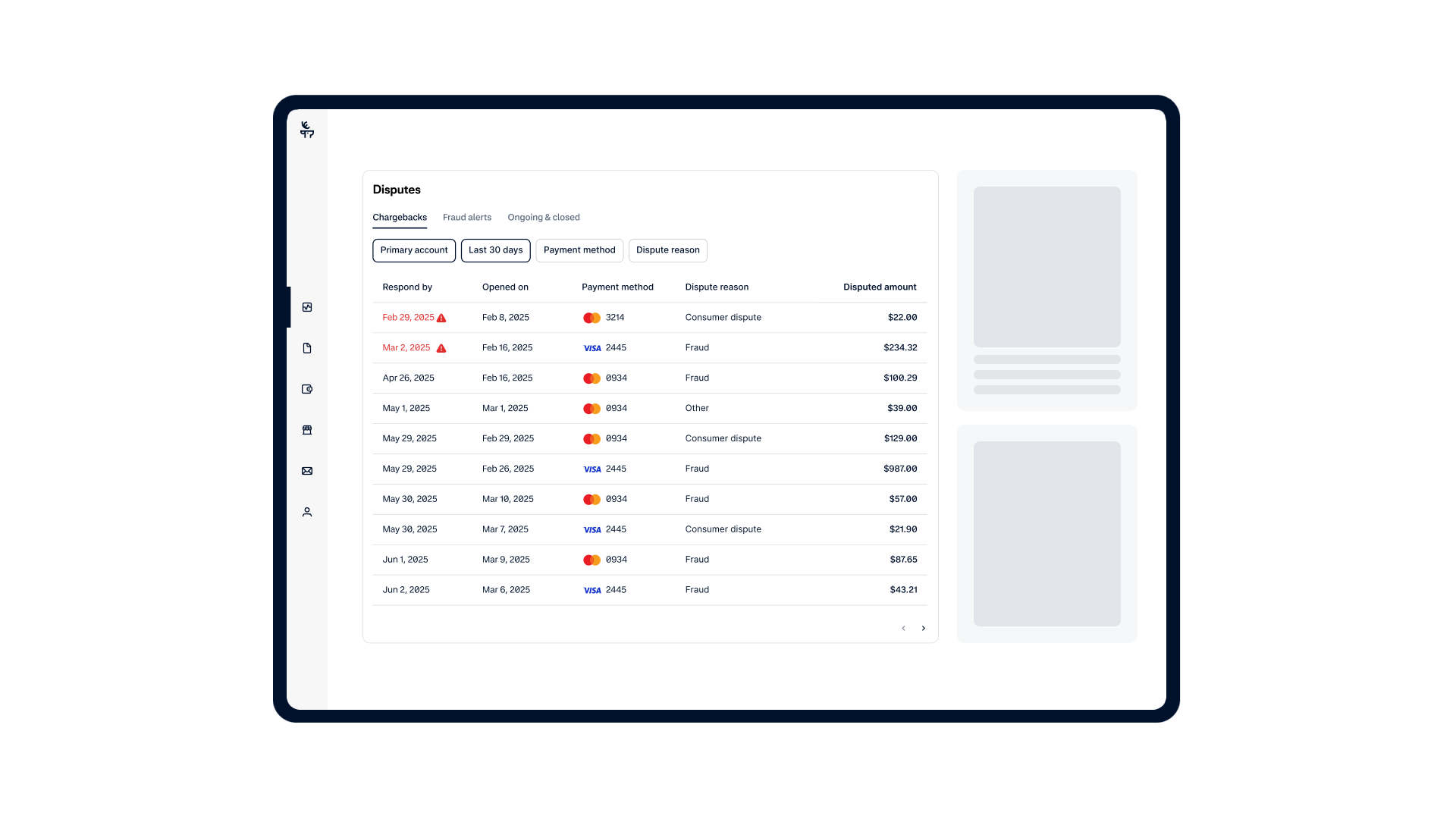
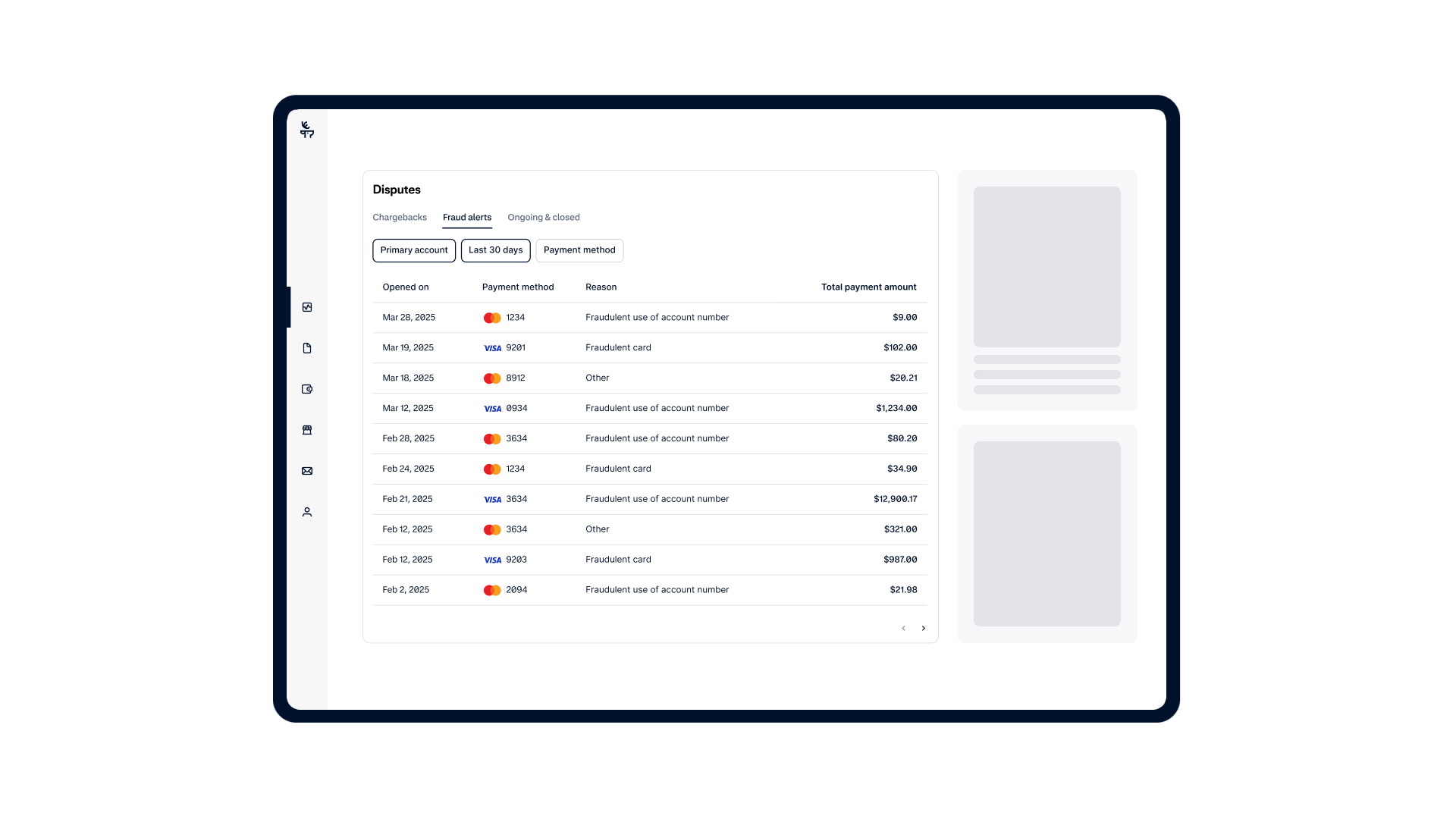
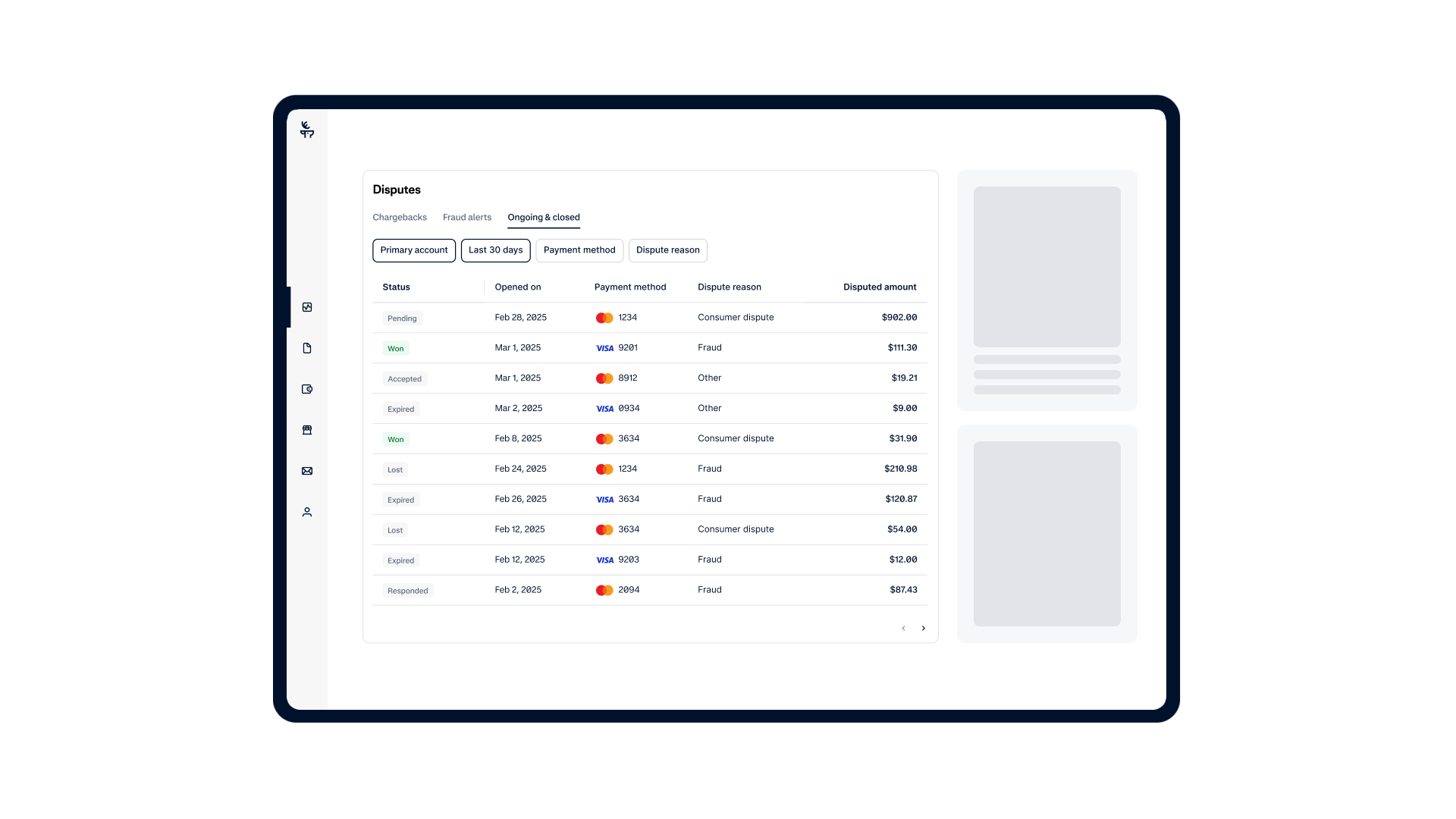 The Disputes Overview component enables users to:
- View a list of chargebacks, fraud alerts, and ongoing and closed disputes for all or a specific balance account.
- Filter disputes by balance account, date opened, payment method, and dispute reason. See available filters for more details.
Available filters
The following sections shows the available filters and their values for the Disputes Overview component.**Balance account
Users with multiple balance accounts can switch between them using the Balance Account filter.**Time period
The Time period filter specifies the date and time range for displaying dispute results. The specified time is determined by the time zone of the selected balance account.| Filter value | Description |
|---|---|
| Last 7 days | Includes disputes from the previous six days and from today until the current time. For example, if today is a Tuesday and the time is 8:00 PM, disputes from the previous Wednesday midnight until this Tuesday 8:00 PM are included. |
| This week | Includes disputes for the current week, starting from Monday midnight until the present moment. |
| Last week | Includes disputes from Monday midnight to Sunday 11:59:59 PM of the previous week. |
| Last 30 days | The default setting. Includes disputes from the previous 29 days and from today until the current time. |
| This month | Includes disputes for the current month, starting from the first day of the month until today’s date. |
| Last month | Includes disputes from the previous month, starting from the first day of the month until the end of the month at 11:59:59 PM. |
| Year to date | Includes disputes from the first day of the current year up until today’s date. |
| Custom | Allows setting a custom time period. |
Payment method
The Payment method filter enables users to filter disputes by specifying the payment method used; this corresponds with card schemes.**Dispute reason
The Dispute Reason filter lets users sort disputes by specifying the reason, such as fraud, consumer dispute, or processing error. Note, instead of dispute reasons, the fraud alerts tab shows Notifications of Fraud (NOF).Dispute Management component
The Dispute Management component shows specific information about a dispute, including the dispute status, dispute reason, reason code, dispute, payment, and merchant references. The component also includes important dates such as when the dispute was opened and when a response is due. For chargebacks, users can accept or defend the dispute. When defending a chargeback, the component prompts users to complete required steps, such as selecting a defense reason and uploading supporting evidence. The component also allows for custom data integration, such as your own fields, icons, links, and buttons.By default, the Dispute Management component is embedded in the Disputes Overview component and is shown as a modal window on the overview page. You can also choose to show the Dispute Management component on a separate page during the initialization of the components.The following tabs illustrate how the component appears on various screen sizes.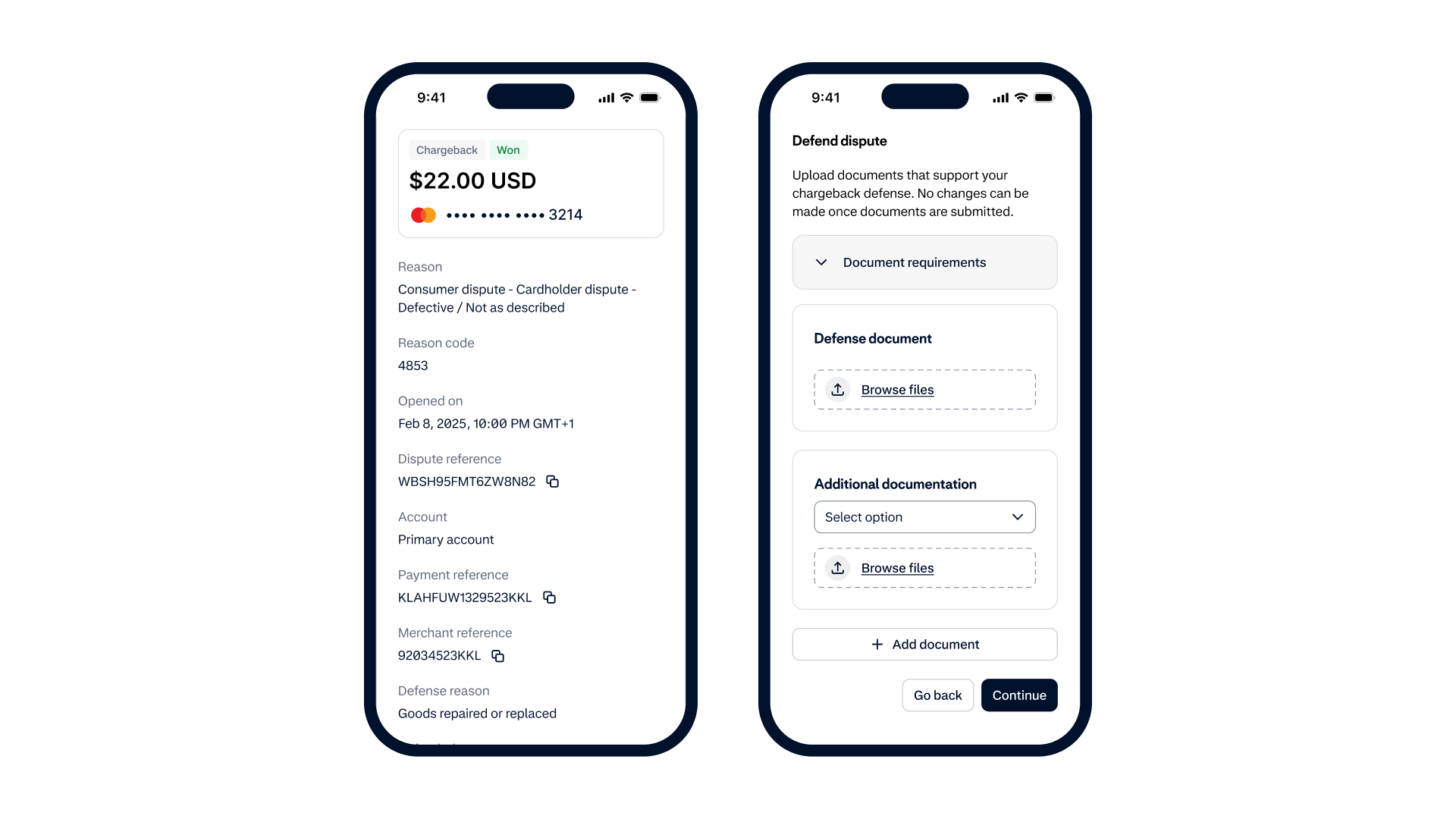
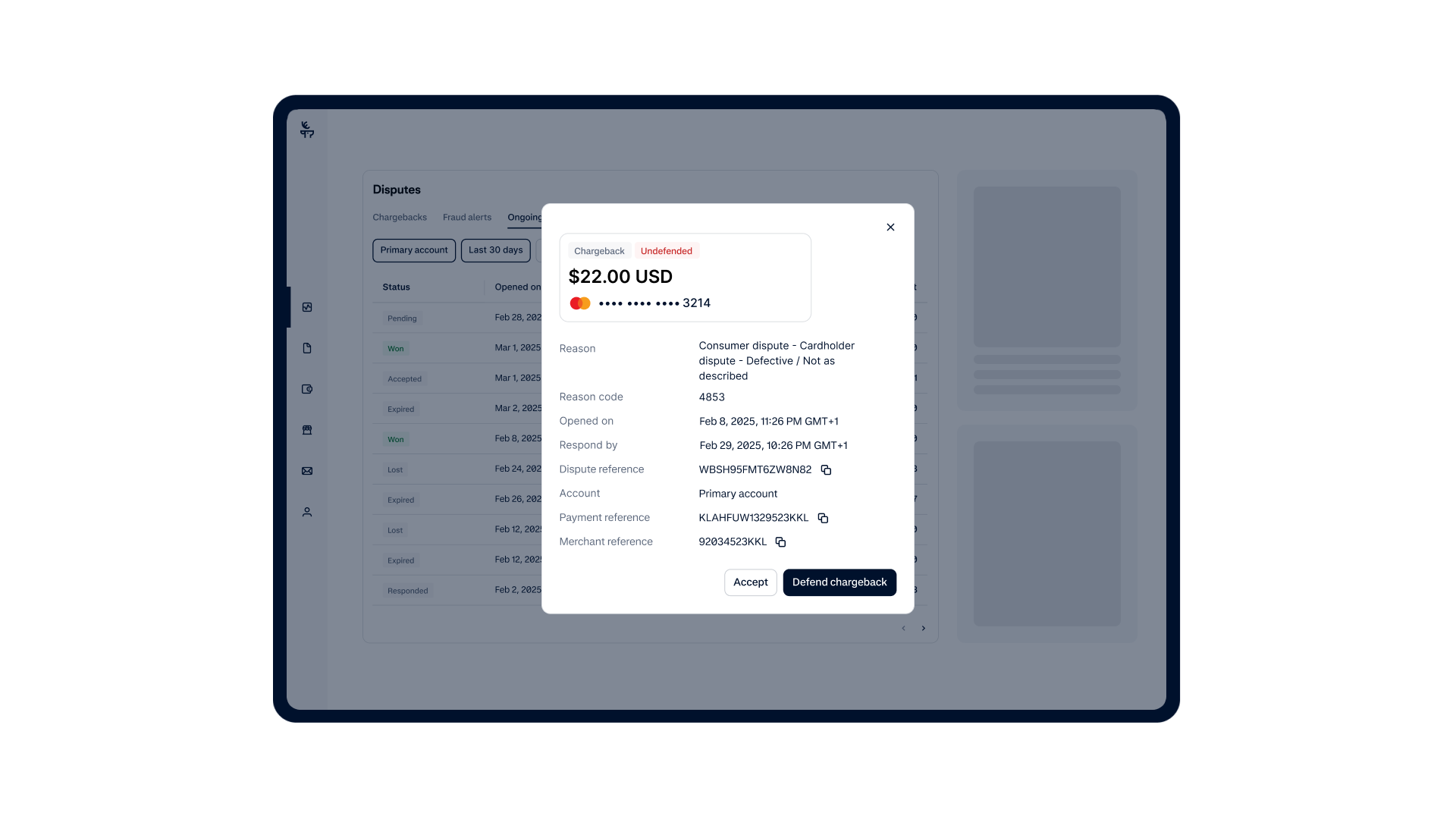 The Dispute Management component enables user to:
- View detailed information about a selected dispute, including dispute reason, reason code, status, and related reference information.
- Accept a chargeback. Accepting a chargeback confirms the disputed amount will not be returned to the balance account.
- Defend a chargeback and submit a defense reason with supporting evidence, which is sent directly to the card schemes for review.
Defend Disputes
How disputes are defended through components
Users can defend disputes directly through the dispute components. When the user submits a defense, the components automatically call Adyen’s API to process the dispute. This means no additional actions are needed on your part as a platform.The user flow for defending a chargeback dispute through the components is as follows:- From the Chargebacks tab the user selects a dispute record. In the Dispute Management, the user selects the Defend chargeback button.
- In the Defend chargeback modal window, the user specifies a reason for defending the chargeback.
- In the Defend chargeback modal window the user is prompted to provide evidence. The user uploads the required documents to support the chargeback defense.
- (Optional) The user has the option to upload additional documents to support the defense.
- The user submits the defense for review.
- After the dispute request is processed, users can view the dispute status message in the Dispute Management.
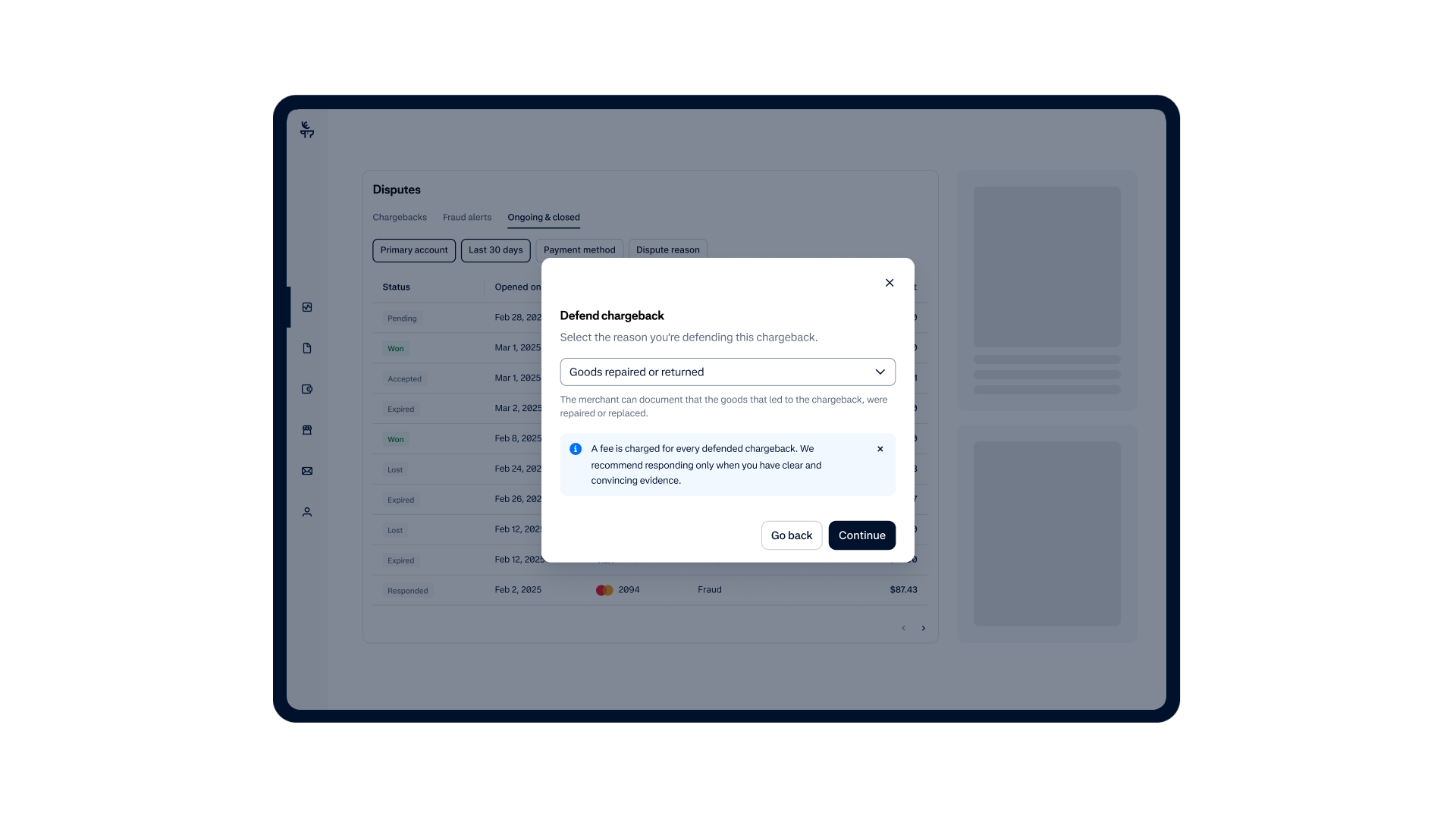
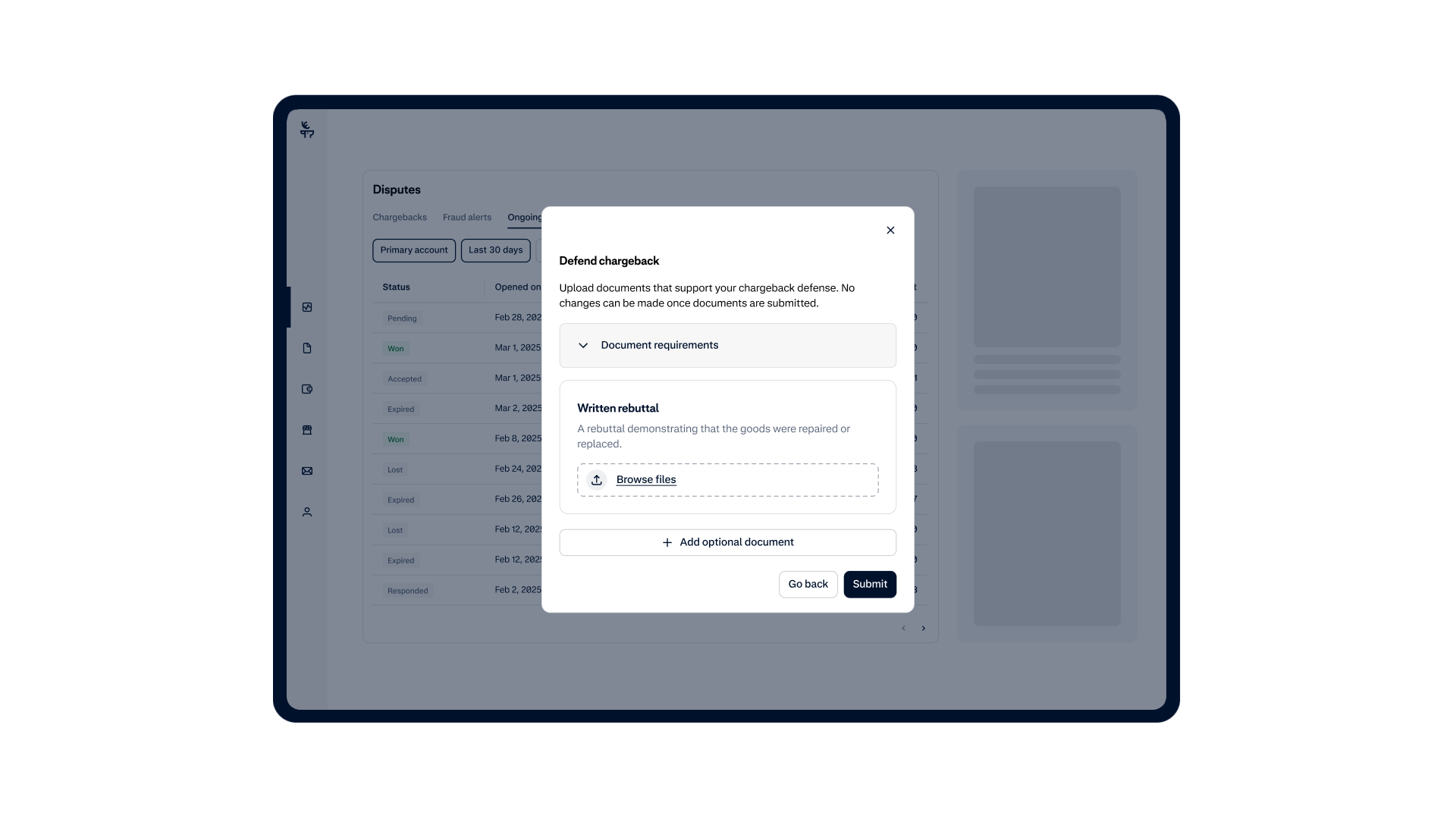
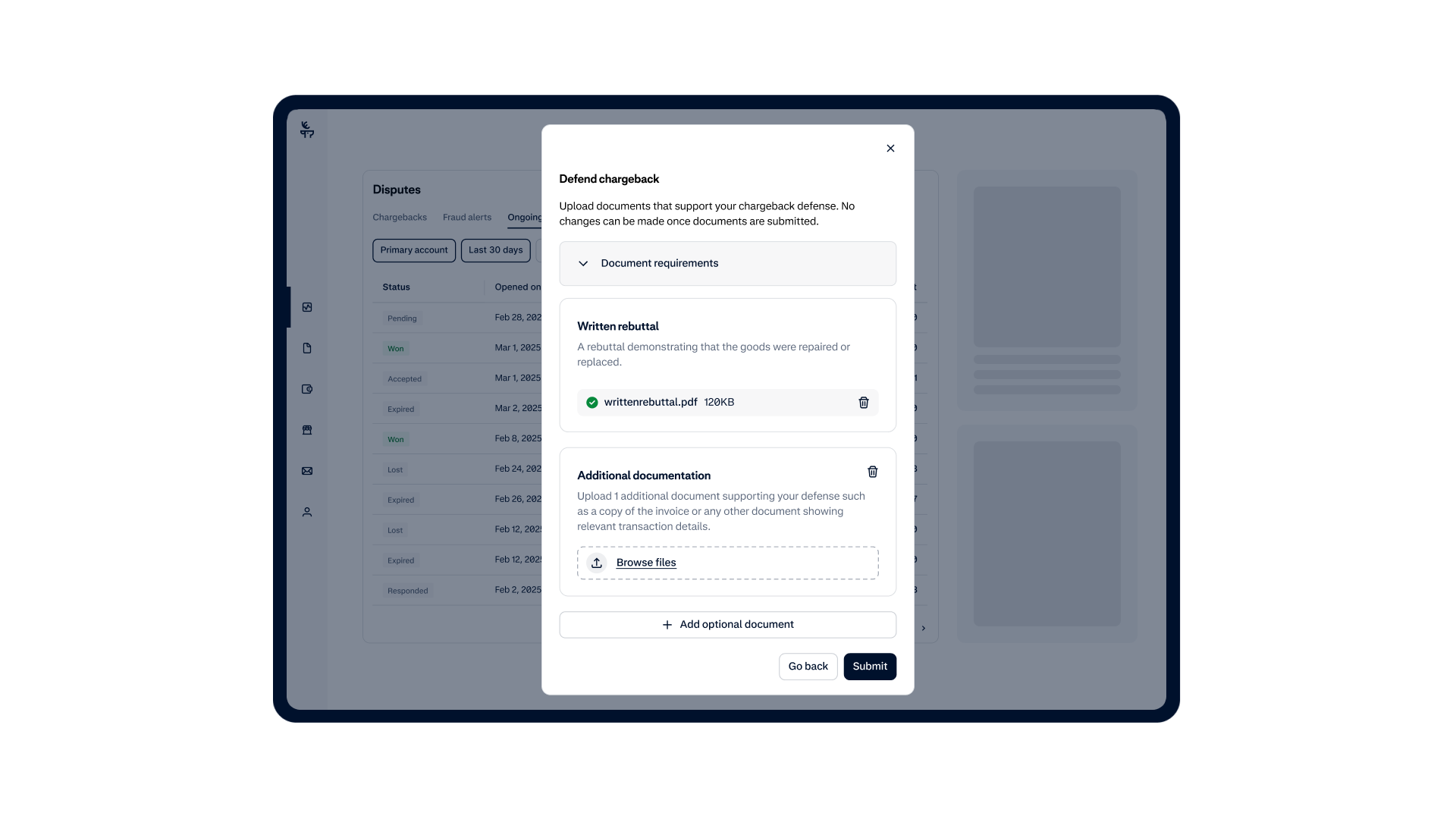
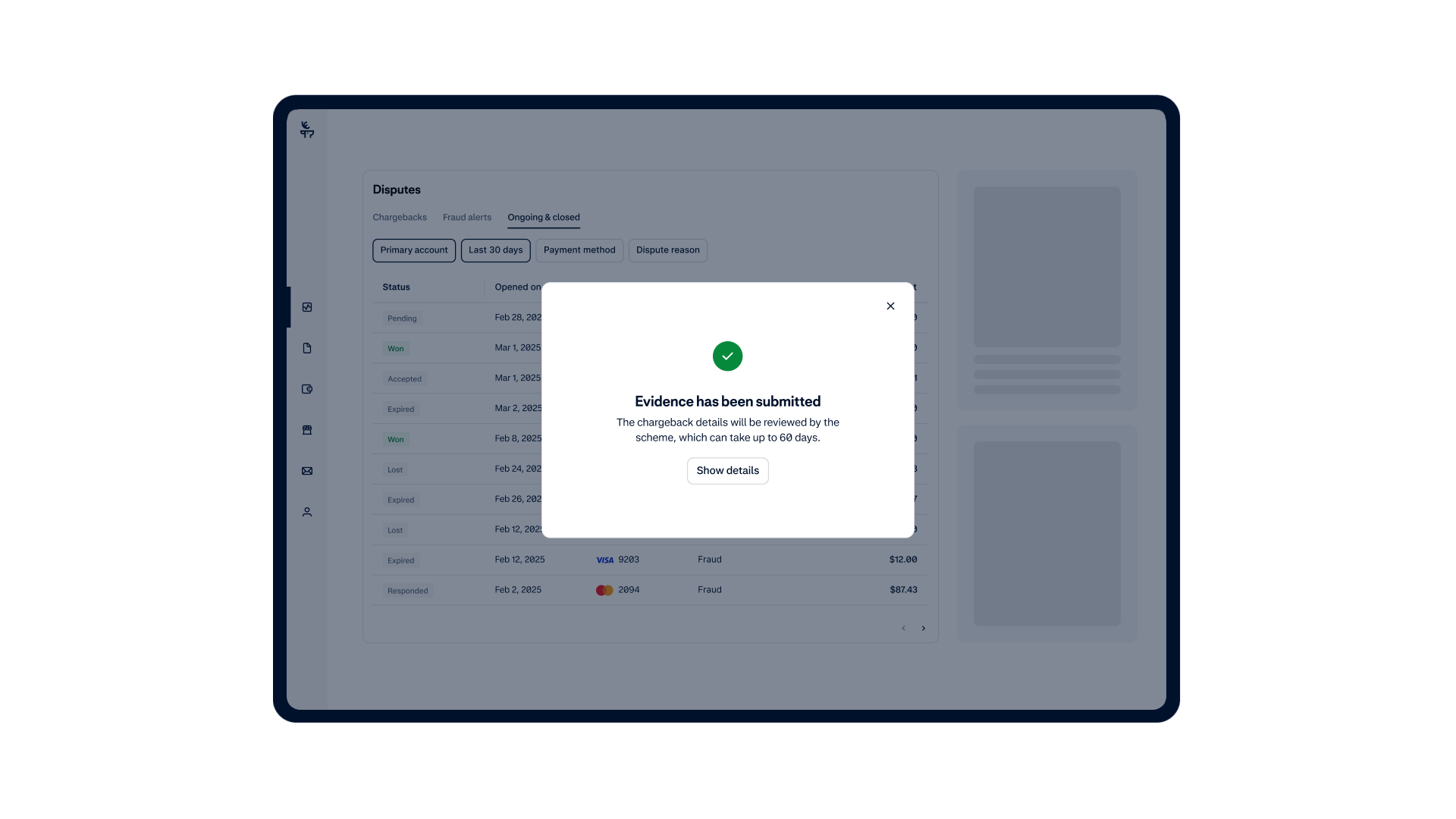
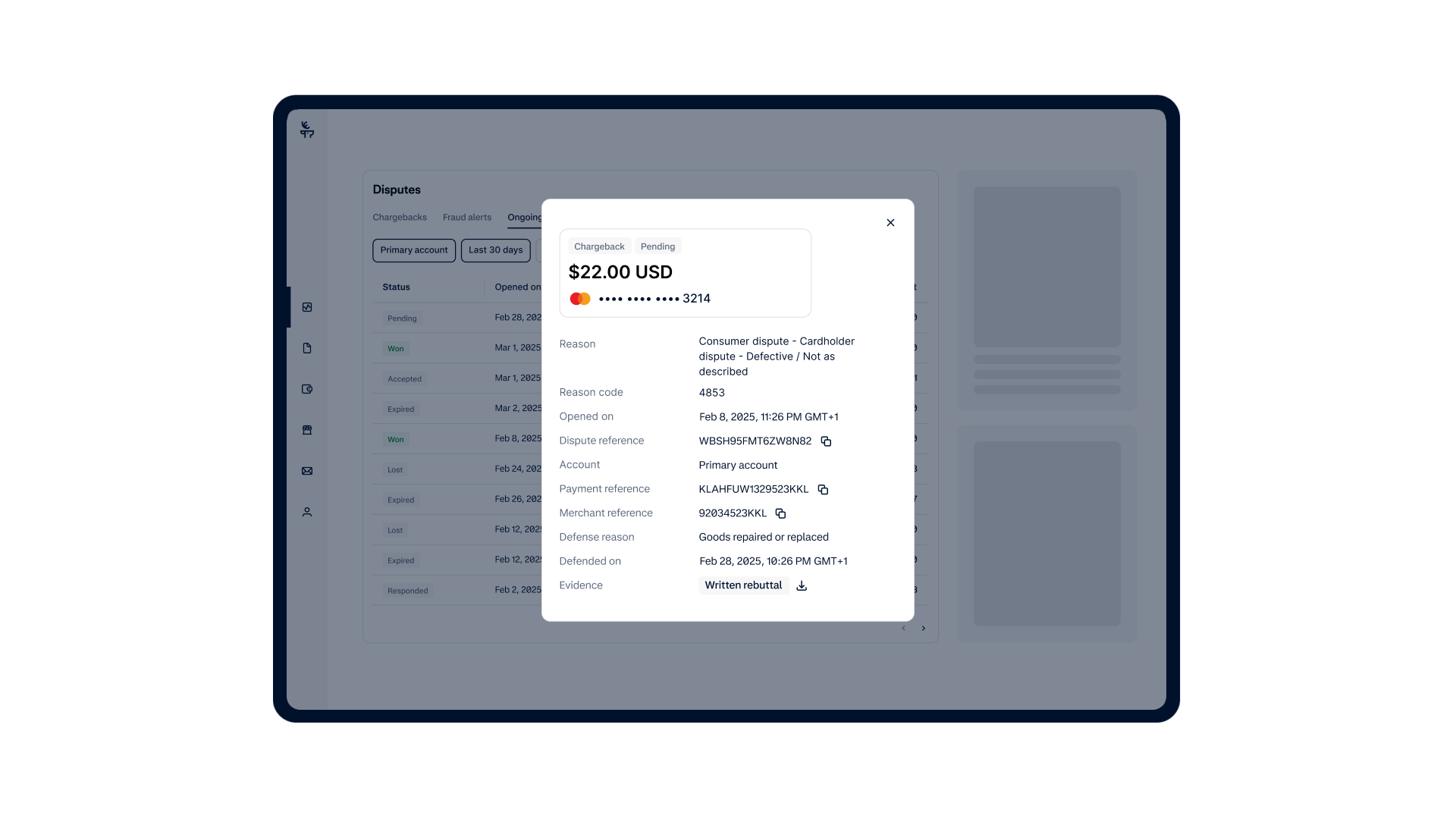
Dispute Statuses
Statuses of a dispute
When a transaction is disputed, it can begin as an RFI (Request for Information) or a chargeback.- An RFI is an initial inquiry from the issuer seeking more details about a transaction, and importantly, no funds are withdrawn from the balance account at this stage. An RFI doesn’t always escalate to a chargeback.
- A chargeback means that the disputed funds have been, or will soon be, withdrawn from the balance account. To potentially recover these funds, the user will need to submit a formal defense. For more information, see Dispute reason codes and defense requirements
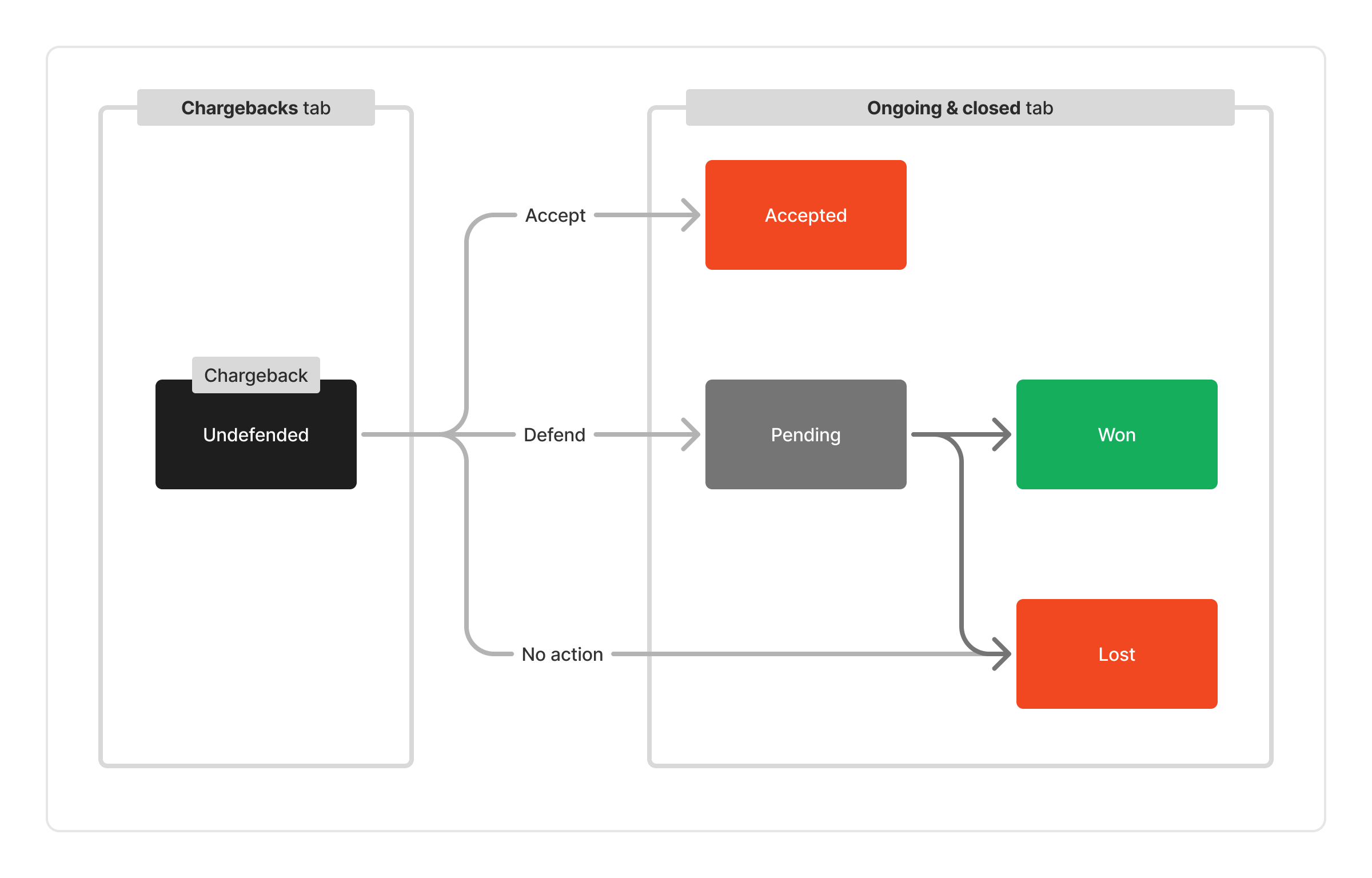 Some disputes are not defendable due to the rules of the payment method, not because of a limitation in the component. These disputes begin and end in the “Lost” status, as no defense action is possible.You can find a detailed explanation for each status in the following table.
| Status | Description |
|---|---|
| Undefended | The chargeback is open, but no defense has been submitted yet. Action is required from the user if they want to defend the dispute. |
| Accepted | The user has accepted the chargeback. |
| Pending | The user has defended the chargeback. The issuer is reviewing the dispute and will determine an outcome. |
| Won | The user submitted a defense and the chargeback was won. |
| Lost | The user submitted a defense and the chargeback was lost, either because the issuer has not accepted the defense or the user did not take action. |
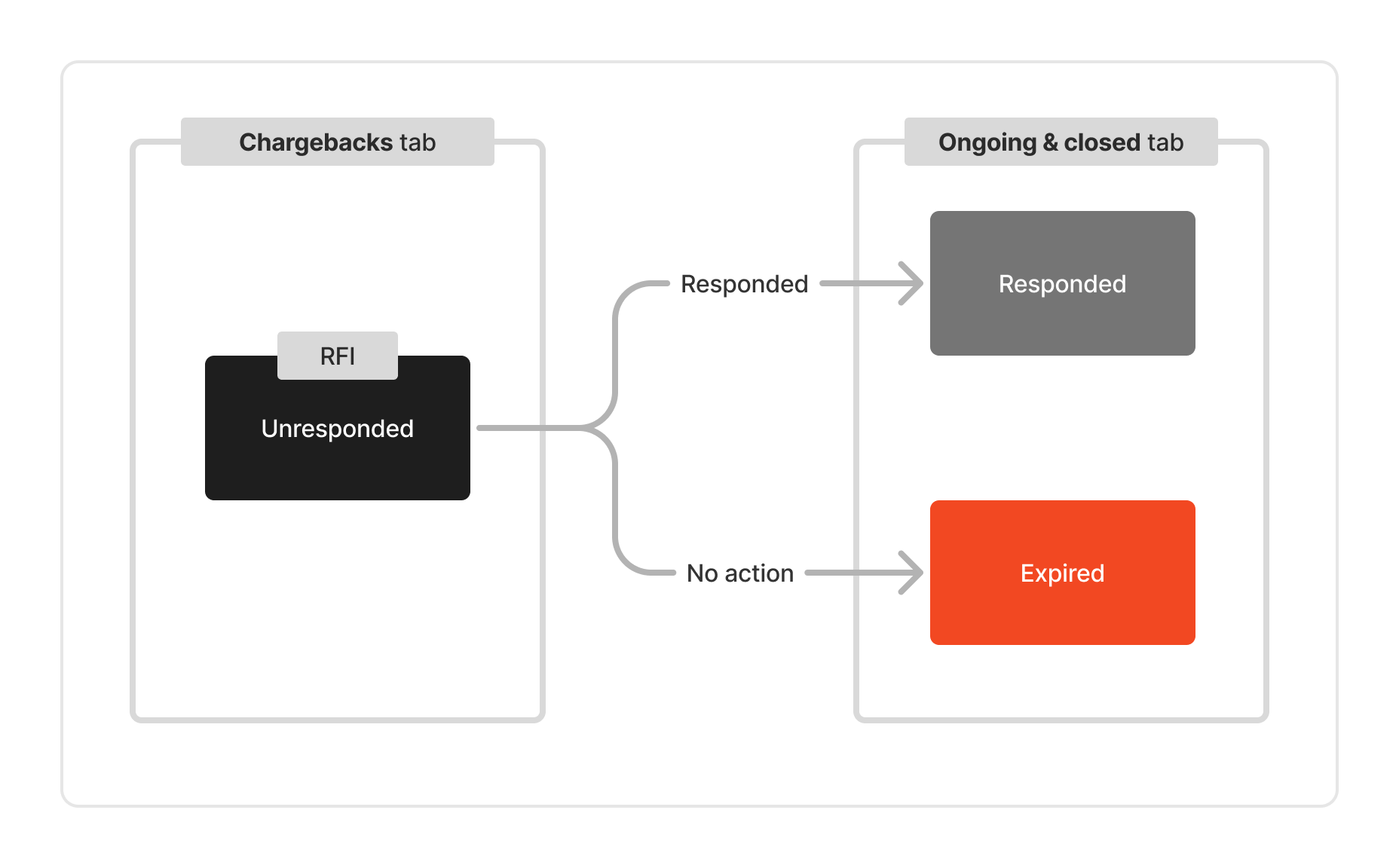 You can find a detailed explanation for each status in the following table.
| Status | Description |
|---|---|
| Unresponded | The RFI is open, but no information has been submitted yet. The user must provide information by a certain time or the status will change to expired. |
| Responded | The user has submitted the requested information. The issuer is reviewing the response and will determine an outcome. |
| Expired | The RFI has expired because the user did not take action. |
How it works
The integration of components involves both server-side and client-side processes. You can find more details on the component libraries page.Integration steps
Follow these steps to integrate the component(s):- Create an authentication session from your server
- Install component library in your front end
- Initialize components
- Optional: Localize components
- Optional: Customize component appearance
- Optional: Customize component data
Create A Session
1. Create an authentication session from your server
To ensure secure communication between components and Adyen server, you must configure your server for authentication and create a session token. To create the token:-
From your server, make a POST /sessions request specifying the following parameters:
To make this API request, your API key must have the Disputes Component: Manage role in your Customer Area. For more information, refer to the Requirements section.
Here is an example request for creating a session token. Create a session token
Parameter Required Description allowOrigin The URL where the component will appear. Must follow the format of https://www.your-company.example.comorhttps://*.your-company.example.com, whereyour-company.example.comis the actual web address of your marketplace. On live, only the HTTPS protocol is supported.policy An object that contains:
resources: An object that contains:accountHolderId: The unique identifier of the account holder that is linked to the balance account shown in the component. type: The type of resource. Set this to accountHolder. roles: The role required to use the component. From library v1.6.0, set this to Disputes Component: Manage role in your request to enable users to process disputes through the components.product The type of product the component belongs to. Set this to platform. curl https://test.adyen.com/authe/api/v1/sessions \ -H 'content-type: application/json' \ -H 'x-api-key: ADYEN_BALANCE_PLATFORM_API_KEY' \ -D '{ "allowOrigin":"YOUR_DOMAIN", "product":"platform", "policy": { "resources": [ { "accountHolderId": "AH00000000000000000000001", "type": "accountHolder" } ], "roles": [ "Disputes Component: Manage" ] } }' -
Note the API response. Later, when initializing the components, you need to create and call a function that passes the entire session object from the response to your front end.
Session token created
{
  "id": "YOUR_SESSION_TOKEN_ID",
  "token": "YOUR_SESSION_TOKEN"
}
Install Component Library
2. Install component library in your front end
Use the Adyen Web npm package, or embed the Adyen Platform Experience script and stylesheet into your HTML file:Install the Adyen Platform Experience library in your front-end application as follows:
-
Install the npm package.
npm install @adyen/adyen-platform-experience-web -
Import the library, the components, and the style sheet.
import { AdyenPlatformExperience, component_name } from '@adyen/adyen-platform-experience-web';
import "@adyen/adyen-platform-experience-web/adyen-platform-experience-web.css";
Use the
integrity attribute so browsers can verify that the script and stylesheet have not been changed unexpectedly.The value of the integrity attribute is the Subresource Integrity (SRI) hash which Adyen provides for each version of the Adyen Web JavaScript and CSS files.Get the SRI hashes from the release notes for the Platform Experience components, under Updating to this version.embed-script-stylesheet.html<!-- Embed the Adyen Platform Experience script element above any other JavaScript in your page. -->
<script src="https://bae81f955b.cdn.adyen.com/platform-components/VERSION/adyen-platform-experience-web.js"
integrity="JS_INTEGRITY_HASH_FOR_YOUR_VERSION"
crossorigin="anonymous"></script>
<!-- Embed the Adyen Platform Experience stylesheet. You can add your own styling by overriding the rules in the CSS file -->
<link rel="stylesheet" href="https://bae81f955b.cdn.adyen.com/platform-components/VERSION/adyen-platform-experience-web.css"
integrity="CSS_INTEGRITY_HASH_FOR_YOUR_VERSION"
crossorigin="anonymous">
Initialize Components
3. Initialize components
To initialize the components:-
Gather the following information to be passed when initializing the library and its components.
-
Gather these parameters to initialize the library.
Parameter Required Description availableTranslationsDeprecatedDeprecated. This field is no longer needed because locales are now dynamically loaded on demand via CDN. Setting this field will trigger a deprecation warning. An array containing the names of the imported locale files used for localizing the components. For example, [es_ES, nl_NL, fr_FR].environmentSpecifies the environment for the component integration. The default value is test. Set the parameter to live when you are ready to go live. localeSpecifies the locale code, which determines the desired language of the components. This code must correspond to a supported language. For example, use es-ES for Spanish. onSessionCreateThe callback function that retrieves an authentication session token and refreshes the current session. - Gather these parameters to initialize each component. Select the tab for the component you want to use:
-
Gather these parameters to initialize the library.
| Parameter | Required | Description |
|---|---|---|
allowLimitSelection | Determines whether the user can change the number of disputes shown per page. Default value: true. | |
dataCustomization | An object that contains the list and details object, which include customization specifications for dashboard fields, allowing for additional data integration from your database. | |
core | | The instance of the library. |
onRecordSelection | If defined, the event allows obtaining the dispute PSP reference when the user selects a specific dispute from any tab of the overview. You can use the obtained value to show the Dispute Management component in a different location within your portal’s UI, outside the Disputes Overview component. | |
preferredLimit | The number of disputes shown per page. Default value: 10. |
| Parameter | Required | Description |
|---|---|---|
core | | The instance of the library. |
dataCustomization | An object that contains the details object, which include customization specifications for dashboard fields, allowing for additional data integration from your database. | |
id | | The unique identifier of the dispute (PSP reference). |
onDismiss | The callback function triggers when a user selects the Go back button on the dispute management screen. Define this function if you need to handle the dismissal of the flow. | |
onDisputeAccept | The callback function triggered after the user accepts the dispute and the dispute acceptance request has been successful. Define this function to exit the default flow after a successful dispute acceptance request. The function accepts an object as an argument that includes the id for the dispute. | |
onDisputeDefend | The callback function triggered after the user defends the dispute, and the defense acceptance request has been successful. Define this function to exit the default flow after a successful dispute defense request. The function accepts an object as an argument that includes the id for the dispute. |
- Create a DOM element on your portal’s UI page where you want the component to be rendered. Assign the element a unique and descriptive ID. This unique ID is important to avoid any misconfigurations when integrating multiple components into your portal’s UI. By default, the Disputes Management component is shown as a modal window within the Disputes Overview component. In this scenario, you only need to create a DOM element for the Disputes Overview component. If you want to use the Dispute Management component on its own, you need to create a separate DOM element for it. If you are using JavaScript frameworks such as Vue or React, make sure that you use references instead of selectors and that you do not re-render the DOM element. Select the tab for the component you want to use:
Create DOM element
<div id="disputes-overview-container"></div>
Create DOM element
<div id="dispute-management-container"></div>
-
Add a function that calls your API to retrieve and refresh an authentication session token.
The following code is the same for both dispute components.
Add function to retrieve and refresh an authentication session token
async function handleSessionCreate() { const response = await fetch('YOUR_IMPLEMENTATION_OF_CREATE_SESSION_ENDPOINT'); return response.json(); } - Initialize the component and mount it to the container you created. Be sure to include the function for retrieving and refreshing the session token that you added in the previous step. To implement the Dispute Management component as a modal window within the Disputes Overview component, use the following code examples. In this implementation, when a user selects a specific dispute from the overview page, the dispute ID is automatically passed to the Dispute Management component, and the modal window opens. Select the tab for the component you want to use:
Initialize library and create component
import { AdyenPlatformExperience, DisputesOverview } from '@adyen/adyen-platform-experience-web';
import "@adyen/adyen-platform-experience-web/adyen-platform-experience-web.css";

const core = await AdyenPlatformExperience({
    onSessionCreate: handleSessionCreate,
});
const disputesOverview = new DisputesOverview({ core });

disputesOverview.mount('#disputes-overview-container');
Initialize library and create component
import { AdyenPlatformExperience, DisputeManagement } from '@adyen/adyen-platform-experience-web';
import "@adyen/adyen-platform-experience-web/adyen-platform-experience-web.css";

const core = await AdyenPlatformExperience({
    onSessionCreate: handleSessionCreate,
});

const disputeManagement = new DisputeManagement({
    core,
    id: 'PPKFQ89R6QRXGN82'
});

disputeManagement.mount('#dispute-management-container');
-
(Optional) To use the Dispute Management component outside of the Disputes Overview component:
- Define the
onRecordSelectioncallback.
const disputesOverview = new DisputesOverview({ core, onRecordSelection: ({ id }) => { // Use selected dispute id. } });- Initialize the Dispute Management component using the
idfrom the object argument as shown below.
const disputeManagement = new DisputeManagement({ core, id: '<SELECTED_DISPUTE_ID>' }); - Define the
Localize Components
4. Optional: Localize components
During the component initialization, you can also configure the components to use one of the supported languages.Update your code for initializing components to include the localization settings. If no localization settings are provided, the components will default to English.Localize componentsimport { AdyenPlatformExperience } from '@adyen/adyen-platform-experience-web';
const core = await AdyenPlatformExperience({
locale: 'es-ES', // See supported languages for possible values
/* ... */
});
Customize Appearance
5. Optional: Customize component appearance
The dispute components have a default appearance with pre-defined styles, such as colors, fonts, and borders. You can customize the appearance of your components by overriding the default values of CSS variables and the class settings:- Inspect the components using your browser’s developer tools.
- Modify the styles in your style sheet file.
style.css
:root {
    --adyen-sdk-border-radius-s: 10px;
    --adyen-sdk-border-radius-m: 20px;
    --adyen-sdk-border-radius-l: 30px;
    --adyen-sdk-color-background-disabled: #9ecdb1;
    --adyen-sdk-color-background-inverse-primary: #0abf53;
    --adyen-sdk-color-background-inverse-primary-hover: #57d389;
    --adyen-sdk-color-decorative-blue: #0abf53;
    --adyen-sdk-color-outline-primary-active: #0abf53;
}
style.css
.adyen-pe-modal {
    border-left: 3px solid #0abf53;
    border-radius: 0;
    height: 100%;
    max-height: unset;
    right: 0;
}
Customize Data
6. Optional: Customize component data
The dispute components allow you to include a diverse range of data types and sources to showcase within your user dashboard. You can:- Integrate custom data, such as your own fields, icons, links, and buttons.
- Define the settings for each dashboard field, including their names and visibility.
- Specify the
dataCustomizationparameter, including:
| Parameter | Required | Description |
|---|---|---|
list | An object that includes customization settings for dashboard fields in the disputes overview. Example: dataCustomization: { list: { } } | |
details | An object that includes customization settings for dashboard fields in the dispute management view. Example: dataCustomization: { list: { }, details: { } } |
| Parameter | Required | Description |
|---|---|---|
details | An object that includes customization settings for dashboard fields in the dispute management view. Example: dataCustomization: { details: { } } |
- Within the
listanddetailsobjects, define the customization settings, such as field names or visibility.
You can customize the default fields and add custom fields. In the dashboard, custom fields will be positioned immediately after the default fields.
| Parameter | Required | Description |
|---|---|---|
fields | | Defines the settings of dashboard fields in the disputes overview. Default fields: ‘createdAt’, ‘status’, ‘respondBy’, ‘paymentMethod’, ‘disputeReason’, ‘reason’, ‘currency’, ‘disputedAmount’, ‘totalPaymentAmount’. Example: dataCustomization: { list: { fields: [] }, details: { fields: [] } } |
onDataRetrieve | The callback function that retrieves a Promise object resolved with an array of the transaction records extended with custom data. Example: dataCustomization: { list: { fields: [], onDataRetrieve: () => { } }, details: { fields: [], onDataRetrieve: () => { } } } |
| Parameter | Required | Description |
|---|---|---|
fields | Defines the settings of dashboard fields in the reports overview. Default fields: ‘disputeReason’, ‘reasonCode’, ‘openedOn’,‘respondBy’, ‘disputeId’, ‘account’, ‘paymentPspReference’,‘paymentMerchantReference’, ‘defenseReason’, ‘defendedOn’, ‘disputeEvidence’, ‘acceptedOn’,‘expiredOn’. | |
onDataRetrieve | The callback function that retrieves a Promise object resolved on the extended dispute record that contains custom data. |
-
Define the settings for each dashboard field using the following parameters.
Parameter Type Required Description keyString Specifies the name of a field. Example: fields: [ { key: '_store' } ]To prevent conflicts with the default field names, always start the names of your custom fields with an underscore (_) character.visibilityString Determines whether a field should be shown or not. Possible values: visible, hidden. If not specified, it defaults to visible. Example: { key: 'account', visibility: 'hidden' } -
If adding a custom field, include the
onDataRetrieveparameter. Make sure to include the received data object in the return object by using the spread syntax. The component can then use this as matching keys to map your custom data with the existing one. `onDataRetrieve` parameter{ details: { fields: [ { key: '_store' }, ], onDataRetrieve: (data) => { const { store } = await getAdditionalData(id); return { ...data, _store: store, }; }, }, } -
Specify the type of your custom data.
Parameter Type Required Description typeString Determines how the custom data value should look and behave. Possible values: text, icon, link, button. If not specified, it defaults to text.
`text` data type
{
  details: {
      fields: [
          { key: '_store' },
      ],
      onDataRetrieve: (data) => {
          return {
              ...data,
              _store: {
                  type: 'text',
                  value: 'New York',
                  config: {
                      className: 'my-class my-class--variant',
                  },
              },
          };
      },
  },
}
`icon` data type
{
  details: {
      fields: [
          { key: '_store' },
      ],
      onDataRetrieve: (data) => {
          return {
              ...data,
              _store: {
                  type: 'icon',
                  value: 'New York',
                  config: {
                      src: '',
                      alt: '',
                      className: 'my-class my-class--variant',
                  },
              },
          };
      },
  },
}
The target should accept both
_self and _blank. The default option is _blank.`link` data type{
details: {
fields: [
{ key: '_store' },
],
onDataRetrieve: (data) => {
return {
...data,
_store: {
type: 'link',
value: 'New York',
config: {
href: '',
target: '_self',
className: 'my-class my-class--variant',
},
},
};
},
},
}
`button` data typeHere is an example
{
  details: {
      fields: [
          { key: '_store' },
      ],
      onDataRetrieve: (data) => {
          return {
              ...data,
              _store: {
                  type: 'button',
                  value: 'New York',
                  config: {
                      action: () => {},
                      className: 'my-class my-class--variant',
                  },
              },
          };
      },
  },
}
dataCustomization object:Example `dataCustomization` object
{
list: {
    fields: [{
            key: 'disputeReason',
            visibility: 'hidden'
        },
        {
            key: 'reason',
            visibility: 'hidden'
        },
        {
            key: '_summary'
        },
        {
            key: '_sendEmail'
        },
        {
            key: 'disputedAmount',
            align: 'left'
        },
    ],
    onDataRetrieve: async data =>
        data.map(dispute => ({
            ...dispute,
            _summary: {
                type: 'link',
                value: 'Summary',
                config: {
                    href: 'https://www.adyen.com/'
                },
            },
            _sendEmail: {
                type: 'button',
                value: 'Send email',
                config: {
                    action: () => {
                        /* client action */ }
                },
            },
        })),
},

details: {
    fields: [{
            key: 'id',
            visibility: 'hidden'
        },
        {
            key: '_store'
        },
        {
            key: '_product'
        },
        {
            key: '_summary'
        },
        {
            key: '_sendEmail'
        },
    ],
    onDataRetrieve: async data => ({
        ...data,
        _store: 'Sydney',
        _product: 'Coffee',
        _summary: {
            type: 'link',
            value: 'Summary',
            config: {
                href: 'https://www.adyen.com/'
            },
        },
        _sendEmail: {
            type: 'button',
            value: 'Send email',
            config: {
                action: () => {
                    /* client action */ }
            },
        },
    }),
},
};
Example `dataCustomization` object
{
    dataCustomization: {
        details: {
            fields: [{ key: 'account', visibility: 'hidden' }, { key: '_store' }],
            onDataRetrieve: async (dispute) => {
                const { store } = await getAdditionalData(id);
                return {
                    ...data,
                    _store: store
                };
            }
        }
    }
}
-
Make sure to include translations for your custom fields in the library initializer:
- If you are not localizing components, add the custom field translations for
en_US. - If you are localizing components, also include the appropriate custom field translations for all supported locales.
const core = await AdyenPlatformExperience({ translations: { en_US: { _store: 'Store' }, es_ES: { _store: 'Tienda' }, } }); - If you are not localizing components, add the custom field translations for
Supported languages
You can set one of the following languages to localize any of the Platform Experience components.| Language | Locale code | Locale file |
|---|---|---|
| Danish | da-DK | da_DK |
| Dutch | nl-NL | nl_NL |
| English | en-US | en_US |
| Finnish | fi-FI | fi_FI |
| French | fr-FR | fr_FR |
| German | de-DE | de_DE |
| Italian | it-IT | it_IT |
| Norwegian | no-NO | no_NO |
| Portuguese (BR) | pt-BR | pt_BR |
| Spanish | es-ES | es_ES |
| Swedish | sv-SE | sv_SE |
Pay by Link components
Use Platform Experience components to build interactive dashboards for your users.Requirements
Before you begin, take into account the following requirements, limitations, and preparations.| Requirement | Description |
|---|---|
| Integration type | You must have the Adyen for Platforms integration. |
| API credentials | You must have a Balance Platform API key (for example, ws[_123456]@BalancePlatform.****[YourBalancePlatform]) to access the Session authentication API. Ensure that you have asked your Adyen contact to assign the following roles to your API credential: Pay By Link Component: View. Allows the user to view payment links only. Used in Pay by Link Overview and Pay by Link Details components. Pay By Link Component: View PII. Allows the user to view Personally Identifiable Information (PII) associated with payment links. Used in Pay by Link Overview and Pay by Link Details components. Pay By Link Component: Manage Links. Allows the user to view, create, and deactivate payment links. Used in Pay by Link Overview and Pay by Link Details components. Pay By Link Component: Manage Settings. Allows the user full administrative control over component configuration, themes, and settings. Used in Terms and theme settings. |
| Limitations | Link availability and scope: Payment links are available and searchable in the payment link list view for up to 90 days from the day they are created. Payment links have an expiration date. The specific expiry date is set by the user (up to a maximum of 70 days) or, if not specified by the user, the link will automatically expire 24 hours after creation.Store requirement: Account holders must be associated with at least one store to use the Pay by Link components.Configuration inheritance: Pay by Link components inherit all merchant or company account settings, except for the terms and conditions and the theme, which are configurable per store. This makes store selection a required step when creating a link, though your store will be automatically selected if you only have one. This component does not support automatic email sending. Themes configured in the component apply only to the component and are not used for links created through the API or Customer Area. Terms of Service configured within the component apply only to those links and are not used for links created through the API or Customer Area. When a shopper makes a payment with a link created in the component, the store split configuration determines how funds are distributed to your user’s balance accounts. If a store does not have a split configuration, all funds are sent to the liable balance account by default. See more details at split payments automatically. This component does not alter existing split logic. |
| Setup steps | Before you begin: Associate account holders with at least one store to use the Pay by Link components. Link the store to a business line that includes payByLink or eCommerce in its sales channels. This can be configured during store creation (in the Customer area or while configuring business lines through the /businessLines). Verify that the component is available in the languages that apply to your situation. Check our Component libraries page for additional information on the supported countries/regions and browser versions. |
Component Description
Payment Links Overview component
The Payment Links Overview component allows users to create new payment links and view a list of existing links generated within a specified time period for all or a specific store. Users can quickly view their payment links, helping them monitor and track their status. When creating a new payment link, the marketplace configuration dictates split payment handling. This component does not alter existing split logic. For details see how to create a payment link and split payments automatically. The links generated by this component support Pay by Link payment methods.This component organizes payment links into two tabs:- Active: Shows payment links that shoppers can use to make a payment. Each link record includes details such as payment link ID, status, amount, and expiration date. Links on this tab have a status of Active or Payment pending.
- Inactive: Shows payment links that are no longer available for payment (either completed or expired). Each link record includes details such as payment link ID, status, amount, and expiration date. Links on this tab have a status of Completed or Expired.
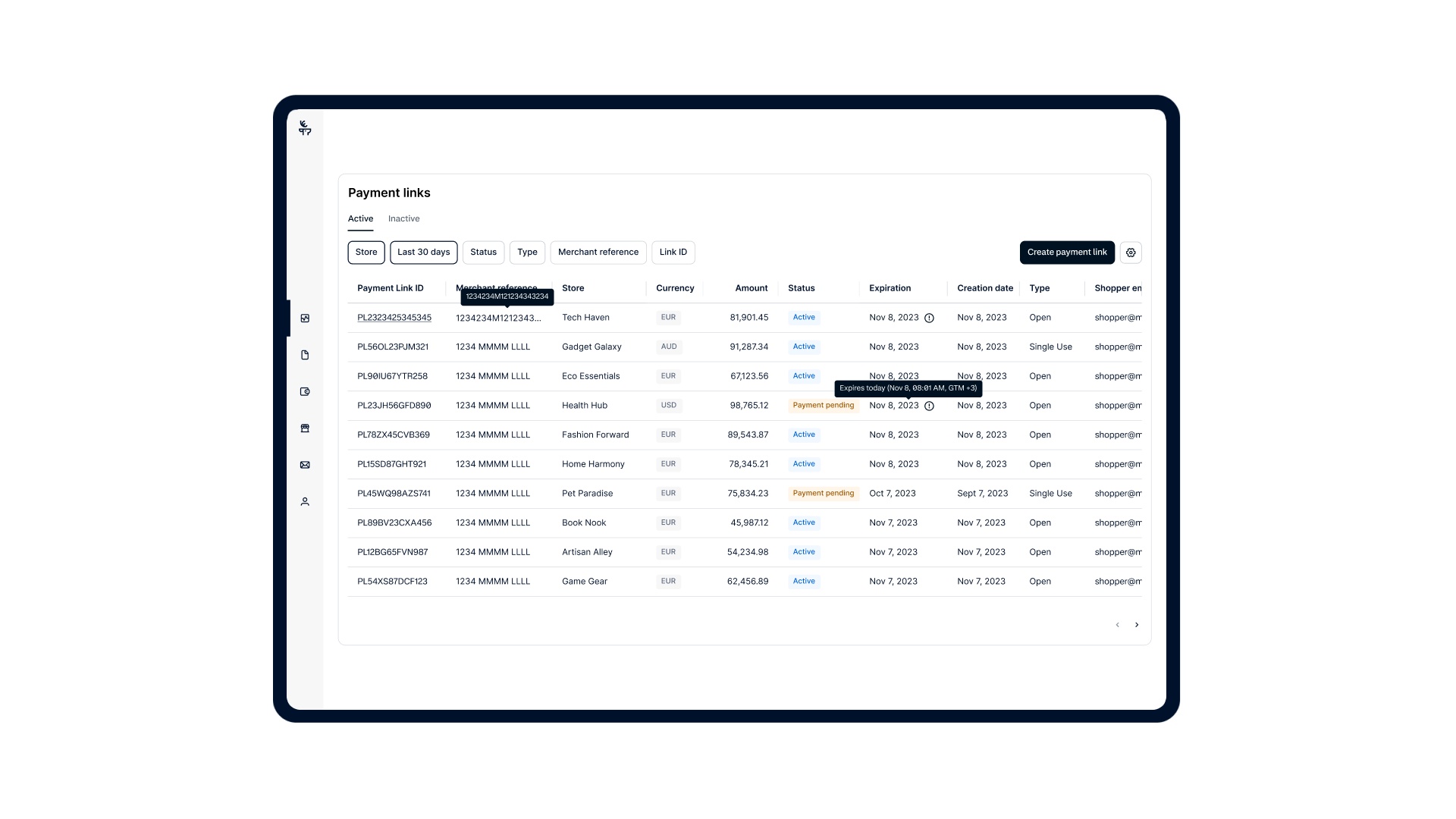
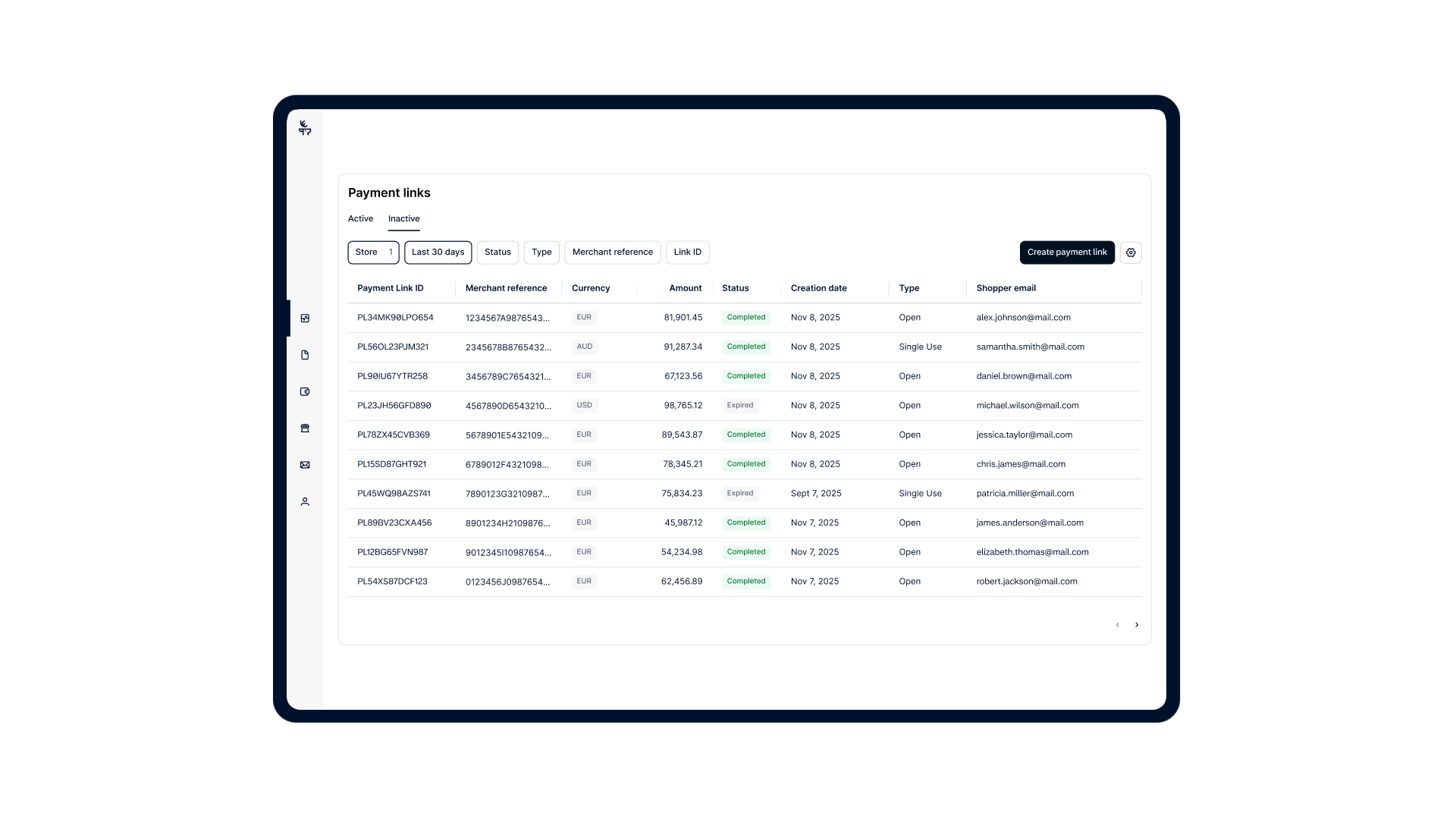 The Payment Links Overview component enables users to:
- Create new payment links to send to shoppers.
- View a list of active and inactive payment links for all or a specific store.
- Filter payment links by store, date, status, type, merchant reference, and payment link ID. See available filters for more details.
- Configure settings where your users can provide terms and conditions of their services to shoppers (this is required before you can create a payment link) and set your theme, including your brand name and logo.
Available filters
The following sections shows the available filters and their values for the Payment Links Overview component.**Store
The Store filter enables users to view payment links generated for a specific store.**Time period
The Time period filter specifies the date and time range for displaying payment link results. The specified time is determined by the time zone of the selected balance account.| Filter value | Description |
|---|---|
| Last 7 days | Includes payment links from the previous six days and from today until the current time. For example, if today is a Tuesday and the time is 8:00 PM, payment links from the previous Wednesday midnight until this Tuesday 8:00 PM are included. |
| This week | Includes payment links for the current week, starting from Monday midnight until the present moment. |
| Last week | Includes payment links from Monday midnight to Sunday 11:59:59 PM of the previous week. |
| Last 30 days | The default setting. Includes payment links from the previous 29 days and from today until the current time. |
| This month | Includes payment links for the current month, starting from the first day of the month until today’s date. |
| Last month | Includes payment links from the previous month, starting from the first day of the month until the end of the month at 11:59:59 PM. |
| Custom | Allows setting a custom time period of up to 90 days. |
Status
The Status filter enables users to filter the list by the current status of the payment link. Possible values are:- Active: The link is live and ready to receive payments.
- Payment pending: The payment process has been started, but the transaction has not been confirmed as successful or failed.
- Completed: The payment link has successfully processed the required payment. For single use links, this status means the link is now deactivated.
- Expired: The link is no longer valid or usable, either because a set expiration date was reached or because the link was deactivated by the user.
Type
The Type filter enables users to filter payment links by their usage configuration, specifying whether the link is Single use or Open.- Single use: A link that expires immediately after the first successful payment is made. It cannot be used again.
- Open: A link that can be used to process payments multiple times, until manually deactivated or canceled by the user.
Merchant reference
The Merchant reference filter enables users to filter the list by the unique reference associated with the payment.**Payment link ID
The Payment link ID filter enables users to filter the list by entering a unique identifier of the payment link.Payment Link Details component
The Payment Link Details component shows specific information about a payment link. Users have the ability to disable an active link, which prevents any further payments from being made with that link, or easily copy the link’s URL for sharing. This component provides users with a comprehensive view of payment link details such as the payment link ID, store, merchant reference, creation, expiration dates, link type, description. It also includes shopper specific information such as shopper reference number, full name, email, email notifications, phone, country or region, shipping and billing address and status history.By default, the Payment Link Details component is embedded in the Payment Links Overview component and is shown as a modal window on the overview page. You can also choose to show the Payment Link Details component on a separate page during the initialization of the components.The following tabs illustrate how the component appears on various screen sizes.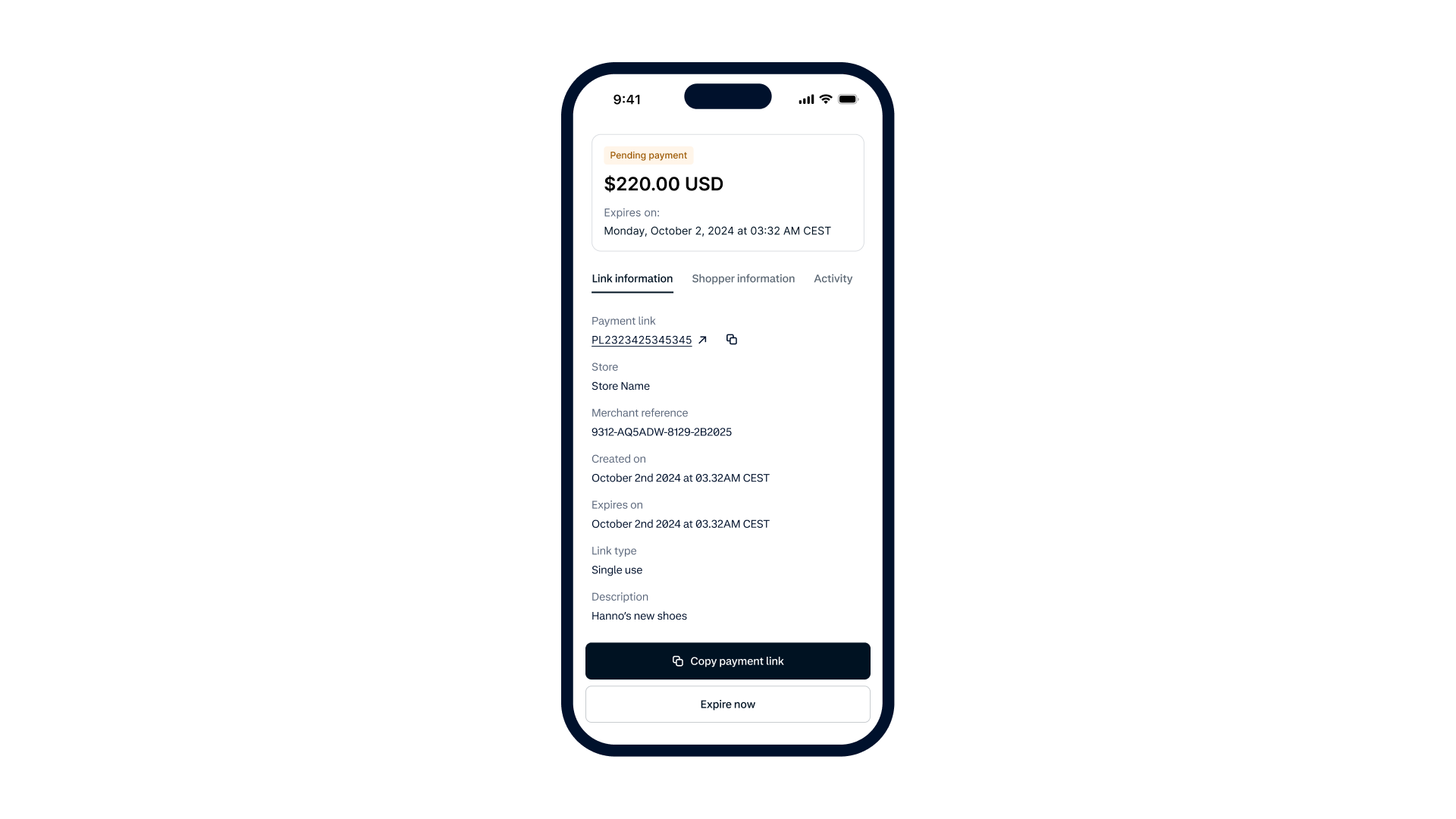
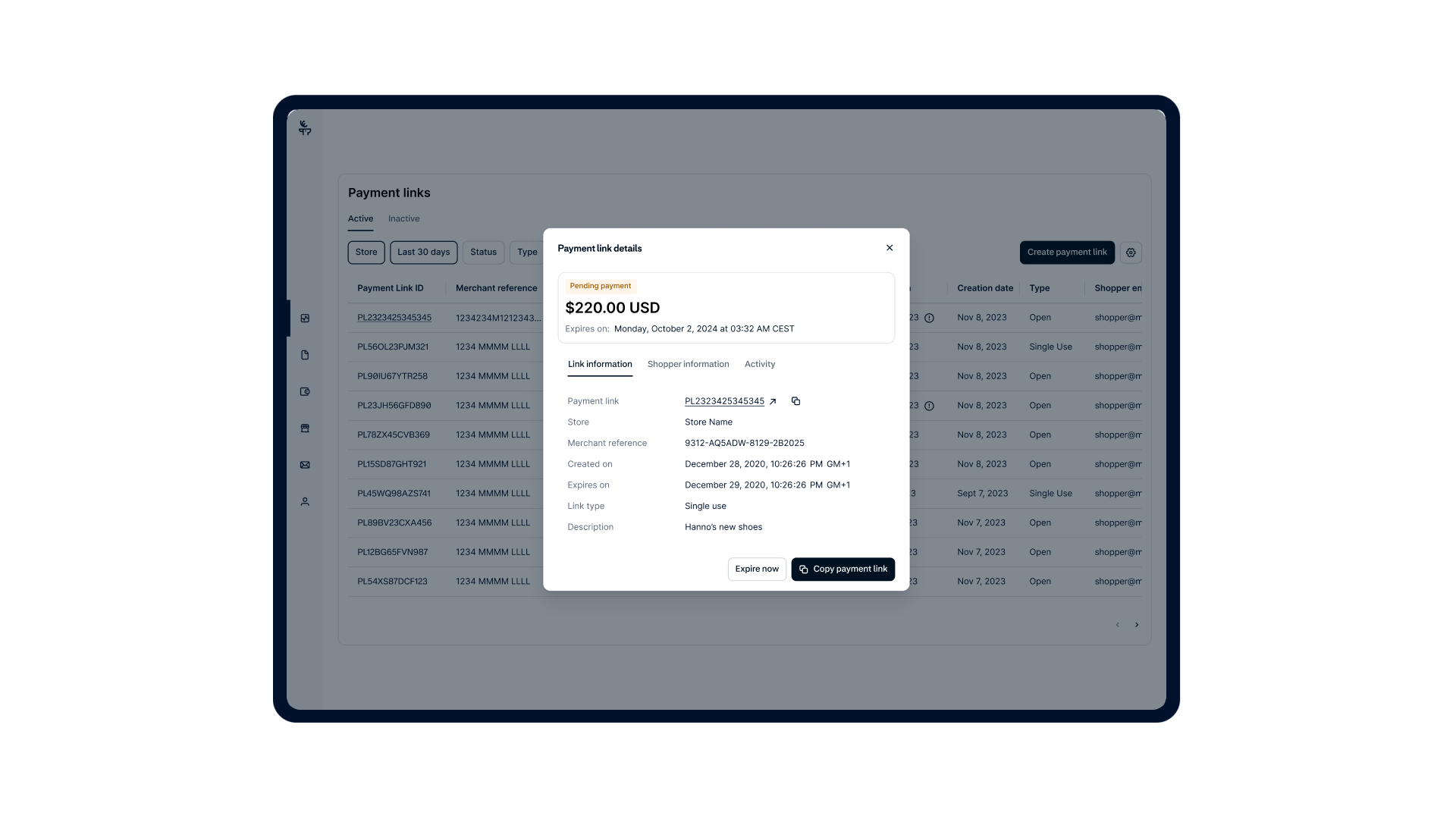 The Payment Link Details component enables user to:
- View detailed information about a selected payment link, including link information, shopper information, and activity.
- Expire a payment link, making it unusable for further payments.
- Copy a payment link, allowing the user to easily copy the payment link’s URL to their clipboard, facilitating quick sharing via email or chat.
Create-A-Link
How to create a payment link through components
Users can create a new payment link directly through the Pay by Link components.Note: The user must provide the required shopper Terms and conditions URL and confirm compliance under the Settings tab before a payment link can be created.The user flow for creating a payment link through the components is as follows:- From the Active or Inactive tabs the user selects the Create payment link button, selects a Store, and selects the Continue button.
- In the Payment step, the user fills in the required information and selects the Continue button.
- In the Customer step, the user provides contact and address details and selects the Continue button.
- In the Summary step, the user reviews all the details before generating the link. Note, that once created you will no longer be able to change the details of the payment link. To complete the process and generate the link, the user selects the Create payment link button.
- A confirmation screen appears to indicate the payment link has been created. At this point the user can copy the payment link to share the URL with the shopper, or they can select Show details to view the details.
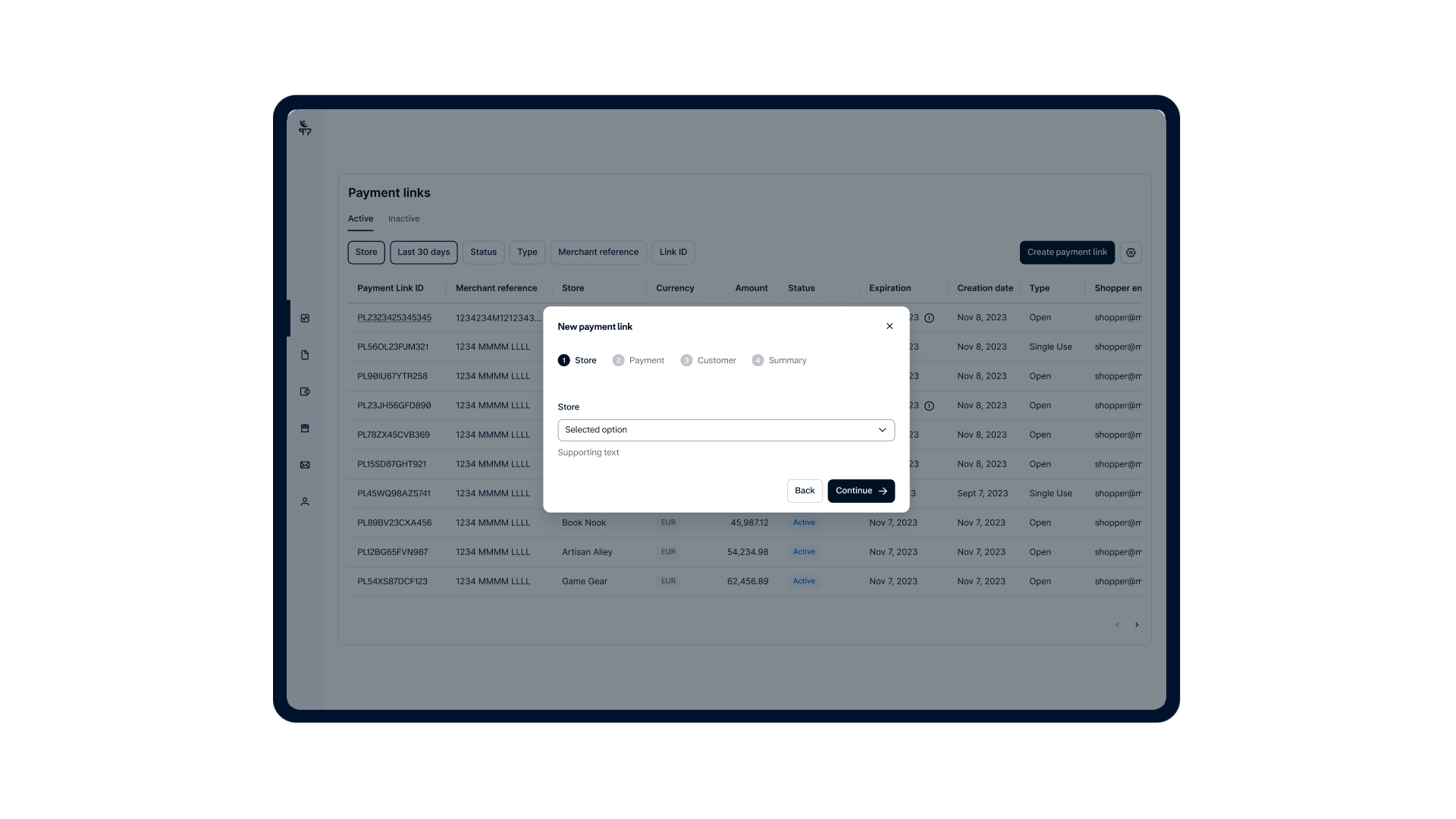
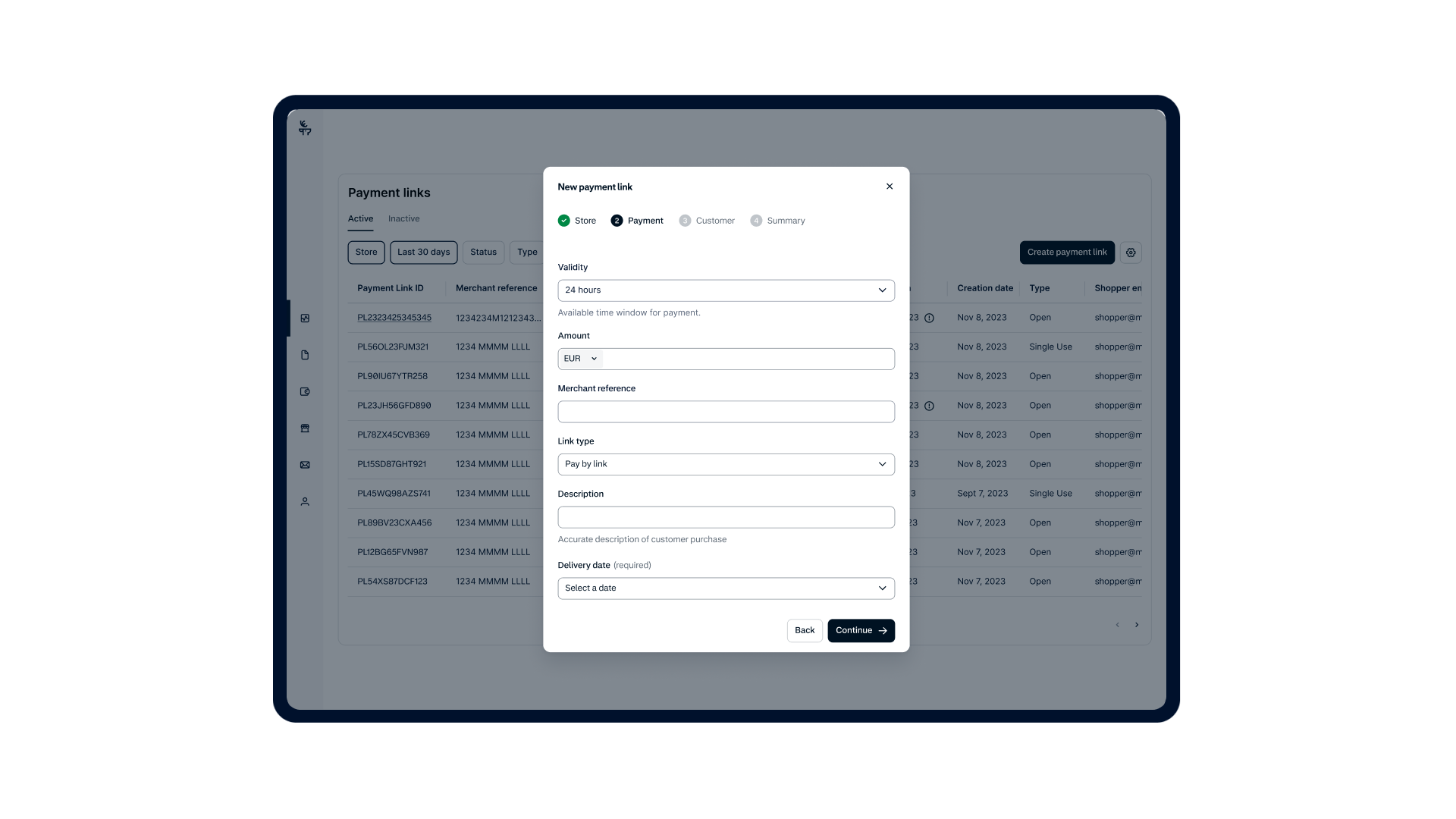
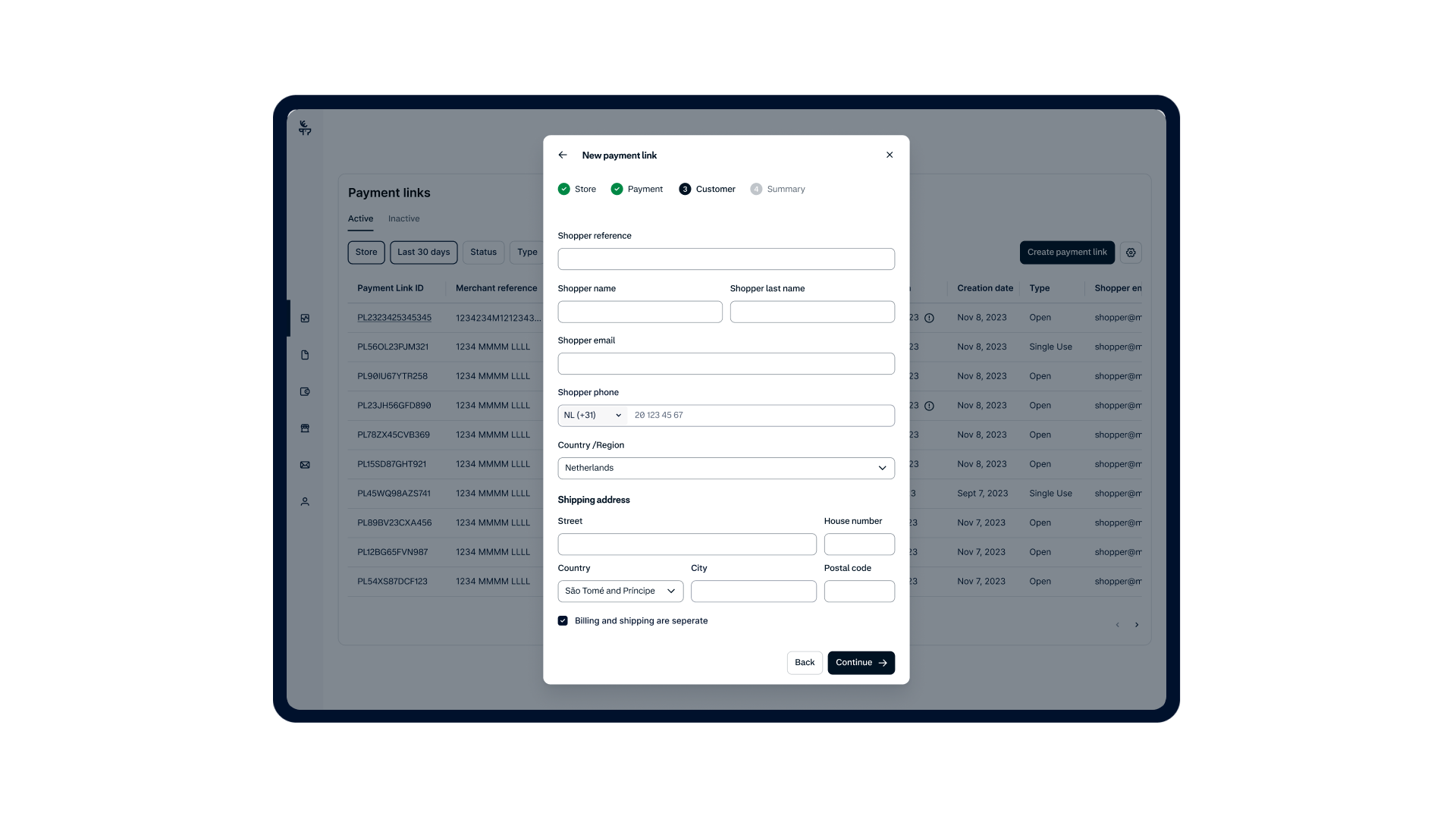
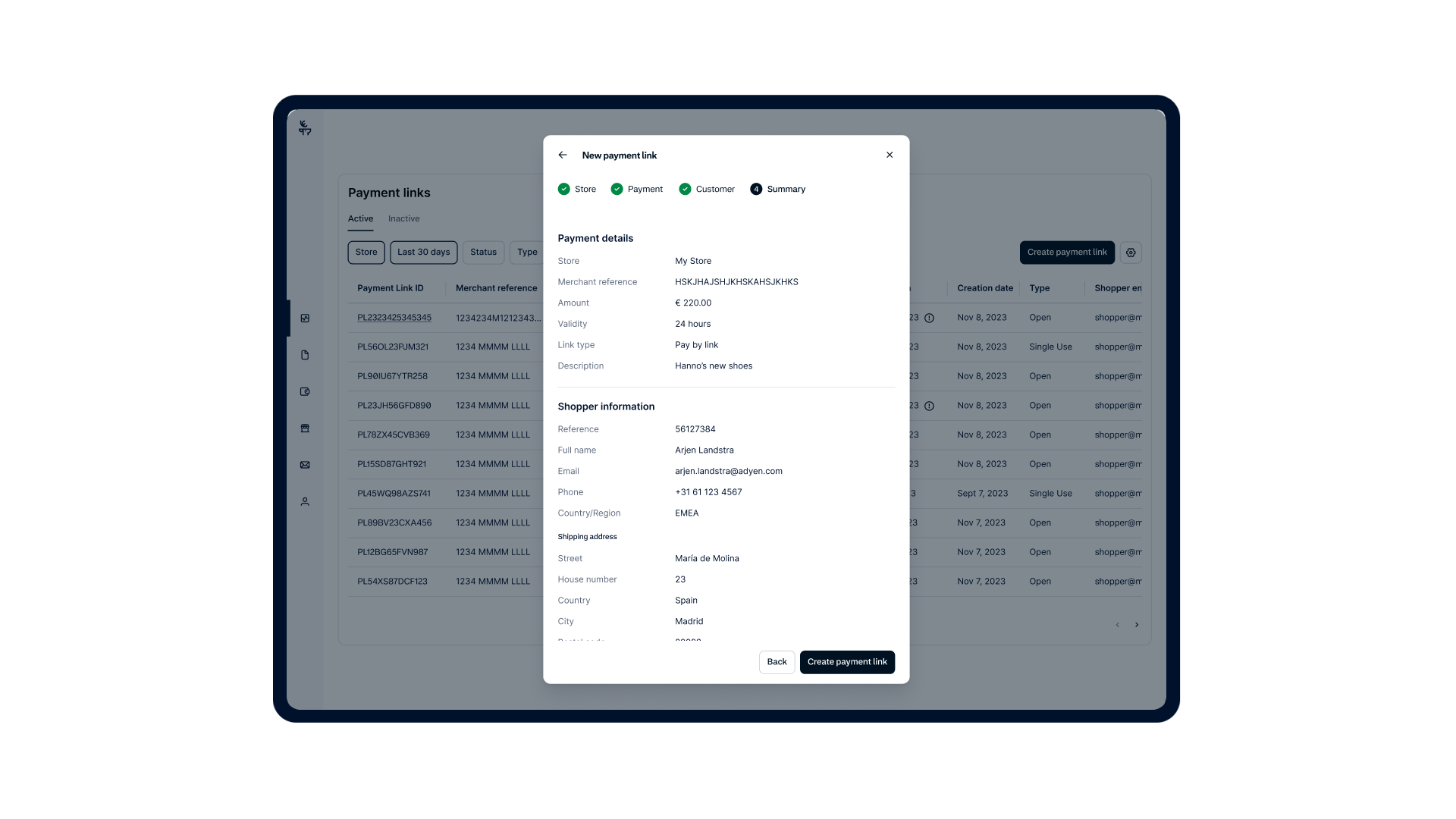
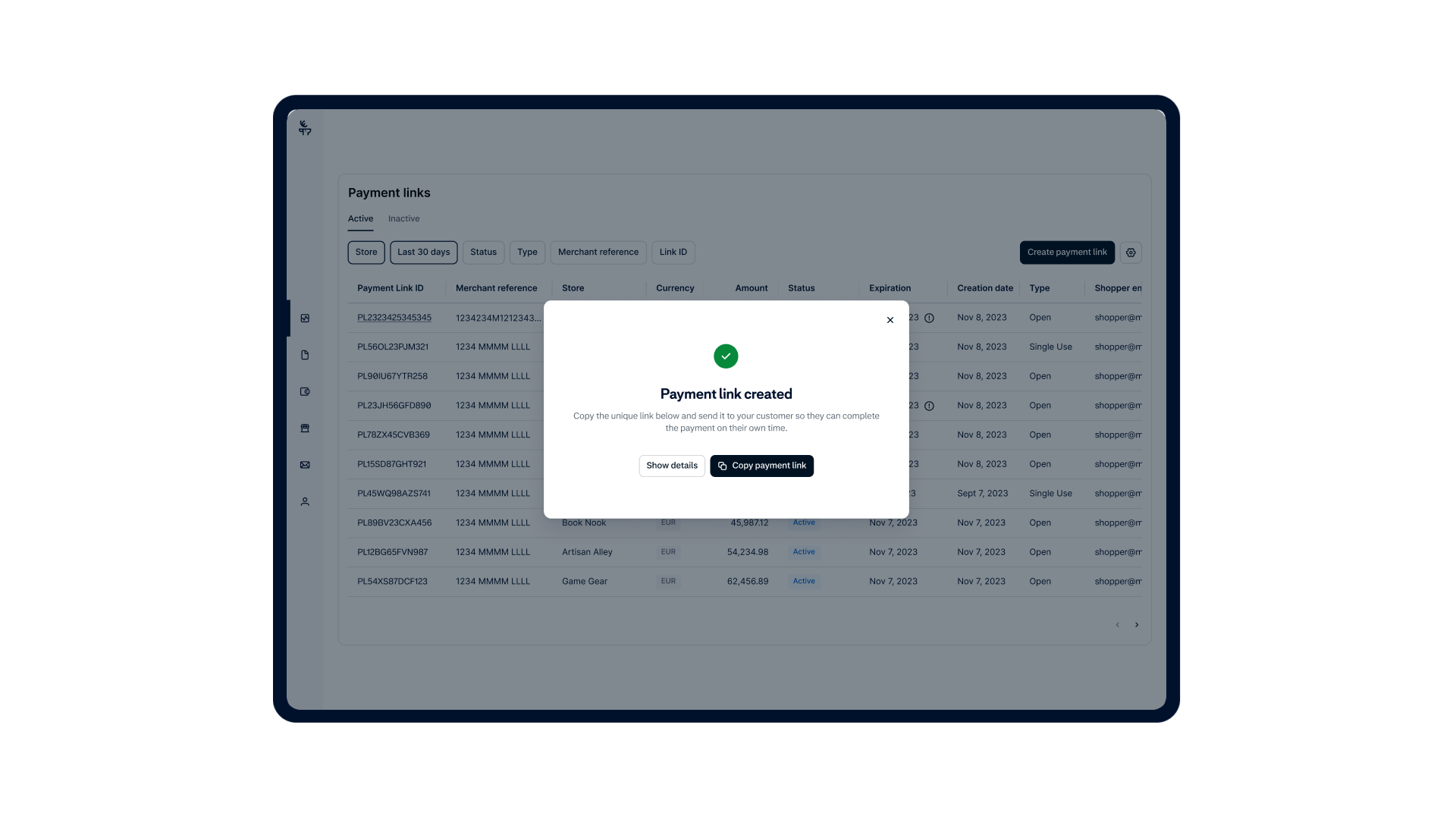
Configure-Settings
Terms and theme settings
The settings area of the Payment Links Overview component is where your users must complete the initial requirements and can optionally customize the shopper’s payment experience.The settings menu contains two items that are managed per store: Themes and Terms and conditions. For each store selected, the your user can set or edit the following items:- Terms and conditions: Your users must provide a terms and conditions URL that satisfies all the required information. This step is required before your users can create their first payment link, as consumer law and scheme regulations require your users to inform shoppers of the applicable terms. Only one terms and conditions URL is allowed per store.
- Themes: Your users can set a theme and customize the appearance of the payment page that shoppers see, which includes configuring a brand name and uploading a logo. Your users are limited to two logo options: Full-width and standard logo, both with specified constraints. Only one theme is allowed per store.
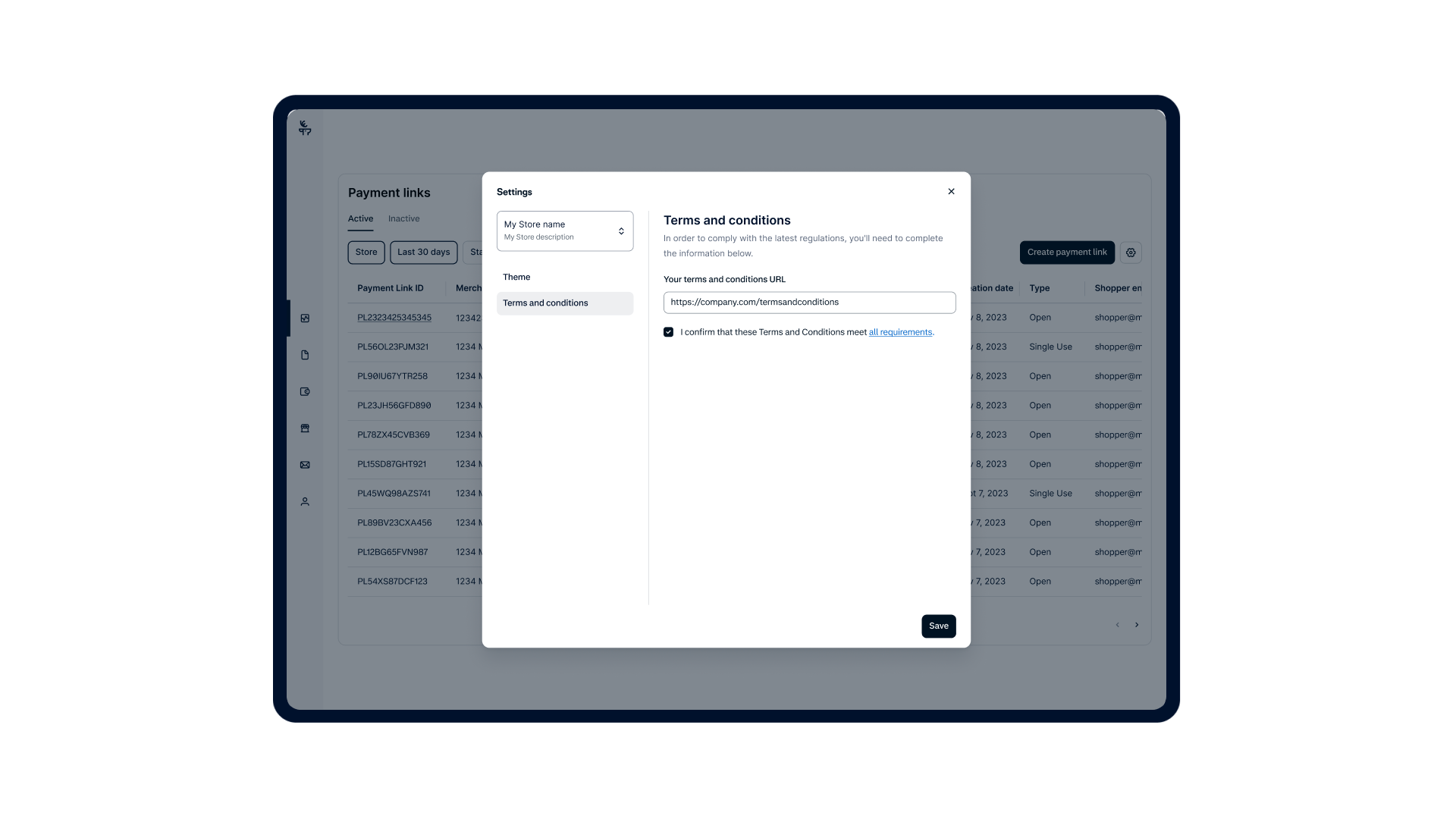
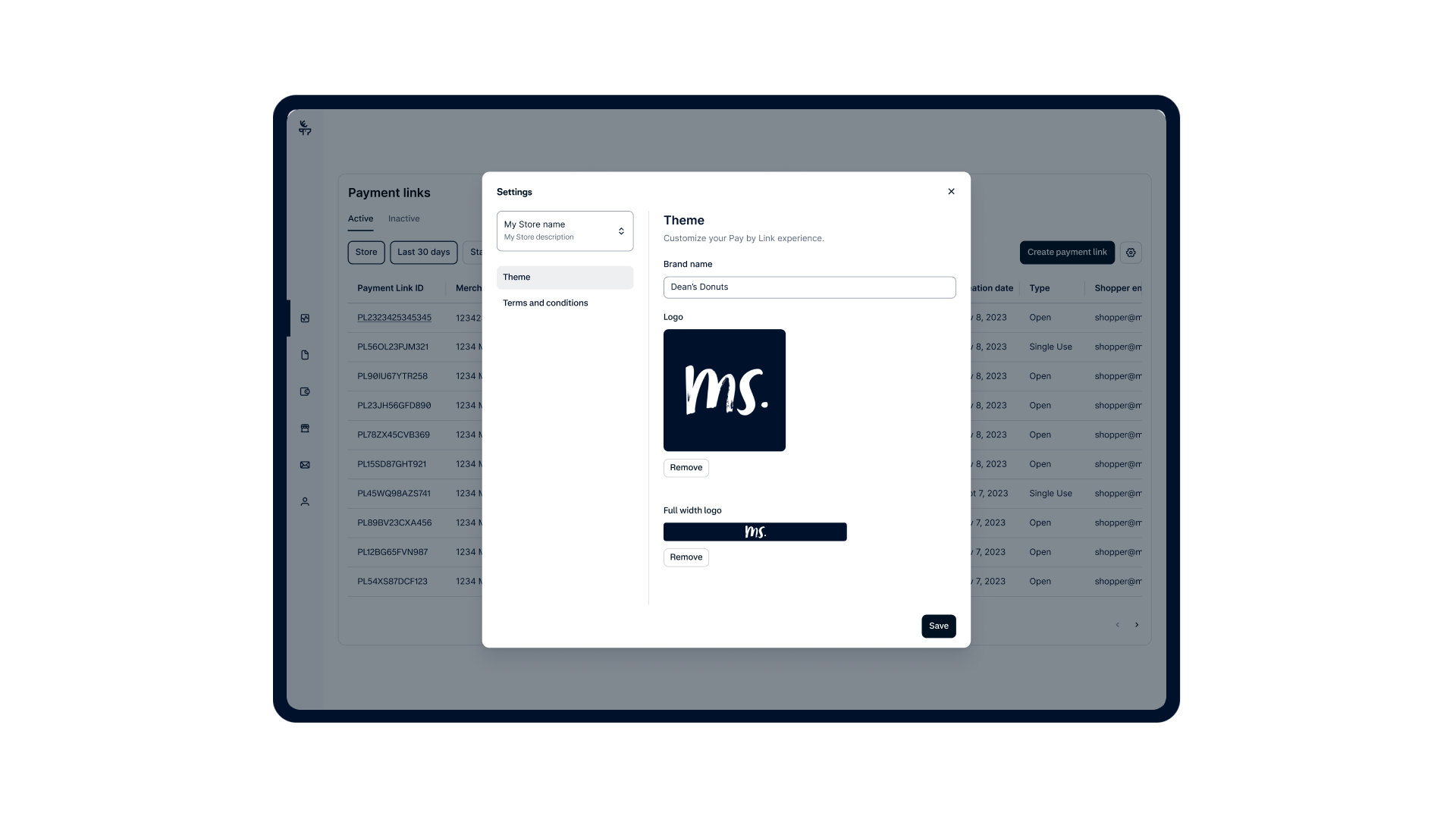
How it works
The integration of components involves both server-side and client-side processes. You can find more details on the component libraries page.Integration steps
Follow these steps to integrate the component(s):- Create an authentication session from your server
- Install component library in your front end
- Initialize components
- Optional: Localize components
- Optional: Customize component appearance
Create A Session
1. Create an authentication session from your server
To ensure secure communication between components and Adyen server, you must configure your server for authentication and create a session token. To create the token:-
From your server, make a POST /sessions request specifying the following parameters:
To make this API request, your API key must have the Pay By Link Component: View role in your Customer Area. For more information, refer to the Requirements section.
Here is an example request for creating a session token. Create a session token
Parameter Required Description allowOrigin The URL where the component will appear. Must follow the format of https://www.yourcompany.comorhttps://*.yourcompany.com, whereyourcompany.comis the actual web address of your marketplace. On live, only the HTTPS protocol is supported.policy An object that contains:
resources: An object that contains:accountHolderId: The unique identifier of the account holder that is linked to the stores and associated with the payment links in the component. type: The type of resource. Set this to accountHolder. roles: The roles required to use the component: Include the Pay By Link Component: View to enable users to view payment links only. Include the Pay By Link Component: View PII to enable users to view Personally Identifiable Information (PII). Include the Pay By Link Component: Manage Links role to allow the user to view, create, and deactivate payment links. Include the Pay By Link Component: Manage Settings role to grant the user full administrative control over component configuration, themes, and settings.product The type of product the component belongs to. Set this to platform. curl https://test.adyen.com/authe/api/v1/sessions \ -H 'content-type: application/json' \ -H 'x-api-key: ADYEN_BALANCE_PLATFORM_API_KEY' \ -D '{ "allowOrigin":"YOUR_DOMAIN", "product":"platform", "policy": { "resources": [ { "accountHolderId": "AH00000000000000000000001", "type": "accountHolder" } ], "roles": [ "Pay By Link Component: View", "Pay By Link Component: View PII", "Pay By Link Component: Manage Links", "Pay By Link Component: Manage Settings" ] } }' -
Note the API response. Later, when initializing the components, you need to create and call a function that passes the entire session object from the response to your front end.
Session token created
{
  "id": "EC1234-1234-1234-1234",
  "token": "xxxxx.yyyyy.zzzzzz"
}
Install Component Library
2. Install component library in your front end
Use the Adyen Web npm package, or embed the Adyen Platform Experience script and stylesheet into your HTML file:Install the Adyen Platform Experience library in your front-end application as follows:
-
Install the npm package.
npm install @adyen/adyen-platform-experience-web -
Import the library, the components, and the style sheet.
import { AdyenPlatformExperience, component_name } from '@adyen/adyen-platform-experience-web';
import "@adyen/adyen-platform-experience-web/adyen-platform-experience-web.css";
Use the
integrity attribute so browsers can verify that the script and stylesheet have not been changed unexpectedly.The value of the integrity attribute is the Subresource Integrity (SRI) hash which Adyen provides for each version of the Adyen Web JavaScript and CSS files.Get the SRI hashes from the release notes for the Platform Experience components, under Updating to this version.embed-script-stylesheet.html<!-- Embed the Adyen Platform Experience script element above any other JavaScript in your page. -->
<script src="https://bae81f955b.cdn.adyen.com/platform-components/VERSION/adyen-platform-experience-web.js"
integrity="JS_INTEGRITY_HASH_FOR_YOUR_VERSION"
crossorigin="anonymous"></script>
<!-- Embed the Adyen Platform Experience stylesheet. You can add your own styling by overriding the rules in the CSS file -->
<link rel="stylesheet" href="https://bae81f955b.cdn.adyen.com/platform-components/VERSION/adyen-platform-experience-web.css"
integrity="CSS_INTEGRITY_HASH_FOR_YOUR_VERSION"
crossorigin="anonymous">
Initialize Components
3. Initialize components
To initialize the components:-
Gather the following information to be passed when initializing the library and its components.
-
Gather these parameters to initialize the library.
Parameter Required Description availableTranslationsDeprecatedDeprecated. This field is no longer needed because locales are now dynamically loaded on demand via CDN. Setting this field will trigger a deprecation warning. An array containing the names of the imported locale files used for localizing the components. For example, [es_ES, nl_NL, fr_FR].environmentSpecifies the environment for the component integration. The default value is test. Set the parameter to live when you are ready to go live. localeSpecifies the locale code, which determines the desired language of the components. This code must correspond to a supported language. For example, use es-ES for Spanish. onSessionCreateThe callback function that retrieves an authentication session token and refreshes the current session. - Gather these parameters to initialize each component. Select the tab for the component you want to use:
-
Gather these parameters to initialize the library.
| Parameter | Required | Description |
|---|---|---|
allowLimitSelection | Determines whether the user can change the number of payment links shown per page. Default value: true. | |
core | | The instance of the library. |
onRecordSelection | If defined, the event allows obtaining the payment link ID when the user selects a specific payment link from any tab of the overview. You can use the obtained ID value to show the Payment Link Details component in a different location within your portal’s UI, outside the Payment Links Overview component. | |
preferredLimit | The number of payment links shown per page. Default value: 10. |
| Parameter | Required | Description |
|---|---|---|
core | | The instance of the library. |
id | | The unique identifier of the payment link. |
- Select the tab for the feature you want to use:
| Parameter | Required | Description |
|---|---|---|
core | | The instance of the library. |
fieldsConfig | A configuration object used to prefill the payment link form and control field visibility. See details below. | |
onPaymentLinkCreated | If defined, this event triggers upon the successful creation of a payment link by the user, providing the complete payment link details along with the unique payment link ID. The obtained ID value can be used to send an email to the shopper or show details in a different location within your portal’s UI. |
| Parameter | Required | Description |
|---|---|---|
core | | The instance of the library. |
-
Create a DOM element on your portal’s UI page where you want the component to be rendered.
Assign the element a unique and descriptive ID. This unique ID is important to avoid any misconfigurations when integrating multiple components into your portal’s UI.
By default, the Payment Link Details component is shown as a modal window within the Payment Links Overview component. In this scenario, you only need to create a DOM element for the Payment Links Overview component. If you want to use the Payment Link Details component on its own, you need to create a separate DOM element for it.
If you are using JavaScript frameworks such as Vue or React, make sure that you use references instead of selectors and that you do not re-render the DOM element.
- Select the tab for the component you want to use:
Create DOM element
<div id="payment-links-overview-container"></div>
Create DOM element
<div id="payment-link-details-container"></div>
- Select the tab for the feature you want to use:
Create DOM element
<div id="payment-link-creation-container"></div>
Create DOM element
<div id="payment-link-settings-container"></div>
-
Add a function that calls your API to retrieve and refresh an authentication session token.
The following code is the same for both Pay by Link components.
Add function to retrieve and refresh an authentication session token
async function handleSessionCreate() { const response = await fetch('YOUR_IMPLEMENTATION_OF_CREATE_SESSION_ENDPOINT'); return response.json(); } -
Initialize the component and mount it to the container you created.
Be sure to include the function for retrieving and refreshing the session token that you added in the previous step.
To implement the Payment Link Details component as a modal window within the Payment Links Overview component, use the following code examples. In this implementation, when a user selects a specific payment link from the overview page, the payment link ID is automatically passed to the Payment Link Details component, and the modal window opens.
- Select the tab for the component you want to use:
Initialize library and create component
import { AdyenPlatformExperience, PaymentLinksOverview } from '@adyen/adyen-platform-experience-web';
import "@adyen/adyen-platform-experience-web/adyen-platform-experience-web.css";

const core = await AdyenPlatformExperience({
    onSessionCreate: handleSessionCreate,
});
const paymentLinksOverview = new PaymentLinksOverview({ core });

paymentLinksOverview.mount('#payment-links-overview-container');
Initialize library and create component
import { AdyenPlatformExperience, PaymentLinkDetails } from '@adyen/adyen-platform-experience-web';
import "@adyen/adyen-platform-experience-web/adyen-platform-experience-web.css";

const core = await AdyenPlatformExperience({
    onSessionCreate: handleSessionCreate,
});

const paymentLinkDetails = new PaymentLinkDetails({
    core,
    id: 'ABCDEFG1234567890'
});

PaymentLinkDetails.mount('#payment-link-details-container');
- Select the tab for the feature you want to use:
Payment Link creation
import { AdyenPlatformExperience, PaymentLinkCreation } from '@adyen/adyen-platform-experience-web';
import "@adyen/adyen-platform-experience-web/adyen-platform-experience-web.css";

const core = await AdyenPlatformExperience({
    onSessionCreate: handleSessionCreate,
});

const paymentLinkCreation = new PaymentLinkCreation({
    core,
});

PaymentLinkCreation.mount('#payment-link-creation-container');
Payment Link settings
import { AdyenPlatformExperience, PaymentLinkSettings } from '@adyen/adyen-platform-experience-web';
import "@adyen/adyen-platform-experience-web/adyen-platform-experience-web.css";

const core = await AdyenPlatformExperience({
    onSessionCreate: handleSessionCreate,
});

const paymentLinkSettings = new PaymentLinkSettings({
    core,
});

PaymentLinkSettings.mount('#payment-link-settings-container');
-
(Optional) To use the Payment Link Details component outside of the Payment Links Overview component:
- Define the
onRecordSelectioncallback.
const paymentLinksOverview = new PaymentLinksOverview({ core, onRecordSelection: ({ id }) => { // Use selected payment link id. } });- Initialize the Payment Link Details component using the
idfrom the object argument as shown below.
const paymentLinkDetails = new PaymentLinkDetails({ core, id: '<SELECTED_PaymentLink_ID>' }); - Define the
Localize Components
4. Optional: Localize components
During the component initialization, you can also configure the components to use one of the supported languages.Update your code for initializing components to include the localization settings. If no localization settings are provided, the components will default to English.Localize componentsimport { AdyenPlatformExperience } from '@adyen/adyen-platform-experience-web';
const core = await AdyenPlatformExperience({
locale: 'es-ES', // See supported languages for possible values
/* ... */
});
Customize Appearance
5. Optional: Customize component appearance
The pay-by-link components have a default appearance with pre-defined styles, such as colors, fonts, and borders. You can customize the appearance of your components by overriding the default values of CSS variables and the class settings:- Inspect the components using your browser’s developer tools.
- Modify the styles in your style sheet file.
style.css
:root {
    --adyen-sdk-border-radius-s: 10px;
    --adyen-sdk-border-radius-m: 20px;
    --adyen-sdk-border-radius-l: 30px;
    --adyen-sdk-color-background-disabled: #9ecdb1;
    --adyen-sdk-color-background-inverse-primary: #0abf53;
    --adyen-sdk-color-background-inverse-primary-hover: #57d389;
    --adyen-sdk-color-decorative-blue: #0abf53;
    --adyen-sdk-color-outline-primary-active: #0abf53;
}
style.css
Use the following structure to define your
Individual address fields cannot be set to hidden. This rule must be applied to the entire fieldset (for example,
This example shows how to lock specific fields. Note that individual address sub-fields remain readOnly per the validation requirements.Mixed visibility on nested fields
.adyen-pe-modal {
    border-left: 3px solid #0abf53;
    border-radius: 0;
    height: 100%;
    max-height: unset;
    right: 0;
}
Prefill-Data
6. Optional: Pre-populate component data
ThefieldsConfig object allows you to pre-populate the payment link creation form, set fields to a readOnly state to restrict user editing, and control the visibility of individual fields.The object accepts two optional parameters:| Parameter | Description |
|---|---|
data | Contains the values used to pre-populate any subset of supported fields. |
visibility | Sets field behavior to either readOnly (visible but locked) or hidden (removed from the UI, but still validated). If a key is missing from the visibility object, the field defaults to an editable state. |
fieldsConfig object:Initial structure
{
 "data": {
   "shopperEmail": "shopper@example.com",
   "telephoneNumber": "+31 0690758074"
 },
 "visibility": {
   "shopperEmail": "readOnly",
   "telephoneNumber": "hidden"
 }
}
Targetable fields and subfields
The following example shows the object structure and all fields available for pre-population or restriction withinfieldsConfig. You can target top-level fields or specific sub-fields. To do this, see Field visibility settings notation.Targetable fields and subfields{
"data": {
"amount": {
"currency": "EUR", // Three letter currency code
"value": 10000 // 100 EUR with 2 decimals
},
"deliveryAddress": {
"city": "Amsterdam",
"country": "NL", // Two letter country code (ISO 3166-1 alpha-2)
"houseNumberOrName": "136",
"postalCode": "1011DJ",
"street": "Simon Carmiggeltstraat"
},
"billingAddress": {
"city": "Medellin",
"country": "CO", // Two letter country code (ISO 3166-1 alpha-2)
"houseNumberOrName": "201",
"postalCode": "05001",
"street": "Calle 25 #34-12"
},
"description": "This is a test description",
"reference": "MER-000001", // Merchant Reference
"deliverAt": "2025-12-09T11:39:24.458Z",
"shopperEmail": "shopper@example.com",
"shopperLocale": "en-US",
"shopperReference": "SHP-000001",
"shopperName": {
"firstName": "John",
"lastName": "Doe"
},
"countryCode": "ES", // Two letter country code (ISO 3166-1 alpha-2)
"telephoneNumber": "+31 0690758074", // Format: +<country code> <phone number>
"linkValidity": {
"durationUnit": "week", // minute, hour, day, week
"quantity": 3
}
},
"visibility": {
"amount": {
"value": "readOnly",
"currency": "readOnly"
},
"deliveryAddress": {
"city": "readOnly",
"country": "readOnly",
"houseNumberOrName": "readOnly",
"postalCode": "readOnly",
"street": "readOnly"
},
"billingAddress": "readOnly",
"description": "hidden",
"reference": "hidden",
"deliverAt": "hidden",
"shopperEmail": "readOnly",
"shopperLocale": "readOnly",
"shopperReference": "hidden",
"shopperName": "hidden",
"countryCode": "readOnly",
"telephoneNumber": "readOnly",
"linkValidity": {
"durationUnit": "readOnly",
"quantity": "readOnly"
}
}
}
Field requirements and constraints
When pre-populating data, ensure that you follow these specific formats:| Fields | Type | Description |
|---|---|---|
currency | string | The three-character ISO currency code of the amount. |
value | string | The numeric value of the amount, in minor units. |
country | string | The two-letter country code, in ISO 3166-1 alpha-2 format. Used in billingAddress and deliveryAddress. |
deliverAt | string | The date and time when the purchased goods should be delivered. ISO 8601 format: YYYY-MM-DDThh:mm:ss+TZD, for example, 2020-12-18T10:15:30+01:00. |
shopperLocale | string | The combination of a language code and a country code to specify the language to be used. |
telephoneNumber | string | The shopper’s telephone number. Must include a ”+” prefix, country code, and a space before the number (for example, +31 0690758074). |
durationUnit | string | The duration of the payment link validity. Possible values: minute, hour, day, week. |
quantity | integer | The numerical value of the duration of the payment link validity, in terms of the defined durationUnit. |
reference | string | The reference to uniquely identify your user. |
shopperReference | string | The reference to uniquely identify this shopper. |
Field visibility settings notation
When setting the visibility of fields, you can either apply a rule to a top-level field (which affects all its nested properties) or target specific sub-fields individually.| Notation | Usage | Example |
|---|---|---|
| string | Applies one rule to an entire top-level field (fieldset). | "billingAddress": "readOnly" |
| object | Applies different rules per individual sub-field. | "billingAddress": { "city": "readOnly" } |
billingAddress or deliveryAddress). This restriction exists because if any field within an address fieldset is populated, all other fields are also required to have a value for validation.Common use cases
| Use case | Data | Visibility/State |
|---|---|---|
| Pre-populate shopper details, allow edits. | Provide values for specific fields, for example shopperEmail). | Omit the field or object. |
| Pre-populate and lock addresses. | Provide values, for example billingAddress or deliveryAddress. In this case, provide all required sub-fields for billingAddress or deliveryAddress. | Set to readOnly. |
| Hide optional sections. | Provide values for the field for required for validation. | Set the specific object or field to hidden. |
Example configurations
This example shows how to pre-populate an address, transaction amount, and phone number, while you lock the address and hide theshopperReference field.Pre-populate and lock billing data
{
 "data": {
   "billingAddress": {
     "city": "Amsterdam",
     "country": "NL",
     "houseNumberOrName": "136",
     "postalCode": "1011DJ",
     "street": "Simon Carmiggeltstraat"
   },
   "amount": {
     "value": 12500,
     "currency": "EUR"
   },
   "telephoneNumber": "+31 0690758074",
   "shopperReference": "SHP-000001"
 },
 "visibility": {
   "billingAddress": "readOnly",
   "amount": {
     "currency": "readOnly"
   },
   "shopperReference": "hidden"
 }
}
{
 "visibility": {
   "deliveryAddress": {
     "country": "readOnly",
     "postalCode": "readOnly"
   },
   "linkValidity": "hidden"
 }
}
Usage tips
- Pre-populate locked fields: A read-only input without data is confusing. Always provide values for locked fields.
- Hidden are not optional: Validation still runs on hidden fields. You must provide valid values via
datafor any required fields you hide. - Match compliance policies: Hide or lock fields that must not be edited based on your specific compliance requirements.
Supported languages
You can set one of the following languages to localize any of the Platform Experience components.| Language | Locale code | Locale file |
|---|---|---|
| Danish | da-DK | da_DK |
| Dutch | nl-NL | nl_NL |
| English | en-US | en_US |
| Finnish | fi-FI | fi_FI |
| French | fr-FR | fr_FR |
| German | de-DE | de_DE |
| Italian | it-IT | it_IT |
| Norwegian | no-NO | no_NO |
| Portuguese (BR) | pt-BR | pt_BR |
| Spanish | es-ES | es_ES |
| Swedish | sv-SE | sv_SE |