

Web Drop-in
Use our pre-built UI for accepting paymentsIntro
Drop-in is our pre-built UI solution for accepting payments on your website. Drop-in shows all payment methods as a list, in the same block. This integration requires you to make API requests to /paymentMethods, /payments, and /payments/details endpoints. Adding new payment methods usually doesn’t require more development work. Drop-in supports cards, wallets, and most local payment methods.Version Update
Introducing Web v6
Improvements
The Web v6 library introduces the following improvements:- Reduced bundle size through tree shaking
- Enhanced design
- Enhanced Typescript developer experience
- Better alignment of express payment methods
- Added support for 6 localizations
- Support for Apple Pay Order tracking
- Improve AVS checks for Google Pay and Apple Pay
Before You Begin
Requirements
Check out our Node.js + Express tutorial
Follow our tutorial to integrate Drop-in with Node.js and Express. Before you begin to integrate, make sure you have followed the Get started with Adyen guide to:- Get an overview of the steps needed to accept live payments.
- Create your test account.
- Get your API key.
- Get your client key.
- Set up webhooks to know the payment outcome.
How it works
For a Drop-in integration, you must implement the following parts:- Your payment server: sends the API requests to get available payment methods, make a payment, and send additional payment details.
- Your client website: shows the Drop-in UI where the shopper makes the payment. Drop-in uses the data from the API responses to handle the payment flow and additional actions on your client website.
- Your webhook server: receives webhooks that include the outcome of each payment.
Payment server
Go to the integration steps for your server.
Client website
Go to the integration steps for your client website.
Webhook server
Go to the integration steps for your webhook server.

- From your server, submit a request to get a list of payment methods available to the shopper.
- Create an instance of Drop-in on your payments form.
- From your server, submit a payment request with data you receive from Drop-in.
- Determine from the response if you need to perform additional actions on your client website.
- From your server, submit additional payment details with data you receive from Drop-in.
- Show the payment result to the shopper.
Install Api Library
Install an API library
Payment server We provide server-side API libraries for several programming languages, available through common package managers, like Gradle and npm, for easier installation and version management. Our API libraries will save you development time, because they:- Use an API version that is up to date.
- Have generated models to help you construct requests.
- Send the request to Adyen using their built-in HTTP client, so you do not have to create your own.
- Java
- PHP
- C#
- NodeJS
- Go
- Python
- Ruby
- npm (recommended)
- Embed script and stylesheet
- All payment methods
- Individual payment methods
- Java
- PHP
- C#
- NodeJS
- Go
- Python
- Ruby
- npm (recommended)
- Embed script and stylesheet
- Java
- PHP
- C#
- NodeJS
- Go
- Python
- Ruby
- Payment method redirect
- 3D Secure 2 redirect
- Swift Package Manager
- CocoaPods
- Carthage
- Java
- PHP
- C#
- NodeJS
- Go
- Python
- Ruby
- Swift Package Manager
- CocoaPods
- Carthage
- Java
- PHP
- C#
- NodeJS
- Go
- Python
- Ruby
- Java
- PHP
- C#
- NodeJS
- Go
- Python
- Ruby
- Payment method redirect
- 3D Secure 2 redirect
- Java
- PHP
- C#
- NodeJS
- Go
- Python
- Ruby
- With Jetpack Compose
- Without Jetpack Compose
- With Jetpack Compose
- Without Jetpack Compose
- Java
- PHP
- C#
- NodeJS
- Go
- Python
- Ruby
- With Jetpack Compose
- Without Jetpack Compose
- With Jetpack Compose
- Without Jetpack Compose
- Java
- PHP
- C#
- NodeJS
- Go
- Python
- Ruby
- Payment method redirect
- 3D Secure 2 redirect
- Java
- PHP
- C#
- NodeJS
- Go
- Python
- Ruby
- iOS
- Android
- Expo
- Java
- PHP
- C#
- NodeJS
- Go
- Python
- Ruby
- iOS
- Android
- Expo
- Java
- PHP
- C#
- NodeJS
- Go
- Python
- Ruby
- Payment method redirect
- 3D Secure 2 redirect
- Java
- PHP
- C#
- NodeJS
- Go
- Python
- Ruby
- iOS
- Android
- Successful payment
- Refused payment
- Java
- PHP
- C#
- NodeJS
- Go
- Python
- Ruby
- iOS
- Android
- InstantComponent
- Other Component
- InstantComponent
- Other Component
- Successful payment
- Refused payment
- Java
- PHP
- C#
- NodeJS
- Go
- Python
- Ruby
- Payment method redirect
- 3D Secure 2 redirect
Try our example integration

Requirements
- Java 11 or later.
Installation
You can use Maven, adding this dependency to your project’s POM.Add the API library<dependency>
<groupId>com.adyen</groupId>
<artifactId>adyen-java-api-library</artifactId>
<version>LATEST_VERSION</version>
</dependency>
Setting up the client
Create a singleton resource that you use for the API requests to Adyen:Set up your client// Import the required classes.
package com.adyen.service;
import com.adyen.Client;
import com.adyen.service.checkout.PaymentsApi;
import com.adyen.model.checkout.Amount;
import com.adyen.enums.Environment;
import com.adyen.service.exception.ApiException;
import java.io.IOException;
public class Snippet {
public Snippet() throws IOException, ApiException {
// Set up the client and service.
Client client = new Client("ADYEN_API_KEY", Environment.TEST);
}
}
Try our example integration
Requirements
- PHP 7.3 or later.
- cURL with SSL support.
- The JSON PHP extension.
- The list of dependencies from the composer require list.
Installation
You can use Composer. Follow the installation instructions if you do not already have composer installed.Install the API librarycomposer require adyen/php-api-library
require __DIR__ . '/vendor/autoload.php';
Set up the client
Create a singleton resource that you use for the API requests to Adyen:Set up your clientuse Adyen\Model\Checkout\Amount;
use Adyen\Model\Checkout\CreateCheckoutSessionRequest;
use Adyen\Service\Checkout\PaymentsApi;
// Include your idempotency key when you make an API request.
$requestOptions['idempotencyKey'] = "YOUR_IDEMPOTENCY_KEY";
// Set up the client and service.
$client = new \Adyen\Client();
$client->setXApiKey('ADYEN_API_KEY');
$client->setEnvironment(\Adyen\Environment::TEST);
$service = new PaymentsApi($client);
Requirements
- .NET standard 2.0 or later.
-
For Terminal API certificate validation, set the application to either of the following:
- .NET core 2.1 or later
- .NET framework 4.6.1 or later
Installation
You can use NuGet:Install the API libraryPM> Install-Package Adyen -Version LATEST_VERSION
Set up the client
Create a singleton resource that you use for the API requests to Adyen:Set up your clientusing Adyen;
using Adyen.Model.Checkout;
using Adyen.Service.Checkout;
using Environment = Adyen.Model.Environment;
class Program
{
static void Main()
{
// Set up the client and service.
var config = new Config
{
XApiKey = "ADYEN_API_KEY",
Environment = Environment.Test
};
var client = new Client(config);
var checkout = new PaymentsService(client);
// Include your idempotency key when you make an API request.
var requestOptions = new Adyen.Model.RequestOptions { IdempotencyKey = "YOUR_IDEMPOTENCY_KEY" };
}
}
Try our example integration
Requirements
- Node.js version 18 or later.
Installation
You can use npm:Install the API librarynpm install --save @adyen/api-library
npm update @adyen/api-library
Setting up the client
Create a singleton resource that you use for the API requests to Adyen:Set up your client// Require the parts of the module you want to use.
const { Client, CheckoutAPI, Types} = require("@adyen/api-library");
// Set up the client and service.
const client = new Client({ apiKey: "ADYEN_API_KEY", environment: "TEST" });
const checkoutApi = new CheckoutAPI(client);
// Include your idempotency key when you make an API request.
const requestOptions = { idempotencyKey: "YOUR_IDEMPOTENCY_KEY" };
Try our example integration
Requirements
- Go 1.13 or later.
Installation
You can use Go modules:Install the API librarygo get github.com/adyen/adyen-go-api-library/vLATEST_VERSION
Set up the client
Create a singleton resource that you use for the API requests to Adyen:Set up your clientpackage main
import (
"github.com/adyen/adyen-go-api-library/vLATEST_VERSION/src/adyen"
"github.com/adyen/adyen-go-api-library/vLATEST_VERSION/src/checkout"
"github.com/adyen/adyen-go-api-library/vLATEST_VERSION/src/common"
)
// Create a payment object.
func main () {
client := adyen.NewClient(&common.Config{
ApiKey: "ADYEN_API_KEY",
Environment: common.TestEnv,
})
service := client.Checkout()
Try our example integration
Requirements
- Python 3.6 or later.
- (Optional) Packages: Requests or PycURL
Installation
You can use pip:Install the API librarypip install Adyen
Set up the client
Create a singleton resource that you use for the API requests to Adyen:Set up your clientimport Adyen
# Set up the client and service.
adyen = Adyen.Adyen()
adyen.client.xapikey = "ADYEN_API_KEY"
adyen.client.platform = "test" # The environment that the library is used in.
Try our example integration
Requirements
- Ruby 2.7 or later.
Installation
You can use RubyGems:Install the API librarygem install adyen-ruby-api-library
bundle install to install dependencies.Set up the client
Create a singleton resource that you use for the API requests to Adyen:Set up your clientrequire 'adyen-ruby-api-library'
# Set up the client and service.
adyen = Adyen::Client.new
adyen.api_key = 'ADYEN_API_KEY'
adyen.env = :test # The environment that the library is used in.
Get available payment methods
Payment serverWhen your shopper is ready to pay, get a list of the available payment methods based on their country, device, and the payment amount.From your server, make a /paymentMethods request, specifying:| Parameter name | Required | Description |
|---|---|---|
merchantAccount |  | Your merchant account name. |
amount | The currency and value of the payment, in minor units. This is used to filter the list of available payment methods to your shopper. | |
channel | The platform of the shopper’s device; use Web. This is used to filter the list of available payment methods to your shopper. | |
countryCode | The shopper’s country/region. This is used to filter the list of available payment methods to your shopper. Format: the two-letter ISO-3166-1 alpha-2 country code. Exception: QZ (Kosovo). | |
shopperLocale | By default, the shopperlocale is set to en-US. To change the language, set this to the shopper’s language and country code. You also need to set the same locale within your Drop-in configuration. |
curl https://checkout-test.adyen.com/v72/paymentMethods \
-H 'x-api-key: ADYEN_API_KEY' \
-H 'content-type: application/json' \
-d '{
"merchantAccount": "ADYEN_MERCHANT_ACCOUNT",
"countryCode": "NL",
"amount": {
"currency": "EUR",
"value": 1000
},
"channel": "Web",
"shopperLocale": "nl-NL"
}'
// Adyen Java API Library v28.4.0
import com.adyen.Client;
import com.adyen.enums.Environment;
import com.adyen.model.checkout.*;
import java.time.OffsetDateTime;
import java.util.*;
import com.adyen.model.RequestOptions;
import com.adyen.service.checkout.*;
// For the live environment, additionally include your liveEndpointUrlPrefix.
Client client = new Client("ADYEN_API_KEY", Environment.TEST);
// Create the request object(s)
Amount amount = new Amount()
.currency("EUR")
.value(1000L);
PaymentMethodsRequest paymentMethodsRequest = new PaymentMethodsRequest()
.amount(amount)
.merchantAccount("ADYEN_MERCHANT_ACCOUNT")
.countryCode("NL")
.channel(PaymentMethodsRequest.ChannelEnum.WEB)
.shopperLocale("nl-NL");
// Send the request
PaymentsApi service = new PaymentsApi(client);
PaymentMethodsResponse response = service.paymentMethods(paymentMethodsRequest, new RequestOptions().idempotencyKey("UUID"));
// Adyen PHP API Library v20.3.0
use Adyen\Client;
use Adyen\Environment;
use Adyen\Model\Checkout\Amount;
use Adyen\Model\Checkout\PaymentMethodsRequest;
use Adyen\Service\Checkout\PaymentsApi;
$client = new Client();
$client->setXApiKey("ADYEN_API_KEY");
// For the live environment, additionally include your liveEndpointUrlPrefix.
$client->setEnvironment(Environment::TEST);
// Create the request object(s)
$amount = new Amount();
$amount
->setCurrency("EUR")
->setValue(1000);
$paymentMethodsRequest = new PaymentMethodsRequest();
$paymentMethodsRequest
->setAmount($amount)
->setMerchantAccount("ADYEN_MERCHANT_ACCOUNT")
->setCountryCode("NL")
->setChannel("Web")
->setShopperLocale("nl-NL");
$requestOptions['idempotencyKey'] = 'UUID';
// Send the request
$service = new PaymentsApi($client);
$response = $service->paymentMethods($paymentMethodsRequest, $requestOptions);
// Adyen .net API Library v20.0.0
using Adyen;
using Environment = Adyen.Model.Environment;
using Adyen.Model;
using Adyen.Model.Checkout;
using Adyen.Service.Checkout;
// For the live environment, additionally include your liveEndpointUrlPrefix.
var config = new Config()
{
XApiKey = "ADYEN_API_KEY",
Environment = Environment.Test
};
var client = new Client(config);
// Create the request object(s)
Amount amount = new Amount
{
Currency = "EUR",
Value = 1000
};
PaymentMethodsRequest paymentMethodsRequest = new PaymentMethodsRequest
{
Amount = amount,
MerchantAccount = "ADYEN_MERCHANT_ACCOUNT",
CountryCode = "NL",
Channel = PaymentMethodsRequest.ChannelEnum.Web,
ShopperLocale = "nl-NL"
};
// Send the request
var service = new PaymentsService(client);
var response = service.PaymentMethods(paymentMethodsRequest, requestOptions: new RequestOptions { IdempotencyKey = "UUID"});
// Adyen Node API Library v19.3.0
// Require the parts of the module you want to use
const { Client, CheckoutAPI } = require('@adyen/api-library');
// Initialize the client object
// For the live environment, additionally include your liveEndpointUrlPrefix.
const client = new Client({apiKey: "ADYEN_API_KEY", environment: "TEST"});
// Create the request object(s)
const paymentMethodsRequest = {
merchantAccount: "ADYEN_MERCHANT_ACCOUNT",
countryCode: "NL",
amount: {
currency: "EUR",
value: 1000
},
channel: "Web",
shopperLocale: "nl-NL"
}
// Send the request
const checkoutAPI = new CheckoutAPI(client);
const response = checkoutAPI.PaymentsApi.paymentMethods(paymentMethodsRequest, { idempotencyKey: "UUID" });
// Adyen Go API Library v12.2.0
import (
"context"
"github.com/adyen/adyen-go-api-library/v9/src/common"
"github.com/adyen/adyen-go-api-library/v9/src/adyen"
"github.com/adyen/adyen-go-api-library/v9/src/checkout"
)
// For the live environment, additionally include your liveEndpointUrlPrefix.
client := adyen.NewClient(&common.Config{
ApiKey: "ADYEN_API_KEY",
Environment: common.TestEnv,
})
// Create the request object(s)
amount := checkout.Amount{
Currency: "EUR",
Value: 1000,
}
paymentMethodsRequest := checkout.PaymentMethodsRequest{
Amount: &amount,
MerchantAccount: "ADYEN_MERCHANT_ACCOUNT",
CountryCode: common.PtrString("NL"),
Channel: common.PtrString("Web"),
ShopperLocale: common.PtrString("nl-NL"),
}
// Send the request
service := client.Checkout()
req := service.PaymentsApi.PaymentMethodsInput().IdempotencyKey("UUID").PaymentMethodsRequest(paymentMethodsRequest)
res, httpRes, err := service.PaymentsApi.PaymentMethods(context.Background(), req)
# Adyen Python API Library v12.7.0
import Adyen
adyen = Adyen.Adyen()
adyen.client.xapikey = "ADYEN_API_KEY"
# For the live environment, additionally include your liveEndpointUrlPrefix.
adyen.client.platform = "test" # The environment to use library in.
# Create the request object(s)
json_request = {
"merchantAccount": "ADYEN_MERCHANT_ACCOUNT",
"countryCode": "NL",
"amount": {
"currency": "EUR",
"value": 1000
},
"channel": "Web",
"shopperLocale": "nl-NL"
}
# Send the request
result = adyen.checkout.payments_api.payment_methods(request=json_request, idempotency_key="UUID")
# Adyen Ruby API Library v9.7.1
require "adyen-ruby-api-library"
adyen = Adyen::Client.new
adyen.api_key = 'ADYEN_API_KEY'
# For the live environment, additionally include your liveEndpointUrlPrefix.
adyen.env = :test # Set to "live" for live environment
# Create the request object(s)
request_body = {
:merchantAccount => 'ADYEN_MERCHANT_ACCOUNT',
:countryCode => 'NL',
:amount => {
:currency => 'EUR',
:value => 1000
},
:channel => 'Web',
:shopperLocale => 'nl-NL'
}
# Send the request
result = adyen.checkout.payments_api.payment_methods(request_body, headers: { 'Idempotency-Key' => 'UUID' })
// Adyen Node API Library v19.3.0
// Require the parts of the module you want to use
import { Client, CheckoutAPI, Types } from "@adyen/api-library";
// Initialize the client object
// For the live environment, additionally include your liveEndpointUrlPrefix.
const client = new Client({apiKey: "ADYEN_API_KEY", environment: "TEST"});
// Create the request object(s)
const amount: Types.checkout.Amount = {
currency: "EUR",
value: 1000
};
const paymentMethodsRequest: Types.checkout.PaymentMethodsRequest = {
amount: amount,
merchantAccount: "ADYEN_MERCHANT_ACCOUNT",
countryCode: "NL",
channel: Types.checkout.PaymentMethodsRequest.ChannelEnum.Web,
shopperLocale: "nl-NL"
};
// Send the request
const checkoutAPI = new CheckoutAPI(client);
const response = checkoutAPI.PaymentsApi.paymentMethods(paymentMethodsRequest, { idempotencyKey: "UUID" });
paymentMethods:/paymentMethods response{
"paymentMethods":[
{
"details":[...],
"name":"Cards",
"type":"scheme"
...
},
{
"details":[...],
"name":"SEPA Direct Debit",
"type":"sepadirectdebit"
},
...
]
}
Custom list of payment methods
When you make a /paymentMethods request, the response includes all payment methods that you enabled in your Customer Area that are available for the transaction.To exclude payment methods from the available list of available payment methods for a specific transaction, include one of the following parameters when making your request:- allowedPaymentMethods: Drop-in renders only the payment methods that you specify.
- blockedPaymentMethods: Drop-in doesn’t render payment methods that you specify.
Add Drop In
Add Drop-in to your payments form
Client websiteNext, use Drop-in to show the available payment methods, and to collect payment details from your shopper.Import using the Adyen Web npm package, or embed the Adyen Web script and stylesheet into your HTML file:We offer two ways of importing with npm:Import Adyen Web into your application:Import Adyen Web into your application.
- Import Drop-in with all payment methods: this method resembles what you are used to before v6. You do not need to import individual payment methods, at the cost of a larger bundle size.
- Import Drop-in with individual payment methods: this method uses tree shaking to let you import only the payment methods you use, speeding up loading time, at the cost of maintainability (adding payment methods requires developer resources).
Import Drop-in with all payment methods
Install the Adyen Web Node package:npm install @adyen/adyen-web --save
import { AdyenCheckout, Dropin } from '@adyen/adyen-web/auto';
import '@adyen/adyen-web/styles/adyen.css';
Import Drop-in with individual payment methods
Install the Adyen Web Node package:npm install @adyen/adyen-web --save
import { AdyenCheckout, Dropin, Card, GooglePay, PayPal } from '@adyen/adyen-web';
import '@adyen/adyen-web/styles/adyen.css';
Use the You can add your own styling by overriding the rules in this CSS file.After you have imported the Adyen Web library, do the following:
integrity attribute so browsers can verify that the script and stylesheet have not been changed unexpectedly.The value of the integrity attribute is the Subresource Integrity (SRI) hash which Adyen provides for each version of the Adyen Web JavaScript and CSS files.Get the SRI hashes in the release notes, under Updating to this version.checkout.html<!-- Embed the Adyen Web script element above any other JavaScript in your checkout page. -->
<script src="https://checkoutshopper-test.cdn.adyen.com/sdk/VERSION/adyen.js"
integrity="JS_INTEGRITY_HASH_FOR_YOUR_VERSION"
crossorigin="anonymous"></script>
<!-- Embed the Adyen Web stylesheet. You can add your own styling by overriding the rules in the CSS file -->
<link rel="stylesheet" href="https://checkoutshopper-test.cdn.adyen.com/checkoutshopper/sdk/VERSION/adyen.css"
integrity="CSS_INTEGRITY_HASH_FOR_YOUR_VERSION"
crossorigin="anonymous">
-
Create a Document Object Model (DOM) element on your checkout page and put it where you want Drop-in to render on the page.
If you are using JavaScript frameworks such as Vue or React, make sure that you use references instead of selectors and that you do not re-render the DOM element.
<div id="dropin-container"></div>
-
Create a global configuration object with the following parameters and events:
Parameter name Required Description paymentMethodsResponseThe full /paymentMethodsresponse returned when you get available payment methods.clientKeyA public key linked to your API credential, used for client-side authentication. Web Drop-in versions before 3.10.1 use originKeyinstead. Find out how to migrate from usingoriginKeytoclientKey.localeThe shopper’s locale. This is used to set the language rendered in the UI. For a list of supported locales, see Language and localization. countryCodeThe shopper’s country/region. This is used to filter the list of available payment methods to your shopper. Format: the two-letter ISO-3166-1 alpha-2 country code. Exception: QZ (Kosovo). environmentUse test. When you are ready to accept live payments, change the value to one of our live environments. secondaryAmountShows the payment amount in an additional currency on the Pay button. You must do the currency conversion and set the amount. This object has properties: currency: The three-character ISO currency code.value: The amount of the transaction, in minor units.currencyDisplay: Sets the currency formatting. Default: symbol.showPayButtonShows or hides a Pay Button for each payment method. Defaults to true. When set to false, you must override it in paymentMethodsConfiguration. The Pay button triggers theonSubmitevent when payment details are valid. If you want to disable the button and then trigger the submit flow on your own, set this to false and call the.submit()method from your own button implementation. PayPal Smart Payment Buttons doesn’t support the.submit()method.amountAmount to be displayed on the Pay Button. It expects an object with the value and currency properties. For example, { value: 1000, currency: 'USD' }.Create a configuration objectEvent name Required Description onSubmit(state, dropin, actions)Create an event handler for this event, which is called when the shopper selects the Pay button, and the details are valid. This applies if the showPayButtonconfiguration parameter is set to true. Makes a POST /payments request. You must callactions.resolve(), passingresultCode,action, andorderobjects (if available) from the /payments response, even if the payment is unsuccessful. If the /payments request from your server fails, or if an unexpected error occurs, callactions.reject().onAdditionalDetails(state, dropin, actions)Create an event handler, called when a payment method requires more details, for example for native 3D Secure 2, or native QR code payment methods. Makes a POST /payments/details request. If the /payments/details request from your server is successful, you must call actions.resolve(), passingresultCode,action, andorderobjects (if available) from the API response. You must call it even if the payment is unsuccessful. If the /payments/details request from your server fails, or if an unexpected error occurs, callactions.reject.onPaymentCompleted(result, component)Create an event handler, called when the payment is completed. onPaymentFailed(result, component)Create an event handler, called when the payment failed. A failed payment has result code Cancelled, Error or Refused. onError(error)Create an event handler, called when an error occurs in Drop-in. onChange(state, dropin)Create an event handler, called when the shopper provides the required payment details. onActionHandledCreate an event handler, called when an action, for example a QR code or 3D Secure 2 authentication screen, is shown to the shopper. The following action.typevalues trigger this callback:threeDSqrawaitReturns data that contains:componentType: The type of component that shows the action to the shopper.actionDescription: A description of the action shown to the shopper.const configuration = { clientKey: "YOUR_CLIENT_KEY", environment: "test", amount: { value: 1000, currency: 'EUR' }, locale: 'nl-NL', countryCode: 'NL', // The full /paymentMethods response object from your server. Contains the payment methods configured in your account. paymentMethodsResponse: paymentMethodsResponse, onSubmit: async (state, component, actions) => { try { // Make a POST /payments request from your server. const result = await makePaymentsCall(state.data, countryCode, locale, amount); // If the /payments request from your server fails, or if an unexpected error occurs. if (!result.resultCode) { actions.reject(); return; } const { resultCode, action, order, donationToken } = result; // If the /payments request request form your server is successful, you must call this to resolve whichever of the listed objects are available. // You must call this, even if the result of the payment is unsuccessful. actions.resolve({ resultCode, action, order, donationToken, }); } catch (error) { console.error("onSubmit", error); actions.reject(); } }, onAdditionalDetails: async (state, component, actions) => { try { // Make a POST /payments/details request from your server. const result = await makeDetailsCall(state.data); // If the /payments/details request from your server fails, or if an unexpected error occurs. if (!result.resultCode) { actions.reject(); return; } const { resultCode, action, order, donationToken } = result; // If the /payments/details request request from your server is successful, you must call this to resolve whichever of the listed objects are available. // You must call this, even if the result of the payment is unsuccessful. actions.resolve({ resultCode, action, order, donationToken, }); } catch (error) { console.error("onSubmit", error); actions.reject(); } }, onPaymentCompleted: (result, component) => { console.info(result, component); }, onPaymentFailed: (result, component) => { console.info(result, component); }, onError: (error, component) => { console.error(error.name, error.message, error.stack, component); } ); -
Create an instance of
AdyenCheckout, passing the global configuration object you created:const checkout = await AdyenCheckout(configuration); -
Create and mount an instance of
Dropin, passing the instance ofAdyenCheckoutyou created. You can add optional Drop-in configuration your instance ofDropin. How you create it depends on if you import resources for all payment methods or individual payment methods.
checkout.js
// Create an instance of Drop-in and mount it to the container you created.
const dropin = new Dropin(checkout).mount('#dropin');
checkout.jsWhen the shopper selects the Pay button, Drop-in calls the
For a successful payment, the event containsFor an unsuccessful payment, you get The parts of your integration work together to complete the payment flow:
// Create an instance of Drop-in.
const dropin = new Dropin(checkout, {
// Include the payment methods that imported.
paymentMethodComponents: [Card, PayPal, GooglePay, ApplePay, Ideal],
// Mount it to the container you created.
}).mount('#dropin');
onSubmit event, which contains a state.data. These are the shopper details that you need to make the payment.-
Pass the
state.datato your server. Sample state from onSubmit event for a card payment{ isValid: true, data: { paymentMethod: { type: "scheme", encryptedCardNumber: "adyenjs_0_1_18$k7s65M5V0KdPxTErhBIPoMPI8HlC..", encryptedExpiryMonth: "adyenjs_0_1_18$p2OZxW2XmwAA8C1Avxm3G9UB6e4..", encryptedExpiryYear: "adyenjs_0_1_18$CkCOLYZsdqpxGjrALWHj3QoGHqe+..", encryptedSecurityCode: "adyenjs_0_1_18$XUyMJyHebrra/TpSda9fha978+.." holderName: "S. Hopper" } } }
Configuring-Drop-In
Optional Drop-in configuration
You can add the following configuration parameters to theDropin configuration:| Parameter name | Description |
|---|---|
openFirstPaymentMethod | When enabled, Drop-in opens the first payment method automatically on page load. Defaults to true. |
openFirstStoredPaymentMethod | When enabled, Drop-in opens the payment method with stored card details on page load. This option takes precedence over openFirstPaymentMethod. Defaults to true. |
openPaymentMethod.type | Automatically selects the specified payment method when Drop-in renders. Set the payment method type that you want to be automatically selected as the value. |
showStoredPaymentMethods | Shows or hides payment methods with stored card details. Defaults to true. |
showRemovePaymentMethodButton | Allows the shopper to remove a stored payment method. Defaults to false. If using this prop, you must also implement the onDisableStoredPaymentMethod callback. |
showPaymentMethods | Shows or hides regular (not stored) payment methods. Set to false if you only want to show payment methods with stored card details. Defaults to true. |
paymentMethodsConfiguration | Configuration for individual payment methods. The payment method guides have configuration options specific to each payment method. If you include this in the configuration on your instance of DropIn, it overrides global payment method configuration on your instance of AdyenCheckout. |
redirectFromTopWhenInIframe | If your Drop-in is inside of an iframe element, set to true if you want redirects to be performed on the top-level window. We recommend that you do not put Component in an iframe. |
instantPaymentTypes | Moves payment methods to the top of the list of available payment methods. This is available for Apple Pay and Google Pay. |
disableFinalAnimation | When enabled, disables the final animation after a shopper completes the payment (whether successful or failed). This lets you implement your own Defaults to false. |
showRadioButton | When enabled, payment methods in the Drop-in have a radio button. Defaults to false. |
Events
Use the following events to include additional logic on your checkout page:| Event name | Description |
|---|---|
onReady() | Called when Drop-in is initialized and ready for use. |
onSelect(component) | Called when the shopper selects a payment method. |
onDisableStoredPaymentMethod(storedPaymentMethodId, resolve, reject) | Called when a shopper removes a stored payment method. To remove the selected payment method, make a DELETE /storedPaymentMethod request including the storedPaymentMethodId. Then call either resolve() or reject(), depending on the /storedPaymentMethods/{storedPaymentMethodId} response. |
Methods
Drop-in supports the following methods:| Method name | Description |
|---|---|
mount(selector) | Mounts the Drop-in into the DOM returned by the selector. The selector must be either a valid CSS selector string or an HTMLElement reference. |
unmount() | Unmounts the Drop-in from the DOM. We recommend to unmount in case the payment amount changes after the initial mount. |
closeActivePaymentMethod() | Closes a selected payment method, for example if you want to reset the Drop-in. |
Optional Update Amount (optional)
Optional: Update the payment amount
You must use Checkout API v72 or later for this feature.After you create a session, the order amount can change before the shopper submits the payment. For example: the shopper adds or removes items from their cart, or applies a discount. You can update the session with the new amount so that the shopper pays the correct total.Update the session amount
Client websitePayment server-
Trigger the
beforeSubmitcallback from your instance ofAdyenCheckoutto make a PATCH/sessions/{sessionId}request to update the session from your server, including the follow parameters:Example request to update the session amountParameter Required Description sessionIdPath parameter
The ID of the session to update. sessionDataThe encoded session data from the original /sessions response. amount.valueThe updated amount in minor units. amount.currencyThe three-character ISO currency code. payableIf you know that the amount in this request is the final amount, set to true. This indicates that the session as ready for payment. When you set this to true, you can no longer update the session. If you set to false, you must make another request to update the session and set to true before the shopper can submit the payment. After you setcurl https://checkout-test.adyen.com/v72/sessions/QFQTPCQ8HXSKGK82 \ -X PATCH \ -H 'x-api-key: ADYEN_API_KEY' \ -H 'idempotency-key: YOUR_IDEMPOTENCY_KEY' \ -H 'content-type: application/json' \ -d '{ "sessionData": "Ab02b4c...", "amount": { "value": 10000, "currency": "EUR" }, "payable": true }'payableto true, you cannot update the session again. Only set this when you confirm the final amount, and the session is ready for payment. The response includes the updated session data. Example response with updated session data{ "sessionData": "Ab02b4c.." } -
Add the updated
sessionDataobject to theactions.resolvemethod, to pass it to Drop-in. When you make a request to update the server-side session data, you must store and get the updated amount on your server. Do not get the updated amount from the client. Example of the beforeSubmit callback to update the sessionconst checkout = await AdyenCheckout({ beforeSubmit: async (data, component, actions) => { try { // Get the latest session data. const { session } = component.core.session; // Make an PATCH /sessions/{sessionId} request to update the session. const updatedSessionData = await patchSession(session); // Add the updated session data to actions.resolve. actions.resolve({ ...data, sessionData: updatedSessionData }); } catch (error) { actions.reject(); } }, // ...Other configuration properties });
Update the amount in Drop-in
Client websiteUpdate the amount in Drop-in when the payment amount changes (for example, when the shopper adds or removes items from their cart). The amount can be updated multiple times without the need to update the server-side session data every time. The server-side session update is required only before the shopper can submit the payment.Show the updated amount to the shopper
Client websiteTo show the updated amount in the payment form:From your instance ofAdyenCheckout, call the update function and pass the new amount.Example to update the amount in the payment form// Create an amount object for the updated amount.
const amount = { value: 1000, currency: 'USD' };
// Update the amount in the payment form, specifying not to reinitialize the checkout instance.
checkout.update({ amount }, { shouldReinitializeCheckout: false });
Make a payment
Payment serverAfter the shopper selects the Pay button or chooses to pay with a payment method that requires a redirection, you must make a payment request to Adyen.-
Pass the data from
onSubmitto your server -
From your server, make a POST /payments request including the following parameters:
For the following cases, you must include additional parameters in your request:
Parameter name Required Description merchantAccountYour merchant account name. amountThe currencyof the payment and itsvaluein minor units.referenceYour unique reference for this payment. paymentMethodThe complete state.data.paymentMethodobject from theonSubmitevent from your client app. It includes the payment method details and other required information.paymentMethod.sdkDataThe object that includes information collected by Drop-in to track the user’s payment journey, including information like the checkout attempt identifier. This is required to use the Checkout dashboard that lets you analyze your checkout performance. returnUrlURL to where the shopper should be taken back to after a redirection. The URL can contain a maximum of 1024 characters and should include the protocol: http://orhttps://. You can also include your own additional query parameters, for example, shopper ID or order reference number. If the URL to return to includes non-ASCII characters, like spaces or special letters, URL encode the value. The URL must not include personally identifiable information (PII), for example name or email address.riskDataDevice characteristics and other data that we use to detect fraudulent payment activity, and mitigate fraud. applicationInfoIf you are building an Adyen solution for multiple merchants, include some basic identifying information, so that we can offer you better support. For more information, refer to Building Adyen solutions. shopperEmailThe shopper’s email address. Strongly recommended because this field is used in a number of risk checks, and for 3D Secure. shopperIPThe shopper’s IP address. Strongly recommended because this field is used in a number of risk checks. shopperReferenceYour reference to uniquely identify this shopper. Minimum length: three characters. Do not include personally identifiable information, for example name or email address. Strongly recommended because this field is used in a number of risk checks. - Integrating some payment methods. For more information, go to payment method integration guides.
- Using our risk management features. For more information, go to data quality and risk field reference.
- Native 3D Secure 2 authentication.
- Creating a token to store the shopper’s payment details.
- Using a token to make a recurring payment with stored payment details.
- Using the Adyen Uplift Personalize module and accessing the Checkout dashboard.
curl
curl https://checkout-test.adyen.com/v72/payments \ -H 'x-api-key: ADYEN_API_KEY' \ -H 'content-type: application/json' \ -d '{ "amount": { "currency": "EUR", "value": 1000 }, "reference": "YOUR_ORDER_NUMBER", "paymentMethod":{ "type": "scheme", "encryptedCardNumber": "test_4111111111111111", "encryptedExpiryMonth": "test_03", "encryptedExpiryYear": "test_2030", "encryptedSecurityCode": "test_737" }, "returnUrl": "https://your-company.example.com/checkout?shopperOrder=12xy..", "riskData": { "clientData": "eyJ0cmFuc1N0YXR1cy...I6IlkifQ==" }, "checkoutAttemptId": "7m583f18-b533-4fn0...", "merchantAccount": "ADYEN_MERCHANT_ACCOUNT" }'Java
// Adyen Java API Library v40.0.0 import com.adyen.Client; import com.adyen.enums.Environment; import com.adyen.model.checkout.*; import java.time.OffsetDateTime; import java.util.*; import com.adyen.model.RequestOptions; import com.adyen.service.checkout.*; // For the LIVE environment, also include your liveEndpointUrlPrefix. Client client = new Client("ADYEN_API_KEY", Environment.TEST); // Create the request object(s) Amount amount = new Amount() .currency("EUR") .value(1000L); CardDetails cardDetails = new CardDetails() .encryptedCardNumber("test_4111111111111111") .encryptedSecurityCode("test_737") .encryptedExpiryYear("test_2030") .encryptedExpiryMonth("test_03") .type(CardDetails.TypeEnum.SCHEME); RiskData riskData = new RiskData() .clientData("eyJ0cmFuc1N0YXR1cy...I6IlkifQ=="); PaymentRequest paymentRequest = new PaymentRequest() .reference("YOUR_ORDER_NUMBER") .amount(amount) .merchantAccount("ADYEN_MERCHANT_ACCOUNT") .paymentMethod(new CheckoutPaymentMethod(cardDetails)) .checkoutAttemptId("7m583f18-b533-4fn0...") .returnUrl("https://your-company.example.com/checkout?shopperOrder=12xy..") .riskData(riskData); // Send the request PaymentsApi service = new PaymentsApi(client); PaymentResponse response = service.payments(paymentRequest, new RequestOptions().idempotencyKey("UUID"));PHP
<?php // Adyen PHP API Library v28.2.0 use Adyen\Client; use Adyen\Environment; use Adyen\Model\Checkout\Amount; use Adyen\Model\Checkout\CheckoutPaymentMethod; use Adyen\Model\Checkout\RiskData; use Adyen\Model\Checkout\PaymentRequest; use Adyen\Service\Checkout\PaymentsApi; $client = new Client(); $client->setXApiKey("ADYEN_API_KEY"); // For the LIVE environment, also include your liveEndpointUrlPrefix. $client->setEnvironment(Environment::TEST); // Create the request object(s) $amount = new Amount(); $amount ->setCurrency("EUR") ->setValue(1000); $checkoutPaymentMethod = new CheckoutPaymentMethod(); $checkoutPaymentMethod ->setEncryptedCardNumber("test_4111111111111111") ->setEncryptedSecurityCode("test_737") ->setEncryptedExpiryYear("test_2030") ->setEncryptedExpiryMonth("test_03") ->setType("scheme"); $riskData = new RiskData(); $riskData ->setClientData("eyJ0cmFuc1N0YXR1cy...I6IlkifQ=="); $paymentRequest = new PaymentRequest(); $paymentRequest ->setReference("YOUR_ORDER_NUMBER") ->setAmount($amount) ->setMerchantAccount("ADYEN_MERCHANT_ACCOUNT") ->setPaymentMethod($checkoutPaymentMethod) ->setCheckoutAttemptId("7m583f18-b533-4fn0...") ->setReturnUrl("https://your-company.example.com/checkout?shopperOrder=12xy..") ->setRiskData($riskData); $requestOptions['idempotencyKey'] = 'UUID'; // Send the request $service = new PaymentsApi($client); $response = $service->payments($paymentRequest, $requestOptions);C#
// Adyen .net API Library v32.1.2 using Adyen; using Environment = Adyen.Model.Environment; using Adyen.Model; using Adyen.Model.Checkout; using Adyen.Service.Checkout; // For the LIVE environment, also include your liveEndpointUrlPrefix. var config = new Config() { XApiKey = "ADYEN_API_KEY", Environment = Environment.Test }; var client = new Client(config); // Create the request object(s) Amount amount = new Amount { Currency = "EUR", Value = 1000 }; CardDetails cardDetails = new CardDetails { EncryptedCardNumber = "test_4111111111111111", EncryptedSecurityCode = "test_737", EncryptedExpiryYear = "test_2030", EncryptedExpiryMonth = "test_03", Type = CardDetails.TypeEnum.Scheme }; RiskData riskData = new RiskData { ClientData = "eyJ0cmFuc1N0YXR1cy...I6IlkifQ==" }; PaymentRequest paymentRequest = new PaymentRequest { Reference = "YOUR_ORDER_NUMBER", Amount = amount, MerchantAccount = "ADYEN_MERCHANT_ACCOUNT", PaymentMethod = new CheckoutPaymentMethod(cardDetails), CheckoutAttemptId = "7m583f18-b533-4fn0...", ReturnUrl = "https://your-company.example.com/checkout?shopperOrder=12xy..", RiskData = riskData }; // Send the request var service = new PaymentsService(client); var response = service.Payments(paymentRequest, requestOptions: new RequestOptions { IdempotencyKey = "UUID"});NodeJS (JavaScript)
// Adyen Node API Library v29.1.0 const { Client, CheckoutAPI } = require('@adyen/api-library'); // For the LIVE environment, also include your liveEndpointUrlPrefix. const config = new Config({ apiKey: "ADYEN_API_KEY", environment: EnvironmentEnum.TEST }); const client = new Client(config); // Create the request object(s) const paymentRequest = { amount: { currency: "EUR", value: 1000 }, reference: "YOUR_ORDER_NUMBER", paymentMethod: { type: "scheme", encryptedCardNumber: "test_4111111111111111", encryptedExpiryMonth: "test_03", encryptedExpiryYear: "test_2030", encryptedSecurityCode: "test_737" }, returnUrl: "https://your-company.example.com/checkout?shopperOrder=12xy..", riskData: { clientData: "eyJ0cmFuc1N0YXR1cy...I6IlkifQ==" }, checkoutAttemptId: "7m583f18-b533-4fn0...", merchantAccount: "ADYEN_MERCHANT_ACCOUNT" } // Send the request const checkoutAPI = new CheckoutAPI(client); const response = checkoutAPI.PaymentsApi.payments(paymentRequest, { idempotencyKey: "UUID" });Go
// Adyen Go API Library v21.0.0 import ( "context" "github.com/adyen/adyen-go-api-library/v21/src/common" "github.com/adyen/adyen-go-api-library/v21/src/adyen" "github.com/adyen/adyen-go-api-library/v21/src/checkout" ) // For the LIVE environment, also include your liveEndpointUrlPrefix. client := adyen.NewClient(&common.Config{ ApiKey: "ADYEN_API_KEY", Environment: common.TestEnv, }) // Create the request object(s) amount := checkout.Amount{ Currency: "EUR", Value: 1000, } cardDetails := checkout.CardDetails{ EncryptedCardNumber: common.PtrString("test_4111111111111111"), EncryptedSecurityCode: common.PtrString("test_737"), EncryptedExpiryYear: common.PtrString("test_2030"), EncryptedExpiryMonth: common.PtrString("test_03"), Type: common.PtrString("scheme"), } riskData := checkout.RiskData{ ClientData: common.PtrString("eyJ0cmFuc1N0YXR1cy...I6IlkifQ=="), } paymentRequest := checkout.PaymentRequest{ Reference: "YOUR_ORDER_NUMBER", Amount: amount, MerchantAccount: "ADYEN_MERCHANT_ACCOUNT", PaymentMethod: checkout.CardDetailsAsCheckoutPaymentMethod(&cardDetails), CheckoutAttemptId: common.PtrString("7m583f18-b533-4fn0..."), ReturnUrl: "https://your-company.example.com/checkout?shopperOrder=12xy..", RiskData: &riskData, } // Send the request service := client.Checkout() req := service.PaymentsApi.PaymentsInput().IdempotencyKey("UUID").PaymentRequest(paymentRequest) res, httpRes, err := service.PaymentsApi.Payments(context.Background(), req)Python
# Adyen Python API Library v13.6.0 import Adyen adyen = Adyen.Adyen() adyen.client.xapikey = "ADYEN_API_KEY" # For the LIVE environment, also include your liveEndpointUrlPrefix. adyen.client.platform = "test" # The environment to use library in. # Create the request object(s) json_request = { "amount": { "currency": "EUR", "value": 1000 }, "reference": "YOUR_ORDER_NUMBER", "paymentMethod": { "type": "scheme", "encryptedCardNumber": "test_4111111111111111", "encryptedExpiryMonth": "test_03", "encryptedExpiryYear": "test_2030", "encryptedSecurityCode": "test_737" }, "returnUrl": "https://your-company.example.com/checkout?shopperOrder=12xy..", "riskData": { "clientData": "eyJ0cmFuc1N0YXR1cy...I6IlkifQ==" }, "checkoutAttemptId": "7m583f18-b533-4fn0...", "merchantAccount": "ADYEN_MERCHANT_ACCOUNT" } # Send the request result = adyen.checkout.payments_api.payments(request=json_request, idempotency_key="UUID")Ruby
# Adyen Ruby API Library v10.4.0 require "adyen-ruby-api-library" adyen = Adyen::Client.new adyen.api_key = 'ADYEN_API_KEY' # For the LIVE environment, also include your liveEndpointUrlPrefix. adyen.env = :test # Set to "live" for live environment # Create the request object(s) request_body = { :amount => { :currency => 'EUR', :value => 1000 }, :reference => 'YOUR_ORDER_NUMBER', :paymentMethod => { :type => 'scheme', :encryptedCardNumber => 'test_4111111111111111', :encryptedExpiryMonth => 'test_03', :encryptedExpiryYear => 'test_2030', :encryptedSecurityCode => 'test_737' }, :returnUrl => 'https://your-company.example.com/checkout?shopperOrder=12xy..', :riskData => { :clientData => 'eyJ0cmFuc1N0YXR1cy...I6IlkifQ==' }, :checkoutAttemptId => '7m583f18-b533-4fn0...', :merchantAccount => 'ADYEN_MERCHANT_ACCOUNT' } # Send the request result = adyen.checkout.payments_api.payments(request_body, headers: { 'Idempotency-Key' => 'UUID' })NodeJS (TypeScript)
// Adyen Node API Library v29.1.0 import { Client, CheckoutAPI, Types } from "@adyen/api-library"; // For the LIVE environment, also include your liveEndpointUrlPrefix. const config = new Config({ apiKey: "ADYEN_API_KEY", environment: EnvironmentEnum.TEST }); const client = new Client(config); // Create the request object(s) const amount: Types.checkout.Amount = { currency: "EUR", value: 1000 }; const cardDetails: Types.checkout.CardDetails = { encryptedCardNumber: "test_4111111111111111", encryptedSecurityCode: "test_737", encryptedExpiryYear: "test_2030", encryptedExpiryMonth: "test_03", type: Types.checkout.CardDetails.TypeEnum.Scheme }; const riskData: Types.checkout.RiskData = { clientData: "eyJ0cmFuc1N0YXR1cy...I6IlkifQ==" }; const paymentRequest: Types.checkout.PaymentRequest = { reference: "YOUR_ORDER_NUMBER", amount: amount, merchantAccount: "ADYEN_MERCHANT_ACCOUNT", paymentMethod: cardDetails, checkoutAttemptId: "7m583f18-b533-4fn0...", returnUrl: "https://your-company.example.com/checkout?shopperOrder=12xy..", riskData: riskData }; // Send the request const checkoutAPI = new CheckoutAPI(client); const response = checkoutAPI.PaymentsApi.payments(paymentRequest, { idempotencyKey: "UUID" });
-
Your next step depends on if the /payments response contains an
actionobject:-
If the response has no
actionobject, get the payment outcome. -
If the response contains an
actionobject, handle the additional action. Example response for iDEAL, a redirect payment method{ "resultCode": "RedirectShopper", "action": { "paymentMethodType": "ideal", "url": "https://checkoutshopper-test.adyen.com/checkoutshopper/checkoutPaymentRedirect?redirectData=X6Xtf...", "method": "GET", "type": "redirect" } }
-
If the response has no
Handle Additional Actions
Handle the additional action
Client websiteSome payment methods require additional action from the shopper. Common examples of additional actions include:- Logging in to a bank’s website or app.
- Authenticating a payment with 3D Secure 2.
- Scanning a QR code.
-
Pass the
actionobject from your server to theonSubmitactions.resolve()function. -
Drop-in performs additional actions depending on the value of
action.type.Type action.typevalueRedirect action redirect 3D Secure 2 authentication action threeDS2 QR code action qrCode SDK action sdk Voucher action voucher Await action await
Redirect action
When the /payments response includesaction.type redirect, Drop-in redirects your shopper to another website to complete the payment.-
When the shopper finishes their payment on the other website, they are returned to your
returnUrlwith an HTTP GET request. ThereturnUrlis appended with a Base64-encodedredirectResult. Example return URLIf the shopper fails to return to your website, you do not get theGET /?shopperOrder=12xy..&&redirectResult=X6XtfGC3%21Y... HTTP/1.1 Host: www.your-company.example.com/checkoutredirectResult. Instead, wait for the corresponding webhook for the outcome of the payment.
-
Get the
redirectResultappended to your return URL. You do not need to decode it. -
Pass the
redirectResultto your server. -
Send additional payment details to complete the payment flow.
Example JavaScript code snippet to handle redirectResult
function handleRedirectResult() { // 1. Get the redirectResult from your return URL. const urlParams = new URLSearchParams(window.location.search); const redirectResult = urlParams.get('redirectResult'); if (redirectResult) { // 2. Pass the redirectResult to your server. // 3. Your server makes the /payments/details request. Adyen's server processes the encoded redirectResult value. fetch('/api/handle-payment-redirect', { method: 'POST', headers: { 'Content-Type': 'application/json', }, body: JSON.stringify({ redirectResult: redirectResult }), }) .then(response => response.json()) .then(data => { // Verify the resultCode from your server's response. if (data && data.resultCode === 'Authorised') { console.log('Payment authorized successfully!'); // Handle successful payment authorization. For example: show a confirmation message or redirect the shopper to a confirmation page. } else { console.log('Payment failed or denied.'); // Handle payment failure. For example: show an error message or redirect the shopper to an error page. } }) .catch(error => { console.error('Error sending redirect result or processing server response:', error); // Handle network errors or issues with server communication. }); } } // Call this function when your page loads. handleRedirectResult();
3D Secure 2 authentication action
When the /payments response includesaction.type: threeDS2, the payment qualifies for 3D Secure 2 and it goes through the frictionless or the challenge flow.- Drop-in handles 3D Secure 2 authentication. If a challenge is required, the shopper performs the authentication challenge to complete the payment.
- Drop-in calls
onAddtionalDetails. - Pass the
state.datafromonAdditionalDetailsto your server. - Send additional payment details to complete the payment flow.
QR code action
When the /payments response includesaction.type: qrCode, the shopper must scan a QR code to complete the payment.- Drop-in shows the QR code to the shopper.
- The shopper scans the QR code to complete the payment.
- Drop-in calls
onAddtionalDetails. - Pass the
state.datafromonAdditionalDetailsto your server. - Send additional payment details to complete the payment flow.
SDK action
When the /payments response includesaction.type: sdk, the shopper must use another UI overlay to complete the payment. For example, a payment method requires the shopper to use its specific UI to enter payment details.- Drop-in shows a different UI in an overlay.
- The shopper uses the UI overlay to complete the payment.
- Drop-in calls
onAddtionalDetails. - Pass the
state.datafromonAdditionalDetailsto your server. - Send additional payment details to complete the payment flow.
Voucher action
When the /payments response includesaction.type: voucher, the shopper must use a voucher to complete the payment.- Drop-in shows the voucher to the shopper.
- The shopper uses the voucher to pay outside of your website.
- You get the payment outcome.
Await action
When the /payments response includesaction.type: await, the shopper must take an additional action to complete the payment. For example: entering a code into their banking app.- Drop-in shows the instructions for the additional action to complete the payment.
- The shopper does the additional action.
- Drop-in calls
onAddtionalDetailsoronError, depending on the result of the additional action. - Pass the
state.datafromonAdditionalDetailsoronErrorto your server. - Send additional payment details to complete the payment flow.
Submit Additional Payment Details
Send additional payment details
Payment serverIf you handled an additional action, you must send additional payment details.For redirects: if the shopper fails to return to your website, you do not get additional payment details to send. Instead, wait for the corresponding webhook for the outcome of the payment.-
Pass additional payment details to your server, depending on the action you handled:
- If you handled a redirect: pass the
redirectResult. - If you handled a non-redirect additional action: pass the complete
state.dataobject from theonAdditionalDetailsevent.
- If you handled a redirect: pass the
-
From your server, make a POST /payments/details request including the
redirectResultor the fullstate.dataobject, depending on the action you handled. Example request to send additional payment detailscurl
curl https://checkout-test.adyen.com/v72/payments/details \ -H 'x-api-key: ADYEN_API_KEY' \ -H 'content-type: application/json' \ -d '{hint:object passed from your client app}STATE_DATA{/hint}'Java
// Set your X-API-KEY with the API key from the Customer Area. String xApiKey = "ADYEN_API_KEY"; Client client = new Client(xApiKey,Environment.TEST); Checkout checkout = new Checkout(client); // STATE_DATA is an object passed from your client app, deserialized from JSON to a data structure. PaymentsDetailsRequest paymentsDetailsRequest = STATE_DATA; PaymentsResponse paymentsDetailsResponse = checkout.paymentsDetails(paymentsDetailsRequest);PHP
// Set your X-API-KEY with the API key from the Customer Area. $client = new \Adyen\Client(); $client->setEnvironment(\Adyen\Environment::TEST); $client->setXApiKey("ADYEN_API_KEY"); $service = new \Adyen\Service\Checkout($client); // STATE_DATA is an object passed from your client app, deserialized from JSON to a data structure. $params = STATE_DATA; $result = $service->paymentsDetails($params); // Check if further action is needed. if (array_key_exists("action", $result)){ // Pass the action object to your client. // $result["action"] } else { // No further action needed, pass the resultCode to your client. // $result['resultCode'] }C#
// Set your X-API-KEY with the API key from the Customer Area. string apiKey = "ADYEN_API_KEY"; var client = new Client (apiKey, Environment.Test); var checkout = new Checkout(client); // STATE_DATA is an object passed from the client app, deserialized from JSON to a data structure. var paymentsDetailsRequest = STATE_DATA; var paymentsDetailsResponse = checkout.PaymentDetails(paymentsDetailsRequest);NodeJS (JavaScript)
const {Client, Config, CheckoutAPI} = require('@adyen/api-library'); const config = new Config(); // Set your X-API-KEY with the API key from the Customer Area. config.apiKey = '[ADYEN_API_KEY]'; const client = new Client({ config }); client.setEnvironment("TEST"); const checkout = new CheckoutAPI(client); // STATE_DATA is an object passed from your client app, deserialized from JSON to a data structure. checkout.paymentsDetails(STATE_DATA).then(res => res);Go
import ( "github.com/adyen/adyen-go-api-library/v5/src/checkout" "github.com/adyen/adyen-go-api-library/v5/src/common" "github.com/adyen/adyen-go-api-library/v5/src/adyen" ) // Set your X-API-KEY with the API key from the Customer Area. client := adyen.NewClient(&common.Config{ Environment: common.TestEnv, ApiKey: "[ADYEN_API_KEY]", }) // STATE_DATA is an object passed from your client app, deserialized from JSON to a data structure. req := STATE_DATA; res, httpRes, err := client.Checkout.PaymentsDetails(&req)Python
# Set your X-API-KEY with the API key from the Customer Area. adyen = Adyen.Adyen() adyen.payment.client.platform = "test" adyen.client.xapikey = 'ADYEN_API_KEY' # STATE_DATA is an object passed from your client app, deserialized from JSON to a data structure. request = STATE_DATA result = adyen.checkout.payments_details(request) # Check if further action is needed. if 'action' in result.message: # Pass the action object to your client. # result.message['action'] else: # No further action needed, pass the resultCode to your client. # result.message['resultCode']Ruby
require 'adyen-ruby-api-library' # Set your X-API-KEY with the API key from the Customer Area. adyen = Adyen::Client.new adyen.env = :test adyen.api_key = "ADYEN_API_KEY" # STATE_DATA is an object passed from your client app, deserialized from JSON to a data structure. request = STATE_DATA response = adyen.checkout.payments.details(request) # Check if further action is needed. if response.body.has_key(:action) # Pass the action object to your client puts response.body[:action] else # No further action needed, pass the resultCode to your client puts response.body[:resultCode] end -
Pass the /payments/details response from your server to your client app.
Example response for a successful payment
Example response for a refused payment
{ "pspReference": "NC6HT9CRT65ZGN82", "resultCode": "Authorised" }{ "pspReference": "KHQC5N7G84BLNK43", "refusalReason": "Not enough balance", "resultCode": "Refused" }
Get the payment outcome
After Drop-in finishes the payment flow, you can show the shopper the current payment status. Adyen sends a webhook with the outcome of the payment.Inform the shopper
Client websiteUse theresultCode from the onPaymentCompleted or onPaymentFailed event to show the shopper the current payment status. This synchronous response doesn’t give you the final outcome of the payment. You get the final payment status in a webhook that you use to update your order management system.Update your order management system
Webhook serverYou get the outcome of each payment asynchronously, in an AUTHORISATION webhook. Use themerchantReference from the webhook to match it to your order reference.For a successful payment, the event contains
success: true.Example webhook for a successful payment{
"live": "false",
"notificationItems":[
{
"NotificationRequestItem":{
"eventCode":"AUTHORISATION",
"merchantAccountCode":"YOUR_MERCHANT_ACCOUNT",
"reason":"033899:1111:03/2030",
"amount":{
"currency":"EUR",
"value":2500
},
"operations":["CANCEL","CAPTURE","REFUND"],
"success":"true",
"paymentMethod":"mc",
"additionalData":{
"expiryDate":"03/2030",
"authCode":"033899",
"cardBin":"411111",
"cardSummary":"1111"
},
"merchantReference":"YOUR_REFERENCE",
"pspReference":"NC6HT9CRT65ZGN82",
"eventDate":"2021-09-13T14:10:22+02:00"
}
}
]
}
success: false, and the reason field has details about why the payment was unsuccessful.Example webhook for an unsuccessful payment{
"live": "false",
"notificationItems":[
{
"NotificationRequestItem":{
"eventCode":"AUTHORISATION",
"merchantAccountCode":"YOUR_MERCHANT_ACCOUNT",
"reason":"validation 101 Invalid card number",
"amount":{
"currency":"EUR",
"value":2500
},
"success":"false",
"paymentMethod":"unknowncard",
"additionalData":{
"expiryDate":"03/2030",
"cardBin":"411111",
"cardSummary":"1112"
},
"merchantReference":"YOUR_REFERENCE",
"pspReference":"KHQC5N7G84BLNK43",
"eventDate":"2021-09-13T14:14:05+02:00"
}
}
]
}
Error handling
In case you encounter errors in your integration, refer to the following:- API error codes: If you receive a non-HTTP 200 response, use the
errorCodeto troubleshoot and modify your request. - Payment refusals: If you receive an HTTP 200 response with an Error or Refused
resultCode, check the refusal reason and, if possible, modify your request.
Test and go live
Before going live, use our list of test cards and other payment methods to test your integration. We recommend testing each payment method that you intend to offer to your shoppers.You can check the status of a test payment in your Customer Area, under Transactions > Payments.To debug or troubleshoot test payments, you can also use API logs in your test environment.When you are ready to go live, you need to:- Apply for a live account. Review the process to start accepting payments on Get started with Adyen.
- Assess your PCI DSS compliance by submitting the Self-Assessment Questionnaire-A.
- Configure your live account.
- Submit a request to add payment methods in your live Customer Area .
- Switch from test to our live endpoints. Make sure that all API requests you make for the same payment session use the same live endpoint region. Using different regions for /payments and /payments/details requests may result in errors, for example, when authenticating with 3D Secure 2.
-
Load Drop-in from one of our live environments and set the
environmentto match your live endpoints:Endpoint region Value Europe (EU) live live United States (US) live live-us Australia (AU) live live-au Northeast Asia (NEA) live live-nea India (IN) live live-in
See also
Next steps
Modify payments
Find out how to cancel, refund, or capture a payment using our API.
Add payment methods
Learn about payment methods and how to add them to your account.
Tokenization
Save shopper payment details for later payments.
3D Secure authentication
Comply with regulations such as PSD2 SCA in Europe.
Web Components
Use our customizable UI componentsIntro
Components is our pre-built UI solution for accepting payments on your website. Each component renders a payment method which you can place anywhere on your website. This integration requires you to make API requests to /paymentMethods, /payments, and /payments/details endpoints.Adding new payment methods usually doesn’t require more development work. Components supports cards, wallets, and most local payment methods.Version Update
Introducing Web v6
Improvements
The Web v6 library introduces the following improvements:- Reduced bundle size through tree shaking
- Enhanced design
- Enhanced Typescript developer experience
- Better alignment of express payment methods
- Added support for 6 localizations
- Support for Apple Pay Order tracking
- Improve AVS checks for Google Pay and Apple Pay
Before You Begin
Requirements
Check out our Node.js + Express tutorial
Follow our tutorial to integrate Drop-in with Node.js and Express.Before you begin to integrate, make sure you have followed the Get started with Adyen guide to:- Get an overview of the steps needed to accept live payments.
- Create your test account.
- Get your API key.
- Get your client key.
- Set up webhooks to know the payment outcome.
How it works
For a Components integration, you must implement the following parts:- Your payment server: sends the API requests to get available payment methods, make a payment, and send additional payment details.
- Your client website: shows the the Component UI where the shopper makes the payment. The Component uses the data from the API responses to handle the payment flow and additional actions on your client website.
- Your webhook server: receives webhooks that include the outcome of each payment.
Payment server
Go to the integration steps for your server.
Client website
Go to the integration steps for your client website.
Webhook server
Go to the integration steps for your webhook server.
- From your server, submit a request to get a list of payment methods available to the shopper.
- Add the specific payment method Component to your payments form.
- From your server, submit a payment request with the data returned by the Component.
- Determine from the response if you need to perform additional actions on your client website, such as to redirect the shopper.
- From your server, submit additional payment details.
- Get the payment outcome.
Install Api Library
Install an API library
Payment serverWe provide server-side API libraries for several programming languages, available through common package managers, like Gradle and npm, for easier installation and version management. Our API libraries will save you development time, because they:- Use an API version that is up to date.
- Have generated models to help you construct requests.
- Send the request to Adyen using their built-in HTTP client, so you do not have to create your own.
Try our example integration
Requirements
- Java 11 or later.
Installation
You can use Maven, adding this dependency to your project’s POM.Add the API library<dependency>
<groupId>com.adyen</groupId>
<artifactId>adyen-java-api-library</artifactId>
<version>LATEST_VERSION</version>
</dependency>
Setting up the client
Create a singleton resource that you use for the API requests to Adyen:Set up your client// Import the required classes.
package com.adyen.service;
import com.adyen.Client;
import com.adyen.service.checkout.PaymentsApi;
import com.adyen.model.checkout.Amount;
import com.adyen.enums.Environment;
import com.adyen.service.exception.ApiException;
import java.io.IOException;
public class Snippet {
public Snippet() throws IOException, ApiException {
// Set up the client and service.
Client client = new Client("ADYEN_API_KEY", Environment.TEST);
}
}
Try our example integration
Requirements
- PHP 7.3 or later.
- cURL with SSL support.
- The JSON PHP extension.
- The list of dependencies from the composer require list.
Installation
You can use Composer. Follow the installation instructions if you do not already have composer installed.Install the API librarycomposer require adyen/php-api-library
require __DIR__ . '/vendor/autoload.php';
Set up the client
Create a singleton resource that you use for the API requests to Adyen:Set up your clientuse Adyen\Model\Checkout\Amount;
use Adyen\Model\Checkout\CreateCheckoutSessionRequest;
use Adyen\Service\Checkout\PaymentsApi;
// Include your idempotency key when you make an API request.
$requestOptions['idempotencyKey'] = "YOUR_IDEMPOTENCY_KEY";
// Set up the client and service.
$client = new \Adyen\Client();
$client->setXApiKey('ADYEN_API_KEY');
$client->setEnvironment(\Adyen\Environment::TEST);
$service = new PaymentsApi($client);
Requirements
- .NET standard 2.0 or later.
-
For Terminal API certificate validation, set the application to either of the following:
- .NET core 2.1 or later
- .NET framework 4.6.1 or later
Installation
You can use NuGet:Install the API libraryPM> Install-Package Adyen -Version LATEST_VERSION
Set up the client
Create a singleton resource that you use for the API requests to Adyen:Set up your clientusing Adyen;
using Adyen.Model.Checkout;
using Adyen.Service.Checkout;
using Environment = Adyen.Model.Environment;
class Program
{
static void Main()
{
// Set up the client and service.
var config = new Config
{
XApiKey = "ADYEN_API_KEY",
Environment = Environment.Test
};
var client = new Client(config);
var checkout = new PaymentsService(client);
// Include your idempotency key when you make an API request.
var requestOptions = new Adyen.Model.RequestOptions { IdempotencyKey = "YOUR_IDEMPOTENCY_KEY" };
}
}
Try our example integration
Requirements
- Node.js version 18 or later.
Installation
You can use npm:Install the API librarynpm install --save @adyen/api-library
npm update @adyen/api-library
Setting up the client
Create a singleton resource that you use for the API requests to Adyen:Set up your client// Require the parts of the module you want to use.
const { Client, CheckoutAPI, Types} = require("@adyen/api-library");
// Set up the client and service.
const client = new Client({ apiKey: "ADYEN_API_KEY", environment: "TEST" });
const checkoutApi = new CheckoutAPI(client);
// Include your idempotency key when you make an API request.
const requestOptions = { idempotencyKey: "YOUR_IDEMPOTENCY_KEY" };
Try our example integration
Requirements
- Go 1.13 or later.
Installation
You can use Go modules:Install the API librarygo get github.com/adyen/adyen-go-api-library/vLATEST_VERSION
Set up the client
Create a singleton resource that you use for the API requests to Adyen:Set up your clientpackage main
import (
"github.com/adyen/adyen-go-api-library/vLATEST_VERSION/src/adyen"
"github.com/adyen/adyen-go-api-library/vLATEST_VERSION/src/checkout"
"github.com/adyen/adyen-go-api-library/vLATEST_VERSION/src/common"
)
// Create a payment object.
func main () {
client := adyen.NewClient(&common.Config{
ApiKey: "ADYEN_API_KEY",
Environment: common.TestEnv,
})
service := client.Checkout()
Try our example integration
Requirements
- Python 3.6 or later.
- (Optional) Packages: Requests or PycURL
Installation
You can use pip:Install the API librarypip install Adyen
Set up the client
Create a singleton resource that you use for the API requests to Adyen:Set up your clientimport Adyen
# Set up the client and service.
adyen = Adyen.Adyen()
adyen.client.xapikey = "ADYEN_API_KEY"
adyen.client.platform = "test" # The environment that the library is used in.
Try our example integration
Requirements
- Ruby 2.7 or later.
Installation
You can use RubyGems:Install the API librarygem install adyen-ruby-api-library
bundle install to install dependencies.Set up the client
Create a singleton resource that you use for the API requests to Adyen:Set up your clientrequire 'adyen-ruby-api-library'
# Set up the client and service.
adyen = Adyen::Client.new
adyen.api_key = 'ADYEN_API_KEY'
adyen.env = :test # The environment that the library is used in.
Get available payment methods
Payment serverWhen your shopper is ready to pay, get a list of the available payment methods based on their country, device, and the payment amount.From your server, make a /paymentMethods request, specifying:| Parameter name | Required | Description |
|---|---|---|
merchantAccount | | Your merchant account name. |
amount | The currency and value of the payment, in minor units. This is used to filter the list of available payment methods to your shopper. | |
channel | The platform of the shopper’s device; use Web. This is used to filter the list of available payment methods to your shopper. | |
countryCode | The shopper’s country/region. This is used to filter the list of available payment methods to your shopper. Format: the two-letter ISO-3166-1 alpha-2 country code. Exception: QZ (Kosovo). | |
shopperLocale | By default, the shopperlocale is set to en-US. To change the language, set this to the shopper’s language and country code. You also need to set the same locale within your Drop-in configuration. |
curl https://checkout-test.adyen.com/v72/paymentMethods \
-H 'x-api-key: ADYEN_API_KEY' \
-H 'content-type: application/json' \
-d '{
"merchantAccount": "ADYEN_MERCHANT_ACCOUNT",
"countryCode": "NL",
"amount": {
"currency": "EUR",
"value": 1000
},
"channel": "Web",
"shopperLocale": "nl-NL"
}'
// Adyen Java API Library v28.4.0
import com.adyen.Client;
import com.adyen.enums.Environment;
import com.adyen.model.checkout.*;
import java.time.OffsetDateTime;
import java.util.*;
import com.adyen.model.RequestOptions;
import com.adyen.service.checkout.*;
// For the live environment, additionally include your liveEndpointUrlPrefix.
Client client = new Client("ADYEN_API_KEY", Environment.TEST);
// Create the request object(s)
Amount amount = new Amount()
.currency("EUR")
.value(1000L);
PaymentMethodsRequest paymentMethodsRequest = new PaymentMethodsRequest()
.amount(amount)
.merchantAccount("ADYEN_MERCHANT_ACCOUNT")
.countryCode("NL")
.channel(PaymentMethodsRequest.ChannelEnum.WEB)
.shopperLocale("nl-NL");
// Send the request
PaymentsApi service = new PaymentsApi(client);
PaymentMethodsResponse response = service.paymentMethods(paymentMethodsRequest, new RequestOptions().idempotencyKey("UUID"));
// Adyen PHP API Library v20.3.0
use Adyen\Client;
use Adyen\Environment;
use Adyen\Model\Checkout\Amount;
use Adyen\Model\Checkout\PaymentMethodsRequest;
use Adyen\Service\Checkout\PaymentsApi;
$client = new Client();
$client->setXApiKey("ADYEN_API_KEY");
// For the live environment, additionally include your liveEndpointUrlPrefix.
$client->setEnvironment(Environment::TEST);
// Create the request object(s)
$amount = new Amount();
$amount
->setCurrency("EUR")
->setValue(1000);
$paymentMethodsRequest = new PaymentMethodsRequest();
$paymentMethodsRequest
->setAmount($amount)
->setMerchantAccount("ADYEN_MERCHANT_ACCOUNT")
->setCountryCode("NL")
->setChannel("Web")
->setShopperLocale("nl-NL");
$requestOptions['idempotencyKey'] = 'UUID';
// Send the request
$service = new PaymentsApi($client);
$response = $service->paymentMethods($paymentMethodsRequest, $requestOptions);
// Adyen .net API Library v20.0.0
using Adyen;
using Environment = Adyen.Model.Environment;
using Adyen.Model;
using Adyen.Model.Checkout;
using Adyen.Service.Checkout;
// For the live environment, additionally include your liveEndpointUrlPrefix.
var config = new Config()
{
XApiKey = "ADYEN_API_KEY",
Environment = Environment.Test
};
var client = new Client(config);
// Create the request object(s)
Amount amount = new Amount
{
Currency = "EUR",
Value = 1000
};
PaymentMethodsRequest paymentMethodsRequest = new PaymentMethodsRequest
{
Amount = amount,
MerchantAccount = "ADYEN_MERCHANT_ACCOUNT",
CountryCode = "NL",
Channel = PaymentMethodsRequest.ChannelEnum.Web,
ShopperLocale = "nl-NL"
};
// Send the request
var service = new PaymentsService(client);
var response = service.PaymentMethods(paymentMethodsRequest, requestOptions: new RequestOptions { IdempotencyKey = "UUID"});
// Adyen Node API Library v19.3.0
// Require the parts of the module you want to use
const { Client, CheckoutAPI } = require('@adyen/api-library');
// Initialize the client object
// For the live environment, additionally include your liveEndpointUrlPrefix.
const client = new Client({apiKey: "ADYEN_API_KEY", environment: "TEST"});
// Create the request object(s)
const paymentMethodsRequest = {
merchantAccount: "ADYEN_MERCHANT_ACCOUNT",
countryCode: "NL",
amount: {
currency: "EUR",
value: 1000
},
channel: "Web",
shopperLocale: "nl-NL"
}
// Send the request
const checkoutAPI = new CheckoutAPI(client);
const response = checkoutAPI.PaymentsApi.paymentMethods(paymentMethodsRequest, { idempotencyKey: "UUID" });
// Adyen Go API Library v12.2.0
import (
"context"
"github.com/adyen/adyen-go-api-library/v9/src/common"
"github.com/adyen/adyen-go-api-library/v9/src/adyen"
"github.com/adyen/adyen-go-api-library/v9/src/checkout"
)
// For the live environment, additionally include your liveEndpointUrlPrefix.
client := adyen.NewClient(&common.Config{
ApiKey: "ADYEN_API_KEY",
Environment: common.TestEnv,
})
// Create the request object(s)
amount := checkout.Amount{
Currency: "EUR",
Value: 1000,
}
paymentMethodsRequest := checkout.PaymentMethodsRequest{
Amount: &amount,
MerchantAccount: "ADYEN_MERCHANT_ACCOUNT",
CountryCode: common.PtrString("NL"),
Channel: common.PtrString("Web"),
ShopperLocale: common.PtrString("nl-NL"),
}
// Send the request
service := client.Checkout()
req := service.PaymentsApi.PaymentMethodsInput().IdempotencyKey("UUID").PaymentMethodsRequest(paymentMethodsRequest)
res, httpRes, err := service.PaymentsApi.PaymentMethods(context.Background(), req)
# Adyen Python API Library v12.7.0
import Adyen
adyen = Adyen.Adyen()
adyen.client.xapikey = "ADYEN_API_KEY"
# For the live environment, additionally include your liveEndpointUrlPrefix.
adyen.client.platform = "test" # The environment to use library in.
# Create the request object(s)
json_request = {
"merchantAccount": "ADYEN_MERCHANT_ACCOUNT",
"countryCode": "NL",
"amount": {
"currency": "EUR",
"value": 1000
},
"channel": "Web",
"shopperLocale": "nl-NL"
}
# Send the request
result = adyen.checkout.payments_api.payment_methods(request=json_request, idempotency_key="UUID")
# Adyen Ruby API Library v9.7.1
require "adyen-ruby-api-library"
adyen = Adyen::Client.new
adyen.api_key = 'ADYEN_API_KEY'
# For the live environment, additionally include your liveEndpointUrlPrefix.
adyen.env = :test # Set to "live" for live environment
# Create the request object(s)
request_body = {
:merchantAccount => 'ADYEN_MERCHANT_ACCOUNT',
:countryCode => 'NL',
:amount => {
:currency => 'EUR',
:value => 1000
},
:channel => 'Web',
:shopperLocale => 'nl-NL'
}
# Send the request
result = adyen.checkout.payments_api.payment_methods(request_body, headers: { 'Idempotency-Key' => 'UUID' })
// Adyen Node API Library v19.3.0
// Require the parts of the module you want to use
import { Client, CheckoutAPI, Types } from "@adyen/api-library";
// Initialize the client object
// For the live environment, additionally include your liveEndpointUrlPrefix.
const client = new Client({apiKey: "ADYEN_API_KEY", environment: "TEST"});
// Create the request object(s)
const amount: Types.checkout.Amount = {
currency: "EUR",
value: 1000
};
const paymentMethodsRequest: Types.checkout.PaymentMethodsRequest = {
amount: amount,
merchantAccount: "ADYEN_MERCHANT_ACCOUNT",
countryCode: "NL",
channel: Types.checkout.PaymentMethodsRequest.ChannelEnum.Web,
shopperLocale: "nl-NL"
};
// Send the request
const checkoutAPI = new CheckoutAPI(client);
const response = checkoutAPI.PaymentsApi.paymentMethods(paymentMethodsRequest, { idempotencyKey: "UUID" });
paymentMethods:/paymentMethods response{
"paymentMethods":[
{
"details":[...],
"name":"Cards",
"type":"scheme"
...
},
{
"details":[...],
"name":"SEPA Direct Debit",
"type":"sepadirectdebit"
},
...
]
}
Custom list of payment methods
When you make a /paymentMethods request, the response includes all payment methods that you enabled in your Customer Area that are available for the transaction.To exclude payment methods from the available list of available payment methods for a specific transaction, include one of the following parameters when making your request:- allowedPaymentMethods: Drop-in renders only the payment methods that you specify.
- blockedPaymentMethods: Drop-in doesn’t render payment methods that you specify.
Add Components
Add Components to your payments form
Client websiteNext, use the Component to render the payment method, and collect the required payment details from your shopper.Import using the Adyen Web npm package, or embed the Adyen Web script and stylesheet into your HTML file:Install the Adyen Web Node package:Import Adyen Web into your application.
npm install @adyen/adyen-web --save
import { AdyenCheckout, Card } from '@adyen/adyen-web';
import '@adyen/adyen-web/styles/adyen.css';
Use the You can add your own styling by overriding the rules in this CSS file.After you have imported the Adyen Web library, do the following:
For a successful payment, the event containsFor an unsuccessful payment, you get
integrity attribute so browsers can verify that the script and stylesheet have not been changed unexpectedly.The value of the integrity attribute is the Subresource Integrity (SRI) hash which Adyen provides for each version of the Adyen Web JavaScript and CSS files.Get the SRI hashes in the release notes, under Updating to this version.checkout.html<!-- Embed the Adyen Web script element above any other JavaScript in your checkout page. -->
<script src="https://checkoutshopper-test.cdn.adyen.com/sdk/VERSION/adyen.js"
integrity="JS_INTEGRITY_HASH_FOR_YOUR_VERSION"
crossorigin="anonymous"></script>
<!-- Embed the Adyen Web stylesheet. You can add your own styling by overriding the rules in the CSS file -->
<link rel="stylesheet" href="https://checkoutshopper-test.cdn.adyen.com/checkoutshopper/sdk/VERSION/adyen.css"
integrity="CSS_INTEGRITY_HASH_FOR_YOUR_VERSION"
crossorigin="anonymous">
-
Create a DOM element on your checkout page, placing it where you want the payment method form to be rendered.
If you are using JavaScript frameworks such as Vue or React, make sure that you use references instead of selectors and that you do not re-render the DOM element.
<div id="component-container"></div> -
Create a
configurationobject with the following parameters:Configure the ComponentParameter name Required Description paymentMethodsResponseThe full /paymentMethodsresponse returned when you get available payment methods.clientKeyA public key linked to your API credential, used for client-side authentication. localeThe shopper’s locale. This is used to set the language rendered in the UI. For a list of supported locales, see Localization. countryCodeThe shopper’s country/region. This is used to filter the list of available payment methods to your shopper. Format: the two-letter ISO-3166-1 alpha-2 country code. Exception: QZ (Kosovo). environmentUse test. When you are ready to accept live payments, change the value to one of our live environments. onSubmit(state, component, actions)Create an event handler for this event, which is called when the shopper selects the Pay button, and the details are valid. This applies if the showPayButtonconfiguration parameter is set to true. Makes a POST /payments request. You must callactions.resolve(), passingresultCode,action, andorderobjects (if available) from the /payments response, even when the payment is unsuccessful. If the /payments request from your server fails, or if an unexpected error occurs, callactions.reject().onAdditionalDetails(state, component, actions)Create an event handler for this event, used for native 3D Secure 2, and for native QR code payment methods. In the example below, the handler is named handleOnAdditionalDetails. Makes a POST /payments/details request.onPaymentCompleted(result, component)Create an event handler, called when the payment is completed. onPaymentFailed(result, component)Create an event handler, called when the payment failed. A failed payment has result code Cancelled, Error or Refused. onError(error)Create an event handler, called when an error occurs in the Component. onChange(state, component)Create an event handler, called when the shopper provides the required payment details. secondaryAmountShows the payment amount in an additional currency on the Pay button. You must do the currency conversion and set the amount. This object has properties: currency: The three-character ISO currency code.value: The amount of the transaction, in minor units.currencyDisplay: Sets the currency formatting. Default: symbol.showPayButtonShows or hides a Pay Button for each payment method. Defaults to true. When set to false, you must override it in paymentMethodsConfiguration. The Pay button triggers theonSubmitevent when payment details are valid. If you want to disable the button and then trigger the submit flow on your own, set this to false and call the.submit()method from your own button implementation. PayPal Smart Payment Buttons doesn’t support the.submit()method.amountThe currencyandvalueof the transaction.onActionHandledCreate an event handler, called when an action, for example a QR code or 3D Secure 2 authentication screen, is shown to the shopper. The following action.typevalues trigger this callback:threeDSqrawaitReturns data that contains:componentType: The type of component that shows the action to the shopper.actionDescription: A description of the action shown to the shopper.const configuration = { clientKey: "YOUR_CLIENT_KEY", environment: "test", amount: { value: 1000, currency: 'EUR' }, locale: 'nl-NL' countryCode: 'NL' // The full /paymentMethods response object from your server. Contains the payment methods configured in your account. paymentMethodsResponse: paymentMethodsResponse, onSubmit: async (state, component, actions) => { try { // Make a POST /payments request from your server. const result = await makePaymentsCall(state.data, countryCode, locale, amount); // If the /payments request from your server fails, or if an unexpected error occurs. if (!result.resultCode) { actions.reject(); return; } const { resultCode, action, order, donationToken } = result; // If the /payments request request from your server is successful, you must call this to resolve whichever of the listed objects are available. // You must call this, even if the result of the payment is unsuccessful. actions.resolve({ resultCode, action, order, donationToken, }); } catch (error) { console.error("onSubmit", error); actions.reject(); } }, onAdditionalDetails: async (state, component, actions) => { try { // Make a POST /payments/details request from your server. const result = await makeDetailsCall(state.data); // If the /payments/details request from your server fails, or if an unexpected error occurs. if (!result.resultCode) { actions.reject(); return; } const { resultCode, action, order, donationToken } = result; // If the /payments/details request request form your server is successful, you must call this to resolve whichever of the listed objects are available. // You must call this, even if the result of the payment is unsuccessful. actions.resolve({ resultCode, action, order, donationToken, }); } catch (error) { console.error("onSubmit", error); actions.reject(); } }, onPaymentCompleted: (result, component) => { console.info(result, component); }, onPaymentFailed: (result, component) => { console.info(result, component); }, onError: (error, component) => { console.error(error.name, error.message, error.stack, component); } ); -
Use the
configurationobject to create an instance ofAdyenCheckout. Create an instance of AdyenCheckoutconst checkout = await AdyenCheckout(configuration); -
Create and mount an instance of the payment method Component.
Some payment method Components require additional configuration. For more information, refer to our payment method integration guides.
For example, to mount the Card Component using its component name,
card: Mount the ComponentYou can also include optional Card Component configuration. When the shopper enters the payment details and selects the Pay button, the Component calls theconst card = new Card(checkout).mount('#component-container');onSubmitevent. Ifstate.isValidis true, use the data instate.datato make the payment. -
Pass the
state.datato your server. state from onChange event for Card Component{ isValid: true, data: { paymentMethod: { type: "scheme", encryptedCardNumber: "adyenjs_0_1_18$MT6ppy0FAMVMLH...", encryptedExpiryMonth: "adyenjs_0_1_18$MT6ppy0FAMVMLH...", encryptedExpiryYear: "adyenjs_0_1_18$MT6ppy0FAMVMLH...", encryptedSecurityCode: "adyenjs_0_1_18$MT6ppy0FAMVMLH..." } } }
Methods
All Components support the following methods:| Method name | Description |
|---|---|
mount(selector) | Mounts the Component into the DOM returned by the selector. The selector must be either a valid CSS selector string or an HTMLElement reference. |
unmount() | Unmounts the Component from the DOM. We recommend to unmount in case the payment amount changes after the initial mount. |
Optional Update Amount (optional)
Optional: Update the payment amount
You must use Checkout API v72 or later for this feature.After you create a session, the order amount can change before the shopper submits the payment. For example: the shopper adds or removes items from their cart, or applies a discount. You can update the session with the new amount so that the shopper pays the correct total.Update the session amount
Client websitePayment server-
Trigger the
beforeSubmitcallback from your instance ofAdyenCheckoutto make a PATCH/sessions/{sessionId}request to update the session from your server, including the follow parameters:Example request to update the session amountParameter Required Description sessionIdPath parameterThe ID of the session to update. sessionDataThe encoded session data from the original /sessions response. amount.valueThe updated amount in minor units. amount.currencyThe three-character ISO currency code. payableIf you know that the amount in this request is the final amount, set to true. This indicates that the session as ready for payment. When you set this to true, you can no longer update the session. If you set to false, you must make another request to update the session and set to true before the shopper can submit the payment. After you setcurl https://checkout-test.adyen.com/v72/sessions/QFQTPCQ8HXSKGK82 \ -X PATCH \ -H 'x-api-key: ADYEN_API_KEY' \ -H 'idempotency-key: YOUR_IDEMPOTENCY_KEY' \ -H 'content-type: application/json' \ -d '{ "sessionData": "Ab02b4c...", "amount": { "value": 10000, "currency": "EUR" }, "payable": true }'payableto true, you cannot update the session again. Only set this when you confirm the final amount, and the session is ready for payment. The response includes the updated session data. Example response with updated session data{ "sessionData": "Ab02b4c.." } -
Add the updated
sessionDataobject to theactions.resolvemethod, to pass it to the Component. When you make a request to update the server-side session data, you must store and get the updated amount on your server. Do not get the updated amount from the client. Example of the beforeSubmit callback to update the sessionconst checkout = await AdyenCheckout({ beforeSubmit: async (data, component, actions) => { try { // Get the latest session data. const { session } = component.core.session; // Make an PATCH /sessions/{sessionId} request to update the session. const updatedSessionData = await patchSession(session); // Add the updated session data to actions.resolve. actions.resolve({ ...data, sessionData: updatedSessionData }); } catch (error) { actions.reject(); } }, // ...Other configuration properties });
Update the amount in the Component
Client websiteUpdate the amount in the Component when the payment amount changes (for example, when the shopper adds or removes items from their cart). The amount can be updated multiple times without the need to update the server-side session data every time. The server-side session update is required only before the shopper can submit the payment.Show the updated amount to the shopper
Client websiteTo show the updated amount in the payment form:From your instance ofAdyenCheckout, call the update function and pass the new amount.Example to update the amount in the payment form// Create an amount object for the updated amount.
const amount = { value: 1000, currency: 'USD' };
// Update the amount in the payment form, specifying not to reinitialize the checkout instance.
checkout.update({ amount }, { shouldReinitializeCheckout: false });
Make a payment
Payment serverAfter the shopper selects the Pay button or chooses to pay with a payment method that requires a redirection, you must make a payment request to Adyen.-
Pass the data from
onSubmitto your server -
From your server, make a POST /payments request including the following parameters:
For the following cases, you must include additional parameters in your request:
Parameter name Required Description merchantAccountYour merchant account name. amountThe currencyof the payment and itsvaluein minor units.referenceYour unique reference for this payment. paymentMethodThe complete state.data.paymentMethodobject from theonSubmitevent from your client app. It includes the payment method details and other required information.paymentMethod.sdkDataThe object that includes information collected by the Component to track the user’s payment journey, including information like the checkout attempt identifier. This is required to use the Checkout dashboard that lets you analyze your checkout performance. returnUrlURL to where the shopper should be taken back to after a redirection. The URL can contain a maximum of 1024 characters and should include the protocol: http://orhttps://. You can also include your own additional query parameters, for example, shopper ID or order reference number. If the URL to return to includes non-ASCII characters, like spaces or special letters, URL encode the value. The URL must not include personally identifiable information (PII), for example name or email address.riskDataDevice characteristics and other data that we use to detect fraudulent payment activity, and mitigate fraud. applicationInfoIf you are building an Adyen solution for multiple merchants, include some basic identifying information, so that we can offer you better support. For more information, refer to Building Adyen solutions. shopperEmailThe shopper’s email address. Strongly recommended because this field is used in a number of risk checks, and for 3D Secure. shopperIPThe shopper’s IP address. Strongly recommended because this field is used in a number of risk checks. shopperReferenceYour reference to uniquely identify this shopper. Minimum length: three characters. Do not include personally identifiable information, for example name or email address. Strongly recommended because this field is used in a number of risk checks. - Integrating some payment methods. For more information, go to payment method integration guides.
- Using our risk management features. For more information, go to data quality and risk field reference.
- Creating a token to store the shopper’s payment details.
- Using a token to make a recurring payment with stored payment details.
- Using the Adyen Uplift Personalize module and accessing the Checkout dashboard.
-
Example request to make a payment for EUR 10
curl
curl https://checkout-test.adyen.com/v72/payments \ -H 'x-api-key: ADYEN_API_KEY' \ -H 'content-type: application/json' \ -d '{ "amount": { "currency": "EUR", "value": 1000 }, "reference": "YOUR_ORDER_NUMBER", "paymentMethod":{ "type": "scheme", "encryptedCardNumber": "test_4111111111111111", "encryptedExpiryMonth": "test_03", "encryptedExpiryYear": "test_2030", "encryptedSecurityCode": "test_737" }, "returnUrl": "https://your-company.example.com/checkout?shopperOrder=12xy..", "riskData": { "clientData": "eyJ0cmFuc1N0YXR1cy...I6IlkifQ==" }, "checkoutAttemptId": "7m583f18-b533-4fn0...", "merchantAccount": "ADYEN_MERCHANT_ACCOUNT" }'Java
// Adyen Java API Library v40.0.0 import com.adyen.Client; import com.adyen.enums.Environment; import com.adyen.model.checkout.*; import java.time.OffsetDateTime; import java.util.*; import com.adyen.model.RequestOptions; import com.adyen.service.checkout.*; // For the LIVE environment, also include your liveEndpointUrlPrefix. Client client = new Client("ADYEN_API_KEY", Environment.TEST); // Create the request object(s) Amount amount = new Amount() .currency("EUR") .value(1000L); CardDetails cardDetails = new CardDetails() .encryptedCardNumber("test_4111111111111111") .encryptedSecurityCode("test_737") .encryptedExpiryYear("test_2030") .encryptedExpiryMonth("test_03") .type(CardDetails.TypeEnum.SCHEME); RiskData riskData = new RiskData() .clientData("eyJ0cmFuc1N0YXR1cy...I6IlkifQ=="); PaymentRequest paymentRequest = new PaymentRequest() .reference("YOUR_ORDER_NUMBER") .amount(amount) .merchantAccount("ADYEN_MERCHANT_ACCOUNT") .paymentMethod(new CheckoutPaymentMethod(cardDetails)) .checkoutAttemptId("7m583f18-b533-4fn0...") .returnUrl("https://your-company.example.com/checkout?shopperOrder=12xy..") .riskData(riskData); // Send the request PaymentsApi service = new PaymentsApi(client); PaymentResponse response = service.payments(paymentRequest, new RequestOptions().idempotencyKey("UUID"));PHP
<?php // Adyen PHP API Library v28.2.0 use Adyen\Client; use Adyen\Environment; use Adyen\Model\Checkout\Amount; use Adyen\Model\Checkout\CheckoutPaymentMethod; use Adyen\Model\Checkout\RiskData; use Adyen\Model\Checkout\PaymentRequest; use Adyen\Service\Checkout\PaymentsApi; $client = new Client(); $client->setXApiKey("ADYEN_API_KEY"); // For the LIVE environment, also include your liveEndpointUrlPrefix. $client->setEnvironment(Environment::TEST); // Create the request object(s) $amount = new Amount(); $amount ->setCurrency("EUR") ->setValue(1000); $checkoutPaymentMethod = new CheckoutPaymentMethod(); $checkoutPaymentMethod ->setEncryptedCardNumber("test_4111111111111111") ->setEncryptedSecurityCode("test_737") ->setEncryptedExpiryYear("test_2030") ->setEncryptedExpiryMonth("test_03") ->setType("scheme"); $riskData = new RiskData(); $riskData ->setClientData("eyJ0cmFuc1N0YXR1cy...I6IlkifQ=="); $paymentRequest = new PaymentRequest(); $paymentRequest ->setReference("YOUR_ORDER_NUMBER") ->setAmount($amount) ->setMerchantAccount("ADYEN_MERCHANT_ACCOUNT") ->setPaymentMethod($checkoutPaymentMethod) ->setCheckoutAttemptId("7m583f18-b533-4fn0...") ->setReturnUrl("https://your-company.example.com/checkout?shopperOrder=12xy..") ->setRiskData($riskData); $requestOptions['idempotencyKey'] = 'UUID'; // Send the request $service = new PaymentsApi($client); $response = $service->payments($paymentRequest, $requestOptions);C#
// Adyen .net API Library v32.1.2 using Adyen; using Environment = Adyen.Model.Environment; using Adyen.Model; using Adyen.Model.Checkout; using Adyen.Service.Checkout; // For the LIVE environment, also include your liveEndpointUrlPrefix. var config = new Config() { XApiKey = "ADYEN_API_KEY", Environment = Environment.Test }; var client = new Client(config); // Create the request object(s) Amount amount = new Amount { Currency = "EUR", Value = 1000 }; CardDetails cardDetails = new CardDetails { EncryptedCardNumber = "test_4111111111111111", EncryptedSecurityCode = "test_737", EncryptedExpiryYear = "test_2030", EncryptedExpiryMonth = "test_03", Type = CardDetails.TypeEnum.Scheme }; RiskData riskData = new RiskData { ClientData = "eyJ0cmFuc1N0YXR1cy...I6IlkifQ==" }; PaymentRequest paymentRequest = new PaymentRequest { Reference = "YOUR_ORDER_NUMBER", Amount = amount, MerchantAccount = "ADYEN_MERCHANT_ACCOUNT", PaymentMethod = new CheckoutPaymentMethod(cardDetails), CheckoutAttemptId = "7m583f18-b533-4fn0...", ReturnUrl = "https://your-company.example.com/checkout?shopperOrder=12xy..", RiskData = riskData }; // Send the request var service = new PaymentsService(client); var response = service.Payments(paymentRequest, requestOptions: new RequestOptions { IdempotencyKey = "UUID"});NodeJS (JavaScript)
// Adyen Node API Library v29.1.0 const { Client, CheckoutAPI } = require('@adyen/api-library'); // For the LIVE environment, also include your liveEndpointUrlPrefix. const config = new Config({ apiKey: "ADYEN_API_KEY", environment: EnvironmentEnum.TEST }); const client = new Client(config); // Create the request object(s) const paymentRequest = { amount: { currency: "EUR", value: 1000 }, reference: "YOUR_ORDER_NUMBER", paymentMethod: { type: "scheme", encryptedCardNumber: "test_4111111111111111", encryptedExpiryMonth: "test_03", encryptedExpiryYear: "test_2030", encryptedSecurityCode: "test_737" }, returnUrl: "https://your-company.example.com/checkout?shopperOrder=12xy..", riskData: { clientData: "eyJ0cmFuc1N0YXR1cy...I6IlkifQ==" }, checkoutAttemptId: "7m583f18-b533-4fn0...", merchantAccount: "ADYEN_MERCHANT_ACCOUNT" } // Send the request const checkoutAPI = new CheckoutAPI(client); const response = checkoutAPI.PaymentsApi.payments(paymentRequest, { idempotencyKey: "UUID" });Go
// Adyen Go API Library v21.0.0 import ( "context" "github.com/adyen/adyen-go-api-library/v21/src/common" "github.com/adyen/adyen-go-api-library/v21/src/adyen" "github.com/adyen/adyen-go-api-library/v21/src/checkout" ) // For the LIVE environment, also include your liveEndpointUrlPrefix. client := adyen.NewClient(&common.Config{ ApiKey: "ADYEN_API_KEY", Environment: common.TestEnv, }) // Create the request object(s) amount := checkout.Amount{ Currency: "EUR", Value: 1000, } cardDetails := checkout.CardDetails{ EncryptedCardNumber: common.PtrString("test_4111111111111111"), EncryptedSecurityCode: common.PtrString("test_737"), EncryptedExpiryYear: common.PtrString("test_2030"), EncryptedExpiryMonth: common.PtrString("test_03"), Type: common.PtrString("scheme"), } riskData := checkout.RiskData{ ClientData: common.PtrString("eyJ0cmFuc1N0YXR1cy...I6IlkifQ=="), } paymentRequest := checkout.PaymentRequest{ Reference: "YOUR_ORDER_NUMBER", Amount: amount, MerchantAccount: "ADYEN_MERCHANT_ACCOUNT", PaymentMethod: checkout.CardDetailsAsCheckoutPaymentMethod(&cardDetails), CheckoutAttemptId: common.PtrString("7m583f18-b533-4fn0..."), ReturnUrl: "https://your-company.example.com/checkout?shopperOrder=12xy..", RiskData: &riskData, } // Send the request service := client.Checkout() req := service.PaymentsApi.PaymentsInput().IdempotencyKey("UUID").PaymentRequest(paymentRequest) res, httpRes, err := service.PaymentsApi.Payments(context.Background(), req)Python
# Adyen Python API Library v13.6.0 import Adyen adyen = Adyen.Adyen() adyen.client.xapikey = "ADYEN_API_KEY" # For the LIVE environment, also include your liveEndpointUrlPrefix. adyen.client.platform = "test" # The environment to use library in. # Create the request object(s) json_request = { "amount": { "currency": "EUR", "value": 1000 }, "reference": "YOUR_ORDER_NUMBER", "paymentMethod": { "type": "scheme", "encryptedCardNumber": "test_4111111111111111", "encryptedExpiryMonth": "test_03", "encryptedExpiryYear": "test_2030", "encryptedSecurityCode": "test_737" }, "returnUrl": "https://your-company.example.com/checkout?shopperOrder=12xy..", "riskData": { "clientData": "eyJ0cmFuc1N0YXR1cy...I6IlkifQ==" }, "checkoutAttemptId": "7m583f18-b533-4fn0...", "merchantAccount": "ADYEN_MERCHANT_ACCOUNT" } # Send the request result = adyen.checkout.payments_api.payments(request=json_request, idempotency_key="UUID")Ruby
# Adyen Ruby API Library v10.4.0 require "adyen-ruby-api-library" adyen = Adyen::Client.new adyen.api_key = 'ADYEN_API_KEY' # For the LIVE environment, also include your liveEndpointUrlPrefix. adyen.env = :test # Set to "live" for live environment # Create the request object(s) request_body = { :amount => { :currency => 'EUR', :value => 1000 }, :reference => 'YOUR_ORDER_NUMBER', :paymentMethod => { :type => 'scheme', :encryptedCardNumber => 'test_4111111111111111', :encryptedExpiryMonth => 'test_03', :encryptedExpiryYear => 'test_2030', :encryptedSecurityCode => 'test_737' }, :returnUrl => 'https://your-company.example.com/checkout?shopperOrder=12xy..', :riskData => { :clientData => 'eyJ0cmFuc1N0YXR1cy...I6IlkifQ==' }, :checkoutAttemptId => '7m583f18-b533-4fn0...', :merchantAccount => 'ADYEN_MERCHANT_ACCOUNT' } # Send the request result = adyen.checkout.payments_api.payments(request_body, headers: { 'Idempotency-Key' => 'UUID' })NodeJS (TypeScript)
Your next step depends on if the /payments response contains an// Adyen Node API Library v29.1.0 import { Client, CheckoutAPI, Types } from "@adyen/api-library"; // For the LIVE environment, also include your liveEndpointUrlPrefix. const config = new Config({ apiKey: "ADYEN_API_KEY", environment: EnvironmentEnum.TEST }); const client = new Client(config); // Create the request object(s) const amount: Types.checkout.Amount = { currency: "EUR", value: 1000 }; const cardDetails: Types.checkout.CardDetails = { encryptedCardNumber: "test_4111111111111111", encryptedSecurityCode: "test_737", encryptedExpiryYear: "test_2030", encryptedExpiryMonth: "test_03", type: Types.checkout.CardDetails.TypeEnum.Scheme }; const riskData: Types.checkout.RiskData = { clientData: "eyJ0cmFuc1N0YXR1cy...I6IlkifQ==" }; const paymentRequest: Types.checkout.PaymentRequest = { reference: "YOUR_ORDER_NUMBER", amount: amount, merchantAccount: "ADYEN_MERCHANT_ACCOUNT", paymentMethod: cardDetails, checkoutAttemptId: "7m583f18-b533-4fn0...", returnUrl: "https://your-company.example.com/checkout?shopperOrder=12xy..", riskData: riskData }; // Send the request const checkoutAPI = new CheckoutAPI(client); const response = checkoutAPI.PaymentsApi.payments(paymentRequest, { idempotencyKey: "UUID" });actionobject:-
If the response has no
actionobject, get the payment outcome. -
If the response contains an
actionobject, handle the additional action. Example response for iDEAL, a redirect payment method{ "resultCode": "RedirectShopper", "action": { "paymentMethodType": "ideal", "url": "https://checkoutshopper-test.adyen.com/checkoutshopper/checkoutPaymentRedirect?redirectData=X6Xtf...", "method": "GET", "type": "redirect" } }
-
If the response has no
Handle Additional Actions
Handle the additional action
Client websiteSome payment methods require additional action from the shopper. Common examples of additional actions include:- Logging in to a bank’s website or app.
- Authenticating a payment with 3D Secure 2.
- Scanning a QR code.
-
Pass the
actionobject from your server to theonSubmitactions.resolve()function. - The Component performs the additional action on the client side.
-
You handle the payment data, depending on the action type (
action.type).Type action.typevalueRedirect action redirect 3D Secure 2 authentication action threeDS2 QR code action qrCode SDK action sdk Voucher action voucher Await action await
Redirect action
When the /payments response includesaction.type redirect, the Component redirects your shopper to another website to complete the payment.-
When the shopper finishes their payment on the other website, they are returned to your
returnUrlwith an HTTP GET request. ThereturnUrlis appended with a Base64-encodedredirectResult. Example return URLIf the shopper fails to return to your website, you do not get theGET /?shopperOrder=12xy..&&redirectResult=X6XtfGC3%21Y... HTTP/1.1 Host: www.your-company.example.com/checkoutredirectResult. Instead, wait for the corresponding webhook for the outcome of the payment.
-
Get the
redirectResultappended to your return URL. You do not need to decode it. -
Pass the
redirectResultto your server. -
Send additional payment details to complete the payment flow.
Example JavaScript code snippet to handle redirectResult
function handleRedirectResult() { // 1. Get the redirectResult from your return URL. const urlParams = new URLSearchParams(window.location.search); const redirectResult = urlParams.get('redirectResult'); if (redirectResult) { // 2. Pass the redirectResult to your server. // 3. Your server makes the /payments/details request. Adyen's server processes the encoded redirectResult value. fetch('/api/handle-payment-redirect', { method: 'POST', headers: { 'Content-Type': 'application/json', }, body: JSON.stringify({ redirectResult: redirectResult }), }) .then(response => response.json()) .then(data => { // Verify the resultCode from your server's response. if (data && data.resultCode === 'Authorised') { console.log('Payment authorized successfully!'); // Handle successful payment authorization. For example: show a confirmation message or redirect the shopper to a confirmation page. } else { console.log('Payment failed or denied.'); // Handle payment failure. For example: show an error message or redirect the shopper to an error page. } }) .catch(error => { console.error('Error sending redirect result or processing server response:', error); // Handle network errors or issues with server communication. }); } } // Call this function when your page loads. handleRedirectResult();
3D Secure 2 authentication action
When the /payments response includesaction.type: threeDS2, the payment qualifies for 3D Secure 2 and it goes through the frictionless or the challenge flow.- The Component handles 3D Secure 2 authentication. If a challenge is required, the shopper performs the authentication challenge to complete the payment.
- The Component calls
onAddtionalDetails. - Pass the
state.datafromonAdditionalDetailsto your server. - Send additional payment details to complete the payment flow.
QR code action
When the /payments response includesaction.type: qrCode, the shopper must scan a QR code to complete the payment.- The Component shows the QR code to the shopper.
- The shopper scans the QR code to complete the payment.
- The Component calls
onAddtionalDetails. - Pass the
state.datafromonAdditionalDetailsto your server. - Send additional payment details to complete the payment flow.
SDK action
When the /payments response includesaction.type: sdk, the shopper must use another UI overlay to complete the payment. For example, a payment method requires the shopper to use its specific UI to enter payment details.- The Component shows a different UI in an overlay.
- The shopper uses the UI overlay to complete the payment.
- The Component calls
onAddtionalDetails. - Pass the
state.datafromonAdditionalDetailsto your server. - Send additional payment details to complete the payment flow.
Voucher action
When the /payments response includesaction.type: voucher, the shopper must use a voucher to complete the payment.- The Component shows the voucher to the shopper.
- The shopper uses the voucher to pay outside of your website.
- You get the payment outcome.
Await action
When the /payments response includesaction.type: await, the shopper must take an additional action to complete the payment. For example: entering a code into their banking app.- The Component shows the instructions for the additional action to complete the payment.
- The shopper does the additional action.
- The Component calls
onAddtionalDetailsoronError, depending on the result of the additional action. - Pass the
state.datafromonAdditionalDetailsoronErrorto your server. - Send additional payment details to complete the payment flow.
Submit Additional Payment Details
Send additional payment details
Payment serverIf you handled an additional action, you must send additional payment details.For redirects: if the shopper fails to return to your website, you do not get additional payment details to send. Instead, wait for the corresponding webhook for the outcome of the payment.-
Pass additional payment details to your server, depending on the action you handled:
- If you handled a redirect: pass the
redirectResult. - If you handled a non-redirect additional action: pass the complete
state.dataobject from theonAdditionalDetailsevent.
- If you handled a redirect: pass the
-
From your server, make a POST /payments/details request including the
redirectResultor the fullstate.dataobject, depending on the action you handled. Example request to send additional payment detailscurl
curl https://checkout-test.adyen.com/v72/payments/details \ -H 'x-api-key: ADYEN_API_KEY' \ -H 'content-type: application/json' \ -d '{hint:object passed from your client app}STATE_DATA{/hint}'Java
// Set your X-API-KEY with the API key from the Customer Area. String xApiKey = "ADYEN_API_KEY"; Client client = new Client(xApiKey,Environment.TEST); Checkout checkout = new Checkout(client); // STATE_DATA is an object passed from your client app, deserialized from JSON to a data structure. PaymentsDetailsRequest paymentsDetailsRequest = STATE_DATA; PaymentsResponse paymentsDetailsResponse = checkout.paymentsDetails(paymentsDetailsRequest);PHP
// Set your X-API-KEY with the API key from the Customer Area. $client = new \Adyen\Client(); $client->setEnvironment(\Adyen\Environment::TEST); $client->setXApiKey("ADYEN_API_KEY"); $service = new \Adyen\Service\Checkout($client); // STATE_DATA is an object passed from your client app, deserialized from JSON to a data structure. $params = STATE_DATA; $result = $service->paymentsDetails($params); // Check if further action is needed. if (array_key_exists("action", $result)){ // Pass the action object to your client. // $result["action"] } else { // No further action needed, pass the resultCode to your client. // $result['resultCode'] }C#
// Set your X-API-KEY with the API key from the Customer Area. string apiKey = "ADYEN_API_KEY"; var client = new Client (apiKey, Environment.Test); var checkout = new Checkout(client); // STATE_DATA is an object passed from the client app, deserialized from JSON to a data structure. var paymentsDetailsRequest = STATE_DATA; var paymentsDetailsResponse = checkout.PaymentDetails(paymentsDetailsRequest);NodeJS (JavaScript)
const {Client, Config, CheckoutAPI} = require('@adyen/api-library'); const config = new Config(); // Set your X-API-KEY with the API key from the Customer Area. config.apiKey = '[ADYEN_API_KEY]'; const client = new Client({ config }); client.setEnvironment("TEST"); const checkout = new CheckoutAPI(client); // STATE_DATA is an object passed from your client app, deserialized from JSON to a data structure. checkout.paymentsDetails(STATE_DATA).then(res => res);Go
import ( "github.com/adyen/adyen-go-api-library/v5/src/checkout" "github.com/adyen/adyen-go-api-library/v5/src/common" "github.com/adyen/adyen-go-api-library/v5/src/adyen" ) // Set your X-API-KEY with the API key from the Customer Area. client := adyen.NewClient(&common.Config{ Environment: common.TestEnv, ApiKey: "[ADYEN_API_KEY]", }) // STATE_DATA is an object passed from your client app, deserialized from JSON to a data structure. req := STATE_DATA; res, httpRes, err := client.Checkout.PaymentsDetails(&req)Python
# Set your X-API-KEY with the API key from the Customer Area. adyen = Adyen.Adyen() adyen.payment.client.platform = "test" adyen.client.xapikey = 'ADYEN_API_KEY' # STATE_DATA is an object passed from your client app, deserialized from JSON to a data structure. request = STATE_DATA result = adyen.checkout.payments_details(request) # Check if further action is needed. if 'action' in result.message: # Pass the action object to your client. # result.message['action'] else: # No further action needed, pass the resultCode to your client. # result.message['resultCode']Ruby
require 'adyen-ruby-api-library' # Set your X-API-KEY with the API key from the Customer Area. adyen = Adyen::Client.new adyen.env = :test adyen.api_key = "ADYEN_API_KEY" # STATE_DATA is an object passed from your client app, deserialized from JSON to a data structure. request = STATE_DATA response = adyen.checkout.payments.details(request) # Check if further action is needed. if response.body.has_key(:action) # Pass the action object to your client puts response.body[:action] else # No further action needed, pass the resultCode to your client puts response.body[:resultCode] end -
Pass the /payments/details response from your server to your client app.
Example response for a successful payment
Example response for a refused payment
{ "pspReference": "NC6HT9CRT65ZGN82", "resultCode": "Authorised" }{ "pspReference": "KHQC5N7G84BLNK43", "refusalReason": "Not enough balance", "resultCode": "Refused" }
Get the payment outcome
After the Component finishes the payment flow, you can show the shopper the current payment status. Adyen sends a webhook with the outcome of the payment.Inform the shopper
Client websiteUse theresultCode from the onPaymentCompleted or onPaymentFailed event to show the shopper the current payment status. This synchronous response doesn’t give you the final outcome of the payment. You get the final payment status in a webhook that you use to update your order management system.Update your order management system
Webhook serverYou get the outcome of each payment asynchronously, in an AUTHORISATION webhook. Use themerchantReference from the webhook to match it to your order reference.For a successful payment, the event contains
success: true.Example webhook for a successful payment{
"live": "false",
"notificationItems":[
{
"NotificationRequestItem":{
"eventCode":"AUTHORISATION",
"merchantAccountCode":"YOUR_MERCHANT_ACCOUNT",
"reason":"033899:1111:03/2030",
"amount":{
"currency":"EUR",
"value":2500
},
"operations":["CANCEL","CAPTURE","REFUND"],
"success":"true",
"paymentMethod":"mc",
"additionalData":{
"expiryDate":"03/2030",
"authCode":"033899",
"cardBin":"411111",
"cardSummary":"1111"
},
"merchantReference":"YOUR_REFERENCE",
"pspReference":"NC6HT9CRT65ZGN82",
"eventDate":"2021-09-13T14:10:22+02:00"
}
}
]
}
success: false, and the reason field has details about why the payment was unsuccessful.Example webhook for an unsuccessful payment{
"live": "false",
"notificationItems":[
{
"NotificationRequestItem":{
"eventCode":"AUTHORISATION",
"merchantAccountCode":"YOUR_MERCHANT_ACCOUNT",
"reason":"validation 101 Invalid card number",
"amount":{
"currency":"EUR",
"value":2500
},
"success":"false",
"paymentMethod":"unknowncard",
"additionalData":{
"expiryDate":"03/2030",
"cardBin":"411111",
"cardSummary":"1112"
},
"merchantReference":"YOUR_REFERENCE",
"pspReference":"KHQC5N7G84BLNK43",
"eventDate":"2021-09-13T14:14:05+02:00"
}
}
]
}
Error handling
In case you encounter errors in your integration, refer to the following:- API error codes: If you receive a non-HTTP 200 response, use the
errorCodeto troubleshoot and modify your request. - Payment refusals: If you receive an HTTP 200 response with an Error or Refused
resultCode, check the refusal reason and, if possible, modify your request.
Test and go live
Before going live, use our list of test cards and other payment methods to test your integration. We recommend testing each payment method that you intend to offer to your shoppers.You can check the status of a test payment in your Customer Area, under Transactions > Payments.To debug or troubleshoot test payments, you can also use API logs in your test environment.When you are ready to go live, you need to:- Apply for a live account. Review the process to start accepting payments on Get started with Adyen.
- Assess your PCI DSS compliance by submitting the Self-Assessment Questionnaire-A.
- Configure your live account.
- Submit a request to add payment methods in your live Customer Area .
- Switch from test to our live endpoints. Make sure that all API requests you make for the same payment session use the same live endpoint region. Using different regions for /payments and /payments/details requests may result in errors, for example, when authenticating with 3D Secure 2.
-
Load Components from one of our live environments and set the
environmentto match your live endpoints:Endpoint region Value Europe (EU) live live United States (US) live live-us Australia (AU) live live-au Northeast Asia (NEA) live live-nea India (IN) live live-in
See also
Next steps
Modify payments
Find out how to cancel, refund, or capture a payment using our API.
Add payment methods
Learn about payment methods and how to add them to your account.
Tokenization
Save shopper payment details for later payments.
3D Secure authentication
Comply with regulations such as PSD2 SCA in Europe.
Web API only
Use Adyen APIs and your own UIIntro
With an API-only integration, you create your own UI, implement your own client-side logic, and use our API to send and receive payment data. You have full control over the look and feel of your checkout page.To reduce your development time and resources, you can use one of our pre-built UI options (Drop-in/Components) instead.Before You Begin
Requirements
Before you build your integration, take into account the following requirements and preparations.| Requirement | Description |
|---|---|
| API credential roles | Make sure that you have the following role: Checkout webservice role |
| Customer Area roles | Make sure that you have one of the following roles: Merchant admin role Manage API credentials |
| Webhooks | Subscribe to the following webhook: Standard webhooks |
| Limitations | Your PCI compliance assesment determines your integration options for card payments. For 3D Secure 2 authentication for shoppers using Chrome, your cookies must use the SameSite attribute. |
| Setup steps | Before you begin: Create your Adyen test account Get your API key. Get your client key. Set up webhooks. If you want to process payments using raw card data, contact your Adyen Account Manager to confirm that you are eligible. |
How it works
For an API-only integration, you must implement the following parts:- Your payment server: sends the API requests to get available payment methods, make a payment, and send additional payment details.
- Your client: shows your custom UI where the shopper makes the payment. Passes data to and receives data from your payment server to handle the payment flow and additional actions on your client.
- Your webhook server: receives webhooks that include the outcome of each payment.
Integration steps
The parts of your integration work together to handle the payment flow:- From your server, make an API request to get a list of payment methods available to the shopper.
- Show the payment form to collect the shopper’s payment details in your UI.
- From your server, make a payment request with the data that you have collected from the shopper.
- For some payment methods, you use your client to handle the additional action that your shopper must do. For example, you redirect your shopper to another website or show a QR code that the shopper uses to complete the payment.
- From your server, send additional payment details.
- Get the payment outcome.
Payment server
Go to the integration steps for your server.
Client website or app
Go to the integration steps for your client.
Webhook server
Go to the integration steps for your webhook server.
Install Api Library
Install an API library
Payment serverWe provide server-side API libraries for several programming languages, available through common package managers, like Gradle and npm, for easier installation and version management. Our API libraries will save you development time, because they:- Use an API version that is up to date.
- Have generated models to help you construct requests.
- Send the request to Adyen using their built-in HTTP client, so you do not have to create your own.
Try our example integration
Requirements
- Java 11 or later.
Installation
You can use Maven, adding this dependency to your project’s POM.Add the API library<dependency>
<groupId>com.adyen</groupId>
<artifactId>adyen-java-api-library</artifactId>
<version>LATEST_VERSION</version>
</dependency>
Setting up the client
Create a singleton resource that you use for the API requests to Adyen:Set up your client// Import the required classes.
package com.adyen.service;
import com.adyen.Client;
import com.adyen.service.checkout.PaymentsApi;
import com.adyen.model.checkout.Amount;
import com.adyen.enums.Environment;
import com.adyen.service.exception.ApiException;
import java.io.IOException;
public class Snippet {
public Snippet() throws IOException, ApiException {
// Set up the client and service.
Client client = new Client("ADYEN_API_KEY", Environment.TEST);
}
}
Try our example integration
Requirements
- PHP 7.3 or later.
- cURL with SSL support.
- The JSON PHP extension.
- The list of dependencies from the composer require list.
Installation
You can use Composer. Follow the installation instructions if you do not already have composer installed.Install the API librarycomposer require adyen/php-api-library
require __DIR__ . '/vendor/autoload.php';
Set up the client
Create a singleton resource that you use for the API requests to Adyen:Set up your clientuse Adyen\Model\Checkout\Amount;
use Adyen\Model\Checkout\CreateCheckoutSessionRequest;
use Adyen\Service\Checkout\PaymentsApi;
// Include your idempotency key when you make an API request.
$requestOptions['idempotencyKey'] = "YOUR_IDEMPOTENCY_KEY";
// Set up the client and service.
$client = new \Adyen\Client();
$client->setXApiKey('ADYEN_API_KEY');
$client->setEnvironment(\Adyen\Environment::TEST);
$service = new PaymentsApi($client);
Requirements
- .NET standard 2.0 or later.
-
For Terminal API certificate validation, set the application to either of the following:
- .NET core 2.1 or later
- .NET framework 4.6.1 or later
Installation
You can use NuGet:Install the API libraryPM> Install-Package Adyen -Version LATEST_VERSION
Set up the client
Create a singleton resource that you use for the API requests to Adyen:Set up your clientusing Adyen;
using Adyen.Model.Checkout;
using Adyen.Service.Checkout;
using Environment = Adyen.Model.Environment;
class Program
{
static void Main()
{
// Set up the client and service.
var config = new Config
{
XApiKey = "ADYEN_API_KEY",
Environment = Environment.Test
};
var client = new Client(config);
var checkout = new PaymentsService(client);
// Include your idempotency key when you make an API request.
var requestOptions = new Adyen.Model.RequestOptions { IdempotencyKey = "YOUR_IDEMPOTENCY_KEY" };
}
}
Try our example integration
Requirements
- Node.js version 18 or later.
Installation
You can use npm:Install the API librarynpm install --save @adyen/api-library
npm update @adyen/api-library
Setting up the client
Create a singleton resource that you use for the API requests to Adyen:Set up your client// Require the parts of the module you want to use.
const { Client, CheckoutAPI, Types} = require("@adyen/api-library");
// Set up the client and service.
const client = new Client({ apiKey: "ADYEN_API_KEY", environment: "TEST" });
const checkoutApi = new CheckoutAPI(client);
// Include your idempotency key when you make an API request.
const requestOptions = { idempotencyKey: "YOUR_IDEMPOTENCY_KEY" };
Try our example integration
Requirements
- Go 1.13 or later.
Installation
You can use Go modules:Install the API librarygo get github.com/adyen/adyen-go-api-library/vLATEST_VERSION
Set up the client
Create a singleton resource that you use for the API requests to Adyen:Set up your clientpackage main
import (
"github.com/adyen/adyen-go-api-library/vLATEST_VERSION/src/adyen"
"github.com/adyen/adyen-go-api-library/vLATEST_VERSION/src/checkout"
"github.com/adyen/adyen-go-api-library/vLATEST_VERSION/src/common"
)
// Create a payment object.
func main () {
client := adyen.NewClient(&common.Config{
ApiKey: "ADYEN_API_KEY",
Environment: common.TestEnv,
})
service := client.Checkout()
Try our example integration
Requirements
- Python 3.6 or later.
- (Optional) Packages: Requests or PycURL
Installation
You can use pip:Install the API librarypip install Adyen
Set up the client
Create a singleton resource that you use for the API requests to Adyen:Set up your clientimport Adyen
# Set up the client and service.
adyen = Adyen.Adyen()
adyen.client.xapikey = "ADYEN_API_KEY"
adyen.client.platform = "test" # The environment that the library is used in.
Try our example integration
Requirements
- Ruby 2.7 or later.
Installation
You can use RubyGems:Install the API librarygem install adyen-ruby-api-library
bundle install to install dependencies.Set up the client
Create a singleton resource that you use for the API requests to Adyen:Set up your clientrequire 'adyen-ruby-api-library'
# Set up the client and service.
adyen = Adyen::Client.new
adyen.api_key = 'ADYEN_API_KEY'
adyen.env = :test # The environment that the library is used in.
Get available payment methods
Payment serverWhen the shopper goes to your checkout page, get a list of the available payment methods to show the shopper.-
From your server, make a POST /paymentMethods request including the following parameters:
The information that you include is used to filter the list of available payment methods. Example for a shopper in the Netherlands and a payment amount of 10 EUR
Parameter name Required Description merchantAccountYour merchant account name. amountAn object with the following parameters: currency: The three-character ISO currency code.value: The value of the payment in minor units.channelWeb countryCodeThe shopper’s country/region. Format: the two-letter ISO-3166-1 alpha-2 country code. Exception: QZ (Kosovo). shopperLocaleLanguage and country code. This is used to translate the payment methods names in the response. Default value: en-US. curl
curl https://checkout-test.adyen.com/v72/paymentMethods \ -H 'x-api-key: ADYEN_API_KEY' \ -H 'content-type: application/json' \ -d '{ "merchantAccount": "ADYEN_MERCHANT_ACCOUNT", "countryCode": "NL", "amount": { "currency": "EUR", "value": 1000 }, "channel": "Web", "shopperLocale": "nl-NL" }'Ruby
# Adyen Ruby API Library v11.0.0 require "adyen-ruby-api-library" adyen = Adyen::Client.new adyen.api_key = 'ADYEN_API_KEY' # For the LIVE environment, also include your liveEndpointUrlPrefix. adyen.env = :test # Set to "live" for live environment # Create the request object(s) request_body = { :merchantAccount => 'ADYEN_MERCHANT_ACCOUNT', :countryCode => 'NL', :amount => { :currency => 'EUR', :value => 1000 }, :channel => 'Web', :shopperLocale => 'nl-NL' } # Send the request result = adyen.checkout.payments_api.payment_methods(request_body, headers: { 'Idempotency-Key' => 'UUID' })NodeJS (TypeScript)
The response includes the list of available payment methods, in the// Adyen Node API Library v30.0.0 import { Client, CheckoutAPI, Types } from "@adyen/api-library"; // For the LIVE environment, also include your liveEndpointUrlPrefix. const config = new Config({ apiKey: "ADYEN_API_KEY", environment: EnvironmentEnum.TEST }); const client = new Client(config); // Create the request object(s) const amount: Types.checkout.Amount = { currency: "EUR", value: 1000 }; const paymentMethodsRequest: Types.checkout.PaymentMethodsRequest = { amount: amount, merchantAccount: "ADYEN_MERCHANT_ACCOUNT", countryCode: "NL", channel: Types.checkout.PaymentMethodsRequest.ChannelEnum.Web, shopperLocale: "nl-NL" }; // Send the request const checkoutAPI = new CheckoutAPI(client); const response = checkoutAPI.PaymentsApi.paymentMethods(paymentMethodsRequest, { idempotencyKey: "UUID" });paymentMethodsobject. The payment methods are ordered by popularity in the shopper’s country. For each payment method, the response contains:Example response with available payment methodsParameter name Description nameThe name of the payment method that you can show in your payment form. typeThe unique payment method code. You must include this when you make a payment. { "paymentMethods":[ { "name": "Cards", "type": "scheme" }, { "name":"SEPA Direct Debit", "type":"sepadirectdebit" } ] } - Pass the list of available payment methods and the required input fields for each payment method to your client.
Collect Shopper Details
Build your payment form
Client website or appCreate your payment form where the shopper enters their information. We recommend that you collect commonly-used shopper information in your payment form to process a transactions, depending on your type of business.Some payment methods require you to collect, or optionally accept, additional information that you include in the payment request. For the additional information you must collect in your payment form for an individual payment method, go to our API-only guide for the individual payment method.We provide payment method and issuer logos that you can download and use in your payment form.
Credit and debit card details
Because governing bodies and organizations regulate the handling of credit and debit card information strictly, you must make sure that you are compliant when collecting card details. When a shopper selects to pay with a card, use the integration option that corresponds to your level of PCI compliance:- (Recommended) Adyen’s Custom Card Component with encryption: our pre-built UI with logic to securely encrypt and handle payment card data.
- Your own UI and logic to collect and handle raw card data: before you build an integration that collects raw credit and debit card data, you must assess your PCI compliance according to the most extensive self-assessment form and contact your Adyen Account Manager to confirm that you are eligible.
Information in the payment form
After collecting information in your payment form, you must add it to corresponding API parameters that you include in the payment request.For example, for commonly-used information:| Field in the payment form | API request parameter |
|---|---|
| First name | shopperName.firstName |
| Last name | shopperName.lastName |
| Email address | shopperEmail |
| Billing address (multiple fields) | billingAddress (object) |
| Shipping address (multiple fields) | deliveryAddress (object) |
| Phone number | telephoneNumber |
Downloading Logos
**Downloading logos
If you are building your own UI, we provide payment method and issuing bank logos that you can use on your checkout page. The images are available in PNG format with different sizes and screen resolutions and in SVG format.If you cannot find a payment method or issuer logo, contact our Support Team.Payment method logos
Download the images from the links below, specifying:-
img-size: Specify the size for PNG format. Use the following values:- small: Image size 40x26 pixels
- medium: Image size 77x50 pixels
- large: Image size 154 x 100 pixels
-
suffix: Specify the image density for PNG format. If not specified, the images will have the same size as theimg-size. Append any of the following values:@2x@3x-ldpi-hdpi-xhdpi-xxhdpi-xxxhdpi
-
pm-type: ThepaymentMethods.typereturned in the/paymentMethodsresponse. For example, googlepay or primeiropay_boleto. For cards, the values you should use are specified underbrandswithtype: scheme. For example,mc,visa, andamex. To get a generic card logo, setpm-typeto card.
https://checkoutshopper-live.cdn.adyen.com/checkoutshopper/images/logos/[pm-type].svg
https://checkoutshopper-live.cdn.adyen.com/checkoutshopper/images/logos/[img-size]/[pm-type][suffix].png
https://checkoutshopper-live.adyen.com/checkoutshopper/images/logos/mc.svg
https://checkoutshopper-live.adyen.com/checkoutshopper/images/logos/large/googlepay@2x.png
Issuing bank logos
Some payment methods such as iDEAL present a list of issuing banks to the shopper.Download the issuing bank logos from the links below, specifying:-
img-size: Specify the size for PNG format. Use the following values:- small: Image size 40x26 pixels
- medium: Image size 77x50 pixels
- large: Image size 154 x 100 pixels
-
suffix: Specify the image density for PNG format. If not specified, the images will have the same size as theimg-size. Append any of the following values:@2x@3x-ldpi-hdpi-xhdpi-xxhdpi-xxxhdpi
-
pm-type: ThepaymentMethods.typein objects withdetails.keyissuer returned in the/paymentMethodsresponse. For example, ideal. -
issuerid: Thedetails.items.idreferring to the issuing bank. For example, 1121 and 1151 for iDEAL.
https://checkoutshopper-live.cdn.adyen.com/checkoutshopper/images/logos/[pm-type]/[issuerid].svg
https://checkoutshopper-live.cdn.adyen.com/checkoutshopper/images/logos/[img-size]/[pm-type]/[issuerid][suffix].png
https://checkoutshopper-live.adyen.com/checkoutshopper/images/logos/ideal/1121.svg
https://checkoutshopper-live.adyen.com/checkoutshopper/images/logos/small/ideal/1151-xxhdpi.png
Make a payment
Payment serverAfter the shopper selects the Pay button or chooses to pay with a payment method that requires a redirection, you must make a payment request to Adyen.- Pass the data from your client to your server.
-
From your server, make a POST /payments request including the following parameters:
For the following cases, you must include additional parameters in your request:
Parameter name Required Description merchantAccountYour merchant account name. amountAn object with the following parameters: currency: The three-character ISO currency code.value: The value of the payment in minor units.referenceYour unique reference for this payment. paymentMethod.typeThe payment method type. From the /paymentMethodsresponse, this is the value inpaymentMethod.type.returnUrlThe URL where the shopper should return to after a redirection. Format:
Include the protocol:http://orhttps://. Maximum 1024 characters. If it includes non-ASCII characters, such as spaces or special letters, URL encode it. You can include your own additional query parameters, such as a shopper ID or order reference number. The URL must not include personally identifiable information (PII), for example name or email address.applicationInfoIf you are a technology partner, service partner, or system integrator, send information about the application, so that we can offer you more support. - Integrating some payment methods. For more information, go to payment method integration guides.
- Using our risk management features. For more information, go to data quality and risk field reference.
- Creating a token to store the shopper’s payment details.
- Using a token to make a recurring payment with stored payment details.
curl
curl https://checkout-test.adyen.com/v72/payments \ -H 'x-api-key: ADYEN_API_KEY' \ -H 'content-type: application/json' \ -d '{ "merchantAccount":"ADYEN_MERCHANT_ACCOUNT", "paymentMethod":{ "type": "scheme", "encryptedCardNumber": "test_4111111111111111", "encryptedExpiryMonth": "test_03", "encryptedExpiryYear": "test_2030", "encryptedSecurityCode": "test_737" }, "amount":{ "currency":"EUR", "value":1000 }, "reference":"YOUR_ORDER_NUMBER", "returnUrl":"https://your-company.example.com/checkout?shopperOrder=12xy.." }'Java
// Adyen Java API Library v39.3.0 import com.adyen.Client; import com.adyen.enums.Environment; import com.adyen.model.checkout.*; import com.adyen.model.RequestOptions; import com.adyen.service.checkout.*; // For the LIVE environment, also include your liveEndpointUrlPrefix. Client client = new Client("ADYEN_API_KEY", Environment.TEST); // Create the request object(s) Amount amount = new Amount() .currency("EUR") .value(1000L); CardDetails cardDetails = new CardDetails() .encryptedCardNumber("test_4111111111111111") .encryptedSecurityCode("test_737") .encryptedExpiryYear("test_2030") .encryptedExpiryMonth("test_03") .type(CardDetails.TypeEnum.SCHEME); PaymentRequest paymentRequest = new PaymentRequest() .reference("YOUR_ORDER_NUMBER") .amount(amount) .merchantAccount("ADYEN_MERCHANT_ACCOUNT") .paymentMethod(new CheckoutPaymentMethod(cardDetails)) .returnUrl("https://your-company.example.com/checkout?shopperOrder=12xy.."); // Send the request PaymentsApi service = new PaymentsApi(client); PaymentResponse response = service.payments(paymentRequest, new RequestOptions().idempotencyKey("UUID"));PHP
<?php // Adyen PHP API Library v28.2.0 use Adyen\Client; use Adyen\Environment; use Adyen\Model\Checkout\Amount; use Adyen\Model\Checkout\CheckoutPaymentMethod; use Adyen\Model\Checkout\PaymentRequest; use Adyen\Service\Checkout\PaymentsApi; $client = new Client(); $client->setXApiKey("ADYEN_API_KEY"); // For the LIVE environment, also include your liveEndpointUrlPrefix. $client->setEnvironment(Environment::TEST); // Create the request object(s) $amount = new Amount(); $amount ->setCurrency("EUR") ->setValue(1000); $checkoutPaymentMethod = new CheckoutPaymentMethod(); $checkoutPaymentMethod ->setEncryptedCardNumber("test_4111111111111111") ->setEncryptedSecurityCode("test_737") ->setEncryptedExpiryYear("test_2030") ->setEncryptedExpiryMonth("test_03") ->setType("scheme"); $paymentRequest = new PaymentRequest(); $paymentRequest ->setReference("YOUR_ORDER_NUMBER") ->setAmount($amount) ->setMerchantAccount("ADYEN_MERCHANT_ACCOUNT") ->setPaymentMethod($checkoutPaymentMethod) ->setReturnUrl("https://your-company.example.com/checkout?shopperOrder=12xy.."); $requestOptions['idempotencyKey'] = 'UUID'; // Send the request $service = new PaymentsApi($client); $response = $service->payments($paymentRequest, $requestOptions);C#
// Adyen .net API Library v32.1.1 using Adyen; using Environment = Adyen.Model.Environment; using Adyen.Model; using Adyen.Model.Checkout; using Adyen.Service.Checkout; // For the LIVE environment, also include your liveEndpointUrlPrefix. var config = new Config() { XApiKey = "ADYEN_API_KEY", Environment = Environment.Test }; var client = new Client(config); // Create the request object(s) Amount amount = new Amount { Currency = "EUR", Value = 1000 }; CardDetails cardDetails = new CardDetails { EncryptedCardNumber = "test_4111111111111111", EncryptedSecurityCode = "test_737", EncryptedExpiryYear = "test_2030", EncryptedExpiryMonth = "test_03", Type = CardDetails.TypeEnum.Scheme }; PaymentRequest paymentRequest = new PaymentRequest { Reference = "YOUR_ORDER_NUMBER", Amount = amount, MerchantAccount = "ADYEN_MERCHANT_ACCOUNT", PaymentMethod = new CheckoutPaymentMethod(cardDetails), ReturnUrl = "https://your-company.example.com/checkout?shopperOrder=12xy.." }; // Send the request var service = new PaymentsService(client); var response = service.Payments(paymentRequest, requestOptions: new RequestOptions { IdempotencyKey = "UUID"});Go
// Adyen Go API Library v21.0.0 import ( "context" "github.com/adyen/adyen-go-api-library/v21/src/common" "github.com/adyen/adyen-go-api-library/v21/src/adyen" "github.com/adyen/adyen-go-api-library/v21/src/checkout" ) // For the LIVE environment, also include your liveEndpointUrlPrefix. client := adyen.NewClient(&common.Config{ ApiKey: "ADYEN_API_KEY", Environment: common.TestEnv, }) // Create the request object(s) amount := checkout.Amount{ Currency: "EUR", Value: 1000, } cardDetails := checkout.CardDetails{ EncryptedCardNumber: common.PtrString("test_4111111111111111"), EncryptedSecurityCode: common.PtrString("test_737"), EncryptedExpiryYear: common.PtrString("test_2030"), EncryptedExpiryMonth: common.PtrString("test_03"), Type: common.PtrString("scheme"), } paymentRequest := checkout.PaymentRequest{ Reference: "YOUR_ORDER_NUMBER", Amount: amount, MerchantAccount: "ADYEN_MERCHANT_ACCOUNT", PaymentMethod: checkout.CardDetailsAsCheckoutPaymentMethod(&cardDetails), ReturnUrl: "https://your-company.example.com/checkout?shopperOrder=12xy..", } // Send the request service := client.Checkout() req := service.PaymentsApi.PaymentsInput().IdempotencyKey("UUID").PaymentRequest(paymentRequest) res, httpRes, err := service.PaymentsApi.Payments(context.Background(), req)Python
# Adyen Python API Library v13.6.0 import Adyen adyen = Adyen.Adyen() adyen.client.xapikey = "ADYEN_API_KEY" # For the LIVE environment, also include your liveEndpointUrlPrefix. adyen.client.platform = "test" # The environment to use library in. # Create the request object(s) json_request = { "merchantAccount": "ADYEN_MERCHANT_ACCOUNT", "paymentMethod": { "type": "scheme", "encryptedCardNumber": "test_4111111111111111", "encryptedExpiryMonth": "test_03", "encryptedExpiryYear": "test_2030", "encryptedSecurityCode": "test_737" }, "amount": { "currency": "EUR", "value": 1000 }, "reference": "YOUR_ORDER_NUMBER", "returnUrl": "https://your-company.example.com/checkout?shopperOrder=12xy.." } # Send the request result = adyen.checkout.payments_api.payments(request=json_request, idempotency_key="UUID")Ruby
# Adyen Ruby API Library v10.4.0 require "adyen-ruby-api-library" adyen = Adyen::Client.new adyen.api_key = 'ADYEN_API_KEY' # For the LIVE environment, also include your liveEndpointUrlPrefix. adyen.env = :test # Set to "live" for live environment # Create the request object(s) request_body = { :merchantAccount => 'ADYEN_MERCHANT_ACCOUNT', :paymentMethod => { :type => 'scheme', :encryptedCardNumber => 'test_4111111111111111', :encryptedExpiryMonth => 'test_03', :encryptedExpiryYear => 'test_2030', :encryptedSecurityCode => 'test_737' }, :amount => { :currency => 'EUR', :value => 1000 }, :reference => 'YOUR_ORDER_NUMBER', :returnUrl => 'https://your-company.example.com/checkout?shopperOrder=12xy..' } # Send the request result = adyen.checkout.payments_api.payments(request_body, headers: { 'Idempotency-Key' => 'UUID' })NodeJS (TypeScript)
// Adyen Node API Library v29.0.0 import { Client, CheckoutAPI, Types } from "@adyen/api-library"; // For the LIVE environment, also include your liveEndpointUrlPrefix. const config = new Config({ apiKey: "ADYEN_API_KEY", environment: EnvironmentEnum.TEST }); const client = new Client(config); // Create the request object(s) const amount: Types.checkout.Amount = { currency: "EUR", value: 1000 }; const cardDetails: Types.checkout.CardDetails = { encryptedCardNumber: "test_4111111111111111", encryptedSecurityCode: "test_737", encryptedExpiryYear: "test_2030", encryptedExpiryMonth: "test_03", type: Types.checkout.CardDetails.TypeEnum.Scheme }; const paymentRequest: Types.checkout.PaymentRequest = { reference: "YOUR_ORDER_NUMBER", amount: amount, merchantAccount: "ADYEN_MERCHANT_ACCOUNT", paymentMethod: cardDetails, returnUrl: "https://your-company.example.com/checkout?shopperOrder=12xy.." }; // Send the request const checkoutAPI = new CheckoutAPI(client); const response = checkoutAPI.PaymentsApi.payments(paymentRequest, { idempotencyKey: "UUID" });
-
Your next step depends on if the /payments response contains an
actionobject:-
If the response has no
actionobject, get the payment outcome. -
If the response contains an
actionobject, handle the additional action. Example response containing an action object for 3D Secure 2 authentication{ "resultCode" : "IdentifyShopper", "action" : { "token" : "eyJkaXJl...", "paymentMethodType" : "scheme", "paymentData" : "Ab02b4c0...", "type" : "threeDS2", "authorisationToken" : "BQABAQ...", "subtype" : "fingerprint" } }
-
If the response has no
Perform Additional Actions
Handle the additional action
Client website or appSome payment methods require additional action from the shopper. Common examples of additional actions include:- Logging in to a bank’s website or app.
- Authenticating a payment with 3D Secure 2.
- Scanning a QR code.
action.type):| Type | action.type value |
|---|---|
| Redirect action | redirect |
| 3D Secure 2 authentication action | threeDS2 |
| QR code action | qrCode |
| SDK action | sdk |
| Voucher action | voucher |
| Await action | await |
Redirect action
When the /payments response includesaction.type redirect, redirect the shopper to another site to complete the payment.How you handle the redirect depends on if it is a payment method redirect or a 3D Secure 2 redirect.Example /payments response for a payment method redirect
{
"action": {
"method": "GET",
"paymentData": "Ab02b4c0!BQ..",
"paymentMethodType": "ideal",
"type": "redirect",
"url": "https://test.adyen.com/hpp/redirectIdeal.shtml?brandCode=ideal¤cyCode=EUR&issuerId=1121..."
}
}
-
From the /payments response, get the following:
Parameter Description action.urlThe URL to redirect the shopper to. -
Redirect the shopper to the
action.urlwith the HTTP GET method, where they finish the payment. Example to redirect the shopperFor security reasons, when displaying the redirect in the app, we recommend that you use SFSafariViewController for iOS or Chrome Custom Tabs for Android, instead of WebView objects. Also refer to the security best practices for WebView.curl https://test.adyen.com/hpp/redirectIdeal.shtml?brandCode=ideal¤cyCode=EUR&issuerId=1121... \ -
When the shopper finishes the payment on the other website, they are returned to your
returnUrlwith the HTTP GET method. ThereturnUrlis appended with a Base64-encodedredirectResult. Redirect result appended to the return URLGET /?shopperOrder=12xy..&&redirectResult=X6XtfGC3%21Y... HTTP/1.1 Host: www.your-company.example.com/checkout -
URL-decode the
redirectResultvalue. If a shopper completed the payment but failed to return to your client, you will receive the outcome of the payment in a webhook event. - Send additional payment details to finish the payment flow.
Example /payments response for a 3D Secure 2 redirectThe response includes information about the current payment status.Example response for a successful paymentExample response for a refused payment
For a successful payment, the event containsFor an unsuccessful payment, you get
{
"resultCode":"RedirectShopper",
"action":{
"data":{
"MD":"OEVudmZVMUlkWjd0MDNwUWs2bmhSdz09...",
"PaReq":"eNpVUttygjAQ/RXbDyAXBYRZ00HpTH3wUosPfe...",
"TermUrl":""
},
"method":"POST",
"paymentData":"Ab02b4c0!BQABAgCJN1wRZuGJmq8dMncmypvknj9s7l5Tj...",
"paymentMethodType":"scheme",
"type":"redirect",
"url":"https://test.adyen.com/hpp/3d/validate.shtml"
},
"details":[
{
"key":"MD",
"type":"text"
},
{
"key":"PaRes",
"type":"text"
}
]
}
-
From the /payments response, get the following from the
actionobject:Parameter Description urlThe URL to redirect the shopper to. methodThe method to use to redirect the shopper: POST. dataAn object with the following data required for authentication: MDPaRes -
Redirect the shopper to the
urlwith the POST HTTP method, including the following data:Example of a redirect to a 3D Secure 2 URLcurl https://checkoutshopper-test.adyen.com/checkoutshopper/threeDS/checkoutRedirect/... \ --data-urlencode 'PaReq=eNpVUttygjAQ/RXbDyAXBYRZ00HpTH3wUosPfe...' \ --data-urlencode 'MD=OEVudmZVMUlkWjd0MDNwUWs2bmhSdz09...' -
The shopper finishes 3D Secure 2 authentication on an issuer website. In the test environment, this is the page:
https://test.adyen.com/hpp/3d/validate.shtml, and you perform the authentication using the 3D Secure test credentials:- Username: user
- Password: password
-
The shopper is returned to your
returnUrlwith the same HTTP method. ThereturnUrlis appended withMDandPaRes. Example of a 3D Secure 2 redirect back to you with MD and PaResPOST / HTTP/1.1 Host: www.your-company.example.com/checkout?shopperOrder=12xy.. Content-Type: application/x-www-form-urlencoded MD=Ab02b4c0%21BQABAgCW5sxB4e%2F%3D%3D..&PaRes=eNrNV0mTo7gS.. -
URL-decode the
MDandPaResvalues. - Send additional payment details to finish the payment flow.
3D Secure 2 authentication action
When the /payments response includesaction.type: threeDS2Fingerprint or threeDS2Challenge, the payment qualifies for 3D Secure 2 and it goes through the frictionless or the challenge flow. Use one of our 3D Secure 2 solutions to handle the action.QR code action
When the /payments response includesaction.type: qrCode, the shopper must scan a QR code to complete the payment.Example /payments response with a QR code action for WeChat Pay desktop{
"resultCode": "Pending",
"action": {
"paymentData": "Ab02b4c0!BQAB..",
"paymentMethodType": "wechatpayQR",
"qrCodeData": "weixin://wxpay/bizpayurl?pr=IM7BCOW",
"type": "qrCode"
}
}
-
From the /payments response, get the following:
Parameter Description action.qrCodeDataContains the URL for the QR code. -
Get the
qrCodeDatafrom theactionobject. This parameter contains a URL for the QR code. - Show the QR code to the shopper.
- The shopper scans the QR code.
- Send additional payment details to finish the payment flow.
SDK action
When the /payments response includesaction.type: sdk, the shopper must use another UI overlay to complete the payment. For example, a payment method requires the shopper to use its specific UI to enter payment details.Example /payments response with an SDK action for WeChat Pay{
"resultCode": "Pending",
"action": {
"paymentMethodType": "wechatpaySDK",
"type": "sdk",
"paymentData": "Ab02b4c0!BQAB..",
"sdkData": {
"appid": "wx3aed7fe146f6a57a",
"noncestr": "cPY0e83ny4hWyf5O",
"packageValue": "Sign=WXPay",
"partnerid": "205287714",
"prepayid": "wx015678064827111da2e4f0b11005864100",
"sign": "169FD3F1E193446D90C45573EBDD4020",
"timestamp": "1573033086"
}
},
"details": [
{
"key": "resultCode",
"type": "text"
}
]
}
-
From the /payments response, get the following from the
actionobject:Parameter Description sdkDataThe data that you must pass to the SDK. -
Pass the data from the
sdkDataobject to the SDK. - The shopper uses the SDK to finish the payment.
- Get the result from the SDK.
- Send additional payment details to finish the payment flow.
Voucher action
When the /payments response includesaction.type: voucher, the shopper must use a voucher to complete the payment.Voucher action type{
"resultCode": "PresentToShopper",
"action": {
"expiresAt": "2021-09-04T19:17:00",
"initialAmount": {
"currency": "IDR",
"value": 10000
},
"instructionsUrl": "https://checkoutshopper-test.adyen.com/checkoutshopper/voucherInstructions.shtml?txVariant=doku_mandiri_va",
"merchantName": "YOUR_SHOP_NAME",
"paymentMethodType": "doku_alfamart",
"reference": "8520126030105485",
"shopperEmail": "john.smith@adyen.com",
"shopperName": "John Smith",
"totalAmount": {
"currency": "IDR",
"value": 10000
},
"paymentData": "Ab02b4c0!BQAB..",
"type": "voucher"
}
}
-
The data included in the /payments response is different for each voucher payment method. Get the available information from it. For example, for DOKU vouchers, get the following:
Parameter Description expiresAtThe date when the voucher expires. initialAmountThe payment amount and currency. merchantNameThe name of your shop. instructionsUrlThe URL where you shopper can get additional information and instructions about how to pay. - Show voucher information to the shopper that your shopper uses to pay outside of your client.
- Send additional payment details to finish the payment flow.
Await action
When the /payments response includesaction.type: await, the shopper must take an additional action to complete the payment. For example: entering a code into their banking app.Example of a /payments response with an await action for a one-time PayTo payment{
"resultCode": "Pending",
"action": {
"paymentData": "Ab02b4c0!BQAB..",
"paymentMethodType": "payto",
"type": "await"
}
}
-
From the /payments response, get the following:
Parameter Description action.paymentDataAdditional payment data. - The shopper finishes the additional action for the payment.
- Send additional payment details to finish the payment flow.
Submit Additional Payment Details
Send additional payment details
Payment serverIf you handled an additional action, you must send additional payment details.For redirects: if the shopper fails to return to your client, you do not get additional payment details to send. Instead, wait for the corresponding webhook message for the outcome of the payment.From your server, make a POST /payments/details request. The parameters that you must include depends on the payment method. For the parameters for an individual payment method, go to the API-only page for the individual payment method .Example request to send details from a redirectcurl https://checkout-test.adyen.com/v72/payments/details \
-H 'x-api-key: ADYEN_API_KEY' \
-H 'content-type: application/json' \
-d '{
"details": {
"redirectResult": "eyJ0cmFuc1N0YXR1cyI6IlkifQ=="
}
}'
// Adyen Java API Library v39.3.0
import com.adyen.Client;
import com.adyen.enums.Environment;
import com.adyen.model.checkout.*;
import com.adyen.model.RequestOptions;
import com.adyen.service.checkout.*;
// For the LIVE environment, also include your liveEndpointUrlPrefix.
Client client = new Client("ADYEN_API_KEY", Environment.TEST);
// Create the request object(s)
// Send the request
PaymentsApi service = new PaymentsApi(client);
PaymentDetailsResponse response = service.paymentsDetails(paymentDetailsRequest, new RequestOptions().idempotencyKey("UUID"));
<?php
// Adyen PHP API Library v28.2.0
use Adyen\Client;
use Adyen\Environment;
use Adyen\Service\Checkout\PaymentsApi;
$client = new Client();
$client->setXApiKey("ADYEN_API_KEY");
// For the LIVE environment, also include your liveEndpointUrlPrefix.
$client->setEnvironment(Environment::TEST);
// Create the request object(s)
$requestOptions['idempotencyKey'] = 'UUID';
// Send the request
$service = new PaymentsApi($client);
$response = $service->paymentsDetails($paymentDetailsRequest, $requestOptions);
// Adyen .net API Library v32.1.1
using Adyen;
using Environment = Adyen.Model.Environment;
using Adyen.Model;
using Adyen.Model.Checkout;
using Adyen.Service.Checkout;
// For the LIVE environment, also include your liveEndpointUrlPrefix.
var config = new Config()
{
XApiKey = "ADYEN_API_KEY",
Environment = Environment.Test
};
var client = new Client(config);
// Create the request object(s)
// Send the request
var service = new PaymentsService(client);
var response = service.PaymentsDetails(paymentDetailsRequest, requestOptions: new RequestOptions { IdempotencyKey = "UUID"});
// Adyen Go API Library v21.0.0
import (
"context"
"github.com/adyen/adyen-go-api-library/v21/src/common"
"github.com/adyen/adyen-go-api-library/v21/src/adyen"
"github.com/adyen/adyen-go-api-library/v21/src/checkout"
)
// For the LIVE environment, also include your liveEndpointUrlPrefix.
client := adyen.NewClient(&common.Config{
ApiKey: "ADYEN_API_KEY",
Environment: common.TestEnv,
})
// Create the request object(s)
// Send the request
service := client.Checkout()
req := service.PaymentsApi.PaymentsDetailsInput().IdempotencyKey("UUID").PaymentDetailsRequest(paymentDetailsRequest)
res, httpRes, err := service.PaymentsApi.PaymentsDetails(context.Background(), req)
# Adyen Python API Library v13.6.0
import Adyen
adyen = Adyen.Adyen()
adyen.client.xapikey = "ADYEN_API_KEY"
# For the LIVE environment, also include your liveEndpointUrlPrefix.
adyen.client.platform = "test" # The environment to use library in.
# Create the request object(s)
json_request = {
"details": {
"redirectResult": "eyJ0cmFuc1N0YXR1cyI6IlkifQ=="
}
}
# Send the request
result = adyen.checkout.payments_api.payments_details(request=json_request, idempotency_key="UUID")
# Adyen Ruby API Library v10.4.0
require "adyen-ruby-api-library"
adyen = Adyen::Client.new
adyen.api_key = 'ADYEN_API_KEY'
# For the LIVE environment, also include your liveEndpointUrlPrefix.
adyen.env = :test # Set to "live" for live environment
# Create the request object(s)
request_body = {
:details => {
:redirectResult => 'eyJ0cmFuc1N0YXR1cyI6IlkifQ=='
}
}
# Send the request
result = adyen.checkout.payments_api.payments_details(request_body, headers: { 'Idempotency-Key' => 'UUID' })
// Adyen Node API Library v29.0.0
import { Client, CheckoutAPI, Types } from "@adyen/api-library";
// For the LIVE environment, also include your liveEndpointUrlPrefix.
const config = new Config({
apiKey: "ADYEN_API_KEY",
environment: EnvironmentEnum.TEST
});
const client = new Client(config);
// Create the request object(s)
// Send the request
const checkoutAPI = new CheckoutAPI(client);
const response = checkoutAPI.PaymentsApi.paymentsDetails(paymentDetailsRequest, { idempotencyKey: "UUID" });
{
"pspReference": "NC6HT9CRT65ZGN82",
"resultCode": "Authorised"
}
{
"pspReference": "KHQC5N7G84BLNK43",
"refusalReason": "Not enough balance",
"resultCode": "Refused"
}
Show Payment Result
Get the payment outcome
After the shopper finishes the payment flow, you can show the shopper the current payment status. Adyen sends a webhook with the outcome of the payment.Inform the shopper
Client website or appUse theresultCode to show the shopper the current payment status. This synchronous response doesn’t give you the final outcome of the payment. You get the final payment status in a webhook that you use to update your order management system.Update your order management system
Webhook serverYou get the outcome of each payment asynchronously, in an AUTHORISATION webhook. Use themerchantReference from the webhook to match it to your order reference.For a successful payment, the event contains
success: true.Example webhook for a successful payment{
"live": "false",
"notificationItems":[
{
"NotificationRequestItem":{
"eventCode":"AUTHORISATION",
"merchantAccountCode":"YOUR_MERCHANT_ACCOUNT",
"reason":"033899:1111:03/2030",
"amount":{
"currency":"EUR",
"value":2500
},
"operations":["CANCEL","CAPTURE","REFUND"],
"success":"true",
"paymentMethod":"mc",
"additionalData":{
"expiryDate":"03/2030",
"authCode":"033899",
"cardBin":"411111",
"cardSummary":"1111"
},
"merchantReference":"YOUR_REFERENCE",
"pspReference":"NC6HT9CRT65ZGN82",
"eventDate":"2021-09-13T14:10:22+02:00"
}
}
]
}
success: false, and the reason field has details about why the payment was unsuccessful.Example webhook for an unsuccessful payment{
"live": "false",
"notificationItems":[
{
"NotificationRequestItem":{
"eventCode":"AUTHORISATION",
"merchantAccountCode":"YOUR_MERCHANT_ACCOUNT",
"reason":"validation 101 Invalid card number",
"amount":{
"currency":"EUR",
"value":2500
},
"success":"false",
"paymentMethod":"unknowncard",
"additionalData":{
"expiryDate":"03/2030",
"cardBin":"411111",
"cardSummary":"1112"
},
"merchantReference":"YOUR_REFERENCE",
"pspReference":"KHQC5N7G84BLNK43",
"eventDate":"2021-09-13T14:14:05+02:00"
}
}
]
}
Error handling
In case you encounter errors in your integration, refer to the following:- API error codes: If you receive a non-HTTP 200 response, use the
errorCodeto troubleshoot and modify your request. - Payment refusals: If you receive an HTTP 200 response with an Error or Refused
resultCode, check the refusal reason and, if possible, modify your request.
Test and go live
Before going live, use our list of test cards and other payment methods to test your integration. We recommend testing each payment method that you intend to offer to your shoppers.You can check the status of a test payment in your Customer Area, under Transactions > Payments.To debug or troubleshoot test payments, you can also use API logs in your test environment.When you are ready to go live, you need to:- Apply for a live account.
-
Assess your PCI DSS compliance by submitting:
- the Self-Assessment Questionnaire-A, if you are using the Custom Card Component.
- the Self-Assessment Questionnaire-D, if you are submitting raw card data.
- Configure your live account.
- Submit a request to add payment methods in your live Customer Area .
- Switch from test to our live endpoints. Make sure that all API requests you make for the same payment session use the same live endpoint region. Using different regions for /payments and /payments/details requests may result in errors, for example, when authenticating with 3D Secure 2.
Next Steps
Set up notifications
Receive confirmation when a payment is authorised or fails.
Add payment methods
Learn about payment methods and how to add them to your account.
Payment modifications
Find out how to cancel, refund, or capture a payment using our API.
iOS Drop-in
Use our pre-built UI for accepting paymentsIntro
Drop-in is our pre-built UI solution for accepting payments in your app. Drop-in shows all payment methods as a list, in the same block. For the Advanced flow, your server makes API requests to the /paymentMethods, /payments, and /payments/details endpoints.Before You Begin
Requirements
Before you begin to integrate, make sure you have followed the Get started with Adyen guide to:- Get an overview of the steps needed to accept live payments.
- Create your test account.
- Get your API key.
- Get your client key.
- Set up webhooks to know the payment outcome.
Install the Adyen iOS client-side library
Choose how you want to install the Adyen iOS client-side library:To install iOS Drop-in using Swift Package Manager, follow the Apple guide and specify:
- The repository URL as
https://github.com/Adyen/adyen-ios - The version to be at least 3.8.0
To install iOS Drop-in from CocoaPods:
- Add
pod 'Adyen'to yourPodfile. - Run
pod install.
To install iOS Drop-in from Carthage: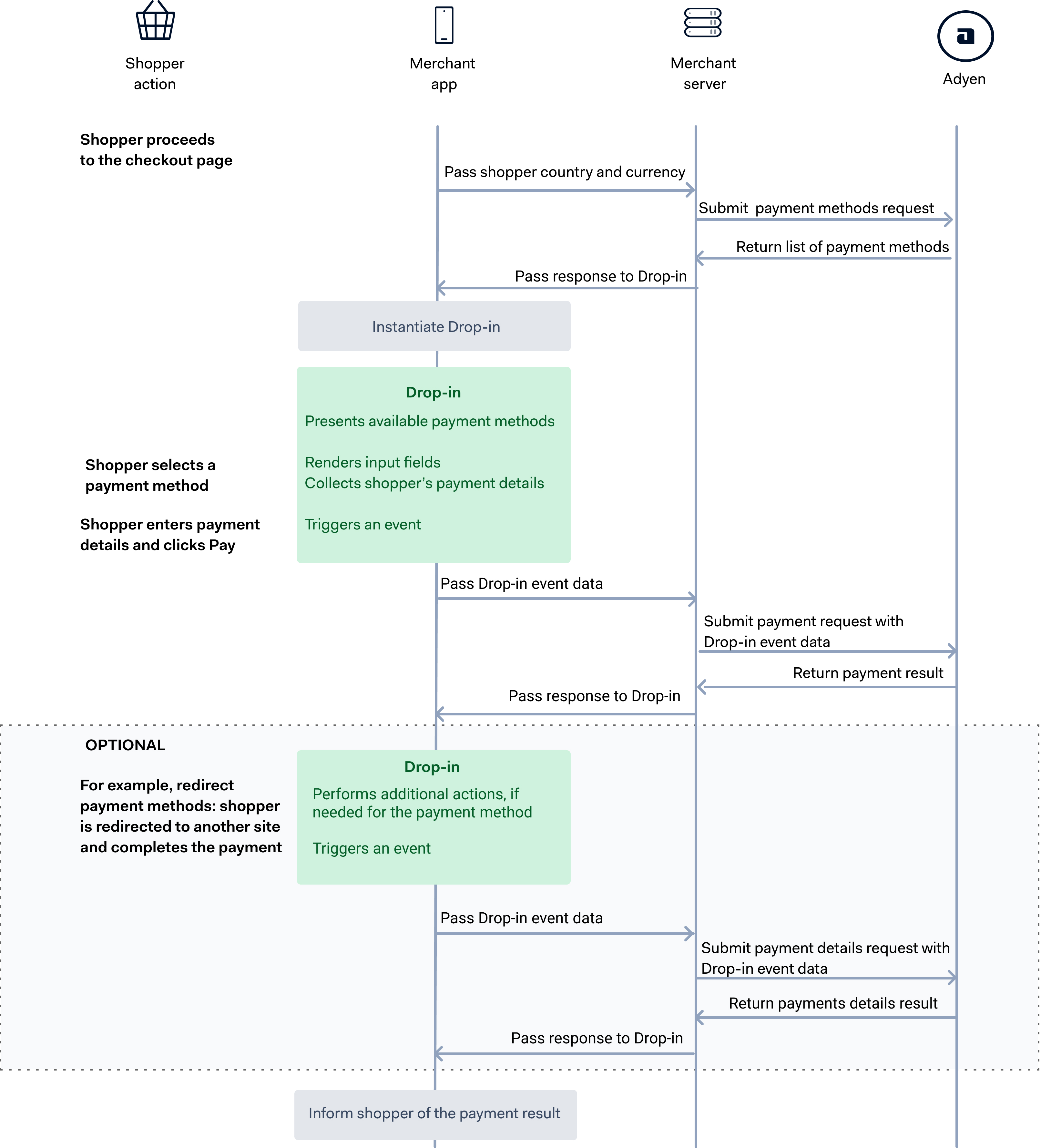 Payment serverClientWebhook server
- Add
github "adyen/adyen-ios"to yourCartfile. - Run
carthage update. - Link the framework with your target as described in Carthage Readme.
Get your client key
You need a client key, a public key linked to your API credential, that the iOS Drop-in uses for client-side authentication.- Log in to your Customer Area.
- Go to Developers > API credentials, and select the API credential for your integration, for example ws@Company.[YourCompanyAccount].
- Under Authentication, select Generate New Client Key.
- Select Save.
How it works
For a Drop-in integration, you must implement the following parts:- Your payment server: sends the API requests to get available payment methods, make a payment, and send additional payment details.
- Your client app: shows the Drop-in UI where the shopper makes the payment. Drop-in uses the data from the API responses to handle the payment flow and additional actions on your client app.
- Your webhook server: receives webhooks that include the outcome of each payment.
- From your server, submit a request to get a list of payment methods available to the shopper.
- Create an instance of Drop-in.
- From your server, submit a payment request with the data returned by Drop-in.
- Determine from the response if you need to perform additional actions on your client app.
- From your server, submit additional payment details with the data returned by Drop-in.
- Get the payment outcome.
Payment server
Go to the integration steps for your server.
Client app
Go to the integration steps for your client app.
Webhook server
Go to the integration steps for your webhook server.
Install Api Library
Install an API library
Payment serverWe provide server-side API libraries for several programming languages, available through common package managers, like Gradle and npm, for easier installation and version management. Our API libraries will save you development time, because they:- Use an API version that is up to date.
- Have generated models to help you construct requests.
- Send the request to Adyen using their built-in HTTP client, so you do not have to create your own.
Try our example integration
Requirements
- Java 11 or later.
Installation
You can use Maven, adding this dependency to your project’s POM.Add the API library<dependency>
<groupId>com.adyen</groupId>
<artifactId>adyen-java-api-library</artifactId>
<version>LATEST_VERSION</version>
</dependency>
Setting up the client
Create a singleton resource that you use for the API requests to Adyen:Set up your client// Import the required classes.
package com.adyen.service;
import com.adyen.Client;
import com.adyen.service.checkout.PaymentsApi;
import com.adyen.model.checkout.Amount;
import com.adyen.enums.Environment;
import com.adyen.service.exception.ApiException;
import java.io.IOException;
public class Snippet {
public Snippet() throws IOException, ApiException {
// Set up the client and service.
Client client = new Client("ADYEN_API_KEY", Environment.TEST);
}
}
Try our example integration
Requirements
- PHP 7.3 or later.
- cURL with SSL support.
- The JSON PHP extension.
- The list of dependencies from the composer require list.
Installation
You can use Composer. Follow the installation instructions if you do not already have composer installed.Install the API librarycomposer require adyen/php-api-library
require __DIR__ . '/vendor/autoload.php';
Set up the client
Create a singleton resource that you use for the API requests to Adyen:Set up your clientuse Adyen\Model\Checkout\Amount;
use Adyen\Model\Checkout\CreateCheckoutSessionRequest;
use Adyen\Service\Checkout\PaymentsApi;
// Include your idempotency key when you make an API request.
$requestOptions['idempotencyKey'] = "YOUR_IDEMPOTENCY_KEY";
// Set up the client and service.
$client = new \Adyen\Client();
$client->setXApiKey('ADYEN_API_KEY');
$client->setEnvironment(\Adyen\Environment::TEST);
$service = new PaymentsApi($client);
Requirements
- .NET standard 2.0 or later.
-
For Terminal API certificate validation, set the application to either of the following:
- .NET core 2.1 or later
- .NET framework 4.6.1 or later
Installation
You can use NuGet:Install the API libraryPM> Install-Package Adyen -Version LATEST_VERSION
Set up the client
Create a singleton resource that you use for the API requests to Adyen:Set up your clientusing Adyen;
using Adyen.Model.Checkout;
using Adyen.Service.Checkout;
using Environment = Adyen.Model.Environment;
class Program
{
static void Main()
{
// Set up the client and service.
var config = new Config
{
XApiKey = "ADYEN_API_KEY",
Environment = Environment.Test
};
var client = new Client(config);
var checkout = new PaymentsService(client);
// Include your idempotency key when you make an API request.
var requestOptions = new Adyen.Model.RequestOptions { IdempotencyKey = "YOUR_IDEMPOTENCY_KEY" };
}
}
Try our example integration
Requirements
- Node.js version 18 or later.
Installation
You can use npm:Install the API librarynpm install --save @adyen/api-library
npm update @adyen/api-library
Setting up the client
Create a singleton resource that you use for the API requests to Adyen:Set up your client// Require the parts of the module you want to use.
const { Client, CheckoutAPI, Types} = require("@adyen/api-library");
// Set up the client and service.
const client = new Client({ apiKey: "ADYEN_API_KEY", environment: "TEST" });
const checkoutApi = new CheckoutAPI(client);
// Include your idempotency key when you make an API request.
const requestOptions = { idempotencyKey: "YOUR_IDEMPOTENCY_KEY" };
Try our example integration
Requirements
- Go 1.13 or later.
Installation
You can use Go modules:Install the API librarygo get github.com/adyen/adyen-go-api-library/vLATEST_VERSION
Set up the client
Create a singleton resource that you use for the API requests to Adyen:Set up your clientpackage main
import (
"github.com/adyen/adyen-go-api-library/vLATEST_VERSION/src/adyen"
"github.com/adyen/adyen-go-api-library/vLATEST_VERSION/src/checkout"
"github.com/adyen/adyen-go-api-library/vLATEST_VERSION/src/common"
)
// Create a payment object.
func main () {
client := adyen.NewClient(&common.Config{
ApiKey: "ADYEN_API_KEY",
Environment: common.TestEnv,
})
service := client.Checkout()
Try our example integration
Requirements
- Python 3.6 or later.
- (Optional) Packages: Requests or PycURL
Installation
You can use pip:Install the API librarypip install Adyen
Set up the client
Create a singleton resource that you use for the API requests to Adyen:Set up your clientimport Adyen
# Set up the client and service.
adyen = Adyen.Adyen()
adyen.client.xapikey = "ADYEN_API_KEY"
adyen.client.platform = "test" # The environment that the library is used in.
Try our example integration
Requirements
- Ruby 2.7 or later.
Installation
You can use RubyGems:Install the API librarygem install adyen-ruby-api-library
bundle install to install dependencies.Set up the client
Create a singleton resource that you use for the API requests to Adyen:Set up your clientrequire 'adyen-ruby-api-library'
# Set up the client and service.
adyen = Adyen::Client.new
adyen.api_key = 'ADYEN_API_KEY'
adyen.env = :test # The environment that the library is used in.
Get available payment methods
Payment serverWhen your shopper is ready to pay, get a list of the available payment methods based on their country, device, and the payment amount.From your server, make a POST /paymentMethods request, providing the following parameters. While most parameters are optional, we recommend that you include them because Adyen uses these to tailor the list of payment methods for your shopper.We use the optional parameters to tailor the list of available payment methods to your shopper.| Parameter name | Required | Description |
|---|---|---|
merchantAccount | | Your merchant account name. |
amount | The currency of the payment and its value in minor units. | |
channel | The platform where the payment is taking place. Use iOS. Adyen returns only the payment methods available for iOS. | |
countryCode | The shopper’s country/region. Adyen returns only the payment methods available in this country. Format: the two-letter ISO-3166-1 alpha-2 country code. Exception: QZ (Kosovo). | |
shopperLocale | By default, the shopperlocale is set to en-US. To change the language, set this to the shopper’s language and country code. You also need to set the same ShopperLocale within your Drop-in configuration. |
curl https://checkout-test.adyen.com/v72/paymentMethods \
-H 'x-api-key: ADYEN_API_KEY' \
-H 'content-type: application/json' \
-d '{
"merchantAccount": "ADYEN_MERCHANT_ACCOUNT",
"countryCode": "NL",
"amount": {
"currency": "EUR",
"value": 1000
},
"channel": "Android",
"shopperLocale": "nl-NL"
}'
// Adyen Java API Library v39.3.0
import com.adyen.Client;
import com.adyen.enums.Environment;
import com.adyen.model.checkout.*;
import java.time.OffsetDateTime;
import java.util.*;
import com.adyen.model.RequestOptions;
import com.adyen.service.checkout.*;
// For the LIVE environment, also include your liveEndpointUrlPrefix.
Client client = new Client("ADYEN_API_KEY", Environment.TEST);
// Create the request object(s)
// Send the request
PaymentsApi service = new PaymentsApi(client);
PaymentMethodsResponse response = service.paymentMethods(paymentMethodsRequest, new RequestOptions().idempotencyKey("UUID"));
// Adyen PHP API Library v19.0.0
use Adyen\Client;
use Adyen\Environment;
use Adyen\Model\Checkout\Amount;
use Adyen\Model\Checkout\PaymentMethodsRequest;
use Adyen\Service\Checkout\PaymentsApi;
$client = new Client();
$client->setXApiKey("ADYEN_API_KEY");
// For the live environment, additionally include your liveEndpointUrlPrefix.
$client->setEnvironment(Environment::TEST);
// Create the request object(s)
$amount = new Amount();
$amount
->setCurrency("EUR")
->setValue(1000);
$paymentMethodsRequest = new PaymentMethodsRequest();
$paymentMethodsRequest
->setAmount($amount)
->setMerchantAccount("ADYEN_MERCHANT_ACCOUNT")
->setCountryCode("NL")
->setChannel("iOS")
->setShopperLocale("nl-NL");
$requestOptions['idempotencyKey'] = 'UUID';
// Send the request
$service = new PaymentsApi($client);
$response = $service->paymentMethods($paymentMethodsRequest, $requestOptions);
// Adyen .net API Library v17.0.0
using Adyen;
using Environment = Adyen.Model.Environment;
using Adyen.Model;
using Adyen.Model.Checkout;
using Adyen.Service.Checkout;
// For the live environment, additionally include your liveEndpointUrlPrefix.
var config = new Config()
{
XApiKey = "ADYEN_API_KEY",
Environment = Environment.Test
};
var client = new Client(config);
// Create the request object(s)
Amount amount = new Amount
{
Currency = "EUR",
Value = 1000
};
PaymentMethodsRequest paymentMethodsRequest = new PaymentMethodsRequest
{
Amount = amount,
MerchantAccount = "ADYEN_MERCHANT_ACCOUNT",
CountryCode = "NL",
Channel = PaymentMethodsRequest.ChannelEnum.IOS,
ShopperLocale = "nl-NL"
};
// Send the request
var service = new PaymentsService(client);
var response = service.PaymentMethods(paymentMethodsRequest, requestOptions: new RequestOptions { IdempotencyKey = "UUID"});
// Adyen Node API Library v18.0.0
// Require the parts of the module you want to use
const { Client, CheckoutAPI } = require('@adyen/api-library');
// Initialize the client object
// For the live environment, additionally include your liveEndpointUrlPrefix.
const client = new Client({apiKey: "ADYEN_API_KEY", environment: "TEST"});
// Create the request object(s)
const paymentMethodsRequest = {
merchantAccount: "ADYEN_MERCHANT_ACCOUNT",
countryCode: "NL",
amount: {
currency: "EUR",
value: 1000
},
channel: "iOS",
shopperLocale: "nl-NL"
}
// Send the request
const checkoutAPI = new CheckoutAPI(client);
const response = checkoutAPI.PaymentsApi.paymentMethods(paymentMethodsRequest, { idempotencyKey: "UUID" });
// Adyen Go API Library v10.4.0
import (
"context"
"github.com/adyen/adyen-go-api-library/v9/src/common"
"github.com/adyen/adyen-go-api-library/v9/src/adyen"
"github.com/adyen/adyen-go-api-library/v9/src/checkout"
)
// For the live environment, additionally include your liveEndpointUrlPrefix.
client := adyen.NewClient(&common.Config{
ApiKey: "ADYEN_API_KEY",
Environment: common.TestEnv,
})
// Create the request object(s)
amount := checkout.Amount{
Currency: "EUR",
Value: 1000,
}
paymentMethodsRequest := checkout.PaymentMethodsRequest{
Amount: &amount,
MerchantAccount: "ADYEN_MERCHANT_ACCOUNT",
CountryCode: common.PtrString("NL"),
Channel: common.PtrString("iOS"),
ShopperLocale: common.PtrString("nl-NL"),
}
// Send the request
service := client.Checkout()
req := service.PaymentsApi.PaymentMethodsInput().IdempotencyKey("UUID").PaymentMethodsRequest(paymentMethodsRequest)
res, httpRes, err := service.PaymentsApi.PaymentMethods(context.Background(), req)
# Adyen Python API Library v12.5.1
import Adyen
adyen = Adyen.Adyen()
adyen.client.xapikey = "ADYEN_API_KEY"
# For the live environment, additionally include your liveEndpointUrlPrefix.
adyen.client.platform = "test" # The environment to use library in.
# Create the request object(s)
json_request = {
"merchantAccount": "ADYEN_MERCHANT_ACCOUNT",
"countryCode": "NL",
"amount": {
"currency": "EUR",
"value": 1000
},
"channel": "iOS",
"shopperLocale": "nl-NL"
}
# Send the request
result = adyen.checkout.payments_api.payment_methods(request=json_request, idempotency_key="UUID")
# Adyen Ruby API Library v9.5.1
require "adyen-ruby-api-library"
adyen = Adyen::Client.new
adyen.api_key = 'ADYEN_API_KEY'
# For the live environment, additionally include your liveEndpointUrlPrefix.
adyen.env = :test # Set to "live" for live environment
# Create the request object(s)
request_body = {
:merchantAccount => 'ADYEN_MERCHANT_ACCOUNT',
:countryCode => 'NL',
:amount => {
:currency => 'EUR',
:value => 1000
},
:channel => 'iOS',
:shopperLocale => 'nl-NL'
}
# Send the request
result = adyen.checkout.payments_api.payment_methods(request_body, headers: { 'Idempotency-Key' => 'UUID' })
// Adyen Node API Library v18.0.0
// Require the parts of the module you want to use
import { Client, CheckoutAPI, Types } from "@adyen/api-library";
// Initialize the client object
// For the live environment, additionally include your liveEndpointUrlPrefix.
const client = new Client({apiKey: "ADYEN_API_KEY", environment: "TEST"});
// Create the request object(s)
const amount: Types.checkout.Amount = {
currency: "EUR",
value: 1000
};
const paymentMethodsRequest: Types.checkout.PaymentMethodsRequest = {
amount: amount,
merchantAccount: "ADYEN_MERCHANT_ACCOUNT",
countryCode: "NL",
channel: Types.checkout.PaymentMethodsRequest.ChannelEnum.IOs,
shopperLocale: "nl-NL"
};
// Send the request
const checkoutAPI = new CheckoutAPI(client);
const response = checkoutAPI.PaymentsApi.paymentMethods(paymentMethodsRequest, { idempotencyKey: "UUID" });
paymentMethods:/paymentMethods response{
"paymentMethods":[
{
"details":[...],
"name":"Cards",
"type":"scheme"
...
},
{
"details":[...],
"name":"SEPA Direct Debit",
"type":"sepadirectdebit"
},
...
]
}
Add Drop In
Add Drop-in to your payment form
Client appNext, use Drop-in to show the available payment methods and to collect payment details from your shopper.-
Decode the /paymentMethods response with the
PaymentMethodsstructure. Decode the /paymentMethods responselet paymentMethods = try JSONDecoder().decode(PaymentMethods.self, from: paymentMethodsResponse) -
Create an instance of
APIContextthat contains to following:Create the APIContextDescription Client key Authenticates requests from your payment environment. Environment setting The environment value that matches the endpoint that your server uses. Use Environment.test for your test environment. // Set the client key and environment in an instance of APIContext. let apiContext = APIContext(clientKey: clientKey, environment: Environment.test) // Set the environment to a live one when going live. -
Create an instance of
AdyenContextthat contains the following:Create the AdyenContextDescription API context Your instance of APIContext.Payment information A Paymentobject with the payment amount and currency.// Create the amount with the value in minor units and the currency code. let amount = Amount(value: 1000, currencyCode: "EUR") // Create the payment object with the amount and country code. let payment = Payment(amount: amount, countryCode: "NL") // Create an instance of AdyenContext, passing the instance of APIContext, and payment object. let adyenContext = AdyenContext(apiContext: apiContext, payment:payment) -
Create a Drop-in configuration object (
DropInComponent.Configuration). You can add the following:The following example shows an optional configuration for cards. Configure Drop-inType of configuration Description Payment method configuration Some payment methods require additional configuration or have optional configuration. Optional configuration You can add optional configuration for Drop-in. let dropInConfiguration = DropInComponent.Configuration() // Some payment methods have additional required or optional configuration. // For example, an optional configuration to show the cardholder name field for cards. dropInConfiguration.card.showsHolderNameField = true -
Initialize Drop-in (
DropInComponent).Initialize Drop-inParameter name Required Description paymentMethodsThe full, decoded /paymentMethods response. contextThe AdyenContextthat you created.paymentMethodsConfigurationFor some payment methods. Configuration for specific payment methods. let dropInComponent = DropInComponent(paymentMethods: paymentMethods, context: adyenContext, configuration: dropInConfiguration) // Keep the instance of Drop-in so that it doesn't get destroyed after the function is executed. self.dropInComponent = dropInComponent // Set self as the delegate. dropInComponent.delegate = self // If you support gift cards, set self as the partial payment delegate. dropInComponent.partialPaymentDelegate = self -
After the shopper selects a payment method and provides payment details, Drop-in invokes the
didSubmitmethod. Get the contents ofdata.paymentMethodand pass this to your server.If an error occurs on the app, Drop-in invokes thefunc didSubmit(_ data: PaymentComponentData, for paymentMethod: PaymentMethod, from component: DropInComponent)didFailmethod. Dismiss Drop-in’s view controller and display an error message.If the shopper decides not to continue with the selected payment method, Drop-in invokes thefunc didFail(with error: Error, from component: DropInComponent)didCancelmethod. You can usedidCancelto track the state of the payment.func didCancel(component: PaymentComponent, from dropInComponent: DropInComponent)
Make a payment
Payment serverWhen the shopper selects the Pay button or chooses to pay with a payment method that requires a redirection, you must make a payment request to Adyen.-
Pass the full data from
didSubmitto your server. -
From your server, make a POST /payments request including the following:
For the following cases, you must include additional parameters in your request:
Parameter name Required Description merchantAccountYour merchant account name. amountThe currencyof the payment and itsvaluein minor units.referenceYour unique reference for this payment. paymentMethodThe complete data.paymentMethodobject from thedidSubmitmethod from your client app. It includes the payment method details and other required information.paymentMethod.sdkDataThe object that includes information collected by Drop-in to track the user’s payment journey, including information like the checkout attempt identifier. This is required to use the Checkout dashboard that lets you analyze your checkout performance. returnUrlThe URL the shopper should be taken back to after a redirection. Use the custom URL for your app, for example, my-app://adyen, to take the shopper back to your app after they complete the payment outside of your app. For more information on setting a custom URL scheme, read the Apple Developer documentation. The URL can contain a maximum of 1024 characters. You can also include your own additional query parameters, for example, shopper ID or order reference number.applicationInfoIf you are building an Adyen solution for multiple merchants, include some basic identifying information, so that we can offer you better support. For more information, refer to Building Adyen solutions. - Integrating some payment methods. For more information, go to payment method integration guides.
- Using our risk management features. For more information, see Required risk fields.
- Native 3D Secure 2 authentication.
- Creating a token to store the shopper’s payment details.
- Using a token to make a recurring payment with stored payment details.
-
Example request to make a payment for EUR 10
curl
curl https://checkout-test.adyen.com/v72/payments \ -H 'x-api-key: ADYEN_API_KEY' \ -H 'content-type: application/json' \ -d '{ "amount":{ "currency":"EUR", "value":1000 }, "reference":"YOUR_ORDER_NUMBER", "paymentMethod":{hint:paymentMethod field of an object passed from your client app}STATE_DATA{/hint}, "returnUrl":"my-app://adyen", "merchantAccount":"ADYEN_MERCHANT_ACCOUNT" }'Java
// Set your ADYEN_API_KEY with the API key from the Customer Area. Client client = new Client(System.getenv("ADYEN_API_KEY"), Environment.TEST); PaymentsApi checkout = new PaymentsApi(client); PaymentRequest paymentRequest = new PaymentRequest(); paymentRequest.setMerchantAccount(System.getenv("MERCHANT_ACCOUNT")); // STATE_DATA is the paymentMethod field of an object passed from your client. String STATE_DATA = "{\n" + " \"type\": \"scheme\",\n" + " \"number\":\"4111111111111111\",\n" + " \"cvc\":\"737\",\n" + " \"expiryMonth\":\"10\",\n" + " \"expiryYear\":\"2020\",\n" + " \"holderName\":\"John Smith\"\n" + "}\n"; // Deserialize the payment method from STATE_DATA. paymentRequest.setPaymentMethod(CheckoutPaymentMethod.fromJson(STATE_DATA)); Amount amount = new Amount(); amount.setCurrency("EUR"); amount.setValue(1000L); paymentRequest.setAmount(amount); paymentRequest.setReference("YOUR_ORDER_NUMBER"); paymentRequest.setReturnUrl("my-app://adyen"); // Add your idempotency key. RequestOptions requestOptions = new RequestOptions(); requestOptions.setIdempotencyKey("YOUR_IDEMPOTENCY_KEY"); PaymentResponse response = checkout.payments(paymentRequest, requestOptions);PHP
// Set ADYEN_API_KEY with the API key from the Customer Area. $client = new \Adyen\Client(); $client->setEnvironment(\Adyen\Environment::TEST); $client->setXApiKey("ADYEN_API_KEY"); $service = new \Adyen\Service\Checkout($client); // STATE_DATA is the paymentMethod field of an object passed from your client app, deserialized from JSON to a data structure. $paymentMethod = STATE_DATA;; $params = array( "paymentMethod" => $paymentMethod, "amount" => array( "currency" => "EUR", "value" => 1000 ), "reference" => "YOUR_ORDER_NUMBER", "returnUrl" => "my-app://adyen", "merchantAccount" => "ADYEN_MERCHANT_ACCOUNT" ); $result = $service->payments($params); // Check if further action is needed if (array_key_exists("action", $result)){ // Pass the action object to your client. // $result["action"] } else { // No further action needed, pass the resultCode to your client. // $result['resultCode'] }C#
// Set ADYEN_API_KEY with the API key from the Customer Area. string apiKey = "ADYEN_API_KEY"; var client = new Client (apiKey, Environment.Test); var checkout = new Checkout(client); var amount = new Adyen.Model.Checkout.Amount("EUR", 1000); var paymentsRequest = new Adyen.Model.Checkout.PaymentRequest { // STATE_DATA is the paymentMethod field of an object passed from your client app, deserialized from JSON to a data structure. PaymentMethod = STATE_DATA, Amount = amount, Reference = "YOUR_ORDER_NUMBER", ReturnUrl = @"my-app://adyen", }; var paymentResponse = checkout.Payments(paymentsRequest);NodeJS (JavaScript)
const {Client, Config, CheckoutAPI} = require('@adyen/api-library'); const config = new Config(); // Set ADYEN_API_KEY with the API key from the Customer Area. config.apiKey = 'ADYEN_API_KEY'; config.merchantAccount = 'ADYEN_MERCHANT_ACCOUNT'; const client = new Client({ config }); client.setEnvironment("TEST"); const checkout = new CheckoutAPI(client); checkout.payments({ merchantAccount: config.merchantAccount, // STATE_DATA is the paymentMethod field of an object passed from the your client app, deserialized from JSON to a data structure. paymentMethod: STATE_DATA, amount: { currency: "EUR", value: 1000, }, reference: "YOUR_ORDER_NUMBER", returnUrl: "my-app://adyen" }).then(res => res);Go
import ( "github.com/adyen/adyen-go-api-library/v5/src/checkout" "github.com/adyen/adyen-go-api-library/v5/src/common" "github.com/adyen/adyen-go-api-library/v5/src/adyen" ) // Set ADYEN_API_KEY with the API key from the Customer Area. client := adyen.NewClient(&common.Config{ Environment: common.TestEnv, ApiKey: "ADYEN_API_KEY", }) // STATE_DATA is the paymentMethod field of an object passed from your client app, deserialized from JSON to a data structure. paymentMethod := STATE_DATA res, httpRes, err := client.Checkout.Payments(&checkout.PaymentRequest{ PaymentMethod: paymentMethod, Amount: checkout.Amount{ Value: 1000, Currency: "EUR", }, Reference: "YOUR_ORDER_NUMBER", ReturnUrl: "my-app://adyen", MerchantAccount: "ADYEN_MERCHANT_ACCOUNT", })Python
# Set ADYEN_API_KEY with the API key from the Customer Area. adyen = Adyen.Adyen() adyen.payment.client.platform = "test" adyen.client.xapikey = 'ADYEN_API_KEY' # STATE_DATA is the paymentMethod field of an object passed from your client app, deserialized from JSON to a data structure. paymentMethod = STATE_DATA result = adyen.checkout.payments({ 'paymentMethod': paymentMethod, 'amount': { 'value': 1000, 'currency': 'EUR' }, 'reference': 'YOUR_ORDER_NUMBER', 'returnUrl': 'my-app://adyen', 'merchantAccount': 'ADYEN_MERCHANT_ACCOUNT' }) # Check if further action is needed if 'action' in result.message: # Pass the action object to your client. # result.message['action'] else: # No further action needed, pass the resultCode to your client. # result.message['resultCode']Ruby
Your next step depends on if the /payments response contains anrequire 'adyen-ruby-api-library' # Set ADYEN_API_KEY with the API key from the Customer Area. adyen = Adyen::Client.new adyen.env = :test adyen.api_key = "ADYEN_API_KEY" # STATE_DATA is the paymentMethod field of an object passed from the front end or client app, deserialized from JSON to a data structure. paymentMethod = STATE_DATA response = adyen.checkout.payments({ :paymentMethod => paymentMethod, :amount => { :currency => 'EUR', :value => 1000 }, :reference => 'YOUR_ORDER_NUMBER', :returnUrl => 'my-app://adyen', :merchantAccount => 'ADYEN_MERCHANT_ACCOUNT' }) # Check if further action is needed. if response.body.has_key(:action) # Pass the action object to your client app. # response.body[:action] else # No further action needed, pass the resultCode object to your client app. # response.body[:resultCode]actionobject:-
If the response has no
actionobject, get the payment outcome. -
If the response contains an
actionobject, handle the additional action. Example response containing an action object for 3D Secure 2 authentication{ "resultCode" : "IdentifyShopper", "action" : { "token" : "eyJkaXJl...", "paymentMethodType" : "scheme", "paymentData" : "Ab02b4c0...", "type" : "threeDS2", "authorisationToken" : "BQABAQ...", "subtype" : "fingerprint" } }
-
If the response has no
Perform Additional Actions
Handle the additional action
Client appSome payment methods require additional action from the shopper. Common examples of additional actions include:- Logging in to a bank’s website or app.
- Authenticating a payment with 3D Secure 2.
- Scanning a QR code.
-
Pass the full
actionobject from your server to your client app. -
Call
dropInComponent.handle(action)to trigger Drop-in to handle the additional action. Use Drop-in to handle the additional actionlet action = try JSONDecoder().decode(Action.self, from: actionData) dropInComponent.handle(action) - Drop-in performs the additional action in your app.
-
You handle the payment data, depending on the value of
action.type.Type action.typevalueRedirect action redirect 3D Secure 2 authentication action threeDS2 QR code action qrCode SDK action sdk Voucher action voucher Await action await
Redirect action
When the /payments response includesaction.type redirect, Drop-in redirects your shopper to another website to complete the payment.-
When the shopper returns to your app, inform Drop-in. To do this, implement the following in your
UIApplicationDelegate:func application(_ app: UIApplication, open url: URL, options: [UIApplicationOpenURLOptionsKey: Any] = [:]) -> Bool { RedirectComponent.applicationDidOpen(from: url) return true } -
After Drop-in completes the additional action, Drop-in invokes the
didProvidemethod. didProvide with action dataIf an error occurs in the app, Drop-in invokes thefunc didProvide(_ data: ActionComponentData, from component: ActionComponent, in dropInComponent: AnyDropInComponent)didFailmethod. Dismiss Drop-in’s view controller and display an error message. didFail with action errorfunc didFail(with error: Error, from component: ActionComponent, in dropInComponent: AnyDropInComponent) -
Get the
datafrom thedidProvidemethod. - Dismiss Drop-in immediately or after the following step.
-
Pass the contents of
datato your server. - Send additional payment details. If the shopper fails to return to your app, you do not get the additional data to send. Instead, wait for the corresponding webhook for the outcome of the payment.
3D Secure 2 authentication action
When the response includesaction.type: threeDS2, the payment qualifies for 3D Secure 2 and it goes through the frictionless or the challenge flow.- Drop-in handles 3D Secure 2 authentication. If a challenge is required, the shopper performs the authentication challenge to complete the payment.
-
After Drop-in completes the additional action, it invokes the
didProvidemethod. didProvide with action dataIf an error occurs in the app, Drop-in invokes thefunc didProvide(_ data: ActionComponentData, from component: ActionComponent, in dropInComponent: AnyDropInComponent)didFailmethod. Dismiss Drop-in’s view controller and display an error message. didFail with action errorfunc didFail(with error: Error, from component: ActionComponent, in dropInComponent: AnyDropInComponent) -
Get the
datafrom thedidProvidemethod. -
Dismiss
dropInComponentnow or after the following step. -
Pass the contents of
datato your server. - Send additional payment details.
QR code action
When the /payments response includesaction.type: qrCode, the shopper must scan a QR code to complete the payment.-
AdyenActionComponentusespresentationDelegateto show the UI for QR code payment. -
Drop-in polls the payment status and, if completed, calls the
didProvidemethod. didProvide with action dataIf an error occurs in the app, Drop-in invokes thefunc didProvide(_ data: ActionComponentData, from component: ActionComponent, in dropInComponent: AnyDropInComponent)didFailmethod. Dismiss Drop-in’s view controller and display an error message. didFail with action errorfunc didFail(with error: Error, from component: ActionComponent, in dropInComponent: AnyDropInComponent) -
Get the
datafrom thedidProvidemethod. -
Dismiss
dropInComponentnow or after the following step. -
Pass the contents of
datato your server. - Send additional payment details.
SDK action
When the /payments response includesaction.type: sdk, the shopper must use the payment method’s app to complete the payment.-
AdyenActionComponenttriggers the app switch from your app to the payment method’s app, if installed in the shopper’s device. -
When the shopper returns to your app, Drop-in invokes the
didProvidemethod. didProvide with action dataIf an error occurs in the app, Drop-in invokes thefunc didProvide(_ data: ActionComponentData, from component: ActionComponent, in dropInComponent: AnyDropInComponent)didFailmethod. Dismiss Drop-in’s view controller and display an error message. didFail with action errorfunc didFail(with error: Error, from component: ActionComponent, in dropInComponent: AnyDropInComponent) -
Get the
datafrom thedidProvidemethod. -
Dismiss
dropInComponentnow or after the following step. -
Pass the contents of
datato your server. - Send additional payment details.
Voucher action
When the /payments response includesaction.type: voucher, the shopper must use a voucher to complete the payment.-
AdyenActionComponentusespresentationDelegateto show the UI for the voucher. - The shopper shares, saves the voucher as an image or, in some cases, adds the voucher to Apple Wallet.
-
When the shopper completes the flow, Drop-in invokes the
didCompletemethod. didProvide with action dataIf an error occurs in the app, Drop-in invokes thefunc didProvide(_ data: ActionComponentData, from component: ActionComponent, in dropInComponent: AnyDropInComponent)didFailmethod. Dismiss Drop-in’s view controller and display an error message. didFail with action errorfunc didFail(with error: Error, from component: ActionComponent, in dropInComponent: AnyDropInComponent) -
Dismiss
dropInComponent. The payment flow in your app is complete.
Await action
When the /payments response includesaction.type: await, the shopper must take an additional action to complete the payment.-
AdyenActionComponentusespresentationDelegateto show the await UI. The shopper continues payment process outside of your app. -
Drop-in polls the payment status and, if completed, calls the
didProvidethedidProvidemethod from theActionComponentDelegate. didProvide with action dataIf an error occurs in the app, Drop-in invokes thefunc didProvide(_ data: ActionComponentData, from component: ActionComponent, in dropInComponent: AnyDropInComponent)didFailmethod. Dismiss Drop-in’s view controller and display an error message. didFail with action errorfunc didFail(with error: Error, from component: ActionComponent, in dropInComponent: AnyDropInComponent) -
Get the
datafrom thedidProvidemethod. -
Dismiss
dropInComponentnow or after the following step. -
Pass the contents of
datato your server. - Send additional payment details.
Submit Additional Details
Send additional payment details
Payment serverIf you handled an additional action, you must send additional payment details.For redirects: if the shopper fails to return to your app, you do not get additional payment details to send. Instead, wait for the corresponding webhook for the outcome of the payment.-
Pass the full
dataobject from thedidProvidemethod to your server. -
From your server, make a POST /payments/details request including the full
dataobject. Example request to send additional payment detailscurl
curl https://checkout-test.adyen.com/v72/payments/details \ -H 'x-api-key: ADYEN_API_KEY' \ -H 'content-type: application/json' \ -d '{hint:object passed from your client app}STATE_DATA{/hint}'Java
// Set your X-API-KEY with the API key from the Customer Area. String xApiKey = "ADYEN_API_KEY"; Client client = new Client(xApiKey,Environment.TEST); Checkout checkout = new Checkout(client); // STATE_DATA is an object passed from your client app, deserialized from JSON to a data structure. PaymentsDetailsRequest paymentsDetailsRequest = STATE_DATA; PaymentsResponse paymentsDetailsResponse = checkout.paymentsDetails(paymentsDetailsRequest);PHP
// Set your X-API-KEY with the API key from the Customer Area. $client = new \Adyen\Client(); $client->setEnvironment(\Adyen\Environment::TEST); $client->setXApiKey("ADYEN_API_KEY"); $service = new \Adyen\Service\Checkout($client); // STATE_DATA is an object passed from your client app, deserialized from JSON to a data structure. $params = STATE_DATA; $result = $service->paymentsDetails($params); // Check if further action is needed. if (array_key_exists("action", $result)){ // Pass the action object to your client. // $result["action"] } else { // No further action needed, pass the resultCode to your client. // $result['resultCode'] }C#
// Set your X-API-KEY with the API key from the Customer Area. string apiKey = "ADYEN_API_KEY"; var client = new Client (apiKey, Environment.Test); var checkout = new Checkout(client); // STATE_DATA is an object passed from the client app, deserialized from JSON to a data structure. var paymentsDetailsRequest = STATE_DATA; var paymentsDetailsResponse = checkout.PaymentDetails(paymentsDetailsRequest);NodeJS (JavaScript)
const {Client, Config, CheckoutAPI} = require('@adyen/api-library'); const config = new Config(); // Set your X-API-KEY with the API key from the Customer Area. config.apiKey = '[ADYEN_API_KEY]'; const client = new Client({ config }); client.setEnvironment("TEST"); const checkout = new CheckoutAPI(client); // STATE_DATA is an object passed from your client app, deserialized from JSON to a data structure. checkout.paymentsDetails(STATE_DATA).then(res => res);Go
import ( "github.com/adyen/adyen-go-api-library/v5/src/checkout" "github.com/adyen/adyen-go-api-library/v5/src/common" "github.com/adyen/adyen-go-api-library/v5/src/adyen" ) // Set your X-API-KEY with the API key from the Customer Area. client := adyen.NewClient(&common.Config{ Environment: common.TestEnv, ApiKey: "[ADYEN_API_KEY]", }) // STATE_DATA is an object passed from your client app, deserialized from JSON to a data structure. req := STATE_DATA; res, httpRes, err := client.Checkout.PaymentsDetails(&req)Python
# Set your X-API-KEY with the API key from the Customer Area. adyen = Adyen.Adyen() adyen.payment.client.platform = "test" adyen.client.xapikey = 'ADYEN_API_KEY' # STATE_DATA is an object passed from your client app, deserialized from JSON to a data structure. request = STATE_DATA result = adyen.checkout.payments_details(request) # Check if further action is needed. if 'action' in result.message: # Pass the action object to your client. # result.message['action'] else: # No further action needed, pass the resultCode to your client. # result.message['resultCode']Ruby
require 'adyen-ruby-api-library' # Set your X-API-KEY with the API key from the Customer Area. adyen = Adyen::Client.new adyen.env = :test adyen.api_key = "ADYEN_API_KEY" # STATE_DATA is an object passed from your client app, deserialized from JSON to a data structure. request = STATE_DATA response = adyen.checkout.payments.details(request) # Check if further action is needed. if response.body.has_key(:action) # Pass the action object to your client puts response.body[:action] else # No further action needed, pass the resultCode to your client puts response.body[:resultCode] end -
Pass the /payments/details response from your server to your client app.
Example response for a successful payment
Example response for a refused payment
{ "pspReference": "NC6HT9CRT65ZGN82", "resultCode": "Authorised" }{ "pspReference": "KHQC5N7G84BLNK43", "refusalReason": "Not enough balance", "resultCode": "Refused" }
Dismiss-Dropin
Dismiss Drop-in
Client appAfter you make a /payments request to submit the payment data or a /payments/details request to send additional details, dismiss Drop-in to finalize the payment flow.CallfinalizeIfNeeded and do the following, depending on what the Drop-in handled:| What to do | |
|---|---|
| Result code | If no further steps are required from the application, dismiss Drop-in. |
| Error | Dismiss Drop-in, and show an error message. |
dropInComponent object:Implement finalizeIfNeeded to dismiss Drop-indropInComponent?.finalizeIfNeeded(with: isSuccessful) { [weak self] in
guard let self else { return }
myCheckoutViewController.dismiss(animated: true) { [weak self] in
// Continue the flow.
}
}
Show Payment Result
Get the payment outcome
After Drop-in finishes the payment flow, you can show the shopper the current payment status. Adyen sends a webhook with the outcome of the payment.Inform the shopper
Client appUse theresultCode to show the shopper the current payment status. This synchronous response doesn’t give you the final outcome of the payment. You get the final payment status in a webhook that you use to update your order management system.Update your order management system
Webhook serverYou get the outcome of each payment asynchronously, in an AUTHORISATION webhook. Use themerchantReference from the webhook to match it to your order reference.For a successful payment, the event contains
success: true.Example webhook for a successful payment{
"live": "false",
"notificationItems":[
{
"NotificationRequestItem":{
"eventCode":"AUTHORISATION",
"merchantAccountCode":"YOUR_MERCHANT_ACCOUNT",
"reason":"033899:1111:03/2030",
"amount":{
"currency":"EUR",
"value":2500
},
"operations":["CANCEL","CAPTURE","REFUND"],
"success":"true",
"paymentMethod":"mc",
"additionalData":{
"expiryDate":"03/2030",
"authCode":"033899",
"cardBin":"411111",
"cardSummary":"1111"
},
"merchantReference":"YOUR_REFERENCE",
"pspReference":"NC6HT9CRT65ZGN82",
"eventDate":"2021-09-13T14:10:22+02:00"
}
}
]
}
success: false, and the reason field has details about why the payment was unsuccessful.Example webhook for an unsuccessful payment{
"live": "false",
"notificationItems":[
{
"NotificationRequestItem":{
"eventCode":"AUTHORISATION",
"merchantAccountCode":"YOUR_MERCHANT_ACCOUNT",
"reason":"validation 101 Invalid card number",
"amount":{
"currency":"EUR",
"value":2500
},
"success":"false",
"paymentMethod":"unknowncard",
"additionalData":{
"expiryDate":"03/2030",
"cardBin":"411111",
"cardSummary":"1112"
},
"merchantReference":"YOUR_REFERENCE",
"pspReference":"KHQC5N7G84BLNK43",
"eventDate":"2021-09-13T14:14:05+02:00"
}
}
]
}
Test and go live
Before going live, use our list of test cards and other payment methods to test your integration. We recommend testing each payment method that you intend to offer to your shoppers.You can check the status of a test payment in your Customer Area, under Transactions > Payments.To debug or troubleshoot test payments, you can also use API logs in your test environment.When you are ready to go live, you need to:- Apply for a live account.
- Assess your PCI DSS compliance, and submit the Self-Assessment Questionnaire-A.
- Configure your live account.
- Switch from test to our live endpoints. Make sure that all API requests you make for the same payment session use the same live endpoint region. Using different regions for /payments and /payments/details requests may result in errors, for example, when authenticating with 3D Secure 2.
-
Load Drop-in from one of our live environments and set the
dropInComponent.environmentto match your live endpoints:Endpoint region environmentvalueEurope liveEurope Australia liveAustralia US liveUnitedStates Northeast Asia liveNea
Error handling
In case you encounter errors in your integration, refer to the following:- API error codes: If you receive a non-HTTP 200 response, use the
errorCodeto troubleshoot and modify your request. - Payment refusals: If you receive an HTTP 200 response with an Error or Refused
resultCode, check the refusal reason and, if possible, modify your request.
Optional configuration
Client appYou can set additional configuration on the Drop-in configuration.| Parameter name | Description |
|---|---|
shopperInformation | Prefilled shopper information. |
localizationParameters | Localization parameters, like custom placeholders in other languages. |
style | Custom styling of the UI. |
Localization
iOS Drop-in supports the languages listed here.To customize a localization, add a newlocalizable.strings file for the language that you need. You can also override existing strings by using the same keys.For example, to override the cardholder name field title, set the following on your localizable.strings file:"adyen.card.nameItem.title" = "Your cardholder name";
localizable.strings file, and then the default Adyen file.You can use LocalizationParameters to customize the localization file name, bundle, or the separator for translation strings.For example, if you store translations in MyLocalizable.strings files in the shared bundle CommonBundle:let localizationParameters = LocalizationParameters(bundle: commonBundle, tableName: "MyLocalizable")
dropInComponent.localizationParameters = localizationParameters
See also
Next steps
Set up notifications
Receive confirmation when a payment is authorised or fails.
Add payment methods
Learn about payment methods and how to add them to your account.
Payment modifications
Find out how to cancel, refund, or capture a payment using our API.
3D Secure authentication
Comply with regulations such as PSD2 SCA in Europe.
iOS Components
Use our customizable UI componentsIntro
Components are our pre-built UI solution for accepting payments in your app. Each Component renders a payment method you can render anywhere in your app. For the Advanced flow, your server makes API requests to the /paymentMethods, /payments, and /payments/details endpoints.Before You Begin
Requirements
Before you begin to integrate, make sure you have followed the Get started with Adyen guide to:- Get an overview of the steps needed to accept live payments.
- Create your test account.
- Get your API key.
- Get your client key.
- Set up webhooks to know the payment outcome.
Install the Adyen iOS client-side library
Choose how you want to install the Adyen iOS client-side library:To install iOS Components using Swift Package Manager, follow the Apple guide and specify:
- The repository URL as
https://github.com/Adyen/adyen-ios - The version to be at least 3.8.0
To install iOS Components from CocoaPods:
- Add
pod 'Adyen'to yourPodfile. - Run
pod install.
To install iOS Components from Carthage:
- Add
github "adyen/adyen-ios"to yourCartfile. - Run
carthage update. - Link the framework with your target as described in Carthage Readme.
Get your client key
You need a client key, a public key linked to your API credential, that the iOS Components use for client-side authentication.- Log in to your Customer Area.
- Go to Developers > API credentials, and select the API credential for your integration, for example ws@Company.[YourCompanyAccount].
- Under Authentication, select Generate New Client Key.
- Select Save.
How it works
For a Components integration, you must implement the following parts:- Your payment server: sends the API requests to get available payment methods, make a payment, and send additional payment details.
- Your client app: shows the the Component UI where the shopper makes the payment. The Component uses the data from the API responses to handle the payment flow and additional actions on your client app.
- Your webhook server: receives webhooks that include the outcome of each payment.
- From your server, submit a request to get a list of payment methods available to the shopper.
- Add Components to your payments form.
- From your server, submit a payment request with the data returned by the Component.
- Determine from the response if you need to perform additional actions on your client app, such as to redirect the shopper.
- From your server, verify the payment result.
- Get the payment outcome.
Payment server
Go to the integration steps for your server.
Client app
Go to the integration steps for your client app.
Webhook server
Go to the integration steps for your webhook server.
Install Api Library
Install an API library
Payment serverWe provide server-side API libraries for several programming languages, available through common package managers, like Gradle and npm, for easier installation and version management. Our API libraries will save you development time, because they:- Use an API version that is up to date.
- Have generated models to help you construct requests.
- Send the request to Adyen using their built-in HTTP client, so you do not have to create your own.
Try our example integration
Requirements
- Java 11 or later.
Installation
You can use Maven, adding this dependency to your project’s POM.Add the API library<dependency>
<groupId>com.adyen</groupId>
<artifactId>adyen-java-api-library</artifactId>
<version>LATEST_VERSION</version>
</dependency>
Setting up the client
Create a singleton resource that you use for the API requests to Adyen:Set up your client// Import the required classes.
package com.adyen.service;
import com.adyen.Client;
import com.adyen.service.checkout.PaymentsApi;
import com.adyen.model.checkout.Amount;
import com.adyen.enums.Environment;
import com.adyen.service.exception.ApiException;
import java.io.IOException;
public class Snippet {
public Snippet() throws IOException, ApiException {
// Set up the client and service.
Client client = new Client("ADYEN_API_KEY", Environment.TEST);
}
}
Try our example integration
Requirements
- PHP 7.3 or later.
- cURL with SSL support.
- The JSON PHP extension.
- The list of dependencies from the composer require list.
Installation
You can use Composer. Follow the installation instructions if you do not already have composer installed.Install the API librarycomposer require adyen/php-api-library
require __DIR__ . '/vendor/autoload.php';
Set up the client
Create a singleton resource that you use for the API requests to Adyen:Set up your clientuse Adyen\Model\Checkout\Amount;
use Adyen\Model\Checkout\CreateCheckoutSessionRequest;
use Adyen\Service\Checkout\PaymentsApi;
// Include your idempotency key when you make an API request.
$requestOptions['idempotencyKey'] = "YOUR_IDEMPOTENCY_KEY";
// Set up the client and service.
$client = new \Adyen\Client();
$client->setXApiKey('ADYEN_API_KEY');
$client->setEnvironment(\Adyen\Environment::TEST);
$service = new PaymentsApi($client);
Requirements
- .NET standard 2.0 or later.
-
For Terminal API certificate validation, set the application to either of the following:
- .NET core 2.1 or later
- .NET framework 4.6.1 or later
Installation
You can use NuGet:Install the API libraryPM> Install-Package Adyen -Version LATEST_VERSION
Set up the client
Create a singleton resource that you use for the API requests to Adyen:Set up your clientusing Adyen;
using Adyen.Model.Checkout;
using Adyen.Service.Checkout;
using Environment = Adyen.Model.Environment;
class Program
{
static void Main()
{
// Set up the client and service.
var config = new Config
{
XApiKey = "ADYEN_API_KEY",
Environment = Environment.Test
};
var client = new Client(config);
var checkout = new PaymentsService(client);
// Include your idempotency key when you make an API request.
var requestOptions = new Adyen.Model.RequestOptions { IdempotencyKey = "YOUR_IDEMPOTENCY_KEY" };
}
}
Try our example integration
Requirements
- Node.js version 18 or later.
Installation
You can use npm:Install the API librarynpm install --save @adyen/api-library
npm update @adyen/api-library
Setting up the client
Create a singleton resource that you use for the API requests to Adyen:Set up your client// Require the parts of the module you want to use.
const { Client, CheckoutAPI, Types} = require("@adyen/api-library");
// Set up the client and service.
const client = new Client({ apiKey: "ADYEN_API_KEY", environment: "TEST" });
const checkoutApi = new CheckoutAPI(client);
// Include your idempotency key when you make an API request.
const requestOptions = { idempotencyKey: "YOUR_IDEMPOTENCY_KEY" };
Try our example integration
Requirements
- Go 1.13 or later.
Installation
You can use Go modules:Install the API librarygo get github.com/adyen/adyen-go-api-library/vLATEST_VERSION
Set up the client
Create a singleton resource that you use for the API requests to Adyen:Set up your clientpackage main
import (
"github.com/adyen/adyen-go-api-library/vLATEST_VERSION/src/adyen"
"github.com/adyen/adyen-go-api-library/vLATEST_VERSION/src/checkout"
"github.com/adyen/adyen-go-api-library/vLATEST_VERSION/src/common"
)
// Create a payment object.
func main () {
client := adyen.NewClient(&common.Config{
ApiKey: "ADYEN_API_KEY",
Environment: common.TestEnv,
})
service := client.Checkout()
Try our example integration
Requirements
- Python 3.6 or later.
- (Optional) Packages: Requests or PycURL
Installation
You can use pip:Install the API librarypip install Adyen
Set up the client
Create a singleton resource that you use for the API requests to Adyen:Set up your clientimport Adyen
# Set up the client and service.
adyen = Adyen.Adyen()
adyen.client.xapikey = "ADYEN_API_KEY"
adyen.client.platform = "test" # The environment that the library is used in.
Try our example integration
Requirements
- Ruby 2.7 or later.
Installation
You can use RubyGems:Install the API librarygem install adyen-ruby-api-library
bundle install to install dependencies.Set up the client
Create a singleton resource that you use for the API requests to Adyen:Set up your clientrequire 'adyen-ruby-api-library'
# Set up the client and service.
adyen = Adyen::Client.new
adyen.api_key = 'ADYEN_API_KEY'
adyen.env = :test # The environment that the library is used in.
Get available payment methods
Payment serverWhen your shopper is ready to pay, get a list of the available payment methods based on their country, device, and the payment amount.From your server, make a POST /paymentMethods request, providing the following parameters. While most parameters are optional, we recommend that you include them because Adyen uses these to tailor the list of payment methods for your shopper.We use the optional parameters to tailor the list of available payment methods to your shopper.| Parameter name | Required | Description |
|---|---|---|
merchantAccount | | Your merchant account name. |
amount | The currency of the payment and its value in minor units. | |
channel | The platform where the payment is taking place. Use iOS. Adyen returns only the payment methods available for iOS. | |
countryCode | The shopper’s country/region. Adyen returns only the payment methods available in this country. Format: the two-letter ISO-3166-1 alpha-2 country code. Exception: QZ (Kosovo). | |
shopperLocale | Language and country code. By default, the shopper locale is set to en-US. If this is provided, the payment method names are translated to the specified language. |
curl https://checkout-test.adyen.com/v72/paymentMethods \
-H 'x-api-key: ADYEN_API_KEY' \
-H 'content-type: application/json' \
-d '{
"merchantAccount": "ADYEN_MERCHANT_ACCOUNT",
"countryCode": "NL",
"amount": {
"currency": "EUR",
"value": 1000
},
"channel": "Android",
"shopperLocale": "nl-NL"
}'
// Adyen Java API Library v39.3.0
import com.adyen.Client;
import com.adyen.enums.Environment;
import com.adyen.model.checkout.*;
import java.time.OffsetDateTime;
import java.util.*;
import com.adyen.model.RequestOptions;
import com.adyen.service.checkout.*;
// For the LIVE environment, also include your liveEndpointUrlPrefix.
Client client = new Client("ADYEN_API_KEY", Environment.TEST);
// Create the request object(s)
// Send the request
PaymentsApi service = new PaymentsApi(client);
PaymentMethodsResponse response = service.paymentMethods(paymentMethodsRequest, new RequestOptions().idempotencyKey("UUID"));
// Adyen PHP API Library v19.0.0
use Adyen\Client;
use Adyen\Environment;
use Adyen\Model\Checkout\Amount;
use Adyen\Model\Checkout\PaymentMethodsRequest;
use Adyen\Service\Checkout\PaymentsApi;
$client = new Client();
$client->setXApiKey("ADYEN_API_KEY");
// For the live environment, additionally include your liveEndpointUrlPrefix.
$client->setEnvironment(Environment::TEST);
// Create the request object(s)
$amount = new Amount();
$amount
->setCurrency("EUR")
->setValue(1000);
$paymentMethodsRequest = new PaymentMethodsRequest();
$paymentMethodsRequest
->setAmount($amount)
->setMerchantAccount("ADYEN_MERCHANT_ACCOUNT")
->setCountryCode("NL")
->setChannel("iOS")
->setShopperLocale("nl-NL");
$requestOptions['idempotencyKey'] = 'UUID';
// Send the request
$service = new PaymentsApi($client);
$response = $service->paymentMethods($paymentMethodsRequest, $requestOptions);
// Adyen .net API Library v17.0.0
using Adyen;
using Environment = Adyen.Model.Environment;
using Adyen.Model;
using Adyen.Model.Checkout;
using Adyen.Service.Checkout;
// For the live environment, additionally include your liveEndpointUrlPrefix.
var config = new Config()
{
XApiKey = "ADYEN_API_KEY",
Environment = Environment.Test
};
var client = new Client(config);
// Create the request object(s)
Amount amount = new Amount
{
Currency = "EUR",
Value = 1000
};
PaymentMethodsRequest paymentMethodsRequest = new PaymentMethodsRequest
{
Amount = amount,
MerchantAccount = "ADYEN_MERCHANT_ACCOUNT",
CountryCode = "NL",
Channel = PaymentMethodsRequest.ChannelEnum.IOS,
ShopperLocale = "nl-NL"
};
// Send the request
var service = new PaymentsService(client);
var response = service.PaymentMethods(paymentMethodsRequest, requestOptions: new RequestOptions { IdempotencyKey = "UUID"});
// Adyen Node API Library v18.0.0
// Require the parts of the module you want to use
const { Client, CheckoutAPI } = require('@adyen/api-library');
// Initialize the client object
// For the live environment, additionally include your liveEndpointUrlPrefix.
const client = new Client({apiKey: "ADYEN_API_KEY", environment: "TEST"});
// Create the request object(s)
const paymentMethodsRequest = {
merchantAccount: "ADYEN_MERCHANT_ACCOUNT",
countryCode: "NL",
amount: {
currency: "EUR",
value: 1000
},
channel: "iOS",
shopperLocale: "nl-NL"
}
// Send the request
const checkoutAPI = new CheckoutAPI(client);
const response = checkoutAPI.PaymentsApi.paymentMethods(paymentMethodsRequest, { idempotencyKey: "UUID" });
// Adyen Go API Library v10.4.0
import (
"context"
"github.com/adyen/adyen-go-api-library/v9/src/common"
"github.com/adyen/adyen-go-api-library/v9/src/adyen"
"github.com/adyen/adyen-go-api-library/v9/src/checkout"
)
// For the live environment, additionally include your liveEndpointUrlPrefix.
client := adyen.NewClient(&common.Config{
ApiKey: "ADYEN_API_KEY",
Environment: common.TestEnv,
})
// Create the request object(s)
amount := checkout.Amount{
Currency: "EUR",
Value: 1000,
}
paymentMethodsRequest := checkout.PaymentMethodsRequest{
Amount: &amount,
MerchantAccount: "ADYEN_MERCHANT_ACCOUNT",
CountryCode: common.PtrString("NL"),
Channel: common.PtrString("iOS"),
ShopperLocale: common.PtrString("nl-NL"),
}
// Send the request
service := client.Checkout()
req := service.PaymentsApi.PaymentMethodsInput().IdempotencyKey("UUID").PaymentMethodsRequest(paymentMethodsRequest)
res, httpRes, err := service.PaymentsApi.PaymentMethods(context.Background(), req)
# Adyen Python API Library v12.5.1
import Adyen
adyen = Adyen.Adyen()
adyen.client.xapikey = "ADYEN_API_KEY"
# For the live environment, additionally include your liveEndpointUrlPrefix.
adyen.client.platform = "test" # The environment to use library in.
# Create the request object(s)
json_request = {
"merchantAccount": "ADYEN_MERCHANT_ACCOUNT",
"countryCode": "NL",
"amount": {
"currency": "EUR",
"value": 1000
},
"channel": "iOS",
"shopperLocale": "nl-NL"
}
# Send the request
result = adyen.checkout.payments_api.payment_methods(request=json_request, idempotency_key="UUID")
# Adyen Ruby API Library v9.5.1
require "adyen-ruby-api-library"
adyen = Adyen::Client.new
adyen.api_key = 'ADYEN_API_KEY'
# For the live environment, additionally include your liveEndpointUrlPrefix.
adyen.env = :test # Set to "live" for live environment
# Create the request object(s)
request_body = {
:merchantAccount => 'ADYEN_MERCHANT_ACCOUNT',
:countryCode => 'NL',
:amount => {
:currency => 'EUR',
:value => 1000
},
:channel => 'iOS',
:shopperLocale => 'nl-NL'
}
# Send the request
result = adyen.checkout.payments_api.payment_methods(request_body, headers: { 'Idempotency-Key' => 'UUID' })
// Adyen Node API Library v18.0.0
// Require the parts of the module you want to use
import { Client, CheckoutAPI, Types } from "@adyen/api-library";
// Initialize the client object
// For the live environment, additionally include your liveEndpointUrlPrefix.
const client = new Client({apiKey: "ADYEN_API_KEY", environment: "TEST"});
// Create the request object(s)
const amount: Types.checkout.Amount = {
currency: "EUR",
value: 1000
};
const paymentMethodsRequest: Types.checkout.PaymentMethodsRequest = {
amount: amount,
merchantAccount: "ADYEN_MERCHANT_ACCOUNT",
countryCode: "NL",
channel: Types.checkout.PaymentMethodsRequest.ChannelEnum.IOs,
shopperLocale: "nl-NL"
};
// Send the request
const checkoutAPI = new CheckoutAPI(client);
const response = checkoutAPI.PaymentsApi.paymentMethods(paymentMethodsRequest, { idempotencyKey: "UUID" });
paymentMethods:/paymentMethods response{
"paymentMethods":[
{
"details":[...],
"name":"Cards",
"type":"scheme"
...
},
{
"details":[...],
"name":"SEPA Direct Debit",
"type":"sepadirectdebit"
},
...
]
}
Add Components
Add Components to your payment form
Client appUse the Component to collect payment details from your shopper.-
Decode the /paymentMethods response with the
PaymentMethodsstructure. Find the payment method object for the Component that you want to instantiate. For example, for a card payment, you need to find theCardPaymentMethodobject. Decode the payment methods responseGet the payment method from the payment methods object. For example, the card payment method: Get the payment methodlet paymentMethods = try JSONDecoder().decode(PaymentMethods.self, from: paymentMethodsResponse)let cardPaymentMethod = paymentMethods.paymentMethod(ofType: CardPaymentMethod.self)
-
Create an instance of
APIContextthat contains to following:Create the APIContextDescription Client key Authenticates requests from your payment environment. Environment setting The environment value that matches the endpoint that your server uses. Use Environment.test for your test environment. // Set the client key and environment in an instance of APIContext. let apiContext = APIContext(clientKey: clientKey, environment: Environment.test) // Set the environment to a live one when going live.
-
Create an instance of
AdyenContextthat contains the following:Create the AdyenContextDescription API context Your instance of APIContext.Payment information A Paymentobject with the payment amount and currency.// Create the amount with the value in minor units and the currency code. let amount = Amount(value: 1000, currencyCode: "EUR") // Create the payment object with the amount and country code. let payment = Payment(amount: amount, countryCode: "NL") // Create an instance of AdyenContext, passing the instance of APIContext, and payment object. let adyenContext = AdyenContext(apiContext: apiContext, payment: payment)
-
Create a configuration object. You can add the following:
The following example shows creating a configuration object for the Card Component. Configure the Component
Type of configuration Description Payment method configuration Some payment methods require additional configuration or have optional configuration. Optional configuration You can add optional configuration to each component. let cardConfiguration = CardComponent.Configuration() // Some payment methods have additional required or optional configuration. // For example, an optional configuration to show the cardholder name field for cards. cardConfiguration.showsHolderNameField = true
-
Initialize the Component class.
The following example shows initializing an instance of
Parameter name Required Description paymentMethodThe full, decoded /paymentMethods response. contextThe AdyenContextthat you created.configurationThe configuration object that you created. CardComponent. Initialize the Componentlet cardComponent = CardComponent(paymentMethod: cardPaymentMethod, context: adyenContext, configuration: cardConfiguration) // Keep the instance of the Component so that it doesn't get destroyed after the function is executed. self.cardComponent = cardComponent // Set self as the delegate. cardComponent.delegate = self -
Get the contents of
data.paymentMethodand pass this to your server. Dismiss the Component immediately, or wait until you have submitted the details to your server. didSubmit with payment method dataIn case an error occurs on the app, the Component invokes thefunc didSubmit(_ data: PaymentComponentData, from component: PaymentComponent)didFailmethod from thePaymentComponentDelegate. Dismiss the Component’s view controller and display an error message. didFail with an errorfunc didFail(with error: Error, from component: PaymentComponent)
Make a payment
Payment serverWhen the shopper selects the Pay button or chooses to pay with a payment method that requires a redirection, you must make a payment request to Adyen.-
Pass the full data from
didSubmitto your server. -
From your server, make a POST /payments request including the following:
For the following cases, you must include additional parameters in your request:
Parameter name Required Description merchantAccountYour merchant account name. amountThe currencyof the payment and itsvaluein minor units.referenceYour unique reference for this payment. paymentMethodThe complete data.paymentMethodobject from thedidSubmitmethod from your client app. It includes the payment method details and other required information.paymentMethod.sdkDataThe object that includes information collected by the Component to track the user’s payment journey, including information like the checkout attempt identifier. This is required to use the Checkout dashboard that lets you analyze your checkout performance. returnUrlThe URL the shopper should be taken back to after a redirection. Use the custom URL for your app, for example, my-app://adyen, to take the shopper back to your app after they complete the payment outside of your app. For more information on setting a custom URL scheme, read the Apple Developer documentation. The URL can contain a maximum of 1024 characters. You can also include your own additional query parameters, for example, shopper ID or order reference number.applicationInfoIf you are building an Adyen solution for multiple merchants, include some basic identifying information, so that we can offer you better support. For more information, refer to Building Adyen solutions. - Integrating some payment methods. For more information, go to payment method integration guides.
- Using our risk management features. For more information, see Required risk fields.
- Native 3D Secure 2 authentication.
- Creating a token to store the shopper’s payment details.
- Using a token to make a recurring payment with stored payment details.
-
Example request to make a payment for EUR 10
curl
curl https://checkout-test.adyen.com/v72/payments \ -H 'x-api-key: ADYEN_API_KEY' \ -H 'content-type: application/json' \ -d '{ "amount":{ "currency":"EUR", "value":1000 }, "reference":"YOUR_ORDER_NUMBER", "paymentMethod":{hint:paymentMethod field of an object passed from your client app}STATE_DATA{/hint}, "returnUrl":"my-app://adyen", "merchantAccount":"ADYEN_MERCHANT_ACCOUNT" }'Java
// Set your ADYEN_API_KEY with the API key from the Customer Area. Client client = new Client(System.getenv("ADYEN_API_KEY"), Environment.TEST); PaymentsApi checkout = new PaymentsApi(client); PaymentRequest paymentRequest = new PaymentRequest(); paymentRequest.setMerchantAccount(System.getenv("MERCHANT_ACCOUNT")); // STATE_DATA is the paymentMethod field of an object passed from your client. String STATE_DATA = "{\n" + " \"type\": \"scheme\",\n" + " \"number\":\"4111111111111111\",\n" + " \"cvc\":\"737\",\n" + " \"expiryMonth\":\"10\",\n" + " \"expiryYear\":\"2020\",\n" + " \"holderName\":\"John Smith\"\n" + "}\n"; // Deserialize the payment method from STATE_DATA. paymentRequest.setPaymentMethod(CheckoutPaymentMethod.fromJson(STATE_DATA)); Amount amount = new Amount(); amount.setCurrency("EUR"); amount.setValue(1000L); paymentRequest.setAmount(amount); paymentRequest.setReference("YOUR_ORDER_NUMBER"); paymentRequest.setReturnUrl("my-app://adyen"); // Add your idempotency key. RequestOptions requestOptions = new RequestOptions(); requestOptions.setIdempotencyKey("YOUR_IDEMPOTENCY_KEY"); PaymentResponse response = checkout.payments(paymentRequest, requestOptions);PHP
// Set ADYEN_API_KEY with the API key from the Customer Area. $client = new \Adyen\Client(); $client->setEnvironment(\Adyen\Environment::TEST); $client->setXApiKey("ADYEN_API_KEY"); $service = new \Adyen\Service\Checkout($client); // STATE_DATA is the paymentMethod field of an object passed from your client app, deserialized from JSON to a data structure. $paymentMethod = STATE_DATA;; $params = array( "paymentMethod" => $paymentMethod, "amount" => array( "currency" => "EUR", "value" => 1000 ), "reference" => "YOUR_ORDER_NUMBER", "returnUrl" => "my-app://adyen", "merchantAccount" => "ADYEN_MERCHANT_ACCOUNT" ); $result = $service->payments($params); // Check if further action is needed if (array_key_exists("action", $result)){ // Pass the action object to your client. // $result["action"] } else { // No further action needed, pass the resultCode to your client. // $result['resultCode'] }C#
// Set ADYEN_API_KEY with the API key from the Customer Area. string apiKey = "ADYEN_API_KEY"; var client = new Client (apiKey, Environment.Test); var checkout = new Checkout(client); var amount = new Adyen.Model.Checkout.Amount("EUR", 1000); var paymentsRequest = new Adyen.Model.Checkout.PaymentRequest { // STATE_DATA is the paymentMethod field of an object passed from your client app, deserialized from JSON to a data structure. PaymentMethod = STATE_DATA, Amount = amount, Reference = "YOUR_ORDER_NUMBER", ReturnUrl = @"my-app://adyen", }; var paymentResponse = checkout.Payments(paymentsRequest);NodeJS (JavaScript)
const {Client, Config, CheckoutAPI} = require('@adyen/api-library'); const config = new Config(); // Set ADYEN_API_KEY with the API key from the Customer Area. config.apiKey = 'ADYEN_API_KEY'; config.merchantAccount = 'ADYEN_MERCHANT_ACCOUNT'; const client = new Client({ config }); client.setEnvironment("TEST"); const checkout = new CheckoutAPI(client); checkout.payments({ merchantAccount: config.merchantAccount, // STATE_DATA is the paymentMethod field of an object passed from the your client app, deserialized from JSON to a data structure. paymentMethod: STATE_DATA, amount: { currency: "EUR", value: 1000, }, reference: "YOUR_ORDER_NUMBER", returnUrl: "my-app://adyen" }).then(res => res);Go
import ( "github.com/adyen/adyen-go-api-library/v5/src/checkout" "github.com/adyen/adyen-go-api-library/v5/src/common" "github.com/adyen/adyen-go-api-library/v5/src/adyen" ) // Set ADYEN_API_KEY with the API key from the Customer Area. client := adyen.NewClient(&common.Config{ Environment: common.TestEnv, ApiKey: "ADYEN_API_KEY", }) // STATE_DATA is the paymentMethod field of an object passed from your client app, deserialized from JSON to a data structure. paymentMethod := STATE_DATA res, httpRes, err := client.Checkout.Payments(&checkout.PaymentRequest{ PaymentMethod: paymentMethod, Amount: checkout.Amount{ Value: 1000, Currency: "EUR", }, Reference: "YOUR_ORDER_NUMBER", ReturnUrl: "my-app://adyen", MerchantAccount: "ADYEN_MERCHANT_ACCOUNT", })Python
# Set ADYEN_API_KEY with the API key from the Customer Area. adyen = Adyen.Adyen() adyen.payment.client.platform = "test" adyen.client.xapikey = 'ADYEN_API_KEY' # STATE_DATA is the paymentMethod field of an object passed from your client app, deserialized from JSON to a data structure. paymentMethod = STATE_DATA result = adyen.checkout.payments({ 'paymentMethod': paymentMethod, 'amount': { 'value': 1000, 'currency': 'EUR' }, 'reference': 'YOUR_ORDER_NUMBER', 'returnUrl': 'my-app://adyen', 'merchantAccount': 'ADYEN_MERCHANT_ACCOUNT' }) # Check if further action is needed if 'action' in result.message: # Pass the action object to your client. # result.message['action'] else: # No further action needed, pass the resultCode to your client. # result.message['resultCode']Ruby
Your next step depends on if the /payments response contains anrequire 'adyen-ruby-api-library' # Set ADYEN_API_KEY with the API key from the Customer Area. adyen = Adyen::Client.new adyen.env = :test adyen.api_key = "ADYEN_API_KEY" # STATE_DATA is the paymentMethod field of an object passed from the front end or client app, deserialized from JSON to a data structure. paymentMethod = STATE_DATA response = adyen.checkout.payments({ :paymentMethod => paymentMethod, :amount => { :currency => 'EUR', :value => 1000 }, :reference => 'YOUR_ORDER_NUMBER', :returnUrl => 'my-app://adyen', :merchantAccount => 'ADYEN_MERCHANT_ACCOUNT' }) # Check if further action is needed. if response.body.has_key(:action) # Pass the action object to your client app. # response.body[:action] else # No further action needed, pass the resultCode object to your client app. # response.body[:resultCode]actionobject:-
If the response has no
actionobject, get the payment outcome. -
If the response contains an
actionobject, handle the additional action. Example response containing an action object for 3D Secure 2 authentication{ "resultCode" : "IdentifyShopper", "action" : { "token" : "eyJkaXJl...", "paymentMethodType" : "scheme", "paymentData" : "Ab02b4c0...", "type" : "threeDS2", "authorisationToken" : "BQABAQ...", "subtype" : "fingerprint" } }
-
If the response has no
Perform Additional Actions
Handle the additional action
Client appSome payment methods require additional action from the shopper. Common examples of additional actions include:- Logging in to a bank’s website or app.
- Authenticating a payment with 3D Secure 2.
- Scanning a QR code.
AdyenActionComponent and the action object from the API response to handle the action.-
Pass the full
actionobject from your server to your client app. -
Create and persist instance of
AdyenActionComponent. AdyenActionComponentinternal lazy var actionComponent: AdyenActionComponent = { let component = AdyenActionComponent(apiContext: apiContext) component.delegate = self component.presentationDelegate = self return component }() -
Use it to handle the action.
Handle the action
let action = try JSONDecoder().decode(Action.self, from: actionData) actionComponent.handle(action) -
AdyenActionComponentperforms the additional action in your app. -
You handle the payment data, depending on the value of
action.type.Type action.typevalueRedirect action redirect 3D Secure 2 authentication action threeDS2 QR code action qrCode SDK action sdk Voucher action voucher Await action await
Redirect action
When the /payments response includesaction.type redirect, the Component redirects your shopper to another website to complete the payment.-
When the shopper returns to your app, inform
AdyenActionComponent. To do this, implement the following in yourUIApplicationDelegate:func application(_ app: UIApplication, open url: URL, options: [UIApplicationOpenURLOptionsKey: Any] = [:]) -> Bool { RedirectComponent.applicationDidOpen(from: url) return true } -
After the Redirect Component (under the hood of
AdyenActionComponent) completes the additional action, the Component invokes thedidProvidemethod from theActionComponentDelegate. didProvide with action dataIf an error occurs in the app, the Component invokes thefunc didProvide(_ data: ActionComponentData, from component: ActionComponent)didFailmethod from theActionComponentDelegate. Dismiss the Component’s view controller and show an error message in your app. didFail with action errorfunc didFail(with error: Error, from component: ActionComponent) -
Get the
datafrom thedidProvidemethod. - Dismiss the Component immediately or after the following step.
-
Pass the contents of
datato your server. - Send additional payment details. If the shopper fails to return to your app, you do not get the additional data to send. Instead, wait for the corresponding webhook for the outcome of the payment.
3D Secure 2 authentication action
When the response includesaction.type: threeDS2, the payment qualifies for 3D Secure 2 and it goes through the frictionless or the challenge flow.- The Component handles 3D Secure 2 authentication. If a challenge is required, the shopper performs the authentication challenge to complete the payment.
-
After the Component completes the additional action, it invokes the
didProvidemethod from theActionComponentDelegate. didProvide with action dataIf an error occurs in the app, the Component invokes thefunc didProvide(_ data: ActionComponentData, from component: ActionComponent)didFailmethod from theActionComponentDelegate. Dismiss the Component’s view controller and show an error message in your app. didFail with action errorfunc didFail(with error: Error, from component: ActionComponent) -
Get the
datafrom thedidProvidemethod. - Dismiss current component now or after the following step.
-
Pass the contents of
datato your server. - Send additional payment details.
QR code action
When the /payments response includesaction.type: qrCode, the shopper must scan a QR code to complete the payment.-
AdyenActionComponentusespresentationDelegateto show the UI for QR code payment. -
The Component polls the payment status and, if completed, calls the
didProvidemethod from theActionComponentDelegate. didProvide with action dataIf an error occurs in the app, the Component invokes thefunc didProvide(_ data: ActionComponentData, from component: ActionComponent)didFailmethod from theActionComponentDelegate. Dismiss the Component’s view controller and show an error message in your app. didFail with action errorfunc didFail(with error: Error, from component: ActionComponent) -
Get the
datafrom thedidProvidemethod. - Dismiss current component now or after the following step.
-
Pass the contents of
datato your server. - Send additional payment details.
SDK action
When the /payments response includesaction.type: sdk, the shopper must use the payment method’s app to complete the payment.-
AdyenActionComponenttriggers the app switch from your app to the payment method’s app, if installed in the shopper’s device. -
When the shopper returns to your app, the Component invokes the
didProvidemethod from theActionComponentDelegate. didProvide with action dataIf an error occurs in the app, the Component invokes thefunc didProvide(_ data: ActionComponentData, from component: ActionComponent)didFailmethod from theActionComponentDelegate. Dismiss the Component’s view controller and show an error message in your app. didFail with action errorfunc didFail(with error: Error, from component: ActionComponent) -
Get the
datafrom thedidProvidemethod. - Dismiss current component now or after the following step.
-
Pass the contents of
datato your server. - Send additional payment details.
Voucher action
When the /payments response includesaction.type: voucher, the shopper must use a voucher to complete the payment.-
AdyenActionComponentusespresentationDelegateto show the UI for the voucher. - The shopper shares, saves the voucher as an image or, in some cases, adds the voucher to Apple Wallet.
-
When the shopper completes the flow, the Component invokes the
didCompletemethod from theActionComponentDelegate. didProvide with action dataIf an error occurs in the app, the Component invokes thefunc didProvide(_ data: ActionComponentData, from component: ActionComponent)didFailmethod from theActionComponentDelegate. Dismiss the Component’s view controller and show an error message in your app. didFail with action errorfunc didFail(with error: Error, from component: ActionComponent) - Dismiss current component. The payment flow in your app is complete.
Await action
When the /payments response includesaction.type: await, the shopper must take an additional action to complete the payment.-
AdyenActionComponentusespresentationDelegateto show the await UI. The shopper continues payment process outside of your app. -
The Component polls the payment status and, if completed, calls the
didProvidethedidProvidemethod from theActionComponentDelegate. didProvide with action dataIf an error occurs in the app, the Component invokes thefunc didProvide(_ data: ActionComponentData, from component: ActionComponent)didFailmethod from theActionComponentDelegate. Dismiss the Component’s view controller and show an error message in your app. didFail with action errorfunc didFail(with error: Error, from component: ActionComponent) -
Get the
datafrom thedidProvidemethod. - Dismiss current component now or after the following step.
-
Pass the contents of
datato your server. - Send additional payment details.
Submit Additional Details
Send additional payment details
Payment serverIf you handled an additional action, you must send additional payment details.For redirects: if the shopper fails to return to your app, you do not get additional payment details to send. Instead, wait for the corresponding webhook for the outcome of the payment.-
Pass the full
dataobject from thedidProvidemethod to your server. -
From your server, make a POST /payments/details request including the full
dataobject. Example request to send additional payment detailscurl
curl https://checkout-test.adyen.com/v72/payments/details \ -H 'x-api-key: ADYEN_API_KEY' \ -H 'content-type: application/json' \ -d '{hint:object passed from your client app}STATE_DATA{/hint}'Java
// Set your X-API-KEY with the API key from the Customer Area. String xApiKey = "ADYEN_API_KEY"; Client client = new Client(xApiKey,Environment.TEST); Checkout checkout = new Checkout(client); // STATE_DATA is an object passed from your client app, deserialized from JSON to a data structure. PaymentsDetailsRequest paymentsDetailsRequest = STATE_DATA; PaymentsResponse paymentsDetailsResponse = checkout.paymentsDetails(paymentsDetailsRequest);PHP
// Set your X-API-KEY with the API key from the Customer Area. $client = new \Adyen\Client(); $client->setEnvironment(\Adyen\Environment::TEST); $client->setXApiKey("ADYEN_API_KEY"); $service = new \Adyen\Service\Checkout($client); // STATE_DATA is an object passed from your client app, deserialized from JSON to a data structure. $params = STATE_DATA; $result = $service->paymentsDetails($params); // Check if further action is needed. if (array_key_exists("action", $result)){ // Pass the action object to your client. // $result["action"] } else { // No further action needed, pass the resultCode to your client. // $result['resultCode'] }C#
// Set your X-API-KEY with the API key from the Customer Area. string apiKey = "ADYEN_API_KEY"; var client = new Client (apiKey, Environment.Test); var checkout = new Checkout(client); // STATE_DATA is an object passed from the client app, deserialized from JSON to a data structure. var paymentsDetailsRequest = STATE_DATA; var paymentsDetailsResponse = checkout.PaymentDetails(paymentsDetailsRequest);NodeJS (JavaScript)
const {Client, Config, CheckoutAPI} = require('@adyen/api-library'); const config = new Config(); // Set your X-API-KEY with the API key from the Customer Area. config.apiKey = '[ADYEN_API_KEY]'; const client = new Client({ config }); client.setEnvironment("TEST"); const checkout = new CheckoutAPI(client); // STATE_DATA is an object passed from your client app, deserialized from JSON to a data structure. checkout.paymentsDetails(STATE_DATA).then(res => res);Go
import ( "github.com/adyen/adyen-go-api-library/v5/src/checkout" "github.com/adyen/adyen-go-api-library/v5/src/common" "github.com/adyen/adyen-go-api-library/v5/src/adyen" ) // Set your X-API-KEY with the API key from the Customer Area. client := adyen.NewClient(&common.Config{ Environment: common.TestEnv, ApiKey: "[ADYEN_API_KEY]", }) // STATE_DATA is an object passed from your client app, deserialized from JSON to a data structure. req := STATE_DATA; res, httpRes, err := client.Checkout.PaymentsDetails(&req)Python
# Set your X-API-KEY with the API key from the Customer Area. adyen = Adyen.Adyen() adyen.payment.client.platform = "test" adyen.client.xapikey = 'ADYEN_API_KEY' # STATE_DATA is an object passed from your client app, deserialized from JSON to a data structure. request = STATE_DATA result = adyen.checkout.payments_details(request) # Check if further action is needed. if 'action' in result.message: # Pass the action object to your client. # result.message['action'] else: # No further action needed, pass the resultCode to your client. # result.message['resultCode']Ruby
require 'adyen-ruby-api-library' # Set your X-API-KEY with the API key from the Customer Area. adyen = Adyen::Client.new adyen.env = :test adyen.api_key = "ADYEN_API_KEY" # STATE_DATA is an object passed from your client app, deserialized from JSON to a data structure. request = STATE_DATA response = adyen.checkout.payments.details(request) # Check if further action is needed. if response.body.has_key(:action) # Pass the action object to your client puts response.body[:action] else # No further action needed, pass the resultCode to your client puts response.body[:resultCode] end -
Pass the /payments/details response from your server to your client app.
Example response for a successful payment
Example response for a refused payment
{ "pspReference": "NC6HT9CRT65ZGN82", "resultCode": "Authorised" }{ "pspReference": "KHQC5N7G84BLNK43", "refusalReason": "Not enough balance", "resultCode": "Refused" }
Dismiss-Component
Dismiss the Component
Client appAfter you make a /payments request to submit the payment data or a /payments/details request to send additional details, dismiss the Component to finalize the payment flow.CallfinalizeIfNeeded and do the following, depending on what the Component handled:| What to do | |
|---|---|
| Result code | If no further steps are required from the application, dismiss the Component. |
| Error | Dismiss the Component, and show an error message. |
currentComponent object:Implement finalizeIfNeeded to dismiss the ComponentcurrentComponent?.finalizeIfNeeded(with: isSuccessful) { [weak self] in
guard let self else { return }
myCheckoutViewController.dismiss(animated: true) { [weak self] in
// Continue the flow.
}
}
Show Payment Result
Get the payment outcome
After the Component finishes the payment flow, you can show the shopper the current payment status. Adyen sends a webhook with the outcome of the payment.Inform the shopper
Client appUse theresultCode to show the shopper the current payment status. This synchronous response doesn’t give you the final outcome of the payment. You get the final payment status in a webhook that you use to update your order management system.Update your order management system
Webhook serverYou get the outcome of each payment asynchronously, in an AUTHORISATION webhook. Use themerchantReference from the webhook to match it to your order reference.For a successful payment, the event contains
success: true.Example webhook for a successful payment{
"live": "false",
"notificationItems":[
{
"NotificationRequestItem":{
"eventCode":"AUTHORISATION",
"merchantAccountCode":"YOUR_MERCHANT_ACCOUNT",
"reason":"033899:1111:03/2030",
"amount":{
"currency":"EUR",
"value":2500
},
"operations":["CANCEL","CAPTURE","REFUND"],
"success":"true",
"paymentMethod":"mc",
"additionalData":{
"expiryDate":"03/2030",
"authCode":"033899",
"cardBin":"411111",
"cardSummary":"1111"
},
"merchantReference":"YOUR_REFERENCE",
"pspReference":"NC6HT9CRT65ZGN82",
"eventDate":"2021-09-13T14:10:22+02:00"
}
}
]
}
success: false, and the reason field has details about why the payment was unsuccessful.Example webhook for an unsuccessful payment{
"live": "false",
"notificationItems":[
{
"NotificationRequestItem":{
"eventCode":"AUTHORISATION",
"merchantAccountCode":"YOUR_MERCHANT_ACCOUNT",
"reason":"validation 101 Invalid card number",
"amount":{
"currency":"EUR",
"value":2500
},
"success":"false",
"paymentMethod":"unknowncard",
"additionalData":{
"expiryDate":"03/2030",
"cardBin":"411111",
"cardSummary":"1112"
},
"merchantReference":"YOUR_REFERENCE",
"pspReference":"KHQC5N7G84BLNK43",
"eventDate":"2021-09-13T14:14:05+02:00"
}
}
]
}
Test and go live
Before going live, use our list of test cards and other payment methods to test your integration. We recommend testing each payment method that you intend to offer to your shoppers.You can check the status of a test payment in your Customer Area, under Transactions > Payments.To debug or troubleshoot test payments, you can also use API logs in your test environment.When you are ready to go live, you need to:- Apply for a live account.
- Assess your PCI DSS compliance, and submit the Self-Assessment Questionnaire-A.
- Configure your live account.
- Switch from test to our live endpoints. Make sure that all API requests you make for the same payment session use the same live endpoint region. Using different regions for /payments and /payments/details requests may result in errors, for example, when authenticating with 3D Secure 2.
-
Load the Components from one of our live environments and set the Component’s
environmentto match your live endpoints:Endpoint region environmentvalueEurope liveEurope Australia liveAustralia US liveUnitedStates Northeast Asia liveNea
Error handling
In case you encounter errors in your integration, refer to the following:- API error codes: If you receive a non-HTTP 200 response, use the
errorCodeto troubleshoot and modify your request. - Payment refusals: If you receive an HTTP 200 response with an Error or Refused
resultCode, check the refusal reason and, if possible, modify your request.
Optional configuration
Client appYou can set additional configuration on the Component configuration.| Parameter name | Description |
|---|---|
showsSubmitButton | Set to false to hide the default pay button, so that you can implement a custom button instead. Default: true. |
shopperInformation | Prefilled shopper information. |
localizationParameters | Localization parameters, like custom placeholders in other languages. |
style | Custom styling of the UI. |
// Create a configuration object for the Component.
let cardComponentConfiguration = CardComponent.Configuration()
// Optional: create a configuration object for styling.
let style = FormComponentStyle()
// Set the background color.
style.backgroundColor = .darkGray
// Set the style on the configuration object.
cardComponentConfiguration.style = style
Implement a custom pay button
To implement a custom pay button, hide the default one and use the included functions to validate and submit payment data.This is not supported for Apple Pay and BACS Direct Debit.- When you create the configuration object, set
showsSubmitButtonto false. - Initialize the Component.
- You can optionally show a confirmation page to the shopper, where payment data is validated.
- Create and show your custom button.
| Function | Required | Description |
|---|---|---|
validate() | Validates the payment data. | |
submit() | | Makes a /payments request to submit the payment data. |
class CardPaymentViewController: UIViewController {
// The instance of CardComponent for handling card payments.
var cardComponent: CardComponent?
// The function to configure and initialize an instance of CardComponent.
func setupCardComponent() {
// 1. Hide the default submit button in the CardComponent configuration.
var cardComponentConfiguration = CardComponent.Configuration(showsSubmitButton: false)
// 2. Decode the payment method response and get the card payment method.
let paymentMethods = try JSONDecoder().decode(PaymentMethods.self, from: paymentMethodsResponse)
let paymentMethod = paymentMethods.paymentMethod(ofType: CardPaymentMethod.self) else {
// If no valid payment method is found, exit setup.
return
}
// 3. Initialize the CardComponent with the payment method, context, and configuration.
cardComponent = CardComponent(paymentMethod: paymentMethod,
context: adyenContext,
configuration: cardComponentConfiguration)
// 4. Set the delegate to handle CardComponent callbacks.
self.cardComponent = cardComponent
cardComponent.delegate = self
}
override func viewDidLoad() {
super.viewDidLoad()
// 5. Create your custom button for starting the payment.
let customSubmitButton = UIButton(frame: .zero)
customSubmitButton.setTitle("Pay Now", for: .normal)
customSubmitButton.backgroundColor = .systemBlue
customSubmitButton.layer.cornerRadius = 8
customSubmitButton.addTarget(self, action: #selector(startPayment), for: .touchUpInside)
// 6. Configure and initialize an instance of CardComponent.
setupCardComponent()
// 7. If the instance of CardComponent successfully initialized, add its view to the view hierarchy.
if let cardView = cardComponent?.viewController.view {
view.addSubview(cardView)
// Optional: set constraints or position cardView.
}
// 8. Add your custom pay button to the view hierarchy.
view.addSubview(customSubmitButton)
// 9. Optional: set constraints or change the position of your custom submit button.
// 10. Optional: configure additional UI elements or the layout.
view.backgroundColor = .white
}
// The action that is triggered when the shopper selects your custom button.
@objc func startPayment() {
// 11. Validate the payment details that the shopper entered.
if cardComponent?.validate() == true {
// 12. If validation is successful, submit the payment.
cardComponent?.submit()
} else {
// 13. If validation is unsuccessful, handle validation errors. For example, show an error message to the user.
print("Validation failed. Please check your card details.")
}
}
}
Localization
iOS Components support the languages listed here.To customize a localization, add a newlocalizable.strings file for the language that you need. You can also override existing strings by using the same keys.For example, to override the cardholder name field title, set the following on your localizable.strings file:"adyen.card.nameItem.title" = "Your cardholder name";
localizable.strings file, and then the default Adyen file.You can use LocalizationParameters to customize the localization file name, bundle, or the separator for translation strings.For example, if you store translations in MyLocalizable.strings files in the shared bundle CommonBundle:let localizationParameters = LocalizationParameters(bundle: commonBundle, tableName: "MyLocalizable")
cardComponentConfiguration.localizationParameters = localizationParameters
See also
Next steps
Set up notifications
Receive confirmation when a payment is authorised or fails.
Add payment methods
Learn about payment methods and how to add them to your account.
Payment modifications
Find out how to cancel, refund, or capture a payment using our API.
3D Secure authentication
Comply with regulations such as PSD2 SCA in Europe.
iOS API only
Use Adyen APIs and your own UIIntro
With an API-only integration, you create your own UI, implement your own client-side logic, and use our API to send and receive payment data. You have full control over the look and feel of your checkout page.To reduce your development time and resources, you can use one of our pre-built UI options (Drop-in/Components) instead.Before You Begin
Requirements
Before you build your integration, take into account the following requirements and preparations.| Requirement | Description |
|---|---|
| API credential roles | Make sure that you have the following role: Checkout webservice role |
| Customer Area roles | Make sure that you have one of the following roles: Merchant admin role Manage API credentials |
| Webhooks | Subscribe to the following webhook: Standard webhooks |
| Limitations | Your PCI compliance assesment determines your integration options for card payments. For 3D Secure 2 authentication for shoppers using Chrome, your cookies must use the SameSite attribute. |
| Setup steps | Before you begin: Create your Adyen test account Get your API key. Get your client key. Set up webhooks. If you want to process payments using raw card data, contact your Adyen Account Manager to confirm that you are eligible. |
How it works
For an API-only integration, you must implement the following parts:- Your payment server: sends the API requests to get available payment methods, make a payment, and send additional payment details.
- Your client: shows your custom UI where the shopper makes the payment. Passes data to and receives data from your payment server to handle the payment flow and additional actions on your client.
- Your webhook server: receives webhooks that include the outcome of each payment.
Integration steps
The parts of your integration work together to handle the payment flow:- From your server, make an API request to get a list of payment methods available to the shopper.
- Show the payment form to collect the shopper’s payment details in your UI.
- From your server, make a payment request with the data that you have collected from the shopper.
- For some payment methods, you use your client to handle the additional action that your shopper must do. For example, you redirect your shopper to another website or show a QR code that the shopper uses to complete the payment.
- From your server, send additional payment details.
- Get the payment outcome.
Payment server
Go to the integration steps for your server.
Client website or app
Go to the integration steps for your client.
Webhook server
Go to the integration steps for your webhook server.
Install Api Library
Install an API library
Payment serverWe provide server-side API libraries for several programming languages, available through common package managers, like Gradle and npm, for easier installation and version management. Our API libraries will save you development time, because they:- Use an API version that is up to date.
- Have generated models to help you construct requests.
- Send the request to Adyen using their built-in HTTP client, so you do not have to create your own.
Try our example integration
Requirements
- Java 11 or later.
Installation
You can use Maven, adding this dependency to your project’s POM.Add the API library<dependency>
<groupId>com.adyen</groupId>
<artifactId>adyen-java-api-library</artifactId>
<version>LATEST_VERSION</version>
</dependency>
Setting up the client
Create a singleton resource that you use for the API requests to Adyen:Set up your client// Import the required classes.
package com.adyen.service;
import com.adyen.Client;
import com.adyen.service.checkout.PaymentsApi;
import com.adyen.model.checkout.Amount;
import com.adyen.enums.Environment;
import com.adyen.service.exception.ApiException;
import java.io.IOException;
public class Snippet {
public Snippet() throws IOException, ApiException {
// Set up the client and service.
Client client = new Client("ADYEN_API_KEY", Environment.TEST);
}
}
Try our example integration
Requirements
- PHP 7.3 or later.
- cURL with SSL support.
- The JSON PHP extension.
- The list of dependencies from the composer require list.
Installation
You can use Composer. Follow the installation instructions if you do not already have composer installed.Install the API librarycomposer require adyen/php-api-library
require __DIR__ . '/vendor/autoload.php';
Set up the client
Create a singleton resource that you use for the API requests to Adyen:Set up your clientuse Adyen\Model\Checkout\Amount;
use Adyen\Model\Checkout\CreateCheckoutSessionRequest;
use Adyen\Service\Checkout\PaymentsApi;
// Include your idempotency key when you make an API request.
$requestOptions['idempotencyKey'] = "YOUR_IDEMPOTENCY_KEY";
// Set up the client and service.
$client = new \Adyen\Client();
$client->setXApiKey('ADYEN_API_KEY');
$client->setEnvironment(\Adyen\Environment::TEST);
$service = new PaymentsApi($client);
Requirements
- .NET standard 2.0 or later.
-
For Terminal API certificate validation, set the application to either of the following:
- .NET core 2.1 or later
- .NET framework 4.6.1 or later
Installation
You can use NuGet:Install the API libraryPM> Install-Package Adyen -Version LATEST_VERSION
Set up the client
Create a singleton resource that you use for the API requests to Adyen:Set up your clientusing Adyen;
using Adyen.Model.Checkout;
using Adyen.Service.Checkout;
using Environment = Adyen.Model.Environment;
class Program
{
static void Main()
{
// Set up the client and service.
var config = new Config
{
XApiKey = "ADYEN_API_KEY",
Environment = Environment.Test
};
var client = new Client(config);
var checkout = new PaymentsService(client);
// Include your idempotency key when you make an API request.
var requestOptions = new Adyen.Model.RequestOptions { IdempotencyKey = "YOUR_IDEMPOTENCY_KEY" };
}
}
Try our example integration
Requirements
- Node.js version 18 or later.
Installation
You can use npm:Install the API librarynpm install --save @adyen/api-library
npm update @adyen/api-library
Setting up the client
Create a singleton resource that you use for the API requests to Adyen:Set up your client// Require the parts of the module you want to use.
const { Client, CheckoutAPI, Types} = require("@adyen/api-library");
// Set up the client and service.
const client = new Client({ apiKey: "ADYEN_API_KEY", environment: "TEST" });
const checkoutApi = new CheckoutAPI(client);
// Include your idempotency key when you make an API request.
const requestOptions = { idempotencyKey: "YOUR_IDEMPOTENCY_KEY" };
Try our example integration
Requirements
- Go 1.13 or later.
Installation
You can use Go modules:Install the API librarygo get github.com/adyen/adyen-go-api-library/vLATEST_VERSION
Set up the client
Create a singleton resource that you use for the API requests to Adyen:Set up your clientpackage main
import (
"github.com/adyen/adyen-go-api-library/vLATEST_VERSION/src/adyen"
"github.com/adyen/adyen-go-api-library/vLATEST_VERSION/src/checkout"
"github.com/adyen/adyen-go-api-library/vLATEST_VERSION/src/common"
)
// Create a payment object.
func main () {
client := adyen.NewClient(&common.Config{
ApiKey: "ADYEN_API_KEY",
Environment: common.TestEnv,
})
service := client.Checkout()
Try our example integration
Requirements
- Python 3.6 or later.
- (Optional) Packages: Requests or PycURL
Installation
You can use pip:Install the API librarypip install Adyen
Set up the client
Create a singleton resource that you use for the API requests to Adyen:Set up your clientimport Adyen
# Set up the client and service.
adyen = Adyen.Adyen()
adyen.client.xapikey = "ADYEN_API_KEY"
adyen.client.platform = "test" # The environment that the library is used in.
Try our example integration
Requirements
- Ruby 2.7 or later.
Installation
You can use RubyGems:Install the API librarygem install adyen-ruby-api-library
bundle install to install dependencies.Set up the client
Create a singleton resource that you use for the API requests to Adyen:Set up your clientrequire 'adyen-ruby-api-library'
# Set up the client and service.
adyen = Adyen::Client.new
adyen.api_key = 'ADYEN_API_KEY'
adyen.env = :test # The environment that the library is used in.
Get available payment methods
Payment serverWhen the shopper goes to your checkout page, get a list of the available payment methods to show the shopper.-
From your server, make a POST /paymentMethods request including the following parameters:
The information that you include is used to filter the list of available payment methods. Example for a shopper in the Netherlands and a payment amount of 10 EUR
Parameter name Required Description merchantAccountYour merchant account name. amountAn object with the following parameters: currency: The three-character ISO currency code.value: The value of the payment in minor units.channeliOS countryCodeThe shopper’s country/region. Format: the two-letter ISO-3166-1 alpha-2 country code. Exception: QZ (Kosovo). shopperLocaleLanguage and country code. This is used to translate the payment methods names in the response. Default value: en-US. The response includes the list of available payment methods, in thecurl https://checkout-test.adyen.com/v72/paymentMethods \ -H 'x-api-key: ADYEN_API_KEY' \ -H 'content-type: application/json' \ -d '{ "merchantAccount": "ADYEN_MERCHANT_ACCOUNT", "countryCode": "NL", "amount": { "currency": "EUR", "value": 1000 }, "channel": "iOS", "shopperLocale": "nl-NL" }'paymentMethodsobject. The payment methods are ordered by popularity in the shopper’s country. For each payment method, the response contains:Example response with available payment methodsParameter name Description nameThe name of the payment method that you can show in your payment form. typeThe unique payment method code. You must include this when you make a payment. { "paymentMethods":[ { "name": "Cards", "type": "scheme" }, { "name":"SEPA Direct Debit", "type":"sepadirectdebit" } ] } - Pass the list of available payment methods and the required input fields for each payment method to your client.
Collect Shopper Details
Build your payment form
Client website or appCreate your payment form where the shopper enters their information. We recommend that you collect commonly-used shopper information in your payment form to process a transactions, depending on your type of business.Some payment methods require you to collect, or optionally accept, additional information that you include in the payment request. For the additional information you must collect in your payment form for an individual payment method, go to our API-only guide for the individual payment method.We provide payment method and issuer logos that you can download and use in your payment form.
Credit and debit card details
Because governing bodies and organizations regulate the handling of credit and debit card information strictly, you must make sure that you are compliant when collecting card details. When a shopper selects to pay with a card, use the integration option that corresponds to your level of PCI compliance:- (Recommended) Adyen’s Custom Card Component with encryption: our pre-built UI with logic to securely encrypt and handle payment card data.
- Your own UI and logic to collect and handle raw card data: before you build an integration that collects raw credit and debit card data, you must assess your PCI compliance according to the most extensive self-assessment form and contact your Adyen Account Manager to confirm that you are eligible.
Information in the payment form
After collecting information in your payment form, you must add it to corresponding API parameters that you include in the payment request.For example, for commonly-used information:| Field in the payment form | API request parameter |
|---|---|
| First name | shopperName.firstName |
| Last name | shopperName.lastName |
| Email address | shopperEmail |
| Billing address (multiple fields) | billingAddress (object) |
| Shipping address (multiple fields) | deliveryAddress (object) |
| Phone number | telephoneNumber |
Downloading Logos
**Downloading logos
If you are building your own UI, we provide payment method and issuing bank logos that you can use on your checkout page. The images are available in PNG format with different sizes and screen resolutions and in SVG format.If you cannot find a payment method or issuer logo, contact our Support Team.Payment method logos
Download the images from the links below, specifying:-
img-size: Specify the size for PNG format. Use the following values:- small: Image size 40x26 pixels
- medium: Image size 77x50 pixels
- large: Image size 154 x 100 pixels
-
suffix: Specify the image density for PNG format. If not specified, the images will have the same size as theimg-size. Append any of the following values:@2x@3x-ldpi-hdpi-xhdpi-xxhdpi-xxxhdpi
-
pm-type: ThepaymentMethods.typereturned in the/paymentMethodsresponse. For example, googlepay or primeiropay_boleto. For cards, the values you should use are specified underbrandswithtype: scheme. For example,mc,visa, andamex. To get a generic card logo, setpm-typeto card.
https://checkoutshopper-live.cdn.adyen.com/checkoutshopper/images/logos/[pm-type].svg
https://checkoutshopper-live.cdn.adyen.com/checkoutshopper/images/logos/[img-size]/[pm-type][suffix].png
https://checkoutshopper-live.adyen.com/checkoutshopper/images/logos/mc.svg
https://checkoutshopper-live.adyen.com/checkoutshopper/images/logos/large/googlepay@2x.png
Issuing bank logos
Some payment methods such as iDEAL present a list of issuing banks to the shopper.Download the issuing bank logos from the links below, specifying:-
img-size: Specify the size for PNG format. Use the following values:- small: Image size 40x26 pixels
- medium: Image size 77x50 pixels
- large: Image size 154 x 100 pixels
-
suffix: Specify the image density for PNG format. If not specified, the images will have the same size as theimg-size. Append any of the following values:@2x@3x-ldpi-hdpi-xhdpi-xxhdpi-xxxhdpi
-
pm-type: ThepaymentMethods.typein objects withdetails.keyissuer returned in the/paymentMethodsresponse. For example, ideal. -
issuerid: Thedetails.items.idreferring to the issuing bank. For example, 1121 and 1151 for iDEAL.
https://checkoutshopper-live.cdn.adyen.com/checkoutshopper/images/logos/[pm-type]/[issuerid].svg
https://checkoutshopper-live.cdn.adyen.com/checkoutshopper/images/logos/[img-size]/[pm-type]/[issuerid][suffix].png
https://checkoutshopper-live.adyen.com/checkoutshopper/images/logos/ideal/1121.svg
https://checkoutshopper-live.adyen.com/checkoutshopper/images/logos/small/ideal/1151-xxhdpi.png
Make a payment
Payment serverAfter the shopper selects the Pay button or chooses to pay with a payment method that requires a redirection, you must make a payment request to Adyen.- Pass the data from your client to your server.
-
From your server, make a POST /payments request including the following parameters:
For the following cases, you must include additional parameters in your request:
Parameter name Required Description merchantAccountYour merchant account name. amountAn object with the following parameters: currency: The three-character ISO currency code.value: The value of the payment in minor units.referenceYour unique reference for this payment. paymentMethod.typeThe payment method type. From the /paymentMethodsresponse, this is the value inpaymentMethod.type.returnUrlThe URL where the shopper should return to after a redirection. Use the custom URL scheme for your app. Example: com.mydomain.adyencheckout://Format:
Maximum 1024 characters. If it includes non-ASCII characters, such as spaces or special letters, URL encode it. You can include your own additional query parameters, such as a shopper ID or order reference number. The URL must not include personally identifiable information (PII), for example name or email address.applicationInfoIf you are a technology partner, service partner, or system integrator, send information about the application, so that we can offer you more support. - Integrating some payment methods. For more information, go to payment method integration guides.
- Using our risk management features. For more information, go to data quality and risk field reference.
- Creating a token to store the shopper’s payment details.
- Using a token to make a recurring payment with stored payment details.
curl https://checkout-test.adyen.com/v72/payments \ -H 'x-api-key: ADYEN_API_KEY' \ -H 'content-type: application/json' \ -d '{ "merchantAccount":"ADYEN_MERCHANT_ACCOUNT", "paymentMethod":{ "type": "scheme", "encryptedCardNumber": "test_4111111111111111", "encryptedExpiryMonth": "test_03", "encryptedExpiryYear": "test_2030", "encryptedSecurityCode": "test_737" }, "amount":{ "currency":"EUR", "value":1000 }, "reference":"YOUR_ORDER_NUMBER", "returnUrl":"com.mydomain.adyencheckout://" }'
-
Your next step depends on if the /payments response contains an
actionobject:-
If the response has no
actionobject, get the payment outcome. -
If the response contains an
actionobject, handle the additional action. Example response containing an action object for 3D Secure 2 authentication{ "resultCode" : "IdentifyShopper", "action" : { "token" : "eyJkaXJl...", "paymentMethodType" : "scheme", "paymentData" : "Ab02b4c0...", "type" : "threeDS2", "authorisationToken" : "BQABAQ...", "subtype" : "fingerprint" } }
-
If the response has no
Perform Additional Actions
Handle the additional action
Client website or appSome payment methods require additional action from the shopper. Common examples of additional actions include:- Logging in to a bank’s website or app.
- Authenticating a payment with 3D Secure 2.
- Scanning a QR code.
action.type):| Type | action.type value |
|---|---|
| Redirect action | redirect |
| 3D Secure 2 authentication action | threeDS2 |
| QR code action | qrCode |
| SDK action | sdk |
| Voucher action | voucher |
| Await action | await |
Redirect action
When the /payments response includesaction.type redirect, redirect the shopper to another site to complete the payment.How you handle the redirect depends on if it is a payment method redirect or a 3D Secure 2 redirect.Example /payments response for a payment method redirect
{
"action": {
"method": "GET",
"paymentData": "Ab02b4c0!BQ..",
"paymentMethodType": "ideal",
"type": "redirect",
"url": "https://test.adyen.com/hpp/redirectIdeal.shtml?brandCode=ideal¤cyCode=EUR&issuerId=1121..."
}
}
-
From the /payments response, get the following:
Parameter Description action.urlThe URL to redirect the shopper to. -
Redirect the shopper to the
action.urlwith the HTTP GET method, where they finish the payment. Example to redirect the shoppercurl https://test.adyen.com/hpp/redirectIdeal.shtml?brandCode=ideal¤cyCode=EUR&issuerId=1121... \ -
When the shopper finishes the payment on the other website, they are returned to your
returnUrlwith the HTTP GET method. ThereturnUrlis appended with a Base64-encodedredirectResult. Redirect result appended to the return URLGET /?shopperOrder=12xy..&&redirectResult=X6XtfGC3%21Y... HTTP/1.1 Host: www.your-company.example.com/checkout -
URL-decode the
redirectResultvalue. If a shopper completed the payment but failed to return to your client, you will receive the outcome of the payment in a webhook event. - Send additional payment details to finish the payment flow.
Example /payments response for a 3D Secure 2 redirectThe response includes information about the current payment status.Example response for a successful paymentExample response for a refused payment
For a successful payment, the event containsFor an unsuccessful payment, you get 
{
"resultCode":"RedirectShopper",
"action":{
"data":{
"MD":"OEVudmZVMUlkWjd0MDNwUWs2bmhSdz09...",
"PaReq":"eNpVUttygjAQ/RXbDyAXBYRZ00HpTH3wUosPfe...",
"TermUrl":""
},
"method":"POST",
"paymentData":"Ab02b4c0!BQABAgCJN1wRZuGJmq8dMncmypvknj9s7l5Tj...",
"paymentMethodType":"scheme",
"type":"redirect",
"url":"https://test.adyen.com/hpp/3d/validate.shtml"
},
"details":[
{
"key":"MD",
"type":"text"
},
{
"key":"PaRes",
"type":"text"
}
]
}
-
From the /payments response, get the following from the
actionobject:Parameter Description urlThe URL to redirect the shopper to. methodThe method to use to redirect the shopper: POST. dataAn object with the following data required for authentication: MDPaRes -
Redirect the shopper to the
urlwith the POST HTTP method, including the following data:Example of a redirect to a 3D Secure 2 URLcurl https://checkoutshopper-test.adyen.com/checkoutshopper/threeDS/checkoutRedirect/... \ --data-urlencode 'PaReq=eNpVUttygjAQ/RXbDyAXBYRZ00HpTH3wUosPfe...' \ --data-urlencode 'MD=OEVudmZVMUlkWjd0MDNwUWs2bmhSdz09...' -
The shopper finishes 3D Secure 2 authentication on an issuer website. In the test environment, this is the page:
https://test.adyen.com/hpp/3d/validate.shtml, and you perform the authentication using the 3D Secure test credentials:- Username: user
- Password: password
-
The shopper is returned to your
returnUrlwith the same HTTP method. ThereturnUrlis appended withMDandPaRes. Example of a 3D Secure 2 redirect back to you with MD and PaResPOST / HTTP/1.1 Host: www.your-company.example.com/checkout?shopperOrder=12xy.. Content-Type: application/x-www-form-urlencoded MD=Ab02b4c0%21BQABAgCW5sxB4e%2F%3D%3D..&PaRes=eNrNV0mTo7gS.. -
URL-decode the
MDandPaResvalues. - Send additional payment details to finish the payment flow.
3D Secure 2 authentication action
When the /payments response includesaction.type: threeDS2Fingerprint or threeDS2Challenge, the payment qualifies for 3D Secure 2 and it goes through the frictionless or the challenge flow. Use one of our 3D Secure 2 solutions to handle the action.QR code action
When the /payments response includesaction.type: qrCode, the shopper must scan a QR code to complete the payment.Example /payments response with a QR code action for WeChat Pay desktop{
"resultCode": "Pending",
"action": {
"paymentData": "Ab02b4c0!BQAB..",
"paymentMethodType": "wechatpayQR",
"qrCodeData": "weixin://wxpay/bizpayurl?pr=IM7BCOW",
"type": "qrCode"
}
}
-
From the /payments response, get the following:
Parameter Description action.qrCodeDataContains the URL for the QR code. -
Get the
qrCodeDatafrom theactionobject. This parameter contains a URL for the QR code. - Show the QR code to the shopper.
- The shopper scans the QR code.
- Send additional payment details to finish the payment flow.
SDK action
When the /payments response includesaction.type: sdk, the shopper must use another UI overlay to complete the payment. For example, a payment method requires the shopper to use its specific UI to enter payment details.Example /payments response with an SDK action for WeChat Pay{
"resultCode": "Pending",
"action": {
"paymentMethodType": "wechatpaySDK",
"type": "sdk",
"paymentData": "Ab02b4c0!BQAB..",
"sdkData": {
"appid": "wx3aed7fe146f6a57a",
"noncestr": "cPY0e83ny4hWyf5O",
"packageValue": "Sign=WXPay",
"partnerid": "205287714",
"prepayid": "wx015678064827111da2e4f0b11005864100",
"sign": "169FD3F1E193446D90C45573EBDD4020",
"timestamp": "1573033086"
}
},
"details": [
{
"key": "resultCode",
"type": "text"
}
]
}
-
From the /payments response, get the following from the
actionobject:Parameter Description sdkDataThe data that you must pass to the SDK. -
Pass the data from the
sdkDataobject to the SDK. - The shopper uses the SDK to finish the payment.
- Get the result from the SDK.
- Send additional payment details to finish the payment flow.
Voucher action
When the /payments response includesaction.type: voucher, the shopper must use a voucher to complete the payment.Voucher action type{
"resultCode": "PresentToShopper",
"action": {
"expiresAt": "2021-09-04T19:17:00",
"initialAmount": {
"currency": "IDR",
"value": 10000
},
"instructionsUrl": "https://checkoutshopper-test.adyen.com/checkoutshopper/voucherInstructions.shtml?txVariant=doku_mandiri_va",
"merchantName": "YOUR_SHOP_NAME",
"paymentMethodType": "doku_alfamart",
"reference": "8520126030105485",
"shopperEmail": "john.smith@adyen.com",
"shopperName": "John Smith",
"totalAmount": {
"currency": "IDR",
"value": 10000
},
"paymentData": "Ab02b4c0!BQAB..",
"type": "voucher"
}
}
-
The data included in the /payments response is different for each voucher payment method. Get the available information from it. For example, for DOKU vouchers, get the following:
Parameter Description expiresAtThe date when the voucher expires. initialAmountThe payment amount and currency. merchantNameThe name of your shop. instructionsUrlThe URL where you shopper can get additional information and instructions about how to pay. - Show voucher information to the shopper that your shopper uses to pay outside of your client.
- Send additional payment details to finish the payment flow.
Await action
When the /payments response includesaction.type: await, the shopper must take an additional action to complete the payment. For example: entering a code into their banking app.Example of a /payments response with an await action for a one-time PayTo payment{
"resultCode": "Pending",
"action": {
"paymentData": "Ab02b4c0!BQAB..",
"paymentMethodType": "payto",
"type": "await"
}
}
-
From the /payments response, get the following:
Parameter Description action.paymentDataAdditional payment data. - The shopper finishes the additional action for the payment.
- Send additional payment details to finish the payment flow.
Submit Additional Payment Details
Send additional payment details
Payment serverIf you handled an additional action, you must send additional payment details.For redirects: if the shopper fails to return to your client, you do not get additional payment details to send. Instead, wait for the corresponding webhook message for the outcome of the payment.From your server, make a POST /payments/details request. The parameters that you must include depends on the payment method. For the parameters for an individual payment method, go to the API-only page for the individual payment method .Example request to send details from a redirectcurl https://checkout-test.adyen.com/v72/payments/details \
-H 'x-api-key: ADYEN_API_KEY' \
-H 'content-type: application/json' \
-d '{
"details": {
"redirectResult": "eyJ0cmFuc1N0YXR1cyI6IlkifQ=="
}
}'
// Adyen Java API Library v39.3.0
import com.adyen.Client;
import com.adyen.enums.Environment;
import com.adyen.model.checkout.*;
import com.adyen.model.RequestOptions;
import com.adyen.service.checkout.*;
// For the LIVE environment, also include your liveEndpointUrlPrefix.
Client client = new Client("ADYEN_API_KEY", Environment.TEST);
// Create the request object(s)
// Send the request
PaymentsApi service = new PaymentsApi(client);
PaymentDetailsResponse response = service.paymentsDetails(paymentDetailsRequest, new RequestOptions().idempotencyKey("UUID"));
<?php
// Adyen PHP API Library v28.2.0
use Adyen\Client;
use Adyen\Environment;
use Adyen\Service\Checkout\PaymentsApi;
$client = new Client();
$client->setXApiKey("ADYEN_API_KEY");
// For the LIVE environment, also include your liveEndpointUrlPrefix.
$client->setEnvironment(Environment::TEST);
// Create the request object(s)
$requestOptions['idempotencyKey'] = 'UUID';
// Send the request
$service = new PaymentsApi($client);
$response = $service->paymentsDetails($paymentDetailsRequest, $requestOptions);
// Adyen .net API Library v32.1.1
using Adyen;
using Environment = Adyen.Model.Environment;
using Adyen.Model;
using Adyen.Model.Checkout;
using Adyen.Service.Checkout;
// For the LIVE environment, also include your liveEndpointUrlPrefix.
var config = new Config()
{
XApiKey = "ADYEN_API_KEY",
Environment = Environment.Test
};
var client = new Client(config);
// Create the request object(s)
// Send the request
var service = new PaymentsService(client);
var response = service.PaymentsDetails(paymentDetailsRequest, requestOptions: new RequestOptions { IdempotencyKey = "UUID"});
// Adyen Go API Library v21.0.0
import (
"context"
"github.com/adyen/adyen-go-api-library/v21/src/common"
"github.com/adyen/adyen-go-api-library/v21/src/adyen"
"github.com/adyen/adyen-go-api-library/v21/src/checkout"
)
// For the LIVE environment, also include your liveEndpointUrlPrefix.
client := adyen.NewClient(&common.Config{
ApiKey: "ADYEN_API_KEY",
Environment: common.TestEnv,
})
// Create the request object(s)
// Send the request
service := client.Checkout()
req := service.PaymentsApi.PaymentsDetailsInput().IdempotencyKey("UUID").PaymentDetailsRequest(paymentDetailsRequest)
res, httpRes, err := service.PaymentsApi.PaymentsDetails(context.Background(), req)
# Adyen Python API Library v13.6.0
import Adyen
adyen = Adyen.Adyen()
adyen.client.xapikey = "ADYEN_API_KEY"
# For the LIVE environment, also include your liveEndpointUrlPrefix.
adyen.client.platform = "test" # The environment to use library in.
# Create the request object(s)
json_request = {
"details": {
"redirectResult": "eyJ0cmFuc1N0YXR1cyI6IlkifQ=="
}
}
# Send the request
result = adyen.checkout.payments_api.payments_details(request=json_request, idempotency_key="UUID")
# Adyen Ruby API Library v10.4.0
require "adyen-ruby-api-library"
adyen = Adyen::Client.new
adyen.api_key = 'ADYEN_API_KEY'
# For the LIVE environment, also include your liveEndpointUrlPrefix.
adyen.env = :test # Set to "live" for live environment
# Create the request object(s)
request_body = {
:details => {
:redirectResult => 'eyJ0cmFuc1N0YXR1cyI6IlkifQ=='
}
}
# Send the request
result = adyen.checkout.payments_api.payments_details(request_body, headers: { 'Idempotency-Key' => 'UUID' })
// Adyen Node API Library v29.0.0
import { Client, CheckoutAPI, Types } from "@adyen/api-library";
// For the LIVE environment, also include your liveEndpointUrlPrefix.
const config = new Config({
apiKey: "ADYEN_API_KEY",
environment: EnvironmentEnum.TEST
});
const client = new Client(config);
// Create the request object(s)
// Send the request
const checkoutAPI = new CheckoutAPI(client);
const response = checkoutAPI.PaymentsApi.paymentsDetails(paymentDetailsRequest, { idempotencyKey: "UUID" });
{
"pspReference": "NC6HT9CRT65ZGN82",
"resultCode": "Authorised"
}
{
"pspReference": "KHQC5N7G84BLNK43",
"refusalReason": "Not enough balance",
"resultCode": "Refused"
}
Show Payment Result
Get the payment outcome
After the shopper finishes the payment flow, you can show the shopper the current payment status. Adyen sends a webhook with the outcome of the payment.Inform the shopper
Client website or appUse theresultCode to show the shopper the current payment status. This synchronous response doesn’t give you the final outcome of the payment. You get the final payment status in a webhook that you use to update your order management system.Update your order management system
Webhook serverYou get the outcome of each payment asynchronously, in an AUTHORISATION webhook. Use themerchantReference from the webhook to match it to your order reference.For a successful payment, the event contains
success: true.Example webhook for a successful payment{
"live": "false",
"notificationItems":[
{
"NotificationRequestItem":{
"eventCode":"AUTHORISATION",
"merchantAccountCode":"YOUR_MERCHANT_ACCOUNT",
"reason":"033899:1111:03/2030",
"amount":{
"currency":"EUR",
"value":2500
},
"operations":["CANCEL","CAPTURE","REFUND"],
"success":"true",
"paymentMethod":"mc",
"additionalData":{
"expiryDate":"03/2030",
"authCode":"033899",
"cardBin":"411111",
"cardSummary":"1111"
},
"merchantReference":"YOUR_REFERENCE",
"pspReference":"NC6HT9CRT65ZGN82",
"eventDate":"2021-09-13T14:10:22+02:00"
}
}
]
}
success: false, and the reason field has details about why the payment was unsuccessful.Example webhook for an unsuccessful payment{
"live": "false",
"notificationItems":[
{
"NotificationRequestItem":{
"eventCode":"AUTHORISATION",
"merchantAccountCode":"YOUR_MERCHANT_ACCOUNT",
"reason":"validation 101 Invalid card number",
"amount":{
"currency":"EUR",
"value":2500
},
"success":"false",
"paymentMethod":"unknowncard",
"additionalData":{
"expiryDate":"03/2030",
"cardBin":"411111",
"cardSummary":"1112"
},
"merchantReference":"YOUR_REFERENCE",
"pspReference":"KHQC5N7G84BLNK43",
"eventDate":"2021-09-13T14:14:05+02:00"
}
}
]
}
Error handling
In case you encounter errors in your integration, refer to the following:- API error codes: If you receive a non-HTTP 200 response, use the
errorCodeto troubleshoot and modify your request. - Payment refusals: If you receive an HTTP 200 response with an Error or Refused
resultCode, check the refusal reason and, if possible, modify your request.
Test and go live
Before going live, use our list of test cards and other payment methods to test your integration. We recommend testing each payment method that you intend to offer to your shoppers.You can check the status of a test payment in your Customer Area, under Transactions > Payments.To debug or troubleshoot test payments, you can also use API logs in your test environment.When you are ready to go live, you need to:- Apply for a live account.
-
Assess your PCI DSS compliance by submitting:
- the Self-Assessment Questionnaire-A, if you are using the Custom Card Component.
- the Self-Assessment Questionnaire-D, if you are submitting raw card data.
- Configure your live account.
- Submit a request to add payment methods in your live Customer Area .
- Switch from test to our live endpoints. Make sure that all API requests you make for the same payment session use the same live endpoint region. Using different regions for /payments and /payments/details requests may result in errors, for example, when authenticating with 3D Secure 2.
Next Steps
Set up notifications
Receive confirmation when a payment is authorised or fails.
Add payment methods
Learn about payment methods and how to add them to your account.
Payment modifications
Find out how to cancel, refund, or capture a payment using our API.
Android Drop-in
Use our pre-built UI for accepting paymentsBefore You Begin
Requirements
Before you begin to integrate, make sure you have followed the Get started with Adyen guide to:- Get an overview of the steps needed to accept live payments.
- Create your test account.
- Get your API key.
- Get your client key.
- Set up webhooks to know the payment outcome.
How it works
For a Drop-in integration, you must implement the following parts:- Your payment server: sends the API requests to get available payment methods, make a payment, and send additional payment details.
- Your client app: shows the Drop-in UI where the shopper makes the payment. Drop-in uses the data from the API responses to handle the payment flow and additional actions on your client app.
- Your webhook server: receives webhooks that include the outcome of each payment.
- From your server, submit a request to get a list of payment methods available to the shopper.
- Configure and launch Drop-in to collect the shopper’s details.
- From your server, make a payment request with data that you receive from Drop-in.
- Handle additional client-side actions, if required.
- From your server, send additional payment details with data you receive from Drop-in, if required.
- Get the payment outcome to inform the shopper and update your order management system.
Payment server
Go to the integration steps for your server.
Client app
Go to the integration steps for your client app.
Webhook server
Go to the integration steps for your webhook server.
Install Api Library
Install an API library
Payment serverWe provide server-side API libraries for several programming languages, available through common package managers, like Gradle and npm, for easier installation and version management. Our API libraries will save you development time, because they:- Use an API version that is up to date.
- Have generated models to help you construct requests.
- Send the request to Adyen using their built-in HTTP client, so you do not have to create your own.
Try our example integration
Requirements
- Java 11 or later.
Installation
You can use Maven, adding this dependency to your project’s POM.Add the API library<dependency>
<groupId>com.adyen</groupId>
<artifactId>adyen-java-api-library</artifactId>
<version>LATEST_VERSION</version>
</dependency>
Setting up the client
Create a singleton resource that you use for the API requests to Adyen:Set up your client// Import the required classes.
package com.adyen.service;
import com.adyen.Client;
import com.adyen.service.checkout.PaymentsApi;
import com.adyen.model.checkout.Amount;
import com.adyen.model.checkout.CreateCheckoutSessionRequest;
import com.adyen.model.checkout.CreateCheckoutSessionResponse;
import com.adyen.enums.Environment;
import com.adyen.service.exception.ApiException;
import java.io.IOException;
public class Snippet {
public Snippet() throws IOException, ApiException {
// Set up the client and service.
Client client = new Client("ADYEN_API_KEY", Environment.TEST);
}
}
Try our example integration
Requirements
- PHP 7.3 or later.
- cURL with SSL support.
- The JSON PHP extension.
- The list of dependencies from the composer require list.
Installation
You can use Composer. Follow the installation instructions if you do not already have composer installed.Install the API librarycomposer require adyen/php-api-library
require __DIR__ . '/vendor/autoload.php';
Set up the client
Create a singleton resource that you use for the API requests to Adyen:Set up your clientuse Adyen\Model\Checkout\Amount;
use Adyen\Model\Checkout\CreateCheckoutSessionRequest;
use Adyen\Service\Checkout\PaymentsApi;
// Include your idempotency key when you make an API request.
$requestOptions['idempotencyKey'] = "YOUR_IDEMPOTENCY_KEY";
// Set up the client and service.
$client = new \Adyen\Client();
$client->setXApiKey('ADYEN_API_KEY');
$client->setEnvironment(\Adyen\Environment::TEST);
$service = new PaymentsApi($client);
Requirements
- .NET standard 2.0 or later.
-
For Terminal API certificate validation, set the application to either of the following:
- .NET core 2.1 or later
- .NET framework 4.6.1 or later
Installation
You can use NuGet:Install the API libraryPM> Install-Package Adyen -Version LATEST_VERSION
Set up the client
Create a singleton resource that you use for the API requests to Adyen:Set up your clientusing Adyen;
using Adyen.Model.Checkout;
using Adyen.Service.Checkout;
using Environment = Adyen.Model.Environment;
class Program
{
static void Main()
{
// Set up the client and service.
var config = new Config
{
XApiKey = "ADYEN_API_KEY",
Environment = Environment.Test
};
var client = new Client(config);
var checkout = new PaymentsService(client);
// Include your idempotency key when you make an API request.
var requestOptions = new Adyen.Model.RequestOptions { IdempotencyKey = "YOUR_IDEMPOTENCY_KEY" };
}
}
Try our example integration
Requirements
- Node.js version 18 or later.
Installation
You can use npm:Install the API librarynpm install --save @adyen/api-library
npm update @adyen/api-library
Setting up the client
Create a singleton resource that you use for the API requests to Adyen:Set up your client// Require the parts of the module you want to use.
const { Client, CheckoutAPI, Types} = require("@adyen/api-library");
// Set up the client and service.
const client = new Client({ apiKey: "ADYEN_API_KEY", environment: "TEST" });
const checkoutApi = new CheckoutAPI(client);
// Include your idempotency key when you make an API request.
const requestOptions = { idempotencyKey: "YOUR_IDEMPOTENCY_KEY" };
Try our example integration
Requirements
- Go 1.13 or later.
Installation
You can use Go modules:Install the API librarygo get github.com/adyen/adyen-go-api-library/vLATEST_VERSION
Set up the client
Create a singleton resource that you use for the API requests to Adyen:Set up your clientpackage main
import (
"github.com/adyen/adyen-go-api-library/vLATEST_VERSION/src/adyen"
"github.com/adyen/adyen-go-api-library/vLATEST_VERSION/src/checkout"
"github.com/adyen/adyen-go-api-library/vLATEST_VERSION/src/common"
)
// Create a payment object.
func main () {
client := adyen.NewClient(&common.Config{
ApiKey: "ADYEN_API_KEY",
Environment: common.TestEnv,
})
service := client.Checkout()
Try our example integration
Requirements
- Python 3.6 or later.
- (Optional) Packages: Requests or PycURL
Installation
You can use pip:Install the API librarypip install Adyen
Set up the client
Create a singleton resource that you use for the API requests to Adyen:Set up your clientimport Adyen
# Set up the client and service.
adyen = Adyen.Adyen()
adyen.client.xapikey = "ADYEN_API_KEY"
adyen.client.platform = "test" # The environment that the library is used in.
Try our example integration
Requirements
- Ruby 2.7 or later.
Installation
You can use RubyGems:Install the API librarygem install adyen-ruby-api-library
bundle install to install dependencies.Set up the client
Create a singleton resource that you use for the API requests to Adyen:Set up your clientrequire 'adyen-ruby-api-library'
# Set up the client and service.
adyen = Adyen::Client.new
adyen.api_key = 'ADYEN_API_KEY'
adyen.env = :test # The environment that the library is used in.
Get Payment Methods
Get available payment methods
Payment serverWhen the shopper is ready to pay, get a list of the available payment methods based on their country, device, and the payment amount.-
From your server, make a POST /paymentMethods request, including:
We recommend that you include all the optional parameters to get the most accurate list of available payment methods.
For example, to get available payment methods for a shopper in the Netherlands, for a payment of 10 EUR:
Parameter name Required Description merchantAccountYour merchant account name. amountThe currencyandvalueof the payment, in minor units.channelUse Android. Adyen returns only the payment methods available for Android. countryCodeThe shopper’s country/region. Adyen returns only the payment methods available in this country. Format: the two-letter ISO-3166-1 alpha-2 country code. Exception: QZ (Kosovo). shopperLocaleBy default, the shopperlocaleis set to en-US. To change the language, set this to the shopper’s language and country code. You also need to set the sameShopperLocalewithin your Drop-in configuration.curl
curl https://checkout-test.adyen.com/v72/paymentMethods \ -H 'x-api-key: ADYEN_API_KEY' \ -H 'content-type: application/json' \ -d '{ "merchantAccount": "ADYEN_MERCHANT_ACCOUNT", "countryCode": "NL", "amount": { "currency": "EUR", "value": 1000 }, "channel": "Android", "shopperLocale": "nl-NL" }'Java
// Adyen Java API Library v39.3.0 import com.adyen.Client; import com.adyen.enums.Environment; import com.adyen.model.checkout.*; import java.time.OffsetDateTime; import java.util.*; import com.adyen.model.RequestOptions; import com.adyen.service.checkout.*; // For the LIVE environment, also include your liveEndpointUrlPrefix. Client client = new Client("ADYEN_API_KEY", Environment.TEST); // Create the request object(s) // Send the request PaymentsApi service = new PaymentsApi(client); PaymentMethodsResponse response = service.paymentMethods(paymentMethodsRequest, new RequestOptions().idempotencyKey("UUID"));PHP
// Adyen PHP API Library v19.0.0 use Adyen\Client; use Adyen\Environment; use Adyen\Model\Checkout\Amount; use Adyen\Model\Checkout\PaymentMethodsRequest; use Adyen\Service\Checkout\PaymentsApi; $client = new Client(); $client->setXApiKey("ADYEN_API_KEY"); // For the live environment, additionally include your liveEndpointUrlPrefix. $client->setEnvironment(Environment::TEST); // Create the request object(s) $amount = new Amount(); $amount ->setCurrency("EUR") ->setValue(1000); $paymentMethodsRequest = new PaymentMethodsRequest(); $paymentMethodsRequest ->setAmount($amount) ->setMerchantAccount("ADYEN_MERCHANT_ACCOUNT") ->setCountryCode("NL") ->setChannel("iOS") ->setShopperLocale("nl-NL"); $requestOptions['idempotencyKey'] = 'UUID'; // Send the request $service = new PaymentsApi($client); $response = $service->paymentMethods($paymentMethodsRequest, $requestOptions);C#
// Adyen .net API Library v17.0.0 using Adyen; using Environment = Adyen.Model.Environment; using Adyen.Model; using Adyen.Model.Checkout; using Adyen.Service.Checkout; // For the live environment, additionally include your liveEndpointUrlPrefix. var config = new Config() { XApiKey = "ADYEN_API_KEY", Environment = Environment.Test }; var client = new Client(config); // Create the request object(s) Amount amount = new Amount { Currency = "EUR", Value = 1000 }; PaymentMethodsRequest paymentMethodsRequest = new PaymentMethodsRequest { Amount = amount, MerchantAccount = "ADYEN_MERCHANT_ACCOUNT", CountryCode = "NL", Channel = PaymentMethodsRequest.ChannelEnum.IOS, ShopperLocale = "nl-NL" }; // Send the request var service = new PaymentsService(client); var response = service.PaymentMethods(paymentMethodsRequest, requestOptions: new RequestOptions { IdempotencyKey = "UUID"});NodeJS (JavaScript)
// Adyen Node API Library v18.0.0 // Require the parts of the module you want to use const { Client, CheckoutAPI } = require('@adyen/api-library'); // Initialize the client object // For the live environment, additionally include your liveEndpointUrlPrefix. const client = new Client({apiKey: "ADYEN_API_KEY", environment: "TEST"}); // Create the request object(s) const paymentMethodsRequest = { merchantAccount: "ADYEN_MERCHANT_ACCOUNT", countryCode: "NL", amount: { currency: "EUR", value: 1000 }, channel: "iOS", shopperLocale: "nl-NL" } // Send the request const checkoutAPI = new CheckoutAPI(client); const response = checkoutAPI.PaymentsApi.paymentMethods(paymentMethodsRequest, { idempotencyKey: "UUID" });Go
// Adyen Go API Library v10.4.0 import ( "context" "github.com/adyen/adyen-go-api-library/v9/src/common" "github.com/adyen/adyen-go-api-library/v9/src/adyen" "github.com/adyen/adyen-go-api-library/v9/src/checkout" ) // For the live environment, additionally include your liveEndpointUrlPrefix. client := adyen.NewClient(&common.Config{ ApiKey: "ADYEN_API_KEY", Environment: common.TestEnv, }) // Create the request object(s) amount := checkout.Amount{ Currency: "EUR", Value: 1000, } paymentMethodsRequest := checkout.PaymentMethodsRequest{ Amount: &amount, MerchantAccount: "ADYEN_MERCHANT_ACCOUNT", CountryCode: common.PtrString("NL"), Channel: common.PtrString("iOS"), ShopperLocale: common.PtrString("nl-NL"), } // Send the request service := client.Checkout() req := service.PaymentsApi.PaymentMethodsInput().IdempotencyKey("UUID").PaymentMethodsRequest(paymentMethodsRequest) res, httpRes, err := service.PaymentsApi.PaymentMethods(context.Background(), req)Python
# Adyen Python API Library v12.5.1 import Adyen adyen = Adyen.Adyen() adyen.client.xapikey = "ADYEN_API_KEY" # For the live environment, additionally include your liveEndpointUrlPrefix. adyen.client.platform = "test" # The environment to use library in. # Create the request object(s) json_request = { "merchantAccount": "ADYEN_MERCHANT_ACCOUNT", "countryCode": "NL", "amount": { "currency": "EUR", "value": 1000 }, "channel": "iOS", "shopperLocale": "nl-NL" } # Send the request result = adyen.checkout.payments_api.payment_methods(request=json_request, idempotency_key="UUID")Ruby
# Adyen Ruby API Library v9.5.1 require "adyen-ruby-api-library" adyen = Adyen::Client.new adyen.api_key = 'ADYEN_API_KEY' # For the live environment, additionally include your liveEndpointUrlPrefix. adyen.env = :test # Set to "live" for live environment # Create the request object(s) request_body = { :merchantAccount => 'ADYEN_MERCHANT_ACCOUNT', :countryCode => 'NL', :amount => { :currency => 'EUR', :value => 1000 }, :channel => 'iOS', :shopperLocale => 'nl-NL' } # Send the request result = adyen.checkout.payments_api.payment_methods(request_body, headers: { 'Idempotency-Key' => 'UUID' })NodeJS (TypeScript)
The response includes the list of available// Adyen Node API Library v18.0.0 // Require the parts of the module you want to use import { Client, CheckoutAPI, Types } from "@adyen/api-library"; // Initialize the client object // For the live environment, additionally include your liveEndpointUrlPrefix. const client = new Client({apiKey: "ADYEN_API_KEY", environment: "TEST"}); // Create the request object(s) const amount: Types.checkout.Amount = { currency: "EUR", value: 1000 }; const paymentMethodsRequest: Types.checkout.PaymentMethodsRequest = { amount: amount, merchantAccount: "ADYEN_MERCHANT_ACCOUNT", countryCode: "NL", channel: Types.checkout.PaymentMethodsRequest.ChannelEnum.IOs, shopperLocale: "nl-NL" }; // Send the request const checkoutAPI = new CheckoutAPI(client); const response = checkoutAPI.PaymentsApi.paymentMethods(paymentMethodsRequest, { idempotencyKey: "UUID" });paymentMethods: /paymentMethods response{ "paymentMethods":[ { "details":[...], "name":"Cards", "type":"scheme" ... }, { "details":[...], "name":"SEPA Direct Debit", "type":"sepadirectdebit" }, ... ] } -
Deserialize the response to a
PaymentMethodsApiResponse:
val paymentMethodsApiResponse = PaymentMethodsApiResponse.SERIALIZER.deserialize(paymentMethodsResponse)
- Pass the
PaymentMethodsApiResponseobject to your client app to launch and show Drop-in.
Configure Drop In
Set up Drop-in
Client app1: Import the library
The default implementation is with Jetpack Compose, but you can import the library without Jetpack Compose instead.Import the compatibility module in yourbuild.gradle file:Import the module with Compose
implementation "com.adyen.checkout:drop-in-compose:YOUR_VERSION"
Import the module without Compose
implementation "com.adyen.checkout:drop-in:YOUR_VERSION"
Create Configuration Object
2: Create the configuration object
Create the configuration object to pass when you launch and show Drop-in.-
Set the following properties in the configuration object:
Property Required Description amountIf you want to show the amount on the Pay button. The currency and value of the payment amount shown on the Pay button. environmentUse Environment.TESTfor testing. When going live, use one of our live environments.clientKeyYour client key. shopperLocaleThe shopper’s locale. By default, this is the device’s locale. -
Add additional configuration to this object. Some payment methods require additional configuration, and you can add optional configuration for Drop-in.
For example, to configure for a payment of 10 EUR:
Example configuration
// Create the amount object. val amount = Amount( currency = "EUR", value = 1000, // Value in minor units. ) // Create a configuration object val checkoutConfiguration = CheckoutConfiguration( environment = environment, clientKey = clientKey, shopperLocale = shopperLocale, // Optional amount = amount, // Optional: set this to show the amount on the Pay button. ) { // Optional: add Drop-in configuration. dropIn { setEnableRemovingStoredPaymentMethods(true) } // Optional: add or change default configuration for the card payment method. card { setHolderNameRequired(true) setShopperReference("...") } // Optional: add or change default configuration for 3D Secure 2. adyen3DS2 { setThreeDSRequestorAppURL("...") } } -
Extend the
DropInServiceclass so that you can interact with Drop-in. -
Implement methods to pass data between your client app and your server. You must also handle the
DropInServiceResultwhich includes the result of the API requests from your server. For example: Example DropInService implementationDrop-in uses theclass YourDropInService : DropInService() { // The handler to make a /payments request. override fun onSubmit(state: PaymentComponentState<*>) { val paymentComponentJson = PaymentComponentData.SERIALIZER.serialize(state.data) // Your server makes a /payments request, including `paymentComponentJson`. // This is used in 4: Make a payment. // Create the `DropInServiceResult` based on the /payments response. // You must switch to a background thread before making an API request. For example, `launch(Dispatchers.IO)` if using coroutines. // If the payment finished, handle the result. sendResult(DropInServiceResult.Finished("YOUR_RESULT")) // If additional action is needed, handle the action. val action = Action.SERIALIZER.deserialize(actionJSONObject) sendResult(DropInServiceResult.Action(action)) } // Handler to make a /payments/details request to send additional payment details. override fun onAdditionalDetails(actionComponentData: ActionComponentData) { val actionComponentJson = ActionComponentData.SERIALIZER.serialize(actionComponentData) // Your server makes a /payments/details request, including `actionComponentJson`. // This is used in Step 5: Submit additional payment details. // Create the `DropInServiceResult` based on the /payments/details response. sendResult(DropInServiceResult.Finished("YOUR_RESULT")) } }DropInServiceResultto complete or dismiss the payment and determine if you need to handle additional actions. Additional actions include redirecting the shopper to another app or performing 3D Secure 2 authentication. -
Add your
DropInServiceto your manifest file. For example:<service android:name=".YourDropInService" android:exported="false" />
Launch and show Drop-in
-
Implement
DropInCallbackto get the final result. Implement DropInCallbackoverride fun onDropInResult(dropInResult: DropInResult?) { when (dropInResult) { // The payment finishes with a result. is DropInResult.Finished -> handleResult(dropInResult.result) // The shopper dismisses Drop-in. is DropInResult.CancelledByUser -> // Drop-in encounters an error. is DropInResult.Error -> handleError(dropInResult.reason) // Drop-in encounters an unexpected state. null -> } } -
Create the Drop-in launcher and call
DropIn.startPayment, passing:For example: Start Drop-inParameter Description dropInLauncherThe Drop-in launcher you created. paymentMethodsApiResponseThe /paymentMethods response that you deserialized. checkoutConfigurationThe Drop-in configuration that you created. YourDropInService::class.java(Example)The DropInServicethat you created.import com.adyen.checkout.dropin.compose.startPayment import com.adyen.checkout.dropin.compose.rememberLauncherForDropInResult @Composable private fun ComposableDropIn() { val dropInLauncher = rememberLauncherForDropInResult(dropInCallback) DropIn.startPayment(dropInLauncher, paymentMethodsApiResponse, checkoutConfiguration, YourDropInService::class.java) }
-
Register your
ActivityorFragmentwith the Activity Result API by callingDropIn.registerForDropInResult. Register your Activity or Fragment// Declare this as a field in your Activity or Fragment. private val dropInLauncher = DropIn.registerForDropInResult(this, dropInCallback) -
Implement
DropInCallbackto get the final result. Implement DropInCallbackoverride fun onDropInResult(dropInResult: DropInResult?) { when (dropInResult) { // The payment finishes with a result. is DropInResult.Finished -> handleResult(dropInResult.result) // The shopper dismisses Drop-in. is DropInResult.CancelledByUser -> // Drop-in encounters an error. is DropInResult.Error -> handleError(dropInResult.reason) // Drop-in encounters an unexpected state. null -> } } -
Deserialize the /paymentMethods response to a
PaymentMethodsApiResponseobject:
val paymentMethodsApiResponse = PaymentMethodsApiResponse.SERIALIZER.deserialize(paymentMethodsResponseJSON)
- Call
DropIn.startPayment, passing:
| Parameter | Description |
|---|---|
context | Your context. |
dropInLauncher | The Drop-in launcher you declared in your Activity or Fragment. |
paymentMethodsApiResponse | The /paymentMethods response that you deserialized. |
checkoutConfiguration | The checkout configuration that you created. |
YourDropInService::class.java (Example) | The DropInService that you created. |
DropIn.startPayment(
context,
dropInLauncher,
paymentMethodsApiResponse,
checkoutConfiguration,
YourDropInService::class.java,
)
Make a payment
Payment serverWhen the shopper enters their payment details and selects the Pay button, theonSubmit method in your DropInService class is called, passing the paymentComponentJson object.-
Pass the
paymentComponentJsonobject to your server. -
From your server, make a POST /payments request including the following:
You must include additional parameters in your payment request to:
Parameter name Required Description merchantAccountYour merchant account name. amountThe currencyandvalueof the payment, in minor units.referenceYour unique reference for this payment. paymentMethodThe complete paymentComponentData.paymentMethodobject from your client app that includes the payment method details and other required information.paymentMethod.sdkDataThe object that includes information collected by Drop-in to track the user’s payment journey, including information like the checkout attempt identifier. This is required to use the Checkout dashboard that lets you analyze your checkout performance. returnUrlIn case of a redirection, this is the URL to where your shopper is redirected after they complete the payment. Maximum length: 1024 characters. Get this URL from Drop-in in the RedirectComponent.getReturnUrl(context).applicationInfoIf you are building an Adyen solution for multiple merchants, include some basic identifying information, so that we can offer you better support. - Integrate some payment methods. For more information, go to payment method integration guides.
- Using our risk management features. For more information, go to Required risk fields.
- Use native 3D Secure 2 authentication.
- Tokenize your shopper’s payment details or make recurring payments.
-
For example, to make a payment request for EUR 10:
curl
curl https://checkout-test.adyen.com/v72/payments \ -H 'x-api-key: ADYEN_API_KEY' \ -H 'content-type: application/json' \ -d '{ "amount":{ "currency":"EUR", "value":1000 }, "reference":"YOUR_ORDER_NUMBER", "paymentMethod":{hint:paymentMethod field of an object passed from your client app}STATE_DATA{/hint}, "returnUrl":"adyencheckout://your.package.name", "merchantAccount":"ADYEN_MERCHANT_ACCOUNT" }'Java
// Adyen Java API Library v39.3.0 import com.adyen.Client; import com.adyen.enums.Environment; import com.adyen.model.checkout.*; import java.time.OffsetDateTime; import java.util.*; import com.adyen.model.RequestOptions; import com.adyen.service.checkout.*; // For the LIVE environment, also include your liveEndpointUrlPrefix. Client client = new Client("ADYEN_API_KEY", Environment.TEST); // Create the request object(s) Amount amount = new Amount() .currency("EUR") .value(1000L); PaymentRequest paymentRequest = new PaymentRequest() .reference("YOUR_ORDER_NUMBER") .amount(amount) .merchantAccount("ADYEN_MERCHANT_ACCOUNT") .returnUrl("adyencheckout://your.package.name"); // Send the request PaymentsApi service = new PaymentsApi(client); PaymentResponse response = service.payments(paymentRequest, new RequestOptions().idempotencyKey("UUID"));PHP
<?php // Adyen PHP API Library v28.2.0 use Adyen\Client; use Adyen\Environment; use Adyen\Model\Checkout\Amount; use Adyen\Model\Checkout\PaymentRequest; use Adyen\Service\Checkout\PaymentsApi; $client = new Client(); $client->setXApiKey("ADYEN_API_KEY"); // For the LIVE environment, also include your liveEndpointUrlPrefix. $client->setEnvironment(Environment::TEST); // Create the request object(s) $amount = new Amount(); $amount ->setCurrency("EUR") ->setValue(1000); $paymentRequest = new PaymentRequest(); $paymentRequest ->setReference("YOUR_ORDER_NUMBER") ->setAmount($amount) ->setMerchantAccount("ADYEN_MERCHANT_ACCOUNT") ->setReturnUrl("adyencheckout://your.package.name"); $requestOptions['idempotencyKey'] = 'UUID'; // Send the request $service = new PaymentsApi($client); $response = $service->payments($paymentRequest, $requestOptions);C#
// Adyen .net API Library v32.1.1 using Adyen; using Environment = Adyen.Model.Environment; using Adyen.Model; using Adyen.Model.Checkout; using Adyen.Service.Checkout; // For the LIVE environment, also include your liveEndpointUrlPrefix. var config = new Config() { XApiKey = "ADYEN_API_KEY", Environment = Environment.Test }; var client = new Client(config); // Create the request object(s) Amount amount = new Amount { Currency = "EUR", Value = 1000 }; PaymentRequest paymentRequest = new PaymentRequest { Reference = "YOUR_ORDER_NUMBER", Amount = amount, MerchantAccount = "ADYEN_MERCHANT_ACCOUNT", ReturnUrl = "adyencheckout://your.package.name" }; // Send the request var service = new PaymentsService(client); var response = service.Payments(paymentRequest, requestOptions: new RequestOptions { IdempotencyKey = "UUID"});NodeJS (JavaScript)
// Adyen Node API Library v29.0.0 const { Client, CheckoutAPI } = require('@adyen/api-library'); // For the LIVE environment, also include your liveEndpointUrlPrefix. const config = new Config({ apiKey: "ADYEN_API_KEY", environment: EnvironmentEnum.TEST }); const client = new Client(config); // Create the request object(s) const paymentRequest = { amount: { currency: "EUR", value: 1000 }, reference: "YOUR_ORDER_NUMBER", paymentMethod: "STATE_DATA", returnUrl: "adyencheckout://your.package.name", merchantAccount: "ADYEN_MERCHANT_ACCOUNT" } // Send the request const checkoutAPI = new CheckoutAPI(client); const response = checkoutAPI.PaymentsApi.payments(paymentRequest, { idempotencyKey: "UUID" });Go
// Adyen Go API Library v21.0.0 import ( "context" "github.com/adyen/adyen-go-api-library/v21/src/common" "github.com/adyen/adyen-go-api-library/v21/src/adyen" "github.com/adyen/adyen-go-api-library/v21/src/checkout" ) // For the LIVE environment, also include your liveEndpointUrlPrefix. client := adyen.NewClient(&common.Config{ ApiKey: "ADYEN_API_KEY", Environment: common.TestEnv, }) // Create the request object(s) amount := checkout.Amount{ Currency: "EUR", Value: 1000, } paymentRequest := checkout.PaymentRequest{ Reference: "YOUR_ORDER_NUMBER", Amount: amount, MerchantAccount: "ADYEN_MERCHANT_ACCOUNT", ReturnUrl: "adyencheckout://your.package.name", } // Send the request service := client.Checkout() req := service.PaymentsApi.PaymentsInput().IdempotencyKey("UUID").PaymentRequest(paymentRequest) res, httpRes, err := service.PaymentsApi.Payments(context.Background(), req)Python
# Adyen Python API Library v13.6.0 import Adyen adyen = Adyen.Adyen() adyen.client.xapikey = "ADYEN_API_KEY" # For the LIVE environment, also include your liveEndpointUrlPrefix. adyen.client.platform = "test" # The environment to use library in. # Create the request object(s) json_request = { "amount": { "currency": "EUR", "value": 1000 }, "reference": "YOUR_ORDER_NUMBER", "paymentMethod": "STATE_DATA", "returnUrl": "adyencheckout://your.package.name", "merchantAccount": "ADYEN_MERCHANT_ACCOUNT" } # Send the request result = adyen.checkout.payments_api.payments(request=json_request, idempotency_key="UUID")Ruby
# Adyen Ruby API Library v10.4.0 require "adyen-ruby-api-library" adyen = Adyen::Client.new adyen.api_key = 'ADYEN_API_KEY' # For the LIVE environment, also include your liveEndpointUrlPrefix. adyen.env = :test # Set to "live" for live environment # Create the request object(s) request_body = { :amount => { :currency => 'EUR', :value => 1000 }, :reference => 'YOUR_ORDER_NUMBER', :paymentMethod => 'STATE_DATA', :returnUrl => 'adyencheckout://your.package.name', :merchantAccount => 'ADYEN_MERCHANT_ACCOUNT' } # Send the request result = adyen.checkout.payments_api.payments(request_body, headers: { 'Idempotency-Key' => 'UUID' })NodeJS (TypeScript)
Your next step depends on if the /payments response contains an// Adyen Node API Library v29.0.0 import { Client, CheckoutAPI, Types } from "@adyen/api-library"; // For the LIVE environment, also include your liveEndpointUrlPrefix. const config = new Config({ apiKey: "ADYEN_API_KEY", environment: EnvironmentEnum.TEST }); const client = new Client(config); // Create the request object(s) const amount: Types.checkout.Amount = { currency: "EUR", value: 1000 }; const paymentRequest: Types.checkout.PaymentRequest = { reference: "YOUR_ORDER_NUMBER", amount: amount, merchantAccount: "ADYEN_MERCHANT_ACCOUNT", returnUrl: "adyencheckout://your.package.name" }; // Send the request const checkoutAPI = new CheckoutAPI(client); const response = checkoutAPI.PaymentsApi.payments(paymentRequest, { idempotencyKey: "UUID" });actionobject:-
If the response has no
actionobject, get the payment outcome. -
If the response contains an
actionobject, handle the additional action. Example response containing an action object for 3D Secure 2 authentication{ "resultCode" : "IdentifyShopper", "action" : { "token" : "eyJkaXJl...", "paymentMethodType" : "scheme", "paymentData" : "Ab02b4c0...", "type" : "threeDS2", "authorisationToken" : "BQABAQ...", "subtype" : "fingerprint" } }
-
If the response has no
Error handling
If the /payments request fails, returnDropInServiceResult.Error to your client app, including the action object.Handle Additional Action
Handle the additional action
Client appSome payment methods require additional action from the shopper. Common examples of additional actions include:- Logging in to a bank’s website or app.
- Authenticating a payment with 3D Secure 2.
- Scanning a QR code.
action object it and pass it to Drop-in.-
Pass the full
actionobject from your server to Drop-in. -
Use
ActionResponse.SERIALIZERto deserialize theactionobject. -
Return it as
DropInServiceResult.Actionto Drop-in. - Drop-in handles the additional action on the client side.
-
You handle the payment data, depending on the type of action (
action.type).Type action.typevalueRedirect action redirect 3D Secure 2 authentication action threeDS2 QR code action qrCode SDK action sdk Voucher action voucher Await action await
Redirect action
When the /payments response includesaction.type redirect, Drop-in redirects your shopper to another website to complete the payment.-
When the shopper returns to your app, Drop-in calls the
onAdditionalDetailsmethod in yourDropInServiceclass. -
From
onAdditionalDetails, get theactionComponentJsonobject.` -
Pass the
actionComponentJsonobject from your client app to your server. - Send additional payment details. If the shopper fails to return to your app, you do not get the additional data to send. Instead, wait for the corresponding webhook for the outcome of the payment.
3D Secure 2 authentication action
When the /payments response includesaction.type: threeDS2, the payment qualifies for 3D Secure 2 and it goes through the frictionless or the challenge flow.- Drop-in handles 3D Secure 2 authentication. If a challenge is required, the shopper performs the authentication challenge to complete the payment.
- Drop-in calls the
onAdditionalDetailsmethod in yourDropInServiceclass. - From
onAdditionalDetails, get theactionComponentJsonobject. - Pass the
actionComponentJsonobject from your client app to your server. - Send additional payment details.
QR code action
When the /payments response includesaction.type: qrCode, the shopper must use a QR code to complete the payment.- Drop-in shows the QR code to the shopper.
- When the shopper uses the QR code to complete the payment, Drop-in calls the
onAdditionalDetailsmethod in yourDropInServiceclass. - From
onAdditionalDetails, get theactionComponentJsonobject. - Pass the
actionComponentJsonobject from your client app to your server. - Send additional payment details.
SDK action
When the /payments response includesaction.type: sdk, the shopper must use another UI overlay to complete the payment. For example, a payment method requires the shopper to use its specific UI to enter payment details.- Drop-in shows a different UI in an overlay.
- The shopper uses the UI overlay to complete the payment.
- Drop-in calls the
onAdditionalDetailsmethod in yourDropInServiceclass. - From
onAdditionalDetails, get theactionComponentJsonobject. - Pass the
actionComponentJsonobject from your client app to your server. - Send additional payment details.
Voucher action
When the /payments response includesaction.type: voucher, the shopper must use a voucher to complete the payment.- Drop-in shows the voucher to the shopper.
- When the shopper completes the additional action with the voucher (for example: saving it to their digital wallet or forwarding it to their email), Drop-in calls the
onAdditionalDetailsmethod in yourDropInServiceclass. - From
onAdditionalDetails, get theactionComponentJsonobject. - Pass the
actionComponentJsonobject from your client app to your server. - Send additional payment details.
Await action
When the /payments response includesaction.type: await, the shopper must take an additional action to complete the payment. For example: entering a code into their banking app.- Drop-in shows the instructions for the additional action to complete the payment.
- The shopper does the additional action.
- Drop-in calls the
onAdditionalDetailsmethod in yourDropInServiceclass. - From
onAdditionalDetails, get theactionComponentJsonobject. - Pass the
actionComponentJsonobject from your client app to your server. - Send additional payment details.
Send Additional Details
Send additional payment details
Payment serverIf you handled an additional action, you must send additional payment details to Adyen.-
Pass the full
actionComponentJsonobject to your server. -
From your server, make a POST /payments/details request including the full data from the
actionComponentJsonobject.curl
curl https://checkout-test.adyen.com/v72/payments/details \ -H 'x-api-key: ADYEN_API_KEY' \ -H 'content-type: application/json' \ -d '{hint:object passed from your client app}STATE_DATA{/hint}'Java
// Set your X-API-KEY with the API key from the Customer Area. String xApiKey = "ADYEN_API_KEY"; Client client = new Client(xApiKey,Environment.TEST); Checkout checkout = new Checkout(client); // STATE_DATA is an object passed from your client app, deserialized from JSON to a data structure. PaymentsDetailsRequest paymentsDetailsRequest = STATE_DATA; PaymentsResponse paymentsDetailsResponse = checkout.paymentsDetails(paymentsDetailsRequest);PHP
// Set your X-API-KEY with the API key from the Customer Area. $client = new \Adyen\Client(); $client->setEnvironment(\Adyen\Environment::TEST); $client->setXApiKey("ADYEN_API_KEY"); $service = new \Adyen\Service\Checkout($client); // STATE_DATA is an object passed from your client app, deserialized from JSON to a data structure. $params = STATE_DATA; $result = $service->paymentsDetails($params); // Check if further action is needed. if (array_key_exists("action", $result)){ // Pass the action object to your client. // $result["action"] } else { // No further action needed, pass the resultCode to your client. // $result['resultCode'] }C#
// Set your X-API-KEY with the API key from the Customer Area. string apiKey = "ADYEN_API_KEY"; var client = new Client (apiKey, Environment.Test); var checkout = new Checkout(client); // STATE_DATA is an object passed from the client app, deserialized from JSON to a data structure. var paymentsDetailsRequest = STATE_DATA; var paymentsDetailsResponse = checkout.PaymentDetails(paymentsDetailsRequest);NodeJS (JavaScript)
const {Client, Config, CheckoutAPI} = require('@adyen/api-library'); const config = new Config(); // Set your X-API-KEY with the API key from the Customer Area. config.apiKey = '[ADYEN_API_KEY]'; const client = new Client({ config }); client.setEnvironment("TEST"); const checkout = new CheckoutAPI(client); // STATE_DATA is an object passed from your client app, deserialized from JSON to a data structure. checkout.paymentsDetails(STATE_DATA).then(res => res);Go
import ( "github.com/adyen/adyen-go-api-library/v5/src/checkout" "github.com/adyen/adyen-go-api-library/v5/src/common" "github.com/adyen/adyen-go-api-library/v5/src/adyen" ) // Set your X-API-KEY with the API key from the Customer Area. client := adyen.NewClient(&common.Config{ Environment: common.TestEnv, ApiKey: "[ADYEN_API_KEY]", }) // STATE_DATA is an object passed from your client app, deserialized from JSON to a data structure. req := STATE_DATA; res, httpRes, err := client.Checkout.PaymentsDetails(&req)Python
# Set your X-API-KEY with the API key from the Customer Area. adyen = Adyen.Adyen() adyen.payment.client.platform = "test" adyen.client.xapikey = 'ADYEN_API_KEY' # STATE_DATA is an object passed from your client app, deserialized from JSON to a data structure. request = STATE_DATA result = adyen.checkout.payments_details(request) # Check if further action is needed. if 'action' in result.message: # Pass the action object to your client. # result.message['action'] else: # No further action needed, pass the resultCode to your client. # result.message['resultCode']Ruby
require 'adyen-ruby-api-library' # Set your X-API-KEY with the API key from the Customer Area. adyen = Adyen::Client.new adyen.env = :test adyen.api_key = "ADYEN_API_KEY" # STATE_DATA is an object passed from your client app, deserialized from JSON to a data structure. request = STATE_DATA response = adyen.checkout.payments.details(request) # Check if further action is needed. if response.body.has_key(:action) # Pass the action object to your client puts response.body[:action] else # No further action needed, pass the resultCode to your client puts response.body[:resultCode] end -
Pass the /payments/details response from your server to your client app.
Example response for a successful payment
Example response for a refused payment
{ "pspReference": "NC6HT9CRT65ZGN82", "resultCode": "Authorised" }{ "pspReference": "KHQC5N7G84BLNK43", "refusalReason": "Not enough balance", "resultCode": "Refused" }
Get Payment Outcome
Get the payment outcome
After Drop-in finishes the payment flow, you can show the shopper the current payment status. Adyen sends a webhook with the outcome of the payment.Inform the shopper
Client appUse theresultCode to show the shopper the current payment status. This synchronous response doesn’t give you the final outcome of the payment. You get the final payment status in a webhook that you use to update your order management system.Update your order management system
Webhook serverYou get the outcome of each payment asynchronously, in a webhook witheventCode: AUTHORISATION. Use this to update your order management system.For a successful payment, the event contains
success: true.Example webhook for a successful payment{
"live": "false",
"notificationItems":[
{
"NotificationRequestItem":{
"eventCode":"AUTHORISATION",
"merchantAccountCode":"YOUR_MERCHANT_ACCOUNT",
"reason":"033899:1111:03/2030",
"amount":{
"currency":"EUR",
"value":2500
},
"operations":["CANCEL","CAPTURE","REFUND"],
"success":"true",
"paymentMethod":"mc",
"additionalData":{
"expiryDate":"03/2030",
"authCode":"033899",
"cardBin":"411111",
"cardSummary":"1111"
},
"merchantReference":"YOUR_REFERENCE",
"pspReference":"NC6HT9CRT65ZGN82",
"eventDate":"2021-09-13T14:10:22+02:00"
}
}
]
}
success: false, and the reason field has details about why the payment was unsuccessful.Example webhook for an unsuccessful payment{
"live": "false",
"notificationItems":[
{
"NotificationRequestItem":{
"eventCode":"AUTHORISATION",
"merchantAccountCode":"YOUR_MERCHANT_ACCOUNT",
"reason":"validation 101 Invalid card number",
"amount":{
"currency":"EUR",
"value":2500
},
"success":"false",
"paymentMethod":"unknowncard",
"additionalData":{
"expiryDate":"03/2030",
"cardBin":"411111",
"cardSummary":"1112"
},
"merchantReference":"YOUR_REFERENCE",
"pspReference":"KHQC5N7G84BLNK43",
"eventDate":"2021-09-13T14:14:05+02:00"
}
}
]
}
Test and go live
Before going live, use our list of test cards and other payment methods to test your integration. Use the Adyen Android test cards app to access, copy, and autofill card details from within your Android device. We recommend testing each payment method that you intend to offer to your shoppers.You can check the status of a test payment in your Customer Area, under Transactions > Payments.To debug or troubleshoot test payments, you can also use API logs in your test environment.When you are ready to go live, you need to:- Apply for a live account. Review the process to start accepting payments on Get started with Adyen.
- Assess your PCI DSS compliance by submitting the Self-Assessment Questionnaire-A.
- Configure your live account.
- Submit a request to add payment methods in your live Customer Area .
- Switch from test to our live endpoints. Make sure that all API requests you make for the same payment session use the same live endpoint region. Using different regions for /payments and /payments/details requests may result in errors, for example, when authenticating with 3D Secure 2.
-
Load from one of our live environments and set the
environmentto match your live endpoints:Endpoint region Value Europe (EU) live EUROPE United States (US) live UNITED_STATES Australia (AU) live AUSTRALIA Northeast Asia (NEA) live NEA India (IN) live INDIA
Next steps
Modify payments
Find out how to cancel, refund, or capture a payment using our API.
Add payment methods
Learn about payment methods and how to add them to your account.
Tokenization
Save shopper payment details for later payments.
3D Secure authentication
Comply with regulations such as PSD2 SCA in Europe.
Android Components
Use our customizable UI componentsHow it works
For a Components integration, you must implement the following parts:- Your payment server: sends the API requests to get available payment methods, make a payment, and send additional payment details.
- Your client app: shows the the Component UI where the shopper makes the payment. The Component uses the data from the API responses to handle the payment flow and additional actions on your client app.
- Your webhook server: receives webhooks that include the outcome of each payment.

- From your server, submit a request to get a list of payment methods available to the shopper.
- Configure and launch the Component to collect the shopper’s details.
- From your server, make a payment request with data that you receive from the Component.
- Handle additional client-side actions, if required.
- From your server, send additional payment details that you receive from the Component, if required.
- Get the payment outcome to inform the shopper and update your order management system.
Payment server
Go to the integration steps for your server.
Client app
Go to the integration steps for your client app.
Webhook server
Go to the integration steps for your webhook server.
Before You Begin
Requirements
Before you begin to integrate, make sure you have followed the Get started with Adyen guide to:- Get an overview of the steps needed to accept live payments.
- Create your test account.
- Get your API key.
- Get your client key.
- Set up webhooks to know the payment outcome.
Install Api Library
Install an API library
Payment serverWe provide server-side API libraries for several programming languages, available through common package managers, like Gradle and npm, for easier installation and version management. Our API libraries will save you development time, because they:- Use an API version that is up to date.
- Have generated models to help you construct requests.
- Send the request to Adyen using their built-in HTTP client, so you do not have to create your own.
Try our example integration
Requirements
- Java 11 or later.
Installation
You can use Maven, adding this dependency to your project’s POM.Add the API library<dependency>
<groupId>com.adyen</groupId>
<artifactId>adyen-java-api-library</artifactId>
<version>LATEST_VERSION</version>
</dependency>
Setting up the client
Create a singleton resource that you use for the API requests to Adyen:Set up your client// Import the required classes.
package com.adyen.service;
import com.adyen.Client;
import com.adyen.service.checkout.PaymentsApi;
import com.adyen.model.checkout.Amount;
import com.adyen.enums.Environment;
import com.adyen.service.exception.ApiException;
import java.io.IOException;
public class Snippet {
public Snippet() throws IOException, ApiException {
// Set up the client and service.
Client client = new Client("ADYEN_API_KEY", Environment.TEST);
}
}
Try our example integration
Requirements
- PHP 7.3 or later.
- cURL with SSL support.
- The JSON PHP extension.
- The list of dependencies from the composer require list.
Installation
You can use Composer. Follow the installation instructions if you do not already have composer installed.Install the API librarycomposer require adyen/php-api-library
require __DIR__ . '/vendor/autoload.php';
Set up the client
Create a singleton resource that you use for the API requests to Adyen:Set up your clientuse Adyen\Model\Checkout\Amount;
use Adyen\Model\Checkout\CreateCheckoutSessionRequest;
use Adyen\Service\Checkout\PaymentsApi;
// Include your idempotency key when you make an API request.
$requestOptions['idempotencyKey'] = "YOUR_IDEMPOTENCY_KEY";
// Set up the client and service.
$client = new \Adyen\Client();
$client->setXApiKey('ADYEN_API_KEY');
$client->setEnvironment(\Adyen\Environment::TEST);
$service = new PaymentsApi($client);
Requirements
- .NET standard 2.0 or later.
-
For Terminal API certificate validation, set the application to either of the following:
- .NET core 2.1 or later
- .NET framework 4.6.1 or later
Installation
You can use NuGet:Install the API libraryPM> Install-Package Adyen -Version LATEST_VERSION
Set up the client
Create a singleton resource that you use for the API requests to Adyen:Set up your clientusing Adyen;
using Adyen.Model.Checkout;
using Adyen.Service.Checkout;
using Environment = Adyen.Model.Environment;
class Program
{
static void Main()
{
// Set up the client and service.
var config = new Config
{
XApiKey = "ADYEN_API_KEY",
Environment = Environment.Test
};
var client = new Client(config);
var checkout = new PaymentsService(client);
// Include your idempotency key when you make an API request.
var requestOptions = new Adyen.Model.RequestOptions { IdempotencyKey = "YOUR_IDEMPOTENCY_KEY" };
}
}
Try our example integration
Requirements
- Node.js version 18 or later.
Installation
You can use npm:Install the API librarynpm install --save @adyen/api-library
npm update @adyen/api-library
Setting up the client
Create a singleton resource that you use for the API requests to Adyen:Set up your client// Require the parts of the module you want to use.
const { Client, CheckoutAPI, Types} = require("@adyen/api-library");
// Set up the client and service.
const client = new Client({ apiKey: "ADYEN_API_KEY", environment: "TEST" });
const checkoutApi = new CheckoutAPI(client);
// Include your idempotency key when you make an API request.
const requestOptions = { idempotencyKey: "YOUR_IDEMPOTENCY_KEY" };
Try our example integration
Requirements
- Go 1.13 or later.
Installation
You can use Go modules:Install the API librarygo get github.com/adyen/adyen-go-api-library/vLATEST_VERSION
Set up the client
Create a singleton resource that you use for the API requests to Adyen:Set up your clientpackage main
import (
"github.com/adyen/adyen-go-api-library/vLATEST_VERSION/src/adyen"
"github.com/adyen/adyen-go-api-library/vLATEST_VERSION/src/checkout"
"github.com/adyen/adyen-go-api-library/vLATEST_VERSION/src/common"
)
// Create a payment object.
func main () {
client := adyen.NewClient(&common.Config{
ApiKey: "ADYEN_API_KEY",
Environment: common.TestEnv,
})
service := client.Checkout()
Try our example integration
Requirements
- Python 3.6 or later.
- (Optional) Packages: Requests or PycURL
Installation
You can use pip:Install the API librarypip install Adyen
Set up the client
Create a singleton resource that you use for the API requests to Adyen:Set up your clientimport Adyen
# Set up the client and service.
adyen = Adyen.Adyen()
adyen.client.xapikey = "ADYEN_API_KEY"
adyen.client.platform = "test" # The environment that the library is used in.
Try our example integration
Requirements
- Ruby 2.7 or later.
Installation
You can use RubyGems:Install the API librarygem install adyen-ruby-api-library
bundle install to install dependencies.Set up the client
Create a singleton resource that you use for the API requests to Adyen:Set up your clientrequire 'adyen-ruby-api-library'
# Set up the client and service.
adyen = Adyen::Client.new
adyen.api_key = 'ADYEN_API_KEY'
adyen.env = :test # The environment that the library is used in.
Get Payment Methods
Get available payment methods
Payment serverWhen the shopper is ready to pay, get a list of the available payment methods based on their country, device, and the payment amount.From your server, make a POST /paymentMethods request, including:We recommend that you include all the optional parameters to get the most accurate list of available payment methods.| Parameter name | Required | Description |
|---|---|---|
merchantAccount | | Your merchant account name. |
amount | The currency and value of the payment, in minor units. | |
channel | Use Android. Adyen returns only the payment methods available for Android. | |
countryCode | The shopper’s country/region. Adyen returns only the payment methods available in this country. Format: the two-letter ISO-3166-1 alpha-2 country code. Exception: QZ (Kosovo). | |
shopperLocale | By default, the shopperlocale is set to en-US. To change the language, set this to the shopper’s language and country code. You also need to set the same ShopperLocale within your Checkout configuration. |
curl https://checkout-test.adyen.com/v72/paymentMethods \
-H 'x-api-key: ADYEN_API_KEY' \
-H 'content-type: application/json' \
-d '{
"merchantAccount": "ADYEN_MERCHANT_ACCOUNT",
"countryCode": "NL",
"amount": {
"currency": "EUR",
"value": 1000
},
"channel": "Android",
"shopperLocale": "nl-NL"
}'
// Adyen Java API Library v39.3.0
import com.adyen.Client;
import com.adyen.enums.Environment;
import com.adyen.model.checkout.*;
import java.time.OffsetDateTime;
import java.util.*;
import com.adyen.model.RequestOptions;
import com.adyen.service.checkout.*;
// For the LIVE environment, also include your liveEndpointUrlPrefix.
Client client = new Client("ADYEN_API_KEY", Environment.TEST);
// Create the request object(s)
// Send the request
PaymentsApi service = new PaymentsApi(client);
PaymentMethodsResponse response = service.paymentMethods(paymentMethodsRequest, new RequestOptions().idempotencyKey("UUID"));
// Adyen PHP API Library v19.0.0
use Adyen\Client;
use Adyen\Environment;
use Adyen\Model\Checkout\Amount;
use Adyen\Model\Checkout\PaymentMethodsRequest;
use Adyen\Service\Checkout\PaymentsApi;
$client = new Client();
$client->setXApiKey("ADYEN_API_KEY");
// For the live environment, additionally include your liveEndpointUrlPrefix.
$client->setEnvironment(Environment::TEST);
// Create the request object(s)
$amount = new Amount();
$amount
->setCurrency("EUR")
->setValue(1000);
$paymentMethodsRequest = new PaymentMethodsRequest();
$paymentMethodsRequest
->setAmount($amount)
->setMerchantAccount("ADYEN_MERCHANT_ACCOUNT")
->setCountryCode("NL")
->setChannel("iOS")
->setShopperLocale("nl-NL");
$requestOptions['idempotencyKey'] = 'UUID';
// Send the request
$service = new PaymentsApi($client);
$response = $service->paymentMethods($paymentMethodsRequest, $requestOptions);
// Adyen .net API Library v17.0.0
using Adyen;
using Environment = Adyen.Model.Environment;
using Adyen.Model;
using Adyen.Model.Checkout;
using Adyen.Service.Checkout;
// For the live environment, additionally include your liveEndpointUrlPrefix.
var config = new Config()
{
XApiKey = "ADYEN_API_KEY",
Environment = Environment.Test
};
var client = new Client(config);
// Create the request object(s)
Amount amount = new Amount
{
Currency = "EUR",
Value = 1000
};
PaymentMethodsRequest paymentMethodsRequest = new PaymentMethodsRequest
{
Amount = amount,
MerchantAccount = "ADYEN_MERCHANT_ACCOUNT",
CountryCode = "NL",
Channel = PaymentMethodsRequest.ChannelEnum.IOS,
ShopperLocale = "nl-NL"
};
// Send the request
var service = new PaymentsService(client);
var response = service.PaymentMethods(paymentMethodsRequest, requestOptions: new RequestOptions { IdempotencyKey = "UUID"});
// Adyen Node API Library v18.0.0
// Require the parts of the module you want to use
const { Client, CheckoutAPI } = require('@adyen/api-library');
// Initialize the client object
// For the live environment, additionally include your liveEndpointUrlPrefix.
const client = new Client({apiKey: "ADYEN_API_KEY", environment: "TEST"});
// Create the request object(s)
const paymentMethodsRequest = {
merchantAccount: "ADYEN_MERCHANT_ACCOUNT",
countryCode: "NL",
amount: {
currency: "EUR",
value: 1000
},
channel: "iOS",
shopperLocale: "nl-NL"
}
// Send the request
const checkoutAPI = new CheckoutAPI(client);
const response = checkoutAPI.PaymentsApi.paymentMethods(paymentMethodsRequest, { idempotencyKey: "UUID" });
// Adyen Go API Library v10.4.0
import (
"context"
"github.com/adyen/adyen-go-api-library/v9/src/common"
"github.com/adyen/adyen-go-api-library/v9/src/adyen"
"github.com/adyen/adyen-go-api-library/v9/src/checkout"
)
// For the live environment, additionally include your liveEndpointUrlPrefix.
client := adyen.NewClient(&common.Config{
ApiKey: "ADYEN_API_KEY",
Environment: common.TestEnv,
})
// Create the request object(s)
amount := checkout.Amount{
Currency: "EUR",
Value: 1000,
}
paymentMethodsRequest := checkout.PaymentMethodsRequest{
Amount: &amount,
MerchantAccount: "ADYEN_MERCHANT_ACCOUNT",
CountryCode: common.PtrString("NL"),
Channel: common.PtrString("iOS"),
ShopperLocale: common.PtrString("nl-NL"),
}
// Send the request
service := client.Checkout()
req := service.PaymentsApi.PaymentMethodsInput().IdempotencyKey("UUID").PaymentMethodsRequest(paymentMethodsRequest)
res, httpRes, err := service.PaymentsApi.PaymentMethods(context.Background(), req)
# Adyen Python API Library v12.5.1
import Adyen
adyen = Adyen.Adyen()
adyen.client.xapikey = "ADYEN_API_KEY"
# For the live environment, additionally include your liveEndpointUrlPrefix.
adyen.client.platform = "test" # The environment to use library in.
# Create the request object(s)
json_request = {
"merchantAccount": "ADYEN_MERCHANT_ACCOUNT",
"countryCode": "NL",
"amount": {
"currency": "EUR",
"value": 1000
},
"channel": "iOS",
"shopperLocale": "nl-NL"
}
# Send the request
result = adyen.checkout.payments_api.payment_methods(request=json_request, idempotency_key="UUID")
# Adyen Ruby API Library v9.5.1
require "adyen-ruby-api-library"
adyen = Adyen::Client.new
adyen.api_key = 'ADYEN_API_KEY'
# For the live environment, additionally include your liveEndpointUrlPrefix.
adyen.env = :test # Set to "live" for live environment
# Create the request object(s)
request_body = {
:merchantAccount => 'ADYEN_MERCHANT_ACCOUNT',
:countryCode => 'NL',
:amount => {
:currency => 'EUR',
:value => 1000
},
:channel => 'iOS',
:shopperLocale => 'nl-NL'
}
# Send the request
result = adyen.checkout.payments_api.payment_methods(request_body, headers: { 'Idempotency-Key' => 'UUID' })
// Adyen Node API Library v18.0.0
// Require the parts of the module you want to use
import { Client, CheckoutAPI, Types } from "@adyen/api-library";
// Initialize the client object
// For the live environment, additionally include your liveEndpointUrlPrefix.
const client = new Client({apiKey: "ADYEN_API_KEY", environment: "TEST"});
// Create the request object(s)
const amount: Types.checkout.Amount = {
currency: "EUR",
value: 1000
};
const paymentMethodsRequest: Types.checkout.PaymentMethodsRequest = {
amount: amount,
merchantAccount: "ADYEN_MERCHANT_ACCOUNT",
countryCode: "NL",
channel: Types.checkout.PaymentMethodsRequest.ChannelEnum.IOs,
shopperLocale: "nl-NL"
};
// Send the request
const checkoutAPI = new CheckoutAPI(client);
const response = checkoutAPI.PaymentsApi.paymentMethods(paymentMethodsRequest, { idempotencyKey: "UUID" });
paymentMethods:/paymentMethods response{
"paymentMethods":[
{
"details":[...],
"name":"Cards",
"type":"scheme"
...
},
{
"details":[...],
"name":"SEPA Direct Debit",
"type":"sepadirectdebit"
},
...
]
}
Configure Drop In
Set up Components
Client app1: Import the library
The default implementation is with Jetpack Compose, but you can import the library without Jetpack Compose instead.Import the compatibility module in yourbuild.gradle file. For example, to import the Card Component:Import the module with Compose
implementation "com.adyen.checkout:card:YOUR_VERSION"
implementation "com.adyen.checkout:components-compose:YOUR_VERSION"
Import the module without ComposeYou can find the module to import for each payment method on the corresponding payment method page.
implementation "com.adyen.checkout:card:YOUR_VERSION"
Create Configuration Object
2: Create the configuration object
-
Set the following properties in the configuration object:
Property Required Description amountIf you want to show the amount on the Pay button. The currency and value of the payment amount shown on the Pay button. environmentUse Environment.TESTfor testing. When going live, use one of our live environments.clientKeyYour client key. shopperLocaleThe shopper’s locale. By default, this is the device’s locale. - Include other configurations for the Component.
// Create the amount object.
val amount = Amount(
currency = "EUR",
value = 1000,
)
// Create a configuration object
val checkoutConfiguration = CheckoutConfiguration(
environment = environment,
clientKey = clientKey,
shopperLocale = shopperLocale, // optional
amount = amount, // optional
) {
// Optional: configuration for the card payment method.
card {
setHolderNameRequired(true)
setShopperReference("...")
}
}
-
Implement methods in
ComponentCallbackto pass data between your client app and your server.Method Description onSubmitMake a /payments request. onAdditionalDetailsMake a /payments/details request. onErrorHandle an error if the Component encounters one.
// Handler to make a /payments request.
override fun onSubmit(state: CardComponentState) {
val paymentComponentJson = PaymentComponentData.SERIALIZER.serialize(state.data)
// Your server makes /payments request, including paymentComponentJson.
// This is used in Step 4: Make a payment.
// If additional action is required, handle the action.
val action = Action.SERIALIZER.deserialize(actionJSONObject)
cardComponent.handleAction(action, activity)
}
// Handler to make a /payments/details request to send additional payment details.
override fun onAdditionalDetails(actionComponentData: ActionComponentData) {
val actionComponentJson = ActionComponentData.SERIALIZER.serialize(actionComponentData)
// Your server makes a /payments/details request, including actionComponentJson.
// This is used in Step 5: Submit additional payment details.
}
// The Component encounters an error.
override fun onError(componentError: ComponentError) {
// Handle the error.
}
Launch And Show Drop In
Launch and show the Component
Client app-
Deserialize the /paymentMethods response to a
PaymentMethodsApiResponseobject: Serialize the API responseval paymentMethodsApiResponse = PaymentMethodsApiResponse.SERIALIZER.deserialize(paymentMethodsResponseJSON) -
Create the Component and attach it to a view. For example:
Create the Component
import com.adyen.checkout.components.compose.get // Create the payment method object from the /paymentMethods response. val paymentMethod = paymentMethodsApiResponse?.paymentMethods.orEmpty().firstOrNull { it.type == PaymentMethodTypes.SCHEME } @Composable private fun ComposableCardComponent() { // Keep a reference to this Component in case you need to access it later. val cardComponent = CardComponent.PROVIDER.get( paymentMethod = paymentMethod, configuration = checkoutConfiguration, componentCallback = callback, // This key is required to ensure a new Component gets created for each different screen or payment session. // Generate a new value for this key every time you need to reset the Component. key = "UNIQUE_KEY_PER_COMPONENT", ) // This is your composable, a wrapper around our xml view. AdyenComponent( component = cardComponent, modifier = YOUR_MODIFIER, ) }
-
Add
AdyenComponentViewto your layout.xmlfile. For example: Add AdyenComponentView<com.adyen.checkout.ui.core.AdyenComponentView android:id="@+id/YOUR_COMPONENT_VIEW_ID" .../> -
Deserialize the /paymentMethods response to a
PaymentMethodsApiResponseobject: Serialize the API responseval paymentMethodsApiResponse = PaymentMethodsApiResponse.SERIALIZER.deserialize(paymentMethodsResponseJSON) -
Launch the Component by calling
PROVIDER.getfrom your Component class, passing:Create the ComponentParameter Description activityorfragment(Example)Your ActivityorFragment.paymentMethodThe payment method from your /paymentMethods response. checkoutConfigurationThe checkout configuration that you created. componentCallbackThe callback for the functions you implemented. // Create the payment method object from the /paymentMethods response. val paymentMethod = paymentMethodsApiResponse?.paymentMethods.orEmpty().firstOrNull { it.type == PaymentMethodTypes.SCHEME } val cardComponent = CardComponent.PROVIDER.get( activity, // Your activity or fragment. paymentMethod, checkoutConfiguration, componentCallback, ) -
Attach your Component to your
ActivityorFragment. For example to attach your Component to your view with the identifiercardView: Attach your Component to your viewbinding.cardView.attach(cardComponent, activity) // Your activity or fragment.
Make a payment
Payment serverWhen the shopper enters their payment details and selects the Pay button, theonSubmit method in your ComponentCallback class is called, passing the paymentComponentJson object.-
Pass the
paymentComponentJsonobject to your server. -
From your server, make a POST /payments request including the following
For the following cases, you must include additional parameters in your request:
Parameter name Required Description merchantAccountYour merchant account name. amountThe currencyandvalueof the payment, in minor units.referenceYour unique reference for this payment. paymentMethodThe complete paymentComponentData.paymentMethodobject from your client app that includes the payment method details and other required information.paymentMethod.sdkDataThe object that includes information collected by the Component to track the user’s payment journey, including information like the checkout attempt identifier. This is required to use the Checkout dashboard that lets you analyze your checkout performance. returnUrlIn case of a redirection, this is the URL to where your shopper is redirected after they complete the payment. Maximum length: 1024 characters. Get this URL from the RedirectComponent.getReturnUrl(context).applicationInfoIf you are building an Adyen solution for multiple merchants, include some basic identifying information, so that we can offer you better support. - Integrating some payment methods. For more information, refer to our payment method integration guides.
- Using our risk management features. For more information, see Required risk fields.
- Native 3D Secure 2 authentication.
- Creating a token to store the shopper’s payment details.
- Using a token to make a recurring payment with stored payment details.
-
Example request to make a payment for EUR 10
curl
curl https://checkout-test.adyen.com/v72/payments \ -H 'x-api-key: ADYEN_API_KEY' \ -H 'content-type: application/json' \ -d '{ "amount":{ "currency":"EUR", "value":1000 }, "reference":"YOUR_ORDER_NUMBER", "paymentMethod":{hint:paymentMethod field of an object passed from your client app}STATE_DATA{/hint}, "returnUrl":"adyencheckout://your.package.name", "merchantAccount":"ADYEN_MERCHANT_ACCOUNT" }'Java
// Adyen Java API Library v39.3.0 import com.adyen.Client; import com.adyen.enums.Environment; import com.adyen.model.checkout.*; import java.time.OffsetDateTime; import java.util.*; import com.adyen.model.RequestOptions; import com.adyen.service.checkout.*; // For the LIVE environment, also include your liveEndpointUrlPrefix. Client client = new Client("ADYEN_API_KEY", Environment.TEST); // Create the request object(s) Amount amount = new Amount() .currency("EUR") .value(1000L); PaymentRequest paymentRequest = new PaymentRequest() .reference("YOUR_ORDER_NUMBER") .amount(amount) .merchantAccount("ADYEN_MERCHANT_ACCOUNT") .returnUrl("adyencheckout://your.package.name"); // Send the request PaymentsApi service = new PaymentsApi(client); PaymentResponse response = service.payments(paymentRequest, new RequestOptions().idempotencyKey("UUID"));PHP
<?php // Adyen PHP API Library v28.2.0 use Adyen\Client; use Adyen\Environment; use Adyen\Model\Checkout\Amount; use Adyen\Model\Checkout\PaymentRequest; use Adyen\Service\Checkout\PaymentsApi; $client = new Client(); $client->setXApiKey("ADYEN_API_KEY"); // For the LIVE environment, also include your liveEndpointUrlPrefix. $client->setEnvironment(Environment::TEST); // Create the request object(s) $amount = new Amount(); $amount ->setCurrency("EUR") ->setValue(1000); $paymentRequest = new PaymentRequest(); $paymentRequest ->setReference("YOUR_ORDER_NUMBER") ->setAmount($amount) ->setMerchantAccount("ADYEN_MERCHANT_ACCOUNT") ->setReturnUrl("adyencheckout://your.package.name"); $requestOptions['idempotencyKey'] = 'UUID'; // Send the request $service = new PaymentsApi($client); $response = $service->payments($paymentRequest, $requestOptions);C#
// Adyen .net API Library v32.1.1 using Adyen; using Environment = Adyen.Model.Environment; using Adyen.Model; using Adyen.Model.Checkout; using Adyen.Service.Checkout; // For the LIVE environment, also include your liveEndpointUrlPrefix. var config = new Config() { XApiKey = "ADYEN_API_KEY", Environment = Environment.Test }; var client = new Client(config); // Create the request object(s) Amount amount = new Amount { Currency = "EUR", Value = 1000 }; PaymentRequest paymentRequest = new PaymentRequest { Reference = "YOUR_ORDER_NUMBER", Amount = amount, MerchantAccount = "ADYEN_MERCHANT_ACCOUNT", ReturnUrl = "adyencheckout://your.package.name" }; // Send the request var service = new PaymentsService(client); var response = service.Payments(paymentRequest, requestOptions: new RequestOptions { IdempotencyKey = "UUID"});NodeJS (JavaScript)
// Adyen Node API Library v29.0.0 const { Client, CheckoutAPI } = require('@adyen/api-library'); // For the LIVE environment, also include your liveEndpointUrlPrefix. const config = new Config({ apiKey: "ADYEN_API_KEY", environment: EnvironmentEnum.TEST }); const client = new Client(config); // Create the request object(s) const paymentRequest = { amount: { currency: "EUR", value: 1000 }, reference: "YOUR_ORDER_NUMBER", paymentMethod: "STATE_DATA", returnUrl: "adyencheckout://your.package.name", merchantAccount: "ADYEN_MERCHANT_ACCOUNT" } // Send the request const checkoutAPI = new CheckoutAPI(client); const response = checkoutAPI.PaymentsApi.payments(paymentRequest, { idempotencyKey: "UUID" });Go
// Adyen Go API Library v21.0.0 import ( "context" "github.com/adyen/adyen-go-api-library/v21/src/common" "github.com/adyen/adyen-go-api-library/v21/src/adyen" "github.com/adyen/adyen-go-api-library/v21/src/checkout" ) // For the LIVE environment, also include your liveEndpointUrlPrefix. client := adyen.NewClient(&common.Config{ ApiKey: "ADYEN_API_KEY", Environment: common.TestEnv, }) // Create the request object(s) amount := checkout.Amount{ Currency: "EUR", Value: 1000, } paymentRequest := checkout.PaymentRequest{ Reference: "YOUR_ORDER_NUMBER", Amount: amount, MerchantAccount: "ADYEN_MERCHANT_ACCOUNT", ReturnUrl: "adyencheckout://your.package.name", } // Send the request service := client.Checkout() req := service.PaymentsApi.PaymentsInput().IdempotencyKey("UUID").PaymentRequest(paymentRequest) res, httpRes, err := service.PaymentsApi.Payments(context.Background(), req)Python
# Adyen Python API Library v13.6.0 import Adyen adyen = Adyen.Adyen() adyen.client.xapikey = "ADYEN_API_KEY" # For the LIVE environment, also include your liveEndpointUrlPrefix. adyen.client.platform = "test" # The environment to use library in. # Create the request object(s) json_request = { "amount": { "currency": "EUR", "value": 1000 }, "reference": "YOUR_ORDER_NUMBER", "paymentMethod": "STATE_DATA", "returnUrl": "adyencheckout://your.package.name", "merchantAccount": "ADYEN_MERCHANT_ACCOUNT" } # Send the request result = adyen.checkout.payments_api.payments(request=json_request, idempotency_key="UUID")Ruby
# Adyen Ruby API Library v10.4.0 require "adyen-ruby-api-library" adyen = Adyen::Client.new adyen.api_key = 'ADYEN_API_KEY' # For the LIVE environment, also include your liveEndpointUrlPrefix. adyen.env = :test # Set to "live" for live environment # Create the request object(s) request_body = { :amount => { :currency => 'EUR', :value => 1000 }, :reference => 'YOUR_ORDER_NUMBER', :paymentMethod => 'STATE_DATA', :returnUrl => 'adyencheckout://your.package.name', :merchantAccount => 'ADYEN_MERCHANT_ACCOUNT' } # Send the request result = adyen.checkout.payments_api.payments(request_body, headers: { 'Idempotency-Key' => 'UUID' })NodeJS (TypeScript)
Your next step depends on if the /payments response contains an// Adyen Node API Library v29.0.0 import { Client, CheckoutAPI, Types } from "@adyen/api-library"; // For the LIVE environment, also include your liveEndpointUrlPrefix. const config = new Config({ apiKey: "ADYEN_API_KEY", environment: EnvironmentEnum.TEST }); const client = new Client(config); // Create the request object(s) const amount: Types.checkout.Amount = { currency: "EUR", value: 1000 }; const paymentRequest: Types.checkout.PaymentRequest = { reference: "YOUR_ORDER_NUMBER", amount: amount, merchantAccount: "ADYEN_MERCHANT_ACCOUNT", returnUrl: "adyencheckout://your.package.name" }; // Send the request const checkoutAPI = new CheckoutAPI(client); const response = checkoutAPI.PaymentsApi.payments(paymentRequest, { idempotencyKey: "UUID" });actionobject:-
If the response has no
actionobject, get the payment outcome. -
If the response contains an
actionobject, handle the additional action. Example response containing an action object for 3D Secure 2 authentication{ "resultCode" : "IdentifyShopper", "action" : { "token" : "eyJkaXJl...", "paymentMethodType" : "scheme", "paymentData" : "Ab02b4c0...", "type" : "threeDS2", "authorisationToken" : "BQABAQ...", "subtype" : "fingerprint" } }
-
If the response has no
Error handling
If the /payments request fails, show the error to the shopper in your client UI.Handle Additional Action
Handle the additional action
Client appSome payment methods require additional action from the shopper. Common examples of additional actions include:- Logging in to a bank’s website or app.
- Authenticating a payment with 3D Secure 2.
- Scanning a QR code.
action object in the response, do the following:- Pass the full
actionobject from your server to the Component. - Use
ActionResponse.SERIALIZERto serialize theactionobject. - Return the serialized object to The Component.
- The Component handles the additional action on the client side.
- You handle the payment data, depending on the type of action (
action.type).
| Type | action.type value |
|---|---|
| Redirect action | redirect |
| 3D Secure 2 authentication action | threeDS2 |
| QR code action | qrCode |
| SDK action | sdk |
| Voucher action | voucher |
| Await action | await |
Redirect action
When the /payments response includesaction.type: redirect, the Component redirects your shopper to another website or app to complete the payment.-
Add an
IntentFilterto yourActivitythat handles redirects. Add handling for redirectsThe<activity android:name="YOUR_ACTIVITY" android:exported="true"> <intent-filter> <action android:name="android.intent.action.VIEW"/> <category android:name="android.intent.category.DEFAULT"/> <category android:name="android.intent.category.BROWSABLE"/> <data android:host="YOUR_APPLICATION_ID" android:scheme="adyencheckout"/> </intent-filter> </activity>android:hostvalue is your package name at build time. This must match thereturnUrlfrom the /payments request.
To get yourreturnUrlfrom the Component, you can use theRedirectComponent.getReturnUrl(context)function. -
Pass the full
actionobject from your server to the Component. - The Component redirects the shopper to another website or app.
- The shopper returns to your app.
-
From your
Activity, get the result of the redirect. -
Pass the
Intentto the the Component. Depending on your activity’s launch mode, you get the intent in eitheronCreateoronNewIntent. Handle the intentprivate fun handleIntent(intent: Intent?) { if (intent.data?.toString().orEmpty().startsWith(RedirectComponent.REDIRECT_RESULT_SCHEME)) { cardComponent?.handleIntent(intent) } } -
The Component notifies you through the
ComponentCallback.onAdditionalDetailsmethod with theactionComponentDataobject fromintent.data. -
Pass the
actionComponentDataobject from your client app to your server. - Send additional payment details. If the shopper fails to return to your app, you do not get the additional data to send. Instead, wait for the corresponding webhook for the outcome of the payment.
3D Secure 2 authentication action
When the /payments response includesaction.type: threeDS2, the payment qualifies for 3D Secure 2 and it goes through the frictionless or the challenge flow.- The Component handles 3D Secure 2 authentication. If a challenge is required, the shopper performs the authentication challenge to complete the payment.
- The Component calls the
onAdditionalDetailsmethod in yourComponentCallbackclass. - From
onAdditionalDetails, get theactionComponentJsonobject. - Pass the
actionComponentJsonobject from your client app to your server. - Send additional payment details.
QR code action
When the /payments response includesaction.type: qrCode, the shopper must use a QR code to complete the payment.- The Component shows the QR code to the shopper.
- When the shopper uses the QR code to complete the payment, the Component calls the
onAdditionalDetailsmethod in yourComponentCallbackclass. - From
onAdditionalDetails, get theactionComponentJsonobject. - Pass the
actionComponentJsonobject from your client app to your server. - Send additional payment details.
SDK action
When the /payments response includesaction.type: sdk, the shopper must use another UI overlay to complete the payment. For example, a payment method requires the shopper to use its specific UI to enter payment details.- The Component shows a different UI in an overlay.
- The shopper uses the UI overlay to complete the payment.
- The Component calls the
onAdditionalDetailsmethod in yourComponentCallbackclass. - From
onAdditionalDetails, get theactionComponentJsonobject. - Pass the
actionComponentJsonobject from your client app to your server. - Send additional payment details.
Voucher action
When the /payments response includesaction.type: voucher, the shopper must use a voucher to complete the payment.- The Component shows the voucher to the shopper.
- When the shopper completes the additional action with the voucher (for example: saving it to their digital wallet or forwarding it to their email), The Component calls the
onAdditionalDetailsmethod in yourComponentCallbackclass. - From
onAdditionalDetails, get theactionComponentJsonobject. - Pass the
actionComponentJsonobject from your client app to your server. - Send additional payment details.
Await action
When the /payments response includesaction.type: await, the shopper must take an additional action to complete the payment. For example: entering a code into their banking app.- The Component shows the instructions for the additional action to complete the payment.
- The shopper does the additional action.
- The Component calls the
onAdditionalDetailsmethod in yourComponentCallbackclass. - From
onAdditionalDetails, get theactionComponentJsonobject. - Pass the
actionComponentJsonobject from your client app to your server. - Send additional payment details.
Send Additional Details
Send additional payment details
Payment serverIf you handled an additional action, you must send additional payment details to Adyen.-
Pass the full
actionComponentJsonobject to your server. -
From your server, make a POST /payments/details request including the full data from the
actionComponentJsonobject.curl
curl https://checkout-test.adyen.com/v72/payments/details \ -H 'x-api-key: ADYEN_API_KEY' \ -H 'content-type: application/json' \ -d '{hint:object passed from your client app}STATE_DATA{/hint}'Java
// Set your X-API-KEY with the API key from the Customer Area. String xApiKey = "ADYEN_API_KEY"; Client client = new Client(xApiKey,Environment.TEST); Checkout checkout = new Checkout(client); // STATE_DATA is an object passed from your client app, deserialized from JSON to a data structure. PaymentsDetailsRequest paymentsDetailsRequest = STATE_DATA; PaymentsResponse paymentsDetailsResponse = checkout.paymentsDetails(paymentsDetailsRequest);PHP
// Set your X-API-KEY with the API key from the Customer Area. $client = new \Adyen\Client(); $client->setEnvironment(\Adyen\Environment::TEST); $client->setXApiKey("ADYEN_API_KEY"); $service = new \Adyen\Service\Checkout($client); // STATE_DATA is an object passed from your client app, deserialized from JSON to a data structure. $params = STATE_DATA; $result = $service->paymentsDetails($params); // Check if further action is needed. if (array_key_exists("action", $result)){ // Pass the action object to your client. // $result["action"] } else { // No further action needed, pass the resultCode to your client. // $result['resultCode'] }C#
// Set your X-API-KEY with the API key from the Customer Area. string apiKey = "ADYEN_API_KEY"; var client = new Client (apiKey, Environment.Test); var checkout = new Checkout(client); // STATE_DATA is an object passed from the client app, deserialized from JSON to a data structure. var paymentsDetailsRequest = STATE_DATA; var paymentsDetailsResponse = checkout.PaymentDetails(paymentsDetailsRequest);NodeJS (JavaScript)
const {Client, Config, CheckoutAPI} = require('@adyen/api-library'); const config = new Config(); // Set your X-API-KEY with the API key from the Customer Area. config.apiKey = '[ADYEN_API_KEY]'; const client = new Client({ config }); client.setEnvironment("TEST"); const checkout = new CheckoutAPI(client); // STATE_DATA is an object passed from your client app, deserialized from JSON to a data structure. checkout.paymentsDetails(STATE_DATA).then(res => res);Go
import ( "github.com/adyen/adyen-go-api-library/v5/src/checkout" "github.com/adyen/adyen-go-api-library/v5/src/common" "github.com/adyen/adyen-go-api-library/v5/src/adyen" ) // Set your X-API-KEY with the API key from the Customer Area. client := adyen.NewClient(&common.Config{ Environment: common.TestEnv, ApiKey: "[ADYEN_API_KEY]", }) // STATE_DATA is an object passed from your client app, deserialized from JSON to a data structure. req := STATE_DATA; res, httpRes, err := client.Checkout.PaymentsDetails(&req)Python
# Set your X-API-KEY with the API key from the Customer Area. adyen = Adyen.Adyen() adyen.payment.client.platform = "test" adyen.client.xapikey = 'ADYEN_API_KEY' # STATE_DATA is an object passed from your client app, deserialized from JSON to a data structure. request = STATE_DATA result = adyen.checkout.payments_details(request) # Check if further action is needed. if 'action' in result.message: # Pass the action object to your client. # result.message['action'] else: # No further action needed, pass the resultCode to your client. # result.message['resultCode']Ruby
require 'adyen-ruby-api-library' # Set your X-API-KEY with the API key from the Customer Area. adyen = Adyen::Client.new adyen.env = :test adyen.api_key = "ADYEN_API_KEY" # STATE_DATA is an object passed from your client app, deserialized from JSON to a data structure. request = STATE_DATA response = adyen.checkout.payments.details(request) # Check if further action is needed. if response.body.has_key(:action) # Pass the action object to your client puts response.body[:action] else # No further action needed, pass the resultCode to your client puts response.body[:resultCode] end -
Pass the /payments/details response from your server to your client app.
Example response for a successful payment
Example response for a refused payment
{ "pspReference": "NC6HT9CRT65ZGN82", "resultCode": "Authorised" }{ "pspReference": "KHQC5N7G84BLNK43", "refusalReason": "Not enough balance", "resultCode": "Refused" }
Get Payment Outcome
Get the payment outcome
After the Component finishes the payment flow, you can show the shopper the current payment status. Adyen sends a webhook with the outcome of the payment.Inform the shopper
Client appUse theresultCode to show the shopper the current payment status. This synchronous response doesn’t give you the final outcome of the payment. You get the final payment status in a webhook that you use to update your order management system.Update your order management system
Webhook serverYou get the outcome of each payment asynchronously, in an AUTHORISATION webhook. Use themerchantReference from the webhook to match it to your order reference.For a successful payment, the event contains
success: true.Example webhook for a successful payment{
"live": "false",
"notificationItems":[
{
"NotificationRequestItem":{
"eventCode":"AUTHORISATION",
"merchantAccountCode":"YOUR_MERCHANT_ACCOUNT",
"reason":"033899:1111:03/2030",
"amount":{
"currency":"EUR",
"value":2500
},
"operations":["CANCEL","CAPTURE","REFUND"],
"success":"true",
"paymentMethod":"mc",
"additionalData":{
"expiryDate":"03/2030",
"authCode":"033899",
"cardBin":"411111",
"cardSummary":"1111"
},
"merchantReference":"YOUR_REFERENCE",
"pspReference":"NC6HT9CRT65ZGN82",
"eventDate":"2021-09-13T14:10:22+02:00"
}
}
]
}
success: false, and the reason field has details about why the payment was unsuccessful.Example webhook for an unsuccessful payment{
"live": "false",
"notificationItems":[
{
"NotificationRequestItem":{
"eventCode":"AUTHORISATION",
"merchantAccountCode":"YOUR_MERCHANT_ACCOUNT",
"reason":"validation 101 Invalid card number",
"amount":{
"currency":"EUR",
"value":2500
},
"success":"false",
"paymentMethod":"unknowncard",
"additionalData":{
"expiryDate":"03/2030",
"cardBin":"411111",
"cardSummary":"1112"
},
"merchantReference":"YOUR_REFERENCE",
"pspReference":"KHQC5N7G84BLNK43",
"eventDate":"2021-09-13T14:14:05+02:00"
}
}
]
}
Test and go live
Before going live, use our list of test cards and other payment methods to test your integration. Use the Adyen Android test cards app to access, copy, and autofill card details from within your Android device. We recommend testing each payment method that you intend to offer to your shoppers.You can check the status of a test payment in your Customer Area, under Transactions > Payments.To debug or troubleshoot test payments, you can also use API logs in your test environment.When you are ready to go live, you need to:- Apply for a live account. Review the process to start accepting payments on Get started with Adyen.
- Assess your PCI DSS compliance by submitting the Self-Assessment Questionnaire-A.
- Configure your live account.
- Submit a request to add payment methods in your live Customer Area .
- Switch from test to our live endpoints. Make sure that all API requests you make for the same payment session use the same live endpoint region. Using different regions for /payments and /payments/details requests may result in errors, for example, when authenticating with 3D Secure 2.
-
Load from one of our live environments and set the
environmentto match your live endpoints:Endpoint region Value Europe (EU) live EUROPE United States (US) live UNITED_STATES Australia (AU) live AUSTRALIA Northeast Asia (NEA) live NEA India (IN) live INDIA
Next steps
Modify payments
Find out how to cancel, refund, or capture a payment using our API.
Add payment methods
Learn about payment methods and how to add them to your account.
Tokenization
Save shopper payment details for later payments.
3D Secure authentication
Comply with regulations such as PSD2 SCA in Europe.
Android API only
Use Adyen APIs and your own UIIntro
With an API-only integration, you create your own UI, implement your own client-side logic, and use our API to send and receive payment data. You have full control over the look and feel of your checkout page.To reduce your development time and resources, you can use one of our pre-built UI options (Drop-in/Components) instead.Before You Begin
Requirements
Before you build your integration, take into account the following requirements and preparations.| Requirement | Description |
|---|---|
| API credential roles | Make sure that you have the following role: Checkout webservice role |
| Customer Area roles | Make sure that you have one of the following roles: Merchant admin role Manage API credentials |
| Webhooks | Subscribe to the following webhook: Standard webhooks |
| Limitations | Your PCI compliance assesment determines your integration options for card payments. For 3D Secure 2 authentication for shoppers using Chrome, your cookies must use the SameSite attribute. |
| Setup steps | Before you begin: Create your Adyen test account Get your API key. Get your client key. Set up webhooks. If you want to process payments using raw card data, contact your Adyen Account Manager to confirm that you are eligible. |
How it works
For an API-only integration, you must implement the following parts:- Your payment server: sends the API requests to get available payment methods, make a payment, and send additional payment details.
- Your client: shows your custom UI where the shopper makes the payment. Passes data to and receives data from your payment server to handle the payment flow and additional actions on your client.
- Your webhook server: receives webhooks that include the outcome of each payment.
Integration steps
The parts of your integration work together to handle the payment flow:- From your server, make an API request to get a list of payment methods available to the shopper.
- Show the payment form to collect the shopper’s payment details in your UI.
- From your server, make a payment request with the data that you have collected from the shopper.
- For some payment methods, you use your client to handle the additional action that your shopper must do. For example, you redirect your shopper to another website or show a QR code that the shopper uses to complete the payment.
- From your server, send additional payment details.
- Get the payment outcome.
Payment server
Go to the integration steps for your server.
Client website or app
Go to the integration steps for your client.
Webhook server
Go to the integration steps for your webhook server.
Install Api Library
Install an API library
Payment serverWe provide server-side API libraries for several programming languages, available through common package managers, like Gradle and npm, for easier installation and version management. Our API libraries will save you development time, because they:- Use an API version that is up to date.
- Have generated models to help you construct requests.
- Send the request to Adyen using their built-in HTTP client, so you do not have to create your own.
Try our example integration
Requirements
- Java 11 or later.
Installation
You can use Maven, adding this dependency to your project’s POM.Add the API library<dependency>
<groupId>com.adyen</groupId>
<artifactId>adyen-java-api-library</artifactId>
<version>LATEST_VERSION</version>
</dependency>
Setting up the client
Create a singleton resource that you use for the API requests to Adyen:Set up your client// Import the required classes.
package com.adyen.service;
import com.adyen.Client;
import com.adyen.service.checkout.PaymentsApi;
import com.adyen.model.checkout.Amount;
import com.adyen.enums.Environment;
import com.adyen.service.exception.ApiException;
import java.io.IOException;
public class Snippet {
public Snippet() throws IOException, ApiException {
// Set up the client and service.
Client client = new Client("ADYEN_API_KEY", Environment.TEST);
}
}
Try our example integration
Requirements
- PHP 7.3 or later.
- cURL with SSL support.
- The JSON PHP extension.
- The list of dependencies from the composer require list.
Installation
You can use Composer. Follow the installation instructions if you do not already have composer installed.Install the API librarycomposer require adyen/php-api-library
require __DIR__ . '/vendor/autoload.php';
Set up the client
Create a singleton resource that you use for the API requests to Adyen:Set up your clientuse Adyen\Model\Checkout\Amount;
use Adyen\Model\Checkout\CreateCheckoutSessionRequest;
use Adyen\Service\Checkout\PaymentsApi;
// Include your idempotency key when you make an API request.
$requestOptions['idempotencyKey'] = "YOUR_IDEMPOTENCY_KEY";
// Set up the client and service.
$client = new \Adyen\Client();
$client->setXApiKey('ADYEN_API_KEY');
$client->setEnvironment(\Adyen\Environment::TEST);
$service = new PaymentsApi($client);
Requirements
- .NET standard 2.0 or later.
-
For Terminal API certificate validation, set the application to either of the following:
- .NET core 2.1 or later
- .NET framework 4.6.1 or later
Installation
You can use NuGet:Install the API libraryPM> Install-Package Adyen -Version LATEST_VERSION
Set up the client
Create a singleton resource that you use for the API requests to Adyen:Set up your clientusing Adyen;
using Adyen.Model.Checkout;
using Adyen.Service.Checkout;
using Environment = Adyen.Model.Environment;
class Program
{
static void Main()
{
// Set up the client and service.
var config = new Config
{
XApiKey = "ADYEN_API_KEY",
Environment = Environment.Test
};
var client = new Client(config);
var checkout = new PaymentsService(client);
// Include your idempotency key when you make an API request.
var requestOptions = new Adyen.Model.RequestOptions { IdempotencyKey = "YOUR_IDEMPOTENCY_KEY" };
}
}
Try our example integration
Requirements
- Node.js version 18 or later.
Installation
You can use npm:Install the API librarynpm install --save @adyen/api-library
npm update @adyen/api-library
Setting up the client
Create a singleton resource that you use for the API requests to Adyen:Set up your client// Require the parts of the module you want to use.
const { Client, CheckoutAPI, Types} = require("@adyen/api-library");
// Set up the client and service.
const client = new Client({ apiKey: "ADYEN_API_KEY", environment: "TEST" });
const checkoutApi = new CheckoutAPI(client);
// Include your idempotency key when you make an API request.
const requestOptions = { idempotencyKey: "YOUR_IDEMPOTENCY_KEY" };
Try our example integration
Requirements
- Go 1.13 or later.
Installation
You can use Go modules:Install the API librarygo get github.com/adyen/adyen-go-api-library/vLATEST_VERSION
Set up the client
Create a singleton resource that you use for the API requests to Adyen:Set up your clientpackage main
import (
"github.com/adyen/adyen-go-api-library/vLATEST_VERSION/src/adyen"
"github.com/adyen/adyen-go-api-library/vLATEST_VERSION/src/checkout"
"github.com/adyen/adyen-go-api-library/vLATEST_VERSION/src/common"
)
// Create a payment object.
func main () {
client := adyen.NewClient(&common.Config{
ApiKey: "ADYEN_API_KEY",
Environment: common.TestEnv,
})
service := client.Checkout()
Try our example integration
Requirements
- Python 3.6 or later.
- (Optional) Packages: Requests or PycURL
Installation
You can use pip:Install the API librarypip install Adyen
Set up the client
Create a singleton resource that you use for the API requests to Adyen:Set up your clientimport Adyen
# Set up the client and service.
adyen = Adyen.Adyen()
adyen.client.xapikey = "ADYEN_API_KEY"
adyen.client.platform = "test" # The environment that the library is used in.
Try our example integration
Requirements
- Ruby 2.7 or later.
Installation
You can use RubyGems:Install the API librarygem install adyen-ruby-api-library
bundle install to install dependencies.Set up the client
Create a singleton resource that you use for the API requests to Adyen:Set up your clientrequire 'adyen-ruby-api-library'
# Set up the client and service.
adyen = Adyen::Client.new
adyen.api_key = 'ADYEN_API_KEY'
adyen.env = :test # The environment that the library is used in.
Get available payment methods
Payment serverWhen the shopper goes to your checkout page, get a list of the available payment methods to show the shopper.-
From your server, make a POST /paymentMethods request including the following parameters:
The information that you include is used to filter the list of available payment methods. Example for a shopper in the Netherlands and a payment amount of 10 EUR
Parameter name Required Description merchantAccountYour merchant account name. amountAn object with the following parameters: currency: The three-character ISO currency code.value: The value of the payment in minor units.channelAndroid countryCodeThe shopper’s country/region. Format: the two-letter ISO-3166-1 alpha-2 country code. Exception: QZ (Kosovo). shopperLocaleLanguage and country code. This is used to translate the payment methods names in the response. Default value: en-US. The response includes the list of available payment methods, in thecurl https://checkout-test.adyen.com/v72/paymentMethods \ -H 'x-api-key: ADYEN_API_KEY' \ -H 'content-type: application/json' \ -d '{ "merchantAccount": "ADYEN_MERCHANT_ACCOUNT", "countryCode": "NL", "amount": { "currency": "EUR", "value": 1000 }, "channel": "Android", "shopperLocale": "nl-NL" }'paymentMethodsobject. The payment methods are ordered by popularity in the shopper’s country. For each payment method, the response contains:Example response with available payment methodsParameter name Description nameThe name of the payment method that you can show in your payment form. typeThe unique payment method code. You must include this when you make a payment. { "paymentMethods":[ { "name": "Cards", "type": "scheme" }, { "name":"SEPA Direct Debit", "type":"sepadirectdebit" } ] } - Pass the list of available payment methods and the required input fields for each payment method to your client.
Collect Shopper Details
Build your payment form
Client website or appCreate your payment form where the shopper enters their information. We recommend that you collect commonly-used shopper information in your payment form to process a transactions, depending on your type of business.Some payment methods require you to collect, or optionally accept, additional information that you include in the payment request. For the additional information you must collect in your payment form for an individual payment method, go to our API-only guide for the individual payment method.We provide payment method and issuer logos that you can download and use in your payment form.
Credit and debit card details
Because governing bodies and organizations regulate the handling of credit and debit card information strictly, you must make sure that you are compliant when collecting card details. When a shopper selects to pay with a card, use the integration option that corresponds to your level of PCI compliance:- (Recommended) Adyen’s Custom Card Component with encryption: our pre-built UI with logic to securely encrypt and handle payment card data.
- Your own UI and logic to collect and handle raw card data: before you build an integration that collects raw credit and debit card data, you must assess your PCI compliance according to the most extensive self-assessment form and contact your Adyen Account Manager to confirm that you are eligible.
Information in the payment form
After collecting information in your payment form, you must add it to corresponding API parameters that you include in the payment request.For example, for commonly-used information:| Field in the payment form | API request parameter |
|---|---|
| First name | shopperName.firstName |
| Last name | shopperName.lastName |
| Email address | shopperEmail |
| Billing address (multiple fields) | billingAddress (object) |
| Shipping address (multiple fields) | deliveryAddress (object) |
| Phone number | telephoneNumber |
Downloading Logos
**Downloading logos
If you are building your own UI, we provide payment method and issuing bank logos that you can use on your checkout page. The images are available in PNG format with different sizes and screen resolutions and in SVG format.If you cannot find a payment method or issuer logo, contact our Support Team.Payment method logos
Download the images from the links below, specifying:-
img-size: Specify the size for PNG format. Use the following values:- small: Image size 40x26 pixels
- medium: Image size 77x50 pixels
- large: Image size 154 x 100 pixels
-
suffix: Specify the image density for PNG format. If not specified, the images will have the same size as theimg-size. Append any of the following values:@2x@3x-ldpi-hdpi-xhdpi-xxhdpi-xxxhdpi
-
pm-type: ThepaymentMethods.typereturned in the/paymentMethodsresponse. For example, googlepay or primeiropay_boleto. For cards, the values you should use are specified underbrandswithtype: scheme. For example,mc,visa, andamex. To get a generic card logo, setpm-typeto card.
https://checkoutshopper-live.cdn.adyen.com/checkoutshopper/images/logos/[pm-type].svg
https://checkoutshopper-live.cdn.adyen.com/checkoutshopper/images/logos/[img-size]/[pm-type][suffix].png
https://checkoutshopper-live.adyen.com/checkoutshopper/images/logos/mc.svg
https://checkoutshopper-live.adyen.com/checkoutshopper/images/logos/large/googlepay@2x.png
Issuing bank logos
Some payment methods such as iDEAL present a list of issuing banks to the shopper.Download the issuing bank logos from the links below, specifying:-
img-size: Specify the size for PNG format. Use the following values:- small: Image size 40x26 pixels
- medium: Image size 77x50 pixels
- large: Image size 154 x 100 pixels
-
suffix: Specify the image density for PNG format. If not specified, the images will have the same size as theimg-size. Append any of the following values:@2x@3x-ldpi-hdpi-xhdpi-xxhdpi-xxxhdpi
-
pm-type: ThepaymentMethods.typein objects withdetails.keyissuer returned in the/paymentMethodsresponse. For example, ideal. -
issuerid: Thedetails.items.idreferring to the issuing bank. For example, 1121 and 1151 for iDEAL.
https://checkoutshopper-live.cdn.adyen.com/checkoutshopper/images/logos/[pm-type]/[issuerid].svg
https://checkoutshopper-live.cdn.adyen.com/checkoutshopper/images/logos/[img-size]/[pm-type]/[issuerid][suffix].png
https://checkoutshopper-live.adyen.com/checkoutshopper/images/logos/ideal/1121.svg
https://checkoutshopper-live.adyen.com/checkoutshopper/images/logos/small/ideal/1151-xxhdpi.png
Make a payment
Payment serverAfter the shopper selects the Pay button or chooses to pay with a payment method that requires a redirection, you must make a payment request to Adyen.- Pass the data from your client to your server.
-
From your server, make a POST /payments request including the following parameters:
For the following cases, you must include additional parameters in your request:
Parameter name Required Description merchantAccountYour merchant account name. amountAn object with the following parameters: currency: The three-character ISO currency code.value: The value of the payment in minor units.referenceYour unique reference for this payment. paymentMethod.typeThe payment method type. From the /paymentMethodsresponse, this is the value inpaymentMethod.type.returnUrlThe URL where the shopper should return to after a redirection. Use the combination of: adyencheckout://scheme Your package name A path.Example:adyencheckout://com.adyen.adyen_checkout_example/adyenPaymentFormat:
Maximum 1024 characters. If it includes non-ASCII characters, such as spaces or special letters, URL encode it. You can include your own additional query parameters, such as a shopper ID or order reference number. The URL must not include personally identifiable information (PII), for example name or email address.applicationInfoIf you are a technology partner, service partner, or system integrator, send information about the application, so that we can offer you more support. - Integrating some payment methods. For more information, go to payment method integration guides.
- Using our risk management features. For more information, go to data quality and risk field reference.
- Creating a token to store the shopper’s payment details.
- Using a token to make a recurring payment with stored payment details.
curl https://checkout-test.adyen.com/v72/payments \ -H 'x-api-key: ADYEN_API_KEY' \ -H 'content-type: application/json' \ -d '{ "merchantAccount":"ADYEN_MERCHANT_ACCOUNT", "paymentMethod":{ "type": "scheme", "encryptedCardNumber": "test_4111111111111111", "encryptedExpiryMonth": "test_03", "encryptedExpiryYear": "test_2030", "encryptedSecurityCode": "test_737" }, "amount":{ "currency":"EUR", "value":1000 }, "reference":"YOUR_ORDER_NUMBER", "returnUrl":"adyencheckout://com.adyen.adyen_checkout_example/adyenPayment" }'
-
Your next step depends on if the /payments response contains an
actionobject:-
If the response has no
actionobject, get the payment outcome. -
If the response contains an
actionobject, handle the additional action. Example response containing an action object for 3D Secure 2 authentication{ "resultCode" : "IdentifyShopper", "action" : { "token" : "eyJkaXJl...", "paymentMethodType" : "scheme", "paymentData" : "Ab02b4c0...", "type" : "threeDS2", "authorisationToken" : "BQABAQ...", "subtype" : "fingerprint" } }
-
If the response has no
Perform Additional Actions
Handle the additional action
Client website or appSome payment methods require additional action from the shopper. Common examples of additional actions include:- Logging in to a bank’s website or app.
- Authenticating a payment with 3D Secure 2.
- Scanning a QR code.
action.type):| Type | action.type value |
|---|---|
| Redirect action | redirect |
| 3D Secure 2 authentication action | threeDS2 |
| QR code action | qrCode |
| SDK action | sdk |
| Voucher action | voucher |
| Await action | await |
Redirect action
When the /payments response includesaction.type redirect, redirect the shopper to another site to complete the payment.How you handle the redirect depends on if it is a payment method redirect or a 3D Secure 2 redirect.Example /payments response for a payment method redirect
{
"action": {
"method": "GET",
"paymentData": "Ab02b4c0!BQ..",
"paymentMethodType": "ideal",
"type": "redirect",
"url": "https://test.adyen.com/hpp/redirectIdeal.shtml?brandCode=ideal¤cyCode=EUR&issuerId=1121..."
}
}
-
From the /payments response, get the following:
Parameter Description action.urlThe URL to redirect the shopper to. -
Redirect the shopper to the
action.urlwith the HTTP GET method, where they finish the payment. Example to redirect the shoppercurl https://test.adyen.com/hpp/redirectIdeal.shtml?brandCode=ideal¤cyCode=EUR&issuerId=1121... \ -
When the shopper finishes the payment on the other website, they are returned to your
returnUrlwith the HTTP GET method. ThereturnUrlis appended with a Base64-encodedredirectResult. Redirect result appended to the return URLGET /?shopperOrder=12xy..&&redirectResult=X6XtfGC3%21Y... HTTP/1.1 Host: www.your-company.example.com/checkout -
URL-decode the
redirectResultvalue. If a shopper completed the payment but failed to return to your client, you will receive the outcome of the payment in a webhook event. - Send additional payment details to finish the payment flow.
Example /payments response for a 3D Secure 2 redirectThe response includes information about the current payment status.Example response for a successful paymentExample response for a refused payment
For a successful payment, the event containsFor an unsuccessful payment, you get The parts of your integration work together to complete the payment flow:
{
"resultCode":"RedirectShopper",
"action":{
"data":{
"MD":"OEVudmZVMUlkWjd0MDNwUWs2bmhSdz09...",
"PaReq":"eNpVUttygjAQ/RXbDyAXBYRZ00HpTH3wUosPfe...",
"TermUrl":""
},
"method":"POST",
"paymentData":"Ab02b4c0!BQABAgCJN1wRZuGJmq8dMncmypvknj9s7l5Tj...",
"paymentMethodType":"scheme",
"type":"redirect",
"url":"https://test.adyen.com/hpp/3d/validate.shtml"
},
"details":[
{
"key":"MD",
"type":"text"
},
{
"key":"PaRes",
"type":"text"
}
]
}
-
From the /payments response, get the following from the
actionobject:Parameter Description urlThe URL to redirect the shopper to. methodThe method to use to redirect the shopper: POST. dataAn object with the following data required for authentication: MDPaRes -
Redirect the shopper to the
urlwith the POST HTTP method, including the following data:Example of a redirect to a 3D Secure 2 URLcurl https://checkoutshopper-test.adyen.com/checkoutshopper/threeDS/checkoutRedirect/... \ --data-urlencode 'PaReq=eNpVUttygjAQ/RXbDyAXBYRZ00HpTH3wUosPfe...' \ --data-urlencode 'MD=OEVudmZVMUlkWjd0MDNwUWs2bmhSdz09...' -
The shopper finishes 3D Secure 2 authentication on an issuer website. In the test environment, this is the page:
https://test.adyen.com/hpp/3d/validate.shtml, and you perform the authentication using the 3D Secure test credentials:- Username: user
- Password: password
-
The shopper is returned to your
returnUrlwith the same HTTP method. ThereturnUrlis appended withMDandPaRes. Example of a 3D Secure 2 redirect back to you with MD and PaResPOST / HTTP/1.1 Host: www.your-company.example.com/checkout?shopperOrder=12xy.. Content-Type: application/x-www-form-urlencoded MD=Ab02b4c0%21BQABAgCW5sxB4e%2F%3D%3D..&PaRes=eNrNV0mTo7gS.. -
URL-decode the
MDandPaResvalues. - Send additional payment details to finish the payment flow.
3D Secure 2 authentication action
When the /payments response includesaction.type: threeDS2Fingerprint or threeDS2Challenge, the payment qualifies for 3D Secure 2 and it goes through the frictionless or the challenge flow. Use one of our 3D Secure 2 solutions to handle the action.QR code action
When the /payments response includesaction.type: qrCode, the shopper must scan a QR code to complete the payment.Example /payments response with a QR code action for WeChat Pay desktop{
"resultCode": "Pending",
"action": {
"paymentData": "Ab02b4c0!BQAB..",
"paymentMethodType": "wechatpayQR",
"qrCodeData": "weixin://wxpay/bizpayurl?pr=IM7BCOW",
"type": "qrCode"
}
}
-
From the /payments response, get the following:
Parameter Description action.qrCodeDataContains the URL for the QR code. -
Get the
qrCodeDatafrom theactionobject. This parameter contains a URL for the QR code. - Show the QR code to the shopper.
- The shopper scans the QR code.
- Send additional payment details to finish the payment flow.
SDK action
When the /payments response includesaction.type: sdk, the shopper must use another UI overlay to complete the payment. For example, a payment method requires the shopper to use its specific UI to enter payment details.Example /payments response with an SDK action for WeChat Pay{
"resultCode": "Pending",
"action": {
"paymentMethodType": "wechatpaySDK",
"type": "sdk",
"paymentData": "Ab02b4c0!BQAB..",
"sdkData": {
"appid": "wx3aed7fe146f6a57a",
"noncestr": "cPY0e83ny4hWyf5O",
"packageValue": "Sign=WXPay",
"partnerid": "205287714",
"prepayid": "wx015678064827111da2e4f0b11005864100",
"sign": "169FD3F1E193446D90C45573EBDD4020",
"timestamp": "1573033086"
}
},
"details": [
{
"key": "resultCode",
"type": "text"
}
]
}
-
From the /payments response, get the following from the
actionobject:Parameter Description sdkDataThe data that you must pass to the SDK. -
Pass the data from the
sdkDataobject to the SDK. - The shopper uses the SDK to finish the payment.
- Get the result from the SDK.
- Send additional payment details to finish the payment flow.
Voucher action
When the /payments response includesaction.type: voucher, the shopper must use a voucher to complete the payment.Voucher action type{
"resultCode": "PresentToShopper",
"action": {
"expiresAt": "2021-09-04T19:17:00",
"initialAmount": {
"currency": "IDR",
"value": 10000
},
"instructionsUrl": "https://checkoutshopper-test.adyen.com/checkoutshopper/voucherInstructions.shtml?txVariant=doku_mandiri_va",
"merchantName": "YOUR_SHOP_NAME",
"paymentMethodType": "doku_alfamart",
"reference": "8520126030105485",
"shopperEmail": "john.smith@adyen.com",
"shopperName": "John Smith",
"totalAmount": {
"currency": "IDR",
"value": 10000
},
"paymentData": "Ab02b4c0!BQAB..",
"type": "voucher"
}
}
-
The data included in the /payments response is different for each voucher payment method. Get the available information from it. For example, for DOKU vouchers, get the following:
Parameter Description expiresAtThe date when the voucher expires. initialAmountThe payment amount and currency. merchantNameThe name of your shop. instructionsUrlThe URL where you shopper can get additional information and instructions about how to pay. - Show voucher information to the shopper that your shopper uses to pay outside of your client.
- Send additional payment details to finish the payment flow.
Await action
When the /payments response includesaction.type: await, the shopper must take an additional action to complete the payment. For example: entering a code into their banking app.Example of a /payments response with an await action for a one-time PayTo payment{
"resultCode": "Pending",
"action": {
"paymentData": "Ab02b4c0!BQAB..",
"paymentMethodType": "payto",
"type": "await"
}
}
-
From the /payments response, get the following:
Parameter Description action.paymentDataAdditional payment data. - The shopper finishes the additional action for the payment.
- Send additional payment details to finish the payment flow.
Submit Additional Payment Details
Send additional payment details
Payment serverIf you handled an additional action, you must send additional payment details.For redirects: if the shopper fails to return to your client, you do not get additional payment details to send. Instead, wait for the corresponding webhook message for the outcome of the payment.From your server, make a POST /payments/details request. The parameters that you must include depends on the payment method. For the parameters for an individual payment method, go to the API-only page for the individual payment method .Example request to send details from a redirectcurl https://checkout-test.adyen.com/v72/payments/details \
-H 'x-api-key: ADYEN_API_KEY' \
-H 'content-type: application/json' \
-d '{
"details": {
"redirectResult": "eyJ0cmFuc1N0YXR1cyI6IlkifQ=="
}
}'
// Adyen Java API Library v39.3.0
import com.adyen.Client;
import com.adyen.enums.Environment;
import com.adyen.model.checkout.*;
import com.adyen.model.RequestOptions;
import com.adyen.service.checkout.*;
// For the LIVE environment, also include your liveEndpointUrlPrefix.
Client client = new Client("ADYEN_API_KEY", Environment.TEST);
// Create the request object(s)
// Send the request
PaymentsApi service = new PaymentsApi(client);
PaymentDetailsResponse response = service.paymentsDetails(paymentDetailsRequest, new RequestOptions().idempotencyKey("UUID"));
<?php
// Adyen PHP API Library v28.2.0
use Adyen\Client;
use Adyen\Environment;
use Adyen\Service\Checkout\PaymentsApi;
$client = new Client();
$client->setXApiKey("ADYEN_API_KEY");
// For the LIVE environment, also include your liveEndpointUrlPrefix.
$client->setEnvironment(Environment::TEST);
// Create the request object(s)
$requestOptions['idempotencyKey'] = 'UUID';
// Send the request
$service = new PaymentsApi($client);
$response = $service->paymentsDetails($paymentDetailsRequest, $requestOptions);
// Adyen .net API Library v32.1.1
using Adyen;
using Environment = Adyen.Model.Environment;
using Adyen.Model;
using Adyen.Model.Checkout;
using Adyen.Service.Checkout;
// For the LIVE environment, also include your liveEndpointUrlPrefix.
var config = new Config()
{
XApiKey = "ADYEN_API_KEY",
Environment = Environment.Test
};
var client = new Client(config);
// Create the request object(s)
// Send the request
var service = new PaymentsService(client);
var response = service.PaymentsDetails(paymentDetailsRequest, requestOptions: new RequestOptions { IdempotencyKey = "UUID"});
// Adyen Go API Library v21.0.0
import (
"context"
"github.com/adyen/adyen-go-api-library/v21/src/common"
"github.com/adyen/adyen-go-api-library/v21/src/adyen"
"github.com/adyen/adyen-go-api-library/v21/src/checkout"
)
// For the LIVE environment, also include your liveEndpointUrlPrefix.
client := adyen.NewClient(&common.Config{
ApiKey: "ADYEN_API_KEY",
Environment: common.TestEnv,
})
// Create the request object(s)
// Send the request
service := client.Checkout()
req := service.PaymentsApi.PaymentsDetailsInput().IdempotencyKey("UUID").PaymentDetailsRequest(paymentDetailsRequest)
res, httpRes, err := service.PaymentsApi.PaymentsDetails(context.Background(), req)
# Adyen Python API Library v13.6.0
import Adyen
adyen = Adyen.Adyen()
adyen.client.xapikey = "ADYEN_API_KEY"
# For the LIVE environment, also include your liveEndpointUrlPrefix.
adyen.client.platform = "test" # The environment to use library in.
# Create the request object(s)
json_request = {
"details": {
"redirectResult": "eyJ0cmFuc1N0YXR1cyI6IlkifQ=="
}
}
# Send the request
result = adyen.checkout.payments_api.payments_details(request=json_request, idempotency_key="UUID")
# Adyen Ruby API Library v10.4.0
require "adyen-ruby-api-library"
adyen = Adyen::Client.new
adyen.api_key = 'ADYEN_API_KEY'
# For the LIVE environment, also include your liveEndpointUrlPrefix.
adyen.env = :test # Set to "live" for live environment
# Create the request object(s)
request_body = {
:details => {
:redirectResult => 'eyJ0cmFuc1N0YXR1cyI6IlkifQ=='
}
}
# Send the request
result = adyen.checkout.payments_api.payments_details(request_body, headers: { 'Idempotency-Key' => 'UUID' })
// Adyen Node API Library v29.0.0
import { Client, CheckoutAPI, Types } from "@adyen/api-library";
// For the LIVE environment, also include your liveEndpointUrlPrefix.
const config = new Config({
apiKey: "ADYEN_API_KEY",
environment: EnvironmentEnum.TEST
});
const client = new Client(config);
// Create the request object(s)
// Send the request
const checkoutAPI = new CheckoutAPI(client);
const response = checkoutAPI.PaymentsApi.paymentsDetails(paymentDetailsRequest, { idempotencyKey: "UUID" });
{
"pspReference": "NC6HT9CRT65ZGN82",
"resultCode": "Authorised"
}
{
"pspReference": "KHQC5N7G84BLNK43",
"refusalReason": "Not enough balance",
"resultCode": "Refused"
}
Show Payment Result
Get the payment outcome
After the shopper finishes the payment flow, you can show the shopper the current payment status. Adyen sends a webhook with the outcome of the payment.Inform the shopper
Client website or appUse theresultCode to show the shopper the current payment status. This synchronous response doesn’t give you the final outcome of the payment. You get the final payment status in a webhook that you use to update your order management system.Update your order management system
Webhook serverYou get the outcome of each payment asynchronously, in an AUTHORISATION webhook. Use themerchantReference from the webhook to match it to your order reference.For a successful payment, the event contains
success: true.Example webhook for a successful payment{
"live": "false",
"notificationItems":[
{
"NotificationRequestItem":{
"eventCode":"AUTHORISATION",
"merchantAccountCode":"YOUR_MERCHANT_ACCOUNT",
"reason":"033899:1111:03/2030",
"amount":{
"currency":"EUR",
"value":2500
},
"operations":["CANCEL","CAPTURE","REFUND"],
"success":"true",
"paymentMethod":"mc",
"additionalData":{
"expiryDate":"03/2030",
"authCode":"033899",
"cardBin":"411111",
"cardSummary":"1111"
},
"merchantReference":"YOUR_REFERENCE",
"pspReference":"NC6HT9CRT65ZGN82",
"eventDate":"2021-09-13T14:10:22+02:00"
}
}
]
}
success: false, and the reason field has details about why the payment was unsuccessful.Example webhook for an unsuccessful payment{
"live": "false",
"notificationItems":[
{
"NotificationRequestItem":{
"eventCode":"AUTHORISATION",
"merchantAccountCode":"YOUR_MERCHANT_ACCOUNT",
"reason":"validation 101 Invalid card number",
"amount":{
"currency":"EUR",
"value":2500
},
"success":"false",
"paymentMethod":"unknowncard",
"additionalData":{
"expiryDate":"03/2030",
"cardBin":"411111",
"cardSummary":"1112"
},
"merchantReference":"YOUR_REFERENCE",
"pspReference":"KHQC5N7G84BLNK43",
"eventDate":"2021-09-13T14:14:05+02:00"
}
}
]
}
Error handling
In case you encounter errors in your integration, refer to the following:- API error codes: If you receive a non-HTTP 200 response, use the
errorCodeto troubleshoot and modify your request. - Payment refusals: If you receive an HTTP 200 response with an Error or Refused
resultCode, check the refusal reason and, if possible, modify your request.
Test and go live
Before going live, use our list of test cards and other payment methods to test your integration. We recommend testing each payment method that you intend to offer to your shoppers.You can check the status of a test payment in your Customer Area, under Transactions > Payments.To debug or troubleshoot test payments, you can also use API logs in your test environment.When you are ready to go live, you need to:- Apply for a live account.
-
Assess your PCI DSS compliance by submitting:
- the Self-Assessment Questionnaire-A, if you are using the Custom Card Component.
- the Self-Assessment Questionnaire-D, if you are submitting raw card data.
- Configure your live account.
- Submit a request to add payment methods in your live Customer Area .
- Switch from test to our live endpoints. Make sure that all API requests you make for the same payment session use the same live endpoint region. Using different regions for /payments and /payments/details requests may result in errors, for example, when authenticating with 3D Secure 2.
Next Steps
Set up notifications
Receive confirmation when a payment is authorised or fails.
Add payment methods
Learn about payment methods and how to add them to your account.
Payment modifications
Find out how to cancel, refund, or capture a payment using our API.
React Native Drop-in
Use our pre-built UI for accepting paymentsIntro
Drop-in is our pre-built UI solution for accepting payments in your app. Drop-in shows all payment methods as a list, in the same block. Your server makes API requests to the /paymentMethods, /payments, and /payments/details endpoints.Before You Begin
Requirements
Before you begin to integrate, make sure you have followed the Get started with Adyen guide to:- Get an overview of the steps needed to accept live payments.
- Create your test account.
- Get your API key.
- Get your client key.
- Set up webhooks to know the payment outcome.
How it works
For a Drop-in integration, you must implement the following parts:- Your payment server: sends the API requests to get available payment methods, make a payment, and send additional payment details.
- Your client app: shows the Drop-in UI where the shopper makes the payment. Drop-in uses the data from the API responses to handle the payment flow and additional actions on your client app.
- Your webhook server: receives webhooks that include the outcome of each payment.
Payment server
Go to the integration steps for your server.
Client app
Go to the integration steps for your client app.
Webhook server
Go to the integration steps for your webhook server.
- The shopper goes to the checkout page.
- Your server uses the shopper’s country and currency information from your client to get available payment methods.
- Drop-in shows the available payment methods, collects the shopper’s payment details, handles additional actions, and shows the payment result to the shopper.
- Your webhook server receives the notification containing the payment outcome.
Install Api Library
Install an API library
Payment serverWe provide server-side API libraries for several programming languages, available through common package managers, like Gradle and npm, for easier installation and version management. Our API libraries will save you development time, because they:- Use an API version that is up to date.
- Have generated models to help you construct requests.
- Send the request to Adyen using their built-in HTTP client, so you do not have to create your own.
Try our example integration
Requirements
- Java 11 or later.
Installation
You can use Maven, adding this dependency to your project’s POM.Add the API library<dependency>
<groupId>com.adyen</groupId>
<artifactId>adyen-java-api-library</artifactId>
<version>LATEST_VERSION</version>
</dependency>
Setting up the client
Create a singleton resource that you use for the API requests to Adyen:Set up your client// Import the required classes.
package com.adyen.service;
import com.adyen.Client;
import com.adyen.service.checkout.PaymentsApi;
import com.adyen.model.checkout.Amount;
import com.adyen.enums.Environment;
import com.adyen.service.exception.ApiException;
import java.io.IOException;
public class Snippet {
public Snippet() throws IOException, ApiException {
// Set up the client and service.
Client client = new Client("ADYEN_API_KEY", Environment.TEST);
}
}
Try our example integration
Requirements
- PHP 7.3 or later.
- cURL with SSL support.
- The JSON PHP extension.
- The list of dependencies from the composer require list.
Installation
You can use Composer. Follow the installation instructions if you do not already have composer installed.Install the API librarycomposer require adyen/php-api-library
require __DIR__ . '/vendor/autoload.php';
Set up the client
Create a singleton resource that you use for the API requests to Adyen:Set up your clientuse Adyen\Model\Checkout\Amount;
use Adyen\Model\Checkout\CreateCheckoutSessionRequest;
use Adyen\Service\Checkout\PaymentsApi;
// Include your idempotency key when you make an API request.
$requestOptions['idempotencyKey'] = "YOUR_IDEMPOTENCY_KEY";
// Set up the client and service.
$client = new \Adyen\Client();
$client->setXApiKey('ADYEN_API_KEY');
$client->setEnvironment(\Adyen\Environment::TEST);
$service = new PaymentsApi($client);
Requirements
- .NET standard 2.0 or later.
-
For Terminal API certificate validation, set the application to either of the following:
- .NET core 2.1 or later
- .NET framework 4.6.1 or later
Installation
You can use NuGet:Install the API libraryPM> Install-Package Adyen -Version LATEST_VERSION
Set up the client
Create a singleton resource that you use for the API requests to Adyen:Set up your clientusing Adyen;
using Adyen.Model.Checkout;
using Adyen.Service.Checkout;
using Environment = Adyen.Model.Environment;
class Program
{
static void Main()
{
// Set up the client and service.
var config = new Config
{
XApiKey = "ADYEN_API_KEY",
Environment = Environment.Test
};
var client = new Client(config);
var checkout = new PaymentsService(client);
// Include your idempotency key when you make an API request.
var requestOptions = new Adyen.Model.RequestOptions { IdempotencyKey = "YOUR_IDEMPOTENCY_KEY" };
}
}
Try our example integration
Requirements
- Node.js version 18 or later.
Installation
You can use npm:Install the API librarynpm install --save @adyen/api-library
npm update @adyen/api-library
Setting up the client
Create a singleton resource that you use for the API requests to Adyen:Set up your client// Require the parts of the module you want to use.
const { Client, CheckoutAPI, Types} = require("@adyen/api-library");
// Set up the client and service.
const client = new Client({ apiKey: "ADYEN_API_KEY", environment: "TEST" });
const checkoutApi = new CheckoutAPI(client);
// Include your idempotency key when you make an API request.
const requestOptions = { idempotencyKey: "YOUR_IDEMPOTENCY_KEY" };
Try our example integration
Requirements
- Go 1.13 or later.
Installation
You can use Go modules:Install the API librarygo get github.com/adyen/adyen-go-api-library/vLATEST_VERSION
Set up the client
Create a singleton resource that you use for the API requests to Adyen:Set up your clientpackage main
import (
"github.com/adyen/adyen-go-api-library/vLATEST_VERSION/src/adyen"
"github.com/adyen/adyen-go-api-library/vLATEST_VERSION/src/checkout"
"github.com/adyen/adyen-go-api-library/vLATEST_VERSION/src/common"
)
// Create a payment object.
func main () {
client := adyen.NewClient(&common.Config{
ApiKey: "ADYEN_API_KEY",
Environment: common.TestEnv,
})
service := client.Checkout()
Try our example integration
Requirements
- Python 3.6 or later.
- (Optional) Packages: Requests or PycURL
Installation
You can use pip:Install the API librarypip install Adyen
Set up the client
Create a singleton resource that you use for the API requests to Adyen:Set up your clientimport Adyen
# Set up the client and service.
adyen = Adyen.Adyen()
adyen.client.xapikey = "ADYEN_API_KEY"
adyen.client.platform = "test" # The environment that the library is used in.
Try our example integration
Requirements
- Ruby 2.7 or later.
Installation
You can use RubyGems:Install the API librarygem install adyen-ruby-api-library
bundle install to install dependencies.Set up the client
Create a singleton resource that you use for the API requests to Adyen:Set up your clientrequire 'adyen-ruby-api-library'
# Set up the client and service.
adyen = Adyen::Client.new
adyen.api_key = 'ADYEN_API_KEY'
adyen.env = :test # The environment that the library is used in.
Get available payment methods
Payment serverWhen your shopper is ready to pay, get a list of the available payment methods based on their country, device, and the payment amount.From your server, make a POST /paymentMethods request, providing the following parameters. While most parameters are optional, we recommend that you include them because Adyen uses these to tailor the list of payment methods for your shopper.We use the optional parameters to tailor the list of available payment methods to your shopper.| Parameter name | Required | Description |
|---|---|---|
merchantAccount | | Your merchant account name. |
amount | The currency of the payment and its value in minor units. | |
channel | The platform where the payment is taking place. For example, when you set this to iOS, Adyen returns only the payment methods available for iOS. | |
countryCode | The shopper’s country/region. Adyen returns only the payment methods available in this country. Format: the two-letter ISO-3166-1 alpha-2 country code. Exception: QZ (Kosovo). | |
shopperLocale | By default, the shopperlocale is set to en-US. To change the language, set this to the shopper’s language and country code. The front end also uses this locale. |
curl https://checkout-test.adyen.com/v72/paymentMethods \
-H 'x-api-key: ADYEN_API_KEY' \
-H 'content-type: application/json' \
-d '{
"merchantAccount": "ADYEN_MERCHANT_ACCOUNT",
"countryCode": "NL",
"amount": {
"currency": "EUR",
"value": 1000
},
"channel": "Android",
"shopperLocale": "nl-NL"
}'
// Adyen Java API Library v39.3.0
import com.adyen.Client;
import com.adyen.enums.Environment;
import com.adyen.model.checkout.*;
import java.time.OffsetDateTime;
import java.util.*;
import com.adyen.model.RequestOptions;
import com.adyen.service.checkout.*;
// For the LIVE environment, also include your liveEndpointUrlPrefix.
Client client = new Client("ADYEN_API_KEY", Environment.TEST);
// Create the request object(s)
// Send the request
PaymentsApi service = new PaymentsApi(client);
PaymentMethodsResponse response = service.paymentMethods(paymentMethodsRequest, new RequestOptions().idempotencyKey("UUID"));
// Adyen PHP API Library v19.0.0
use Adyen\Client;
use Adyen\Environment;
use Adyen\Model\Checkout\Amount;
use Adyen\Model\Checkout\PaymentMethodsRequest;
use Adyen\Service\Checkout\PaymentsApi;
$client = new Client();
$client->setXApiKey("ADYEN_API_KEY");
// For the live environment, additionally include your liveEndpointUrlPrefix.
$client->setEnvironment(Environment::TEST);
// Create the request object(s)
$amount = new Amount();
$amount
->setCurrency("EUR")
->setValue(1000);
$paymentMethodsRequest = new PaymentMethodsRequest();
$paymentMethodsRequest
->setAmount($amount)
->setMerchantAccount("ADYEN_MERCHANT_ACCOUNT")
->setCountryCode("NL")
->setChannel("iOS")
->setShopperLocale("nl-NL");
$requestOptions['idempotencyKey'] = 'UUID';
// Send the request
$service = new PaymentsApi($client);
$response = $service->paymentMethods($paymentMethodsRequest, $requestOptions);
// Adyen .net API Library v17.0.0
using Adyen;
using Environment = Adyen.Model.Environment;
using Adyen.Model;
using Adyen.Model.Checkout;
using Adyen.Service.Checkout;
// For the live environment, additionally include your liveEndpointUrlPrefix.
var config = new Config()
{
XApiKey = "ADYEN_API_KEY",
Environment = Environment.Test
};
var client = new Client(config);
// Create the request object(s)
Amount amount = new Amount
{
Currency = "EUR",
Value = 1000
};
PaymentMethodsRequest paymentMethodsRequest = new PaymentMethodsRequest
{
Amount = amount,
MerchantAccount = "ADYEN_MERCHANT_ACCOUNT",
CountryCode = "NL",
Channel = PaymentMethodsRequest.ChannelEnum.IOS,
ShopperLocale = "nl-NL"
};
// Send the request
var service = new PaymentsService(client);
var response = service.PaymentMethods(paymentMethodsRequest, requestOptions: new RequestOptions { IdempotencyKey = "UUID"});
// Adyen Node API Library v18.0.0
// Require the parts of the module you want to use
const { Client, CheckoutAPI } = require('@adyen/api-library');
// Initialize the client object
// For the live environment, additionally include your liveEndpointUrlPrefix.
const client = new Client({apiKey: "ADYEN_API_KEY", environment: "TEST"});
// Create the request object(s)
const paymentMethodsRequest = {
merchantAccount: "ADYEN_MERCHANT_ACCOUNT",
countryCode: "NL",
amount: {
currency: "EUR",
value: 1000
},
channel: "iOS",
shopperLocale: "nl-NL"
}
// Send the request
const checkoutAPI = new CheckoutAPI(client);
const response = checkoutAPI.PaymentsApi.paymentMethods(paymentMethodsRequest, { idempotencyKey: "UUID" });
// Adyen Go API Library v10.4.0
import (
"context"
"github.com/adyen/adyen-go-api-library/v9/src/common"
"github.com/adyen/adyen-go-api-library/v9/src/adyen"
"github.com/adyen/adyen-go-api-library/v9/src/checkout"
)
// For the live environment, additionally include your liveEndpointUrlPrefix.
client := adyen.NewClient(&common.Config{
ApiKey: "ADYEN_API_KEY",
Environment: common.TestEnv,
})
// Create the request object(s)
amount := checkout.Amount{
Currency: "EUR",
Value: 1000,
}
paymentMethodsRequest := checkout.PaymentMethodsRequest{
Amount: &amount,
MerchantAccount: "ADYEN_MERCHANT_ACCOUNT",
CountryCode: common.PtrString("NL"),
Channel: common.PtrString("iOS"),
ShopperLocale: common.PtrString("nl-NL"),
}
// Send the request
service := client.Checkout()
req := service.PaymentsApi.PaymentMethodsInput().IdempotencyKey("UUID").PaymentMethodsRequest(paymentMethodsRequest)
res, httpRes, err := service.PaymentsApi.PaymentMethods(context.Background(), req)
# Adyen Python API Library v12.5.1
import Adyen
adyen = Adyen.Adyen()
adyen.client.xapikey = "ADYEN_API_KEY"
# For the live environment, additionally include your liveEndpointUrlPrefix.
adyen.client.platform = "test" # The environment to use library in.
# Create the request object(s)
json_request = {
"merchantAccount": "ADYEN_MERCHANT_ACCOUNT",
"countryCode": "NL",
"amount": {
"currency": "EUR",
"value": 1000
},
"channel": "iOS",
"shopperLocale": "nl-NL"
}
# Send the request
result = adyen.checkout.payments_api.payment_methods(request=json_request, idempotency_key="UUID")
# Adyen Ruby API Library v9.5.1
require "adyen-ruby-api-library"
adyen = Adyen::Client.new
adyen.api_key = 'ADYEN_API_KEY'
# For the live environment, additionally include your liveEndpointUrlPrefix.
adyen.env = :test # Set to "live" for live environment
# Create the request object(s)
request_body = {
:merchantAccount => 'ADYEN_MERCHANT_ACCOUNT',
:countryCode => 'NL',
:amount => {
:currency => 'EUR',
:value => 1000
},
:channel => 'iOS',
:shopperLocale => 'nl-NL'
}
# Send the request
result = adyen.checkout.payments_api.payment_methods(request_body, headers: { 'Idempotency-Key' => 'UUID' })
// Adyen Node API Library v18.0.0
// Require the parts of the module you want to use
import { Client, CheckoutAPI, Types } from "@adyen/api-library";
// Initialize the client object
// For the live environment, additionally include your liveEndpointUrlPrefix.
const client = new Client({apiKey: "ADYEN_API_KEY", environment: "TEST"});
// Create the request object(s)
const amount: Types.checkout.Amount = {
currency: "EUR",
value: 1000
};
const paymentMethodsRequest: Types.checkout.PaymentMethodsRequest = {
amount: amount,
merchantAccount: "ADYEN_MERCHANT_ACCOUNT",
countryCode: "NL",
channel: Types.checkout.PaymentMethodsRequest.ChannelEnum.IOs,
shopperLocale: "nl-NL"
};
// Send the request
const checkoutAPI = new CheckoutAPI(client);
const response = checkoutAPI.PaymentsApi.paymentMethods(paymentMethodsRequest, { idempotencyKey: "UUID" });
paymentMethods:/paymentMethods response{
"paymentMethods":[
{
"details":[...],
"name":"Cards",
"type":"scheme"
...
},
{
"details":[...],
"name":"SEPA Direct Debit",
"type":"sepadirectdebit"
},
...
]
}
Add Adyen To Your App
Add Adyen Drop-in to your app
Client app1. Add Adyen React Native to your project
Add Adyen React Native$ yarn add @adyen/react-native
2. Install
-
Run
pod install. -
In your
AppDelegate.mfile, add a return URL handler for handling redirects from other apps. For example: iOS return URL handlerIf you useimport <adyen-react-native/ADYRedirectComponent.h> { ... - (BOOL)application:(UIApplication *)app openURL:(NSURL *)url options:(NSDictionary<UIApplicationOpenURLOptionsKey,id> *)options { return [ADYRedirectComponent applicationDidOpenURL:url]; }RCTLinkingManageror other ways of deep linking, useADYRedirectComponent.applicationDidOpenURLfirst: Return URL handler with deep linkingIf you want to support universal links in your app, add the following return URL handler instead: Return handler with universal link supportimport <adyen-react-native/ADYRedirectComponent.h> { ... - (BOOL)application:(UIApplication *)app openURL:(NSURL *)url options:(NSDictionary<UIApplicationOpenURLOptionsKey,id> *)options { return [ADYRedirectComponent applicationDidOpenURL:url] || [super application:application openURL:url options:options] || [RCTLinkingManager application:application openURL:url options:options]; }import <adyen-react-native/ADYRedirectComponent.h> { ... - (BOOL)application:(UIApplication *)application continueUserActivity:(nonnull NSUserActivity *)userActivity restorationHandler:(nonnull void (^)(NSArray<id<UIUserActivityRestoring>> * _Nullable))restorationHandler { if ([[userActivity activityType] isEqualToString:NSUserActivityTypeBrowsingWeb]) { NSURL *url = [userActivity webpageURL]; if (![url isEqual:[NSNull null]] && [ADYRedirectComponent applicationDidOpenURL:url]) { return YES; } } BOOL result = [RCTLinkingManager application:application continueUserActivity:userActivity restorationHandler:restorationHandler]; return [super application:application continueUserActivity:userActivity restorationHandler:restorationHandler] || result; }
Podfile has use_frameworks!, import the redirect component using underscores (_) instead of hyphens(-):#import <adyen_react_native/ADYRedirectComponent.h>
-
Provide your checkout activity to
AdyenCheckout. Provide checkout activity to AdyenCheckout@Override protected void onCreate(Bundle savedInstanceState) { super.onCreate(savedInstanceState); AdyenCheckout.setLauncherActivity(this); } -
To enable standalone redirect components, return the URL handler to your Checkout activity
onNewIntent. Return URL handler to onNewIntent@Override public void onNewIntent(Intent intent) { super.onNewIntent(intent); AdyenCheckout.handle(intent); }
The library is not compatible with ExpoGo and is only available with the Expo managed workflow.
For example:Create a configuration objectTo add configuration for specific payment methods, add these in a payment method specific configuration object. For example, for Apple Pay:Add configuration for Apple Pay
For example:Add optional configuration for Drop-in
In your The context starts Adyen’s Native Component for Drop-in.
For a successful payment, the event containsFor an unsuccessful payment, you get
The parts of your integration work together to complete the payment flow:
-
Add the Adyen React Native plugin to your
app.json. Add Adyen React Native{ "expo": { "plugins": ["@adyen/react-native"] } }
Create A Configuration Object
3. Create a configuration object
Create a configuration object with the following properties:| Parameter | Required | Description | |
|---|---|---|---|
environment | | Use test. When you’re ready to accept live payments, change the value to one of our live environments. | |
clientKey | | A public key linked to your API credential, used for client-side authentication. | |
returnUrl | | For iOS, this is the URL to your app, where the shopper should return, after a redirection. Maximum of 1024 characters. For more information on setting a custom URL scheme for your app, read the Apple Developer documentation. For Android, this value is automatically overridden by AdyenCheckout. | |
countryCode | If you want to show the amount on the Pay button. | The shopper’s country/region. Format: the two-letter ISO-3166-1 alpha-2 country code. Exception: QZ (Kosovo). | |
amount | If you want to show the amount on the Pay button. | The currency and value of the payment, in minor units. |
const configuration = {
// When you're ready to accept live payments, change the value to one of our live environments.
environment: 'test',
clientKey: 'YOUR_CLIENT_KEY',
// For iOS, this is the URL to your app. For Android, this is automatically overridden by AdyenCheckout.
returnUrl: 'your-app://',
// Must be included to show the amount on the Pay button.
countryCode: 'NL',
amount: { currency: 'EUR', value: 1000 }
};
const configuration: Configuration = {
environment: 'test', // When you're ready to accept real payments, change the value to a suitable live environment.
clientKey: 'YOUR_CLIENT_KEY',
returnUrl: 'your-app://',
countryCode: 'NL',
amount: {
currency: 'EUR',
value: 1000
},
applepay: {
merchantID: 'APPLE_PAY_MERCHANT_ID',
merchantName: 'APPLE_PAY_MERCHANT_NAME'
}
};
Optional configuration
Optionally, you can configure the following properties for Drop-in.| Parameter | Description |
|---|---|
showPreselectedStoredPaymentMethod | When enabled, shows the preselected stored payment method view. Defaults to true. |
skipListWhenSinglePaymentMethod | Set to true to skip showing the payment methods list when only one non-instant payment method is available. Defaults to false. |
title Only for iOS | Set a custom title for the pre-selected stored payment view. By default, the app’s name is used. |
showRemovePaymentMethodButton | Allows the shopper to remove a stored payment method. Defaults to false. When enabled, you must also implement the onDisableStoredPaymentMethod callback. |
onDisableStoredPaymentMethod(storedPaymentMethod, resolve, reject) => {} | Called when a shopper removes a stored payment method. To remove the selected payment method, make a DELETE storedPaymentMethods request using the storedPaymentMethodId. Then call either resolve() or reject(), depending on the /storedPaymentMethods/{storedPaymentMethodId} response. |
const configuration: Configuration = {
environment: 'test', // When you're ready to accept real payments, change the value to a suitable live environment.
clientKey: '{YOUR_CLIENT_KEY}',
returnUrl: 'your-app://',
countryCode: 'NL',
amount: { currency: 'EUR', value: 1000 },
dropin: {
skipListWhenSinglePaymentMethod: true,
showPreselectedStoredPaymentMethod: false
}
};
Initialize
4. Initialize Drop-in
- Configure
AdyenCheckout, setting the following:
| Parameter | Description |
|---|---|
config | Your configuration object. |
paymentMethods | The full response from the /paymentMethods endpoint. |
onSubmit | Callback that uses data to make a /payments request when the shopper selects the Pay button and the payment details are valid. |
onAdditionalDetails | Callback that uses data to make a /payments/details request when a payment requires additional details, for example to authenticate with 3D Secure or to pay using a QR code. |
onError | Callback that handles errors. |
onSubmit, onAdditionalDetails, and onError callbacks, you must call component.hide(result) to dismiss the payment UI when the API request is completed and the payment result is known.For example:Configure AdyenCheckout// Import AdyenCheckout.
import { AdyenCheckout } from '@adyen/react-native';
import { useCallback } from 'react';
const submitHandler = useCallback(
(data, component, extra) => {
// Make a /payments request.
// When this callback is executed, you must call `component.hide(true | false)` to dismiss the payment UI.
},
[...],
);
const errorHandler = useCallback(
(error, component) => {
// Handle errors or termination by shopper.
// When this callback is executed, you must call `component.hide(false)` to dismiss the payment UI.
},
[...],
);
const additionalDetailsHandler = useCallback(
(data, component) => {
// Make a /payments/details request.
// When this callback is executed, you must call `component.hide(true | false)` to dismiss the payment UI.
},
[...],
);
<AdyenCheckout
config={configuration}
paymentMethods={paymentMethods}
onSubmit={submitHandler}
onError={errorHandler}
onAdditionalDetails={additionalDetailsHandler}
>
<YourCheckoutView/>
</AdyenCheckout>
- Create a way, like a button, for
AdyenCheckoutto call thestartfunction.
// Import useAdyenCheckout.
import { useAdyenCheckout } from '@adyen/react-native';
// Set your View to use AdyenCheckout as the context.
const YourCheckoutView = () => {
const { start } = useAdyenCheckout();
return (
// Create a way, like a checkout button, that starts Drop-in.
<Button
title="Checkout"
// Use dropIn to show the full list of available payment methods.
onPress={() => { start('dropIn'); }} />
);
};
Make a payment
Payment serverWhen the shopper selects the Pay button or chooses to pay with a payment method that requires a redirection, the Native Component callsonSubmit, and you must make a payment request to Adyen.-
Pass the data from
onSubmitto your server. -
From your server, make a POST /payments request including the following parameters:
For the following cases, you must include additional parameters in your request:
Parameter name Required Description merchantAccountYour merchant account name. amountThe currencyof the payment and itsvaluein minor units.referenceYour unique reference for this payment. paymentMethodThe complete paymentMethodobject from your client app. It includes the payment method details and other required information.paymentMethod.sdkDataThe object that includes information collected by the Component to track the user’s payment journey, including information like the checkout attempt identifier. This is required to use the Checkout dashboard that lets you analyze your checkout performance. returnUrl For Android, this value is automatically overridden by AdyenCheckout.For iOS, this is the URL to your app, where the shopper should return, after a redirection. Maximum of 1024 characters. For more information on setting a custom URL scheme for your app, read the Apple Developer documentation. If the URL to return to includes non-ASCII characters, like spaces or special letters, URL encode the value. The URL must not include personally identifiable information (PII), for example name or email address. applicationInfoIf you are building an Adyen solution for multiple merchants, include some basic identifying information, so that we can offer you better support. For more information, refer to Building Adyen solutions. - Integrating some payment methods. For more information, go to payment method integration guides.
- Using our risk management features. For more information, see Required risk fields.
- Native 3D Secure 2 authentication.
- Creating a token to store the shopper’s payment details.
- Using a token to make a recurring payment with stored payment details.
-
Example request to make a payment for EUR 10
curl
curl https://checkout-test.adyen.com/v72/payments \ -H 'x-api-key: ADYEN_API_KEY' \ -H 'content-type: application/json' \ -d '{ "amount":{ "currency":"EUR", "value":1000 }, "reference":"YOUR_ORDER_NUMBER", "paymentMethod":{hint:paymentMethod field of an object passed from your client app}STATE_DATA{/hint}, "returnUrl":"my-app://adyen", "merchantAccount":"ADYEN_MERCHANT_ACCOUNT" }'Java
// Set your ADYEN_API_KEY with the API key from the Customer Area. Client client = new Client(System.getenv("ADYEN_API_KEY"), Environment.TEST); PaymentsApi checkout = new PaymentsApi(client); PaymentRequest paymentRequest = new PaymentRequest(); paymentRequest.setMerchantAccount(System.getenv("MERCHANT_ACCOUNT")); // STATE_DATA is the paymentMethod field of an object passed from your client. String STATE_DATA = "{\n" + " \"type\": \"scheme\",\n" + " \"number\":\"4111111111111111\",\n" + " \"cvc\":\"737\",\n" + " \"expiryMonth\":\"10\",\n" + " \"expiryYear\":\"2020\",\n" + " \"holderName\":\"John Smith\"\n" + "}\n"; // Deserialize the payment method from STATE_DATA. paymentRequest.setPaymentMethod(CheckoutPaymentMethod.fromJson(STATE_DATA)); Amount amount = new Amount(); amount.setCurrency("EUR"); amount.setValue(1000L); paymentRequest.setAmount(amount); paymentRequest.setReference("YOUR_ORDER_NUMBER"); paymentRequest.setReturnUrl("my-app://adyen"); // Add your idempotency key. RequestOptions requestOptions = new RequestOptions(); requestOptions.setIdempotencyKey("YOUR_IDEMPOTENCY_KEY"); PaymentResponse response = checkout.payments(paymentRequest, requestOptions);PHP
// Set ADYEN_API_KEY with the API key from the Customer Area. $client = new \Adyen\Client(); $client->setEnvironment(\Adyen\Environment::TEST); $client->setXApiKey("ADYEN_API_KEY"); $service = new \Adyen\Service\Checkout($client); // STATE_DATA is the paymentMethod field of an object passed from your client app, deserialized from JSON to a data structure. $paymentMethod = STATE_DATA;; $params = array( "paymentMethod" => $paymentMethod, "amount" => array( "currency" => "EUR", "value" => 1000 ), "reference" => "YOUR_ORDER_NUMBER", "returnUrl" => "my-app://adyen", "merchantAccount" => "ADYEN_MERCHANT_ACCOUNT" ); $result = $service->payments($params); // Check if further action is needed if (array_key_exists("action", $result)){ // Pass the action object to your client. // $result["action"] } else { // No further action needed, pass the resultCode to your client. // $result['resultCode'] }C#
// Set ADYEN_API_KEY with the API key from the Customer Area. string apiKey = "ADYEN_API_KEY"; var client = new Client (apiKey, Environment.Test); var checkout = new Checkout(client); var amount = new Adyen.Model.Checkout.Amount("EUR", 1000); var paymentsRequest = new Adyen.Model.Checkout.PaymentRequest { // STATE_DATA is the paymentMethod field of an object passed from your client app, deserialized from JSON to a data structure. PaymentMethod = STATE_DATA, Amount = amount, Reference = "YOUR_ORDER_NUMBER", ReturnUrl = @"my-app://adyen", }; var paymentResponse = checkout.Payments(paymentsRequest);NodeJS (JavaScript)
const {Client, Config, CheckoutAPI} = require('@adyen/api-library'); const config = new Config(); // Set ADYEN_API_KEY with the API key from the Customer Area. config.apiKey = 'ADYEN_API_KEY'; config.merchantAccount = 'ADYEN_MERCHANT_ACCOUNT'; const client = new Client({ config }); client.setEnvironment("TEST"); const checkout = new CheckoutAPI(client); checkout.payments({ merchantAccount: config.merchantAccount, // STATE_DATA is the paymentMethod field of an object passed from the your client app, deserialized from JSON to a data structure. paymentMethod: STATE_DATA, amount: { currency: "EUR", value: 1000, }, reference: "YOUR_ORDER_NUMBER", returnUrl: "my-app://adyen" }).then(res => res);Go
import ( "github.com/adyen/adyen-go-api-library/v5/src/checkout" "github.com/adyen/adyen-go-api-library/v5/src/common" "github.com/adyen/adyen-go-api-library/v5/src/adyen" ) // Set ADYEN_API_KEY with the API key from the Customer Area. client := adyen.NewClient(&common.Config{ Environment: common.TestEnv, ApiKey: "ADYEN_API_KEY", }) // STATE_DATA is the paymentMethod field of an object passed from your client app, deserialized from JSON to a data structure. paymentMethod := STATE_DATA res, httpRes, err := client.Checkout.Payments(&checkout.PaymentRequest{ PaymentMethod: paymentMethod, Amount: checkout.Amount{ Value: 1000, Currency: "EUR", }, Reference: "YOUR_ORDER_NUMBER", ReturnUrl: "my-app://adyen", MerchantAccount: "ADYEN_MERCHANT_ACCOUNT", })Python
# Set ADYEN_API_KEY with the API key from the Customer Area. adyen = Adyen.Adyen() adyen.payment.client.platform = "test" adyen.client.xapikey = 'ADYEN_API_KEY' # STATE_DATA is the paymentMethod field of an object passed from your client app, deserialized from JSON to a data structure. paymentMethod = STATE_DATA result = adyen.checkout.payments({ 'paymentMethod': paymentMethod, 'amount': { 'value': 1000, 'currency': 'EUR' }, 'reference': 'YOUR_ORDER_NUMBER', 'returnUrl': 'my-app://adyen', 'merchantAccount': 'ADYEN_MERCHANT_ACCOUNT' }) # Check if further action is needed if 'action' in result.message: # Pass the action object to your client. # result.message['action'] else: # No further action needed, pass the resultCode to your client. # result.message['resultCode']Ruby
Your next step depends on if the /payments response contains anrequire 'adyen-ruby-api-library' # Set ADYEN_API_KEY with the API key from the Customer Area. adyen = Adyen::Client.new adyen.env = :test adyen.api_key = "ADYEN_API_KEY" # STATE_DATA is the paymentMethod field of an object passed from the front end or client app, deserialized from JSON to a data structure. paymentMethod = STATE_DATA response = adyen.checkout.payments({ :paymentMethod => paymentMethod, :amount => { :currency => 'EUR', :value => 1000 }, :reference => 'YOUR_ORDER_NUMBER', :returnUrl => 'my-app://adyen', :merchantAccount => 'ADYEN_MERCHANT_ACCOUNT' }) # Check if further action is needed. if response.body.has_key(:action) # Pass the action object to your client app. # response.body[:action] else # No further action needed, pass the resultCode object to your client app. # response.body[:resultCode]actionobject:-
If the response has no
actionobject, get the payment outcome. -
If the response contains an
actionobject, handle the additional action. Example response for iDEAL, a redirect payment method{ "resultCode": "RedirectShopper", "action": { "paymentMethodType": "ideal", "url": "https://checkoutshopper-test.adyen.com/checkoutshopper/checkoutPaymentRedirect?redirectData=X6Xtf...", "method": "GET", "type": "redirect" } }
-
If the response has no
Errors
If an error occurs, you get an error object from theonError callback with one of the following error codes:| Error code | Description | Action to take |
|---|---|---|
| canceledByShopper | The shopper canceled the payment. | Take the shopper back to the checkout page. |
| notSupported | The payment method isn’t supported by the shopper’s device. | Tell the shopper that the payment method isn’t supported by their device. |
| noClientKey | No clientKey configured. | Tell the shopper that an error occurred. |
| noPayment | No payment information configured. | Tell the shopper that an error occurred. |
| invalidPaymentMethods | Can’t parse the paymentMethods list, or the list is empty. | Tell the shopper that an error occurred. |
| noPaymentMethod | Can’t find the selected payment method. | Tell the shopper that their selected payment method is currently unavailable. |
Perform Additional Front End Actions
Handle the additional action
Client appSome payment methods require additional action from the shopper. Common examples of additional actions include:- Logging in to a bank’s website or app.
- Authenticating a payment with 3D Secure 2.
- Scanning a QR code.
AdyenCheckout provides a handle function.-
Call
handlefrom one of Adyen’s Native Components and pass theactionto it. For example: Handle the action// Call the handle function from the Native Component corresponding to the payment method. nativeComponent.handle(action) - The Native Component performs the additional action on the client side.
-
You handle the payment data, depending on the value of
action.type.Type action.typevalueRedirect action redirect 3D Secure 2 authentication action threeDS2 QR code action qrCode SDK action sdk Voucher action voucher Await action await
Redirect action
When the /payments response includesaction.type redirect, Drop-in redirects your shopper to another website to complete the payment.-
When the shopper returns to your app, Drop-in calls the
onAdditionalDetailsevent. -
Pass the
dataobject from thedidProvidemethod to your server. - Send additional payment details. If the shopper fails to return to your app, you do not get the additional data to send. Instead, wait for the corresponding webhook for the outcome of the payment.
3D Secure 2 authentication action
When the /payments response includesaction.type: threeDS2, the payment qualifies for 3D Secure 2 and it goes through the frictionless or the challenge flow.- Drop-in handles 3D Secure 2 authentication. If a challenge is required, the shopper performs the authentication challenge to complete the payment.
- Drop-in calls the
onAdditionalDetailsevent. - Pass the
dataobject from thedidProvidemethod to your server. - Send additional payment details.
QR code action
When the /payments response includesaction.type: qrCode, the shopper must use a QR code to complete the payment.- Drop-in shows the QR code to the shopper.
- When the shopper uses the QR code to complete the payment, Drop-in calls the
onAdditionalDetailsevent. - Pass the
dataobject from thedidProvidemethod to your server. - Send additional payment details.
SDK action
When the /payments response includesaction.type: sdk, the shopper must use another UI overlay to complete the payment. For example, a payment method requires the shopper to use its specific UI to enter payment details.- Drop-in shows a different UI in an overlay.
- The shopper uses the UI overlay to complete the payment.
- Drop-in calls the
onAdditionalDetailsevent. - Pass the
dataobject from thedidProvidemethod to your server. - Send additional payment details.
Voucher action
When the /payments response includesaction.type: voucher, the shopper must use a voucher to complete the payment.- Drop-in shows the voucher to the shopper.
- When the shopper completes the additional action with the voucher (for example: saving it to their digital wallet or forwarding it to their email), Drop-in calls the
onAdditionalDetailsevent. - Pass the
dataobject from thedidProvidemethod to your server. - Send additional payment details.
Await action
When the /payments response includesaction.type: await, the shopper must take an additional action to complete the payment. For example: entering a code into their banking app.- Drop-in shows the instructions for the additional action to complete the payment.
- The shopper does the additional action.
- Drop-in calls the
onAdditionalDetailsevent. - Pass the
dataobject from thedidProvidemethod to your server. - Send additional payment details.
Submit Additional Payment Details
Send additional payment details
Payment serverIf you handled an additional action, you must send additional payment details.For redirects: if the shopper fails to return to your app, you do not get additional payment details to send. Instead, wait for the corresponding webhook for the outcome of the payment.-
Pass the full
dataobject from thedidProvidemethod to your server. -
From your server, make a POST /payments/details request including the full
dataobject. Example request to send additional payment detailscurl
curl https://checkout-test.adyen.com/v72/payments/details \ -H 'x-api-key: ADYEN_API_KEY' \ -H 'content-type: application/json' \ -d '{hint:object passed from your client app}STATE_DATA{/hint}'Java
// Set your X-API-KEY with the API key from the Customer Area. String xApiKey = "ADYEN_API_KEY"; Client client = new Client(xApiKey,Environment.TEST); Checkout checkout = new Checkout(client); // STATE_DATA is an object passed from your client app, deserialized from JSON to a data structure. PaymentsDetailsRequest paymentsDetailsRequest = STATE_DATA; PaymentsResponse paymentsDetailsResponse = checkout.paymentsDetails(paymentsDetailsRequest);PHP
// Set your X-API-KEY with the API key from the Customer Area. $client = new \Adyen\Client(); $client->setEnvironment(\Adyen\Environment::TEST); $client->setXApiKey("ADYEN_API_KEY"); $service = new \Adyen\Service\Checkout($client); // STATE_DATA is an object passed from your client app, deserialized from JSON to a data structure. $params = STATE_DATA; $result = $service->paymentsDetails($params); // Check if further action is needed. if (array_key_exists("action", $result)){ // Pass the action object to your client. // $result["action"] } else { // No further action needed, pass the resultCode to your client. // $result['resultCode'] }C#
// Set your X-API-KEY with the API key from the Customer Area. string apiKey = "ADYEN_API_KEY"; var client = new Client (apiKey, Environment.Test); var checkout = new Checkout(client); // STATE_DATA is an object passed from the client app, deserialized from JSON to a data structure. var paymentsDetailsRequest = STATE_DATA; var paymentsDetailsResponse = checkout.PaymentDetails(paymentsDetailsRequest);NodeJS (JavaScript)
const {Client, Config, CheckoutAPI} = require('@adyen/api-library'); const config = new Config(); // Set your X-API-KEY with the API key from the Customer Area. config.apiKey = '[ADYEN_API_KEY]'; const client = new Client({ config }); client.setEnvironment("TEST"); const checkout = new CheckoutAPI(client); // STATE_DATA is an object passed from your client app, deserialized from JSON to a data structure. checkout.paymentsDetails(STATE_DATA).then(res => res);Go
import ( "github.com/adyen/adyen-go-api-library/v5/src/checkout" "github.com/adyen/adyen-go-api-library/v5/src/common" "github.com/adyen/adyen-go-api-library/v5/src/adyen" ) // Set your X-API-KEY with the API key from the Customer Area. client := adyen.NewClient(&common.Config{ Environment: common.TestEnv, ApiKey: "[ADYEN_API_KEY]", }) // STATE_DATA is an object passed from your client app, deserialized from JSON to a data structure. req := STATE_DATA; res, httpRes, err := client.Checkout.PaymentsDetails(&req)Python
# Set your X-API-KEY with the API key from the Customer Area. adyen = Adyen.Adyen() adyen.payment.client.platform = "test" adyen.client.xapikey = 'ADYEN_API_KEY' # STATE_DATA is an object passed from your client app, deserialized from JSON to a data structure. request = STATE_DATA result = adyen.checkout.payments_details(request) # Check if further action is needed. if 'action' in result.message: # Pass the action object to your client. # result.message['action'] else: # No further action needed, pass the resultCode to your client. # result.message['resultCode']Ruby
require 'adyen-ruby-api-library' # Set your X-API-KEY with the API key from the Customer Area. adyen = Adyen::Client.new adyen.env = :test adyen.api_key = "ADYEN_API_KEY" # STATE_DATA is an object passed from your client app, deserialized from JSON to a data structure. request = STATE_DATA response = adyen.checkout.payments.details(request) # Check if further action is needed. if response.body.has_key(:action) # Pass the action object to your client puts response.body[:action] else # No further action needed, pass the resultCode to your client puts response.body[:resultCode] end -
Pass the /payments/details response from your server to your client app.
Example response for a successful payment
Example response for a refused payment
{ "pspReference": "NC6HT9CRT65ZGN82", "resultCode": "Authorised" }{ "pspReference": "KHQC5N7G84BLNK43", "refusalReason": "Not enough balance", "resultCode": "Refused" }
Show Payment Result
Get the payment outcome
After Drop-in finishes the payment flow, you can show the shopper the current payment status. Adyen sends a webhook with the outcome of the payment.Inform the shopper
Client appUse theresultCode to show the shopper the current payment status. This synchronous response doesn’t give you the final outcome of the payment. You get the final payment status in a webhook that you use to update your order management system.Update your order management system
Webhook serverYou get the outcome of each payment asynchronously, in an AUTHORISATION webhook. Use themerchantReference from the webhook to match it to your order reference.For a successful payment, the event contains
success: true.Example webhook for a successful payment{
"live": "false",
"notificationItems":[
{
"NotificationRequestItem":{
"eventCode":"AUTHORISATION",
"merchantAccountCode":"YOUR_MERCHANT_ACCOUNT",
"reason":"033899:1111:03/2030",
"amount":{
"currency":"EUR",
"value":2500
},
"operations":["CANCEL","CAPTURE","REFUND"],
"success":"true",
"paymentMethod":"mc",
"additionalData":{
"expiryDate":"03/2030",
"authCode":"033899",
"cardBin":"411111",
"cardSummary":"1111"
},
"merchantReference":"YOUR_REFERENCE",
"pspReference":"NC6HT9CRT65ZGN82",
"eventDate":"2021-09-13T14:10:22+02:00"
}
}
]
}
success: false, and the reason field has details about why the payment was unsuccessful.Example webhook for an unsuccessful payment{
"live": "false",
"notificationItems":[
{
"NotificationRequestItem":{
"eventCode":"AUTHORISATION",
"merchantAccountCode":"YOUR_MERCHANT_ACCOUNT",
"reason":"validation 101 Invalid card number",
"amount":{
"currency":"EUR",
"value":2500
},
"success":"false",
"paymentMethod":"unknowncard",
"additionalData":{
"expiryDate":"03/2030",
"cardBin":"411111",
"cardSummary":"1112"
},
"merchantReference":"YOUR_REFERENCE",
"pspReference":"KHQC5N7G84BLNK43",
"eventDate":"2021-09-13T14:14:05+02:00"
}
}
]
}
Test and go live
Before going live, use our list of test cards and other payment methods to test your integration. We recommend testing each payment method that you intend to offer to your shoppers.You can check the status of a test payment in your Customer Area, under Transactions > Payments.To debug or troubleshoot test payments, you can also use API logs in your test environment.When you are ready to go live, you need to:- Apply for a live account. Review the process to start accepting payments on Get started with Adyen.
- Assess your PCI DSS compliance by submitting the Self-Assessment Questionnaire-A.
- Configure your live account.
- Submit a request to add payment methods in your live Customer Area .
- Switch from test to our live endpoints. Make sure that all API requests you make for the same payment session use the same live endpoint region. Using different regions for /payments and /payments/details requests may result in errors, for example, when authenticating with 3D Secure 2.
-
Load Drop-in from one of our live environments and set the
environmentto match your live endpoints:
| Endpoint region | environment value |
|---|---|
| Europe | live-eu |
| Australia | live-au |
| US | live-us |
Next steps
Modify payments
Find out how to cancel, refund, or capture a payment using our API.
Add payment methods
Learn about payment methods and how to add them to your account.
Tokenization
Save shopper payment details for later payments.
3D Secure authentication
Comply with regulations such as PSD2 SCA in Europe.
React Native Components
Use our customizable UI componentsIntro
Components are our pre-built UI solution for accepting payments in your app. Each Component renders a payment method you can render anywhere in your app. Your server makes API requests to the /paymentMethods, /payments, and /payments/details endpoints.Before You Begin
Requirements
Before you begin to integrate, make sure you have followed the Get started with Adyen guide to:- Get an overview of the steps needed to accept live payments.
- Create your test account.
- Get your API key.
- Get your client key.
- Set up webhooks to know the payment outcome.
How it works
For a Components integration, you must implement the following parts:- Your payment server: sends the API requests to get available payment methods, make a payment, and send additional payment details.
- Your client app: shows the the Component UI where the shopper makes the payment. The Component uses the data from the API responses to handle the payment flow and additional actions on your client app.
- Your webhook server: receives webhooks that include the outcome of each payment.
Payment server
Go to the integration steps for your server.
Client app
Go to the integration steps for your client app.
Webhook server
Go to the integration steps for your webhook server.
- The shopper goes to the checkout page.
- Your server uses the shopper’s country and currency information from your client to get available payment methods.
- The Component collects the shopper’s payment details, handles additional actions, and shows the payment result to the shopper.
- Your webhook server receives the notification containing the payment outcome.
Install Api Library
Install an API library
Payment serverWe provide server-side API libraries for several programming languages, available through common package managers, like Gradle and npm, for easier installation and version management. Our API libraries will save you development time, because they:- Use an API version that is up to date.
- Have generated models to help you construct requests.
- Send the request to Adyen using their built-in HTTP client, so you do not have to create your own.
Try our example integration
Requirements
- Java 11 or later.
Installation
You can use Maven, adding this dependency to your project’s POM.Add the API library<dependency>
<groupId>com.adyen</groupId>
<artifactId>adyen-java-api-library</artifactId>
<version>LATEST_VERSION</version>
</dependency>
Setting up the client
Create a singleton resource that you use for the API requests to Adyen:Set up your client// Import the required classes.
package com.adyen.service;
import com.adyen.Client;
import com.adyen.service.checkout.PaymentsApi;
import com.adyen.model.checkout.Amount;
import com.adyen.enums.Environment;
import com.adyen.service.exception.ApiException;
import java.io.IOException;
public class Snippet {
public Snippet() throws IOException, ApiException {
// Set up the client and service.
Client client = new Client("ADYEN_API_KEY", Environment.TEST);
}
}
Try our example integration
Requirements
- PHP 7.3 or later.
- cURL with SSL support.
- The JSON PHP extension.
- The list of dependencies from the composer require list.
Installation
You can use Composer. Follow the installation instructions if you do not already have composer installed.Install the API librarycomposer require adyen/php-api-library
require __DIR__ . '/vendor/autoload.php';
Set up the client
Create a singleton resource that you use for the API requests to Adyen:Set up your clientuse Adyen\Model\Checkout\Amount;
use Adyen\Model\Checkout\CreateCheckoutSessionRequest;
use Adyen\Service\Checkout\PaymentsApi;
// Include your idempotency key when you make an API request.
$requestOptions['idempotencyKey'] = "YOUR_IDEMPOTENCY_KEY";
// Set up the client and service.
$client = new \Adyen\Client();
$client->setXApiKey('ADYEN_API_KEY');
$client->setEnvironment(\Adyen\Environment::TEST);
$service = new PaymentsApi($client);
Requirements
- .NET standard 2.0 or later.
-
For Terminal API certificate validation, set the application to either of the following:
- .NET core 2.1 or later
- .NET framework 4.6.1 or later
Installation
You can use NuGet:Install the API libraryPM> Install-Package Adyen -Version LATEST_VERSION
Set up the client
Create a singleton resource that you use for the API requests to Adyen:Set up your clientusing Adyen;
using Adyen.Model.Checkout;
using Adyen.Service.Checkout;
using Environment = Adyen.Model.Environment;
class Program
{
static void Main()
{
// Set up the client and service.
var config = new Config
{
XApiKey = "ADYEN_API_KEY",
Environment = Environment.Test
};
var client = new Client(config);
var checkout = new PaymentsService(client);
// Include your idempotency key when you make an API request.
var requestOptions = new Adyen.Model.RequestOptions { IdempotencyKey = "YOUR_IDEMPOTENCY_KEY" };
}
}
Try our example integration
Requirements
- Node.js version 18 or later.
Installation
You can use npm:Install the API librarynpm install --save @adyen/api-library
npm update @adyen/api-library
Setting up the client
Create a singleton resource that you use for the API requests to Adyen:Set up your client// Require the parts of the module you want to use.
const { Client, CheckoutAPI, Types} = require("@adyen/api-library");
// Set up the client and service.
const client = new Client({ apiKey: "ADYEN_API_KEY", environment: "TEST" });
const checkoutApi = new CheckoutAPI(client);
// Include your idempotency key when you make an API request.
const requestOptions = { idempotencyKey: "YOUR_IDEMPOTENCY_KEY" };
Try our example integration
Requirements
- Go 1.13 or later.
Installation
You can use Go modules:Install the API librarygo get github.com/adyen/adyen-go-api-library/vLATEST_VERSION
Set up the client
Create a singleton resource that you use for the API requests to Adyen:Set up your clientpackage main
import (
"github.com/adyen/adyen-go-api-library/vLATEST_VERSION/src/adyen"
"github.com/adyen/adyen-go-api-library/vLATEST_VERSION/src/checkout"
"github.com/adyen/adyen-go-api-library/vLATEST_VERSION/src/common"
)
// Create a payment object.
func main () {
client := adyen.NewClient(&common.Config{
ApiKey: "ADYEN_API_KEY",
Environment: common.TestEnv,
})
service := client.Checkout()
Try our example integration
Requirements
- Python 3.6 or later.
- (Optional) Packages: Requests or PycURL
Installation
You can use pip:Install the API librarypip install Adyen
Set up the client
Create a singleton resource that you use for the API requests to Adyen:Set up your clientimport Adyen
# Set up the client and service.
adyen = Adyen.Adyen()
adyen.client.xapikey = "ADYEN_API_KEY"
adyen.client.platform = "test" # The environment that the library is used in.
Try our example integration
Requirements
- Ruby 2.7 or later.
Installation
You can use RubyGems:Install the API librarygem install adyen-ruby-api-library
bundle install to install dependencies.Set up the client
Create a singleton resource that you use for the API requests to Adyen:Set up your clientrequire 'adyen-ruby-api-library'
# Set up the client and service.
adyen = Adyen::Client.new
adyen.api_key = 'ADYEN_API_KEY'
adyen.env = :test # The environment that the library is used in.
Get available payment methods
Payment serverWhen your shopper is ready to pay, get a list of the available payment methods based on their country, device, and the payment amount.From your server, make a POST /paymentMethods request, providing the following parameters. While most parameters are optional, we recommend that you include them because Adyen uses these to tailor the list of payment methods for your shopper.We use the optional parameters to tailor the list of available payment methods to your shopper.| Parameter name | Required | Description |
|---|---|---|
merchantAccount | | Your merchant account name. |
amount | The currency of the payment and its value in minor units. | |
channel | The platform where the payment is taking place. For example, when you set this to iOS, Adyen returns only the payment methods available for iOS. | |
countryCode | The shopper’s country/region. Adyen returns only the payment methods available in this country. Format: the two-letter ISO-3166-1 alpha-2 country code. Exception: QZ (Kosovo). | |
shopperLocale | By default, the shopperlocale is set to en-US. To change the language, set this to the shopper’s language and country code. The front end also uses this locale. |
curl https://checkout-test.adyen.com/v72/paymentMethods \
-H 'x-api-key: ADYEN_API_KEY' \
-H 'content-type: application/json' \
-d '{
"merchantAccount": "ADYEN_MERCHANT_ACCOUNT",
"countryCode": "NL",
"amount": {
"currency": "EUR",
"value": 1000
},
"channel": "Android",
"shopperLocale": "nl-NL"
}'
// Adyen Java API Library v39.3.0
import com.adyen.Client;
import com.adyen.enums.Environment;
import com.adyen.model.checkout.*;
import java.time.OffsetDateTime;
import java.util.*;
import com.adyen.model.RequestOptions;
import com.adyen.service.checkout.*;
// For the LIVE environment, also include your liveEndpointUrlPrefix.
Client client = new Client("ADYEN_API_KEY", Environment.TEST);
// Create the request object(s)
// Send the request
PaymentsApi service = new PaymentsApi(client);
PaymentMethodsResponse response = service.paymentMethods(paymentMethodsRequest, new RequestOptions().idempotencyKey("UUID"));
// Adyen PHP API Library v19.0.0
use Adyen\Client;
use Adyen\Environment;
use Adyen\Model\Checkout\Amount;
use Adyen\Model\Checkout\PaymentMethodsRequest;
use Adyen\Service\Checkout\PaymentsApi;
$client = new Client();
$client->setXApiKey("ADYEN_API_KEY");
// For the live environment, additionally include your liveEndpointUrlPrefix.
$client->setEnvironment(Environment::TEST);
// Create the request object(s)
$amount = new Amount();
$amount
->setCurrency("EUR")
->setValue(1000);
$paymentMethodsRequest = new PaymentMethodsRequest();
$paymentMethodsRequest
->setAmount($amount)
->setMerchantAccount("ADYEN_MERCHANT_ACCOUNT")
->setCountryCode("NL")
->setChannel("iOS")
->setShopperLocale("nl-NL");
$requestOptions['idempotencyKey'] = 'UUID';
// Send the request
$service = new PaymentsApi($client);
$response = $service->paymentMethods($paymentMethodsRequest, $requestOptions);
// Adyen .net API Library v17.0.0
using Adyen;
using Environment = Adyen.Model.Environment;
using Adyen.Model;
using Adyen.Model.Checkout;
using Adyen.Service.Checkout;
// For the live environment, additionally include your liveEndpointUrlPrefix.
var config = new Config()
{
XApiKey = "ADYEN_API_KEY",
Environment = Environment.Test
};
var client = new Client(config);
// Create the request object(s)
Amount amount = new Amount
{
Currency = "EUR",
Value = 1000
};
PaymentMethodsRequest paymentMethodsRequest = new PaymentMethodsRequest
{
Amount = amount,
MerchantAccount = "ADYEN_MERCHANT_ACCOUNT",
CountryCode = "NL",
Channel = PaymentMethodsRequest.ChannelEnum.IOS,
ShopperLocale = "nl-NL"
};
// Send the request
var service = new PaymentsService(client);
var response = service.PaymentMethods(paymentMethodsRequest, requestOptions: new RequestOptions { IdempotencyKey = "UUID"});
// Adyen Node API Library v18.0.0
// Require the parts of the module you want to use
const { Client, CheckoutAPI } = require('@adyen/api-library');
// Initialize the client object
// For the live environment, additionally include your liveEndpointUrlPrefix.
const client = new Client({apiKey: "ADYEN_API_KEY", environment: "TEST"});
// Create the request object(s)
const paymentMethodsRequest = {
merchantAccount: "ADYEN_MERCHANT_ACCOUNT",
countryCode: "NL",
amount: {
currency: "EUR",
value: 1000
},
channel: "iOS",
shopperLocale: "nl-NL"
}
// Send the request
const checkoutAPI = new CheckoutAPI(client);
const response = checkoutAPI.PaymentsApi.paymentMethods(paymentMethodsRequest, { idempotencyKey: "UUID" });
// Adyen Go API Library v10.4.0
import (
"context"
"github.com/adyen/adyen-go-api-library/v9/src/common"
"github.com/adyen/adyen-go-api-library/v9/src/adyen"
"github.com/adyen/adyen-go-api-library/v9/src/checkout"
)
// For the live environment, additionally include your liveEndpointUrlPrefix.
client := adyen.NewClient(&common.Config{
ApiKey: "ADYEN_API_KEY",
Environment: common.TestEnv,
})
// Create the request object(s)
amount := checkout.Amount{
Currency: "EUR",
Value: 1000,
}
paymentMethodsRequest := checkout.PaymentMethodsRequest{
Amount: &amount,
MerchantAccount: "ADYEN_MERCHANT_ACCOUNT",
CountryCode: common.PtrString("NL"),
Channel: common.PtrString("iOS"),
ShopperLocale: common.PtrString("nl-NL"),
}
// Send the request
service := client.Checkout()
req := service.PaymentsApi.PaymentMethodsInput().IdempotencyKey("UUID").PaymentMethodsRequest(paymentMethodsRequest)
res, httpRes, err := service.PaymentsApi.PaymentMethods(context.Background(), req)
# Adyen Python API Library v12.5.1
import Adyen
adyen = Adyen.Adyen()
adyen.client.xapikey = "ADYEN_API_KEY"
# For the live environment, additionally include your liveEndpointUrlPrefix.
adyen.client.platform = "test" # The environment to use library in.
# Create the request object(s)
json_request = {
"merchantAccount": "ADYEN_MERCHANT_ACCOUNT",
"countryCode": "NL",
"amount": {
"currency": "EUR",
"value": 1000
},
"channel": "iOS",
"shopperLocale": "nl-NL"
}
# Send the request
result = adyen.checkout.payments_api.payment_methods(request=json_request, idempotency_key="UUID")
# Adyen Ruby API Library v9.5.1
require "adyen-ruby-api-library"
adyen = Adyen::Client.new
adyen.api_key = 'ADYEN_API_KEY'
# For the live environment, additionally include your liveEndpointUrlPrefix.
adyen.env = :test # Set to "live" for live environment
# Create the request object(s)
request_body = {
:merchantAccount => 'ADYEN_MERCHANT_ACCOUNT',
:countryCode => 'NL',
:amount => {
:currency => 'EUR',
:value => 1000
},
:channel => 'iOS',
:shopperLocale => 'nl-NL'
}
# Send the request
result = adyen.checkout.payments_api.payment_methods(request_body, headers: { 'Idempotency-Key' => 'UUID' })
// Adyen Node API Library v18.0.0
// Require the parts of the module you want to use
import { Client, CheckoutAPI, Types } from "@adyen/api-library";
// Initialize the client object
// For the live environment, additionally include your liveEndpointUrlPrefix.
const client = new Client({apiKey: "ADYEN_API_KEY", environment: "TEST"});
// Create the request object(s)
const amount: Types.checkout.Amount = {
currency: "EUR",
value: 1000
};
const paymentMethodsRequest: Types.checkout.PaymentMethodsRequest = {
amount: amount,
merchantAccount: "ADYEN_MERCHANT_ACCOUNT",
countryCode: "NL",
channel: Types.checkout.PaymentMethodsRequest.ChannelEnum.IOs,
shopperLocale: "nl-NL"
};
// Send the request
const checkoutAPI = new CheckoutAPI(client);
const response = checkoutAPI.PaymentsApi.paymentMethods(paymentMethodsRequest, { idempotencyKey: "UUID" });
paymentMethods:/paymentMethods response{
"paymentMethods":[
{
"details":[...],
"name":"Cards",
"type":"scheme"
...
},
{
"details":[...],
"name":"SEPA Direct Debit",
"type":"sepadirectdebit"
},
...
]
}
Add Adyen To Your App
Add Adyen Components to your app
1. Add Adyen React Native to your project
$ yarn add @adyen/react-native
2. Install
-
Run
pod install. -
In your
AppDelegate.mfile, add a return URL handler for handling redirects from other apps. For example: Return URL handlerIf you useimport <adyen-react-native/ADYRedirectComponent.h> { ... - (BOOL)application:(UIApplication *)app openURL:(NSURL *)url options:(NSDictionary<UIApplicationOpenURLOptionsKey,id> *)options { return [ADYRedirectComponent applicationDidOpenURL:url]; }RCTLinkingManageror other ways of deep linking, useADYRedirectComponent.applicationDidOpenURLfirst: Return URL handler with deep linking supportIf you want to support universal links in your app, add the following return URL handler instead: Return handler with universal link supportimport <adyen-react-native/ADYRedirectComponent.h> { ... - (BOOL)application:(UIApplication *)app openURL:(NSURL *)url options:(NSDictionary<UIApplicationOpenURLOptionsKey,id> *)options { return [ADYRedirectComponent applicationDidOpenURL:url] || [super application:application openURL:url options:options] || [RCTLinkingManager application:application openURL:url options:options]; }import <adyen-react-native/ADYRedirectComponent.h> { ... - (BOOL)application:(UIApplication *)application continueUserActivity:(nonnull NSUserActivity *)userActivity restorationHandler:(nonnull void (^)(NSArray<id<UIUserActivityRestoring>> * _Nullable))restorationHandler { if ([[userActivity activityType] isEqualToString:NSUserActivityTypeBrowsingWeb]) { NSURL *url = [userActivity webpageURL]; if (![url isEqual:[NSNull null]] && [ADYRedirectComponent applicationDidOpenURL:url]) { return YES; } } BOOL result = [RCTLinkingManager application:application continueUserActivity:userActivity restorationHandler:restorationHandler]; return [super application:application continueUserActivity:userActivity restorationHandler:restorationHandler] || result; }
Podfile has use_frameworks!, import the redirect component using underscores (_) instead of hyphens(-):#import <adyen_react_native/ADYRedirectComponent.h>
-
Provide your checkout activity to
AdyenCheckout. Provide checkout activity to AdyenCheckout@Override protected void onCreate(Bundle savedInstanceState) { super.onCreate(savedInstanceState); AdyenCheckout.setLauncherActivity(this); }
-
To enable standalone redirect components, return the URL handler to your Checkout activity
onNewIntent. Return URL handler to onNewIntent@Override public void onNewIntent(Intent intent) { super.onNewIntent(intent); AdyenCheckout.handle(intent); }
The library is not compatible with ExpoGo and is only available with the Expo managed workflow.
For example:Create a configuration objectTo add configuration for specific payment methods, add these in a payment method specific configuration object. For example, for Apple Pay:Add configuration for Apple Pay
In your The context starts Adyen’s Native Component for the corresponding payment method.
For a successful payment, the event containsFor an unsuccessful payment, you get
-
Add the Adyen React Native plugin to your
app.json. Add Adyen React Native{ "expo": { "plugins": ["@adyen/react-native"] } }
Create A Configuration Object
3. Create a configuration object
Create a configuration object with the following properties:| Parameter | Required | Description | |
|---|---|---|---|
environment | | Use test. When you’re ready to accept live payments, change the value to one of our live environments. | |
clientKey | | A public key linked to your API credential, used for client-side authentication. | |
returnUrl | | For iOS, this is the URL to your app, where the shopper should return, after a redirection. Maximum of 1024 characters. For more information on setting a custom URL scheme for your app, read the Apple Developer documentation. For Android, this value is automatically overridden by AdyenCheckout. | |
countryCode | If you want to show the amount on the Pay button. | The shopper’s country/region. Format: the two-letter ISO-3166-1 alpha-2 country code. Exception: QZ (Kosovo). | |
amount | If you want to show the amount on the Pay button. | The currency and value of the payment, in minor units. |
const configuration = {
// When you're ready to accept live payments, change the value to one of our live environments.
environment: 'test',
clientKey: 'YOUR_CLIENT_KEY',
// For iOS, this is the URL to your app. For Android, this is automatically overridden by AdyenCheckout.
returnUrl: 'your-app://',
// Must be included to show the amount on the Pay button.
countryCode: 'NL',
amount: { currency: 'EUR', value: 1000 }
};
const configuration: Configuration = {
environment: 'test', // When you're ready to accept real payments, change the value to a suitable live environment.
clientKey: 'YOUR_CLIENT_KEY',
returnUrl: 'your-app://',
countryCode: 'NL',
amount: {
currency: 'EUR',
value: 1000
},
applepay: {
merchantID: 'APPLE_PAY_MERCHANT_ID',
merchantName: 'APPLE_PAY_MERCHANT_NAME'
}
};
Initialize
4. Initialize Components
- Configure
AdyenCheckout, setting the following:
| Parameter | Description |
|---|---|
config | Your configuration object. |
paymentMethods | The full response from the /paymentMethods endpoint. |
onSubmit | Callback that uses data to make a /payments request when the shopper selects the Pay button and the payment details are valid. |
onAdditionalDetails | Callback that uses data to make a /payments/details request when a payment requires additional details, for example to authenticate with 3D Secure or to pay using a QR code. |
onError | Callback that handles errors. |
onSubmit, onAdditionalDetails, and onError callbacks, you must call component.hide(result) to dismiss the payment UI when the API request is completed and the payment result is known.For example:Configure AdyenCheckout// Import AdyenCheckout.
import { AdyenCheckout } from '@adyen/react-native';
import { useCallback } from 'react';
const submitHandler = useCallback(
(data, component, extra) => {
// Make a /payments request.
// When this callback is executed, you must call `component.hide(true | false)` to dismiss the payment UI.
},
[...],
);
const errorHandler = useCallback(
(error, component) => {
// Handle errors or termination by shopper.
// When this callback is executed, you must call `component.hide(false)` to dismiss the payment UI.
},
[...],
);
const additionalDetailsHandler = useCallback(
(data, component) => {
// Make a /payments/details request.
// When this callback is executed, you must call `component.hide(true | false)` to dismiss the payment UI.
},
[...],
);
<AdyenCheckout
config={configuration}
paymentMethods={paymentMethods}
onSubmit={submitHandler}
onError={errorHandler}
onAdditionalDetails={additionalDetailsHandler}
>
<YourCheckoutView/>
</AdyenCheckout>
- Create a way, like a button, for
AdyenCheckoutto call thestartfunction.
import { useAdyenCheckout } from '@adyen/react-native';
// Set your View to use AdyenCheckout as the context.
const YourCheckoutView = () => {
const { start } = useAdyenCheckout();
return (
// Create a way, like a checkout button, that starts the Component.
<Button
title="Checkout"
// The paymentMethod is the paymentMethod.type from the /paymentMethods response.
onPress={() => { start('paymentMethod'); }} />
);
};
Make a payment
Payment serverWhen the shopper selects the Pay button or chooses to pay with a payment method that requires a redirection, the Native Component callsonSubmit, and you must make a payment request to Adyen.-
Pass the data from
onSubmitto your server. -
From your server, make a POST /payments request including the following parameters:
For the following cases, you must include additional parameters in your request:
Parameter name Required Description merchantAccountYour merchant account name. amountThe currencyof the payment and itsvaluein minor units.referenceYour unique reference for this payment. paymentMethodThe complete paymentMethodobject from your client app. It includes the payment method details and other required information.paymentMethod.sdkDataThe object that includes information collected by the Component to track the user’s payment journey, including information like the checkout attempt identifier. This is required to use the Checkout dashboard that lets you analyze your checkout performance. returnUrl For Android, this value is automatically overridden by AdyenCheckout.For iOS, this is the URL to your app, where the shopper should return, after a redirection. Maximum of 1024 characters. For more information on setting a custom URL scheme for your app, read the Apple Developer documentation. If the URL to return to includes non-ASCII characters, like spaces or special letters, URL encode the value. The URL must not include personally identifiable information (PII), for example name or email address. applicationInfoIf you are building an Adyen solution for multiple merchants, include some basic identifying information, so that we can offer you better support. For more information, refer to Building Adyen solutions. - Integrating some payment methods. For more information, go to payment method integration guides.
- Using our risk management features. For more information, see Required risk fields.
- Native 3D Secure 2 authentication.
- Creating a token to store the shopper’s payment details.
- Using a token to make a recurring payment with stored payment details.
-
Example request to make a payment for EUR 10
curl
curl https://checkout-test.adyen.com/v72/payments \ -H 'x-api-key: ADYEN_API_KEY' \ -H 'content-type: application/json' \ -d '{ "amount":{ "currency":"EUR", "value":1000 }, "reference":"YOUR_ORDER_NUMBER", "paymentMethod":{hint:paymentMethod field of an object passed from your client app}STATE_DATA{/hint}, "returnUrl":"my-app://adyen", "merchantAccount":"ADYEN_MERCHANT_ACCOUNT" }'Java
// Set your ADYEN_API_KEY with the API key from the Customer Area. Client client = new Client(System.getenv("ADYEN_API_KEY"), Environment.TEST); PaymentsApi checkout = new PaymentsApi(client); PaymentRequest paymentRequest = new PaymentRequest(); paymentRequest.setMerchantAccount(System.getenv("MERCHANT_ACCOUNT")); // STATE_DATA is the paymentMethod field of an object passed from your client. String STATE_DATA = "{\n" + " \"type\": \"scheme\",\n" + " \"number\":\"4111111111111111\",\n" + " \"cvc\":\"737\",\n" + " \"expiryMonth\":\"10\",\n" + " \"expiryYear\":\"2020\",\n" + " \"holderName\":\"John Smith\"\n" + "}\n"; // Deserialize the payment method from STATE_DATA. paymentRequest.setPaymentMethod(CheckoutPaymentMethod.fromJson(STATE_DATA)); Amount amount = new Amount(); amount.setCurrency("EUR"); amount.setValue(1000L); paymentRequest.setAmount(amount); paymentRequest.setReference("YOUR_ORDER_NUMBER"); paymentRequest.setReturnUrl("my-app://adyen"); // Add your idempotency key. RequestOptions requestOptions = new RequestOptions(); requestOptions.setIdempotencyKey("YOUR_IDEMPOTENCY_KEY"); PaymentResponse response = checkout.payments(paymentRequest, requestOptions);PHP
// Set ADYEN_API_KEY with the API key from the Customer Area. $client = new \Adyen\Client(); $client->setEnvironment(\Adyen\Environment::TEST); $client->setXApiKey("ADYEN_API_KEY"); $service = new \Adyen\Service\Checkout($client); // STATE_DATA is the paymentMethod field of an object passed from your client app, deserialized from JSON to a data structure. $paymentMethod = STATE_DATA;; $params = array( "paymentMethod" => $paymentMethod, "amount" => array( "currency" => "EUR", "value" => 1000 ), "reference" => "YOUR_ORDER_NUMBER", "returnUrl" => "my-app://adyen", "merchantAccount" => "ADYEN_MERCHANT_ACCOUNT" ); $result = $service->payments($params); // Check if further action is needed if (array_key_exists("action", $result)){ // Pass the action object to your client. // $result["action"] } else { // No further action needed, pass the resultCode to your client. // $result['resultCode'] }C#
// Set ADYEN_API_KEY with the API key from the Customer Area. string apiKey = "ADYEN_API_KEY"; var client = new Client (apiKey, Environment.Test); var checkout = new Checkout(client); var amount = new Adyen.Model.Checkout.Amount("EUR", 1000); var paymentsRequest = new Adyen.Model.Checkout.PaymentRequest { // STATE_DATA is the paymentMethod field of an object passed from your client app, deserialized from JSON to a data structure. PaymentMethod = STATE_DATA, Amount = amount, Reference = "YOUR_ORDER_NUMBER", ReturnUrl = @"my-app://adyen", }; var paymentResponse = checkout.Payments(paymentsRequest);NodeJS (JavaScript)
const {Client, Config, CheckoutAPI} = require('@adyen/api-library'); const config = new Config(); // Set ADYEN_API_KEY with the API key from the Customer Area. config.apiKey = 'ADYEN_API_KEY'; config.merchantAccount = 'ADYEN_MERCHANT_ACCOUNT'; const client = new Client({ config }); client.setEnvironment("TEST"); const checkout = new CheckoutAPI(client); checkout.payments({ merchantAccount: config.merchantAccount, // STATE_DATA is the paymentMethod field of an object passed from the your client app, deserialized from JSON to a data structure. paymentMethod: STATE_DATA, amount: { currency: "EUR", value: 1000, }, reference: "YOUR_ORDER_NUMBER", returnUrl: "my-app://adyen" }).then(res => res);Go
import ( "github.com/adyen/adyen-go-api-library/v5/src/checkout" "github.com/adyen/adyen-go-api-library/v5/src/common" "github.com/adyen/adyen-go-api-library/v5/src/adyen" ) // Set ADYEN_API_KEY with the API key from the Customer Area. client := adyen.NewClient(&common.Config{ Environment: common.TestEnv, ApiKey: "ADYEN_API_KEY", }) // STATE_DATA is the paymentMethod field of an object passed from your client app, deserialized from JSON to a data structure. paymentMethod := STATE_DATA res, httpRes, err := client.Checkout.Payments(&checkout.PaymentRequest{ PaymentMethod: paymentMethod, Amount: checkout.Amount{ Value: 1000, Currency: "EUR", }, Reference: "YOUR_ORDER_NUMBER", ReturnUrl: "my-app://adyen", MerchantAccount: "ADYEN_MERCHANT_ACCOUNT", })Python
# Set ADYEN_API_KEY with the API key from the Customer Area. adyen = Adyen.Adyen() adyen.payment.client.platform = "test" adyen.client.xapikey = 'ADYEN_API_KEY' # STATE_DATA is the paymentMethod field of an object passed from your client app, deserialized from JSON to a data structure. paymentMethod = STATE_DATA result = adyen.checkout.payments({ 'paymentMethod': paymentMethod, 'amount': { 'value': 1000, 'currency': 'EUR' }, 'reference': 'YOUR_ORDER_NUMBER', 'returnUrl': 'my-app://adyen', 'merchantAccount': 'ADYEN_MERCHANT_ACCOUNT' }) # Check if further action is needed if 'action' in result.message: # Pass the action object to your client. # result.message['action'] else: # No further action needed, pass the resultCode to your client. # result.message['resultCode']Ruby
Your next step depends on if the /payments response contains anrequire 'adyen-ruby-api-library' # Set ADYEN_API_KEY with the API key from the Customer Area. adyen = Adyen::Client.new adyen.env = :test adyen.api_key = "ADYEN_API_KEY" # STATE_DATA is the paymentMethod field of an object passed from the front end or client app, deserialized from JSON to a data structure. paymentMethod = STATE_DATA response = adyen.checkout.payments({ :paymentMethod => paymentMethod, :amount => { :currency => 'EUR', :value => 1000 }, :reference => 'YOUR_ORDER_NUMBER', :returnUrl => 'my-app://adyen', :merchantAccount => 'ADYEN_MERCHANT_ACCOUNT' }) # Check if further action is needed. if response.body.has_key(:action) # Pass the action object to your client app. # response.body[:action] else # No further action needed, pass the resultCode object to your client app. # response.body[:resultCode]actionobject:-
If the response has no
actionobject, get the payment outcome. -
If the response contains an
actionobject, handle the additional action. Example response for iDEAL, a redirect payment method{ "resultCode": "RedirectShopper", "action": { "paymentMethodType": "ideal", "url": "https://checkoutshopper-test.adyen.com/checkoutshopper/checkoutPaymentRedirect?redirectData=X6Xtf...", "method": "GET", "type": "redirect" } }
-
If the response has no
Errors
If an error occurs, you get an error object from theonError callback with one of the following error codes:| Error code | Description | Action to take |
|---|---|---|
| canceledByShopper | The shopper canceled the payment. | Take the shopper back to the checkout page. |
| notSupported | The payment method isn’t supported by the shopper’s device. | Tell the shopper that the payment method isn’t supported by their device. |
| noClientKey | No clientKey configured. | Tell the shopper that an error occurred. |
| noPayment | No payment information configured. | Tell the shopper that an error occurred. |
| invalidPaymentMethods | Can’t parse the paymentMethods list, or the list is empty. | Tell the shopper that an error occurred. |
| noPaymentMethod | Can’t find the selected payment method. | Tell the shopper that their selected payment method is currently unavailable. |
Perform Additional Front End Actions
Handle the additional action
Client appSome payment methods require additional action from the shopper. Common examples of additional actions include:- Logging in to a bank’s website or app.
- Authenticating a payment with 3D Secure 2.
- Scanning a QR code.
AdyenCheckout provides a handle function.-
Call
handlefrom one of Adyen’s Native Components and pass theactionto it. For example: Handle the action// Call the handle function from the Native Component corresponding to the payment method. nativeComponent.handle(action) - The Native Component performs the additional action on the client side.
-
You handle the payment data, depending on the value of
action.type.Type action.typevalueRedirect action redirect 3D Secure 2 authentication action threeDS2 QR code action qrCode SDK action sdk Voucher action voucher Await action await
Redirect action
When the /payments response includesaction.type redirect, the Component redirects your shopper to another website to complete the payment.-
When the shopper returns to your app, the Component calls the
onAdditionalDetailsevent. -
Pass the
dataobject from thedidProvidemethod to your server. - Send additional payment details. If the shopper fails to return to your app, you do not get the additional data to send. Instead, wait for the corresponding webhook for the outcome of the payment.
3D Secure 2 authentication action
When the /payments response includesaction.type: threeDS2, the payment qualifies for 3D Secure 2 and it goes through the frictionless or the challenge flow.- The Component handles 3D Secure 2 authentication. If a challenge is required, the shopper performs the authentication challenge to complete the payment.
- The Component calls the
onAdditionalDetailsevent. - Pass the
dataobject from thedidProvidemethod to your server. - Send additional payment details.
QR code action
When the /payments response includesaction.type: qrCode, the shopper must use a QR code to complete the payment.- The Component shows the QR code to the shopper.
- When the shopper uses the QR code to complete the payment, the Component calls the
onAdditionalDetailsevent. - Pass the
dataobject from thedidProvidemethod to your server. - Send additional payment details.
SDK action
When the /payments response includesaction.type: sdk, the shopper must use another UI overlay to complete the payment. For example, a payment method requires the shopper to use its specific UI to enter payment details.- The Component shows a different UI in an overlay.
- The shopper uses the UI overlay to complete the payment.
- The Component calls the
onAdditionalDetailsevent. - Pass the
dataobject from thedidProvidemethod to your server. - Send additional payment details.
Voucher action
When the /payments response includesaction.type: voucher, the shopper must use a voucher to complete the payment.- The Component shows the voucher to the shopper.
- When the shopper completes the additional action with the voucher (for example: saving it to their digital wallet or forwarding it to their email), the Component calls the
onAdditionalDetailsevent. - Pass the
dataobject from thedidProvidemethod to your server. - Send additional payment details.
Await action
When the /payments response includesaction.type: await, the shopper must take an additional action to complete the payment. For example: entering a code into their banking app.- The Component shows the instructions for the additional action to complete the payment.
- The shopper does the additional action.
- The Component calls the
onAdditionalDetailsevent. - Pass the
dataobject from thedidProvidemethod to your server. - Send additional payment details.
Submit Additional Payment Details
Send additional payment details
Payment serverIf you handled an additional action, you must send additional payment details.For redirects: if the shopper fails to return to your app, you do not get additional payment details to send. Instead, wait for the corresponding webhook for the outcome of the payment.-
Pass the full
dataobject from thedidProvidemethod to your server. -
From your server, make a POST /payments/details request including the full
dataobject. Example request to send additional payment detailscurl
curl https://checkout-test.adyen.com/v72/payments/details \ -H 'x-api-key: ADYEN_API_KEY' \ -H 'content-type: application/json' \ -d '{hint:object passed from your client app}STATE_DATA{/hint}'Java
// Set your X-API-KEY with the API key from the Customer Area. String xApiKey = "ADYEN_API_KEY"; Client client = new Client(xApiKey,Environment.TEST); Checkout checkout = new Checkout(client); // STATE_DATA is an object passed from your client app, deserialized from JSON to a data structure. PaymentsDetailsRequest paymentsDetailsRequest = STATE_DATA; PaymentsResponse paymentsDetailsResponse = checkout.paymentsDetails(paymentsDetailsRequest);PHP
// Set your X-API-KEY with the API key from the Customer Area. $client = new \Adyen\Client(); $client->setEnvironment(\Adyen\Environment::TEST); $client->setXApiKey("ADYEN_API_KEY"); $service = new \Adyen\Service\Checkout($client); // STATE_DATA is an object passed from your client app, deserialized from JSON to a data structure. $params = STATE_DATA; $result = $service->paymentsDetails($params); // Check if further action is needed. if (array_key_exists("action", $result)){ // Pass the action object to your client. // $result["action"] } else { // No further action needed, pass the resultCode to your client. // $result['resultCode'] }C#
// Set your X-API-KEY with the API key from the Customer Area. string apiKey = "ADYEN_API_KEY"; var client = new Client (apiKey, Environment.Test); var checkout = new Checkout(client); // STATE_DATA is an object passed from the client app, deserialized from JSON to a data structure. var paymentsDetailsRequest = STATE_DATA; var paymentsDetailsResponse = checkout.PaymentDetails(paymentsDetailsRequest);NodeJS (JavaScript)
const {Client, Config, CheckoutAPI} = require('@adyen/api-library'); const config = new Config(); // Set your X-API-KEY with the API key from the Customer Area. config.apiKey = '[ADYEN_API_KEY]'; const client = new Client({ config }); client.setEnvironment("TEST"); const checkout = new CheckoutAPI(client); // STATE_DATA is an object passed from your client app, deserialized from JSON to a data structure. checkout.paymentsDetails(STATE_DATA).then(res => res);Go
import ( "github.com/adyen/adyen-go-api-library/v5/src/checkout" "github.com/adyen/adyen-go-api-library/v5/src/common" "github.com/adyen/adyen-go-api-library/v5/src/adyen" ) // Set your X-API-KEY with the API key from the Customer Area. client := adyen.NewClient(&common.Config{ Environment: common.TestEnv, ApiKey: "[ADYEN_API_KEY]", }) // STATE_DATA is an object passed from your client app, deserialized from JSON to a data structure. req := STATE_DATA; res, httpRes, err := client.Checkout.PaymentsDetails(&req)Python
# Set your X-API-KEY with the API key from the Customer Area. adyen = Adyen.Adyen() adyen.payment.client.platform = "test" adyen.client.xapikey = 'ADYEN_API_KEY' # STATE_DATA is an object passed from your client app, deserialized from JSON to a data structure. request = STATE_DATA result = adyen.checkout.payments_details(request) # Check if further action is needed. if 'action' in result.message: # Pass the action object to your client. # result.message['action'] else: # No further action needed, pass the resultCode to your client. # result.message['resultCode']Ruby
require 'adyen-ruby-api-library' # Set your X-API-KEY with the API key from the Customer Area. adyen = Adyen::Client.new adyen.env = :test adyen.api_key = "ADYEN_API_KEY" # STATE_DATA is an object passed from your client app, deserialized from JSON to a data structure. request = STATE_DATA response = adyen.checkout.payments.details(request) # Check if further action is needed. if response.body.has_key(:action) # Pass the action object to your client puts response.body[:action] else # No further action needed, pass the resultCode to your client puts response.body[:resultCode] end -
Pass the /payments/details response from your server to your client app.
Example response for a successful payment
Example response for a refused payment
{ "pspReference": "NC6HT9CRT65ZGN82", "resultCode": "Authorised" }{ "pspReference": "KHQC5N7G84BLNK43", "refusalReason": "Not enough balance", "resultCode": "Refused" }
Show Payment Result
Get the payment outcome
After the Component finishes the payment flow, you can show the shopper the current payment status. Adyen sends a webhook with the outcome of the payment.Inform the shopper
Client appUse theresultCode to show the shopper the current payment status. This synchronous response doesn’t give you the final outcome of the payment. You get the final payment status in a webhook that you use to update your order management system.Update your order management system
Webhook serverYou get the outcome of each payment asynchronously, in an AUTHORISATION webhook. Use themerchantReference from the webhook to match it to your order reference.For a successful payment, the event contains
success: true.Example webhook for a successful payment{
"live": "false",
"notificationItems":[
{
"NotificationRequestItem":{
"eventCode":"AUTHORISATION",
"merchantAccountCode":"YOUR_MERCHANT_ACCOUNT",
"reason":"033899:1111:03/2030",
"amount":{
"currency":"EUR",
"value":2500
},
"operations":["CANCEL","CAPTURE","REFUND"],
"success":"true",
"paymentMethod":"mc",
"additionalData":{
"expiryDate":"03/2030",
"authCode":"033899",
"cardBin":"411111",
"cardSummary":"1111"
},
"merchantReference":"YOUR_REFERENCE",
"pspReference":"NC6HT9CRT65ZGN82",
"eventDate":"2021-09-13T14:10:22+02:00"
}
}
]
}
success: false, and the reason field has details about why the payment was unsuccessful.Example webhook for an unsuccessful payment{
"live": "false",
"notificationItems":[
{
"NotificationRequestItem":{
"eventCode":"AUTHORISATION",
"merchantAccountCode":"YOUR_MERCHANT_ACCOUNT",
"reason":"validation 101 Invalid card number",
"amount":{
"currency":"EUR",
"value":2500
},
"success":"false",
"paymentMethod":"unknowncard",
"additionalData":{
"expiryDate":"03/2030",
"cardBin":"411111",
"cardSummary":"1112"
},
"merchantReference":"YOUR_REFERENCE",
"pspReference":"KHQC5N7G84BLNK43",
"eventDate":"2021-09-13T14:14:05+02:00"
}
}
]
}
Test and go live
Before going live, use our list of test cards and other payment methods to test your integration. We recommend testing each payment method that you intend to offer to your shoppers.You can check the status of a test payment in your Customer Area, under Transactions > Payments.To debug or troubleshoot test payments, you can also use API logs in your test environment.When you are ready to go live, you need to:- Apply for a live account. Review the process to start accepting payments on Get started with Adyen.
- Assess your PCI DSS compliance by submitting the Self-Assessment Questionnaire-A.
- Configure your live account.
- Submit a request to add payment methods in your live Customer Area .
- Switch from test to our live endpoints. Make sure that all API requests you make for the same payment session use the same live endpoint region. Using different regions for /payments and /payments/details requests may result in errors, for example, when authenticating with 3D Secure 2.
-
Load Components from one of our live environments and set the
environmentto match your live endpoints:
| Endpoint region | environment value |
|---|---|
| Europe | live-eu |
| Australia | live-au |
| US | live-us |
Next steps
Modify payments
Find out how to cancel, refund, or capture a payment using our API.
Add payment methods
Learn about payment methods and how to add them to your account.
Tokenization
Save shopper payment details for later payments.
3D Secure authentication
Comply with regulations such as PSD2 SCA in Europe.
React Native API only
Use Adyen APIs and your own UIIntro
With an API-only integration, you create your own UI, implement your own client-side logic, and use our API to send and receive payment data. You have full control over the look and feel of your checkout page.To reduce your development time and resources, you can use one of our pre-built UI options (Drop-in/Components) instead.Before You Begin
Requirements
Before you build your integration, take into account the following requirements and preparations.| Requirement | Description |
|---|---|
| API credential roles | Make sure that you have the following role: Checkout webservice role |
| Customer Area roles | Make sure that you have one of the following roles: Merchant admin role Manage API credentials |
| Webhooks | Subscribe to the following webhook: Standard webhooks |
| Limitations | Your PCI compliance assesment determines your integration options for card payments. For 3D Secure 2 authentication for shoppers using Chrome, your cookies must use the SameSite attribute. |
| Setup steps | Before you begin: Create your Adyen test account Get your API key. Get your client key. Set up webhooks. If you want to process payments using raw card data, contact your Adyen Account Manager to confirm that you are eligible. |
How it works
For an API-only integration, you must implement the following parts:- Your payment server: sends the API requests to get available payment methods, make a payment, and send additional payment details.
- Your client: shows your custom UI where the shopper makes the payment. Passes data to and receives data from your payment server to handle the payment flow and additional actions on your client.
- Your webhook server: receives webhooks that include the outcome of each payment.
Integration steps
The parts of your integration work together to handle the payment flow:- From your server, make an API request to get a list of payment methods available to the shopper.
- Show the payment form to collect the shopper’s payment details in your UI.
- From your server, make a payment request with the data that you have collected from the shopper.
- For some payment methods, you use your client to handle the additional action that your shopper must do. For example, you redirect your shopper to another website or show a QR code that the shopper uses to complete the payment.
- From your server, send additional payment details.
- Get the payment outcome.
Payment server
Go to the integration steps for your server.
Client website or app
Go to the integration steps for your client.
Webhook server
Go to the integration steps for your webhook server.
Install Api Library
Install an API library
Payment serverWe provide server-side API libraries for several programming languages, available through common package managers, like Gradle and npm, for easier installation and version management. Our API libraries will save you development time, because they:- Use an API version that is up to date.
- Have generated models to help you construct requests.
- Send the request to Adyen using their built-in HTTP client, so you do not have to create your own.
Try our example integration
Requirements
- Java 11 or later.
Installation
You can use Maven, adding this dependency to your project’s POM.Add the API library<dependency>
<groupId>com.adyen</groupId>
<artifactId>adyen-java-api-library</artifactId>
<version>LATEST_VERSION</version>
</dependency>
Setting up the client
Create a singleton resource that you use for the API requests to Adyen:Set up your client// Import the required classes.
package com.adyen.service;
import com.adyen.Client;
import com.adyen.service.checkout.PaymentsApi;
import com.adyen.model.checkout.Amount;
import com.adyen.enums.Environment;
import com.adyen.service.exception.ApiException;
import java.io.IOException;
public class Snippet {
public Snippet() throws IOException, ApiException {
// Set up the client and service.
Client client = new Client("ADYEN_API_KEY", Environment.TEST);
}
}
Try our example integration
Requirements
- PHP 7.3 or later.
- cURL with SSL support.
- The JSON PHP extension.
- The list of dependencies from the composer require list.
Installation
You can use Composer. Follow the installation instructions if you do not already have composer installed.Install the API librarycomposer require adyen/php-api-library
require __DIR__ . '/vendor/autoload.php';
Set up the client
Create a singleton resource that you use for the API requests to Adyen:Set up your clientuse Adyen\Model\Checkout\Amount;
use Adyen\Model\Checkout\CreateCheckoutSessionRequest;
use Adyen\Service\Checkout\PaymentsApi;
// Include your idempotency key when you make an API request.
$requestOptions['idempotencyKey'] = "YOUR_IDEMPOTENCY_KEY";
// Set up the client and service.
$client = new \Adyen\Client();
$client->setXApiKey('ADYEN_API_KEY');
$client->setEnvironment(\Adyen\Environment::TEST);
$service = new PaymentsApi($client);
Requirements
- .NET standard 2.0 or later.
-
For Terminal API certificate validation, set the application to either of the following:
- .NET core 2.1 or later
- .NET framework 4.6.1 or later
Installation
You can use NuGet:Install the API libraryPM> Install-Package Adyen -Version LATEST_VERSION
Set up the client
Create a singleton resource that you use for the API requests to Adyen:Set up your clientusing Adyen;
using Adyen.Model.Checkout;
using Adyen.Service.Checkout;
using Environment = Adyen.Model.Environment;
class Program
{
static void Main()
{
// Set up the client and service.
var config = new Config
{
XApiKey = "ADYEN_API_KEY",
Environment = Environment.Test
};
var client = new Client(config);
var checkout = new PaymentsService(client);
// Include your idempotency key when you make an API request.
var requestOptions = new Adyen.Model.RequestOptions { IdempotencyKey = "YOUR_IDEMPOTENCY_KEY" };
}
}
Try our example integration
Requirements
- Node.js version 18 or later.
Installation
You can use npm:Install the API librarynpm install --save @adyen/api-library
npm update @adyen/api-library
Setting up the client
Create a singleton resource that you use for the API requests to Adyen:Set up your client// Require the parts of the module you want to use.
const { Client, CheckoutAPI, Types} = require("@adyen/api-library");
// Set up the client and service.
const client = new Client({ apiKey: "ADYEN_API_KEY", environment: "TEST" });
const checkoutApi = new CheckoutAPI(client);
// Include your idempotency key when you make an API request.
const requestOptions = { idempotencyKey: "YOUR_IDEMPOTENCY_KEY" };
Try our example integration
Requirements
- Go 1.13 or later.
Installation
You can use Go modules:Install the API librarygo get github.com/adyen/adyen-go-api-library/vLATEST_VERSION
Set up the client
Create a singleton resource that you use for the API requests to Adyen:Set up your clientpackage main
import (
"github.com/adyen/adyen-go-api-library/vLATEST_VERSION/src/adyen"
"github.com/adyen/adyen-go-api-library/vLATEST_VERSION/src/checkout"
"github.com/adyen/adyen-go-api-library/vLATEST_VERSION/src/common"
)
// Create a payment object.
func main () {
client := adyen.NewClient(&common.Config{
ApiKey: "ADYEN_API_KEY",
Environment: common.TestEnv,
})
service := client.Checkout()
Try our example integration
Requirements
- Python 3.6 or later.
- (Optional) Packages: Requests or PycURL
Installation
You can use pip:Install the API librarypip install Adyen
Set up the client
Create a singleton resource that you use for the API requests to Adyen:Set up your clientimport Adyen
# Set up the client and service.
adyen = Adyen.Adyen()
adyen.client.xapikey = "ADYEN_API_KEY"
adyen.client.platform = "test" # The environment that the library is used in.
Try our example integration
Requirements
- Ruby 2.7 or later.
Installation
You can use RubyGems:Install the API librarygem install adyen-ruby-api-library
bundle install to install dependencies.Set up the client
Create a singleton resource that you use for the API requests to Adyen:Set up your clientrequire 'adyen-ruby-api-library'
# Set up the client and service.
adyen = Adyen::Client.new
adyen.api_key = 'ADYEN_API_KEY'
adyen.env = :test # The environment that the library is used in.
Get available payment methods
Payment serverWhen the shopper goes to your checkout page, get a list of the available payment methods to show the shopper.-
From your server, make a POST /paymentMethods request including the following parameters:
The information that you include is used to filter the list of available payment methods. Example for a shopper in the Netherlands and a payment amount of 10 EUR
Parameter name Required Description merchantAccountYour merchant account name. amountAn object with the following parameters: currency: The three-character ISO currency code.value: The value of the payment in minor units.channelThe shopper’s device: iOS or Android. countryCodeThe shopper’s country/region. Format: the two-letter ISO-3166-1 alpha-2 country code. Exception: QZ (Kosovo). shopperLocaleLanguage and country code. This is used to translate the payment methods names in the response. Default value: en-US. The response includes the list of available payment methods, in thecurl https://checkout-test.adyen.com/v72/paymentMethods \ -H 'x-api-key: ADYEN_API_KEY' \ -H 'content-type: application/json' \ -d '{ "merchantAccount": "ADYEN_MERCHANT_ACCOUNT", "countryCode": "NL", "amount": { "currency": "EUR", "value": 1000 }, "channel": "iOS", "shopperLocale": "nl-NL" }'paymentMethodsobject. The payment methods are ordered by popularity in the shopper’s country. For each payment method, the response contains:Example response with available payment methodsParameter name Description nameThe name of the payment method that you can show in your payment form. typeThe unique payment method code. You must include this when you make a payment. { "paymentMethods":[ { "name": "Cards", "type": "scheme" }, { "name":"SEPA Direct Debit", "type":"sepadirectdebit" } ] } - Pass the list of available payment methods and the required input fields for each payment method to your client.
Collect Shopper Details
Build your payment form
Client website or appCreate your payment form where the shopper enters their information. We recommend that you collect commonly-used shopper information in your payment form to process a transactions, depending on your type of business.Some payment methods require you to collect, or optionally accept, additional information that you include in the payment request. For the additional information you must collect in your payment form for an individual payment method, go to our API-only guide for the individual payment method.We provide payment method and issuer logos that you can download and use in your payment form.
Credit and debit card details
Because governing bodies and organizations regulate the handling of credit and debit card information strictly, you must make sure that you are compliant when collecting card details. When a shopper selects to pay with a card, use the integration option that corresponds to your level of PCI compliance:- (Recommended) Adyen’s Custom Card Component with encryption: our pre-built UI with logic to securely encrypt and handle payment card data.
- Your own UI and logic to collect and handle raw card data: before you build an integration that collects raw credit and debit card data, you must assess your PCI compliance according to the most extensive self-assessment form and contact your Adyen Account Manager to confirm that you are eligible.
Information in the payment form
After collecting information in your payment form, you must add it to corresponding API parameters that you include in the payment request.For example, for commonly-used information:| Field in the payment form | API request parameter |
|---|---|
| First name | shopperName.firstName |
| Last name | shopperName.lastName |
| Email address | shopperEmail |
| Billing address (multiple fields) | billingAddress (object) |
| Shipping address (multiple fields) | deliveryAddress (object) |
| Phone number | telephoneNumber |
Downloading Logos
**Downloading logos
If you are building your own UI, we provide payment method and issuing bank logos that you can use on your checkout page. The images are available in PNG format with different sizes and screen resolutions and in SVG format.If you cannot find a payment method or issuer logo, contact our Support Team.Payment method logos
Download the images from the links below, specifying:-
img-size: Specify the size for PNG format. Use the following values:- small: Image size 40x26 pixels
- medium: Image size 77x50 pixels
- large: Image size 154 x 100 pixels
-
suffix: Specify the image density for PNG format. If not specified, the images will have the same size as theimg-size. Append any of the following values:@2x@3x-ldpi-hdpi-xhdpi-xxhdpi-xxxhdpi
-
pm-type: ThepaymentMethods.typereturned in the/paymentMethodsresponse. For example, googlepay or primeiropay_boleto. For cards, the values you should use are specified underbrandswithtype: scheme. For example,mc,visa, andamex. To get a generic card logo, setpm-typeto card.
https://checkoutshopper-live.cdn.adyen.com/checkoutshopper/images/logos/[pm-type].svg
https://checkoutshopper-live.cdn.adyen.com/checkoutshopper/images/logos/[img-size]/[pm-type][suffix].png
https://checkoutshopper-live.adyen.com/checkoutshopper/images/logos/mc.svg
https://checkoutshopper-live.adyen.com/checkoutshopper/images/logos/large/googlepay@2x.png
Issuing bank logos
Some payment methods such as iDEAL present a list of issuing banks to the shopper.Download the issuing bank logos from the links below, specifying:-
img-size: Specify the size for PNG format. Use the following values:- small: Image size 40x26 pixels
- medium: Image size 77x50 pixels
- large: Image size 154 x 100 pixels
-
suffix: Specify the image density for PNG format. If not specified, the images will have the same size as theimg-size. Append any of the following values:@2x@3x-ldpi-hdpi-xhdpi-xxhdpi-xxxhdpi
-
pm-type: ThepaymentMethods.typein objects withdetails.keyissuer returned in the/paymentMethodsresponse. For example, ideal. -
issuerid: Thedetails.items.idreferring to the issuing bank. For example, 1121 and 1151 for iDEAL.
https://checkoutshopper-live.cdn.adyen.com/checkoutshopper/images/logos/[pm-type]/[issuerid].svg
https://checkoutshopper-live.cdn.adyen.com/checkoutshopper/images/logos/[img-size]/[pm-type]/[issuerid][suffix].png
https://checkoutshopper-live.adyen.com/checkoutshopper/images/logos/ideal/1121.svg
https://checkoutshopper-live.adyen.com/checkoutshopper/images/logos/small/ideal/1151-xxhdpi.png
Make a payment
Payment serverAfter the shopper selects the Pay button or chooses to pay with a payment method that requires a redirection, you must make a payment request to Adyen.- Pass the data from your client to your server.
-
From your server, make a POST /payments request including the following parameters:
For the following cases, you must include additional parameters in your request:
Parameter name Required Description merchantAccountYour merchant account name. amountAn object with the following parameters: currency: The three-character ISO currency code.value: The value of the payment in minor units.referenceYour unique reference for this payment. paymentMethod.typeThe payment method type. From the /paymentMethodsresponse, this is the value inpaymentMethod.type.returnUrlThe URL where the shopper should return to after a redirection. iOS: Use the custom URL scheme for your app. iOS example: com.mydomain.adyencheckout://Android: Use the combination of:adyencheckout://scheme Your package name A path.Android example:adyencheckout://com.adyen.adyen_checkout_example/adyenPaymentFormat:
Maximum 1024 characters. If it includes non-ASCII characters, such as spaces or special letters, URL encode it. You can include your own additional query parameters, such as a shopper ID or order reference number. The URL must not include personally identifiable information (PII), for example name or email address.applicationInfoIf you are a technology partner, service partner, or system integrator, send information about the application, so that we can offer you more support. - Integrating some payment methods. For more information, go to payment method integration guides.
- Using our risk management features. For more information, go to data quality and risk field reference.
- Creating a token to store the shopper’s payment details.
- Using a token to make a recurring payment with stored payment details.
curl https://checkout-test.adyen.com/v71/payments \ -H 'x-api-key: ADYEN_API_KEY' \ -H 'content-type: application/json' \ -d '{ "merchantAccount":"ADYEN_MERCHANT_ACCOUNT", "paymentMethod":{ "type": "scheme", "encryptedCardNumber": "test_4111111111111111", "encryptedExpiryMonth": "test_03", "encryptedExpiryYear": "test_2030", "encryptedSecurityCode": "test_737" }, "amount":{ "currency":"EUR", "value":1000 }, "reference":"YOUR_ORDER_NUMBER", "returnUrl":"com.mydomain.adyencheckout://" }'
-
Your next step depends on if the /payments response contains an
actionobject:-
If the response has no
actionobject, get the payment outcome. -
If the response contains an
actionobject, handle the additional action. Example response containing an action object for 3D Secure 2 authentication{ "resultCode" : "IdentifyShopper", "action" : { "token" : "eyJkaXJl...", "paymentMethodType" : "scheme", "paymentData" : "Ab02b4c0...", "type" : "threeDS2", "authorisationToken" : "BQABAQ...", "subtype" : "fingerprint" } }
-
If the response has no
Perform Additional Actions
Handle the additional action
Client website or appSome payment methods require additional action from the shopper. Common examples of additional actions include:- Logging in to a bank’s website or app.
- Authenticating a payment with 3D Secure 2.
- Scanning a QR code.
action.type):| Type | action.type value |
|---|---|
| Redirect action | redirect |
| 3D Secure 2 authentication action | threeDS2 |
| QR code action | qrCode |
| SDK action | sdk |
| Voucher action | voucher |
| Await action | await |
Redirect action
When the /payments response includesaction.type redirect, redirect the shopper to another site to complete the payment.How you handle the redirect depends on if it is a payment method redirect or a 3D Secure 2 redirect.Example /payments response for a payment method redirect
{
"action": {
"method": "GET",
"paymentData": "Ab02b4c0!BQ..",
"paymentMethodType": "ideal",
"type": "redirect",
"url": "https://test.adyen.com/hpp/redirectIdeal.shtml?brandCode=ideal¤cyCode=EUR&issuerId=1121..."
}
}
-
From the /payments response, get the following:
Parameter Description action.urlThe URL to redirect the shopper to. -
Redirect the shopper to the
action.urlwith the HTTP GET method, where they finish the payment. Example to redirect the shoppercurl https://test.adyen.com/hpp/redirectIdeal.shtml?brandCode=ideal¤cyCode=EUR&issuerId=1121... \ -
When the shopper finishes the payment on the other website, they are returned to your
returnUrlwith the HTTP GET method. ThereturnUrlis appended with a Base64-encodedredirectResult. Redirect result appended to the return URLGET /?shopperOrder=12xy..&&redirectResult=X6XtfGC3%21Y... HTTP/1.1 Host: www.your-company.example.com/checkout -
URL-decode the
redirectResultvalue. If a shopper completed the payment but failed to return to your client, you will receive the outcome of the payment in a webhook event. - Send additional payment details to finish the payment flow.
Example /payments response for a 3D Secure 2 redirectThe response includes information about the current payment status.Example response for a successful paymentExample response for a refused payment
For a successful payment, the event containsFor an unsuccessful payment, you get  If you are integrating these parts separately, you can start at the corresponding part of this integration guide:
{
"resultCode":"RedirectShopper",
"action":{
"data":{
"MD":"OEVudmZVMUlkWjd0MDNwUWs2bmhSdz09...",
"PaReq":"eNpVUttygjAQ/RXbDyAXBYRZ00HpTH3wUosPfe...",
"TermUrl":""
},
"method":"POST",
"paymentData":"Ab02b4c0!BQABAgCJN1wRZuGJmq8dMncmypvknj9s7l5Tj...",
"paymentMethodType":"scheme",
"type":"redirect",
"url":"https://test.adyen.com/hpp/3d/validate.shtml"
},
"details":[
{
"key":"MD",
"type":"text"
},
{
"key":"PaRes",
"type":"text"
}
]
}
-
From the /payments response, get the following from the
actionobject:Parameter Description urlThe URL to redirect the shopper to. methodThe method to use to redirect the shopper: POST. dataAn object with the following data required for authentication: MDPaRes -
Redirect the shopper to the
urlwith the POST HTTP method, including the following data:Example of a redirect to a 3D Secure 2 URLcurl https://checkoutshopper-test.adyen.com/checkoutshopper/threeDS/checkoutRedirect/... \ --data-urlencode 'PaReq=eNpVUttygjAQ/RXbDyAXBYRZ00HpTH3wUosPfe...' \ --data-urlencode 'MD=OEVudmZVMUlkWjd0MDNwUWs2bmhSdz09...' -
The shopper finishes 3D Secure 2 authentication on an issuer website. In the test environment, this is the page:
https://test.adyen.com/hpp/3d/validate.shtml, and you perform the authentication using the 3D Secure test credentials:- Username: user
- Password: password
-
The shopper is returned to your
returnUrlwith the same HTTP method. ThereturnUrlis appended withMDandPaRes. Example of a 3D Secure 2 redirect back to you with MD and PaResPOST / HTTP/1.1 Host: www.your-company.example.com/checkout?shopperOrder=12xy.. Content-Type: application/x-www-form-urlencoded MD=Ab02b4c0%21BQABAgCW5sxB4e%2F%3D%3D..&PaRes=eNrNV0mTo7gS.. -
URL-decode the
MDandPaResvalues. - Send additional payment details to finish the payment flow.
3D Secure 2 authentication action
When the /payments response includesaction.type: threeDS2Fingerprint or threeDS2Challenge, the payment qualifies for 3D Secure 2 and it goes through the frictionless or the challenge flow. Use one of our 3D Secure 2 solutions to handle the action.QR code action
When the /payments response includesaction.type: qrCode, the shopper must scan a QR code to complete the payment.Example /payments response with a QR code action for WeChat Pay desktop{
"resultCode": "Pending",
"action": {
"paymentData": "Ab02b4c0!BQAB..",
"paymentMethodType": "wechatpayQR",
"qrCodeData": "weixin://wxpay/bizpayurl?pr=IM7BCOW",
"type": "qrCode"
}
}
-
From the /payments response, get the following:
Parameter Description action.qrCodeDataContains the URL for the QR code. -
Get the
qrCodeDatafrom theactionobject. This parameter contains a URL for the QR code. - Show the QR code to the shopper.
- The shopper scans the QR code.
- Send additional payment details to finish the payment flow.
SDK action
When the /payments response includesaction.type: sdk, the shopper must use another UI overlay to complete the payment. For example, a payment method requires the shopper to use its specific UI to enter payment details.Example /payments response with an SDK action for WeChat Pay{
"resultCode": "Pending",
"action": {
"paymentMethodType": "wechatpaySDK",
"type": "sdk",
"paymentData": "Ab02b4c0!BQAB..",
"sdkData": {
"appid": "wx3aed7fe146f6a57a",
"noncestr": "cPY0e83ny4hWyf5O",
"packageValue": "Sign=WXPay",
"partnerid": "205287714",
"prepayid": "wx015678064827111da2e4f0b11005864100",
"sign": "169FD3F1E193446D90C45573EBDD4020",
"timestamp": "1573033086"
}
},
"details": [
{
"key": "resultCode",
"type": "text"
}
]
}
-
From the /payments response, get the following from the
actionobject:Parameter Description sdkDataThe data that you must pass to the SDK. -
Pass the data from the
sdkDataobject to the SDK. - The shopper uses the SDK to finish the payment.
- Get the result from the SDK.
- Send additional payment details to finish the payment flow.
Voucher action
When the /payments response includesaction.type: voucher, the shopper must use a voucher to complete the payment.Voucher action type{
"resultCode": "PresentToShopper",
"action": {
"expiresAt": "2021-09-04T19:17:00",
"initialAmount": {
"currency": "IDR",
"value": 10000
},
"instructionsUrl": "https://checkoutshopper-test.adyen.com/checkoutshopper/voucherInstructions.shtml?txVariant=doku_mandiri_va",
"merchantName": "YOUR_SHOP_NAME",
"paymentMethodType": "doku_alfamart",
"reference": "8520126030105485",
"shopperEmail": "john.smith@adyen.com",
"shopperName": "John Smith",
"totalAmount": {
"currency": "IDR",
"value": 10000
},
"paymentData": "Ab02b4c0!BQAB..",
"type": "voucher"
}
}
-
The data included in the /payments response is different for each voucher payment method. Get the available information from it. For example, for DOKU vouchers, get the following:
Parameter Description expiresAtThe date when the voucher expires. initialAmountThe payment amount and currency. merchantNameThe name of your shop. instructionsUrlThe URL where you shopper can get additional information and instructions about how to pay. - Show voucher information to the shopper that your shopper uses to pay outside of your client.
- Send additional payment details to finish the payment flow.
Await action
When the /payments response includesaction.type: await, the shopper must take an additional action to complete the payment. For example: entering a code into their banking app.Example of a /payments response with an await action for a one-time PayTo payment{
"resultCode": "Pending",
"action": {
"paymentData": "Ab02b4c0!BQAB..",
"paymentMethodType": "payto",
"type": "await"
}
}
-
From the /payments response, get the following:
Parameter Description action.paymentDataAdditional payment data. - The shopper finishes the additional action for the payment.
- Send additional payment details to finish the payment flow.
Submit Additional Payment Details
Send additional payment details
Payment serverIf you handled an additional action, you must send additional payment details.For redirects: if the shopper fails to return to your client, you do not get additional payment details to send. Instead, wait for the corresponding webhook message for the outcome of the payment.From your server, make a POST /payments/details request. The parameters that you must include depends on the payment method. For the parameters for an individual payment method, go to the API-only page for the individual payment method .Example request to send details from a redirectcurl https://checkout-test.adyen.com/v72/payments/details \
-H 'x-api-key: ADYEN_API_KEY' \
-H 'content-type: application/json' \
-d '{
"details": {
"redirectResult": "eyJ0cmFuc1N0YXR1cyI6IlkifQ=="
}
}'
// Adyen Java API Library v39.3.0
import com.adyen.Client;
import com.adyen.enums.Environment;
import com.adyen.model.checkout.*;
import com.adyen.model.RequestOptions;
import com.adyen.service.checkout.*;
// For the LIVE environment, also include your liveEndpointUrlPrefix.
Client client = new Client("ADYEN_API_KEY", Environment.TEST);
// Create the request object(s)
// Send the request
PaymentsApi service = new PaymentsApi(client);
PaymentDetailsResponse response = service.paymentsDetails(paymentDetailsRequest, new RequestOptions().idempotencyKey("UUID"));
<?php
// Adyen PHP API Library v28.2.0
use Adyen\Client;
use Adyen\Environment;
use Adyen\Service\Checkout\PaymentsApi;
$client = new Client();
$client->setXApiKey("ADYEN_API_KEY");
// For the LIVE environment, also include your liveEndpointUrlPrefix.
$client->setEnvironment(Environment::TEST);
// Create the request object(s)
$requestOptions['idempotencyKey'] = 'UUID';
// Send the request
$service = new PaymentsApi($client);
$response = $service->paymentsDetails($paymentDetailsRequest, $requestOptions);
// Adyen .net API Library v32.1.1
using Adyen;
using Environment = Adyen.Model.Environment;
using Adyen.Model;
using Adyen.Model.Checkout;
using Adyen.Service.Checkout;
// For the LIVE environment, also include your liveEndpointUrlPrefix.
var config = new Config()
{
XApiKey = "ADYEN_API_KEY",
Environment = Environment.Test
};
var client = new Client(config);
// Create the request object(s)
// Send the request
var service = new PaymentsService(client);
var response = service.PaymentsDetails(paymentDetailsRequest, requestOptions: new RequestOptions { IdempotencyKey = "UUID"});
// Adyen Go API Library v21.0.0
import (
"context"
"github.com/adyen/adyen-go-api-library/v21/src/common"
"github.com/adyen/adyen-go-api-library/v21/src/adyen"
"github.com/adyen/adyen-go-api-library/v21/src/checkout"
)
// For the LIVE environment, also include your liveEndpointUrlPrefix.
client := adyen.NewClient(&common.Config{
ApiKey: "ADYEN_API_KEY",
Environment: common.TestEnv,
})
// Create the request object(s)
// Send the request
service := client.Checkout()
req := service.PaymentsApi.PaymentsDetailsInput().IdempotencyKey("UUID").PaymentDetailsRequest(paymentDetailsRequest)
res, httpRes, err := service.PaymentsApi.PaymentsDetails(context.Background(), req)
# Adyen Python API Library v13.6.0
import Adyen
adyen = Adyen.Adyen()
adyen.client.xapikey = "ADYEN_API_KEY"
# For the LIVE environment, also include your liveEndpointUrlPrefix.
adyen.client.platform = "test" # The environment to use library in.
# Create the request object(s)
json_request = {
"details": {
"redirectResult": "eyJ0cmFuc1N0YXR1cyI6IlkifQ=="
}
}
# Send the request
result = adyen.checkout.payments_api.payments_details(request=json_request, idempotency_key="UUID")
# Adyen Ruby API Library v10.4.0
require "adyen-ruby-api-library"
adyen = Adyen::Client.new
adyen.api_key = 'ADYEN_API_KEY'
# For the LIVE environment, also include your liveEndpointUrlPrefix.
adyen.env = :test # Set to "live" for live environment
# Create the request object(s)
request_body = {
:details => {
:redirectResult => 'eyJ0cmFuc1N0YXR1cyI6IlkifQ=='
}
}
# Send the request
result = adyen.checkout.payments_api.payments_details(request_body, headers: { 'Idempotency-Key' => 'UUID' })
// Adyen Node API Library v29.0.0
import { Client, CheckoutAPI, Types } from "@adyen/api-library";
// For the LIVE environment, also include your liveEndpointUrlPrefix.
const config = new Config({
apiKey: "ADYEN_API_KEY",
environment: EnvironmentEnum.TEST
});
const client = new Client(config);
// Create the request object(s)
// Send the request
const checkoutAPI = new CheckoutAPI(client);
const response = checkoutAPI.PaymentsApi.paymentsDetails(paymentDetailsRequest, { idempotencyKey: "UUID" });
{
"pspReference": "NC6HT9CRT65ZGN82",
"resultCode": "Authorised"
}
{
"pspReference": "KHQC5N7G84BLNK43",
"refusalReason": "Not enough balance",
"resultCode": "Refused"
}
Show Payment Result
Get the payment outcome
After the shopper finishes the payment flow, you can show the shopper the current payment status. Adyen sends a webhook with the outcome of the payment.Inform the shopper
Client website or appUse theresultCode to show the shopper the current payment status. This synchronous response doesn’t give you the final outcome of the payment. You get the final payment status in a webhook that you use to update your order management system.Update your order management system
Webhook serverYou get the outcome of each payment asynchronously, in an AUTHORISATION webhook. Use themerchantReference from the webhook to match it to your order reference.For a successful payment, the event contains
success: true.Example webhook for a successful payment{
"live": "false",
"notificationItems":[
{
"NotificationRequestItem":{
"eventCode":"AUTHORISATION",
"merchantAccountCode":"YOUR_MERCHANT_ACCOUNT",
"reason":"033899:1111:03/2030",
"amount":{
"currency":"EUR",
"value":2500
},
"operations":["CANCEL","CAPTURE","REFUND"],
"success":"true",
"paymentMethod":"mc",
"additionalData":{
"expiryDate":"03/2030",
"authCode":"033899",
"cardBin":"411111",
"cardSummary":"1111"
},
"merchantReference":"YOUR_REFERENCE",
"pspReference":"NC6HT9CRT65ZGN82",
"eventDate":"2021-09-13T14:10:22+02:00"
}
}
]
}
success: false, and the reason field has details about why the payment was unsuccessful.Example webhook for an unsuccessful payment{
"live": "false",
"notificationItems":[
{
"NotificationRequestItem":{
"eventCode":"AUTHORISATION",
"merchantAccountCode":"YOUR_MERCHANT_ACCOUNT",
"reason":"validation 101 Invalid card number",
"amount":{
"currency":"EUR",
"value":2500
},
"success":"false",
"paymentMethod":"unknowncard",
"additionalData":{
"expiryDate":"03/2030",
"cardBin":"411111",
"cardSummary":"1112"
},
"merchantReference":"YOUR_REFERENCE",
"pspReference":"KHQC5N7G84BLNK43",
"eventDate":"2021-09-13T14:14:05+02:00"
}
}
]
}
Error handling
In case you encounter errors in your integration, refer to the following:- API error codes: If you receive a non-HTTP 200 response, use the
errorCodeto troubleshoot and modify your request. - Payment refusals: If you receive an HTTP 200 response with an Error or Refused
resultCode, check the refusal reason and, if possible, modify your request.
Test and go live
Before going live, use our list of test cards and other payment methods to test your integration. We recommend testing each payment method that you intend to offer to your shoppers.You can check the status of a test payment in your Customer Area, under Transactions > Payments.To debug or troubleshoot test payments, you can also use API logs in your test environment.When you are ready to go live, you need to:- Apply for a live account.
-
Assess your PCI DSS compliance by submitting:
- the Self-Assessment Questionnaire-A, if you are using the Custom Card Component.
- the Self-Assessment Questionnaire-D, if you are submitting raw card data.
- Configure your live account.
- Submit a request to add payment methods in your live Customer Area .
- Switch from test to our live endpoints. Make sure that all API requests you make for the same payment session use the same live endpoint region. Using different regions for /payments and /payments/details requests may result in errors, for example, when authenticating with 3D Secure 2.
Next Steps
Set up notifications
Receive confirmation when a payment is authorised or fails.
Add payment methods
Learn about payment methods and how to add them to your account.
Payment modifications
Find out how to cancel, refund, or capture a payment using our API.
Flutter Drop-in
Use our pre-built UI for accepting paymentsIntro
Drop-in is our pre-built UI solution for accepting payments in your app. Drop-in shows all payment methods as a list, in the same block. Your server makes API requests to the /paymentMethods, /payments, and /payments/details endpoints.Before You Begin
Requirements
Before you begin to integrate, make sure you have followed the Get started with Adyen guide to:- Get an overview of the steps needed to accept live payments.
- Create your test account.
- Get your API key.
- Get your client key.
- Set up webhooks to know the payment outcome.
- iOS 12 or later.
- Android 5.0 or later.
- Kotlin 1.8 or later.
- Gradle v8 or later.
How it works
For a Drop-in integration, you must implement the following parts:- Your payment server: sends the API requests to get available payment methods, make a payment, and send additional payment details.
- Your client app: shows the Drop-in UI where the shopper makes the payment. Drop-in uses the data from the API responses to handle the payment flow and additional actions on your client app.
- Your webhook server: receives webhooks that include the outcome of each payment.
- The shopper goes to the checkout screen.
- Your server uses the shopper’s country and currency information from your client to get available payment methods.
- Drop-in shows the available payment methods, collects the shopper’s payment details, handles the additional action, and shows the payment result to the shopper.
- Your webhook server receives the notification containing the payment outcome.
If you are integrating these parts separately, you can start at the corresponding part of this integration guide:Payment server
Go to the integration steps for your server.
Client app
Go to the integration steps for your client app.
Webhook server
Go to the integration steps for your webhook server.
Install Api Library
Install an API library
Payment serverWe provide server-side API libraries for several programming languages, available through common package managers, like Gradle and npm, for easier installation and version management. Our API libraries will save you development time, because they:- Use an API version that is up to date.
- Have generated models to help you construct requests.
- Send the request to Adyen using their built-in HTTP client, so you do not have to create your own.
Try our example integration
Requirements
- Java 11 or later.
Installation
You can use Maven, adding this dependency to your project’s POM.Add the API library<dependency>
<groupId>com.adyen</groupId>
<artifactId>adyen-java-api-library</artifactId>
<version>LATEST_VERSION</version>
</dependency>
Setting up the client
Create a singleton resource that you use for the API requests to Adyen:Set up your client// Import the required classes.
package com.adyen.service;
import com.adyen.Client;
import com.adyen.service.checkout.PaymentsApi;
import com.adyen.model.checkout.Amount;
import com.adyen.enums.Environment;
import com.adyen.service.exception.ApiException;
import java.io.IOException;
public class Snippet {
public Snippet() throws IOException, ApiException {
// Set up the client and service.
Client client = new Client("ADYEN_API_KEY", Environment.TEST);
}
}
Try our example integration
Requirements
- PHP 7.3 or later.
- cURL with SSL support.
- The JSON PHP extension.
- The list of dependencies from the composer require list.
Installation
You can use Composer. Follow the installation instructions if you do not already have composer installed.Install the API librarycomposer require adyen/php-api-library
require __DIR__ . '/vendor/autoload.php';
Set up the client
Create a singleton resource that you use for the API requests to Adyen:Set up your clientuse Adyen\Model\Checkout\Amount;
use Adyen\Model\Checkout\CreateCheckoutSessionRequest;
use Adyen\Service\Checkout\PaymentsApi;
// Include your idempotency key when you make an API request.
$requestOptions['idempotencyKey'] = "YOUR_IDEMPOTENCY_KEY";
// Set up the client and service.
$client = new \Adyen\Client();
$client->setXApiKey('ADYEN_API_KEY');
$client->setEnvironment(\Adyen\Environment::TEST);
$service = new PaymentsApi($client);
Requirements
- .NET standard 2.0 or later.
-
For Terminal API certificate validation, set the application to either of the following:
- .NET core 2.1 or later
- .NET framework 4.6.1 or later
Installation
You can use NuGet:Install the API libraryPM> Install-Package Adyen -Version LATEST_VERSION
Set up the client
Create a singleton resource that you use for the API requests to Adyen:Set up your clientusing Adyen;
using Adyen.Model.Checkout;
using Adyen.Service.Checkout;
using Environment = Adyen.Model.Environment;
class Program
{
static void Main()
{
// Set up the client and service.
var config = new Config
{
XApiKey = "ADYEN_API_KEY",
Environment = Environment.Test
};
var client = new Client(config);
var checkout = new PaymentsService(client);
// Include your idempotency key when you make an API request.
var requestOptions = new Adyen.Model.RequestOptions { IdempotencyKey = "YOUR_IDEMPOTENCY_KEY" };
}
}
Try our example integration
Requirements
- Node.js version 18 or later.
Installation
You can use npm:Install the API librarynpm install --save @adyen/api-library
npm update @adyen/api-library
Setting up the client
Create a singleton resource that you use for the API requests to Adyen:Set up your client// Require the parts of the module you want to use.
const { Client, CheckoutAPI, Types} = require("@adyen/api-library");
// Set up the client and service.
const client = new Client({ apiKey: "ADYEN_API_KEY", environment: "TEST" });
const checkoutApi = new CheckoutAPI(client);
// Include your idempotency key when you make an API request.
const requestOptions = { idempotencyKey: "YOUR_IDEMPOTENCY_KEY" };
Try our example integration
Requirements
- Go 1.13 or later.
Installation
You can use Go modules:Install the API librarygo get github.com/adyen/adyen-go-api-library/vLATEST_VERSION
Set up the client
Create a singleton resource that you use for the API requests to Adyen:Set up your clientpackage main
import (
"github.com/adyen/adyen-go-api-library/vLATEST_VERSION/src/adyen"
"github.com/adyen/adyen-go-api-library/vLATEST_VERSION/src/checkout"
"github.com/adyen/adyen-go-api-library/vLATEST_VERSION/src/common"
)
// Create a payment object.
func main () {
client := adyen.NewClient(&common.Config{
ApiKey: "ADYEN_API_KEY",
Environment: common.TestEnv,
})
service := client.Checkout()
Try our example integration
Requirements
- Python 3.6 or later.
- (Optional) Packages: Requests or PycURL
Installation
You can use pip:Install the API librarypip install Adyen
Set up the client
Create a singleton resource that you use for the API requests to Adyen:Set up your clientimport Adyen
# Set up the client and service.
adyen = Adyen.Adyen()
adyen.client.xapikey = "ADYEN_API_KEY"
adyen.client.platform = "test" # The environment that the library is used in.
Try our example integration
Requirements
- Ruby 2.7 or later.
Installation
You can use RubyGems:Install the API librarygem install adyen-ruby-api-library
bundle install to install dependencies.Set up the client
Create a singleton resource that you use for the API requests to Adyen:Set up your clientrequire 'adyen-ruby-api-library'
# Set up the client and service.
adyen = Adyen::Client.new
adyen.api_key = 'ADYEN_API_KEY'
adyen.env = :test # The environment that the library is used in.
Get available payment methods
Payment serverWhen your shopper is ready to pay, get a list of the available payment methods based on their country, device, and the payment amount.From your server, make a POST /paymentMethods request, providing the following parameters. While most parameters are optional, we recommend that you include them because Adyen uses these to tailor the list of payment methods for your shopper.We use the optional parameters to tailor the list of available payment methods to your shopper.| Parameter name | Required | Description |
|---|---|---|
merchantAccount | | Your merchant account name. |
amount | The currency of the payment and its value in minor units. | |
channel | The platform where the payment is taking place. For example, when you set this to iOS, Adyen returns only the payment methods available for iOS. | |
countryCode | The shopper’s country/region. Adyen returns only the payment methods available in this country. Format: the two-letter ISO-3166-1 alpha-2 country code. Exception: QZ (Kosovo). | |
shopperLocale | By default, the shopperlocale is set to en-US. To change the language, set this to the shopper’s language and country code. Your client app also uses this locale. |
curl https://checkout-test.adyen.com/v72/paymentMethods \
-H 'x-api-key: ADYEN_API_KEY' \
-H 'content-type: application/json' \
-d '{
"merchantAccount": "ADYEN_MERCHANT_ACCOUNT",
"countryCode": "NL",
"amount": {
"currency": "EUR",
"value": 1000
},
"channel": "Android",
"shopperLocale": "nl-NL"
}'
// Adyen Java API Library v39.3.0
import com.adyen.Client;
import com.adyen.enums.Environment;
import com.adyen.model.checkout.*;
import java.time.OffsetDateTime;
import java.util.*;
import com.adyen.model.RequestOptions;
import com.adyen.service.checkout.*;
// For the LIVE environment, also include your liveEndpointUrlPrefix.
Client client = new Client("ADYEN_API_KEY", Environment.TEST);
// Create the request object(s)
// Send the request
PaymentsApi service = new PaymentsApi(client);
PaymentMethodsResponse response = service.paymentMethods(paymentMethodsRequest, new RequestOptions().idempotencyKey("UUID"));
// Adyen PHP API Library v19.0.0
use Adyen\Client;
use Adyen\Environment;
use Adyen\Model\Checkout\Amount;
use Adyen\Model\Checkout\PaymentMethodsRequest;
use Adyen\Service\Checkout\PaymentsApi;
$client = new Client();
$client->setXApiKey("ADYEN_API_KEY");
// For the live environment, additionally include your liveEndpointUrlPrefix.
$client->setEnvironment(Environment::TEST);
// Create the request object(s)
$amount = new Amount();
$amount
->setCurrency("EUR")
->setValue(1000);
$paymentMethodsRequest = new PaymentMethodsRequest();
$paymentMethodsRequest
->setAmount($amount)
->setMerchantAccount("ADYEN_MERCHANT_ACCOUNT")
->setCountryCode("NL")
->setChannel("iOS")
->setShopperLocale("nl-NL");
$requestOptions['idempotencyKey'] = 'UUID';
// Send the request
$service = new PaymentsApi($client);
$response = $service->paymentMethods($paymentMethodsRequest, $requestOptions);
// Adyen .net API Library v17.0.0
using Adyen;
using Environment = Adyen.Model.Environment;
using Adyen.Model;
using Adyen.Model.Checkout;
using Adyen.Service.Checkout;
// For the live environment, additionally include your liveEndpointUrlPrefix.
var config = new Config()
{
XApiKey = "ADYEN_API_KEY",
Environment = Environment.Test
};
var client = new Client(config);
// Create the request object(s)
Amount amount = new Amount
{
Currency = "EUR",
Value = 1000
};
PaymentMethodsRequest paymentMethodsRequest = new PaymentMethodsRequest
{
Amount = amount,
MerchantAccount = "ADYEN_MERCHANT_ACCOUNT",
CountryCode = "NL",
Channel = PaymentMethodsRequest.ChannelEnum.IOS,
ShopperLocale = "nl-NL"
};
// Send the request
var service = new PaymentsService(client);
var response = service.PaymentMethods(paymentMethodsRequest, requestOptions: new RequestOptions { IdempotencyKey = "UUID"});
// Adyen Node API Library v18.0.0
// Require the parts of the module you want to use
const { Client, CheckoutAPI } = require('@adyen/api-library');
// Initialize the client object
// For the live environment, additionally include your liveEndpointUrlPrefix.
const client = new Client({apiKey: "ADYEN_API_KEY", environment: "TEST"});
// Create the request object(s)
const paymentMethodsRequest = {
merchantAccount: "ADYEN_MERCHANT_ACCOUNT",
countryCode: "NL",
amount: {
currency: "EUR",
value: 1000
},
channel: "iOS",
shopperLocale: "nl-NL"
}
// Send the request
const checkoutAPI = new CheckoutAPI(client);
const response = checkoutAPI.PaymentsApi.paymentMethods(paymentMethodsRequest, { idempotencyKey: "UUID" });
// Adyen Go API Library v10.4.0
import (
"context"
"github.com/adyen/adyen-go-api-library/v9/src/common"
"github.com/adyen/adyen-go-api-library/v9/src/adyen"
"github.com/adyen/adyen-go-api-library/v9/src/checkout"
)
// For the live environment, additionally include your liveEndpointUrlPrefix.
client := adyen.NewClient(&common.Config{
ApiKey: "ADYEN_API_KEY",
Environment: common.TestEnv,
})
// Create the request object(s)
amount := checkout.Amount{
Currency: "EUR",
Value: 1000,
}
paymentMethodsRequest := checkout.PaymentMethodsRequest{
Amount: &amount,
MerchantAccount: "ADYEN_MERCHANT_ACCOUNT",
CountryCode: common.PtrString("NL"),
Channel: common.PtrString("iOS"),
ShopperLocale: common.PtrString("nl-NL"),
}
// Send the request
service := client.Checkout()
req := service.PaymentsApi.PaymentMethodsInput().IdempotencyKey("UUID").PaymentMethodsRequest(paymentMethodsRequest)
res, httpRes, err := service.PaymentsApi.PaymentMethods(context.Background(), req)
# Adyen Python API Library v12.5.1
import Adyen
adyen = Adyen.Adyen()
adyen.client.xapikey = "ADYEN_API_KEY"
# For the live environment, additionally include your liveEndpointUrlPrefix.
adyen.client.platform = "test" # The environment to use library in.
# Create the request object(s)
json_request = {
"merchantAccount": "ADYEN_MERCHANT_ACCOUNT",
"countryCode": "NL",
"amount": {
"currency": "EUR",
"value": 1000
},
"channel": "iOS",
"shopperLocale": "nl-NL"
}
# Send the request
result = adyen.checkout.payments_api.payment_methods(request=json_request, idempotency_key="UUID")
# Adyen Ruby API Library v9.5.1
require "adyen-ruby-api-library"
adyen = Adyen::Client.new
adyen.api_key = 'ADYEN_API_KEY'
# For the live environment, additionally include your liveEndpointUrlPrefix.
adyen.env = :test # Set to "live" for live environment
# Create the request object(s)
request_body = {
:merchantAccount => 'ADYEN_MERCHANT_ACCOUNT',
:countryCode => 'NL',
:amount => {
:currency => 'EUR',
:value => 1000
},
:channel => 'iOS',
:shopperLocale => 'nl-NL'
}
# Send the request
result = adyen.checkout.payments_api.payment_methods(request_body, headers: { 'Idempotency-Key' => 'UUID' })
// Adyen Node API Library v18.0.0
// Require the parts of the module you want to use
import { Client, CheckoutAPI, Types } from "@adyen/api-library";
// Initialize the client object
// For the live environment, additionally include your liveEndpointUrlPrefix.
const client = new Client({apiKey: "ADYEN_API_KEY", environment: "TEST"});
// Create the request object(s)
const amount: Types.checkout.Amount = {
currency: "EUR",
value: 1000
};
const paymentMethodsRequest: Types.checkout.PaymentMethodsRequest = {
amount: amount,
merchantAccount: "ADYEN_MERCHANT_ACCOUNT",
countryCode: "NL",
channel: Types.checkout.PaymentMethodsRequest.ChannelEnum.IOs,
shopperLocale: "nl-NL"
};
// Send the request
const checkoutAPI = new CheckoutAPI(client);
const response = checkoutAPI.PaymentsApi.paymentMethods(paymentMethodsRequest, { idempotencyKey: "UUID" });
paymentMethods:/paymentMethods response{
"paymentMethods":[
{
"details":[...],
"name":"Cards",
"type":"scheme"
...
},
{
"details":[...],
"name":"SEPA Direct Debit",
"type":"sepadirectdebit"
},
...
]
}
Add Adyen To Your App
Add Drop-in to your app
Client app1. Add platform-specific configurations
-
Add the return URL handler to your
AppDelegate.swiftfile: Add return URL handleroverride func application(_: UIApplication, open url: URL, options _: [UIApplication.OpenURLOptionsKey: Any] = [:]) -> Bool { RedirectComponent.applicationDidOpen(from: url) return true } -
In your app, add a custom URL scheme that matches the
returnUrlyou use when making a payment. -
For voucher payment methods, add photo library usage descriptions to the
Info.plistfile. -
For Apple Pay, do the following
- Complete the steps to enable Apple Pay.
- In your Runner target, add Apple Pay as a capability.
- In your Runner target, enter your merchant ID.
Set your activity to inherit from
For example:Create a configuration objectTo add configuration for specific payment methods, create an additional configuration object. For example, for Apple Pay:Create a configuration object
Add optional configuration
Add required callbacks
Show Drop-inDrop-in handles the payment flow.
Example responses:
FlutterFragmentActivity:Inherit from FlutterFragmentActivityimport io.flutter.embedding.android.FlutterFragmentActivity
class MainActivity: FlutterFragmentActivity() {
// ...
}
Create A Configuration Object
2. Create a configuration object
Create a configuration object with the following properties:| Parameter | Required | Description |
|---|---|---|
environment | | Use test. When you are ready to accept live payments, change the value to one of our live environments. |
clientKey | | A public key linked to your API credential, used for client-side authentication. |
countryCode | | The shopper’s country/region. This is used to filter the list of available payment methods to your shopper. Format: the two-letter ISO-3166-1 alpha-2 country code. Exception: QZ (Kosovo). |
shopperLocale | By default, this is set to en-US. To change the language, set this to the shopper’s language and country code. If you included shopperLocale in your /payments request, Drop-in uses that one. | |
amount | The currency and value of the payment, in minor units. This is used to filter the list of available payment methods to your shopper. |
final DropInConfiguration dropInConfiguration = DropInConfiguration(
// Change the environment to live to accept live payments.
environment: Environment.test,
clientKey: CLIENT_KEY,
countryCode: COUNTRY_CODE,
shopperLocale: SHOPPER_LOCALE, // Optional.
amount: AMOUNT, // Optional.
// Configuration for specific payment methods. For example, Apple Pay.
applePayConfiguration: applePayConfiguration
);
final ApplePayConfiguration applePayConfiguration = ApplePayConfiguration(
merchantId: MERCHANT_ID,
merchantName: MERCHANT_NAME,
);
Optional configuration
| Parameter name | Description |
|---|---|
preselectedPaymentMethodTitle Only for iOS. | When you have a preselected payment method, sets the title of the Drop-in overlay. |
paymentMethodNames | If you want to use custom names when displaying payment methods, set the name to use for each payment method. |
final DropInConfiguration dropInConfiguration = DropInConfiguration(
// Change the environment to live to accept live payments.
environment: Environment.test,
clientKey: CLIENT_KEY,
countryCode: COUNTRY_CODE,
shopperLocale: SHOPPER_LOCALE, // Optional.
amount: AMOUNT, // Optional.
// Configuration for specific payment methods. For example, Apple Pay.
applePayConfiguration: applePayConfiguration
// Optional Drop-in configuration.
paymentMethodNames: {
"scheme": "Credit Card",
},
);
Add Required Callbacks
3. Add required callbacks
In an instance ofAdvancedCheckout, add the following callbacks:| Callback | Description |
|---|---|
onSubmit | From your server, make a /payments request. The callback returns: - data: payment data that you must pass to your server. - extra: additional information, like the shopper’s shipping address, for some payment methods. This can be null if no additional information is provided. |
onAdditionalDetails | From your server, make a /payments/details request, passing the data object from the onSubmit callback. |
final AdvancedCheckout advancedCheckout = AdvancedCheckout(
onSubmit: YOUR_ON_SUBMIT_CALL,
onAdditionalDetails: YOUR_ON_ADDITIONAL_DETAILS_CALL,
);
Show
4. Show Drop-in in your app
CallstartDropin to show the Drop-in, passing the following:| Parameter | Required | Description |
|---|---|---|
dropInConfiguration | | The configuration object you created. |
paymentMethodsResponse | | The full /paymentMethods response. |
checkout | | The advancedCheckout that you created. |
final PaymentResult paymentResult = await AdyenCheckout.advanced.startDropIn(
dropInConfiguration: dropInConfiguration,
paymentMethods: paymentMethodsResponse,
checkout: advancedCheckout,
);
5. Dismiss Drop-in (optional)
Client appYou can optionally implement the method to dismiss Drop-in, if this is required for your app. For example, if you want to stop showing the Drop-in UI when the shopper abandons your payment page for an extended period of time.Use the globalAdyenCheckout.advanced.stopDropIn(); method to dismiss Drop-in. If you do not implement this method, Drop-in is automatically dismissed when the payment flow ends.If the shopper has been redirected to a third-party app, for example to authorize the payment on an issuer-hosted website, they can still complete the payment even after you dismiss the Drop-in UI.Make a payment
Payment serverClient appWhen the shopper selects the Pay button or chooses to pay with a payment method that requires a redirection, Drop-in callsonSubmit.-
From your server, make a POST /payments request specifying:
For the following cases, you must include additional parameters in your request:
Parameter name Required Description merchantAccountYour merchant account name. amountThe currencyof the payment and itsvaluein minor units.referenceYour unique reference for this payment. paymentMethodThe complete payloadof theonSubmitevent from your client app that includes the payment method details and other required information.paymentMethod.sdkDataThe object that includes information collected by Drop-in to track the user’s payment journey, including information like the checkout attempt identifier. This is required to use the Checkout dashboard that lets you analyze your checkout performance. returnUrlThe URL where the shopper should return to after a redirection. iOS: Use the custom URL scheme for your app. You also need to:1) Add the return URL handler to your AppDelegate in your native iOS layer. Configure the custom URL scheme in your Info.plist file. iOS example: com.mydomain.adyencheckout://Android: Use the combination of:adyencheckout://scheme Your package nameUse theAdyenCheckout.instance.getReturnUrl()method to get the value, or hardcode the string. Android example:adyencheckout://com.adyen.adyen_checkout_exampleFormat: Maximum 1024 characters. The URL must not include personally identifiable information (PII), for example name or email address.applicationInfoIf you are building an Adyen solution for multiple merchants, include some basic identifying information, so that we can offer you better support. For more information, refer to Building Adyen solutions. - Integrating some payment methods. For more information, go to payment method integration guides.
- Using our risk management features. For more information, see Required risk fields.
- Native 3D Secure 2 authentication.
- Creating a token to store the shopper’s payment details.
- Using a token to make a recurring payment with stored payment details.
-
Example of a payment request for EUR 10
curl
curl https://checkout-test.adyen.com/v72/payments \ -H 'x-api-key: ADYEN_API_KEY' \ -H 'content-type: application/json' \ -d '{ "amount":{ "currency":"EUR", "value":1000 }, "reference":"YOUR_ORDER_NUMBER", "paymentMethod":{hint:paymentMethod field of an object passed from your client app}STATE_DATA{/hint}, "returnUrl":"my-app://adyen", "merchantAccount":"ADYEN_MERCHANT_ACCOUNT" }'Java
// Set your ADYEN_API_KEY with the API key from the Customer Area. Client client = new Client(System.getenv("ADYEN_API_KEY"), Environment.TEST); PaymentsApi checkout = new PaymentsApi(client); PaymentRequest paymentRequest = new PaymentRequest(); paymentRequest.setMerchantAccount(System.getenv("MERCHANT_ACCOUNT")); // STATE_DATA is the paymentMethod field of an object passed from your client. String STATE_DATA = "{\n" + " \"type\": \"scheme\",\n" + " \"number\":\"4111111111111111\",\n" + " \"cvc\":\"737\",\n" + " \"expiryMonth\":\"10\",\n" + " \"expiryYear\":\"2020\",\n" + " \"holderName\":\"John Smith\"\n" + "}\n"; // Deserialize the payment method from STATE_DATA. paymentRequest.setPaymentMethod(CheckoutPaymentMethod.fromJson(STATE_DATA)); Amount amount = new Amount(); amount.setCurrency("EUR"); amount.setValue(1000L); paymentRequest.setAmount(amount); paymentRequest.setReference("YOUR_ORDER_NUMBER"); paymentRequest.setReturnUrl("my-app://adyen"); // Add your idempotency key. RequestOptions requestOptions = new RequestOptions(); requestOptions.setIdempotencyKey("YOUR_IDEMPOTENCY_KEY"); PaymentResponse response = checkout.payments(paymentRequest, requestOptions);PHP
// Set ADYEN_API_KEY with the API key from the Customer Area. $client = new \Adyen\Client(); $client->setEnvironment(\Adyen\Environment::TEST); $client->setXApiKey("ADYEN_API_KEY"); $service = new \Adyen\Service\Checkout($client); // STATE_DATA is the paymentMethod field of an object passed from your client app, deserialized from JSON to a data structure. $paymentMethod = STATE_DATA;; $params = array( "paymentMethod" => $paymentMethod, "amount" => array( "currency" => "EUR", "value" => 1000 ), "reference" => "YOUR_ORDER_NUMBER", "returnUrl" => "my-app://adyen", "merchantAccount" => "ADYEN_MERCHANT_ACCOUNT" ); $result = $service->payments($params); // Check if further action is needed if (array_key_exists("action", $result)){ // Pass the action object to your client. // $result["action"] } else { // No further action needed, pass the resultCode to your client. // $result['resultCode'] }C#
// Set ADYEN_API_KEY with the API key from the Customer Area. string apiKey = "ADYEN_API_KEY"; var client = new Client (apiKey, Environment.Test); var checkout = new Checkout(client); var amount = new Adyen.Model.Checkout.Amount("EUR", 1000); var paymentsRequest = new Adyen.Model.Checkout.PaymentRequest { // STATE_DATA is the paymentMethod field of an object passed from your client app, deserialized from JSON to a data structure. PaymentMethod = STATE_DATA, Amount = amount, Reference = "YOUR_ORDER_NUMBER", ReturnUrl = @"my-app://adyen", }; var paymentResponse = checkout.Payments(paymentsRequest);NodeJS (JavaScript)
const {Client, Config, CheckoutAPI} = require('@adyen/api-library'); const config = new Config(); // Set ADYEN_API_KEY with the API key from the Customer Area. config.apiKey = 'ADYEN_API_KEY'; config.merchantAccount = 'ADYEN_MERCHANT_ACCOUNT'; const client = new Client({ config }); client.setEnvironment("TEST"); const checkout = new CheckoutAPI(client); checkout.payments({ merchantAccount: config.merchantAccount, // STATE_DATA is the paymentMethod field of an object passed from the your client app, deserialized from JSON to a data structure. paymentMethod: STATE_DATA, amount: { currency: "EUR", value: 1000, }, reference: "YOUR_ORDER_NUMBER", returnUrl: "my-app://adyen" }).then(res => res);Go
import ( "github.com/adyen/adyen-go-api-library/v5/src/checkout" "github.com/adyen/adyen-go-api-library/v5/src/common" "github.com/adyen/adyen-go-api-library/v5/src/adyen" ) // Set ADYEN_API_KEY with the API key from the Customer Area. client := adyen.NewClient(&common.Config{ Environment: common.TestEnv, ApiKey: "ADYEN_API_KEY", }) // STATE_DATA is the paymentMethod field of an object passed from your client app, deserialized from JSON to a data structure. paymentMethod := STATE_DATA res, httpRes, err := client.Checkout.Payments(&checkout.PaymentRequest{ PaymentMethod: paymentMethod, Amount: checkout.Amount{ Value: 1000, Currency: "EUR", }, Reference: "YOUR_ORDER_NUMBER", ReturnUrl: "my-app://adyen", MerchantAccount: "ADYEN_MERCHANT_ACCOUNT", })Python
# Set ADYEN_API_KEY with the API key from the Customer Area. adyen = Adyen.Adyen() adyen.payment.client.platform = "test" adyen.client.xapikey = 'ADYEN_API_KEY' # STATE_DATA is the paymentMethod field of an object passed from your client app, deserialized from JSON to a data structure. paymentMethod = STATE_DATA result = adyen.checkout.payments({ 'paymentMethod': paymentMethod, 'amount': { 'value': 1000, 'currency': 'EUR' }, 'reference': 'YOUR_ORDER_NUMBER', 'returnUrl': 'my-app://adyen', 'merchantAccount': 'ADYEN_MERCHANT_ACCOUNT' }) # Check if further action is needed if 'action' in result.message: # Pass the action object to your client. # result.message['action'] else: # No further action needed, pass the resultCode to your client. # result.message['resultCode']Ruby
Example response for iDEAL, a redirect payment methodrequire 'adyen-ruby-api-library' # Set ADYEN_API_KEY with the API key from the Customer Area. adyen = Adyen::Client.new adyen.env = :test adyen.api_key = "ADYEN_API_KEY" # STATE_DATA is the paymentMethod field of an object passed from the front end or client app, deserialized from JSON to a data structure. paymentMethod = STATE_DATA response = adyen.checkout.payments({ :paymentMethod => paymentMethod, :amount => { :currency => 'EUR', :value => 1000 }, :reference => 'YOUR_ORDER_NUMBER', :returnUrl => 'my-app://adyen', :merchantAccount => 'ADYEN_MERCHANT_ACCOUNT' }) # Check if further action is needed. if response.body.has_key(:action) # Pass the action object to your client app. # response.body[:action] else # No further action needed, pass the resultCode object to your client app. # response.body[:resultCode]Map the response to one of the following{ "resultCode": "RedirectShopper", "action": { "paymentMethodType": "ideal", "url": "https://checkoutshopper-test.adyen.com/checkoutshopper/checkoutPaymentRedirect?redirectData=X6Xtf...", "method": "GET", "type": "redirect" } }PaymentEventobjects:Type Description FinishedThe payment is finished. ActionAn additional action is required. Drop-in automatically handles the additional action. ErrorAn error has occured. -
Pass the object to your client. The
onSubmitcallback expects it.
Errors
If an error occurs, you get one of the following error codes:| Error code | Description | Action to take |
|---|---|---|
| canceledByShopper | The shopper canceled the payment. | Take the shopper back to the checkout page. |
| notSupported | The payment method isn’t supported by the shopper’s device. | Tell the shopper that the payment method isn’t supported by their device. |
| noClientKey | No clientKey configured. | Tell the shopper that an error occurred. |
| noPayment | No payment information configured. | Tell the shopper that an error occurred. |
| invalidPaymentMethods | Can’t parse the paymentMethods list, or the list is empty. | Tell the shopper that an error occurred. |
| noPaymentMethod | Can’t find the selected payment method. | Tell the shopper that their selected payment method is currently unavailable. |
Submit Additional Details
Send additional payment details
Payment serverIf the shopper performed additional actions to complete the payment, Drop-in callsonAdditionalDetails to make a POST /payments/details request from your server:Example request to send additional payment detailscurl https://checkout-test.adyen.com/v72/payments/details \
-H 'x-api-key: ADYEN_API_KEY' \
-H 'content-type: application/json' \
-d '{hint:object passed from your client app}STATE_DATA{/hint}'
// Set your X-API-KEY with the API key from the Customer Area.
String xApiKey = "ADYEN_API_KEY";
Client client = new Client(xApiKey,Environment.TEST);
Checkout checkout = new Checkout(client);
// STATE_DATA is an object passed from your client app, deserialized from JSON to a data structure.
PaymentsDetailsRequest paymentsDetailsRequest = STATE_DATA;
PaymentsResponse paymentsDetailsResponse = checkout.paymentsDetails(paymentsDetailsRequest);
// Set your X-API-KEY with the API key from the Customer Area.
$client = new \Adyen\Client();
$client->setEnvironment(\Adyen\Environment::TEST);
$client->setXApiKey("ADYEN_API_KEY");
$service = new \Adyen\Service\Checkout($client);
// STATE_DATA is an object passed from your client app, deserialized from JSON to a data structure.
$params = STATE_DATA;
$result = $service->paymentsDetails($params);
// Check if further action is needed.
if (array_key_exists("action", $result)){
// Pass the action object to your client.
// $result["action"]
}
else {
// No further action needed, pass the resultCode to your client.
// $result['resultCode']
}
// Set your X-API-KEY with the API key from the Customer Area.
string apiKey = "ADYEN_API_KEY";
var client = new Client (apiKey, Environment.Test);
var checkout = new Checkout(client);
// STATE_DATA is an object passed from the client app, deserialized from JSON to a data structure.
var paymentsDetailsRequest = STATE_DATA;
var paymentsDetailsResponse = checkout.PaymentDetails(paymentsDetailsRequest);
const {Client, Config, CheckoutAPI} = require('@adyen/api-library');
const config = new Config();
// Set your X-API-KEY with the API key from the Customer Area.
config.apiKey = '[ADYEN_API_KEY]';
const client = new Client({ config });
client.setEnvironment("TEST");
const checkout = new CheckoutAPI(client);
// STATE_DATA is an object passed from your client app, deserialized from JSON to a data structure.
checkout.paymentsDetails(STATE_DATA).then(res => res);
import (
"github.com/adyen/adyen-go-api-library/v5/src/checkout"
"github.com/adyen/adyen-go-api-library/v5/src/common"
"github.com/adyen/adyen-go-api-library/v5/src/adyen"
)
// Set your X-API-KEY with the API key from the Customer Area.
client := adyen.NewClient(&common.Config{
Environment: common.TestEnv,
ApiKey: "[ADYEN_API_KEY]",
})
// STATE_DATA is an object passed from your client app, deserialized from JSON to a data structure.
req := STATE_DATA;
res, httpRes, err := client.Checkout.PaymentsDetails(&req)
# Set your X-API-KEY with the API key from the Customer Area.
adyen = Adyen.Adyen()
adyen.payment.client.platform = "test"
adyen.client.xapikey = 'ADYEN_API_KEY'
# STATE_DATA is an object passed from your client app, deserialized from JSON to a data structure.
request = STATE_DATA
result = adyen.checkout.payments_details(request)
# Check if further action is needed.
if 'action' in result.message:
# Pass the action object to your client.
# result.message['action']
else:
# No further action needed, pass the resultCode to your client.
# result.message['resultCode']
require 'adyen-ruby-api-library'
# Set your X-API-KEY with the API key from the Customer Area.
adyen = Adyen::Client.new
adyen.env = :test
adyen.api_key = "ADYEN_API_KEY"
# STATE_DATA is an object passed from your client app, deserialized from JSON to a data structure.
request = STATE_DATA
response = adyen.checkout.payments.details(request)
# Check if further action is needed.
if response.body.has_key(:action)
# Pass the action object to your client
puts response.body[:action]
else
# No further action needed, pass the resultCode to your client
puts response.body[:resultCode]
end
Successful payment response
{
"pspReference": "NC6HT9CRT65ZGN82",
"resultCode": "Authorised"
}
Refused payment response
Handle the object and inform the shopper.
For a successful payment, the event containsFor an unsuccessful payment, you get  If you are integrating these parts separately, you can start at the corresponding part of this integration guide:
{
"pspReference": "KHQC5N7G84BLNK43",
"refusalReason": "Not enough balance",
"resultCode": "Refused"
}
-
Map the response to a
PaymentEventobject. -
Pass the object from your server to your client app. The
onAdditionalDetailcallback expects it.- If another additional action is required, Drop-in handles it.
- If no additional action is required, Drop-in completes the payment flow.
Handle Result
Handle the result
Client appWhen Drop-in completes the payment flow, you get one of the following objects:| Object | Description |
|---|---|
PaymentAdvancedFinished | The payment was successfully submitted. Contains a resultCode with the status of the payment. |
PaymentCancelledByUser | The payment was canceled by the user. |
PaymentError | The payment encountered an error. |
Get Payment Outcome
Get the payment outcome
After Drop-in finishes the payment flow, you can show the shopper the current payment status. Adyen sends a webhook with the outcome of the payment.Inform the shopper
Client appUse theresultCode to show the shopper the current payment status. This synchronous response doesn’t give you the final outcome of the payment. You get the final payment status in a webhook that you use to update your order management system.Update your order management system
Webhook serverYou get the outcome of each payment asynchronously, in an AUTHORISATION webhook. Use themerchantReference from the webhook to match it to your order reference.For a successful payment, the event contains
success: true.Example webhook for a successful payment{
"live": "false",
"notificationItems":[
{
"NotificationRequestItem":{
"eventCode":"AUTHORISATION",
"merchantAccountCode":"YOUR_MERCHANT_ACCOUNT",
"reason":"033899:1111:03/2030",
"amount":{
"currency":"EUR",
"value":2500
},
"operations":["CANCEL","CAPTURE","REFUND"],
"success":"true",
"paymentMethod":"mc",
"additionalData":{
"expiryDate":"03/2030",
"authCode":"033899",
"cardBin":"411111",
"cardSummary":"1111"
},
"merchantReference":"YOUR_REFERENCE",
"pspReference":"NC6HT9CRT65ZGN82",
"eventDate":"2021-09-13T14:10:22+02:00"
}
}
]
}
success: false, and the reason field has details about why the payment was unsuccessful.Example webhook for an unsuccessful payment{
"live": "false",
"notificationItems":[
{
"NotificationRequestItem":{
"eventCode":"AUTHORISATION",
"merchantAccountCode":"YOUR_MERCHANT_ACCOUNT",
"reason":"validation 101 Invalid card number",
"amount":{
"currency":"EUR",
"value":2500
},
"success":"false",
"paymentMethod":"unknowncard",
"additionalData":{
"expiryDate":"03/2030",
"cardBin":"411111",
"cardSummary":"1112"
},
"merchantReference":"YOUR_REFERENCE",
"pspReference":"KHQC5N7G84BLNK43",
"eventDate":"2021-09-13T14:14:05+02:00"
}
}
]
}
Test and go live
Before going live, use our list of test cards and other payment methods to test your integration. We recommend testing each payment method that you intend to offer to your shoppers.You can check the status of a test payment in your Customer Area, under Transactions > Payments.To debug or troubleshoot test payments, you can also use API logs in your test environment.When you are ready to go live, you need to:- Apply for a live account. Review the process to start accepting payments on Get started with Adyen.
- Assess your PCI DSS compliance by submitting the Self-Assessment Questionnaire-A.
- Configure your live account.
- Submit a request to add payment methods in your live Customer Area .
- Switch from test to our live endpoints. Make sure that all API requests you make for the same payment session use the same live endpoint region. Using different regions for /payments and /payments/details requests may result in errors, for example, when authenticating with 3D Secure 2.
-
Load Drop-in from one of our live environments and set the
environmentto match your live endpoints:Endpoint region Value Europe (EU) live europe United States (US) live unitedStates Australia (AU) live australia Northeast Asia (NEA) live nea India (IN) live india
Next steps
Modify payments
Find out how to cancel, refund, or capture a payment using our API.
Add payment methods
Learn about payment methods and how to add them to your account.
Tokenization
Save shopper payment details for later payments.
3D Secure authentication
Comply with regulations such as PSD2 SCA in Europe.
Flutter Components
Use our customizable UI componentsIntro
Components are our pre-built UI solution for accepting payments in your app. Each Component renders a payment method you can render anywhere in your app. Your server makes API requests to the /paymentMethods, /payments, and /payments/details endpoints.Before You Begin
Requirements
Before you begin to integrate, make sure you have followed the Get started with Adyen guide to:- Get an overview of the steps needed to accept live payments.
- Create your test account.
- Get your API key.
- Get your client key.
- Set up webhooks to know the payment outcome.
- iOS 12 or later.
- Android 5.0 or later.
- Kotlin 1.8 or later.
- Gradle v8 or later.
How it works
For a Components integration, you must implement the following parts:- Your payment server: sends the API requests to get available payment methods, make a payment, and send additional payment details.
- Your client app: shows the the Component UI where the shopper makes the payment. The Component uses the data from the API responses to handle the payment flow and additional actions on your client app.
- Your webhook server: receives webhooks that include the outcome of each payment.
- The shopper goes to the checkout screen.
- Your server uses the shopper’s country and currency information from your client to get available payment methods.
- The Component collects the shopper’s payment details, handles the additional action, and shows the payment result to the shopper.
- Your webhook server receives the notification containing the payment outcome.
If you are integrating these parts separately, you can start at the corresponding part of this integration guide:Payment server
Go to the integration steps for your server.
Client app
Go to the integration steps for your client app.
Webhook server
Go to the integration steps for your webhook server.
Install Api Library
Install an API library
Payment serverWe provide server-side API libraries for several programming languages, available through common package managers, like Gradle and npm, for easier installation and version management. Our API libraries will save you development time, because they:- Use an API version that is up to date.
- Have generated models to help you construct requests.
- Send the request to Adyen using their built-in HTTP client, so you do not have to create your own.
Try our example integration
Requirements
- Java 11 or later.
Installation
You can use Maven, adding this dependency to your project’s POM.Add the API library<dependency>
<groupId>com.adyen</groupId>
<artifactId>adyen-java-api-library</artifactId>
<version>LATEST_VERSION</version>
</dependency>
Setting up the client
Create a singleton resource that you use for the API requests to Adyen:Set up your client// Import the required classes.
package com.adyen.service;
import com.adyen.Client;
import com.adyen.service.checkout.PaymentsApi;
import com.adyen.model.checkout.Amount;
import com.adyen.enums.Environment;
import com.adyen.service.exception.ApiException;
import java.io.IOException;
public class Snippet {
public Snippet() throws IOException, ApiException {
// Set up the client and service.
Client client = new Client("ADYEN_API_KEY", Environment.TEST);
}
}
Try our example integration
Requirements
- PHP 7.3 or later.
- cURL with SSL support.
- The JSON PHP extension.
- The list of dependencies from the composer require list.
Installation
You can use Composer. Follow the installation instructions if you do not already have composer installed.Install the API librarycomposer require adyen/php-api-library
require __DIR__ . '/vendor/autoload.php';
Set up the client
Create a singleton resource that you use for the API requests to Adyen:Set up your clientuse Adyen\Model\Checkout\Amount;
use Adyen\Model\Checkout\CreateCheckoutSessionRequest;
use Adyen\Service\Checkout\PaymentsApi;
// Include your idempotency key when you make an API request.
$requestOptions['idempotencyKey'] = "YOUR_IDEMPOTENCY_KEY";
// Set up the client and service.
$client = new \Adyen\Client();
$client->setXApiKey('ADYEN_API_KEY');
$client->setEnvironment(\Adyen\Environment::TEST);
$service = new PaymentsApi($client);
Requirements
- .NET standard 2.0 or later.
-
For Terminal API certificate validation, set the application to either of the following:
- .NET core 2.1 or later
- .NET framework 4.6.1 or later
Installation
You can use NuGet:Install the API libraryPM> Install-Package Adyen -Version LATEST_VERSION
Set up the client
Create a singleton resource that you use for the API requests to Adyen:Set up your clientusing Adyen;
using Adyen.Model.Checkout;
using Adyen.Service.Checkout;
using Environment = Adyen.Model.Environment;
class Program
{
static void Main()
{
// Set up the client and service.
var config = new Config
{
XApiKey = "ADYEN_API_KEY",
Environment = Environment.Test
};
var client = new Client(config);
var checkout = new PaymentsService(client);
// Include your idempotency key when you make an API request.
var requestOptions = new Adyen.Model.RequestOptions { IdempotencyKey = "YOUR_IDEMPOTENCY_KEY" };
}
}
Try our example integration
Requirements
- Node.js version 18 or later.
Installation
You can use npm:Install the API librarynpm install --save @adyen/api-library
npm update @adyen/api-library
Setting up the client
Create a singleton resource that you use for the API requests to Adyen:Set up your client// Require the parts of the module you want to use.
const { Client, CheckoutAPI, Types} = require("@adyen/api-library");
// Set up the client and service.
const client = new Client({ apiKey: "ADYEN_API_KEY", environment: "TEST" });
const checkoutApi = new CheckoutAPI(client);
// Include your idempotency key when you make an API request.
const requestOptions = { idempotencyKey: "YOUR_IDEMPOTENCY_KEY" };
Try our example integration
Requirements
- Go 1.13 or later.
Installation
You can use Go modules:Install the API librarygo get github.com/adyen/adyen-go-api-library/vLATEST_VERSION
Set up the client
Create a singleton resource that you use for the API requests to Adyen:Set up your clientpackage main
import (
"github.com/adyen/adyen-go-api-library/vLATEST_VERSION/src/adyen"
"github.com/adyen/adyen-go-api-library/vLATEST_VERSION/src/checkout"
"github.com/adyen/adyen-go-api-library/vLATEST_VERSION/src/common"
)
// Create a payment object.
func main () {
client := adyen.NewClient(&common.Config{
ApiKey: "ADYEN_API_KEY",
Environment: common.TestEnv,
})
service := client.Checkout()
Try our example integration
Requirements
- Python 3.6 or later.
- (Optional) Packages: Requests or PycURL
Installation
You can use pip:Install the API librarypip install Adyen
Set up the client
Create a singleton resource that you use for the API requests to Adyen:Set up your clientimport Adyen
# Set up the client and service.
adyen = Adyen.Adyen()
adyen.client.xapikey = "ADYEN_API_KEY"
adyen.client.platform = "test" # The environment that the library is used in.
Try our example integration
Requirements
- Ruby 2.7 or later.
Installation
You can use RubyGems:Install the API librarygem install adyen-ruby-api-library
bundle install to install dependencies.Set up the client
Create a singleton resource that you use for the API requests to Adyen:Set up your clientrequire 'adyen-ruby-api-library'
# Set up the client and service.
adyen = Adyen::Client.new
adyen.api_key = 'ADYEN_API_KEY'
adyen.env = :test # The environment that the library is used in.
Get available payment methods
Payment serverWhen your shopper is ready to pay, get a list of the available payment methods based on their country, device, and the payment amount.From your server, make a POST /paymentMethods request, providing the following parameters. While most parameters are optional, we recommend that you include them because Adyen uses these to tailor the list of payment methods for your shopper.We use the optional parameters to tailor the list of available payment methods to your shopper.| Parameter name | Required | Description |
|---|---|---|
merchantAccount | | Your merchant account name. |
amount | The currency of the payment and its value in minor units. | |
channel | The platform where the payment is taking place. For example, when you set this to iOS, Adyen returns only the payment methods available for iOS. | |
countryCode | The shopper’s country/region. Adyen returns only the payment methods available in this country. Format: the two-letter ISO-3166-1 alpha-2 country code. Exception: QZ (Kosovo). | |
shopperLocale | By default, the shopperlocale is set to en-US. To change the language, set this to the shopper’s language and country code. Your client app also uses this locale. |
curl https://checkout-test.adyen.com/v72/paymentMethods \
-H 'x-api-key: ADYEN_API_KEY' \
-H 'content-type: application/json' \
-d '{
"merchantAccount": "ADYEN_MERCHANT_ACCOUNT",
"countryCode": "NL",
"amount": {
"currency": "EUR",
"value": 1000
},
"channel": "Android",
"shopperLocale": "nl-NL"
}'
// Adyen Java API Library v39.3.0
import com.adyen.Client;
import com.adyen.enums.Environment;
import com.adyen.model.checkout.*;
import java.time.OffsetDateTime;
import java.util.*;
import com.adyen.model.RequestOptions;
import com.adyen.service.checkout.*;
// For the LIVE environment, also include your liveEndpointUrlPrefix.
Client client = new Client("ADYEN_API_KEY", Environment.TEST);
// Create the request object(s)
// Send the request
PaymentsApi service = new PaymentsApi(client);
PaymentMethodsResponse response = service.paymentMethods(paymentMethodsRequest, new RequestOptions().idempotencyKey("UUID"));
// Adyen PHP API Library v19.0.0
use Adyen\Client;
use Adyen\Environment;
use Adyen\Model\Checkout\Amount;
use Adyen\Model\Checkout\PaymentMethodsRequest;
use Adyen\Service\Checkout\PaymentsApi;
$client = new Client();
$client->setXApiKey("ADYEN_API_KEY");
// For the live environment, additionally include your liveEndpointUrlPrefix.
$client->setEnvironment(Environment::TEST);
// Create the request object(s)
$amount = new Amount();
$amount
->setCurrency("EUR")
->setValue(1000);
$paymentMethodsRequest = new PaymentMethodsRequest();
$paymentMethodsRequest
->setAmount($amount)
->setMerchantAccount("ADYEN_MERCHANT_ACCOUNT")
->setCountryCode("NL")
->setChannel("iOS")
->setShopperLocale("nl-NL");
$requestOptions['idempotencyKey'] = 'UUID';
// Send the request
$service = new PaymentsApi($client);
$response = $service->paymentMethods($paymentMethodsRequest, $requestOptions);
// Adyen .net API Library v17.0.0
using Adyen;
using Environment = Adyen.Model.Environment;
using Adyen.Model;
using Adyen.Model.Checkout;
using Adyen.Service.Checkout;
// For the live environment, additionally include your liveEndpointUrlPrefix.
var config = new Config()
{
XApiKey = "ADYEN_API_KEY",
Environment = Environment.Test
};
var client = new Client(config);
// Create the request object(s)
Amount amount = new Amount
{
Currency = "EUR",
Value = 1000
};
PaymentMethodsRequest paymentMethodsRequest = new PaymentMethodsRequest
{
Amount = amount,
MerchantAccount = "ADYEN_MERCHANT_ACCOUNT",
CountryCode = "NL",
Channel = PaymentMethodsRequest.ChannelEnum.IOS,
ShopperLocale = "nl-NL"
};
// Send the request
var service = new PaymentsService(client);
var response = service.PaymentMethods(paymentMethodsRequest, requestOptions: new RequestOptions { IdempotencyKey = "UUID"});
// Adyen Node API Library v18.0.0
// Require the parts of the module you want to use
const { Client, CheckoutAPI } = require('@adyen/api-library');
// Initialize the client object
// For the live environment, additionally include your liveEndpointUrlPrefix.
const client = new Client({apiKey: "ADYEN_API_KEY", environment: "TEST"});
// Create the request object(s)
const paymentMethodsRequest = {
merchantAccount: "ADYEN_MERCHANT_ACCOUNT",
countryCode: "NL",
amount: {
currency: "EUR",
value: 1000
},
channel: "iOS",
shopperLocale: "nl-NL"
}
// Send the request
const checkoutAPI = new CheckoutAPI(client);
const response = checkoutAPI.PaymentsApi.paymentMethods(paymentMethodsRequest, { idempotencyKey: "UUID" });
// Adyen Go API Library v10.4.0
import (
"context"
"github.com/adyen/adyen-go-api-library/v9/src/common"
"github.com/adyen/adyen-go-api-library/v9/src/adyen"
"github.com/adyen/adyen-go-api-library/v9/src/checkout"
)
// For the live environment, additionally include your liveEndpointUrlPrefix.
client := adyen.NewClient(&common.Config{
ApiKey: "ADYEN_API_KEY",
Environment: common.TestEnv,
})
// Create the request object(s)
amount := checkout.Amount{
Currency: "EUR",
Value: 1000,
}
paymentMethodsRequest := checkout.PaymentMethodsRequest{
Amount: &amount,
MerchantAccount: "ADYEN_MERCHANT_ACCOUNT",
CountryCode: common.PtrString("NL"),
Channel: common.PtrString("iOS"),
ShopperLocale: common.PtrString("nl-NL"),
}
// Send the request
service := client.Checkout()
req := service.PaymentsApi.PaymentMethodsInput().IdempotencyKey("UUID").PaymentMethodsRequest(paymentMethodsRequest)
res, httpRes, err := service.PaymentsApi.PaymentMethods(context.Background(), req)
# Adyen Python API Library v12.5.1
import Adyen
adyen = Adyen.Adyen()
adyen.client.xapikey = "ADYEN_API_KEY"
# For the live environment, additionally include your liveEndpointUrlPrefix.
adyen.client.platform = "test" # The environment to use library in.
# Create the request object(s)
json_request = {
"merchantAccount": "ADYEN_MERCHANT_ACCOUNT",
"countryCode": "NL",
"amount": {
"currency": "EUR",
"value": 1000
},
"channel": "iOS",
"shopperLocale": "nl-NL"
}
# Send the request
result = adyen.checkout.payments_api.payment_methods(request=json_request, idempotency_key="UUID")
# Adyen Ruby API Library v9.5.1
require "adyen-ruby-api-library"
adyen = Adyen::Client.new
adyen.api_key = 'ADYEN_API_KEY'
# For the live environment, additionally include your liveEndpointUrlPrefix.
adyen.env = :test # Set to "live" for live environment
# Create the request object(s)
request_body = {
:merchantAccount => 'ADYEN_MERCHANT_ACCOUNT',
:countryCode => 'NL',
:amount => {
:currency => 'EUR',
:value => 1000
},
:channel => 'iOS',
:shopperLocale => 'nl-NL'
}
# Send the request
result = adyen.checkout.payments_api.payment_methods(request_body, headers: { 'Idempotency-Key' => 'UUID' })
// Adyen Node API Library v18.0.0
// Require the parts of the module you want to use
import { Client, CheckoutAPI, Types } from "@adyen/api-library";
// Initialize the client object
// For the live environment, additionally include your liveEndpointUrlPrefix.
const client = new Client({apiKey: "ADYEN_API_KEY", environment: "TEST"});
// Create the request object(s)
const amount: Types.checkout.Amount = {
currency: "EUR",
value: 1000
};
const paymentMethodsRequest: Types.checkout.PaymentMethodsRequest = {
amount: amount,
merchantAccount: "ADYEN_MERCHANT_ACCOUNT",
countryCode: "NL",
channel: Types.checkout.PaymentMethodsRequest.ChannelEnum.IOs,
shopperLocale: "nl-NL"
};
// Send the request
const checkoutAPI = new CheckoutAPI(client);
const response = checkoutAPI.PaymentsApi.paymentMethods(paymentMethodsRequest, { idempotencyKey: "UUID" });
paymentMethods:/paymentMethods response{
"paymentMethods":[
{
"details":[...],
"name":"Cards",
"type":"scheme"
...
},
{
"details":[...],
"name":"SEPA Direct Debit",
"type":"sepadirectdebit"
},
...
]
}
Add Adyen To Your App
Add Components to your app
Client app1. Add platform-specific configurations
-
Add the return URL handler to your
AppDelegate.swiftfile: Add return URL handleroverride func application(_: UIApplication, open url: URL, options _: [UIApplication.OpenURLOptionsKey: Any] = [:]) -> Bool { RedirectComponent.applicationDidOpen(from: url) return true } - In your app, add a custom URL scheme that matches the return URL.
-
For Apple Pay, do the following:
- Complete the steps to set up Apple Pay with your own certificate.
- In your Runner target, add Apple Pay as a capability.
- In your Runner target, enter your merchant ID.
-
Set your activity to inherit from
FlutterFragmentActivity: Inherit from FlutterFragmentActivityimport io.flutter.embedding.android.FlutterFragmentActivity class MainActivity: FlutterFragmentActivity() { // ... } -
Declare the intent filter in your
AndroidManifest.xmlfile: Configure your manifest file<intent-filter> <action android:name="android.intent.action.VIEW" /> <category android:name="android.intent.category.DEFAULT" /> <category android:name="android.intent.category.BROWSABLE" /> <data android:host="YOUR_APPLICATION_ID" <!-- For example: com.adyen.checkout.flutter.your-app --> android:path="YOUR_CUSTOM_PATH" <!-- For example: /adyenPayment --> android:scheme="adyencheckout" /> </intent-filter> }
Create A Configuration Object
2. Create a configuration object
Create a configuration object with the following properties:| Parameter | Required | Description |
|---|---|---|
environment | | Use test. When you are ready to accept live payments, change the value to one of our live environments. |
clientKey | | A public key linked to your API credential, used for client-side authentication. |
countryCode | | The shopper’s country/region. This is used to filter the list of available payment methods to your shopper. Format: the two-letter ISO-3166-1 alpha-2 country code. Exception: QZ (Kosovo). |
shopperLocale | By default, this is set to en-US. To change the language, set this to the shopper’s language and country code. If you included shopperLocale in your /payments request, the Component uses that one. | |
amount | The currency and value of the payment, in minor units. This is used to filter the list of available payment methods to your shopper. |
InstantComponent that takes the InstantComponentConfiguration, so they do not have specific configuration.Some payment methods use another type of Component that requires specific configuration. Check the Github repo for configuration for different payment method Components.Create an
InstantComponentConfiguration object:Create the configuration objectfinal InstantComponentConfiguration instantComponentConfiguration = InstantComponentConfiguration(
// Change the environment to live to accept live payments.
environment: Environment.test,
clientKey: CLIENT_KEY,
countryCode: COUNTRY_CODE,
shopperLocale: SHOPPER_LOCALE, // Optional.
amount: AMOUNT, // Optional.
);
The following example shows the configuration object for cards:Create a configuration object for the Card Component
Add required callbacks
final CardComponentConfiguration cardComponentConfiguration = CardComponentConfiguration(
// Change the environment to live to accept live payments.
environment: Environment.test,
clientKey: CLIENT_KEY,
countryCode: COUNTRY_CODE,
shopperLocale: SHOPPER_LOCALE, // Optional.
amount: AMOUNT, // Optional.
);
Add Required Callbacks
3. Add required callbacks
In an instance ofAdvancedCheckout, add the following callbacks:| Callback | Description |
|---|---|
onSubmit | From your server, make a /payments request. The callback returns: - data: payment data that you must pass to your server. - extra: additional information, like the shopper’s shipping address, for some payment methods. This can be null if no additional information is provided. |
onAdditionalDetails | From your server, make a /payments/details request, passing the data object from the onSubmit callback. |
final AdvancedCheckout advancedCheckout = AdvancedCheckout(
onSubmit: YOUR_ON_SUBMIT_CALL,
onAdditionalDetails: YOUR_ON_ADDITIONAL_DETAILS_CALL,
);
Show
4. Show the Component in your app
Check that the selected payment method is available in your /paymentMethods response.- From the list of payment methods from the /paymentMethods response, put the selected payment method in an object of the type
Map<String, dynamic>.
- Call
startInstantComponentto show the Component, passing the following:
| Parameter | Required | Description |
|---|---|---|
configuration | | The configuration object you created. |
paymentMethod | | The payment method from the /paymentMethods response, in an object of type Map<String, dynamic>. |
checkout | | The advancedCheckout that you created. |
final PaymentResult paymentResult = await AdyenCheckout.advanced.startInstantComponent(
configuration: instantComponentConfiguration,
paymentMethod: paymentMethod,
checkout: advancedCheckout,
);
- Create the widget for your Component with the required parameters. For example, for the Card Component:
| Parameter | Required | Description |
|---|---|---|
configuration | | The configuration object you created. |
paymentMethod | | The payment method from the /paymentMethods response, in an object of type Map<String, dynamic>. |
checkout | | The advancedCheckout that you created. |
onPaymentResult | | Create a handler for the paymentResult object. |
AdyenCardComponent(
configuration: cardComponentConfiguration,
paymentMethod: paymentMethod,
checkout: advancedCheckout,
onPaymentResult: (paymentResult) async {
// Handle the `paymentResult` that you get when the shopper completes the payment.
},
);
Make a payment
Payment serverClient appWhen the shopper selects the Pay button or chooses to pay with a payment method that requires a redirection, the Component callsonSubmit.From your server, make a POST /payments request specifying:| Parameter name | Required | Description |
|---|---|---|
merchantAccount | | Your merchant account name. |
amount | | The currency of the payment and its value in minor units. |
reference | | Your unique reference for this payment. |
paymentMethod | | The complete payload of the onSubmit event from your client app that includes the payment method details and other required information. |
paymentMethod.sdkData | | The object that includes information collected by the Component to track the user’s payment journey, including information like the checkout attempt identifier. This is required to use the Checkout dashboard that lets you analyze your checkout performance. |
returnUrl | | The URL where the shopper should return to after a redirection. iOS: Use the custom URL scheme for your app. You also need to:1) Add the return URL handler to your AppDelegate in your native iOS layer. Configure the custom URL scheme in your Info.plist file.iOS example: com.mydomain.adyencheckout:// Android: Use the combination of:adyencheckout:// scheme Your package name A path. You must add an intent filter to your Manifest.xml file with this path. This is required for Components.Android example: adyencheckout://com.adyen.adyen_checkout_example/adyenPayment Format: Maximum 1024 characters. The URL must not include personally identifiable information (PII), for example name or email address. |
applicationInfo | If you are building an Adyen solution for multiple merchants, include some basic identifying information, so that we can offer you better support. For more information, refer to Building Adyen solutions. |
- Integrating some payment methods. For more information, go to payment method integration guides.
- Using our risk management features. For more information, see Required risk fields.
- Native 3D Secure 2 authentication.
- Creating a token to store the shopper’s payment details.
- Using a token to make a recurring payment with stored payment details.
curl https://checkout-test.adyen.com/v72/payments \
-H 'x-api-key: ADYEN_API_KEY' \
-H 'content-type: application/json' \
-d '{
"amount":{
"currency":"EUR",
"value":1000
},
"reference":"YOUR_ORDER_NUMBER",
"paymentMethod":{hint:paymentMethod field of an object passed from your client app}STATE_DATA{/hint},
"returnUrl":"my-app://adyen",
"merchantAccount":"ADYEN_MERCHANT_ACCOUNT"
}'
// Set your ADYEN_API_KEY with the API key from the Customer Area.
Client client = new Client(System.getenv("ADYEN_API_KEY"), Environment.TEST);
PaymentsApi checkout = new PaymentsApi(client);
PaymentRequest paymentRequest = new PaymentRequest();
paymentRequest.setMerchantAccount(System.getenv("MERCHANT_ACCOUNT"));
// STATE_DATA is the paymentMethod field of an object passed from your client.
String STATE_DATA = "{\n" +
" \"type\": \"scheme\",\n" +
" \"number\":\"4111111111111111\",\n" +
" \"cvc\":\"737\",\n" +
" \"expiryMonth\":\"10\",\n" +
" \"expiryYear\":\"2020\",\n" +
" \"holderName\":\"John Smith\"\n" +
"}\n";
// Deserialize the payment method from STATE_DATA.
paymentRequest.setPaymentMethod(CheckoutPaymentMethod.fromJson(STATE_DATA));
Amount amount = new Amount();
amount.setCurrency("EUR");
amount.setValue(1000L);
paymentRequest.setAmount(amount);
paymentRequest.setReference("YOUR_ORDER_NUMBER");
paymentRequest.setReturnUrl("my-app://adyen");
// Add your idempotency key.
RequestOptions requestOptions = new RequestOptions();
requestOptions.setIdempotencyKey("YOUR_IDEMPOTENCY_KEY");
PaymentResponse response = checkout.payments(paymentRequest, requestOptions);
// Set ADYEN_API_KEY with the API key from the Customer Area.
$client = new \Adyen\Client();
$client->setEnvironment(\Adyen\Environment::TEST);
$client->setXApiKey("ADYEN_API_KEY");
$service = new \Adyen\Service\Checkout($client);
// STATE_DATA is the paymentMethod field of an object passed from your client app, deserialized from JSON to a data structure.
$paymentMethod = STATE_DATA;;
$params = array(
"paymentMethod" => $paymentMethod,
"amount" => array(
"currency" => "EUR",
"value" => 1000
),
"reference" => "YOUR_ORDER_NUMBER",
"returnUrl" => "my-app://adyen",
"merchantAccount" => "ADYEN_MERCHANT_ACCOUNT"
);
$result = $service->payments($params);
// Check if further action is needed
if (array_key_exists("action", $result)){
// Pass the action object to your client.
// $result["action"]
}
else {
// No further action needed, pass the resultCode to your client.
// $result['resultCode']
}
// Set ADYEN_API_KEY with the API key from the Customer Area.
string apiKey = "ADYEN_API_KEY";
var client = new Client (apiKey, Environment.Test);
var checkout = new Checkout(client);
var amount = new Adyen.Model.Checkout.Amount("EUR", 1000);
var paymentsRequest = new Adyen.Model.Checkout.PaymentRequest
{
// STATE_DATA is the paymentMethod field of an object passed from your client app, deserialized from JSON to a data structure.
PaymentMethod = STATE_DATA,
Amount = amount,
Reference = "YOUR_ORDER_NUMBER",
ReturnUrl = @"my-app://adyen",
};
var paymentResponse = checkout.Payments(paymentsRequest);
const {Client, Config, CheckoutAPI} = require('@adyen/api-library');
const config = new Config();
// Set ADYEN_API_KEY with the API key from the Customer Area.
config.apiKey = 'ADYEN_API_KEY';
config.merchantAccount = 'ADYEN_MERCHANT_ACCOUNT';
const client = new Client({ config });
client.setEnvironment("TEST");
const checkout = new CheckoutAPI(client);
checkout.payments({
merchantAccount: config.merchantAccount,
// STATE_DATA is the paymentMethod field of an object passed from the your client app, deserialized from JSON to a data structure.
paymentMethod: STATE_DATA,
amount: { currency: "EUR", value: 1000, },
reference: "YOUR_ORDER_NUMBER",
returnUrl: "my-app://adyen"
}).then(res => res);
import (
"github.com/adyen/adyen-go-api-library/v5/src/checkout"
"github.com/adyen/adyen-go-api-library/v5/src/common"
"github.com/adyen/adyen-go-api-library/v5/src/adyen"
)
// Set ADYEN_API_KEY with the API key from the Customer Area.
client := adyen.NewClient(&common.Config{
Environment: common.TestEnv,
ApiKey: "ADYEN_API_KEY",
})
// STATE_DATA is the paymentMethod field of an object passed from your client app, deserialized from JSON to a data structure.
paymentMethod := STATE_DATA
res, httpRes, err := client.Checkout.Payments(&checkout.PaymentRequest{
PaymentMethod: paymentMethod,
Amount: checkout.Amount{
Value: 1000,
Currency: "EUR",
},
Reference: "YOUR_ORDER_NUMBER",
ReturnUrl: "my-app://adyen",
MerchantAccount: "ADYEN_MERCHANT_ACCOUNT",
})
# Set ADYEN_API_KEY with the API key from the Customer Area.
adyen = Adyen.Adyen()
adyen.payment.client.platform = "test"
adyen.client.xapikey = 'ADYEN_API_KEY'
# STATE_DATA is the paymentMethod field of an object passed from your client app, deserialized from JSON to a data structure.
paymentMethod = STATE_DATA
result = adyen.checkout.payments({
'paymentMethod': paymentMethod,
'amount': {
'value': 1000,
'currency': 'EUR'
},
'reference': 'YOUR_ORDER_NUMBER',
'returnUrl': 'my-app://adyen',
'merchantAccount': 'ADYEN_MERCHANT_ACCOUNT'
})
# Check if further action is needed
if 'action' in result.message:
# Pass the action object to your client.
# result.message['action']
else:
# No further action needed, pass the resultCode to your client.
# result.message['resultCode']
require 'adyen-ruby-api-library'
# Set ADYEN_API_KEY with the API key from the Customer Area.
adyen = Adyen::Client.new
adyen.env = :test
adyen.api_key = "ADYEN_API_KEY"
# STATE_DATA is the paymentMethod field of an object passed from the front end or client app, deserialized from JSON to a data structure.
paymentMethod = STATE_DATA
response = adyen.checkout.payments({
:paymentMethod => paymentMethod,
:amount => {
:currency => 'EUR',
:value => 1000
},
:reference => 'YOUR_ORDER_NUMBER',
:returnUrl => 'my-app://adyen',
:merchantAccount => 'ADYEN_MERCHANT_ACCOUNT'
})
# Check if further action is needed.
if response.body.has_key(:action)
# Pass the action object to your client app.
# response.body[:action]
else
# No further action needed, pass the resultCode object to your client app.
# response.body[:resultCode]
{
"resultCode": "RedirectShopper",
"action": {
"paymentMethodType": "ideal",
"url": "https://checkoutshopper-test.adyen.com/checkoutshopper/checkoutPaymentRedirect?redirectData=X6Xtf...",
"method": "GET",
"type": "redirect"
}
}
-
Map the response to one of the following
PaymentEventobjects:Type Description FinishedThe payment is finished. ActionAn additional action is required. The Component automatically handles the additional action. ErrorAn error has occured. -
Pass the object to your client. The
onSubmitcallback expects it.
Errors
If an error occurs, you get one of the following error codes:| Error code | Description | Action to take |
|---|---|---|
| canceledByShopper | The shopper canceled the payment. | Take the shopper back to the checkout page. |
| notSupported | The payment method isn’t supported by the shopper’s device. | Tell the shopper that the payment method isn’t supported by their device. |
| noClientKey | No clientKey configured. | Tell the shopper that an error occurred. |
| noPayment | No payment information configured. | Tell the shopper that an error occurred. |
| invalidPaymentMethods | Can’t parse the paymentMethods list, or the list is empty. | Tell the shopper that an error occurred. |
| noPaymentMethod | Can’t find the selected payment method. | Tell the shopper that their selected payment method is currently unavailable. |
Submit Additional Details
Send additional payment details
Payment serverIf the shopper performed additional actions to complete the payment, the Component callsonAdditionalDetails to make a POST /payments/details request from your server:Example request to send additional payment detailscurl https://checkout-test.adyen.com/v72/payments/details \
-H 'x-api-key: ADYEN_API_KEY' \
-H 'content-type: application/json' \
-d '{hint:object passed from your client app}STATE_DATA{/hint}'
// Set your X-API-KEY with the API key from the Customer Area.
String xApiKey = "ADYEN_API_KEY";
Client client = new Client(xApiKey,Environment.TEST);
Checkout checkout = new Checkout(client);
// STATE_DATA is an object passed from your client app, deserialized from JSON to a data structure.
PaymentsDetailsRequest paymentsDetailsRequest = STATE_DATA;
PaymentsResponse paymentsDetailsResponse = checkout.paymentsDetails(paymentsDetailsRequest);
// Set your X-API-KEY with the API key from the Customer Area.
$client = new \Adyen\Client();
$client->setEnvironment(\Adyen\Environment::TEST);
$client->setXApiKey("ADYEN_API_KEY");
$service = new \Adyen\Service\Checkout($client);
// STATE_DATA is an object passed from your client app, deserialized from JSON to a data structure.
$params = STATE_DATA;
$result = $service->paymentsDetails($params);
// Check if further action is needed.
if (array_key_exists("action", $result)){
// Pass the action object to your client.
// $result["action"]
}
else {
// No further action needed, pass the resultCode to your client.
// $result['resultCode']
}
// Set your X-API-KEY with the API key from the Customer Area.
string apiKey = "ADYEN_API_KEY";
var client = new Client (apiKey, Environment.Test);
var checkout = new Checkout(client);
// STATE_DATA is an object passed from the client app, deserialized from JSON to a data structure.
var paymentsDetailsRequest = STATE_DATA;
var paymentsDetailsResponse = checkout.PaymentDetails(paymentsDetailsRequest);
const {Client, Config, CheckoutAPI} = require('@adyen/api-library');
const config = new Config();
// Set your X-API-KEY with the API key from the Customer Area.
config.apiKey = '[ADYEN_API_KEY]';
const client = new Client({ config });
client.setEnvironment("TEST");
const checkout = new CheckoutAPI(client);
// STATE_DATA is an object passed from your client app, deserialized from JSON to a data structure.
checkout.paymentsDetails(STATE_DATA).then(res => res);
import (
"github.com/adyen/adyen-go-api-library/v5/src/checkout"
"github.com/adyen/adyen-go-api-library/v5/src/common"
"github.com/adyen/adyen-go-api-library/v5/src/adyen"
)
// Set your X-API-KEY with the API key from the Customer Area.
client := adyen.NewClient(&common.Config{
Environment: common.TestEnv,
ApiKey: "[ADYEN_API_KEY]",
})
// STATE_DATA is an object passed from your client app, deserialized from JSON to a data structure.
req := STATE_DATA;
res, httpRes, err := client.Checkout.PaymentsDetails(&req)
# Set your X-API-KEY with the API key from the Customer Area.
adyen = Adyen.Adyen()
adyen.payment.client.platform = "test"
adyen.client.xapikey = 'ADYEN_API_KEY'
# STATE_DATA is an object passed from your client app, deserialized from JSON to a data structure.
request = STATE_DATA
result = adyen.checkout.payments_details(request)
# Check if further action is needed.
if 'action' in result.message:
# Pass the action object to your client.
# result.message['action']
else:
# No further action needed, pass the resultCode to your client.
# result.message['resultCode']
require 'adyen-ruby-api-library'
# Set your X-API-KEY with the API key from the Customer Area.
adyen = Adyen::Client.new
adyen.env = :test
adyen.api_key = "ADYEN_API_KEY"
# STATE_DATA is an object passed from your client app, deserialized from JSON to a data structure.
request = STATE_DATA
response = adyen.checkout.payments.details(request)
# Check if further action is needed.
if response.body.has_key(:action)
# Pass the action object to your client
puts response.body[:action]
else
# No further action needed, pass the resultCode to your client
puts response.body[:resultCode]
end
Successful payment response
{
"pspReference": "NC6HT9CRT65ZGN82",
"resultCode": "Authorised"
}
Refused payment response
Handle the object and inform the shopper.
For a successful payment, the event containsFor an unsuccessful payment, you get
{
"pspReference": "KHQC5N7G84BLNK43",
"refusalReason": "Not enough balance",
"resultCode": "Refused"
}
-
Map the response to a
PaymentEventobject. -
Pass the object from your server to your client app. The
onAdditionalDetailcallback expects it.- If another additional action is required, the Component handles it.
- If no additional action is required, the Component completes the payment flow.
Handle Result
Handle the result
Client appWhen the Component completes the payment flow, you get one of the following objects:| Object | Description |
|---|---|
PaymentAdvancedFinished | The payment was successfully submitted. Contains a resultCode with the status of the payment. |
PaymentCancelledByUser | The payment was canceled by the user. |
PaymentError | The payment encountered an error. |
Get Payment Outcome
Get the payment outcome
After the Component finishes the payment flow, you can show the shopper the current payment status. Adyen sends a webhook with the outcome of the payment.Inform the shopper
Client appUse theresultCode to show the shopper the current payment status. This synchronous response doesn’t give you the final outcome of the payment. You get the final payment status in a webhook that you use to update your order management system.Update your order management system
Webhook serverYou get the outcome of each payment asynchronously, in an AUTHORISATION webhook. Use themerchantReference from the webhook to match it to your order reference.For a successful payment, the event contains
success: true.Example webhook for a successful payment{
"live": "false",
"notificationItems":[
{
"NotificationRequestItem":{
"eventCode":"AUTHORISATION",
"merchantAccountCode":"YOUR_MERCHANT_ACCOUNT",
"reason":"033899:1111:03/2030",
"amount":{
"currency":"EUR",
"value":2500
},
"operations":["CANCEL","CAPTURE","REFUND"],
"success":"true",
"paymentMethod":"mc",
"additionalData":{
"expiryDate":"03/2030",
"authCode":"033899",
"cardBin":"411111",
"cardSummary":"1111"
},
"merchantReference":"YOUR_REFERENCE",
"pspReference":"NC6HT9CRT65ZGN82",
"eventDate":"2021-09-13T14:10:22+02:00"
}
}
]
}
success: false, and the reason field has details about why the payment was unsuccessful.Example webhook for an unsuccessful payment{
"live": "false",
"notificationItems":[
{
"NotificationRequestItem":{
"eventCode":"AUTHORISATION",
"merchantAccountCode":"YOUR_MERCHANT_ACCOUNT",
"reason":"validation 101 Invalid card number",
"amount":{
"currency":"EUR",
"value":2500
},
"success":"false",
"paymentMethod":"unknowncard",
"additionalData":{
"expiryDate":"03/2030",
"cardBin":"411111",
"cardSummary":"1112"
},
"merchantReference":"YOUR_REFERENCE",
"pspReference":"KHQC5N7G84BLNK43",
"eventDate":"2021-09-13T14:14:05+02:00"
}
}
]
}
Test and go live
Before going live, use our list of test cards and other payment methods to test your integration. We recommend testing each payment method that you intend to offer to your shoppers.You can check the status of a test payment in your Customer Area, under Transactions > Payments.To debug or troubleshoot test payments, you can also use API logs in your test environment.When you are ready to go live, you need to:- Apply for a live account. Review the process to start accepting payments on Get started with Adyen.
- Assess your PCI DSS compliance by submitting the Self-Assessment Questionnaire-A.
- Configure your live account.
- Submit a request to add payment methods in your live Customer Area .
- Switch from test to our live endpoints. Make sure that all API requests you make for the same payment session use the same live endpoint region. Using different regions for /payments and /payments/details requests may result in errors, for example, when authenticating with 3D Secure 2.
-
Load Components from one of our live environments and set the
environmentto match your live endpoints:Endpoint region Value Europe (EU) live europe United States (US) live unitedStates Australia (AU) live australia Northeast Asia (NEA) live nea India (IN) live india
Next steps
Modify payments
Find out how to cancel, refund, or capture a payment using our API.
Add payment methods
Learn about payment methods and how to add them to your account.
Tokenization
Save shopper payment details for later payments.
3D Secure authentication
Comply with regulations such as PSD2 SCA in Europe.
Flutter API only
Use Adyen APIs and your own UIIntro
With an API-only integration, you create your own UI, implement your own client-side logic, and use our API to send and receive payment data. You have full control over the look and feel of your checkout page.To reduce your development time and resources, you can use one of our pre-built UI options (Drop-in/Components) instead.Before You Begin
Requirements
Before you build your integration, take into account the following requirements and preparations.| Requirement | Description |
|---|---|
| API credential roles | Make sure that you have the following role: Checkout webservice role |
| Customer Area roles | Make sure that you have one of the following roles: Merchant admin role Manage API credentials |
| Webhooks | Subscribe to the following webhook: Standard webhooks |
| Limitations | Your PCI compliance assesment determines your integration options for card payments. For 3D Secure 2 authentication for shoppers using Chrome, your cookies must use the SameSite attribute. |
| Setup steps | Before you begin: Create your Adyen test account Get your API key. Get your client key. Set up webhooks. If you want to process payments using raw card data, contact your Adyen Account Manager to confirm that you are eligible. |
How it works
For an API-only integration, you must implement the following parts:- Your payment server: sends the API requests to get available payment methods, make a payment, and send additional payment details.
- Your client: shows your custom UI where the shopper makes the payment. Passes data to and receives data from your payment server to handle the payment flow and additional actions on your client.
- Your webhook server: receives webhooks that include the outcome of each payment.
Integration steps
The parts of your integration work together to handle the payment flow:- From your server, make an API request to get a list of payment methods available to the shopper.
- Show the payment form to collect the shopper’s payment details in your UI.
- From your server, make a payment request with the data that you have collected from the shopper.
- For some payment methods, you use your client to handle the additional action that your shopper must do. For example, you redirect your shopper to another website or show a QR code that the shopper uses to complete the payment.
- From your server, send additional payment details.
- Get the payment outcome.
Payment server
Go to the integration steps for your server.
Client website or app
Go to the integration steps for your client.
Webhook server
Go to the integration steps for your webhook server.
Install Api Library
Install an API library
Payment serverWe provide server-side API libraries for several programming languages, available through common package managers, like Gradle and npm, for easier installation and version management. Our API libraries will save you development time, because they:- Use an API version that is up to date.
- Have generated models to help you construct requests.
- Send the request to Adyen using their built-in HTTP client, so you do not have to create your own.
Try our example integration
Requirements
- Java 11 or later.
Installation
You can use Maven, adding this dependency to your project’s POM.Add the API library<dependency>
<groupId>com.adyen</groupId>
<artifactId>adyen-java-api-library</artifactId>
<version>LATEST_VERSION</version>
</dependency>
Setting up the client
Create a singleton resource that you use for the API requests to Adyen:Set up your client// Import the required classes.
package com.adyen.service;
import com.adyen.Client;
import com.adyen.service.checkout.PaymentsApi;
import com.adyen.model.checkout.Amount;
import com.adyen.enums.Environment;
import com.adyen.service.exception.ApiException;
import java.io.IOException;
public class Snippet {
public Snippet() throws IOException, ApiException {
// Set up the client and service.
Client client = new Client("ADYEN_API_KEY", Environment.TEST);
}
}
Try our example integration
Requirements
- PHP 7.3 or later.
- cURL with SSL support.
- The JSON PHP extension.
- The list of dependencies from the composer require list.
Installation
You can use Composer. Follow the installation instructions if you do not already have composer installed.Install the API librarycomposer require adyen/php-api-library
require __DIR__ . '/vendor/autoload.php';
Set up the client
Create a singleton resource that you use for the API requests to Adyen:Set up your clientuse Adyen\Model\Checkout\Amount;
use Adyen\Model\Checkout\CreateCheckoutSessionRequest;
use Adyen\Service\Checkout\PaymentsApi;
// Include your idempotency key when you make an API request.
$requestOptions['idempotencyKey'] = "YOUR_IDEMPOTENCY_KEY";
// Set up the client and service.
$client = new \Adyen\Client();
$client->setXApiKey('ADYEN_API_KEY');
$client->setEnvironment(\Adyen\Environment::TEST);
$service = new PaymentsApi($client);
Requirements
- .NET standard 2.0 or later.
-
For Terminal API certificate validation, set the application to either of the following:
- .NET core 2.1 or later
- .NET framework 4.6.1 or later
Installation
You can use NuGet:Install the API libraryPM> Install-Package Adyen -Version LATEST_VERSION
Set up the client
Create a singleton resource that you use for the API requests to Adyen:Set up your clientusing Adyen;
using Adyen.Model.Checkout;
using Adyen.Service.Checkout;
using Environment = Adyen.Model.Environment;
class Program
{
static void Main()
{
// Set up the client and service.
var config = new Config
{
XApiKey = "ADYEN_API_KEY",
Environment = Environment.Test
};
var client = new Client(config);
var checkout = new PaymentsService(client);
// Include your idempotency key when you make an API request.
var requestOptions = new Adyen.Model.RequestOptions { IdempotencyKey = "YOUR_IDEMPOTENCY_KEY" };
}
}
Try our example integration
Requirements
- Node.js version 18 or later.
Installation
You can use npm:Install the API librarynpm install --save @adyen/api-library
npm update @adyen/api-library
Setting up the client
Create a singleton resource that you use for the API requests to Adyen:Set up your client// Require the parts of the module you want to use.
const { Client, CheckoutAPI, Types} = require("@adyen/api-library");
// Set up the client and service.
const client = new Client({ apiKey: "ADYEN_API_KEY", environment: "TEST" });
const checkoutApi = new CheckoutAPI(client);
// Include your idempotency key when you make an API request.
const requestOptions = { idempotencyKey: "YOUR_IDEMPOTENCY_KEY" };
Try our example integration
Requirements
- Go 1.13 or later.
Installation
You can use Go modules:Install the API librarygo get github.com/adyen/adyen-go-api-library/vLATEST_VERSION
Set up the client
Create a singleton resource that you use for the API requests to Adyen:Set up your clientpackage main
import (
"github.com/adyen/adyen-go-api-library/vLATEST_VERSION/src/adyen"
"github.com/adyen/adyen-go-api-library/vLATEST_VERSION/src/checkout"
"github.com/adyen/adyen-go-api-library/vLATEST_VERSION/src/common"
)
// Create a payment object.
func main () {
client := adyen.NewClient(&common.Config{
ApiKey: "ADYEN_API_KEY",
Environment: common.TestEnv,
})
service := client.Checkout()
Try our example integration
Requirements
- Python 3.6 or later.
- (Optional) Packages: Requests or PycURL
Installation
You can use pip:Install the API librarypip install Adyen
Set up the client
Create a singleton resource that you use for the API requests to Adyen:Set up your clientimport Adyen
# Set up the client and service.
adyen = Adyen.Adyen()
adyen.client.xapikey = "ADYEN_API_KEY"
adyen.client.platform = "test" # The environment that the library is used in.
Try our example integration
Requirements
- Ruby 2.7 or later.
Installation
You can use RubyGems:Install the API librarygem install adyen-ruby-api-library
bundle install to install dependencies.Set up the client
Create a singleton resource that you use for the API requests to Adyen:Set up your clientrequire 'adyen-ruby-api-library'
# Set up the client and service.
adyen = Adyen::Client.new
adyen.api_key = 'ADYEN_API_KEY'
adyen.env = :test # The environment that the library is used in.
Get available payment methods
Payment serverWhen the shopper goes to your checkout page, get a list of the available payment methods to show the shopper.-
From your server, make a POST /paymentMethods request including the following parameters:
The information that you include is used to filter the list of available payment methods. Example for a shopper in the Netherlands and a payment amount of 10 EUR
Parameter name Required Description merchantAccountYour merchant account name. amountAn object with the following parameters: currency: The three-character ISO currency code.value: The value of the payment in minor units.channelWeb countryCodeThe shopper’s country/region. Format: the two-letter ISO-3166-1 alpha-2 country code. Exception: QZ (Kosovo). shopperLocaleLanguage and country code. This is used to translate the payment methods names in the response. Default value: en-US. curl
curl https://checkout-test.adyen.com/v72/paymentMethods \ -H 'x-api-key: ADYEN_API_KEY' \ -H 'content-type: application/json' \ -d '{ "merchantAccount": "ADYEN_MERCHANT_ACCOUNT", "countryCode": "NL", "amount": { "currency": "EUR", "value": 1000 }, "channel": "Web", "shopperLocale": "nl-NL" }'Ruby
# Adyen Ruby API Library v11.0.0 require "adyen-ruby-api-library" adyen = Adyen::Client.new adyen.api_key = 'ADYEN_API_KEY' # For the LIVE environment, also include your liveEndpointUrlPrefix. adyen.env = :test # Set to "live" for live environment # Create the request object(s) request_body = { :merchantAccount => 'ADYEN_MERCHANT_ACCOUNT', :countryCode => 'NL', :amount => { :currency => 'EUR', :value => 1000 }, :channel => 'Web', :shopperLocale => 'nl-NL' } # Send the request result = adyen.checkout.payments_api.payment_methods(request_body, headers: { 'Idempotency-Key' => 'UUID' })NodeJS (TypeScript)
The response includes the list of available payment methods, in the// Adyen Node API Library v30.0.0 import { Client, CheckoutAPI, Types } from "@adyen/api-library"; // For the LIVE environment, also include your liveEndpointUrlPrefix. const config = new Config({ apiKey: "ADYEN_API_KEY", environment: EnvironmentEnum.TEST }); const client = new Client(config); // Create the request object(s) const amount: Types.checkout.Amount = { currency: "EUR", value: 1000 }; const paymentMethodsRequest: Types.checkout.PaymentMethodsRequest = { amount: amount, merchantAccount: "ADYEN_MERCHANT_ACCOUNT", countryCode: "NL", channel: Types.checkout.PaymentMethodsRequest.ChannelEnum.Web, shopperLocale: "nl-NL" }; // Send the request const checkoutAPI = new CheckoutAPI(client); const response = checkoutAPI.PaymentsApi.paymentMethods(paymentMethodsRequest, { idempotencyKey: "UUID" });paymentMethodsobject. The payment methods are ordered by popularity in the shopper’s country. For each payment method, the response contains:Example response with available payment methodsParameter name Description nameThe name of the payment method that you can show in your payment form. typeThe unique payment method code. You must include this when you make a payment. { "paymentMethods":[ { "name": "Cards", "type": "scheme" }, { "name":"SEPA Direct Debit", "type":"sepadirectdebit" } ] } - Pass the list of available payment methods and the required input fields for each payment method to your client.
Collect Shopper Details
Build your payment form
Client website or appCreate your payment form where the shopper enters their information. We recommend that you collect commonly-used shopper information in your payment form to process a transactions, depending on your type of business.Some payment methods require you to collect, or optionally accept, additional information that you include in the payment request. For the additional information you must collect in your payment form for an individual payment method, go to our API-only guide for the individual payment method.We provide payment method and issuer logos that you can download and use in your payment form.
Credit and debit card details
Because governing bodies and organizations regulate the handling of credit and debit card information strictly, you must make sure that you are compliant when collecting card details. When a shopper selects to pay with a card, use the integration option that corresponds to your level of PCI compliance:- (Recommended) Adyen’s Custom Card Component with encryption: our pre-built UI with logic to securely encrypt and handle payment card data.
- Your own UI and logic to collect and handle raw card data: before you build an integration that collects raw credit and debit card data, you must assess your PCI compliance according to the most extensive self-assessment form and contact your Adyen Account Manager to confirm that you are eligible.
Information in the payment form
After collecting information in your payment form, you must add it to corresponding API parameters that you include in the payment request.For example, for commonly-used information:| Field in the payment form | API request parameter |
|---|---|
| First name | shopperName.firstName |
| Last name | shopperName.lastName |
| Email address | shopperEmail |
| Billing address (multiple fields) | billingAddress (object) |
| Shipping address (multiple fields) | deliveryAddress (object) |
| Phone number | telephoneNumber |
Downloading Logos
**Downloading logos
If you are building your own UI, we provide payment method and issuing bank logos that you can use on your checkout page. The images are available in PNG format with different sizes and screen resolutions and in SVG format.If you cannot find a payment method or issuer logo, contact our Support Team.Payment method logos
Download the images from the links below, specifying:-
img-size: Specify the size for PNG format. Use the following values:- small: Image size 40x26 pixels
- medium: Image size 77x50 pixels
- large: Image size 154 x 100 pixels
-
suffix: Specify the image density for PNG format. If not specified, the images will have the same size as theimg-size. Append any of the following values:@2x@3x-ldpi-hdpi-xhdpi-xxhdpi-xxxhdpi
-
pm-type: ThepaymentMethods.typereturned in the/paymentMethodsresponse. For example, googlepay or primeiropay_boleto. For cards, the values you should use are specified underbrandswithtype: scheme. For example,mc,visa, andamex. To get a generic card logo, setpm-typeto card.
https://checkoutshopper-live.cdn.adyen.com/checkoutshopper/images/logos/[pm-type].svg
https://checkoutshopper-live.cdn.adyen.com/checkoutshopper/images/logos/[img-size]/[pm-type][suffix].png
https://checkoutshopper-live.adyen.com/checkoutshopper/images/logos/mc.svg
https://checkoutshopper-live.adyen.com/checkoutshopper/images/logos/large/googlepay@2x.png
Issuing bank logos
Some payment methods such as iDEAL present a list of issuing banks to the shopper.Download the issuing bank logos from the links below, specifying:-
img-size: Specify the size for PNG format. Use the following values:- small: Image size 40x26 pixels
- medium: Image size 77x50 pixels
- large: Image size 154 x 100 pixels
-
suffix: Specify the image density for PNG format. If not specified, the images will have the same size as theimg-size. Append any of the following values:@2x@3x-ldpi-hdpi-xhdpi-xxhdpi-xxxhdpi
-
pm-type: ThepaymentMethods.typein objects withdetails.keyissuer returned in the/paymentMethodsresponse. For example, ideal. -
issuerid: Thedetails.items.idreferring to the issuing bank. For example, 1121 and 1151 for iDEAL.
https://checkoutshopper-live.cdn.adyen.com/checkoutshopper/images/logos/[pm-type]/[issuerid].svg
https://checkoutshopper-live.cdn.adyen.com/checkoutshopper/images/logos/[img-size]/[pm-type]/[issuerid][suffix].png
https://checkoutshopper-live.adyen.com/checkoutshopper/images/logos/ideal/1121.svg
https://checkoutshopper-live.adyen.com/checkoutshopper/images/logos/small/ideal/1151-xxhdpi.png
Make a payment
Payment serverAfter the shopper selects the Pay button or chooses to pay with a payment method that requires a redirection, you must make a payment request to Adyen.- Pass the data from your client to your server.
-
From your server, make a POST /payments request including the following parameters:
For the following cases, you must include additional parameters in your request:
Parameter name Required Description merchantAccountYour merchant account name. amountAn object with the following parameters: currency: The three-character ISO currency code.value: The value of the payment in minor units.referenceYour unique reference for this payment. paymentMethod.typeThe payment method type. From the /paymentMethodsresponse, this is the value inpaymentMethod.type.returnUrlThe URL where the shopper should return to after a redirection. Format:
Include the protocol:http://orhttps://. Maximum 1024 characters. If it includes non-ASCII characters, such as spaces or special letters, URL encode it. You can include your own additional query parameters, such as a shopper ID or order reference number. The URL must not include personally identifiable information (PII), for example name or email address.applicationInfoIf you are a technology partner, service partner, or system integrator, send information about the application, so that we can offer you more support. - Integrating some payment methods. For more information, go to payment method integration guides.
- Using our risk management features. For more information, go to data quality and risk field reference.
- Creating a token to store the shopper’s payment details.
- Using a token to make a recurring payment with stored payment details.
curl
curl https://checkout-test.adyen.com/v72/payments \ -H 'x-api-key: ADYEN_API_KEY' \ -H 'content-type: application/json' \ -d '{ "merchantAccount":"ADYEN_MERCHANT_ACCOUNT", "paymentMethod":{ "type": "scheme", "encryptedCardNumber": "test_4111111111111111", "encryptedExpiryMonth": "test_03", "encryptedExpiryYear": "test_2030", "encryptedSecurityCode": "test_737" }, "amount":{ "currency":"EUR", "value":1000 }, "reference":"YOUR_ORDER_NUMBER", "returnUrl":"https://your-company.example.com/checkout?shopperOrder=12xy.." }'Java
// Adyen Java API Library v39.3.0 import com.adyen.Client; import com.adyen.enums.Environment; import com.adyen.model.checkout.*; import com.adyen.model.RequestOptions; import com.adyen.service.checkout.*; // For the LIVE environment, also include your liveEndpointUrlPrefix. Client client = new Client("ADYEN_API_KEY", Environment.TEST); // Create the request object(s) Amount amount = new Amount() .currency("EUR") .value(1000L); CardDetails cardDetails = new CardDetails() .encryptedCardNumber("test_4111111111111111") .encryptedSecurityCode("test_737") .encryptedExpiryYear("test_2030") .encryptedExpiryMonth("test_03") .type(CardDetails.TypeEnum.SCHEME); PaymentRequest paymentRequest = new PaymentRequest() .reference("YOUR_ORDER_NUMBER") .amount(amount) .merchantAccount("ADYEN_MERCHANT_ACCOUNT") .paymentMethod(new CheckoutPaymentMethod(cardDetails)) .returnUrl("https://your-company.example.com/checkout?shopperOrder=12xy.."); // Send the request PaymentsApi service = new PaymentsApi(client); PaymentResponse response = service.payments(paymentRequest, new RequestOptions().idempotencyKey("UUID"));PHP
<?php // Adyen PHP API Library v28.2.0 use Adyen\Client; use Adyen\Environment; use Adyen\Model\Checkout\Amount; use Adyen\Model\Checkout\CheckoutPaymentMethod; use Adyen\Model\Checkout\PaymentRequest; use Adyen\Service\Checkout\PaymentsApi; $client = new Client(); $client->setXApiKey("ADYEN_API_KEY"); // For the LIVE environment, also include your liveEndpointUrlPrefix. $client->setEnvironment(Environment::TEST); // Create the request object(s) $amount = new Amount(); $amount ->setCurrency("EUR") ->setValue(1000); $checkoutPaymentMethod = new CheckoutPaymentMethod(); $checkoutPaymentMethod ->setEncryptedCardNumber("test_4111111111111111") ->setEncryptedSecurityCode("test_737") ->setEncryptedExpiryYear("test_2030") ->setEncryptedExpiryMonth("test_03") ->setType("scheme"); $paymentRequest = new PaymentRequest(); $paymentRequest ->setReference("YOUR_ORDER_NUMBER") ->setAmount($amount) ->setMerchantAccount("ADYEN_MERCHANT_ACCOUNT") ->setPaymentMethod($checkoutPaymentMethod) ->setReturnUrl("https://your-company.example.com/checkout?shopperOrder=12xy.."); $requestOptions['idempotencyKey'] = 'UUID'; // Send the request $service = new PaymentsApi($client); $response = $service->payments($paymentRequest, $requestOptions);C#
// Adyen .net API Library v32.1.1 using Adyen; using Environment = Adyen.Model.Environment; using Adyen.Model; using Adyen.Model.Checkout; using Adyen.Service.Checkout; // For the LIVE environment, also include your liveEndpointUrlPrefix. var config = new Config() { XApiKey = "ADYEN_API_KEY", Environment = Environment.Test }; var client = new Client(config); // Create the request object(s) Amount amount = new Amount { Currency = "EUR", Value = 1000 }; CardDetails cardDetails = new CardDetails { EncryptedCardNumber = "test_4111111111111111", EncryptedSecurityCode = "test_737", EncryptedExpiryYear = "test_2030", EncryptedExpiryMonth = "test_03", Type = CardDetails.TypeEnum.Scheme }; PaymentRequest paymentRequest = new PaymentRequest { Reference = "YOUR_ORDER_NUMBER", Amount = amount, MerchantAccount = "ADYEN_MERCHANT_ACCOUNT", PaymentMethod = new CheckoutPaymentMethod(cardDetails), ReturnUrl = "https://your-company.example.com/checkout?shopperOrder=12xy.." }; // Send the request var service = new PaymentsService(client); var response = service.Payments(paymentRequest, requestOptions: new RequestOptions { IdempotencyKey = "UUID"});Go
// Adyen Go API Library v21.0.0 import ( "context" "github.com/adyen/adyen-go-api-library/v21/src/common" "github.com/adyen/adyen-go-api-library/v21/src/adyen" "github.com/adyen/adyen-go-api-library/v21/src/checkout" ) // For the LIVE environment, also include your liveEndpointUrlPrefix. client := adyen.NewClient(&common.Config{ ApiKey: "ADYEN_API_KEY", Environment: common.TestEnv, }) // Create the request object(s) amount := checkout.Amount{ Currency: "EUR", Value: 1000, } cardDetails := checkout.CardDetails{ EncryptedCardNumber: common.PtrString("test_4111111111111111"), EncryptedSecurityCode: common.PtrString("test_737"), EncryptedExpiryYear: common.PtrString("test_2030"), EncryptedExpiryMonth: common.PtrString("test_03"), Type: common.PtrString("scheme"), } paymentRequest := checkout.PaymentRequest{ Reference: "YOUR_ORDER_NUMBER", Amount: amount, MerchantAccount: "ADYEN_MERCHANT_ACCOUNT", PaymentMethod: checkout.CardDetailsAsCheckoutPaymentMethod(&cardDetails), ReturnUrl: "https://your-company.example.com/checkout?shopperOrder=12xy..", } // Send the request service := client.Checkout() req := service.PaymentsApi.PaymentsInput().IdempotencyKey("UUID").PaymentRequest(paymentRequest) res, httpRes, err := service.PaymentsApi.Payments(context.Background(), req)Python
# Adyen Python API Library v13.6.0 import Adyen adyen = Adyen.Adyen() adyen.client.xapikey = "ADYEN_API_KEY" # For the LIVE environment, also include your liveEndpointUrlPrefix. adyen.client.platform = "test" # The environment to use library in. # Create the request object(s) json_request = { "merchantAccount": "ADYEN_MERCHANT_ACCOUNT", "paymentMethod": { "type": "scheme", "encryptedCardNumber": "test_4111111111111111", "encryptedExpiryMonth": "test_03", "encryptedExpiryYear": "test_2030", "encryptedSecurityCode": "test_737" }, "amount": { "currency": "EUR", "value": 1000 }, "reference": "YOUR_ORDER_NUMBER", "returnUrl": "https://your-company.example.com/checkout?shopperOrder=12xy.." } # Send the request result = adyen.checkout.payments_api.payments(request=json_request, idempotency_key="UUID")Ruby
# Adyen Ruby API Library v10.4.0 require "adyen-ruby-api-library" adyen = Adyen::Client.new adyen.api_key = 'ADYEN_API_KEY' # For the LIVE environment, also include your liveEndpointUrlPrefix. adyen.env = :test # Set to "live" for live environment # Create the request object(s) request_body = { :merchantAccount => 'ADYEN_MERCHANT_ACCOUNT', :paymentMethod => { :type => 'scheme', :encryptedCardNumber => 'test_4111111111111111', :encryptedExpiryMonth => 'test_03', :encryptedExpiryYear => 'test_2030', :encryptedSecurityCode => 'test_737' }, :amount => { :currency => 'EUR', :value => 1000 }, :reference => 'YOUR_ORDER_NUMBER', :returnUrl => 'https://your-company.example.com/checkout?shopperOrder=12xy..' } # Send the request result = adyen.checkout.payments_api.payments(request_body, headers: { 'Idempotency-Key' => 'UUID' })NodeJS (TypeScript)
// Adyen Node API Library v29.0.0 import { Client, CheckoutAPI, Types } from "@adyen/api-library"; // For the LIVE environment, also include your liveEndpointUrlPrefix. const config = new Config({ apiKey: "ADYEN_API_KEY", environment: EnvironmentEnum.TEST }); const client = new Client(config); // Create the request object(s) const amount: Types.checkout.Amount = { currency: "EUR", value: 1000 }; const cardDetails: Types.checkout.CardDetails = { encryptedCardNumber: "test_4111111111111111", encryptedSecurityCode: "test_737", encryptedExpiryYear: "test_2030", encryptedExpiryMonth: "test_03", type: Types.checkout.CardDetails.TypeEnum.Scheme }; const paymentRequest: Types.checkout.PaymentRequest = { reference: "YOUR_ORDER_NUMBER", amount: amount, merchantAccount: "ADYEN_MERCHANT_ACCOUNT", paymentMethod: cardDetails, returnUrl: "https://your-company.example.com/checkout?shopperOrder=12xy.." }; // Send the request const checkoutAPI = new CheckoutAPI(client); const response = checkoutAPI.PaymentsApi.payments(paymentRequest, { idempotencyKey: "UUID" });
-
Your next step depends on if the /payments response contains an
actionobject:-
If the response has no
actionobject, get the payment outcome. -
If the response contains an
actionobject, handle the additional action. Example response containing an action object for 3D Secure 2 authentication{ "resultCode" : "IdentifyShopper", "action" : { "token" : "eyJkaXJl...", "paymentMethodType" : "scheme", "paymentData" : "Ab02b4c0...", "type" : "threeDS2", "authorisationToken" : "BQABAQ...", "subtype" : "fingerprint" } }
-
If the response has no
Perform Additional Actions
Handle the additional action
Client website or appSome payment methods require additional action from the shopper. Common examples of additional actions include:- Logging in to a bank’s website or app.
- Authenticating a payment with 3D Secure 2.
- Scanning a QR code.
action.type):| Type | action.type value |
|---|---|
| Redirect action | redirect |
| 3D Secure 2 authentication action | threeDS2 |
| QR code action | qrCode |
| SDK action | sdk |
| Voucher action | voucher |
| Await action | await |
Redirect action
When the /payments response includesaction.type redirect, redirect the shopper to another site to complete the payment.How you handle the redirect depends on if it is a payment method redirect or a 3D Secure 2 redirect.Example /payments response for a payment method redirect
{
"action": {
"method": "GET",
"paymentData": "Ab02b4c0!BQ..",
"paymentMethodType": "ideal",
"type": "redirect",
"url": "https://test.adyen.com/hpp/redirectIdeal.shtml?brandCode=ideal¤cyCode=EUR&issuerId=1121..."
}
}
-
From the /payments response, get the following:
Parameter Description action.urlThe URL to redirect the shopper to. -
Redirect the shopper to the
action.urlwith the HTTP GET method, where they finish the payment. Example to redirect the shopperFor security reasons, when displaying the redirect in the app, we recommend that you use SFSafariViewController for iOS or Chrome Custom Tabs for Android, instead of WebView objects. Also refer to the security best practices for WebView.curl https://test.adyen.com/hpp/redirectIdeal.shtml?brandCode=ideal¤cyCode=EUR&issuerId=1121... \ -
When the shopper finishes the payment on the other website, they are returned to your
returnUrlwith the HTTP GET method. ThereturnUrlis appended with a Base64-encodedredirectResult. Redirect result appended to the return URLGET /?shopperOrder=12xy..&&redirectResult=X6XtfGC3%21Y... HTTP/1.1 Host: www.your-company.example.com/checkout -
URL-decode the
redirectResultvalue. If a shopper completed the payment but failed to return to your client, you will receive the outcome of the payment in a webhook event. - Send additional payment details to finish the payment flow.
Example /payments response for a 3D Secure 2 redirectThe response includes information about the current payment status.Example response for a successful paymentExample response for a refused payment
For a successful payment, the event containsFor an unsuccessful payment, you get 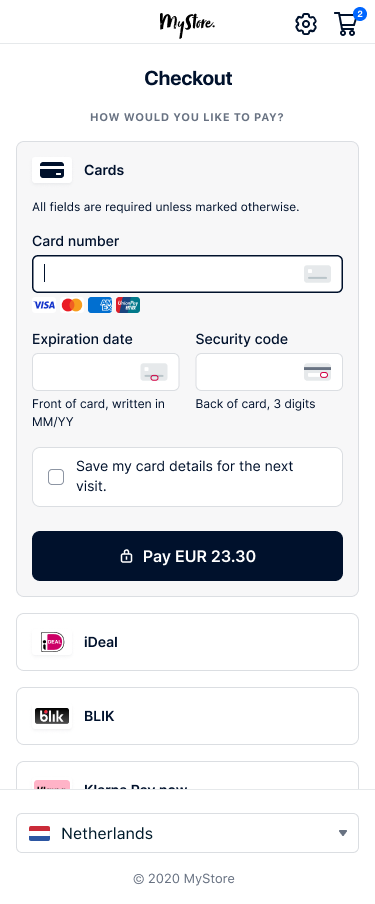















{
"resultCode":"RedirectShopper",
"action":{
"data":{
"MD":"OEVudmZVMUlkWjd0MDNwUWs2bmhSdz09...",
"PaReq":"eNpVUttygjAQ/RXbDyAXBYRZ00HpTH3wUosPfe...",
"TermUrl":""
},
"method":"POST",
"paymentData":"Ab02b4c0!BQABAgCJN1wRZuGJmq8dMncmypvknj9s7l5Tj...",
"paymentMethodType":"scheme",
"type":"redirect",
"url":"https://test.adyen.com/hpp/3d/validate.shtml"
},
"details":[
{
"key":"MD",
"type":"text"
},
{
"key":"PaRes",
"type":"text"
}
]
}
-
From the /payments response, get the following from the
actionobject:Parameter Description urlThe URL to redirect the shopper to. methodThe method to use to redirect the shopper: POST. dataAn object with the following data required for authentication: MDPaRes -
Redirect the shopper to the
urlwith the POST HTTP method, including the following data:Example of a redirect to a 3D Secure 2 URLcurl https://checkoutshopper-test.adyen.com/checkoutshopper/threeDS/checkoutRedirect/... \ --data-urlencode 'PaReq=eNpVUttygjAQ/RXbDyAXBYRZ00HpTH3wUosPfe...' \ --data-urlencode 'MD=OEVudmZVMUlkWjd0MDNwUWs2bmhSdz09...' -
The shopper finishes 3D Secure 2 authentication on an issuer website. In the test environment, this is the page:
https://test.adyen.com/hpp/3d/validate.shtml, and you perform the authentication using the 3D Secure test credentials:- Username: user
- Password: password
-
The shopper is returned to your
returnUrlwith the same HTTP method. ThereturnUrlis appended withMDandPaRes. Example of a 3D Secure 2 redirect back to you with MD and PaResPOST / HTTP/1.1 Host: www.your-company.example.com/checkout?shopperOrder=12xy.. Content-Type: application/x-www-form-urlencoded MD=Ab02b4c0%21BQABAgCW5sxB4e%2F%3D%3D..&PaRes=eNrNV0mTo7gS.. -
URL-decode the
MDandPaResvalues. - Send additional payment details to finish the payment flow.
3D Secure 2 authentication action
When the /payments response includesaction.type: threeDS2Fingerprint or threeDS2Challenge, the payment qualifies for 3D Secure 2 and it goes through the frictionless or the challenge flow. Use one of our 3D Secure 2 solutions to handle the action.QR code action
When the /payments response includesaction.type: qrCode, the shopper must scan a QR code to complete the payment.Example /payments response with a QR code action for WeChat Pay desktop{
"resultCode": "Pending",
"action": {
"paymentData": "Ab02b4c0!BQAB..",
"paymentMethodType": "wechatpayQR",
"qrCodeData": "weixin://wxpay/bizpayurl?pr=IM7BCOW",
"type": "qrCode"
}
}
-
From the /payments response, get the following:
Parameter Description action.qrCodeDataContains the URL for the QR code. -
Get the
qrCodeDatafrom theactionobject. This parameter contains a URL for the QR code. - Show the QR code to the shopper.
- The shopper scans the QR code.
- Send additional payment details to finish the payment flow.
SDK action
When the /payments response includesaction.type: sdk, the shopper must use another UI overlay to complete the payment. For example, a payment method requires the shopper to use its specific UI to enter payment details.Example /payments response with an SDK action for WeChat Pay{
"resultCode": "Pending",
"action": {
"paymentMethodType": "wechatpaySDK",
"type": "sdk",
"paymentData": "Ab02b4c0!BQAB..",
"sdkData": {
"appid": "wx3aed7fe146f6a57a",
"noncestr": "cPY0e83ny4hWyf5O",
"packageValue": "Sign=WXPay",
"partnerid": "205287714",
"prepayid": "wx015678064827111da2e4f0b11005864100",
"sign": "169FD3F1E193446D90C45573EBDD4020",
"timestamp": "1573033086"
}
},
"details": [
{
"key": "resultCode",
"type": "text"
}
]
}
-
From the /payments response, get the following from the
actionobject:Parameter Description sdkDataThe data that you must pass to the SDK. -
Pass the data from the
sdkDataobject to the SDK. - The shopper uses the SDK to finish the payment.
- Get the result from the SDK.
- Send additional payment details to finish the payment flow.
Voucher action
When the /payments response includesaction.type: voucher, the shopper must use a voucher to complete the payment.Voucher action type{
"resultCode": "PresentToShopper",
"action": {
"expiresAt": "2021-09-04T19:17:00",
"initialAmount": {
"currency": "IDR",
"value": 10000
},
"instructionsUrl": "https://checkoutshopper-test.adyen.com/checkoutshopper/voucherInstructions.shtml?txVariant=doku_mandiri_va",
"merchantName": "YOUR_SHOP_NAME",
"paymentMethodType": "doku_alfamart",
"reference": "8520126030105485",
"shopperEmail": "john.smith@adyen.com",
"shopperName": "John Smith",
"totalAmount": {
"currency": "IDR",
"value": 10000
},
"paymentData": "Ab02b4c0!BQAB..",
"type": "voucher"
}
}
-
The data included in the /payments response is different for each voucher payment method. Get the available information from it. For example, for DOKU vouchers, get the following:
Parameter Description expiresAtThe date when the voucher expires. initialAmountThe payment amount and currency. merchantNameThe name of your shop. instructionsUrlThe URL where you shopper can get additional information and instructions about how to pay. - Show voucher information to the shopper that your shopper uses to pay outside of your client.
- Send additional payment details to finish the payment flow.
Await action
When the /payments response includesaction.type: await, the shopper must take an additional action to complete the payment. For example: entering a code into their banking app.Example of a /payments response with an await action for a one-time PayTo payment{
"resultCode": "Pending",
"action": {
"paymentData": "Ab02b4c0!BQAB..",
"paymentMethodType": "payto",
"type": "await"
}
}
-
From the /payments response, get the following:
Parameter Description action.paymentDataAdditional payment data. - The shopper finishes the additional action for the payment.
- Send additional payment details to finish the payment flow.
Submit Additional Payment Details
Send additional payment details
Payment serverIf you handled an additional action, you must send additional payment details.For redirects: if the shopper fails to return to your client, you do not get additional payment details to send. Instead, wait for the corresponding webhook message for the outcome of the payment.From your server, make a POST /payments/details request. The parameters that you must include depends on the payment method. For the parameters for an individual payment method, go to the API-only page for the individual payment method .Example request to send details from a redirectcurl https://checkout-test.adyen.com/v72/payments/details \
-H 'x-api-key: ADYEN_API_KEY' \
-H 'content-type: application/json' \
-d '{
"details": {
"redirectResult": "eyJ0cmFuc1N0YXR1cyI6IlkifQ=="
}
}'
// Adyen Java API Library v39.3.0
import com.adyen.Client;
import com.adyen.enums.Environment;
import com.adyen.model.checkout.*;
import com.adyen.model.RequestOptions;
import com.adyen.service.checkout.*;
// For the LIVE environment, also include your liveEndpointUrlPrefix.
Client client = new Client("ADYEN_API_KEY", Environment.TEST);
// Create the request object(s)
// Send the request
PaymentsApi service = new PaymentsApi(client);
PaymentDetailsResponse response = service.paymentsDetails(paymentDetailsRequest, new RequestOptions().idempotencyKey("UUID"));
<?php
// Adyen PHP API Library v28.2.0
use Adyen\Client;
use Adyen\Environment;
use Adyen\Service\Checkout\PaymentsApi;
$client = new Client();
$client->setXApiKey("ADYEN_API_KEY");
// For the LIVE environment, also include your liveEndpointUrlPrefix.
$client->setEnvironment(Environment::TEST);
// Create the request object(s)
$requestOptions['idempotencyKey'] = 'UUID';
// Send the request
$service = new PaymentsApi($client);
$response = $service->paymentsDetails($paymentDetailsRequest, $requestOptions);
// Adyen .net API Library v32.1.1
using Adyen;
using Environment = Adyen.Model.Environment;
using Adyen.Model;
using Adyen.Model.Checkout;
using Adyen.Service.Checkout;
// For the LIVE environment, also include your liveEndpointUrlPrefix.
var config = new Config()
{
XApiKey = "ADYEN_API_KEY",
Environment = Environment.Test
};
var client = new Client(config);
// Create the request object(s)
// Send the request
var service = new PaymentsService(client);
var response = service.PaymentsDetails(paymentDetailsRequest, requestOptions: new RequestOptions { IdempotencyKey = "UUID"});
// Adyen Go API Library v21.0.0
import (
"context"
"github.com/adyen/adyen-go-api-library/v21/src/common"
"github.com/adyen/adyen-go-api-library/v21/src/adyen"
"github.com/adyen/adyen-go-api-library/v21/src/checkout"
)
// For the LIVE environment, also include your liveEndpointUrlPrefix.
client := adyen.NewClient(&common.Config{
ApiKey: "ADYEN_API_KEY",
Environment: common.TestEnv,
})
// Create the request object(s)
// Send the request
service := client.Checkout()
req := service.PaymentsApi.PaymentsDetailsInput().IdempotencyKey("UUID").PaymentDetailsRequest(paymentDetailsRequest)
res, httpRes, err := service.PaymentsApi.PaymentsDetails(context.Background(), req)
# Adyen Python API Library v13.6.0
import Adyen
adyen = Adyen.Adyen()
adyen.client.xapikey = "ADYEN_API_KEY"
# For the LIVE environment, also include your liveEndpointUrlPrefix.
adyen.client.platform = "test" # The environment to use library in.
# Create the request object(s)
json_request = {
"details": {
"redirectResult": "eyJ0cmFuc1N0YXR1cyI6IlkifQ=="
}
}
# Send the request
result = adyen.checkout.payments_api.payments_details(request=json_request, idempotency_key="UUID")
# Adyen Ruby API Library v10.4.0
require "adyen-ruby-api-library"
adyen = Adyen::Client.new
adyen.api_key = 'ADYEN_API_KEY'
# For the LIVE environment, also include your liveEndpointUrlPrefix.
adyen.env = :test # Set to "live" for live environment
# Create the request object(s)
request_body = {
:details => {
:redirectResult => 'eyJ0cmFuc1N0YXR1cyI6IlkifQ=='
}
}
# Send the request
result = adyen.checkout.payments_api.payments_details(request_body, headers: { 'Idempotency-Key' => 'UUID' })
// Adyen Node API Library v29.0.0
import { Client, CheckoutAPI, Types } from "@adyen/api-library";
// For the LIVE environment, also include your liveEndpointUrlPrefix.
const config = new Config({
apiKey: "ADYEN_API_KEY",
environment: EnvironmentEnum.TEST
});
const client = new Client(config);
// Create the request object(s)
// Send the request
const checkoutAPI = new CheckoutAPI(client);
const response = checkoutAPI.PaymentsApi.paymentsDetails(paymentDetailsRequest, { idempotencyKey: "UUID" });
{
"pspReference": "NC6HT9CRT65ZGN82",
"resultCode": "Authorised"
}
{
"pspReference": "KHQC5N7G84BLNK43",
"refusalReason": "Not enough balance",
"resultCode": "Refused"
}
Show Payment Result
Get the payment outcome
After the shopper finishes the payment flow, you can show the shopper the current payment status. Adyen sends a webhook with the outcome of the payment.Inform the shopper
Client website or appUse theresultCode to show the shopper the current payment status. This synchronous response doesn’t give you the final outcome of the payment. You get the final payment status in a webhook that you use to update your order management system.Update your order management system
Webhook serverYou get the outcome of each payment asynchronously, in an AUTHORISATION webhook. Use themerchantReference from the webhook to match it to your order reference.For a successful payment, the event contains
success: true.Example webhook for a successful payment{
"live": "false",
"notificationItems":[
{
"NotificationRequestItem":{
"eventCode":"AUTHORISATION",
"merchantAccountCode":"YOUR_MERCHANT_ACCOUNT",
"reason":"033899:1111:03/2030",
"amount":{
"currency":"EUR",
"value":2500
},
"operations":["CANCEL","CAPTURE","REFUND"],
"success":"true",
"paymentMethod":"mc",
"additionalData":{
"expiryDate":"03/2030",
"authCode":"033899",
"cardBin":"411111",
"cardSummary":"1111"
},
"merchantReference":"YOUR_REFERENCE",
"pspReference":"NC6HT9CRT65ZGN82",
"eventDate":"2021-09-13T14:10:22+02:00"
}
}
]
}
success: false, and the reason field has details about why the payment was unsuccessful.Example webhook for an unsuccessful payment{
"live": "false",
"notificationItems":[
{
"NotificationRequestItem":{
"eventCode":"AUTHORISATION",
"merchantAccountCode":"YOUR_MERCHANT_ACCOUNT",
"reason":"validation 101 Invalid card number",
"amount":{
"currency":"EUR",
"value":2500
},
"success":"false",
"paymentMethod":"unknowncard",
"additionalData":{
"expiryDate":"03/2030",
"cardBin":"411111",
"cardSummary":"1112"
},
"merchantReference":"YOUR_REFERENCE",
"pspReference":"KHQC5N7G84BLNK43",
"eventDate":"2021-09-13T14:14:05+02:00"
}
}
]
}
Error handling
In case you encounter errors in your integration, refer to the following:- API error codes: If you receive a non-HTTP 200 response, use the
errorCodeto troubleshoot and modify your request. - Payment refusals: If you receive an HTTP 200 response with an Error or Refused
resultCode, check the refusal reason and, if possible, modify your request.
Test and go live
Before going live, use our list of test cards and other payment methods to test your integration. We recommend testing each payment method that you intend to offer to your shoppers.You can check the status of a test payment in your Customer Area, under Transactions > Payments.To debug or troubleshoot test payments, you can also use API logs in your test environment.When you are ready to go live, you need to:- Apply for a live account.
-
Assess your PCI DSS compliance by submitting:
- the Self-Assessment Questionnaire-A, if you are using the Custom Card Component.
- the Self-Assessment Questionnaire-D, if you are submitting raw card data.
- Configure your live account.
- Submit a request to add payment methods in your live Customer Area .
- Switch from test to our live endpoints. Make sure that all API requests you make for the same payment session use the same live endpoint region. Using different regions for /payments and /payments/details requests may result in errors, for example, when authenticating with 3D Secure 2.
Next Steps
Set up notifications
Receive confirmation when a payment is authorised or fails.
Add payment methods
Learn about payment methods and how to add them to your account.
Payment modifications
Find out how to cancel, refund, or capture a payment using our API.