Mini glossary
Get familiar with some of the terms related to payments:- Your users: third-parties such as sellers, service providers, or contractors that use your platform to sell their goods and services to their customers.
- Merchant account: the account where we process payments for your users. You can have multiple merchant accounts.
- Store: ensures that the transactions you process for your users correspond to an accurate payer statement.
- Balance platform: the accounting system on which you manage your users and funds.
- Balance account: holds the funds of your user. All financial activities in your platform, such as paying out to a bank account, happen through balance accounts.
How it works
- During the onboarding process, you decide which payment methods to allow and add these to your users’ stores. You can always add additional payment methods or remove them at a later time.
- Your user receives a payment using one of the added payment methods.
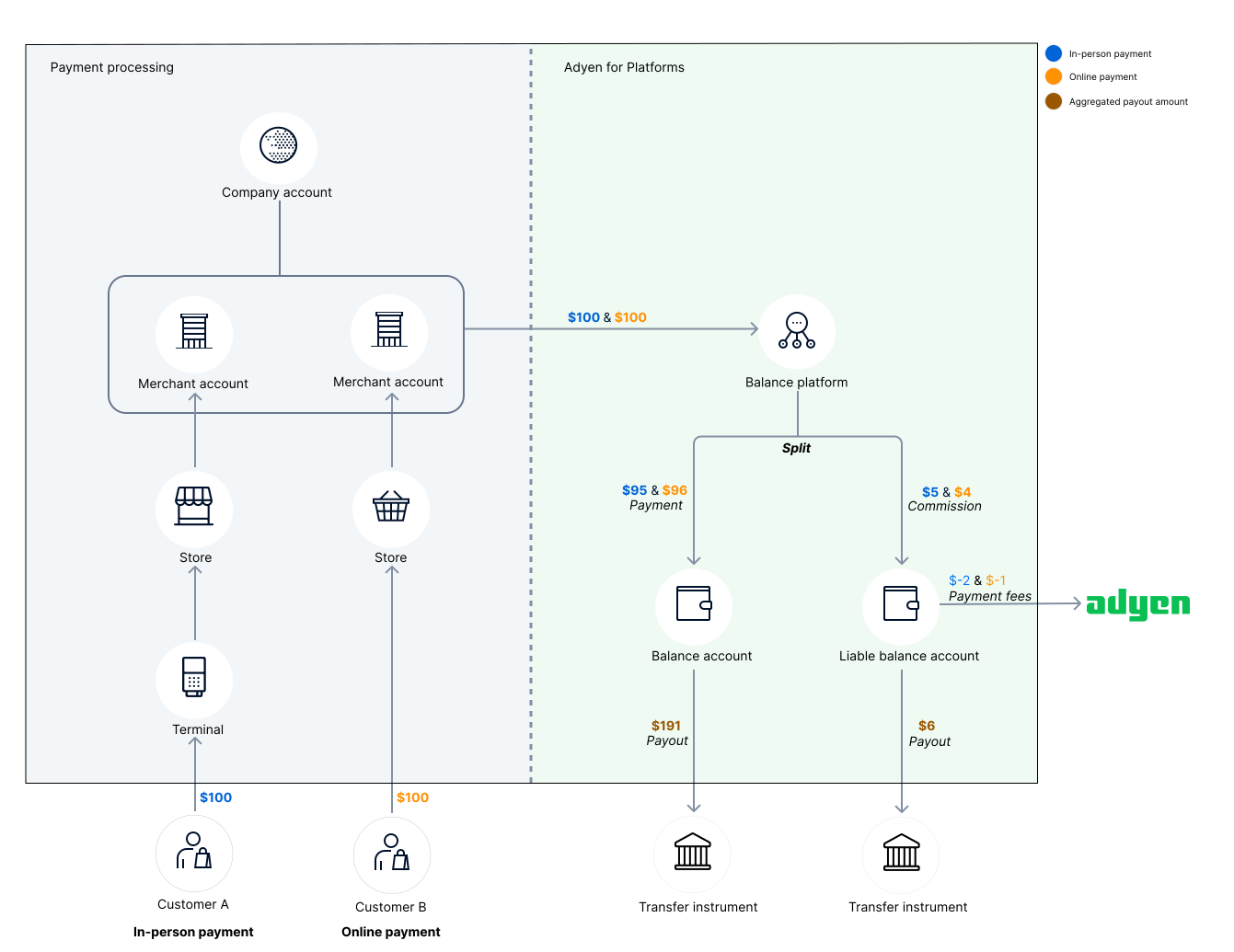
- The payment is processed through your user’s store, into their merchant account. From here, the funds move into the balance platform.
- Based on the split instructions you provide for the payment, the funds are split between the balance accounts on your platform.
- The funds arrive in the specified balance accounts at a later time, which is determined by your chosen settlement model.
- The funds are paid out to your user’s verified bank account (transfer instrument) according to your payout configuration.
Payment methods
You can process payments on behalf of your users using a variety of payment methods. You can add payment methods to your users’ stores during the onboarding process. Additionally, using the Management API, you can:- Request additional payment methods if required by making a POST /merchants/{merchantId}/paymentMethodSettings request.
- Get the details of a single payment method by making a GET /merchants/{merchantId}/paymentMethodSettings/{paymentMethodId} request.
- Get the details of all payment methods by making a GET /merchants/{merchantId}/paymentMethodSettings request.
- Update your users’ payment methods by making a PATCH /merchants/{merchantId}/paymentMethodSettings/{paymentMethodId} request.
Split transactions
For every transaction you process, you can define instructions on how to split the funds between the balance accounts in your platform. This way, you can ensure that the sale amount, your platform’s commission, the transaction fees, and other amounts are booked to the right balance accounts. You can either define these instructions manually for each online or in-person request you send, or you can set up split configuration profiles that automatically split all transactions processed through a specific store. The instructions you provide in your API requests override the instructions you defined in your split configuration profiles. Learn how to:- Split online transactions manually using the Checkout API.
- Split in-person transactions manually using the Terminal API.
- Split online and in-person transactions automatically using the Management API.
Flow of funds
The following diagram shows the flow of funds if you have both an online and in-person payments integration, from the moment your user’s customers pay to when your user’s and your platform’s funds are paid out.