

Supported versions
You can use our plugin to integrate with all Opera workstations that are compatible with OPI. With our plugin, we can support on-premise, hosted, and cloud setups.Get started
Before you begin to integrate, make sure you have followed the Get started with Adyen guide to:- Get an overview of the steps needed to accept live payments.
- Create your test account.
How it works
OPI sends all transaction messages directly from your Opera workstation to Adyen’s payment terminal.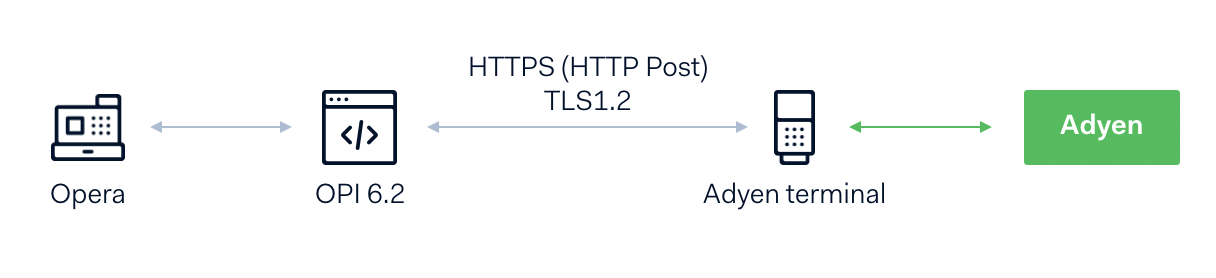
Features
With Adyen’s plugin, you can use the following transaction types provided by Oracle:- Pre-Authorization: performed when a guest checks-in. An amount is held temporarily for authorization, but it is not a transaction charge.
- Top-up Authorization: at the end of each day, the pre-authorized amount can be increased with a top-up transaction.
- Authorization Release: returns the pre-authorized amount to the guest’s account.
- Sales Completion: performed when a guest checks out. The transaction is completed by charging the final amount.
- Sale/Purchase: charges the guest’s card directly without a pre-authorization.
- Refund: returns the authorized amount to the guest’s account.
- Void: reverses the original Sale/Purchase or Sales Completion transaction. This transaction type is only supported within the same settlement day.
- Reversal: if the connection between the Oracle Hospitality POS system and the OPI terminates before the financial transaction is complete, or the transaction times out, then the OPI reverses the transaction made.
- Get Token: requests the cardholder data entered into the terminal. The data is sent to Adyen and exchanged for a token. The token can then be used for further top-ups or final settlement.
-
Get Token Bulk: exchanges a single token or swaps the entire OPERA database of card data for a token. This transaction type is used for:
- Migration of payment data when you move to Adyen’s services.
- Reservations from third parties.
- Manual card entry in Opera for phone reservations.
Get an OPI token for online payments
Aside from POS payments, you can also create OPI tokens for online payments that your guests make. This way, you can fully benefit from an omnichannel strategy and tokenize guest payment information from multiple channels. To be able to retrieve OPI tokens for ecommerce payments, contact our Support Team. They can activate the correct settings for your merchant account. Once the settings in your account are active, you can request an OPI token in your /payments request. The response will return an OPI token that you can use in your Oracle Opera integration. Store the OPI token in your Oracle database. To return therecurringDetailReference in the /payments response, follow the steps in Create tokens.
To get an OPI token, in your /payments request, specify the following:
For example:
/payments request